Our readers keep the lights on and my smoothie glass nicely filled. As an Amazon Associate, I earn from qualifying purchases.
Specs are compiled from manufacturer listings and verified buyer reviews and can change over time — please confirm the key details on the product page before buying.
The biggest fear when buying a cheap gaming PC is that you will end up with a paperweight that cannot run the games you actually want to play. This guide compares real specs, real buyer experiences, and real trade-offs across nine of the most affordable pre-built towers, so you know exactly where to spend and where to save.
I’m Mohammad Maruf — the founder and writer behind WellFizz. This guide is built by comparing the manufacturers’ published specifications and the patterns across verified customer reviews, so you get each pick’s real strengths and trade-offs instead of marketing spin.
If you are a first-time buyer on a tight budget or a parent setting up a gaming rig for a teenager, this breakdown of the cheapest gaming PC options helps you avoid the common pitfalls of outdated hardware and unreliable support.
Our Picks at a Glance


How To Choose The Best Cheapest Gaming PC
Shopping for a budget gaming PC means balancing raw performance against the risk of aging hardware. The cheapest options often pair a decent processor with a weak graphics card or use outdated RAM, which will hold you back in newer titles. Here is what to watch for.
Graphics Card — The Real Engine
Your graphics card, or GPU (the component that creates the images you see on screen), matters most for frame rates in modern games. At the budget level, you will commonly see the AMD Radeon RX 560 or RX 550, and the NVIDIA GeForce GTX 1050 Ti. The GTX 1050 Ti and RX 560 are roughly equal in 1080p gaming, while the RX 550 is noticeably weaker and best for lighter esports titles.
RAM — DDR3 vs DDR4
DDR3 RAM is an older, slower standard of computer memory. If you see 16GB of DDR3 listed, the whole motherboard platform is likely from around 2013-2015. That machine will struggle with multitasking and modern game loading. At this budget, 16GB of DDR4 is the minimum you should accept for a smooth experience.
Processor Generation
An Intel Core i5 or i7 from the 3rd or 4th generation (like i5-3470 or i7-4770) is over a decade old. Even if it has a decent clock speed, it will bottleneck (limit the performance of) modern GPUs. Look for at least 6th-gen Intel or a modern Ryzen 5 to avoid running into CPU-related stuttering in newer games.
Quick Comparison
| Model | Best For | GPU | RAM | Storage | Amazon |
|---|---|---|---|---|---|
| STGAubron RX 560★ Best Overall | First budget PC | RX 560 4GB | 16GB | 512GB SSD | Amazon |
| Thermaltake LCGS Quartz i1460Premium Pick | Future-proofing | RTX 5060 8GB | 16GB DDR4 | 1TB NVMe | Amazon |
| WIWB Ryzen 5 5500Also Great | 1080P gaming | RX 6500 XT 4GB | 16GB DDR4 | 512GB NVMe | Amazon |
| CyberPowerPC Gamer Master | Brand reliability | RX 6500 XT 4GB | 8GB DDR4 | 500GB PCIe 4.0 | Amazon |
| NOVATECH Phantom 2.0 | VR-ready budget | RX 580 8GB | 16GB DDR4 | 512GB M.2 | Amazon |
| abytespark i5 Tower | Office plus light gaming | RX 550 4GB | 16GB | 512GB SSD | Amazon |
| Kroteaup RX 560 | Entry-level 1080P | RX 560 4GB | 16GB DDR3 | 512GB NVMe | Amazon |
| STGAubron Prebuilt RX 560 | Casual gaming | RX 560 4GB | 16GB | 512GB SSD | Amazon |
| Dell GTX 1050 Ti | eSports titles | GTX 1050 Ti 4GB | 16GB DDR4 | 512GB SSD | Amazon |
In‑Depth Reviews
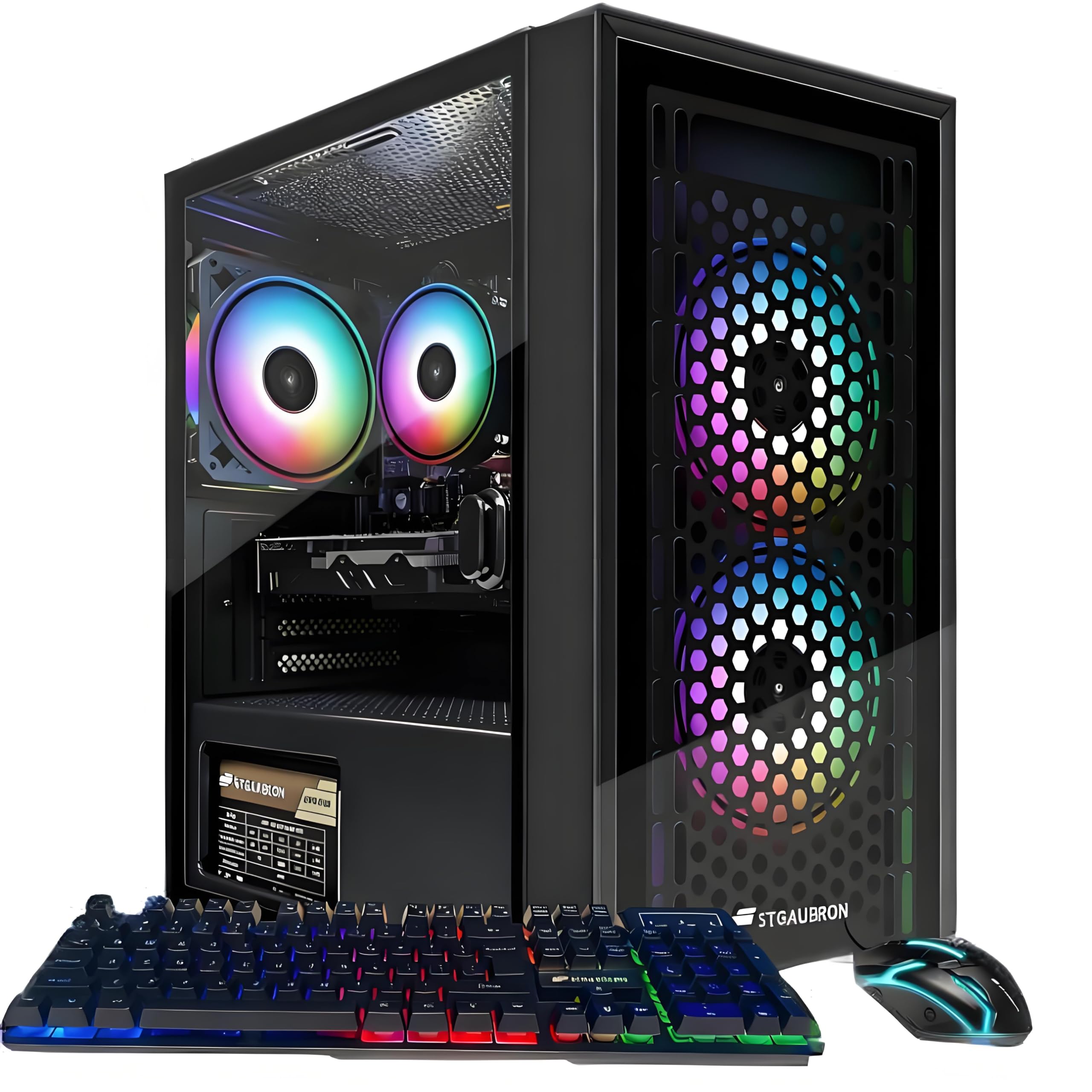
1. STGAubron Gaming PC Computer Desktop (RX 560, 3 Fans)
The absolute lowest entry point with a dedicated GPU and full peripheral kit.
This is the cheapest option in the lineup, and it pairs an Intel Core i5 processor (up to 3.6 GHz) with a Radeon RX 560 4GB graphics card, 16GB of RAM, and a 512GB SSD. It includes three RGB fans, WiFi 6, Bluetooth 5.0, and an RGB gaming keyboard and mouse. The RX 560 4GB can run popular titles like Fortnite, GTA V, and Apex Legends at 60+ fps on 1080P, making it a genuine entry-level gaming machine.
The compromise is reliability. One buyer mentioned the “HDMI port wasn’t super secure and any jiggle at all caused a flicker.” Another said the computer “does not have a TPM installed and Windows 11 was somehow put on it,” which caused update issues and lag after the return window. The RX 560 here matches the STGAubron Prebuilt model, but with 3 RGB fans instead of 2 — a 1.5x fan advantage for better cooling in the same price range. This is a budget-friendly starter if you are willing to accept the risk of hardware quirks.
Why consider it
- Lowest price in the lineup for a dedicated GPU gaming PC
- Includes full peripheral set (keyboard, mouse, mousepad)
- 3 RGB fans provide decent cooling for the price
The risks are real
- Some units lack TPM for proper Windows 11 updates
- HDMI port may be loose, causing display flicker
Only for the tightest budget: If you have absolutely no room in your budget and need any working gaming PC, this is the cheapest way to get an RX 560 and start playing.
skip it if you can save a little more: The extra money for the STGAubron Prebuilt or the Dell tower buys you far better reliability and support.
2. Thermaltake LCGS Quartz i1460 Gaming Desktop
The only budget PC ready for today’s AAA titles with tomorrow’s GPU.
If you can stretch your budget to this tier, you get a dramatically different machine. The Thermaltake LCGS Quartz i1460 pairs an Intel Core i5-14400F with an NVIDIA GeForce RTX 5060, delivering 8GB of GDDR6 video memory that handles ray tracing (a lighting effect that makes reflections and shadows look more realistic) and high settings in modern games without stuttering. You also get 16GB of DDR4 3600MHz RGB memory and a 1TB NVMe M.2 drive, which is double the storage space of most competitors at this level.
Buyers report that it runs Fallout 76 at max settings at around 60fps and handles FPS games with no stuttering even over WiFi. The case features a 3mm thick tempered glass side panel and a full-length PSU power cover for a clean look. Some units arrived with a faulty built-in WiFi adapter, though an external adapter resolved the issue. The RTX 5060 is a huge leap ahead of the RX 560 found in cheaper models, making this the only pick here that feels genuinely future-proof.
Why it stands out
- Latest-gen RTX 5060 handles ray tracing and high settings
- 1TB NVMe drive gives you space for multiple modern games
- Upgradeable platform with Intel B760 chipset
One thing to know
- Some units had built-in WiFi issues requiring an external adapter
- Budget-friendly RAM speed at DDR4 3600MHz
Best for future-proofing: If you want a machine that can run newer games on high settings for the next few years without upgrading, the RTX 5060 makes this the most capable affordable option.
Skip if your budget is strict: This costs more than the other picks here, so only stretch to it if you are comfortable spending near the four-figure mark for a genuinely modern experience.
3. WIWB Gaming PC Desktop Computer (Ryzen 5 5500, RX 6500 XT)
A modern 1080P gaming PC that actually delivers smooth frame rates without old parts.
This WIWB desktop is the closest you can get to a modern mid-range PC at a budget price. It runs on a 6-core, 12-thread Ryzen 5 5500 processor paired with a Radeon RX 6500 XT 4GB graphics card, plus 16GB of DDR4 RAM and a 512GB NVMe SSD. That combination lets it dominate 1080P gaming in titles like Fortnite, Valorant, and Apex Legends without the CPU bottleneck you find in older picks.
Owners mention averaging 300 fps in Marvel Rivals and 200 fps in Overwatch 2 on high graphics, even after five months of use. The white case with a button on top to cycle RGB colors is a nice touch. The RX 6500 XT is a clear step up from the RX 560 found in the STGAubron models — you are getting a GPU that supports modern features like DirectX 12 Ultimate. A few units arrived with an extra black wire in the box and bottom GPU fans that did not spin, though the seller was responsive about addressing issues.
What makes it great
- Modern Ryzen 5 5500 won’t bottleneck modern games
- RX 6500 XT delivers real 1080P high-frame-rate performance
- 16GB DDR4 RAM handles multitasking smoothly
The trade-off
- Graphics card has 4GB VRAM, which limits texture detail in some titles
- Bottom GPU fans on some units did not spin on arrival
Our top recommendation for most buyers: You get a genuinely modern 1080P gaming experience with a capable CPU and GPU that will not be obsolete in a year.
Reach for this if… you want to play competitive shooters at high frame rates and have the budget for a step above entry-level components.
4. NOVATECH Phantom 2.0 Prebuilt Gaming PC

The best-performing GPU you can get for under in a reliable pre-built.
The NOVATECH Phantom 2.0 packs an AMD Radeon RX 580 with 8GB of video memory — that is double the VRAM of the RX 560 or RX 6500 XT, making it noticeably stronger for texture-heavy games at 1080P. It is powered by an Intel Xeon E3-1230V6 server-grade processor (running at up to 3.9 GHz) and 16GB of DDR4 RAM, with a 512GB M.2 SSD for fast boot times. The 8GB VRAM on the RX 580 allows it to run VR gaming smoothly and handle titles like God of War at 76 fps.
Customers note excellent packaging with clear unpacking instructions and quiet operation. The machine runs most games at 70-200 fps and handles God of War at 76 fps. The 8GB of video memory on the RX 580 is a clear advantage over the 4GB on the RX 560 and GTX 1050 Ti options below — meaning you can use higher texture settings. Some units arrived with a defective graphics card showing glitch stripes, and the included WiFi dongle has limited range. The seller’s customer service was responsive about replacements.
Why it wins on value
- RX 580 with 8GB VRAM handles higher texture settings than any other sub- pick
- Quiet operation with a premium case and good cable management
- 16GB DDR4 RAM for smooth multitasking
Know before you buy
- Xeon CPU is older architecture, may bottleneck top-tier GPUs if you upgrade later
- Some units shipped with defective GPUs requiring replacement
Reach for this if you want the most GPU power for your dollar: The RX 580 8GB is the strongest graphics card you can find at this price, ideal for 1080P gaming with higher texture settings.
Look elsewhere if… you plan to upgrade the CPU later — the Xeon platform is a dead end for future processor swaps.
5. CyberPowerPC Gamer Master (GMA3100A3)

A familiar brand name with a modern GPU, but the RAM is half what it should be.
CyberPowerPC is a well-known system builder, and this Gamer Master desktop uses a Ryzen 5 5500 paired with a Radeon RX 6500 XT 4GB on an AMD B550 chipset motherboard. The 500GB PCIe 4.0 NVMe SSD is fast, and the case has a tempered glass side panel with custom RGB lighting. It also comes with a 1-year parts and labor warranty and free lifetime tech support.
The catch is the 8GB of DDR4 RAM — that is half the memory of nearly every other pick here, and it will cause stuttering if you try to game with a browser or Discord open. Compared to the WIWB Ryzen 5 5500 above, this CyberPowerPC has the same CPU and GPU but half the memory for a higher price. Reviewers point out it works great as a starter PC for browsing and office use, but one unit shut off and would not turn on after a single day. The 8GB RAM is a real limitation for modern gaming multitasking.
What you get
- Reputable brand with a 1-year warranty and lifetime tech support
- Fast PCIe 4.0 SSD for quick game loading
- Modern Ryzen 5 5500 CPU
The big limitation
- Only 8GB of RAM — expect stuttering when multitasking during games
- Higher price than the WIWB with equivalent specs but more memory
Best for brand confidence: If you want a recognizable name with a proper warranty and support line, CyberPowerPC delivers that confidence.
Skip if… you are comfortable with a less-known brand like WIWB — you get more RAM for less money with that alternative.
6. Dell RGB Gaming Tower Computer (GTX 1050 Ti)

A refurbished Dell with a proven GPU that crushes competitive shooters.
This Dell OptiPlex-based tower is a refurbished unit (previously owned and returned, then inspected and repaired), which means you are getting a professional-grade business chassis with an added GeForce GTX 1050 Ti 4GB. You get 16GB of DDR4 RAM and a 512GB SSD, plus built-in WiFi and a full RGB setup including keyboard, mouse, and speakers.
Shoppers say this machine delivers “120+ FPS in Overwatch 2/Valorant on low, 60+ FPS in Witcher 3 on high.” It also handles DaVinci Resolve and Krita for creative work. The catch is that some units arrived with a dead power supply within 24 hours, and the initial setup may require a BIOS tweak to get the GPU recognized. One reviewer noted it has an AMD Radeon 6400 instead of the listed Nvidia card, suggesting inconsistency in the refurbishing process.
What it does well
- Proven 120+ fps on eSports titles like Overwatch 2 and Valorant
- Comes with a full peripheral bundle (keyboard, mouse, speakers)
- 16GB DDR4 RAM for solid multitasking
Risks to consider
- Refurbished unit — some arrived dead within 24 hours
- Component inconsistencies reported (different GPU than listed)
Great for competitive shooters on a tight budget: If you mostly play Overwatch, Valorant, or CSGO and want high frame rates, this Dell delivers proven performance.
Skip if reliability is your top priority: Refurbished units come with risk, and some buyers received dead hardware.
7. STGAubron Prebuilt Gaming PC Desktop (RX 560)

The most-reviewed budget PC with a proven track record for casual gaming.
With over 820 ratings, this STGAubron desktop is the most popular entry in the cheapest gaming PC category. It uses an Intel Core i5 processor running at up to 3.7 GHz paired with an AMD Radeon RX 560 4GB graphics card, 16GB of RAM, and a 512GB SSD. It runs Windows 11 Home and includes WiFi 6 and Bluetooth 5.0 for wireless connectivity. The CPU speed of 3.7 GHz is 9% higher than the Dell Core i7’s 3.4 GHz, giving it a slight edge in processor-bound tasks.
Buyers report it works well for light gaming like Roblox, Sims 4, and VRChat, and one owner said they used it “for months; only issue is WiFi cutting out every few hours for ~3 mins.” The two RGB fans and included keyboard and mouse make it a true plug-and-play setup. The RX 560 4GB handles 60+ fps in titles like Fortnite and GTA V at 1080P, though it will struggle with the latest AAA releases. Some users report the hardware uses older components that may not support Windows 11 updates properly over time.
What makes it popular
- Most reviewed budget PC with a large buyer community
- WiFi 6 and Bluetooth 5.0 for modern wireless connections
- Includes RGB keyboard and mouse
Watch out for
- WiFi may drop out periodically for a few minutes
- Older components may cause Windows 11 compatibility issues
Best for casual gamers who want a proven entry: The high review count and positive feedback for light gaming make this a safe starter choice for kids or beginners.
Reach for the RX 560 variant with 5 fans if… you want better cooling and a flashier case without spending much more.
8. Kroteaup Gaming PC (RX 560, 5 RGB Fans)

Five RGB fans for a cool case, but old DDR3 RAM limits its potential.
This Kroteaup desktop has the same Radeon RX 560 4GB GPU as the STGAubron models, paired with an Intel Core i5-3470 processor running at 3.2GHz. It comes with 16GB of dual-channel DDR3 RAM — and that is the red flag. DDR3 is over a decade old and significantly slower than DDR4, which means the system will struggle with multitasking and loading times. The 512GB NVMe SSD helps, but the older RAM platform is a bottleneck.
The standout feature here is the RGB fan count: five cooling fans create a dramatic lighting effect and keep temperatures low, compared to the two or three fans on the STGAubron models. That is a 2.5x gap in fan count versus the STGAubron Prebuilt with 2 fans, which helps if you are worried about heat buildup. Owners mention it runs well as a beginning computer and delivers excellent graphics at the price point, though one unit arrived with a cracked case and freezing issues during gameplay.
What it does well
- Five RGB fans provide excellent cooling and visual flair
- NVMe SSD for quick boot and game loading
- Budget-friendly price for a full desktop setup
The big drawback
- DDR3 RAM is a dead platform — much slower than DDR4
- Older i5-3470 CPU will bottleneck in newer games
Reach for this if looks matter most: The five RGB fans create a flashy lighting setup that stands out on a desk, and the cooling is excellent for the price.
Skip if you care about performance: The DDR3 RAM and old i5 processor will hold you back in modern games compared to similarly-priced DDR4 options.
9. abytespark Prebuilt Gaming PC Desktop (RX 550)

A clean white case with five fans, but the weakest GPU in this lineup.
This abytespark tower stands out visually with a white case and five RGB fans, plus an included gaming keyboard, mouse, and mousepad. It runs on an Intel Core i5 processor at up to 3.6 GHz with 16GB of RAM, a 512GB SSD, and Windows 11 Home. The graphics card is an AMD Radeon RX 550 with 4GB of GDDR4 memory — that is the weakest GPU among all the picks here, roughly half as powerful as the RX 560.
The RX 550 can run popular games like Fortnite and Minecraft at 50+ fps, but it will struggle with newer AAA titles. The RX 550 4GB is a clear step down from the RX 560 4GB found in the STGAubron and Kroteaup models. Customers note it runs BONEWORKS in VR surprisingly well for a budget machine and is easy to upgrade with standard components. Some users noted the product listing was misleading: it ships with a decade-old i7-4770 and lacks Bluetooth, requiring a separate adapter.
What makes it different
- Unique white case stands out from the black tower crowd
- Five RGB fans for strong cooling
- Easy to upgrade standard components
The performance cost
- Weakest GPU in the lineup — RX 550 struggles with modern games
- Some units shipped with older CPUs than advertised
Best for light gaming in a white-themed setup: If you want an affordable PC for schoolwork and casual Minecraft sessions, and the white case is a must for your desk aesthetic, this fits the bill.
Look elsewhere for serious gaming: The RX 550 is too weak for modern titles, so spend a bit more on an RX 560 model if you want to play newer games.
Understanding the Specs
GPU — Graphics Card (Your Frame Rate)
The graphics card, or GPU, is the most important component for gaming performance. It determines how many frames per second (fps) you get in each game. The AMD Radeon RX 560 4GB and NVIDIA GeForce GTX 1050 Ti 4GB are the baseline for 60 fps gaming at 1080P in popular titles like Fortnite and GTA V. The RX 550 is weaker and better for lighter games, while the RX 580 8GB and RTX 5060 are clear upgrades that handle higher settings and newer releases.
RAM — Memory (Your Multitasking)
Random Access Memory (RAM) is your computer’s short-term memory for running programs. For gaming, 16GB is the modern standard — it lets you run a game, a browser with a few tabs, and Discord at the same time without stuttering. 8GB will cause lag in the same scenario. Watch out for DDR3 RAM: it is an older, slower standard often found in very cheap builds that limits overall system performance.
FAQ
Can a cheapest gaming PC run Fortnite at 60 fps?
What is the difference between DDR3 and DDR4 RAM in a cheap gaming PC?
Will a cheap gaming PC support Windows 11 updates?
How long will a budget gaming PC last?
Is it better to build my own cheap gaming PC instead of buying pre-built?
Why do some cheap gaming PCs come with a keyboard and mouse?
What does refurbished mean for a gaming PC?
Can I upgrade a cheapest gaming PC later?
Should I buy a cheap gaming PC with Intel or AMD processor?
What is an RGB fan and does it improve performance?
Final Thoughts: The Verdict
Related Guides

Mo Maruf
I created WellFizz to bridge the gap between vague wellness advice and actionable solutions. My mission is simple: to decode the research and give you practical tools you can actually use.
Beyond the data, I am a passionate traveler. I believe that stepping away from the screen to explore new environments is essential for mental clarity and physical vitality.