Our readers keep the lights on and my smoothie glass nicely filled. As an Amazon Associate, I earn from qualifying purchases.
Specs are compiled from manufacturer listings and verified buyer reviews and can change over time — please confirm the key details on the product page before buying.
Finding a keyboard that costs as little as possible but still feels good to type on every day is the real challenge — most cheap boards rattle, feel mushy, or break a few months in. This guide reviews seven budget-friendly keyboards (wired and wireless) that deliver quiet keys, a full number pad, and a reliable connection.
I’m Mohammad Maruf — the founder and writer behind WellFizz. This guide is built by comparing the manufacturers’ published specifications and the patterns across verified customer reviews, so you get each pick’s real strengths and trade-offs instead of marketing spin.
if you need a wired option for zero latency or a wireless model to clean up your desk, the right cheapest keyboard will give you a comfortable, quiet typing experience without the headache of a failed connection or keys that fade too quickly.
Our Picks at a Glance


How To Choose The Best Cheapest Keyboard
A budget keyboard balances price with quiet keys, a comfortable layout, and a stable connection. Here is what to look for before you click buy.
Wired vs Wireless: Which connection fits your desk?
A wired keyboard connects directly via USB — you get zero latency, no batteries to replace, and a simple plug-and-play setup. A wireless keyboard (using a 2.4 GHz USB dongle) frees up a USB port and keeps your desk tidy, but you need to keep spare batteries handy. For this price range, wireless models rely on AAA or AA batteries and typically offer an auto-sleep feature to extend battery life.
Key feel, noise level, and durability
Most affordable keyboards use membrane or scissor-switch mechanisms under the keys. Look for a model that advertises noise reduction (some claim up to 90% less noise) and check the key travel (around 3mm is common for quiet, responsive typing). Pay attention to customer reviews for long-term issues like fading letters — some budget boards have key legends that wear off within a year of daily use.
Layout and ergonomic extras
A full-size keyboard with a number pad (usually 104 to 117 keys) is essential if you work with numbers or navigate spreadsheets. Adjustable tilt legs, a palm rest, and crater-shaped or scooped keycaps reduce wrist strain during long sessions. Spill-resistance with drainage holes can save your keyboard from a coffee accident, which is a common selling point at this price level.
Quick Comparison
| Model | Best For | Button Count | Dimensions | Connection Type | Amazon |
|---|---|---|---|---|---|
| Virfour Wired★ Best Overall | Quiet wired typing with multimedia keys | 117 | — | USB-A Wired | Amazon |
| Logitech MK270Also Great | Long battery life & keyboard+mouse combo | — | — | 2.4 GHz Wireless | Amazon |
| TECKNET Wireless | Ergonomic keys and spill-resistance | — | 17″ x 5″ x 3″ | 2.4 GHz Wireless | Amazon |
| Harburfine Wireless | Ultra-compact wireless with number pad | 106 | 16.89″ x 4.96″ x 0.91″ | 2.4 GHz Wireless | Amazon |
| EDJO Wired Combo | Keyboard+mouse wired combo with palm rest | 104 | — | USB Wired | Amazon |
| QUASIO Wireless | Built-in wrist rest & full 104-key layout | 104 | — | 2.4 GHz Wireless | Amazon |
| Logitech MK120 | Durable wired combo from a trusted brand | — | — | USB Wired | Amazon |
In‑Depth Reviews
1. Virfour Wired Keyboard 117-key — more shortcut keys than the Logitech MK120
A fully loaded wired board with more keys than any other pick here.
You get 117 keys total — that is 13 extra keys beyond the standard 104-key layout, so you have dedicated buttons for calculator, email, and media playback without using software shortcuts. The keys use a low-profile chiclet design with a noise-reduction membrane that the maker claims reduces clicking noise by 50%, so your coworkers or family will not hear you typing late at night. It is also spill-resistant thanks to a sealed film circuit under the keys, which protects against accidental coffee splashes.
But the honest trade-off after extended use is durability of the key legends: owners mention that the letters E, A, I, and S faded after 10 months of daily use — a common issue on ultra-budget keyboards. The keys also feel a bit sticky to some reviewers, requiring more force than expected, and the calculator key sits where you might hit it by accident. For its price, though, this keyboard gives you the most dedicated media keys of any wired model here.
Right for the job: The 117-button layout and quiet USB connection make this a great fit if you want every possible shortcut key and zero wireless hassle.
One catch from owners: A keyboard cover can protect the fading key legends — several buyers recommended this after seeing E, A, I, and S wear off around the 10-month mark.
2. Logitech MK270 Wireless Keyboard and Mouse Combo
The combo that keeps typing for years without changing batteries.
This is the pick that virtually every budget buyer ends up with, and for good reason — the Logitech MK270 gives you both a full-size keyboard and a compact mouse that share a single USB receiver, so you free up a port and use only one dongle. The keyboard features a spill-resistant design (a drainage channel under the keys), low-profile quiet keys, and a reliable 2.4 GHz wireless connection that reaches up to 33 feet with no dropouts. Logitech rates the keyboard battery at 36 months and the mouse at 12 months, with an on/off switch on each device.
Unlike the wired Logitech MK120 or the EDJO combo below, the MK270 keeps your desk completely free of cables and still delivers responsive typing. Buyers report the keys feel quiet and have a solid weight — one owner noted it “works well despite Parkinson’s disease,” calling it a very nice keyboard. The mouse, while compact and ambidextrous, feels a little lightweight compared to the keyboard, and some users wish the rear feet were higher. Still, this is the most reviewed budget combo on the market for a reason.
Why you will use it every day
- 36-month keyboard battery life means you almost never change batteries
- 8 multimedia hotkeys give instant access to volume, play/pause, email, and internet
- Spill-resistant design protects against accidental coffee or water spills
One honest trade-off
- Mouse feels a bit cheap and lightweight compared to the keyboard
- No second dongle to use keyboard and mouse on separate computers
Best for daily drivers: If you want a wireless keyboard and mouse that just works, with batteries that last years and a trusted brand behind it, this is the one to buy.
Look elsewhere if: You do not need a mouse and want the absolute cheapest wired-only option — the MK120 or Virfour wired boards save a few extra dollars.
3. TECKNET Wireless Keyboard — Crater-shaped keys make it quieter than the QUASIO
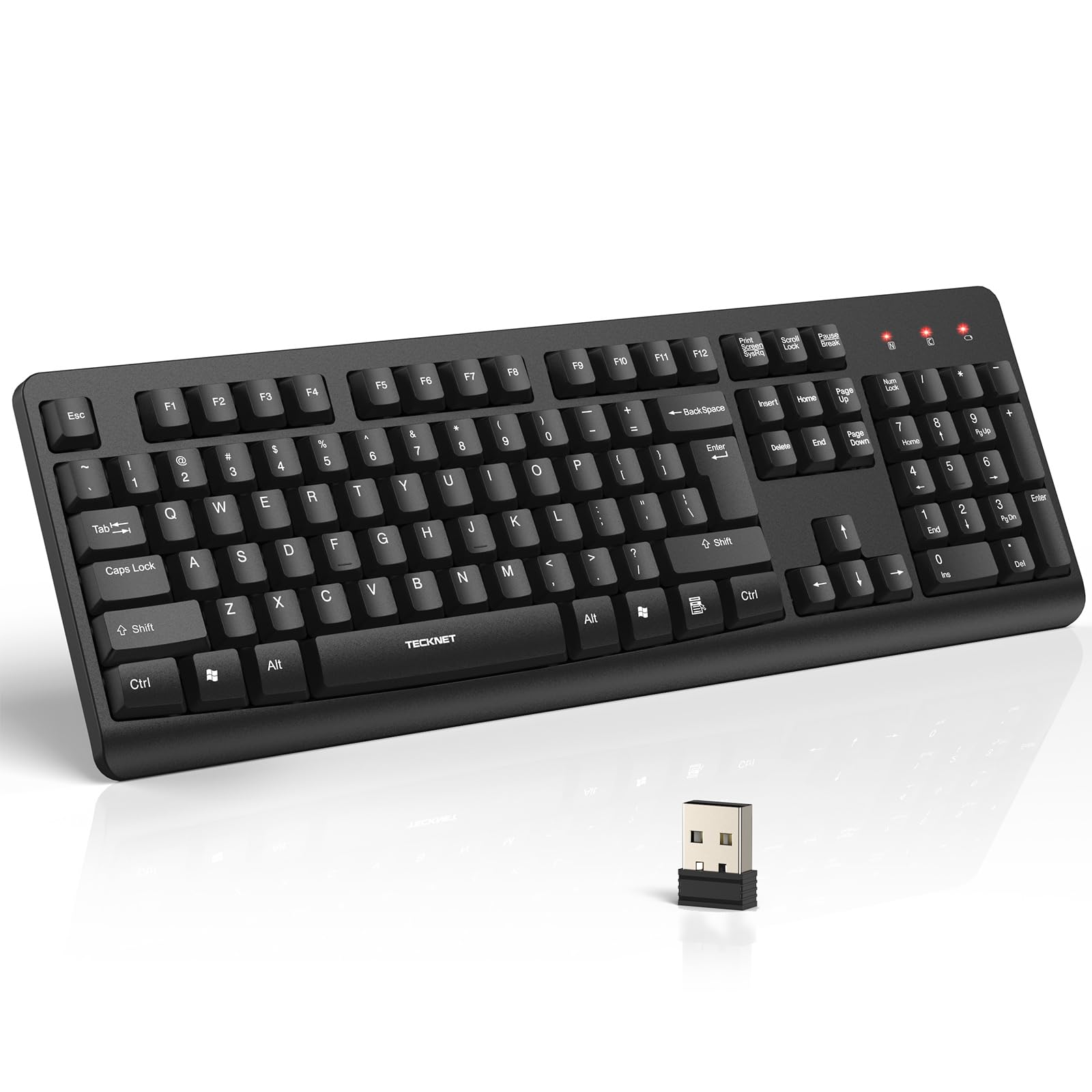
Ergonomic crater-shaped keys that made one reviewer type faster.
The TECKNET wireless keyboard stands out for its keycap design — the keys are crater-shaped to match your finger pads, and the board uses PET film switches with 3mm of key travel to reduce typing noise by up to 90% compared to a standard keyboard. It connects via a 2.4 GHz USB dongle (stored in the battery compartment) with a range of up to 43 feet, and a single AA battery powers it with an auto-sleep mode plus an LED low-battery alert. The board also has four drainage holes under the frame, so an accidental spill of coffee or tea can drain out instead of frying the electronics.
One reviewer noted that their “wpm is better than it used to be because of how ergonomic they keys are with my hands” — a concrete example of the key shape making a real difference. The dimensions (17″ x 5″ x 3″) are very close to the Harburfine (16.89″ x 4.96″ x 0.91″), but the TECKNET feels more substantial. The main layout quirk: the Enter key is vertical instead of horizontal, which takes a day or two to adjust to if you are used to a standard Enter key position.
The comfort edge
- Crater-shaped keycaps fit your fingers naturally and reduce fatigue during long typing sessions
- Spill-resistant design with 4 drainage holes protects against liquid accidents
- 90% noise reduction makes it one of the quietest wireless boards at this price
The layout quirk
- Vertical Enter key sits past an extra key (forward slash) — not the standard horizontal placement
- No on/off switch mentioned; auto sleep is your only power-saving option
Grab it for the feel: If comfortable, responsive keys that actually improve your typing speed matter most, the TECKNET delivers the best ergonomics of any wireless board in this price range.
skip it if: You cannot adapt to a non-standard Enter key layout — the Virfour or Logitech MK120 offer a more conventional arrangement.
4. Harburfine Wireless Keyboard 106-key — 16.89" wide compared to the TECKNET 17" wide

The slimmest full-size wireless board that still keeps your number pad.
The Harburfine wireless keyboard squeezes a full 106-key layout with a numeric keypad into a remarkably thin profile — just 16.89″ wide and 0.91″ tall — making it the most compact full-size option here. It uses a 2.4 GHz USB dongle (stored in the battery compartment) for a stable connection up to 33 feet, and a single AAA battery powers it with an auto-sleep function that kicks in after 15 minutes. The maker claims up to 6 months of battery life from one AAA cell. Silicone dampening makes the keys quiet enough for an open office.
The downside that owners flag consistently is power management: customers note the battery dies within 2 months of minimal use, and there is no off switch except physically removing the battery. The Virfour wired board (117 keys) offers a larger button set for roughly the same price, although it is wired and not as slim. If you value a very thin, lightweight wireless keyboard for dropping into a laptop bag, this is the pick — just keep a spare AAA nearby.
Why it stands out: The ultra-slim 0.91″ profile is barely taller than a laptop deck, so it slides into a briefcase or desk drawer easily.
The battery caveat: Without a power switch, you will need to remove the battery after each session if you want the battery to last longer than a couple of months — a minor hassle for the slim design.
5. EDJO Wired Keyboard and Mouse Combo, Full-Sized Ergonomic with Palm Rest

A wired combo that wraps your wrists in a cushioned palm rest, unlike the bare Logitech MK120.
The EDJO wired combo pairs a full-size 104-key keyboard with an optical wired mouse, and the standout feature is the built-in palm rest that spans the entire front edge of the board — you get wrist support without needing a separate gel pad. The keyboard uses a standard QWERTY layout with 12 multimedia shortcut keys for instant access to volume, email, and music, plus a foldable stand to adjust the typing angle. The optical mouse is symmetrical (ambidextrous) and works on smooth surfaces even without a mouse pad, making it a decent backup for a laptop bag.
Buyers praise the quiet, responsive keys and the anti-slip rubber feet that keep the board planted during fast typing. One reviewer with carpal tunnel found the palm rest very comfortable, adding that the keys are quiet enough for shared spaces. The honest split: the keyboard is comfortable and accurate, but several reviewers point out that the mouse squeaks when clicked and emits a high-pitched noise — so the mouse is the weak link. If you need a wired combo with strong ergonomics and mostly use the keyboard anyway, this is a solid pick over the Logitech MK120 (which has a simpler mouse).
What works well
- Built-in palm rest reduces wrist strain without an extra accessory
- 12 multimedia shortcuts improve workflow efficiency while typing
- Anti-slip base keeps the keyboard stable during fast typing sessions
The weak link
- Mouse develops a squeak and high-pitched noise on repeated clicks
- Key legends could be bolder for readability in low light
Reach for this if: You prioritize wrist comfort during long work hours and want a quiet keyboard — the palm rest alone makes it worth considering over a bare board.
Pass on it if: You need a reliable mouse too — the Logitech MK120 or MK270 combos have a more durable mouse half.
6. QUASIO Wireless Keyboard — wireless comfort that rivals the EDJO palm rest without the cable

A wireless board with a comfy wrist rest that rivals the EDJO’s wired comfort.
The QUASIO wireless keyboard matches the EDJO’s ergonomic thinking but cuts the cable — it is a full 104-key wireless board with a built-in palm rest and a folding stand that adjusts the slope to keep your wrists level during long typing sessions. It connects via a 2.4 GHz USB dongle with a range of about 33 feet, and the auto-sleep function engages after 30 minutes of inactivity (longer than the Harburfine’s 15-minute timer) to preserve battery life from a single AA cell. The bottom has anti-slide pads and an adjustable stand so the board stays put.
Reviewers consistently call the keys bouncy and responsive, and the built-in wrist support makes this notably more comfortable than the Harburfine (which has no palm rest). The catch: waking from sleep requires pressing a key, and the first letter you type is often cut off — a small annoyance that reviewers point out. There is also no off switch, so the auto-sleep is your only power management. At this price, the QUASIO gives you a feature set (wireless + wrist rest + 104 keys) that usually costs more elsewhere.
Solid wireless ergonomics: The integrated palm rest and adjustable tilt make this a good upgrade from a basic flat board if you type for hours.
The wake-up quirk: Because the keyboard cuts the first keystroke after sleep, you will want to tap a key lightly before starting a sentence — a small adaptation.
7. Logitech MK120 Wired Keyboard and Mouse Combo — 10 million keystroke durability tops the Virfour

The wired combo that survived 10 million keystrokes and still feels fresh.
The board is spill-resistant with drainage channels, and the bold white key legends are durable and easy to read. The included optical mouse has an ambidextrous shape with smooth, accurate tracking on most surfaces, and all you do is plug the two USB cables into your laptop or PC — no software needed.
Reviewers give this combo a 4.6 rating from over 22,000 reviews, making it the most-vetted product on this list. Buyers call it “one of the best membrane keyboards used” and note that the keys are quiet and the space bar is curved for comfort. The limitation: the mouse is fine for daily office work and MOBA games like League of Legends, but it fails at rapid clicking — clicks can go unregistered during intense gaming. If you just need a reliable, dirt-cheap wired keyboard with a decent mouse for everyday work, the MK120 is the safe choice that the Virfour and EDJO combos cannot quite match in durability reputation.
The proven workhorse
- 10 million keystroke durability ensures years of daily typing.
- Bold white key legends stay readable longer than many budget competitors
- Spill-resistant design with drainage channels protects against liquid accidents
Not for gamers
- Mouse misses rapid clicks during intense gaming sessions
- Space bar can pop out under a hard push (user error, but worth noting)
Go-to wired bundle: If you want the confidence of a Logitech brand with proven longevity, this is the wired combo to buy — just keep the mouse for office tasks, not gaming.
Consider an alternative if: You need a mouse that can handle fast clicking — the MK270 wireless combo has a more responsive mouse for a slightly higher investment.
Understanding the Specs
Button Count (Keys)
This is the total number of physical keys on the keyboard, including letters, numbers, F-keys, and special function buttons. A standard full-size keyboard has 104 keys, but some budget models add extra multimedia keys (like a calculator or email button) to bring the count up to 117. More keys generally mean more shortcuts without needing to memorize software combos, though the core typing experience stays the same.
Connection Type: Wired vs Wireless (2.4 GHz)
Wired keyboards connect via a USB cable — you get instant response with no battery worries, and the connection never drops. Wireless keyboards in this price range use a 2.4 GHz USB dongle to communicate with your computer, offering a range of up to 33-43 feet. They free up a USB port and tidy your desk, but they require one AA or AAA battery and often feature an auto-sleep mode to save power. The trade-off is that the first keystroke after sleep may be lost on some models.
Noise Reduction
Many budget keyboards now advertise noise reduction by using membrane switches, PET film, or silicone dampeners under the keys. These materials absorb the clicking sound so your typing does not disturb coworkers or family in the same room. Some models claim to reduce noise by up to 90% compared to standard keyboards. A lower noise level is useful for open offices, libraries, or shared living spaces.
Spill-Resistance and Durability
A spill-resistant design means the keyboard has a protective film or drainage holes that allow liquid (like coffee or tea) to pass through without damaging the internal circuits. This is important if you eat or drink at your desk. Key durability is measured in keystroke lifespan (e.g., 10 million keystrokes), and key legend durability refers to how long the printed letters on the keys last before fading — a common failure point on very cheap boards.
FAQ
Will a cheap keyboard work with my Mac or Chromebook?
How long do the key legends last on a budget keyboard?
Why does my cheap wireless keyboard lose the first letter I type when waking up?
Is a wired or wireless keyboard better for gaming on a tight budget?
How do I connect a wireless keyboard that uses a USB dongle?
What does a spill-resistant keyboard actually protect against?
How many keys do I need — is 104 enough or do I need more?
Will a cheap keyboard work with Windows 11?
What is the difference between a membrane keyboard and a mechanical keyboard at this price?
Final Thoughts: The Verdict
If you want one dependable pick, the best cheapest keyboard is the Logitech MK270 because it pairs a comfortable, spill-resistant keyboard with a mouse that uses a single USB dongle, and the 36-month battery life means you will rarely think about power. If you want a wired setup with more dedicated keys and zero battery management, grab the Virfour Wired Keyboard. And for the best ergonomic feel and quiet typing on a budget, the TECKNET Wireless Keyboard offers crater-shaped keys and 90% noise reduction without breaking your wallet.
How We Picked
We do not accept paid placement. Every pick is matched to a real buyer and a real use-case; we do not hands-on test units.
Sources & Methodology
Specifications: manufacturer listings and product documentation. Review insights: verified customer reviews, as of July 2026. Pricing: not shown on this page (it changes often); check the current price via the retailer link.
As an Amazon Associate, WellFizz earns from qualifying purchases. This does not affect which products we feature.
Related Guides

Mo Maruf
I created WellFizz to bridge the gap between vague wellness advice and actionable solutions. My mission is simple: to decode the research and give you practical tools you can actually use.
Beyond the data, I am a passionate traveler. I believe that stepping away from the screen to explore new environments is essential for mental clarity and physical vitality.