Our readers keep the lights on and my smoothie glass nicely filled. As an Amazon Associate, I earn from qualifying purchases.
Specs are compiled from manufacturer listings and verified buyer reviews and can change over time — please confirm the key details on the product page before buying.
Buying your first pair of audiophile computer speakers is like switching from a filtered photo to a raw image — you suddenly hear every detail, every breath, every room echo that cheaper speakers smear into noise. The challenge is finding powered monitors that stay honest without introducing buzz, hum, or a fake bass boost that hides mix mistakes.
I’m Mohammad Maruf — the founder and writer behind WellFizz. This guide is built by comparing the manufacturers’ published specifications and the patterns across verified customer reviews, so you get each pick’s real strengths and trade-offs instead of marketing spin.
These three studio monitors were selected because they sit right in the decision zone where real hi-fi starts and consumer gimmicks end. Here is what matters when choosing the right computer speakers audiophile pair for your desk or home studio.
How To Choose The Best Computer Speakers Audiophile
Audiophile computer speakers are really just powered studio monitors — they are made to play sound exactly as recorded, not to flatter your playlist with extra bass or treble. If you are looking for a warmer, colored sound, you might want to read up on the difference between studio monitors and hifi speakers before making a choice. For this guide, we focus on the monitors that give you the unaltered truth.
Driver size and room fit
A 5-inch woofer (like on the Yamaha HS5) works well on a desktop in a small or untreated room because it pushes less bass energy that would bounce around and create mud. A 6.5-inch driver (like on the Kali LP-6 V2 or the JBL 306P MkII) reaches deeper into the low frequencies — around 47Hz to 54Hz — but needs more careful placement away from walls to avoid boomy buildup.
Bi-amping and power
Bi-amped means the speaker has two separate amplifier sections — one for the tweeter (highs) and one for the woofer (lows). This keeps each driver running clean without interference. Total power matters less than clean headroom: 70 watts to 80 watts per speaker (bi-amped) is enough for near-field listening on a desk, and lower wattage can still sound great if the design is efficient.
Inputs and interface needs
All three speakers use balanced XLR or TRS connections, which reject electrical noise better than the unbalanced 3.5mm jack on your laptop. That means you will need an audio interface (like a Focusrite Scarlett) or a DAC with balanced outputs to connect them to your computer — a small added cost that makes a big difference in noise floor.
Quick Comparison
In‑Depth Reviews
1. JBL 306P MkII 6.5″ Studio Monitoring Speakers (Pair)

The JBL pair that delivers deep, distortion-free bass with no ground hum.
If you want clear lows without buying a separate subwoofer, the JBL 306P MkII pair justifies its place as the premium recommendation here. The 6.5-inch driver pulls out noticeably deeper bass than the Yamaha HS5’s 5-inch woofer — buyers report the sound is clean, free of vibration, and rated at a staggering 600W max, with no ground fuzz or connection pops. The redesigned transducers give you better damping, which simply means the speaker stops and starts fast, so kick drums hit tight instead of ringing.
The new boundary EQ switch is the practical feature: it restores neutral low-end when you place the speakers on a desktop or close to a wall, solving the common problem of boomy bass. One reviewer noted these replaced M-Audio BX5a monitors with capacitor buzz and found the JBLs comparable to speakers. The catch is physical — at this size, they take up noticeable desk space, so measure your setup first.
Where it leads: The JBL 306P MkII beats the Kali LP-6 V2 on raw power and has zero reported hum issues at normal volumes, according to verified buyers. One reviewer called them “excellent intermediate studio monitors” and praised the durable double-reinforced XLR jacks.
Best for: anyone who wants a pair of speakers that can handle loud, clean listening without a subwoofer and does not want to worry about ground-loop buzz.
Trade-off: the larger cabinet demands more desk real estate than the compact Yamaha HS5 — measure twice before buying.
2. Kali Audio LP-6 V2 6.5″ Project Lone Pine Powered Studio Monitor (Single)
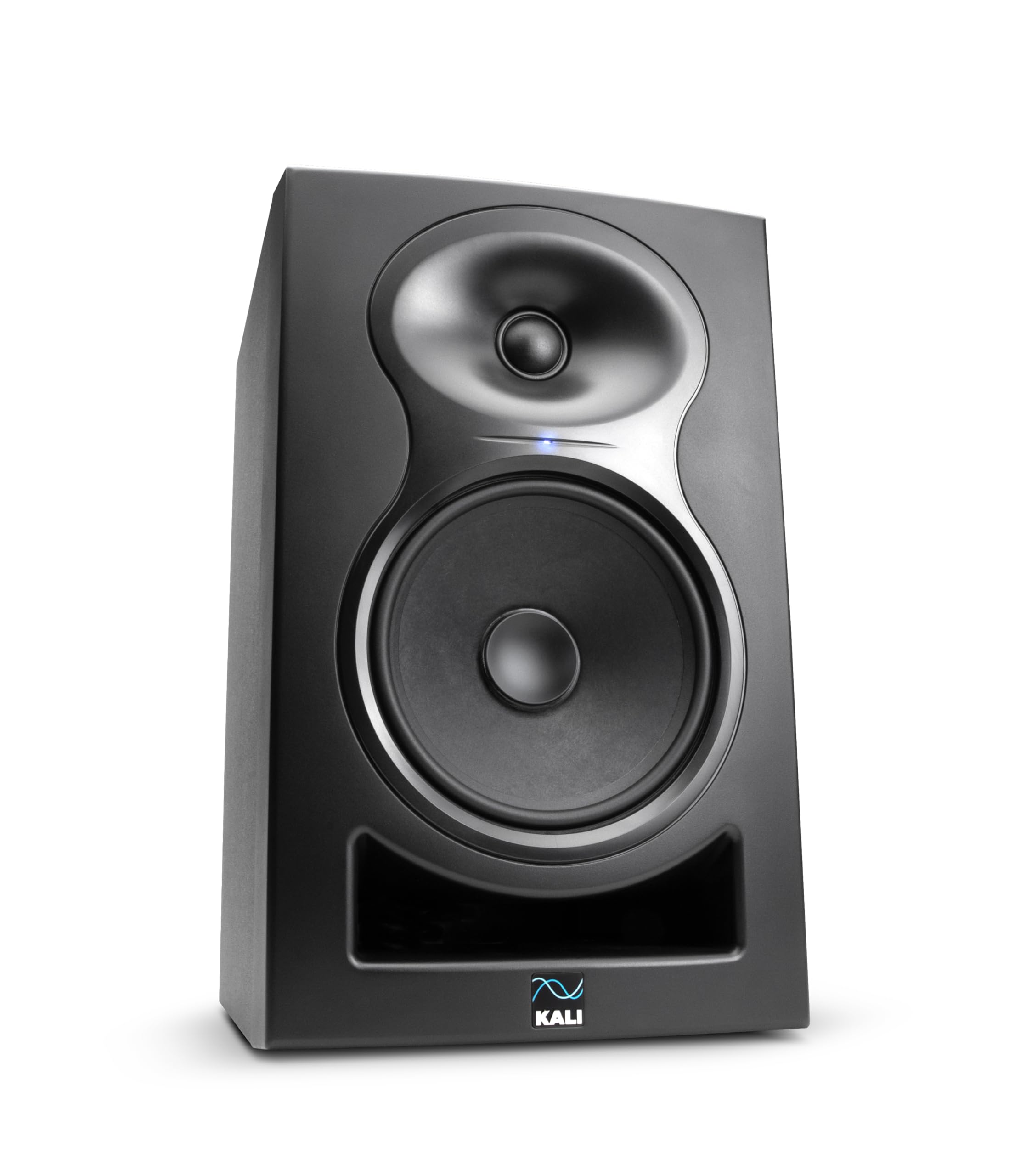
The flat-response champion with a built-in DSP that reveals every mix detail.
Buy one LP-6 V2 if you want a single high-performance monitor, or buy a pair for a stereo setup that rivals speakers many times its price. The DSP system tunes the speaker to a flat frequency response, so you hear your audio exactly as recorded, with no added bass boost or treble sparkle.
The front-firing port design cuts down on chuffing (air noise from the port) and the 12dB noise reduction keeps the self-noise quiet — a real win for desktop listening where your ear is two feet away. Buyers consistently praise the sound as “flat, transparent, and detailed” and note that it improves on headphones like the HD 800S for emotional engagement. The updated boundary EQ lets you place it against a wall or on a stand without losing low-end accuracy. One reviewer called them the “best desk top speakers ever.”
One honest concern from buyers: a minority report that after 6 months, both speakers developed a constant hum at all volumes, making them unusable. While many units run flawlessly for years, the hum reports are note — check return policy before buying.
Where it shines: You get class-leading sonic accuracy for the price, thanks to the DSP (digital signal processor that fine-tunes the sound) and bi-amped design (separate amplifiers for the woofer and tweeter). The 6.5-inch driver reaches down to 47Hz (a low bass frequency), which is deeper than the 54Hz of the Yamaha HS5, so you get fuller bass without needing a separate subwoofer.
The pick for: a listener who prioritizes a flat, uncolored sound signature and wants the most detail per dollar. Ideal for music production, critical listening, and mixing.
Consider something else if: the reported hum issue after several months worries you, or you want a smaller, more proven long-term reliability record like the Yamaha HS5 enjoys.
3. YAMAHA Hs5 Powered Studio Monitor, Pair

The studio standard that fits small desks and reveals every recording flaw.
If you have a compact desk or a treated room, the Yamaha HS5 pair is the reference monitor that audio engineers have trusted for years. The 5-inch woofer paired with a 1-inch dome tweeter covers 54Hz to 30kHz — the high end extends noticeably further than the Kali’s 21kHz ceiling, giving air and sparkle to cymbals and ambient recordings. The bi-amped design delivers 45 watts to the woofer and 25 watts to the tweeter for a total of 70 watts, so you get clean, uncolored sound at moderate volumes.
Owners mention these are a huge upgrade from smaller monitors like the Presonus Eris 4.5s, with much more detail and a wider stereo field. One reviewer called them “the best sounding speakers I’ve ever owned” and another specifically recommends them for guitarists working with modelers. Reviewers also say they perform perfectly from the start with no EQ needed. The heavy build and stable connection make them feel solid on a desk.
Worth noting: the 5-inch driver cannot match the low-end depth of the 6.5-inch JBL or Kali — you will likely want a subwoofer for electronic music or cinematic bass. One buyer mentioned paying for the pair and seeing them as low as on sale, so the price varies.
Pro insight: The Yamaha HS5’s extended high-frequency response (30kHz vs 21kHz on the Kali) means it reproduces upper harmonics more faithfully, which matters if you are mixing acoustic instruments or female vocals. Its compact size also makes placement easier on a crowded desk compared to the larger JBL 306P MkII.
Reach for these if: you want a proven, long-lasting reference monitor for mixing, editing, or podcasting on a smaller desk. The sonic purity and build quality are near-universally praised.
Look elsewhere if: you want deep bass without a subwoofer or you need the higher output level of a 6.5-inch driver for a larger room.
Understanding the Specs
Driver Size and Bass Extension
The woofer diameter is the first thing you check. A 6.5-inch driver moves more air than a 5-inch driver, so it reaches deeper into low frequencies — the Kali and JBL both dig down to the mid-40Hz range, while the Yamaha HS5 bottoms out around 54Hz. That difference means you feel kick drums and bass lines more with the larger woofer. The trade-off is that a 6.5-inch driver in a small untreated room can push too much low-end energy off the walls, making the bass sound muddy. If your desk is up against a wall, the boundary EQ switch on the JBL and Kali helps tame that boom.
Bi-Amplification and Total Power
Bi-amped means the woofer and tweeter each have their own amplifier channel inside the speaker cabinet. This keeps the power dedicated and clean — the highs do not get starved when the bass demands more current. The Kali LP-6 V2 puts out 80 watts total (bi-amped), while the Yamaha HS5 delivers 70 watts (45W LF + 25W HF). More watts give you higher clean playback levels without distortion, but near-field listening on a desk rarely needs the full headroom — 70 watts is sufficient for most home studios and critical listening setups.
Frequency Response and the Meaning of Flat
A flat frequency response means the speaker does not boost or cut any part of the audio — it plays the recording exactly as it is. The Kali LP-6 V2 aims for flat through digital DSP tuning, while the Yamaha HS5 achieves it through analog circuit design and a rigid cabinet. The Yamaha extends higher (30kHz vs 21kHz on the Kali), which can make high-frequency details like vocal sibilance and cymbal shimmer more audible. For most listeners, the difference above 20kHz is subtle, but if you mix acoustic or high-sample-rate audio, the extra top end gives you more accuracy.
Inputs and the Audio Interface Requirement
All three monitors use balanced XLR or TRS inputs — these are three-pin connectors that cancel out electrical interference from your computer’s power supply. You cannot plug these directly into your laptop’s headphone jack; you need an audio interface (like a Focusrite Scarlett 2i2) or a DAC with balanced outputs. This adds roughly to to your total setup cost but removes the hiss and buzz that cheap 3.5mm connections introduce. The Yamaha HS5 accepts both XLR and TRS, while the Kali LP-6 V2 adds RCA for consumer gear flexibility.
FAQ
Do I need an audio interface to use these speakers with my computer?
Can I use just one speaker instead of a pair?
How much desk space do these speakers need?
Should I buy a subwoofer to go with these monitors?
What is boundary EQ and why does it matter?
Do studio monitors sound good for casual music listening?
Is the Yamaha HS5 worth the extra cost over the Kali LP-6 V2?
What cables do I need for these speakers?
Can I put these speakers on foam isolation pads?
Are these speakers good for gaming?
Final Thoughts: The Verdict
For most people, the computer speakers audiophile winner is the Kali Audio LP-6 V2 because it gives you studio-grade detail, deep bass, and DSP tuning for a lower price than the other options. If you want a compact, battle-proven reference monitor for small desks, grab the Yamaha HS5. And for clean, powerful bass without a subwoofer and no hum, the JBL 306P MkII delivers the most easy low-end in this comparison.
How We Picked
We do not accept paid placement. Every pick is matched to a real buyer and a real use-case; we do not hands-on test units.
Sources & Methodology
Specifications: manufacturer listings and product documentation. Review insights: verified customer reviews, as of July 2026. Pricing: not shown on this page (it changes often); check the current price via the retailer link.
As an Amazon Associate, WellFizz earns from qualifying purchases. This does not affect which products we feature.
Related Guides

Mo Maruf
I created WellFizz to bridge the gap between vague wellness advice and actionable solutions. My mission is simple: to decode the research and give you practical tools you can actually use.
Beyond the data, I am a passionate traveler. I believe that stepping away from the screen to explore new environments is essential for mental clarity and physical vitality.