Our readers keep the lights on and my smoothie glass nicely filled. As an Amazon Associate, I earn from qualifying purchases.
Specs are compiled from manufacturer listings and verified buyer reviews and can change over time — please confirm the key details on the product page before buying.
A compact mouse needs to be two things at once: small enough to vanish into a bag, yet comfortable enough for an eight-hour workday. The tricky part is finding one that doesn’t force you to sacrifice a quiet click, a long-lasting charge, or smooth tracking just to save a few inches of desk space. This guide compares seven of the smallest wireless mice available, focusing on the real-world specs that separate a travel-friendly tool from a cramped frustration.
I’m Mohammad Maruf — the founder and writer behind WellFizz. This guide is built by comparing the manufacturers’ published specifications and the patterns across verified customer reviews, so you get each pick’s real strengths and trade-offs instead of marketing spin.
Whether you pair it with a laptop, tablet, or desktop, the right choice depends on how you connect, how long you need the battery to last, and how much noise you are willing to make. If you are looking for the best compact mouse, the answer is not one size fits all — it depends on whether you prioritize silent clicks, multi-device switching, or a rechargeable battery over disposable ones.
Quick Picks
- TECKNET Bluetooth Wireless Mouse (Rechargeable) — Best Overall
- Logitech M240 Silent Bluetooth Mouse — Pure Bluetooth Pick
- XBG B15pro Tri-Mode Bluetooth Mouse — Full-Featured Flyer
- Kovess Bluetooth Wireless Mouse (4-Mode) — Jiggler Built In
- Logitech M340 Wireless Mouse (Floral Leaves) — Budget Darling
- FOPATO Travel Donut Mouse (Pink) — Style Compact
- Mini Bluetooth Mouse with TF Card Reader — Pocket Tiny
How To Choose The Best Compact Mouse
You need a compact mouse that fits your hand, lasts long enough between charges, and connects easily to your devices. Pick wrong, and you will end up with a mouse that dies mid-flight or forces you into awkward hand positions.
Connection Type: Bluetooth vs. 2.4GHz
A Bluetooth mouse pairs without a dongle, which is a lifesaver if you switch between a work laptop and a personal tablet. The trade-off is occasional pairing hiccups. A 2.4GHz mouse uses a tiny USB receiver that you plug in and forget — it is more reliable, but if you lose the dongle, the mouse is useless. Many models now offer both modes, letting you pick the best option for each device.
Battery Type: Rechargeable vs. Disposable
Rechargeable mice save money over time and reduce waste, but they need to be plugged in every few weeks or months. Disposable AA/AAA batteries last up to 18 months on a single cell, meaning you never have to think about charging — but you’ll need to keep a spare battery handy. The choice depends on whether you prefer occasional charging with a cable or swapping a battery once a year.
DPI and Tracking Precision
DPI (dots per inch) measures how far the cursor moves for every inch you slide the mouse. A higher DPI means the cursor zips across a large monitor without you moving your hand much — useful for fast-paced work or gaming. A lower DPI gives finer control for detailed tasks like photo editing. Most compact mice offer adjustable DPI settings between 800 and 4800, letting you dial in the speed that feels right.
Quick Comparison
| Model | Best For | Connection Modes | Battery Life | Weight | Amazon |
|---|---|---|---|---|---|
| TECKNET Bluetooth Mouse | Multi-device heavy users | Bluetooth 5.2/3.0, 2.4G | 60 days (rechargeable) | 3.2 oz | Amazon |
| Logitech M240 Silent | Pure Bluetooth simplicity | Bluetooth (no dongle) | 18 months (AAA) | 2.6 oz | Amazon |
| XBG B15pro | Spec-savvy power users | Bluetooth 5.0/4.0, 2.4G | 1 month (rechargeable) | 2.5 oz | Amazon |
| Kovess Bluetooth Mouse | Jiggler mode & USB-C flex | Bluetooth 5.2/3.0, 2.4G USB-A & USB-C | 90 days standby (rechargeable) | 2.8 oz | Amazon |
| Logitech M340 Floral Leaves | Budget-friendly & stylish | 2.4G USB (dongle) | 18 months (AA) | 2.4 oz | Amazon |
| FOPATO Travel Donut Mouse | Travel & style | Bluetooth, 2.4G | 20 days (rechargeable) | 56 g | Amazon |
| Mini Bluetooth Mouse (Generic) | Ultra-portable & TF card reader | Bluetooth (no dongle) | 120 mAh (rechargeable) | 26 g | Amazon |
In‑Depth Reviews
1. TECKNET Bluetooth Wireless Mouse (Rechargeable)
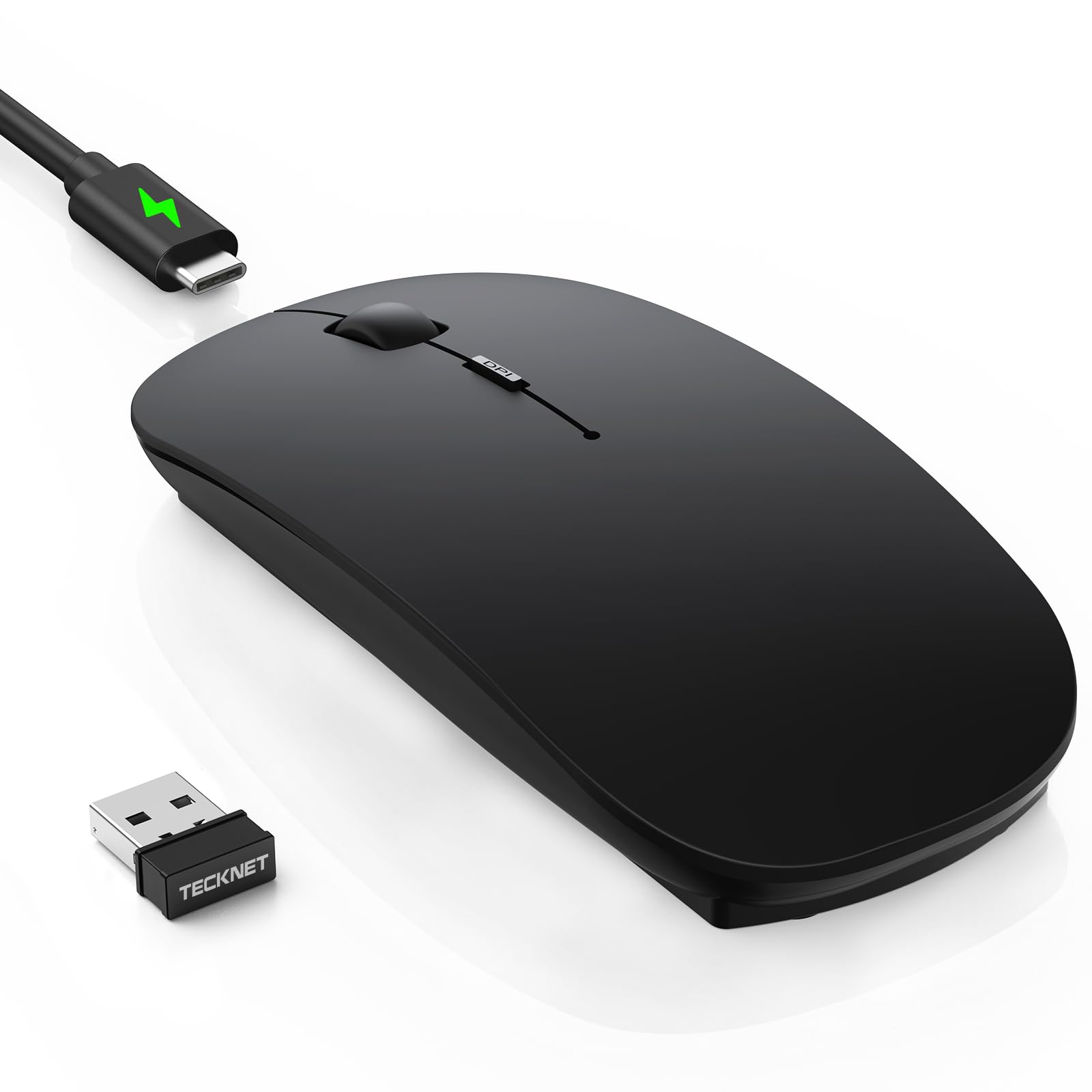
The triple-connection workhorse that outlasts your workweek on a single charge.
The TECKNET earns the top spot because it solves the two biggest hassles of a compact mouse: juggling multiple devices and keeping it powered. It connects to up to three devices using Bluetooth 5.2, Bluetooth 3.0, or the included 2.4G receiver, and you switch between them with a press — no unplugging or re-pairing. This is a step above the Logitech M240, which relies on Bluetooth only and lacks that second connectivity option.
Buyers report that “just 2.5 hours of charging powers 60 days of work (2h/day),” while a 12-month standby and 30-minute auto-sleep mode keep it ready. That rechargeable battery is a practical win over the Logitech M340’s AA battery, which lasts 18 months but requires a spare on hand. With 6-level adjustable DPI from 800 to 4800, you get enough range to shift from precise photo editing to fast cursor sweeps across a multi-monitor setup.
Three Ways to Connect
- Bluetooth 5.2, 3.0, and 2.4G in one mouse
- 60-day battery life on a 2.5-hour USB-C charge
- 6 DPI levels up to 4800 for flexible tracking speed
Minor Gripes
- Some owners mention initial tracking lag that disappears after two days
- Black matte finish may show fingerprints with sweaty hands
Reach for this if: you work across a laptop, tablet, and desktop and want to swap between them without fishing for a dongle or battery pack.
Look elsewhere if: you want the absolute smallest carry size — the TECKNET is slimmer than most but not pocket-coin tiny like the 26g Generic mouse.
2. Logitech M240 Silent Bluetooth Mouse

The no-dongle, no-fuss companion that pairs in seconds and stays quiet for a year and a half.
The M240 skips the USB receiver entirely — you pair it over Bluetooth, and it remembers your device so you never need to carry a dongle. Logitech claims the silent clicks reduce noise by 90%, and buyers back that up: one who works from home 8 hours a day, 5 days a week reports the mouse is “quiet and works amazing.” That silence is a direct comparison to the TECKNET, which some customers note is not fully silent despite being quiet.
You get up to 18 months from a single AAA battery, thanks to an auto-sleep feature that kicks in to preserve power. The compact design is ambidextrous and slim enough to toss in a bag, though one reviewer noted it is “very small” — the raised arc makes it more comfortable than a flat Magic Mouse, but large hands may wish for a fuller shape.
Why It Wins
- Wireless Bluetooth connection needs no dongle or USB port
- 90% reduced click sound confirmed by long-hour workers
- 18-month AAA battery life with built-in auto-sleep
Acknowledged Limits
- Lacks a 2.4GHz option, so you cannot use it on a device without Bluetooth
- Small size may be cramped for users with larger hands during extended sessions
Who this suits: minimalist travelers or remote workers who hate fussing with cables and just want a mouse that pairs instantly and stays paired for months.
One real limitation: unlike the TECKNET, there is no USB receiver backup, so a laptop without Bluetooth leaves you stuck.
3. XBG B15pro Tri-Mode Bluetooth Mouse

A triple-mode mouse with a live battery readout and five DPI levels — none of the guesswork.
The XBG B15pro stands out with an LED screen that shows real-time battery percentage, DPI level (800 to 2400 across five steps), and which connection mode you are in. That kind of transparency is rare in compact mice — most just have a flashing light or a vague low-battery warning. It connects via Bluetooth 5.0, Bluetooth 4.0, or 2.4GHz, and you can switch between devices in 0.8 seconds, making it a strong competitor to the TECKNET for multi-device workflows.
Reviewers point out the silent clicks are the “quietest ever” and that 1600 DPI works smoothly across two 36-inch monitors plus a laptop screen. The 500 mAh rechargeable battery lasts about one month per charge, which is shorter than the TECKNET’s 60 days, but the LED screen removes the anxiety of guessing when it will die. An ergonomic contoured thumb rest and arched palm support make it comfortable for 8-hour workdays, though the ambidextrous shape leans toward right-handed use.
Standout Features
- Built-in LED screen shows exact battery and DPI level
- Tri-mode: Bluetooth 5.0, 4.0, and 2.4GHz with fast device switching
- Ergonomic thumb rest prevents wrist strain during long sessions
Downsides
- Battery life is shorter (1 month) than the TECKNET’s 60-day claim
- Cannot rekey buttons or adjust the auto-sleep timer
Grab it for: the LED display alone — if you hate guessing battery life and DPI settings, this is the only compact mouse that tells you outright.
But know this: the sleep mode kicks in after 5 minutes and is not adjustable, so frequent short pauses mean frequent wake-up clicks.
4. Kovess Bluetooth Wireless Mouse (4-Mode)

A compact mouse with a built-in pointer jiggler — ideal for keeping your computer awake during downloads or meetings.
The Kovess mouse includes a rare feature for its size: a jiggler mode that randomly moves the mouse pointer to prevent your computer from falling asleep. That is a practical tool for online meetings, long downloads, or remote desktop sessions where you need the screen active. It also offers four connection modes — Bluetooth 5.2, Bluetooth 3.0, 2.4GHz USB-A, and 2.4GHz USB-C via a dual-port receiver — giving you more flexibility than the XBG or TECKNET.
One buyer mentioned the mouse jiggler feature as “probably my favorite feature of the mouse.” The 800 mAh rechargeable battery lasts 3-4 weeks of typical use with a 90-day standby time, and it enters sleep mode after 8 minutes of inactivity. At the same time, some users report that it glides poorly without a mouse pad, so you may want a surface under it. The slim, glossy design is sleek but may feel too small for larger hands.
Unique Advantages
- Jiggler mode prevents computer sleep — perfect for remote work
- Dual-port receiver includes both USB-A and USB-C
- 800 mAh battery with 3-4 weeks of daily use
Trade-Offs
- Does not track well on glass or glossy surfaces without a pad
- Initial MacBook Bluetooth pairing took one buyer 10 minutes
Choose this for: the jiggler mode if you regularly need to keep a computer awake without touching it — no other compact mouse here offers that feature.
Watch out: the glossy finish and 8-minute sleep timer may not suit everyone, and the mice from TECKNET and XBG offer smoother out-of-box tracking.
5. Logitech M340 Wireless Mouse (Floral Leaves)

A colorful, ultra-slim travel mouse that works for 18 months on one AA battery.
The M340 is the most affordable pick here and one of the thinnest, with a minimalist design that fits flat into a laptop bag. It uses Silent Touch Technology to remove 90% of click noise, and buyers confirm the difference — one reviewer working 8 hours a day, 5 days a week says it is “quiet and works amazing.” Unlike the TECKNET or XBG, it has only 3 buttons (no DPI switch, no side buttons), but that simplicity keeps it reliable and easy to use.
The key trade-off is connectivity: the M340 uses a 2.4GHz USB receiver, not Bluetooth. That means you need a USB-A port on your device at all times. It also lacks a rechargeable battery — the included AA lasts up to 18 months, which is the same duration as the M240 but without the option of a rechargeable cell. If you want a stylish, no-frills mouse for a single laptop and never want to think about charging, this is a strong contender.
Why It Works
- Ultra-compact and lightweight for easy travel
- Silent clicks confirmed by daily remote workers
- Up to 18 months on one AA battery with auto-sleep
Its Limits
- Only 3 buttons — no DPI adjustment or forward/back buttons
- Requires a USB-A port; no Bluetooth option
Pick it if: you want a cheap, cheerful, and very slim mouse for a single device and you prefer a year and a half of battery life without ever plugging in a cable.
skip it if: you need Bluetooth to free up a USB port or want adjustable DPI — the TECKNET or XBG serve those needs better for a small step up in price.
6. FOPATO Travel Donut Mouse (Pink)
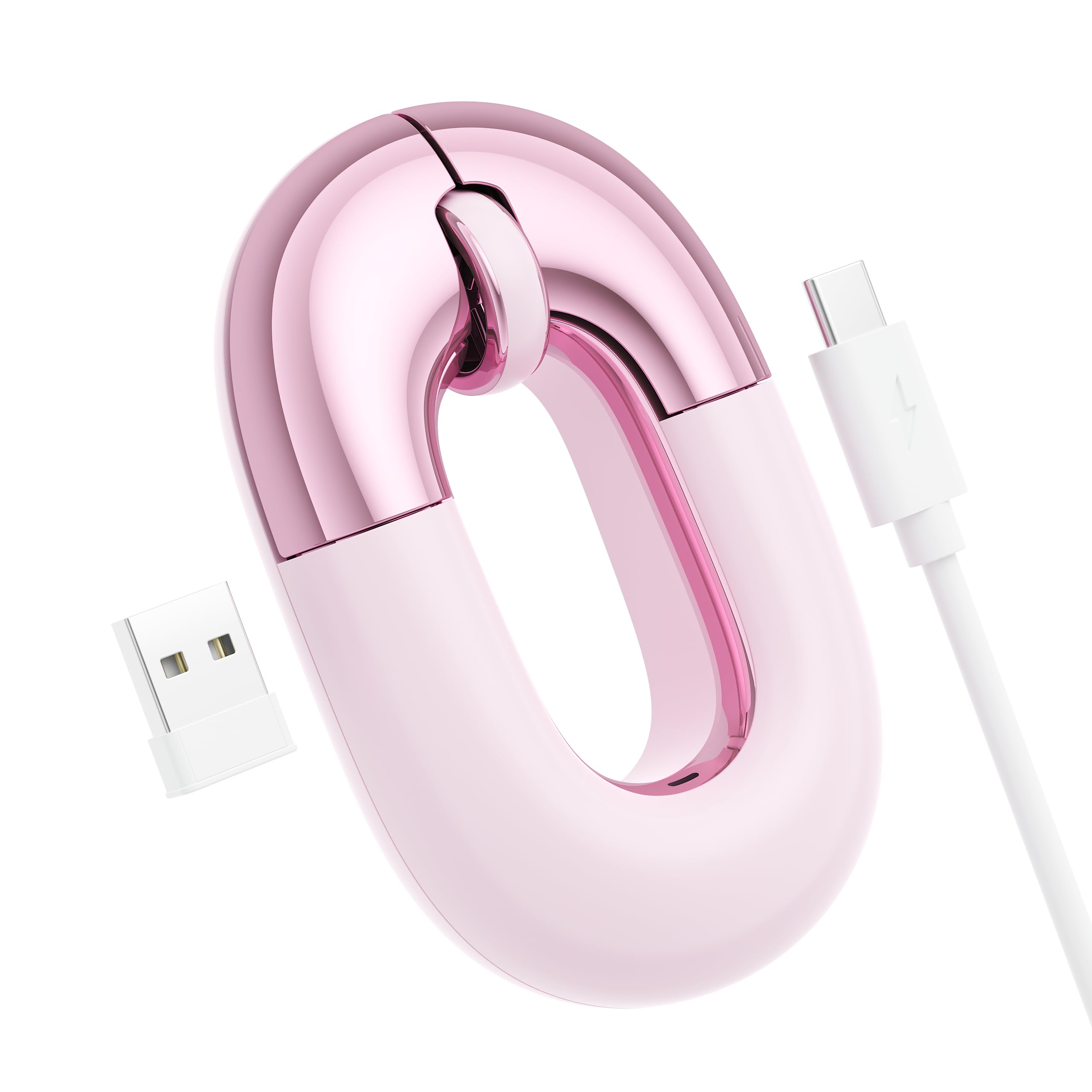
A cute, donut-shaped pink mouse that pairs via Bluetooth or 2.4G and fits in your pocket.
The FOPATO Travel Donut Mouse is built for people who want their tech to have personality without losing function. It supports both Bluetooth and 2.4G connections, switching between devices with a single button, and works with Windows, macOS, iOS, iPadOS, and Android. At 56 grams, it is heavier than the 26g Generic mouse but still light enough for daily carry in a bag or coat pocket.
Buyers love the color — “dusty rose pink metallic” — and say it glides smoothly on any surface except glass. The silent clicks are “dainty” and quiet, though one owner reported that using it for extended periods can cause wrist pain unless you have a supportive wrist rest. The built-in battery lasts up to 20 days per charge, which is shorter than the TECKNET or Logitech options, but it supports use while charging via USB-C.
Stylish & Functional
- Dual-mode Bluetooth and 2.4G with easy device switching
- Silent clicks and smooth tracking on most surfaces
- Compact enough for pockets, with a unique donut design
Considerations
- 20-day battery life is shorter than the 60-day TECKNET
- Flat shape may cause wrist strain during full workdays
Best for: anyone who values a distinct look and needs a travel-friendly mouse that still offers dual-mode connectivity — the donut design is a conversation starter.
But note: if you work 8-hour days without breaks, the Logitech M240 or TECKNET offer better ergonomics and longer battery life for the same money.
7. Mini Bluetooth Mouse with TF Card Reader (Generic)
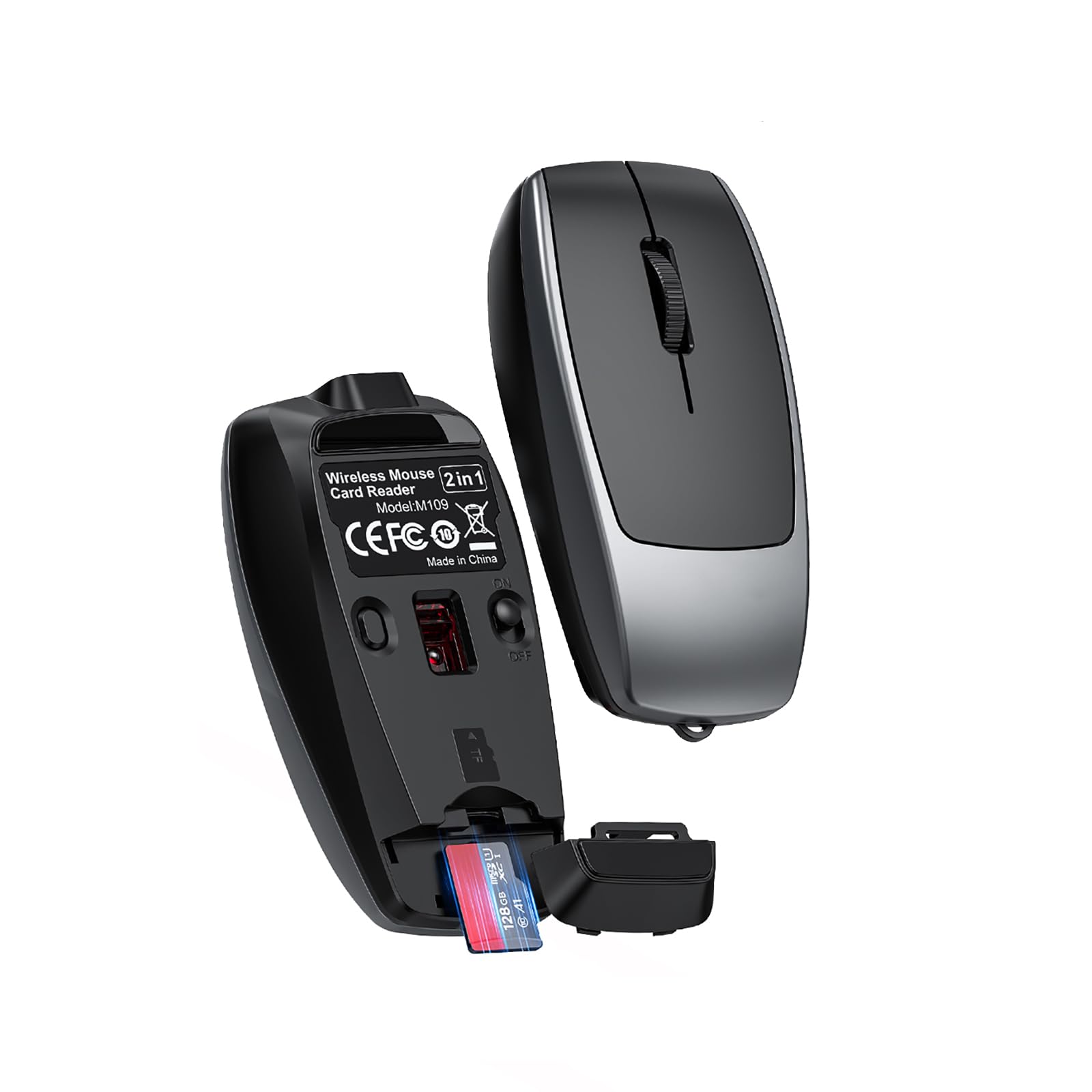
The world’s most portable pointer — 26g, with a built-in TF card reader and a lanyard-style charging cable.
At just 26 grams and a size of 7.8 x 3.8 x 2.2 cm, this is the smallest mouse on the list. It packs a surprising feature: a TF (microSD) card reader that lets you transfer data between your phone, tablet, or computer using the included lanyard cable. That makes it a two-in-one gadget for travelers who want to free up space in their bag. The 120 mAh battery recharges via USB-C, and shoppers say the Bluetooth pairing is easy once you get used to the brief auto-sleep timer.
The trade-off is comfort. One reviewer admitted it “took some time to adapt to the size and shape,” and the 4-button layout with just 800-1600 DPI range is basic compared to the TECKNET’s 4800 DPI or the XBG’s 2400 DPI. Some users reported it did not work with certain Lenovo laptops. It is the best pick for absolute portability — you can clip it to a keychain — but it is not built for all-day ergonomic use.
Ultra-Portable Perks
- Weighs only 26g — the lightest mouse in the roundup
- Built-in TF card reader for quick data transfers
- Lanyard cable doubles as a charging cord and carry strap
Real-World Cautions
- Comfort takes time to adapt to due to extremely small size
- Some compatibility issues reported with new Lenovo laptops
- DPI range maxes out at 1600, lower than the TECKNET or XBG
Reach for it when: every ounce in your bag matters and you want a mouse plus a microSD reader in one tiny package — ideal for frequent flyers.
Pass if: you need a daily work mouse for 8-hour sessions — the TECKNET or XBG offer far more comfort and DPI range for the price.
Understanding the Specs
DPI (Dots Per Inch)
DPI tells you how fast the cursor moves for every inch you slide the mouse. A higher DPI, like 4800, makes the cursor zip across large monitors without you moving your hand far — useful for multi-screen setups or fast-paced work. A lower DPI, like 800, gives you fine control for detailed tasks like photo editing. Most compact mice let you adjust the DPI on the fly, so you can slow down for precision work and speed up for general browsing.
Battery Life Claims
Manufacturers test battery life under ideal conditions: a few hours of use per day, stable temperatures, and fresh batteries. A mouse rated for 18 months on a single disposable AAA battery means about 18 months of typical 8-hour workdays. Rechargeable mice often quote battery life in days or weeks based on a standard workday — for example, “60 days of work (2h/day)” from the TECKNET. Always check the small print for the usage pattern behind the number.
FAQ
Will a compact mouse feel too small for my hand?
Can I use a compact mouse with an iPad or iPhone?
What does silent click mean in decibels?
How do Bluetooth 5.0 and 5.2 differ for a mouse?
Can I use a 2.4G mouse without the USB receiver?
How often do I need to charge a rechargeable compact mouse?
What is a mouse jiggler and do I need one?
How does the XBG B15pro LED screen help?
Does a compact mouse work on glass surfaces?
Can I use a compact mouse for gaming?
Final Thoughts: The Verdict
For most people, the best compact mouse winner is the TECKNET Bluetooth Wireless Mouse because it balances triple-device connectivity, a 60-day rechargeable battery, and 6-level DPI up to 4800 in a slim, pocket-friendly body. If you want pure Bluetooth simplicity with an 18-month battery, grab the Logitech M240 Silent. And for the absolute smallest carry with the bonus of a built-in TF card reader, the standout is the Mini Bluetooth Mouse with TF Card Reader.
How We Picked
We do not accept paid placement. Every pick is matched to a real buyer and a real use-case; we do not hands-on test units.
Sources & Methodology
Specifications: manufacturer listings and product documentation. Review insights: verified customer reviews, as of July 2026. Pricing: not shown on this page (it changes often); check the current price via the retailer link.
As an Amazon Associate, WellFizz earns from qualifying purchases. This does not affect which products we feature.
Related Guides

Mo Maruf
I created WellFizz to bridge the gap between vague wellness advice and actionable solutions. My mission is simple: to decode the research and give you practical tools you can actually use.
Beyond the data, I am a passionate traveler. I believe that stepping away from the screen to explore new environments is essential for mental clarity and physical vitality.