Our readers keep the lights on and my smoothie glass nicely filled. As an Amazon Associate, I earn from qualifying purchases.
Specs are compiled from manufacturer listings and verified buyer reviews and can change over time — please confirm the key details on the product page before buying.
You do not have to spend a fortune to get a smooth, colorful monitor. A couple of years ago, getting an IPS (In-Plane Switching) panel with a 120Hz (120 refreshes per second) screen at a low price was rare. Now, you can buy a monitor with a 240Hz refresh rate for what 120Hz used to cost. This guide looks at seven 1080p monitors, from a cheap Amazon Basics work screen to a fast 240Hz gaming model, so you know what you are paying for.
I’m Mohammad Maruf — the founder and writer behind WellFizz. This guide is built by comparing the manufacturers’ published specifications and the patterns across verified customer reviews, so you get each pick’s real strengths and trade-offs instead of marketing spin.
if you need a second screen for spreadsheets, a fast panel for competitive gaming, or a vibrant display for casual content, this roundup of the best computer monitors cheap covers the key details: refresh rate (how many times the image updates per second), color accuracy, connectivity, and real-world buyer experience.
Quick Picks
- LG 24U411A-B 24-inch Full HD IPS Computer Monitor, 120Hz — Best Overall
- msi PRO MP251W E2 24.5-inch IPS Gaming Office Monitor, 120Hz — Best Color Depth
- Sceptre 24.5-inch Gaming Monitor 240Hz 1ms — Best for Gaming
- ViewSonic VA2456A-MHD 24 Inch 1080p IPS Monitor, 120Hz — Best All-Rounder
- Dell 27 Monitor SE2725HM – 27-inch Full HD IPS, 100Hz — Largest Screen
- Sceptre 24-inch Prime Monitor Thin 1080p LED 99% sRGB — Budget Champion
- Amazon Basics 24-inch Full HD IPS Monitor, 75 Hz — Reliable Basic
How To Choose The Best Computer Monitors Cheap
Focus on refresh rate, panel type, and connectivity — not brand name — when every dollar counts.
Refresh Rate: The Smoothness Decider
Measured in hertz (Hz) — the number of times the screen updates per second — a standard 60Hz (60 updates per second) feels sluggish when you scroll a webpage or move a window. Jumping to a 120Hz monitor makes everything — from dragging text to playing a shooter — feel visibly smoother. In this list, you will see options from a basic 75Hz Amazon Basics to a blistering 240Hz Sceptre gaming monitor.
Panel Type: Why IPS Wins at This Price
In-Plane Switching (IPS) panels give you accurate colors that do not wash out when you look from an angle — critical if you share your screen or just shift in your chair. Older Twisted Nematic (TN) panels are cheaper but look dull and lose contrast off-center. Every single pick here uses IPS or a closely related LED technology, so you get consistent color from almost any seat.
Connectivity: Not Just HDMI
Look for at least one HDMI input. DisplayPort is a bonus for PC gaming because it supports higher refresh rates over longer cable runs. VGA is outdated — treat it as a legacy fallback. A headphone jack on the monitor keeps your desk cleaner if you do not have speakers.
Quick Comparison
| Model | Best For | Refresh Rate | Panel Type | Contrast Ratio | Amazon |
|---|---|---|---|---|---|
| LG 24U411A-B | Best Overall Value | 120Hz | IPS | 1500:1 | Amazon |
| MSI PRO MP251W E2 | Vivid Colors & Black Levels | 120Hz | IPS | 2000:1 | Amazon |
| Sceptre 24.5″ 240Hz | Competitive Gaming | 240Hz | LED | 2000:1 | Amazon |
| ViewSonic VA2456A-MHD | Versatile Office & Light Gaming | 120Hz | IPS | 1500:1 | Amazon |
| Dell SE2725HM | Larger Screen with Eye Care | 100Hz | IPS | 1000:1 | Amazon |
| Sceptre E248W-19203R | Budget Gaming Starter | 100Hz | LED | — | Amazon |
| Amazon Basics 24″ | Basic Office / Second Screen | 75Hz | IPS | 1000:1 | Amazon |
In‑Depth Reviews
1. LG 24U411A-B 24-inch Full HD IPS Computer Monitor, 120Hz

A 120Hz (120 refreshes per second) IPS monitor that scrolls smoothly and keeps colors accurate for under — it is the all-around winner.
The LG 24U411A-B gives you smooth motion without the premium price. Its 120Hz refresh rate (the screen updates 120 times a second) is double what basic office monitors offer — so web pages scroll smoothly, and fast-paced games feel responsive. The IPS panel (In-Plane Switching) keeps colors accurate from wide angles, and with a contrast ratio of 1500:1 (the difference between the brightest white and darkest black), it delivers deeper blacks than the Dell SE2725HM’s 1000:1 ratio. Buyers report that colors look “great” and “surprisingly good for the price” after a quick adjustment, though the default out-of-box picture leans green-tinted and over-saturated. The slim bezels and metal stand give it a clean modern look, but there are no built-in speakers — you will need external ones for audio. Reader Mode helps reduce blue light for long reading sessions, and the 1ms MBR (Motion Blur Reduction — a tech that dims the backlight between frames to reduce blur) keeps fast action crisp.
The single HDMI port limits connectivity compared to multi-port rivals, and the menu knob takes some getting used to, but for a core 120Hz IPS experience at this price, it is tough to top. If you need built-in speakers or a DisplayPort, this is not the pick.
Why It Stands Out
- Smooth 120Hz refresh rate — a 60% gap over the Amazon Basics’ 75Hz
- 1500:1 contrast ratio with vibrant IPS color
- 1ms Motion Blur Reduction keeps fast movement sharp
What to Know First
- No built-in speakers
- Only one HDMI port
- Out-of-box colors may need manual tuning
Smooth operator: Best for students, remote workers, and casual gamers who want fluid everyday motion and accurate color without extra frills.
One caveat: If you absolutely need built-in speakers or a DisplayPort connection, the LG is not the pick.
2. msi PRO MP251W E2 24.5-inch IPS Gaming Office Monitor, 120Hz
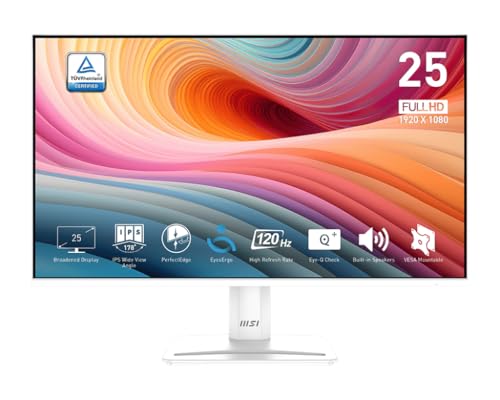
A 120Hz IPS panel with a 2000:1 contrast ratio — 33% deeper blacks than the LG — for richer dark scenes without the washed-out look.
The MSI PRO MP251W E2 stands out because of its 2000:1 contrast ratio (the difference between the brightest white and darkest black). That is a 33% improvement over the LG 24U411A-B’s 1500:1, so movie night scenes and dark game corridors look rich instead of gray. At 24.5 inches, it offers a slightly larger canvas than the 24-inch competitors without being too big for a small desk. Buyers rave about “great colors and black levels for price” and note the “smooth motion” of the 120Hz refresh rate. The white chassis gives it a clean, premium look that stands out from the sea of black monitors. Inside the box, you get HDMI, VGA, and DisplayPort inputs, giving you flexibility with older and newer devices alike.
One honest trade-off: the stand is fixed with no height adjustment, so you will want a VESA mount (a standard wall or arm mount) or a stack of books if your desk setup needs a taller screen. MSI includes an Eye-Q Check feature that reminds you to rest your eyes during long sessions. If you need a height-adjustable stand without buying a separate VESA mount, look at the ViewSonic or Dell instead.
Where It Excels
- top-tier 2000:1 contrast ratio for deep blacks
- 120Hz refresh with smooth flicker-free motion
- Versatile ports — HDMI, VGA, DisplayPort
Its Limitations
- Stand is not height-adjustable
- No FreeSync support (not advertised, but note for AMD GPU owners)
- Built-in speakers are basic
Dark-scene champion: Reach for this MSI if you watch a lot of movies or play darker games where black level quality matters more than extra features.
The catch: If you need a height-adjustable stand without buying a separate VESA mount, look at the ViewSonic or Dell instead.
3. Sceptre 24.5-inch Gaming Monitor 240Hz 1ms

A 240Hz (240 refreshes per second) gaming monitor that costs what 120Hz used to — and even has built-in speakers.
The Sceptre E255B-FWD240 is the fastest monitor in this roundup at 240Hz. A 240Hz refresh rate (the screen updates 240 times a second) and 1ms BR (Blur Reduction — a tech that dims the backlight between frames to reduce motion blur) mean fast-paced shooters and racing games look silky smooth with almost no motion blur. With FreeSync Premium support (anti-screen-tearing tech for compatible AMD graphics cards), it eliminates screen tearing during gameplay. The 100% sRGB color gamut (a standard color space) keeps colors vibrant, a step above the 99% sRGB on the Sceptre E248W-19203R. Owners mention the “great color settings with high saturation” and praise its sturdy metal base. The monitor includes two HDMI and two DisplayPort inputs, so you can keep a PC, a console, and a streaming device plugged in simultaneously. Blue Light Shift technology helps reduce eye strain during long sessions.
The built-in speakers are mediocre — customers note “rare audio feedback at high volume” — so you will likely want a dedicated headset. The default stand has limited height adjustment (it cannot go lower than its default position), but the metal base feels stable. If you are a creative professional needing accurate out-of-box colors or you want a height-adjustable stand without buying a VESA mount, skip this one.
Strengths
- 240Hz 1ms for competitive gaming performance
- FreeSync Premium for tear-free gameplay
- 100% sRGB color gamut
Weaknesses
- Built-in speakers are weak (audible feedback at high volume)
- Height adjustment on stand is limited
- Colors are “mediocre but acceptable” straight out of box
Speed demon: Perfect for competitive Fortnite, Valorant, or Call of Duty players who want the fastest refresh rate available under.
skip it if: You are a creative professional needing accurate out-of-box colors or you want a height-adjustable stand without buying a VESA mount.
4. ViewSonic VA2456A-MHD 24 Inch 1080p IPS Monitor, 120Hz

A 120Hz IPS monitor known for lasting over a decade — reviewers point out units still running after 10+ years.
ViewSonic has a reputation for durability — shoppers say monitors lasting over a decade of daily use — and the VA2456A-MHD upholds that standard. The 24-inch IPS panel (In-Plane Switching) delivers sharp text and vivid colors, while the 120Hz refresh rate with Adaptive Sync (FreeSync — a tech that matches screen refresh to your graphics card to stop tearing) provides smooth scrolling and tear-free gaming. It balances refresh rate, color, and connectivity to satisfy most users without excelling in any single area. The thin bezels look modern, and the connectivity includes HDMI, DisplayPort, and VGA — covering everything from a modern gaming PC to an older office laptop. Buyers report the “crisp text” and “vibrant colors,” and several mention it fits perfectly in a server rack for networking setups. The monitor includes five presets (Game, Movie, Web, Text, Mono) so you can quickly switch between tasks.
The basic stand has no height adjustment and brightness caps at 250 cd/m² (candelas per square meter) — fine for indoor use but not ideal near a bright window. The VGA port feels outdated in 2024, but its presence means old equipment still works without an adapter. If you need a height-adjustable stand or plan to use the monitor in a very brightly lit room, look elsewhere.
What Works
- 120Hz with Adaptive Sync for smooth daily use
- Versatile ports (HDMI, DisplayPort, VGA)
- ViewSonic’s proven reliability — many units last years
What Could Be Better
- Basic stand with no height adjustment
- 250 nits (unit of brightness) feels dim in bright rooms
- Menu rocker switch takes some getting used to
Trusted daily driver: Go for the ViewSonic if you want a reliable 120Hz monitor that works for spreadsheets, streaming, and occasional gaming without any fuss.
Not for you if: You need a height-adjustable stand or plan to use the monitor in a very brightly lit room.
5. Dell 27 Monitor SE2725HM – 27-inch Full HD IPS, 100Hz

A 27-inch 100Hz panel with an anti-glare coating that reduces eye strain — the biggest screen in this roundup.
The Dell SE2725HM is the only 27-inch pick here, giving you a larger workspace for multitasking without needing a second screen. At 100Hz (100 refreshes per second), it is not as fast as the 120Hz monitors above, but it still feels noticeably smoother than a standard 60Hz display — perfect for office work, web browsing, and video calls. The IPS panel covers 16.7 million colors, and ComfortView Plus technology reduces harmful blue light without making the screen look yellow. Buyers highlight the “accurate colors” and find it “excellent for fine detail and old eyes” due to the large, clear display. The built-in power supply and cable holder keep your desk tidy — a thoughtful touch that many budget monitors ignore. The anti-glare matte coating works well in rooms with overhead lighting.
The biggest trade-off is the lower 100Hz refresh rate compared to the 120Hz rivals, and the contrast ratio of 1000:1 lags behind the MSI’s 2000:1. There are no built-in speakers, so you will need external audio. The stand offers tilt adjustment but no height adjustment, and there is only one HDMI port plus one VGA port — no DisplayPort. If you game competitively, the 100Hz and no DisplayPort limit your options — choose the LG or ViewSonic 120Hz instead.
What You Get
- Large 27-inch screen for better multitasking
- 100Hz refresh with TÜV Rheinland 3-star certified eye comfort
- Cable management and built-in power supply keep the desk clean
The Downsides
- 1000:1 contrast ratio is weaker than some 24-inch rivals
- Only one HDMI and one VGA — no DisplayPort
- No built-in speakers
Big-screen eye saver: Ideal for home office workers and older users who value a large, clear display and blue-light protection over raw gaming speed.
Watch out: If you game competitively, the 100Hz and no DisplayPort limit your options — choose the LG or ViewSonic 120Hz instead.
6. Sceptre 24-inch Prime Monitor Thin 1080p LED 99% sRGB

A 100Hz LED monitor with gaming modes and 99% sRGB color — surprising features for the lowest price.
The Sceptre E248W-19203R delivers decent performance at the lowest price. Up to 100Hz refresh rate (100 updates per second), 99% sRGB color gamut, and built-in speakers make it a versatile pick for budget gaming and everyday use. It includes FPS (First-Person Shooter) and RTS (Real-Time Strategy) gaming modes that adjust the display settings for competitive shooters and strategy games. Blue Light Shift helps protect your eyes during long sessions. Buyers are surprised by the quality — one calls it “awesome for the price” and notes “75Hz, colors good after tuning, can look OLED-like in some light.” Another reviewer says it works great with an Xbox and is “very easy installation.” The two HDMI ports and one VGA port give you options for multiple devices, and the VESA 100×100 mount pattern means you can wall-mount it.
The trade-offs are the expected ones at this price: the stand wobbles slightly, the bezels are thick and old-fashioned, and the built-in speakers are quiet with no bass. Owners mention “visible backlight” in dark scenes, so it is not ideal for a dark-room movie experience. The on-screen controls are basic buttons on the back, making adjustments awkward. If wobbly stands or visible backlight in dark movies drive you crazy, spend a little more on the LG or MSI.
Why It Impresses
- 100Hz refresh rate with 99% sRGB color gamut
- Built-in speakers (saves desk space)
- Two HDMI ports for flexible device switching
Its Real Limits
- Stand is wobbly and bezels are thick
- Speakers are quiet with no bass
- Visible backlight in dark scenes
Ultra-budget starter: A great first pick for a student dorm room, a young gamer’s first rig, or a secondary screen where cost is the number-one concern.
Not for perfectionists: If wobbly stands or visible backlight in dark movies drive you crazy, spend a little more on the LG or MSI.
7. Amazon Basics 24-inch Full HD IPS Monitor, 75 Hz

A 75Hz IPS monitor for email and spreadsheets — no frills, simple setup.
The Amazon Basics 24-inch monitor is a no-frills IPS display for email, spreadsheets, and browsing. The IPS panel (In-Plane Switching) delivers accurate colors from wide angles, and the 75Hz refresh rate is a small but noticeable step up from the standard 60Hz found on older office monitors. At 6.92 pounds, it is light enough to move between rooms easily. Buyers love the value — one calls it “an excellent value” with “great definition and color,” and another says it is a “solid monitor, fits small spaces, smooth tilt, easy 5-min setup, zero input lag.” The stand tilts from -5 to 23 degrees, and you can VESA mount it (100x100mm) if you prefer a cleaner desk. The monitor comes with an HDMI cable and a power cord right in the box.
The built-in speakers are weak — customers note they are “bad speakers, good everything else” and “quiet at max.” The 75Hz refresh rate means it is noticeably less smooth than the 120Hz options above — a 60% gap in refresh rate. For any gaming beyond very casual use, the Sceptre or LG would be a better fit.
Simple Strengths
- IPS panel with solid colors and wide viewing angles
- 75Hz feels smoother than standard 60Hz office monitors
- Easy tilt adjustment and VESA mount compatible
Known Shortfalls
- 75Hz is a significant drop from the 120Hz rivals
- Built-in speakers are very quiet
- No height adjustment on the stand
Simple and reliable: Pick this Amazon Basics if you need an honest IPS screen for office documents, video calls, and web browsing with zero setup headache.
Look elsewhere for: Gaming or any fast-moving content — the 75Hz refresh rate will feel sluggish compared to the 120Hz monitors in this list.
Understanding the Specs
Refresh Rate (Hz)
This is the number of times the screen redraws the image every second. A 60Hz monitor feels standard but shows visible stutter when you scroll or move a mouse quickly. A 120Hz monitor doubles that, making everything from dragging windows to playing shooters feel noticeably fluid. Between the two, 75Hz is a minor step up from 60Hz, while 240Hz is for competitive gamers who want every edge in reaction time.
IPS Panel
In-Plane Switching (IPS) technology creates better color accuracy and wider viewing angles than older TN (Twisted Nematic) panels. With an IPS monitor, the image stays bright and colorful even if you look from the side — useful when sharing your screen, watching movies with someone next to you, or just shifting in your chair. Avoid cheap TN monitors if you care about color.
FAQ
Is 75Hz good enough for gaming?
Is a 27-inch 1080p monitor too pixelated?
Do I need a monitor with built-in speakers?
What does Adaptive Sync or FreeSync do?
Can I mount these monitors on a wall or arm?
What is the difference between HDMI and DisplayPort for a cheap monitor?
How important is the contrast ratio?
Will a cheap 120Hz monitor work with a console like Xbox or PS5?
What does 1ms MBR (Motion Blur Reduction) mean?
How long do budget monitors typically last?
Final Thoughts: The Verdict
For the majority of shoppers, the best computer monitors cheap winner is the LG 24U411A-B because it packs a 120Hz IPS panel, 1500:1 contrast ratio, and slim design into one well-rounded package for under. If you want richer black levels for movies and dark games, grab the msi PRO MP251W E2 with its standout 2000:1 contrast ratio. And for competitive gamers who need every frame to be buttery smooth, the standout is the Sceptre 24.5-inch 240Hz monitor at a price that usually only buys 120Hz.
How We Picked
We do not accept paid placement. Every pick is matched to a real buyer and a real use-case; we do not hands-on test units.
Sources & Methodology
Specifications: manufacturer listings and product documentation. Review insights: verified customer reviews, as of July 2026. Pricing: not shown on this page (it changes often); check the current price via the retailer link.
As an Amazon Associate, WellFizz earns from qualifying purchases. This does not affect which products we feature.

Mo Maruf
I created WellFizz to bridge the gap between vague wellness advice and actionable solutions. My mission is simple: to decode the research and give you practical tools you can actually use.
Beyond the data, I am a passionate traveler. I believe that stepping away from the screen to explore new environments is essential for mental clarity and physical vitality.