Our readers keep the lights on and my smoothie glass nicely filled. As an Amazon Associate, I earn from qualifying purchases.
Specs are compiled from manufacturer listings and verified buyer reviews and can change over time — please confirm the key details on the product page before buying.
You want a cheap computer that actually opens apps quickly and does not freeze on a few browser tabs — but that is harder to find than it sounds. This guide skips the models that cut corners on RAM or storage and focuses on eight desktop and mini PCs that genuinely deliver real-world speed for office work, streaming, and home use — with each pick backed by its real specs and verified owner experiences.
I’m Mohammad Maruf — the founder and writer behind WellFizz. This guide is built by comparing the manufacturers’ published specifications and the patterns across verified customer reviews, so you get each pick’s real strengths and trade-offs instead of marketing spin.
You need the right balance of processing power, memory, and storage. These are the models worth your attention when searching for a cheap computer that does not feel cheap to use.
Quick Picks
- ACEMAGIC Retro X3 Mini PC — Best Overall
- GEEKOM A5 2026 Edition Mini PC — Best for Office
- GMKtec Nucbox G10 (Ryzen 5 3500U) — Best for Servers
- KAMRUI Pinova P1 Mini PC — Compact Traveler
- Glorlin GT103 Mini PC (Ryzen 5300U) — Best Value
- Dell OptiPlex 5060 Desktop (Renewed) — Best for Storage
- GMKtec G3 S Mini PC (Intel N95) — Compact Office
- BOSGAME E4 Air Mini PC — Budget Champion
How To Choose The Best Cheap Computer
Buying on a budget means every dollar has to earn its keep. A cheap computer that is too slow to open a browser or runs out of storage in six months is no bargain at all — you end up frustrated or buying a replacement. Here is what to prioritize so you get a machine that genuinely works for daily life while staying affordable.
Processor Generation Matters More Than Turbo Speed
A CPU with a high turbo frequency sounds impressive, but a newer architecture often delivers better multitasking and efficiency. An Intel N95 (from the 12th Gen Alder Lake family) can outperform older, higher-clocked chips like the Intel 10110U in real-world office tasks. Pay attention to the generation and the number of cores and threads, not just the GHz number. A quad-core processor with eight threads (like the AMD Ryzen 5 3500U) handles multiple programs and browser tabs more fluidly than a dual-core chip with the same clock speed.
RAM — The Performance Floor
Eight gigabytes (GB) of RAM (the computer’s short-term memory for open programs) is the absolute minimum for a usable Windows 11 experience. If you intend to run many programs at once, keep 20 browser tabs open, or do any photo editing, 16GB of RAM provides a noticeably smoother ride. Many budget mini PCs allow upgrading, but some use non-upgradeable soldered RAM. Check before you buy; your future self will thank you.
Storage — SSD is Non-Negotiable
A computer with a traditional spinning hard drive (HDD) alone will feel sluggish from day one. An SSD (Solid State Drive — a storage chip with no moving parts) is the single biggest speed booster for any cheap computer. Look for at least 256GB of SSD storage — enough for the operating system, essential programs, and everyday files. If you need lots of room for movies or large projects, a model that pairs an SSD with a second HDD bay offers the best of both worlds: speed for your programs and cheap bulk storage for your files.
Connectivity and Expansion
Check the ports before you buy. If you use a wired keyboard and mouse, a mini PC with only two USB ports will fill up fast. An extra USB 3.2 port and a dedicated HDMI (High-Definition Multimedia Interface) or DisplayPort for your monitor are essential. Some budget mini PCs also offer dual Ethernet ports (useful for networking enthusiasts) or extra M.2 slots for adding a second SSD later. Think about what you might plug in a year from now, not just what sits on your desk today.
Quick Comparison
| Model | Best For | Processor | RAM | Storage | Amazon |
|---|---|---|---|---|---|
| ACEMAGIC Retro X3 | Light Gaming & Power Users | Ryzen 7 H 255 (4.9GHz) | 16GB LPDDR5 | 1TB NVMe PCIe 4.0 SSD | Amazon |
| GEEKOM A5 2026 Edition | Long-Term Office Reliability | Ryzen 5 7430U (4.3GHz) | 16GB DDR4 | 512GB M.2 NVMe SSD | Amazon |
| GMKtec G10 (Ryzen 5) | Server / Plex / Light Work | Ryzen 5 3500U (3.7GHz) | 16GB DDR4 | 1TB SSD | Amazon |
| KAMRUI Pinova P1 | Ultra Compact Travel PC | AMD Ryzen R2544 (3.7GHz) | 16GB DDR4 | 256GB M.2 SSD | Amazon |
| Glorlin GT103 (5300U) | Value & Expandability | AMD Ryzen 5300U (3.8GHz) | 16GB DDR4 | 512GB NVMe SSD | Amazon |
| Dell OptiPlex 5060 | Bulk Storage & Basic Use | Intel Core i5-8500 (4.3GHz) | 16GB DDR4 | 500GB SSD + 1TB HDD | Amazon |
| GMKtec G3 S (N95) | Everyday Office & School | Intel N95 (3.4GHz) | 8GB DDR4 | 256GB M.2 SSD | Amazon |
| BOSGAME E4 Air | Basic Office & Media Hub | Ryzen 5 3500U (3.7GHz) | 8GB DDR4 | 256GB SATA SSD | Amazon |
In‑Depth Reviews
1. ACEMAGIC Retro X3 Mini PC
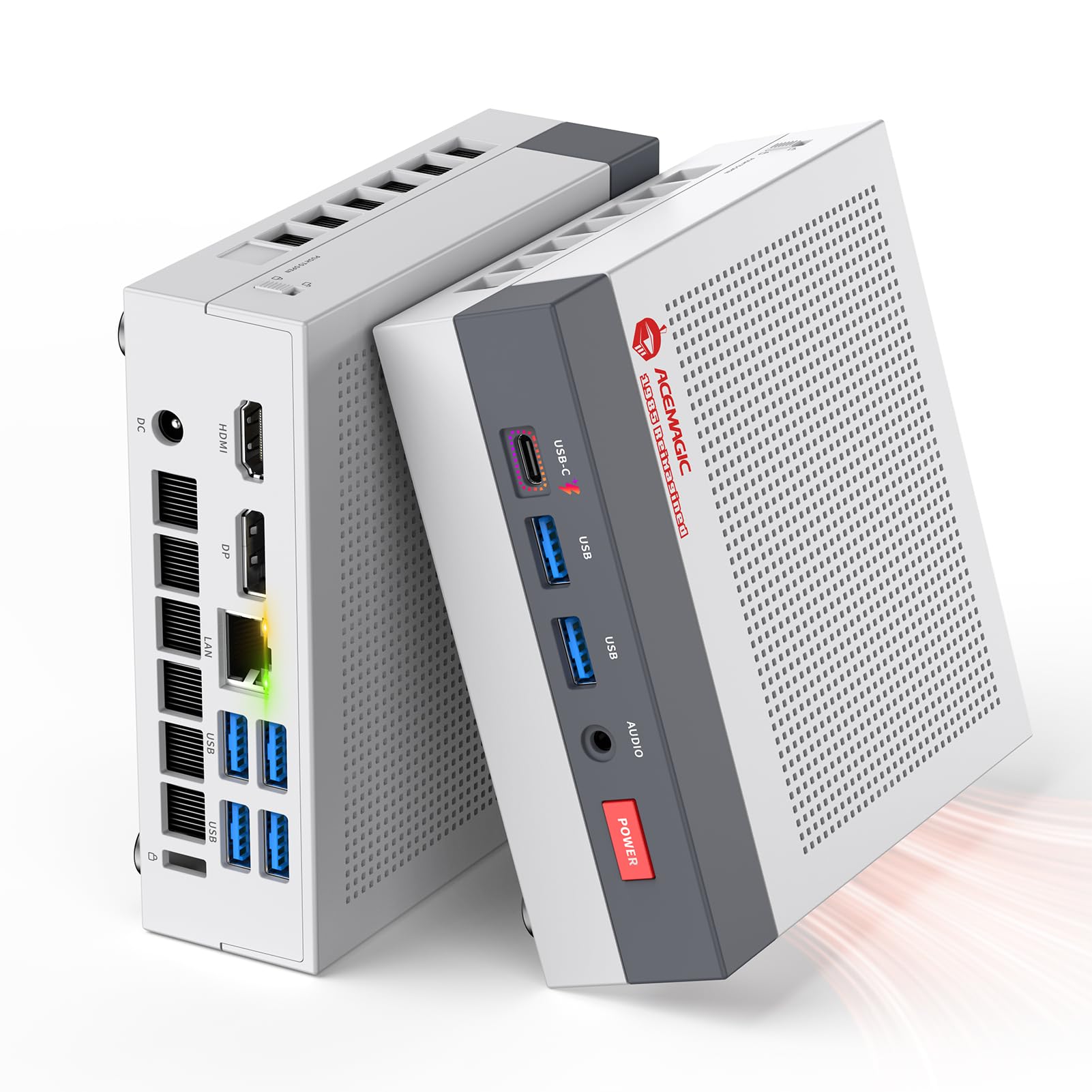
Gaming-capable graphics that rival entry-level dedicated GPUs, packed in a retro-styled case.
This is not your average cheap computer. The ACEMAGIC Retro X3 can play modern games at respectable frame rates, so you do not need a separate graphics card. It is powered by an AMD Ryzen 7 H 255 processor that boosts up to 4.9 GHz and an AMD Radeon 780M integrated GPU (a graphics chip built directly onto the processor). The maker claims the 780M delivers stronger frame rates than older Vega 2 graphics in most games, and scores higher than Intel Iris Xe in benchmark tools like 3DMark and Superposition. It comes with 16GB of LPDDR5 RAM (low-power, high-speed memory) and a fast 1TB NVMe PCIe 4.0 SSD (a storage chip the maker positions as much faster than a traditional hard drive for file transfers), so boot times and app loading feel almost instant.
Connectivity is generous: you get a USB4 Type-C port (a reversible plug) that supports 8K at 60Hz (or 4K at 120Hz) and 40Gbps data transfers, six USB 3.2 Type-A ports (standard rectangular plugs), a 2.5G LAN port (wired network port), HDMI 2.1 (High-Definition Multimedia Interface), and DisplayPort 2.0. Dual fans and upgraded cooling pipes keep temperatures in check better than the single-fan designs found on many cheaper mini PCs. The case has a nostalgic retro console look, with a tool-free top cover that makes accessing the internal slots for swapping parts easy.
Where It Excels
- Graphics power (Radeon 780M) handles modern games at respectable frame rates
- Superfast PCIe 4.0 storage with 1TB capacity from the start
- Triple display output (HDMI, DP, USB-C) supports 8K resolution
- 2.5G Ethernet and WiFi 6E for excellent networking speed
Trade-Offs to Know
- Higher price point than other budget picks
- LPDDR5 RAM is soldered and not user-upgradable
- Some users note the retro styling isn’t for every desk setup
The power play: Pick this if you want a cheap computer that can also run games and handle demanding creative software without needing a separate graphics card.
Check your budget: The premium features push the price up — if you only need web browsing and email, a simpler model will save you money and still feel fast.
2. GEEKOM A5 2026 Edition Mini PC

A 3-year warranty and a quiet metal chassis built for years of daily Zoom calls and spreadsheets.
If your cheap computer needs to survive years of daily Zoom calls, spreadsheet work, and video conferencing without a hiccup, the GEEKOM A5 is built for exactly that scenario. It runs an AMD Ryzen 5 7430U processor with a max boost of 4.3 GHz, 16GB of DDR4 RAM (upgradable to 64GB), and a 512GB M.2 NVMe SSD (a small, removable storage card). The key differentiator here is the 3-year limited warranty — most mini PC brands offer only one year. Combined with a reinforced ABS+PC shell (a blend of tough plastics), a metal mid-frame for heat dissipation, and vibration-damping feet (rubber pads that reduce noise), this machine is designed to run 24/7 in a home office or business environment.
On the display side, the integrated AMD Radeon Vega 7 graphics (a built-in graphics chip) can drive up to four 4K screens (using two HDMI and two USB-C ports), and one USB-C port supports 8K visuals. WiFi 6 and Bluetooth 5.2 handle wireless connections smoothly. Buyers report the fan is very quiet, and the tool-less access for adding an extra M.2 SSD makes future upgrades simple. The only complaint from a few buyers is the single NVMe slot limits internal expansion, though the additional 2.5-inch HDD bay (for a larger, slower drive) for up to 10TB total storage partially offsets that.
What Stands Out
- Industry-leading 3-year warranty provides confidence for business use
- Runs cool and quiet even under a full day of office workloads
- Supports up to four 4K displays for serious multitasking
Room for Improvement
- Only one internal NVMe slot can limit expansion without an external drive
- Pre-installed Windows 11 Pro setup was slow, according to one reviewer
Built to last: The GEEKOM A5 is the pick for anyone who needs a reliable, long-term office machine and values a strong warranty over the absolute lowest price.
Not for gamers: The integrated Vega 7 graphics handle office apps and streaming beautifully, but you will not want to play demanding modern games on this.
3. GMKtec Nucbox G10 (Ryzen 5 3500U)
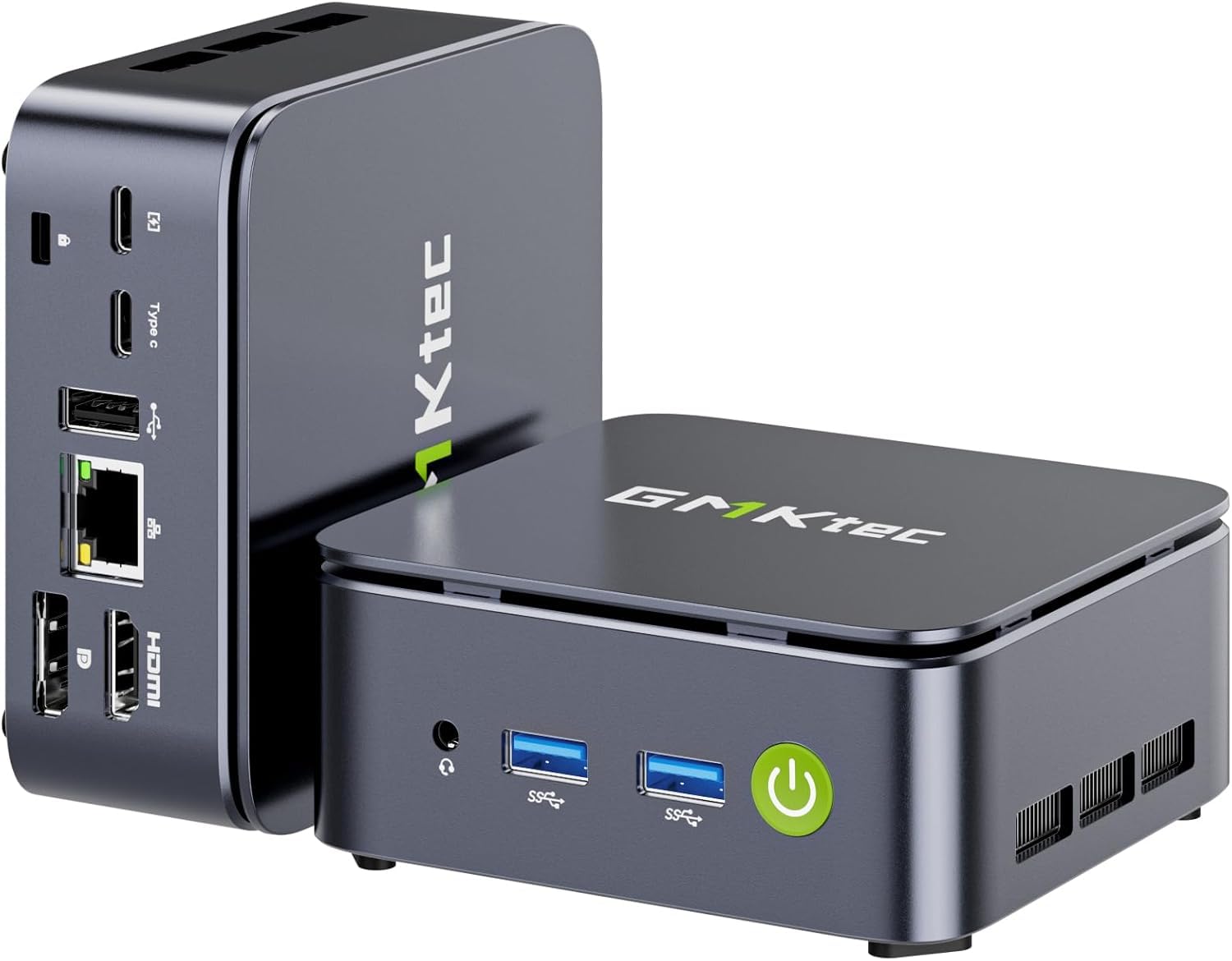
A media server or networking powerhouse with 2.5GbE and dual M.2 slots.
The GMKtec Nucbox G10 takes a different angle on the cheap computer concept. It uses the same AMD Ryzen 5 3500U chip (4 cores, 8 threads, up to 3.7 GHz) found in the BOSGAME E4 Air, but it pairs it with a more generous 16GB of DDR4 RAM and a massive 1TB SSD. The standout feature for tech-savvy buyers is the 2.5 Gigabit Ethernet port — 2.5GbE versus the standard 1GbE port found on most budget PCs. Reviewers have successfully used it as a router, firewall, or Plex media server (a program that streams your video files) running FreeBSD (a free operating system). The Radeon Vega 8 graphics (up to 1.2 GHz) drive three displays simultaneously via HDMI 2.1 (TMDS), DisplayPort 1.4, and USB-C, making it practical for a multi-monitor office setup too.
One particularly handy design choice: the top cover pops off for easy access to the dual M.2 2280 PCIe 3.0 slots (internal sockets for adding storage), which support up to 16TB of total SSD storage. The RAM is also upgradable to 64GB. A dual cooling fan system keeps the processor from throttling (slowing down) under load. The trade-off for all this I/O and upgrade flexibility is a slightly larger chassis than some ultra-compact rivals.
Why It Shines
- 2.5GbE LAN makes it ideal for high-speed networking and server builds
- 16GB RAM and 1TB SSD are generous for a mid-range budget machine
- Dual M.2 slots allow massive storage expansion
Consider This
- Processor is a slightly older Zen+ architecture (Ryzen 5 3500U)
- WiFi 5 (not WiFi 6) lags behind some comparably-priced models
Network and media builders: This is the cheap computer to pick if you plan to run a home server, Plex box, or software router and need fast Ethernet.
Stick with something newer: If you just want to browse the web and write documents, newer processors in this price range offer better single-core performance and power efficiency.
4. KAMRUI Pinova P1 Mini PC
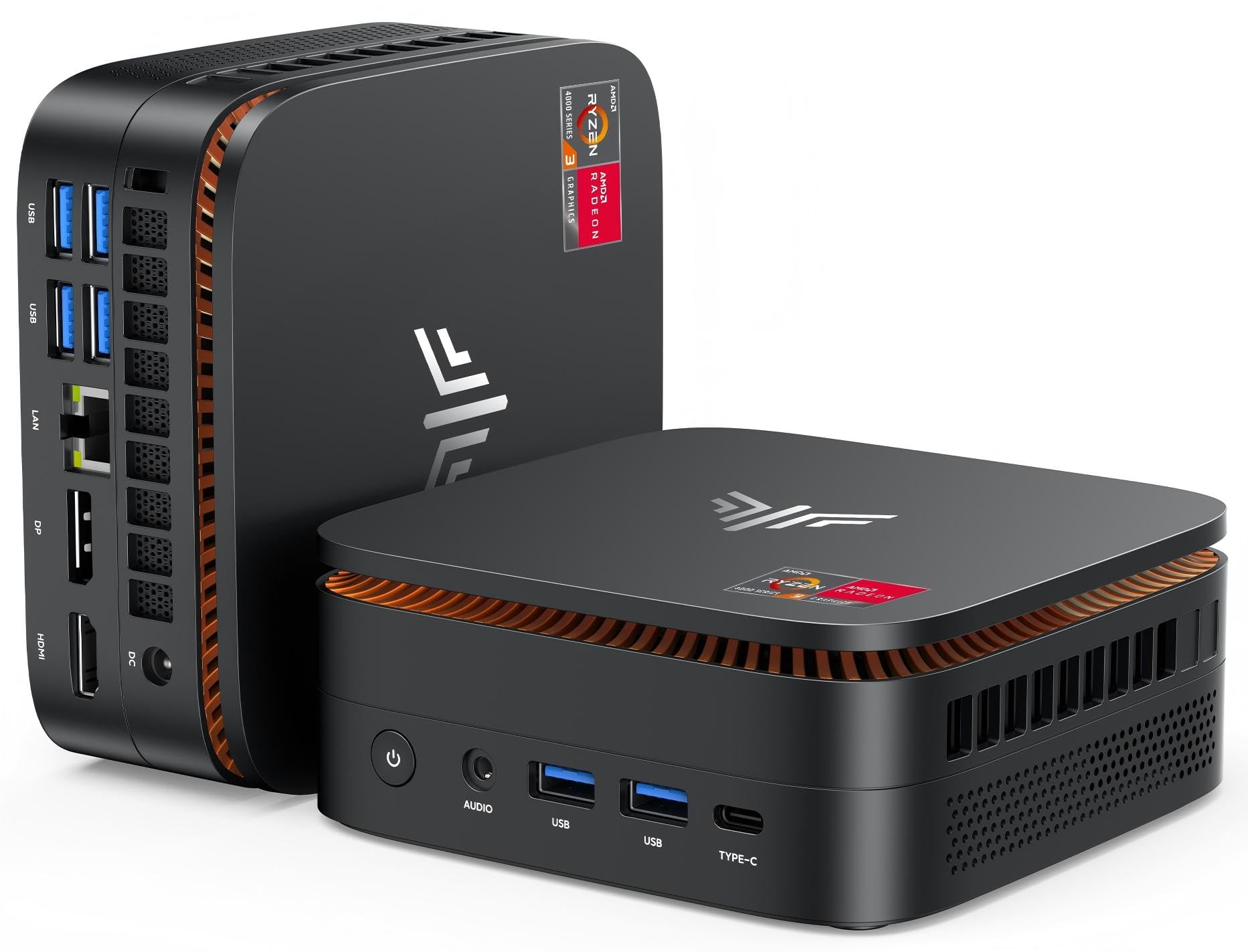
A tiny travel companion that slips into a bag and runs a triple-monitor setup.
At just 5.06 x 5.06 x 2.01 inches, the KAMRUI Pinova P1 is among the most portable cheap computers on this list. It is powered by an AMD Ryzen R2544 processor (4 cores, 4 threads, up to 3.7 GHz), which the maker claims offers stronger performance than Intel 10110U or N95 chips. It comes with 16GB of DDR4 RAM and a 256GB M.2 SSD. The compact size means you can easily tuck it behind a monitor using the included VESA mount (a bracket that screws into the back of a screen) or toss it into a laptop bag for work trips.
Despite its small footprint, the P1 supports triple display output through HDMI, DisplayPort, and USB-C at 4K@60Hz resolution. It runs Windows 11 Pro from the start and supports Linux, PXE boot (a way to start the computer from a network), Wake-on-LAN (turning it on remotely), and RTC wake (scheduled power-on). Reviewers report it is completely silent, handles heat exceptionally well, and boots very fast. One reviewer noted using it as a living room big-screen TV computer with excellent results. The main limitation to check: the single RJ45 port is Gigabit Ethernet only (no 2.5GbE), and Bluetooth is version 4.2 rather than the newer 5.x standards.
Travel-Friendly
- Extremely compact and lightweight, ideal for frequent travel
- Runs completely silent even under heavier loads like video encoding
- Triple 4K display support in a case this small is rare
Trade-Offs
- 256GB storage is tight; you will likely need external or cloud storage soon
- Bluetooth 4.2 is dated — connecting newer peripherals may have range issues
Tuck and go: Pick the KAMRUI P1 if desk space is at a premium or you want a cheap computer that travels in a bag without sacrificing multi-monitor work.
Storage caution: If you work with large media files or install many programs, the 256GB drive will fill up fast — plan for external storage.
5. Glorlin GT103 Mini PC (Ryzen 5300U)
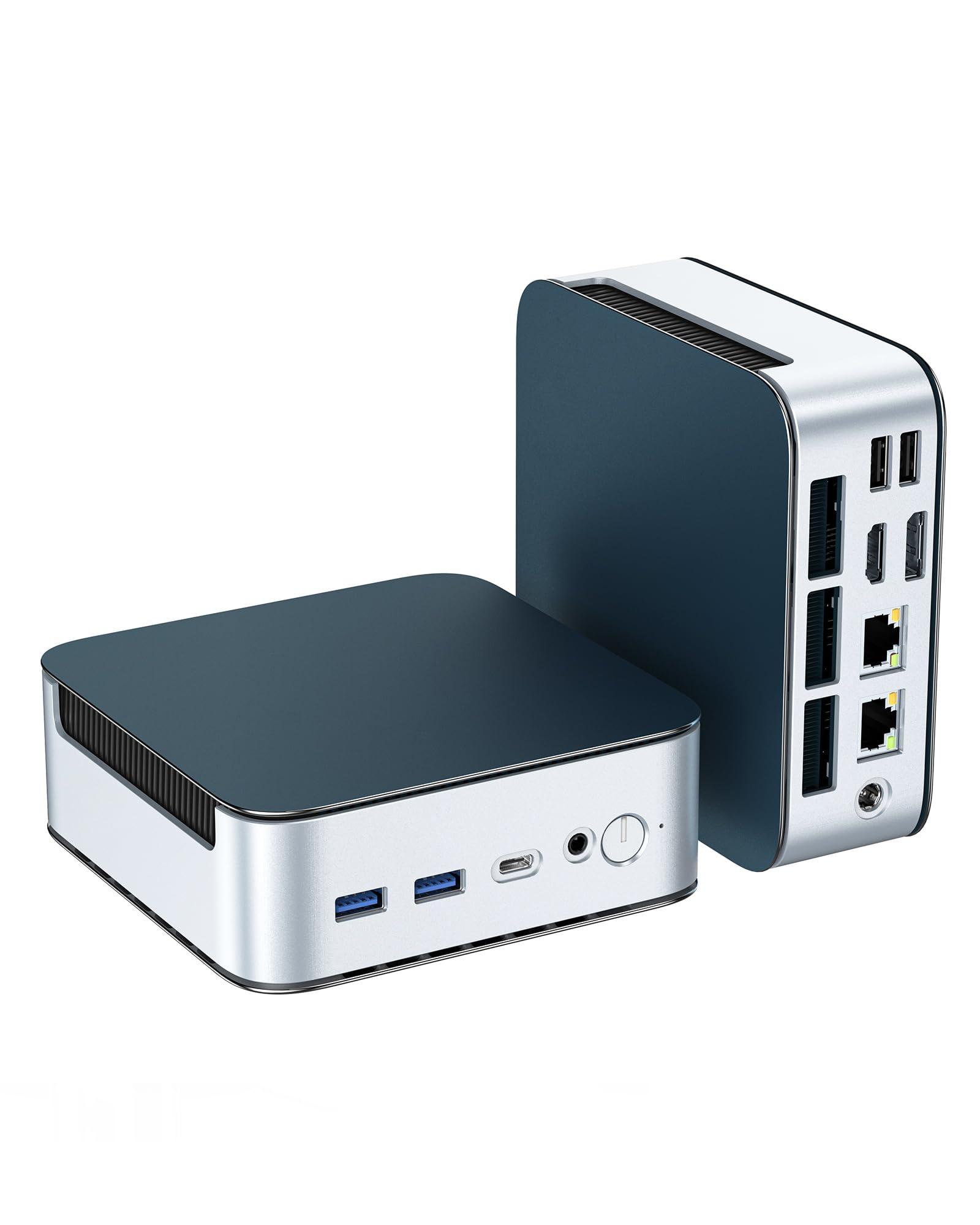
The best balance of mid-range processor power, dual 2.5G Ethernet, and upgrade potential for the money.
The Glorlin GT103 is built around the AMD Ryzen 5300U processor (4 cores, 8 threads, up to 3.8 GHz) and pairs it with a rare combination at the price: 16GB of DDR4 RAM, a 512GB NVMe SSD (a very fast storage chip), dual 2.5G Ethernet ports (wired network ports at 2.5GbE rather than standard 1GbE), and WiFi 6 with Bluetooth 5.3. That networking suite puts it ahead of many cheaper mini PCs that still rely on WiFi 5 (older wireless standard) and gigabit-only Ethernet. The triple 4K display support (via HDMI, DisplayPort, and USB-C) gives you a productive multi-monitor workspace, and the unit runs cool thanks to a low-noise fan and efficient thermal materials.
Owners mention it handles 3D printer slicer software (programs that prepare 3D models for printing) with ease, and several praised the upgradeability — RAM can expand to 64GB, and storage can go up to 4TB. One reviewer called it the “lowest price seen” for a machine with this spec level and bought a second unit for their kids. The only catch: the integrated Radeon graphics have just 512MB of dedicated video RAM (memory just for graphics), which limits performance in modern 3D games.
Value Highlights
- Dual 2.5G LAN ports are unusual at this price point
- WiFi 6 and Bluetooth 5.3 provide modern wireless performance
- Expandable RAM (to 64GB) and storage (to 4TB) extend the usable life
The Catch
- Only 512MB of dedicated graphics memory limits gaming viability
- Some buyers noted the default Windows installation needs a manual reinstall for tight performance
The smart money pick: If you want fast networking, upgrade room, and a solid processor without overspending, the Glorlin GT103 is your best balance of features and cost.
Not a gamer’s choice: Stick with the ACEMAGIC Retro X3 if running modern games matters more than Ethernet speed.
6. Dell OptiPlex 5060 Desktop (Renewed)

A refurbished office tower that gives you a huge storage combo (SSD + 1TB HDD) and a fast six-core processor.
While most cheap computers on this list are mini PCs, the Dell OptiPlex 5060 is a traditional desktop tower — and that brings distinct advantages. It packs an Intel Core i5-8500 processor with six cores and a max turbo speed of 4.3 GHz, versus the GMKtec G3 S’s Intel N95 chip at 3.4 GHz, plus 16GB of DDR4 RAM. The storage arrangement is the real headline: a 500GB SSD for fast boot times and program launches, plus a 1TB spinning hard drive (HDD) for bulk file storage. That gives you 1.5TB total space, which is more than any other machine in this lineup.
Being a refurbished business-class Dell (a used computer that has been inspected and restored) means build quality is solid, and the tower form factor allows for internal upgrades. Customers note the SSD is extremely fast — one owner said moving 97GB of data took about two seconds. The downsides: the integrated Intel UHD Graphics 630 (a basic built-in graphics chip) works fine for office apps and streaming but is not meant for gaming. A couple of buyers mentioned the fan is a bit noisy, and the lack of a built-in HDMI port (it uses DisplayPort connectors) means you may need an adapter for standard monitors. The 16GB RAM in the OptiPlex, versus 8GB in the BOSGAME E4 Air, gives it more headroom for smoother multitasking.
Why It Works
- Six-core Intel i5-8500 handles demanding multi-tasking well
- Storage combo (SSD + 1TB HDD) offers speed and volume
- 15-second boot time and 30W power draw, per one owner’s measurements
Know Before Buying
- Renewed unit — condition varies by seller; some report perfect, others had issues
- No HDMI port from the start; uses DisplayPort connectors
Storage king: The Dell OptiPlex 5060 is the cheap computer to choose if you need a lot of local storage for files, photos, and videos right from the start.
Skip it for quiet or portable use: The tower is bigger and noisier than a mini PC, and the refurbished nature introduces some risk in unit condition.
7. GMKtec G3 S Mini PC (Intel N95)

An intro-level mini PC that feels snappy for basic tasks but skips some polish in build quality.
The GMKtec G3 S is powered by a 12th Gen Intel N95 processor (4 cores, 4 threads, up to 3.4 GHz, 6MB cache — a small super-fast memory for frequently used data), which the maker claims delivers better overall performance than earlier N100/N5105 models. It comes with 8GB of DDR4 RAM and a 256GB M.2 2242 SSD. This combination is genuinely snappy for routine office work, web browsing, and streaming — one buyer mentioned it handles Office Pro applications and even a CAD (Computer-Aided Design) program without issue. Dual HDMI 2.0 ports support two 4K@60Hz displays, and the Intel UHD Graphics (up to 1000MHz) handles 4K video playback and AV1 decoding (a modern video format) smoothly.
The trade-offs matter. Multiple verified buyers reported a non-functional USB port on their unit (the front port farthest from the power button). This is a recurring issue that GMKtec has not publicly fixed. Because there are only three USB ports total, losing one means you may need a USB hub (a device that adds more ports) if you use a wired keyboard and mouse. The packaging also drew complaints — the product box arrived in a plain brown envelope with no bubble wrap, which is risky for a sensitive electronic device.
Solid Foundation
- Intel N95 is a noticeable upgrade over older N-series chips
- Dual 4K@60Hz display support is great for a compact budget PC
- Very small footprint frees up desk and travel space
Frustration Points
- Faulty USB port reported by multiple buyers is a hardware lottery
- 8GB RAM is at the minimum for comfortable Windows 11 use
Basic tasks, tight budget: The G3 S works well for web, email, and light office apps if you get a good unit — and the price is hard to argue with.
Check the USB port immediately: Test all ports on arrival, and be prepared to buy a USB hub in case one is dead.
8. BOSGAME E4 Air Mini PC

The cheapest entry into Ryzen 5 processor performance, but you might play the return lottery.
The BOSGAME E4 Air is the lowest-priced mini PC on this list, and it brings surprising specs: an AMD Ryzen 5 3500U processor (4 cores, 8 threads, up to 3.7 GHz) with Radeon Vega 8 Graphics (built-in graphics), 8GB of DDR4 RAM, and a 256GB SATA SSD (a slightly slower type of solid-state drive). It drives three 4K monitors simultaneously via HDMI, DisplayPort, and USB-C, which is genuinely impressive at this price point. Dual Gigabit Ethernet ports (wired network ports), WiFi 5 (older wireless standard), and Bluetooth 5.0 round out the connectivity.
“First unit had blue screen issues; returned for refund and reordered,” one owner reported — and that anecdote captures the biggest risk. While the replacement “works great” and other owners praise its speed (40-second boot, 2-second shutdown) and compatibility with Linux (a free operating system), the quality control appears inconsistent. Another buyer said the first unit would not boot at all, and the manufacturer was unresponsive. If you are comfortable with the possibility of a return or exchange to get a good unit, the reward is compelling core performance for the money. One reviewer successfully runs 7 screens on it and uses it with a USB hub.
Why It Tempts
- Ryzen 5 3500U and Vega 8 graphics punch well above the price
- Triple 4K display support is rare at this budget level
- Dual RJ45 ports add flexibility for networking
Why It Risks
- Inconsistent quality control — some units have blue screen issues or fail to boot
- Runs Windows poorly according to one reviewer; Linux is recommended
- Lacks a rear 3.5mm audio jack (a round headphone plug), which some users found inconvenient
Maximum specs for minimum spend: The BOSGAME E4 Air is the pick if your budget is extremely tight and you are willing to risk a return for a processor that performs like a mid-range model.
Skip it for low-maintenance buying: If you cannot afford the time to test and potentially return a defective unit, spend a bit more on one of the more reliable options above.
Understanding the Specs
Processor Cores vs. Clock Speed
The number of cores (physical processing units on the chip) often matters more for daily use than the peak turbo speed in gigahertz (GHz). A quad-core processor with eight threads can run your browser, email, music player, and a video call all at once without stuttering, while a dual-core chip with a high clock speed may choke on that many tasks. For a cheap computer used for multitasking, aim for a processor with at least four cores and eight threads (like the Ryzen 5 3500U or Intel i5-8500).
RAM Capacity and Upgrade Path
RAM is your computer’s short-term memory for open programs. Eight gigabytes (GB) is the minimum for a tolerable Windows 11 experience. If you often have 15+ browser tabs open, or you run Office alongside a music app and a messaging app, go for 16GB. More importantly, check if the RAM is upgradeable — many budget mini PCs use soldered memory that cannot be changed later. A cheap computer with upgradeable slots can be refreshed years down the line by adding more RAM, saving you from buying a whole new machine.
SSD vs. HDD: The Speed Difference
A Solid State Drive (SSD) is the single biggest upgrade you can experience in a cheap computer. It makes Windows boot in seconds, programs open instantly, and files copy without waiting. A traditional Hard Disk Drive (HDD) is much slower but offers more storage for the same money. The ideal setup is a small SSD for the operating system and programs, plus a large HDD for your movies, music, and photos. Some desktop towers let you add both; most mini PCs only have room for a single SSD.
FAQ
Can a cheap computer handle video editing?
How many USB ports do I really need on a cheap PC?
Is it worth buying a refurbished computer to save money?
Can a mini PC be used as a home server?
What is the difference between WiFi 5 and WiFi 6?
How much storage do I need in a budget computer?
Will a cheap computer run Windows 11 smoothly?
What does a VESA mount do for a mini PC?
Are cheap computers good for kids’ schoolwork?
How important is the dedicated graphics memory in a cheap computer?
Final Thoughts: The Verdict
For most buyers, the cheap computer winner is the ACEMAGIC Retro X3 because it delivers gaming-capable graphics, a superfast PCIe 4.0 SSD, and all the modern ports you need in a compact, upgrade-friendly chassis. If you want the best long-term value for office work and multi-monitor productivity, grab the GEEKOM A5 for its excellent 3-year warranty and business-grade build. And for a tight budget where every dollar counts, the BOSGAME E4 Air offers impressive Ryzen 5 and triple-display specs, as long as you are prepared to test it thoroughly on arrival.
How We Picked
We do not accept paid placement. Every pick is matched to a real buyer and a real use-case; we do not hands-on test units.
Sources & Methodology
Specifications: manufacturer listings and product documentation. Review insights: verified customer reviews, as of July 2026. Pricing: not shown on this page (it changes often); check the current price via the retailer link.
As an Amazon Associate, WellFizz earns from qualifying purchases. This does not affect which products we feature.

Mo Maruf
I created WellFizz to bridge the gap between vague wellness advice and actionable solutions. My mission is simple: to decode the research and give you practical tools you can actually use.
Beyond the data, I am a passionate traveler. I believe that stepping away from the screen to explore new environments is essential for mental clarity and physical vitality.