Our readers keep the lights on and my smoothie glass nicely filled. As an Amazon Associate, I earn from qualifying purchases.
Specs are compiled from manufacturer listings and verified buyer reviews and can change over time — please confirm the key details on the product page before buying.
You apply a filter, and then the beach ball spins and you wait. The main job of a photo-editing computer is to make that waiting stop. You need a machine that works through hundreds of raw files (unprocessed camera images) without slowing down and shows every pixel accurately, so your edits look right when you share them. This guide covers ten computers built for exactly that.
I’m Mohammad Maruf — the founder and writer behind WellFizz. This guide is built by comparing the manufacturers’ published specifications and the patterns across verified customer reviews, so you get each pick’s real strengths and trade-offs instead of marketing spin.
The right computer for photos will save you hours of frustration each week — you just need to know which processor chip and how much memory (RAM) actually matter.
Quick Picks
- GEEKOM IT13 MAX AI Mini PC — Best Overall
- HP OmniDesk Desktop Computer PC — Best Value
- HP Mini Desktop PC Computer — Compact Workhorse
- NIMO 17.3″ Gaming-Creator Laptop — Mobile Creator
- HP 27 inch All-in-One Desktop PC — All-in-One Touch
- Apple 2026 MacBook Air 13-inch M5 — Ultraportable
- Suevery Prebuilt Gaming PC — GPU Power
- HELLOLAND Gaming PC Desktop — Premium Performer
How To Choose The Best Computer For Photos
Match your computer’s components to the size of your photo files and your editing workflow. A laptop that handles iPhone photos smoothly may choke on 50-megapixel raw files from a full-frame camera.
Processor: The Engine Behind Every Adjustment
The processor (CPU) handles heavy lifting when you apply presets, reduce noise, or export batches of images. For smooth Lightroom editing, choose a chip with at least six performance cores. The Intel Core i7, Intel Core Ultra 9, and AMD Ryzen 7 series are solid starting points. Faster clock speeds, such as 5.1 GHz, make each adjustment feel instant.
Memory (RAM): Your Workspace Size
RAM is the temporary workspace where your editing software holds open photos. Too little RAM forces your computer to use the storage drive as overflow, causing lag. For photo work, 16GB (gigabytes) is the starting point for comfortable editing. If you work with very large files or keep many browser tabs open alongside Lightroom, choose 32GB or more.
Storage: Speed Matters More Than Space at First
An SSD (Solid State Drive, a fast chip-based drive) loads your programs and photos in seconds. A traditional HDD (hard disk drive, a spinning-disk drive) would make you wait. Get at least a 512GB SSD to hold your operating system, software, and current projects. You can always add external drives to archive older photos.
Graphics: Integrated vs Dedicated
For basic color corrections and RAW conversions, the built-in graphics inside modern Intel and AMD chips (like the Intel UHD 770 or the AMD Radeon 780M) is enough. But if you use the GPU-accelerated (Graphics Processing Unit, or graphics card, sped-up) features in Lightroom or work with layers in Photoshop, a dedicated graphics card like an RTX 5060 or RTX 5070 gives you much smoother brush strokes and faster preview generation.
Display Quality: Seeing True Colors
When you edit a product photo or a portrait, you need a screen that shows colors accurately. Look for an IPS panel (In-Plane Switching, a screen type with wide viewing angles) with a resolution of at least 1920 x 1080 for sharp images. Some all-in-one PCs, like one model below, cover 99% of the sRGB color space (a standard color range for screens), which means the green in a leaf on your screen matches what you upload to your website.
Quick Comparison
| Model | Best For | Processor | RAM | Storage | Amazon |
|---|---|---|---|---|---|
| GEEKOM IT13 MAX | Multi-tasking editor | Intel Core Ultra 9 185H | 16GB DDR5 | 1TB SSD | Amazon |
| HP OmniDesk | AI-enhanced editing | AMD Ryzen 7 8700G | 32GB DDR5 | 1TB NVMe SSD | Amazon |
| HP Mini Desktop | Small desk setup | Intel Core i7-12700T | 16GB DDR4 | 512GB SSD | Amazon |
| NIMO Laptop | Mobile creator | AMD Ryzen 7 8745HS | 32GB DDR5 | 1TB PCIe 4.0 SSD | Amazon |
| HP All-in-One 27″ | Touchscreen editing | AMD Ryzen 5 7520U | 16GB LPDDR5 | 1TB SSD | Amazon |
| Apple MacBook Air M5 | On-the-go creator | Apple M5 | 16GB Unified Memory | 512GB SSD | Amazon |
| Suevery Gaming PC | Demanding edits & play | Intel Core i9 13900HX | 32GB DDR5 | 1TB NVMe SSD | Amazon |
| HELLOLAND Gaming PC | Top-tier raw speed | AMD Ryzen 7 7800X3D | 32GB DDR5 | 1TB SSD | Amazon |
In‑Depth Reviews
1. GEEKOM IT13 MAX AI Mini PC
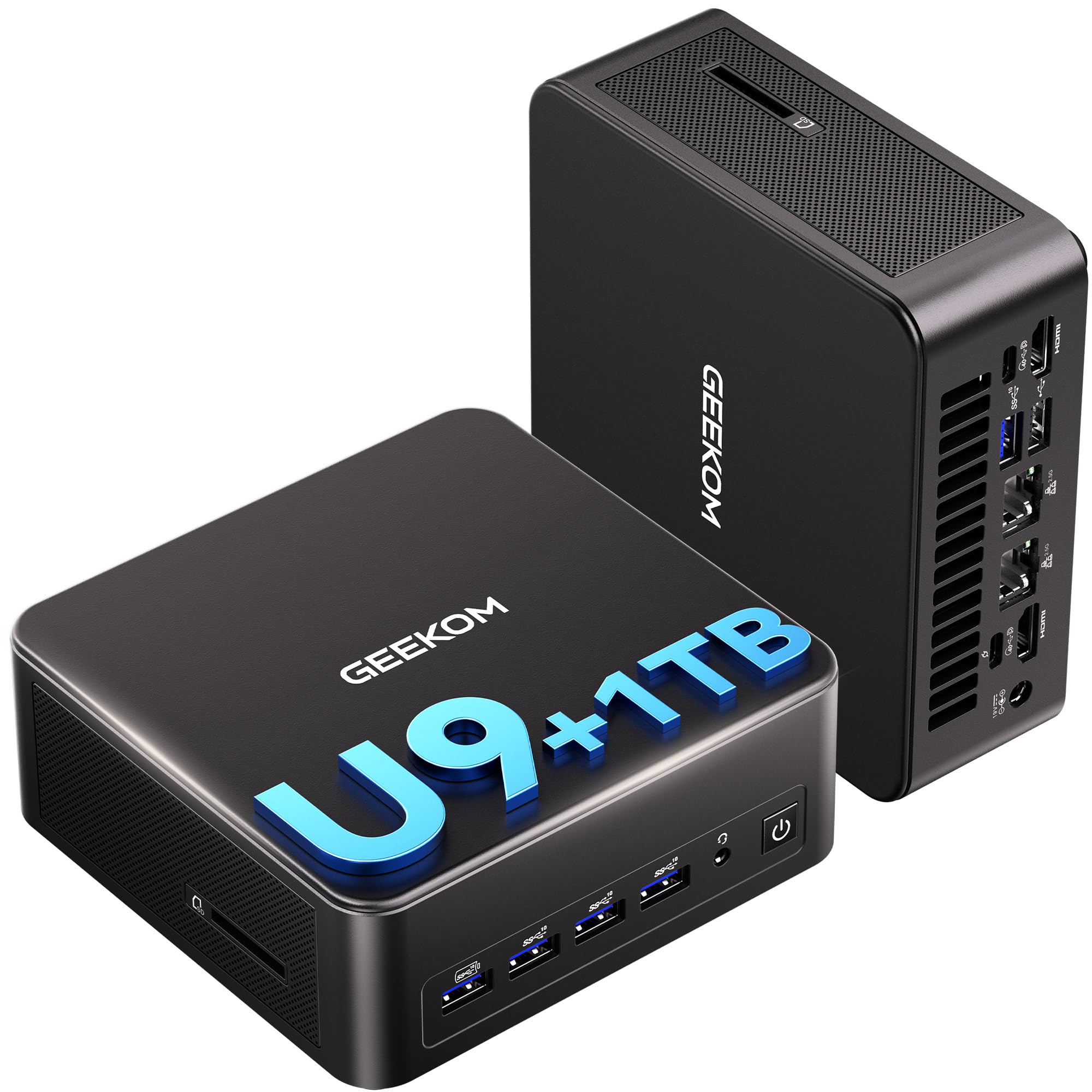
It keeps your desk clear while the Intel Core Ultra 9 185H processor, hitting up to 5.1 GHz, chews through large raw catalogs without making fan noise.
If you want to keep your desk neat but refuse to compromise on speed, this tiny machine delivers. Inside the small chassis is an Intel Core Ultra 9 185H processor that boosts up to 5.1 GHz, paired with 16GB of DDR5 RAM (double data rate 5th generation, a fast memory type) and a 1TB SSD. So you can run Lightroom, Photoshop, and a dozen browser tabs without the system lagging. Buyers report that it handles heavy editing, such as 4K video and over 800 raw photos, and multitasking smoothly. The 24 MB of cache memory (a small, ultra-fast memory on the processor) compares with the HP Mini Desktop below at 25 MB, which helps when you are scrubbing through a timeline of high-res images.
Unlike the HP OmniDesk, this Geekom uses its IceBlast 3.0 cooling system to stay 40% quieter, according to the brand, than typical mini PCs. That matters if you edit in a quiet room at night. For color-critical work, it supports up to four monitors at once: one 8K display via USB-C and three 4K displays via HDMI, so you can keep tools on one screen and a full-image preview on another. Owners mention that it is “impressively powerful in a small package,” and that the fan is “audible but not loud” during extended use. The 3-year warranty adds confidence for a long-term investment.
Why it stands out
- Silent cooling design that is 40% quieter than typical mini PCs
- Runs up to 4 displays including 8K resolution
- 3-year warranty for long-term reliability
What to watch
- Integrated graphics, not a dedicated GPU, so heavy 3D rendering is a stretch
- Some users find HDMI ports picky about cable types
Reach for this if: you need a compact, high-performance machine for editing large volumes of photos (800+ raw files per session) without the fan noise of a bigger desktop.
Look elsewhere if: you require a dedicated graphics card for intense 3D modeling or serious gaming, as the integrated Arc GPU is not built for that.
2. HP OmniDesk Desktop Computer PC

Double the RAM of many machines in its price tier makes batch exports feel easy.
The HP OmniDesk changes the conversation by giving you 32GB of DDR5 memory and a 1TB NVMe SSD (Non-Volatile Memory Express, a very fast SSD interface) for a mid-range price. That is double the RAM of many machines in its tier, which matters when you are layering dozens of adjustments in Photoshop or running batch exports from Lightroom. The AMD Ryzen 7 8700G chip boosts up to 5.1 GHz, and its integrated Radeon 780M graphics performs well for photo work, letting you scrub through large raw files without stutter.
Customers note the system arrived with all pieces as posted and that it serves well as a “solid value for the money.” The machine also includes AI capabilities, like an AMD Ryzen AI engine with 16 NPU TOPS (Neural Processing Unit Trillions of Operations Per Second, a measure of AI processing speed), which the brand claims speeds up certain generative-fill and masking tasks inside supported apps. One reviewer notes that the included keyboard and mouse feel cheap, which lines up with the budget-oriented accessories. Compared to the HP Mini Desktop, this machine does not list a dedicated cache value, while the HP Mini Desktop lists 25 MB. The tower takes up desk space, but it is fully upgradeable — you can add more storage later.
High-memory win: At 32GB, this machine handles heavy multitasking (editing in Lightroom while watching a tutorial) better than the 16GB machines in its price bracket.
Great for: editors who need high memory for large batch processing on a budget — the 32GB DDR5 RAM handles heavy layers and exports.
skip it if: you expect a premium keyboard and mouse from the start; you will want to replace the included peripherals.
3. HP Mini Desktop PC Computer

A 6.97-inch-wide box that drives three 4K screens for a panoramic editing workspace.
If desk space is your biggest constraint, the HP Mini Desktop is a great solution. It is just 6.97 inches across, yet holds a 12th Gen Intel i7-12700T processor (12 cores, up to 4.7 GHz) and 16GB of DDR4 RAM. The 25 MB cache memory compares with the GEEKOM IT13 MAX at 24 MB, so it can help when juggling multiple large photo files. It outputs to three 4K monitors at 60Hz through dual DisplayPort 1.4 and HDMI 2.1, giving you room for your editing software on one screen and the image preview on another.
The 512GB SSD is smaller than the 1TB found in many competitors, but the machine includes a wired keyboard and mouse. One downside: some Linux users (an open-source operating system) report trouble finding a compatible version to install. For photo editing on Windows 11 Pro, though, this machine feels quiet and quick. It is best for someone who works at a desk with multiple displays and wants the tower out of sight.
Strengths
- Triple 4K monitor support with DisplayPort and HDMI
- Whisper-quiet operation for quiet editing spaces
- Comes with keyboard and mouse included
Limitations
- 16GB DDR4 memory is slightly slower than DDR5 found in similar-price machines
- 512GB storage fills up quickly if you store many raw files locally
Best for the multi-monitor editor: if you work across three screens for tools, previews, and references, this small machine handles it well.
Not for: heavy AI processing or 4K video editing alongside photo work — the older DDR4 RAM and integrated UHD 770 graphics will struggle.
4. NIMO 17.3″ Gaming-Creator Laptop

A 17.3-inch 4K screen and 32GB of DDR5 RAM let you edit on location with desktop-level speed.
For photographers who need to edit on location, the NIMO laptop combines a large 17.3-inch 4K display with desktop-class specs. The AMD Ryzen 7 8745HS processor runs up to 4.9 GHz, and the Radeon 780M integrated graphics can handle demanding tasks like 4K video and live streaming. It comes with 32GB of DDR5 RAM and a 1TB PCIe 4.0 SSD (Peripheral Component Interconnect Express 4.0, a very fast connection for drives), so you can keep thousands of raw files on your drive while running multiple editing apps. The 100W PD Type-C (Power Delivery USB-C) charger is small enough to travel with, and the laptop weighs under 2.1 kg (about 4.6 pounds).
Buyers mention this machine is a “beast” for music studio work and “lightning fast” for school projects. The 180-degree hinge lets you lay the screen flat for client presentations. Compared to the HP OmniDesk, this NIMO is slower in pure CPU clock speed (4.9 GHz vs 5.1 GHz) but offers portability. The integrated fingerprint sensor is handy for securing your client galleries. One caveat: the fan can get audible under heavy load, but reviewers point out the performance justifies the noise.
Why you will like it
- Large 17.3-inch display with 4K resolution for detailed editing
- Expandable to 64GB RAM for future-proofing your workflow
- Includes a 2-year warranty and 90-day returns
Trade-offs
- No dedicated GPU for heavy 3D rendering
- Fans become audible during long export sessions
Grab this for: editing large batches of photos on the go or at a secondary location, with a screen big enough to see fine details.
Consider skipping if: you edit at a single desk and prefer a full-size tower that is easier to upgrade and costs less for equivalent performance.
5. HP 27 inch All-in-One Desktop PC

The 27-inch touchscreen covers 99% of the sRGB color spectrum, so your screen matches your prints.
The HP All-in-One puts computer, screen, and speakers into a single 27-inch unit, so there is no tower to hide. The FHD (1920 x 1080) IPS touchscreen covers 99% of the sRGB color space, meaning the reds and greens you see on screen are accurate for printing or sharing online. The AMD Ryzen 5 7520U processor and 16GB of LPDDR5 RAM (Low-Power Double Data Rate 5th generation, an efficient memory) are enough for light to moderate editing, like adjusting exposure, cropping, and applying presets in Lightroom.
One reviewer noted this machine is “great for the visually impaired,” as the large touchscreen helps with reading emails and watching videos. Another reviewer reported a motherboard failure after six months, but most feedback is positive for ease of setup. The integrated 1080p privacy camera with noise reduction is a plus for video meetings with clients. If you want to touch-zoom into details on the screen while using Photoshop, this is one of the few computers that makes it natural. However, the RAM is soldered to the motherboard, so you cannot upgrade it later.
Perfect for light editing: the 99% sRGB display and touch interface are fantastic for quickly adjusting photos and sharing them with clients, but the Ryzen 5 chip and 16GB RAM will lag if you try to edit large batches of 50-megapixel raw files.
Get this if: you edit photos in a living room or office where a clean, all-in-one design matters and you rarely work with huge raw files.
Pass on it if: you need the fastest processing power for heavy batch editing or plan to upgrade your RAM down the line.
8. Apple 2026 MacBook Air 13-inch M5

At 2.71 pounds and fanless, this laptop lets you edit silently all day on one charge.
The MacBook Air with the M5 chip is the choice for the photographer who values portability above all else. Weighing just 2.71 pounds and measuring 0.44 inches thin, you can slip it into a bag and hardly notice it is there. The 13.6-inch Liquid Retina display supports 1 billion colors, so your photo edits are shown with vibrant, accurate tones. The M5 chip’s unified memory means the 16GB RAM is used efficiently for both the CPU and GPU, making Photoshop and Lightroom feel responsive.
Reviewers report “incredible performance” with zero lag when multitasking and a battery that lasts up to 18 hours, meaning you can edit through a full day of flights or coffee shops without hunting for an outlet. The 12MP Center Stage camera automatically keeps you in frame during video calls with clients. The machine is fanless, so it stays completely silent during editing — a clear advantage over the fan-cooled NIMO laptop. The base storage is 512GB, which holds your system and current projects, but you will want external storage for your full library. The Wi-Fi 7 support ensures fast file transfers to a network drive.
Built for mobile creatives: the combination of all-day battery life, a brilliant screen, and a fanless, silent body makes this the top pick for photographers who edit on location or travel frequently.
Ideal for: the photographer who needs a lightweight, silent machine with fantastic battery life for editing on the go.
it’s not for you if: you work primarily at a desk and want a larger screen or more upgradeable internal storage than the MacBook Air offers.
9. Suevery Prebuilt Gaming PC

The dedicated RTX 5060 with 8GB GDDR6 memory handles Photoshop layers far faster than integrated graphics.
If your photo editing work also includes some video editing or casual gaming, the Suevery PC offers a solid blend. It uses an Intel Core i9 13900HX processor with 24 cores and 32 threads that boost up to 5.4 GHz — that is a beast for batch processing and exporting. The 32GB of DDR5 RAM and 1TB NVMe SSD are standard for this tier, but the star is the dedicated RTX 5060 8GB GDDR6 graphics card. This handles GPU-accelerated tasks in Photoshop (like content-aware fill and complex layer blending) with ease, far faster than integrated graphics.
Buyers report this is a “great starter PC for gaming and photo editing” and that it runs games like Fortnite and Planet Zoo without issues. The white case with customizable RGB lighting looks at home in a modern studio setup. The 32 MB cache is generous for quick data access. However, one buyer mentioned receiving a defective unit, so testing immediately on arrival is wise. The single RAM stick means you are running single-channel memory, which is slightly slower than dual-channel configurations found in the Dell ECT1250.
Strengths
- Dedicated RTX 5060 GPU for fast GPU-accelerated editing
- 24-core i9 processor handles heavy multitasking and batch exports
- 32GB DDR5 RAM keeps large catalogs responsive
Weaknesses
- Single RAM stick may reduce memory bandwidth
- Some units reported defective; check immediately
Grab it for: heavy photo editing that benefits from a dedicated GPU, plus the ability to play games when you are not working.
Consider something else if: you want plug-and-play reliability over the chance of needing to return a defective unit.
10. HELLOLAND Gaming PC Desktop

The AMD Ryzen 7 7800X3D with 96MB cache and RTX 5070 with 12GB GDDR7 VRAM deliver the fastest raw processing in this guide.
At the top of the performance range, the HELLOLAND PC pairs the AMD Ryzen 7 7800X3D processor with the RTX 5070 12GB GDDR7 GPU. The 7800X3D features the company’s 3D V-Cache technology (96MB cache), which the brand claims significantly speeds up game-loading and certain creative tasks. The 12GB of VRAM (Video Random Access Memory, graphics card memory) on the 5070 is useful for very large Photoshop files with many layers. The 32GB of DDR5 6000 MHz CL30 dual-channel memory is perfectly matched to the processor, ensuring no bottlenecks when you are exporting a long gallery.
Owners mention this machine “overkills games” at 1080p and runs Fortnite and Rainbow Six Siege at over 240 FPS. The pre-installed Windows 11 is clean with no trial bloatware, a benefit over many prebuilt systems. The 240mm liquid cooler keeps the CPU temperature under control during long batch exports, and the white chassis with customizable RGB fans fits a well-lit studio desk. The main caveat is the price: it is the most expensive option here, but you are paying for current-generation GPU and CPU. It is a great machine for a professional photographer who also wants to game in 4K.
Highlights
- RTX 5070 with 12GB VRAM for smooth GPU-heavy editing tasks
- 96MB L3 cache for fast data processing
- Clean Windows 11 install with no bloatware
Note
- Premium price point
- Fans are audible under load, typical for a high-performance PC
Ideal for the professional: if you edit large projects daily and also want the option to play the latest games at high settings, this machine is a top choice.
Too much for casual editors: if you only edit family photos and social media posts, a mid-range machine like the HP OmniDesk will meet your needs without the premium cost.
Understanding the Specs
RAM (Memory)
RAM (Random Access Memory) is your computer’s short-term memory. Every photo you open in Lightroom, every layer in Photoshop, every browser tab sits in RAM. If you run out, the machine slows down. For photo editing, 16GB is the absolute minimum for comfortable work. At 32GB, you can keep your entire week’s shoot open alongside your email, Spotify, and reference images. More RAM means your sliders respond instantly instead of hanging.
SSD vs. Hard Drive
An SSD (Solid State Drive, a fast chip-based drive) opens your photo library and editing programs in seconds. A traditional HDD (hard disk drive, a spinning-disk drive) might take a minute or more. When you are importing a thousand raw files from a memory card, an SSD also writes them much faster. All the computers in this guide use SSDs. Look for a PCIe NVMe SSD, which is the fastest type — it reads and writes data at many gigabytes per second, so your large files load nearly instantly.
Dedicated vs Integrated Graphics
The graphics card (GPU, Graphics Processing Unit) helps with things like zooming into a photo smoothly, applying certain filters, and running the interface in high resolution. Integrated graphics are built into the CPU (central processing unit, the main chip) and are fine for basic editing — like the Intel UHD 770 or the AMD Radeon 780M. Dedicated graphics cards, like the RTX 5060 or RTX 5070, have their own memory (VRAM) and chip. They accelerate complex tasks like content-aware fill, noise reduction (removing grain in a photo), and exporting high-res images in Lightroom. For most photo editing, integrated graphics work well, but dedicated cards are a boost if you use heavy filters often.
Multi-Monitor Support
Many photo editors benefit from having the photo on one screen and the tool panels, histograms, and reference images on another. Some computers support two, three, or four monitors at 4K resolution. Check the specs if you plan to run more than one screen. For example, the HP Mini Desktop supports three 4K monitors at 60Hz, which is excellent for a multi-screen editing setup without needing a separate graphics card.
FAQ
How much RAM do I need for Lightroom and Photoshop?
Is a mini PC powerful enough for photo editing?
Do I need a dedicated graphics card for editing photos?
Is a laptop or a desktop better for photo editing?
What screen resolution do I need for photo editing?
Can I use a gaming PC for photo editing?
How much storage do I need for a photo library?
What is the difference between DDR4 and DDR5 RAM?
Will a MacBook Air M5 handle heavy 4K video editing?
What does the cache memory size do for photo editing?
Final Thoughts: The Verdict
Across the board, the computer for photos winner is the GEEKOM IT13 MAX because its silent, compact design does not force you to choose between desk space and editing power — the Intel Core Ultra 9 chip and triple 4K output handle large raw catalogs smoothly. If you want a laptop that goes everywhere with you, grab the Apple MacBook Air M5 for its 18-hour battery and brilliant 1-b

Mo Maruf
I created WellFizz to bridge the gap between vague wellness advice and actionable solutions. My mission is simple: to decode the research and give you practical tools you can actually use.
Beyond the data, I am a passionate traveler. I believe that stepping away from the screen to explore new environments is essential for mental clarity and physical vitality.