Our readers keep the lights on and my smoothie glass nicely filled. As an Amazon Associate, I earn from qualifying purchases.
Specs are compiled from manufacturer listings and verified buyer reviews and can change over time — please confirm the key details on the product page before buying.
You have a spare monitor or TV with an open HDMI port, and you want a real computer you can plug directly into it — no tower, no messy wires, just a device that lives on the back of the screen. That is exactly what a computer stick does: it is a full Windows PC squeezed into a body no bigger than a TV remote, ready for office work, digital signage, or turning any display into a smart home theater hub. The hard part is picking the right one because the tiny size hides big differences in processor power, RAM (the memory your computer uses to run apps), and storage (the space it uses to save files).
I’m Mohammad Maruf — the founder and writer behind WellFizz. This guide is built by comparing the manufacturers’ published specifications and the patterns across verified customer reviews, so you get each pick’s real strengths and trade-offs instead of marketing spin.
For most people, the MeLE Fanless Mini PC Stick PCG02 is the one worth buying. Its N100 processor (a modern chip that peaks at 3.4 GHz) and 8GB RAM handle daily office work, video calls, and web browsing without the lag you feel on older sticks. If you need 4K output for a TV or presentation screen, pick the HEIGAOLAPC Mini PC Stick J4115 for its 3840×2160 resolution. And for a quiet, single-task budget machine, the HEIGAOLAPC J3455 does the job at the lowest entry price.
Quick Picks
- MeLE Fanless Mini PC Stick PCG02, N100 Compute Stick — Top Performer
- HEIGAOLAPC Mini PC Stick, Win 11 Pro J4115 — Best Value
- Intel Compute Stick CS125 Computer with Intel Atom x5 — Retro Streamer
- HEIGAOLAPC Mini PC Stick, Intel Celeron J3455 — Budget Champion
How To Choose The Best Computer Stick
Picking the right computer stick depends on matching the processor, memory, and ports to the one job you need it to do most. The wrong pick leaves you with a device that feels slow from day one, so focus on these three areas first.
Processor Power Determines What You Can Run
The CPU (central processing unit) is the brain of the stick. In this category, you will see Intel Celeron J-series chips (J3455, J4115), the older Atom x5, or the newer N100. Speed matters here: a Celeron J4115 peaks at 2.5 GHz while the N100 can boost up to 3.4 GHz for demanding tasks. If your daily tasks include only web browsing, email, and 1080p video, a J-series works fine. For heavier multitasking or running Windows 11 Pro without lag, the N100 gives you noticeably smoother performance.
RAM and Storage Set Your Limits
You will see configurations from 2GB RAM and 32GB storage all the way up to 8GB RAM and 128GB storage. Windows 11 itself uses around 4GB just to run (that means you lose nearly half a 2GB stick’s capacity before opening a single app), so 2GB is really only good for a very basic streaming or kiosk device. For office apps and light multitasking, aim for 4GB minimum — 6GB or 8GB is much more comfortable. Storage fills up fast with Windows updates and apps, so a model with a Micro SD card slot (allowing expansion up to 1TB) gives you room to grow.
Connectivity Dictates Your Setup
Every computer stick plugs into an HDMI port (the common video connector on most modern TVs and monitors), but the ports around the edges matter just as much. Look for at least one USB 3.0 port (a fast data port for keyboards and mice) or USB-C 10Gbps on newer models. Check if the stick has Gigabit Ethernet (a wired internet port that avoids Wi-Fi dropouts) — especially if you plan to run digital signage or a thin client that cannot afford a dropped connection. Bluetooth 5.0 or 4.2 makes pairing wireless peripherals easy, so you do not need a separate hub for every accessory.
Quick Comparison
| Model | Best For | CPU / Speed | RAM / Storage | Max Display Res | Amazon |
|---|---|---|---|---|---|
| MeLE Fanless Mini PC Stick PCG02 | Premium all-around performance | N100 / up to 3.4 GHz | 8GB / 128GB | 1920×1080 | Amazon |
| HEIGAOLAPC Mini PC Stick J4115 | Mid-range office multitasking | J4115 / up to 2.5 GHz | 6GB / 128GB | 3840×2160 | Amazon |
| Intel Compute Stick CS125 | Basic streaming and retro setup | Atom x5 / up to 1.44 GHz (burst) | 2GB / 32GB | 3840×2160 | Amazon |
| HEIGAOLAPC Mini PC Stick J3455 | Budget-friendly silent operation | J3455 / up to 2.3 GHz | 4GB / 64GB | 3840×2160 | Amazon |
In‑Depth Reviews
1. MeLE Fanless Mini PC Stick PCG02, N100 Compute Stick
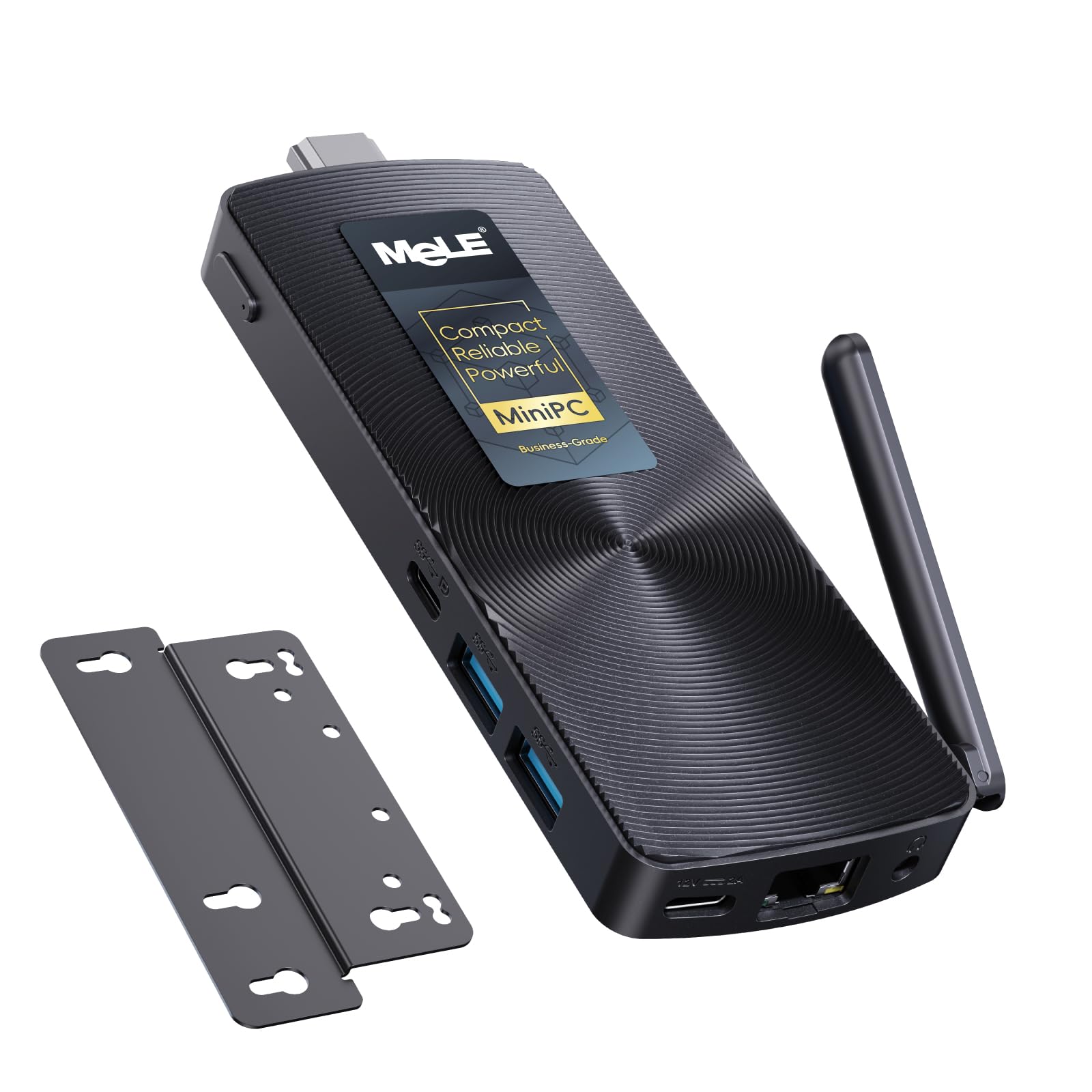
The modern computer stick that finally keeps up with daily multitasking.
This MeLE stick ditches the older Celeron J-series for the newer N100 processor — a quad-core chip that ramps from 0.8 GHz up to 3.4 GHz. The manufacturer claims this gives a performance boost over the previous J4125 generation. That extra speed means you can juggle browser tabs, office documents, and video calls without the stutter you would feel on an Atom-powered stick. Paired with 8GB LPDDR4 RAM (fast laptop-style memory for quick app switching) and 128GB of storage, plus a Micro SD card slot that expands capacity up to 1TB, it genuinely works as a daily desktop replacement — so you can keep Outlook, Chrome, and Zoom open all day without reloading.
Buyers report it is “smaller than a cellphone” and runs Windows 11 Pro pre-installed, though they note the startup is slower than a typical laptop because the N100 is still a low-power chip. The fanless passive cooling design (no moving fans) keeps it dead silent during use, but the manufacturer openly states the surface temperature can reach 55°C to 70°C — that is normal for the International Electrotechnical IEC62368-1:2018 safety standard, but warmer than a traditional fan-cooled PC. With dual USB-A 10Gbps ports, one USB-C 10Gbps port, Gigabit Ethernet, and Bluetooth 4.2, this is the most future-proof port selection of any stick here.
One trade-off to consider: unlike its competitors, the MeLE tops out at a 1920×1080 display resolution maximum, not 4K. For a home theater setup that needs native 4K output, the HEIGAOLAPC J4115 model below supports 3840×2160 resolution, making it a better fit for 4K signage or presentation screens. But for everyday office work, remote desktop access, and 1080p home theater playback, the N100’s raw power makes this the smoothest-running stick on the list.
Where it shines
- Fastest processor here (N100 up to 3.4 GHz) handles real multitasking
- 8GB RAM plus microSD expansion up to 1TB gives you room to grow
- USB-C 10Gbps and Gigabit Ethernet make it genuinely versatile
What holds it back
- Display output is limited to 1920×1080 — no 4K support
- Surface runs warm (55–70°C) under load, which is normal but surprising
- Slower boot-up than a standard desktop PC due to low-power CPU
Reach for this if: you want a computer stick that feels responsive enough for daily office work, video calls, and web browsing without reaching for a tower.
Look elsewhere if: you need native 4K output for a TV or large monitor — the HEIGAOLAPC J4115 supports 3840×2160 resolution.
2. HEIGAOLAPC Mini PC Stick, Win 11 Pro J4115
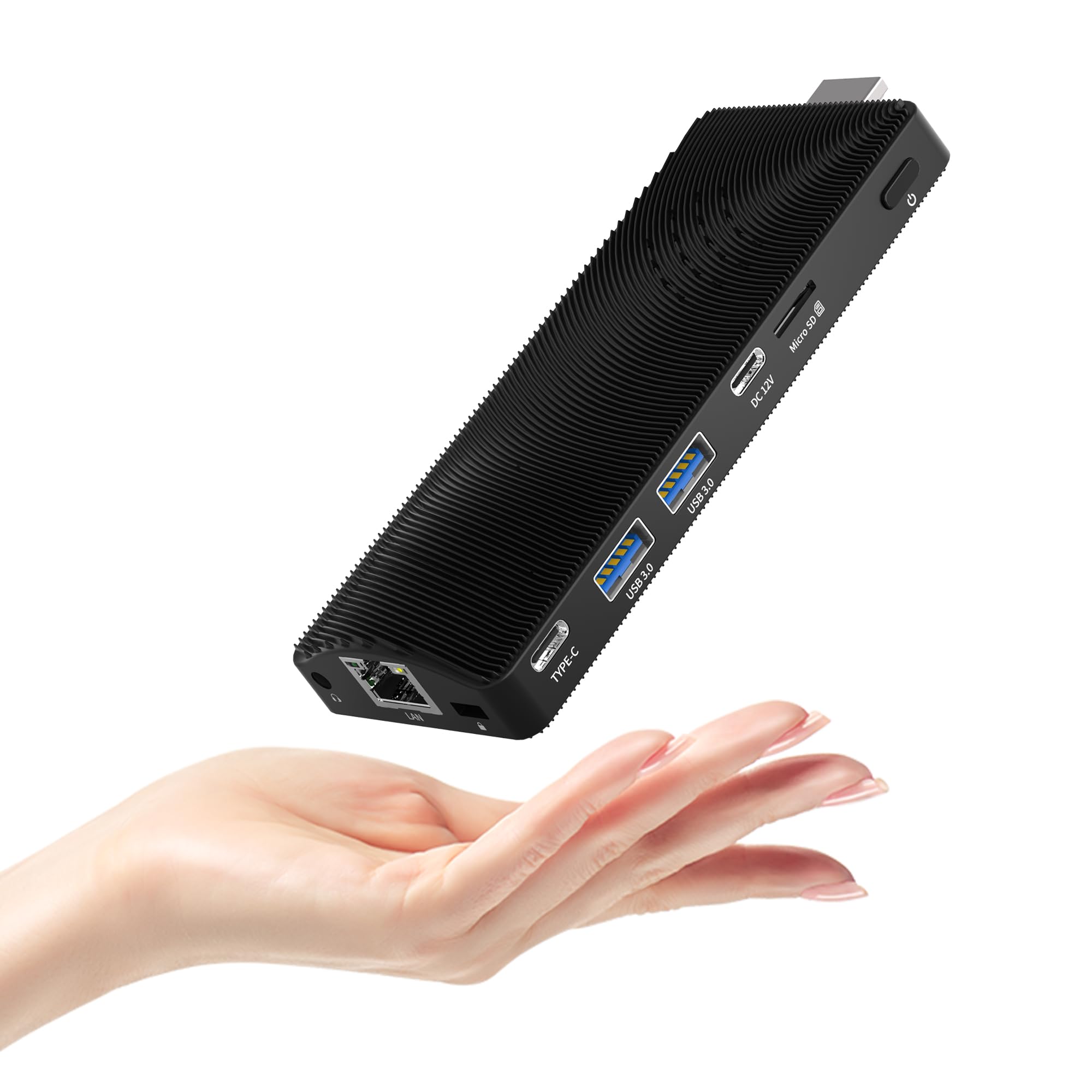
Balances 4K output with enough RAM to keep Windows 11 humming.
This HEIGAOLAPC stick lands in the balance between price and performance by pairing a quad-core J4115 processor that hits 2.5 GHz with 6GB RAM and 128GB of storage. Buyers describe it as an “ultra-compact palm-sized mini PC” that handles Office and 24/7 tasks reliably, though they caution it is only good for “single to double tasking” rather than heavy workloads.
Where this stick beats every other mid-range option is its 4K HDMI output — it supports 3840×2160 pixels at 30Hz, so you can connect it to a 4K monitor or TV for presentations, digital signage, or home theater use. The manufacturer recommends sticking to 1080P for video streaming, but the 4K resolution is genuinely useful for desktop real estate when working with spreadsheets or dashboards. It also includes Gigabit Ethernet, USB 3.0, USB-C with PD fast charging, a TF card slot (a Micro SD slot for expandable storage), and Bluetooth — enough ports to avoid a separate hub.
There is a catch: the J4115 processor is older than the MeLE’s N100 — the MeLE peaks at 3.4 GHz versus this stick’s 2.5 GHz — so you will notice slower load times when opening apps or switching between browser tabs with many scripts running. Reviewers also mention that the initial setup involves “lots of firmware updates” that take hours to install, so plan for a long first evening. For the money, though, this is the strongest 4K-capable computer stick you can buy today.
Performance balance — right on the edge: The 6GB RAM and 128GB storage give you room to run Office, browse, and stream, but the J4115 processor will feel strained if you try to edit photos or run a dozen browser tabs at once. Think of it as a reliable everyday work companion that can also drive a 4K screen.
Best for: anyone who needs a 4K-capable stick PC for an office, digital signage, or classroom — without jumping to the premium price of an N100 model.
Not ideal for: heavy multitaskers who keep 15+ browser tabs open plus Slack and Spotify — you will feel the processor struggling.
3. Intel Compute Stick CS125 Computer with Intel Atom x5

The original stick PC with a loyal following for streaming and retro setups.
Intel’s Compute Stick CS125 is the device that defined this category back in 2016, and it still has a dedicated fan base. Powered by a quad-core Intel Atom x5-Z8300 processor with 2GB DDR3L RAM and 32GB of storage, it runs Windows 10 (32-bit) and delivers 4K output (3840×2160 resolution maximum) through Intel HD graphics. One long-time buyer calls it the “best TV stick” and reports running Netflix, Hulu, KODI (a media center app for TV and movies), and Remote Desktop “smoothly with little lag” — proof of what this tiny stick can do when kept within its limits.
The connectivity is surprisingly complete for its age: one USB 3.0 port, one USB 2.0 port, integrated wireless 802.11ac (Intel Dual Band Wireless-AC 7265), Bluetooth 4.0, and an HDMI connector that plugs directly into your display. A reviewer notes that using the USB 3.0 port can interfere with Wi-Fi, and recommends a short 3-foot USB extension cable to fix the issue.
This stick’s max resolution matches the HEIGAOLAPC J4115 at 3840×2160, but its 2GB RAM versus the J4115’s 6GB means the Intel stick will stutter with anything beyond light streaming and a browser. One buyer warns that a recent Windows update “breaks wireless completely,” forcing you to rely on Ethernet. For a dedicated TV streaming device running KODI or Plex, this is a nostalgic gem that still works. For general office computing in 2025, you will outgrow it quickly.
Why it still has fans
- True plug-and-play HDMI stick design works with any TV or projector
- 4K output (3840×2160) is rare for this price tier
- Dual-band 802.11ac Wi-Fi with good range (5-bar signal at 20ft per one buyer)
Where it shows its age
- Only 2GB RAM severely limits multitasking and modern Windows use
- USB 3.0 interference with Wi-Fi requires a workaround cable
- Latest Windows updates reportedly break wireless connectivity for some users
Grab it for: a simple, dedicated streaming stick for a spare TV or projector where you only run Netflix, Amazon Prime, and KODI.
Pass if: you need a computer stick for actual work — the 2GB RAM will frustrate you within a week.
4. HEIGAOLAPC Mini PC Stick, Intel Celeron J3455
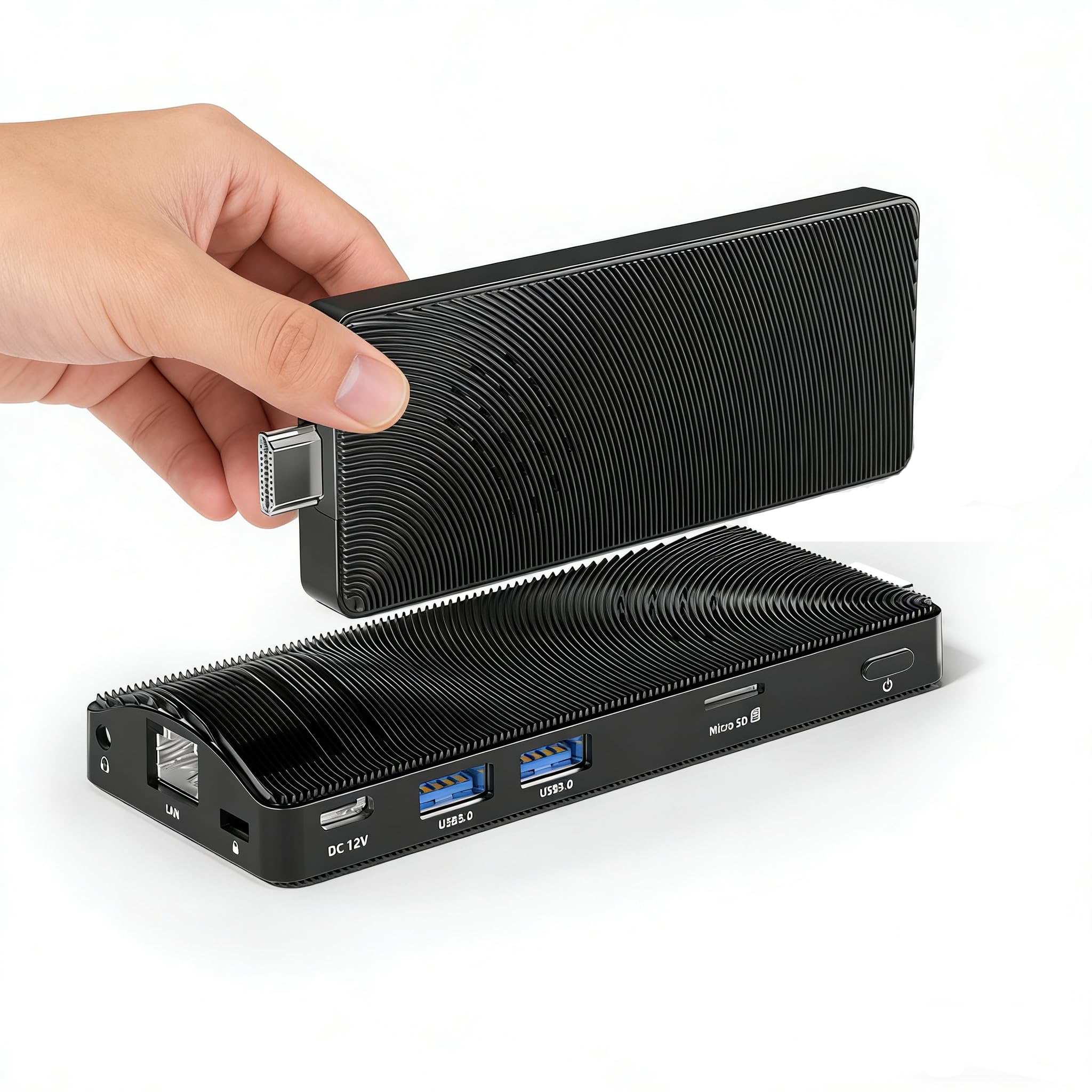
A silent, palm-sized workhorse for one-task-at-a-time computing.
If your main concern is keeping costs low while getting a fanless, silent stick that can run Windows 11 Pro for basic office tasks, this HEIGAOLAPC J3455 model does exactly that. Powered by a quad-core Intel Celeron J3455 processor that bursts up to 2.3 GHz versus the J4115’s 2.5 GHz, it comes with 4GB RAM and 64GB of eMMC storage. Owners mention it is “extremely compact, palm-sized,” and works reliably for “24/7 office work (Office, PyCharm)” as long as you keep expectations modest.
This stick supports 4K output at 3840×2160 resolution via its integrated Intel UHD Graphics 600, though the manufacturer recommends sticking to 1080P for video streaming. The fanless design means zero noise during operation — one reviewer who runs it continuously notes it handles “single to double tasking” perfectly for everyday routines. Connectivity includes 2x USB 3.0 ports, Gigabit Ethernet, Wi-Fi, Bluetooth 5.0, and a TF card slot for storage expansion, which is a solid port set for a budget model.
There are two real-world issues to note. First, multiple customers note that Windows was not pre-installed or failed to activate, requiring a manual (and sometimes tricky) reinstall process. Second, while the 4GB RAM is enough to run Windows 11 and one or two apps, you will bump into memory limits the moment you open a third browser tab with a video. Compared to the J4115 model above which has 6GB RAM, this stick feels noticeably tighter during light multitasking. For a single-purpose use like a digital signage player, a thin client, or a dedicated Zoom machine, it is perfectly fine. Pick the J4115 model if this will be your daily work computer.
Value proposition — simple and honest: You get a genuinely silent, fanless stick PC with 4K output and Gigabit Ethernet for a low entry price. The trade-off is clear: 4GB RAM and a 2.3 GHz processor limit you to one or two apps at a time. If you know that is all you need, this is the smart budget pick.
Pick this if: you need a cheap, silent, always-on PC for a single task like digital signage, a conference room Zoom station, or a light-duty thin client.
Steer clear if: you plan to do any real multitasking or cannot spend time troubleshooting Windows installation issues on arrival.
Understanding the Specs
Processor (CPU) — The Engine That Defines Speed
The CPU (central processing unit) is the single most important spec in a computer stick because it determines how many tasks you can do at once without lag. You will see three main families: Intel Atom (like the x5-Z8300) — the weakest, fine only for streaming one video; Intel Celeron J-series (J3455, J4115) — mid-range, good for Office and light web browsing; and the newer Intel N100 — the fastest, capable of handling multiple apps, video calls, and even light photo editing. Clock speed (measured in GHz) tells you how fast each core processes data, but the chip architecture matters more — a modern N100 at 3.4 GHz will feel much quicker than an old Atom even if the numbers look close.
RAM and Storage — How Many Apps You Can Keep Open
RAM (random access memory) is your short-term workspace: 2GB is enough for Windows 10 and one app, 4GB handles a couple of browser tabs plus Office, and 6GB or 8GB lets you keep email, Slack, a browser, and a video chat running without things grinding to a halt. Storage (measured in GB on an eMMC chip) holds your files and the operating system — Windows 11 takes up roughly 30GB after updates, so a 32GB stick leaves you almost no room for apps. Look for a Micro SD card slot if you need extra space; some sticks allow expansion up to 1TB. A model with 8GB/128GB like the MeLE N100 gives you real breathing room for daily computing.
FAQ
Can a computer stick replace a desktop PC?
Do computer sticks need a fan for cooling?
What is the difference between a computer stick and a mini PC?
Will a computer stick run Windows 11?
How do I connect a keyboard and mouse to a computer stick?
Can I use a computer stick for digital signage?
How does a computer stick connect to the internet?
Does a computer stick support 4K video playback?
Can I expand the storage on a computer stick?
Why would I choose a computer stick over a laptop?
Final Thoughts: The Verdict
For most people, the best computer stick is the MeLE Fanless Mini PC Stick PCG02 because the N100 processor and 8GB RAM give you the smoothest everyday experience without a fan noise trade-off. If you need 4K output and a more balanced price, grab the HEIGAOLAPC Mini PC Stick J4115. And for a silent budget option that handles a single task reliably, the HEIGAOLAPC J3455 gets the job done for the lowest entry point.
How We Picked
We do not accept paid placement. Every pick is matched to a real buyer and a real use-case; we do not hands-on test units.
Sources & Methodology
Specifications: manufacturer listings and product documentation. Review insights: verified customer reviews, as of July 2026. Pricing: not shown on this page (it changes often); check the current price via the retailer link.
As an Amazon Associate, WellFizz earns from qualifying purchases. This does not affect which products we feature.

Mo Maruf
I created WellFizz to bridge the gap between vague wellness advice and actionable solutions. My mission is simple: to decode the research and give you practical tools you can actually use.
Beyond the data, I am a passionate traveler. I believe that stepping away from the screen to explore new environments is essential for mental clarity and physical vitality.