Our readers keep the lights on and my smoothie glass nicely filled. As an Amazon Associate, I earn from qualifying purchases.
Specs are compiled from manufacturer listings and verified buyer reviews and can change over time — please confirm the key details on the product page before buying.
Most computer monitors look the same until you put them side by side — then the gap in sharpness, speed, and build shows fast. You want to know which panel earns the higher spend and which one cuts corners you will notice daily.
This guide is built from the manufacturers’ published specifications and the patterns across verified customer reviews, so you get each pick’s real strengths and trade-offs instead of marketing spin.
These recommendations will help you find the best computer monitor value for your workflow and desk.
Quick Picks
- LG 27GR83Q-B 27-inch Ultragear — Top Performer
- Acer Nitro XV272U W2bmiiprx — Pro Grade
- Alienware AW2725DM 27 QHD — Gamer’s Choice
- Dell S2725DSM 27 Plus QHD — Best for Work
- KTC H27T27S 27 Inch QHD 144Hz — Best Value
- ViewSonic VS2725-2K 27 Inch 1440p — Budget QHD
- Acer SB273 G0bi 27″ Full HD — Ultra-Thin
- Dell SE2725HM 27″ Full HD — Enterprise Pick
- ViewSonic VA2456A-MHD 24″ 1080p — Budget Champ
How To Choose The Best Computer Monitor Value
Picking a monitor is about matching the right specs to what you actually see and do every day. A big size means nothing if the text is fuzzy, and a high refresh rate won’t help if you never play a game. Here is what actually matters.
Resolution: The Sharpness You See Every Second
Full HD (1920 x 1080) is the baseline — fine for browsing and spreadsheets. QHD (2560 x 1440) gives you 3,686,400 pixels instead of 2,073,600 on the same 27-inch space, so text looks crisp and images show more detail. If you read small plans, edit photos, or want a bigger screen, QHD is worth the jump.
Refresh Rate and Response Time: Smooth vs. Sharp Motion
Standard 60Hz monitors are fine for office work, but at 100Hz or 144Hz the cursor glides and scrolling feels fluid. For gaming, 144Hz (144 screen updates per second) is the balance. Response time (measured in milliseconds (ms)) tells you how fast a pixel changes color — 1ms is best for fast action, while 5ms is fine for everyday use.
Panel Technology: IPS vs VA
IPS panels give you consistent colors and brightness from any angle, so a second person can see the screen too. VA panels can produce deeper blacks and higher contrast ratios, such as 4000:1 instead of 1000:1, which makes dark scenes in movies or horror games look richer. Your choice depends on if you need wide angles or deep blacks.
Quick Comparison
| Model | Best For | Resolution | Refresh Rate | Contrast Ratio | Amazon |
|---|---|---|---|---|---|
| LG 27GR83Q-B | Competitive gaming at 240Hz | 2560 x 1440 | 240Hz | 1000:1 | Amazon |
| Acer Nitro XV272U | High-refresh QHD with full ergo stand | 2560 x 1440 | 240Hz | 1000:1 | Amazon |
| Alienware AW2725DM | Marathon gaming with G-Sync | 2560 x 1440 | 180Hz | 1000:1 | Amazon |
| Dell S2725DSM | Productivity with built-in speakers | 2560 x 1440 | 144Hz | 1500:1 | Amazon |
| KTC H27T27S | Deep contrast for dark scenes | 2560 x 1440 | 144Hz | 4000:1 | Amazon |
| ViewSonic VS2725-2K | Budget entry into QHD | 2560 x 1440 | 100Hz | 4000:1 | Amazon |
| Acer SB273 G0bi | Big 27-inch on a tight budget | 1920 x 1080 | 120Hz | 100,000,000:1 (dynamic) | Amazon |
| Dell SE2725HM | Enterprise-grade consistency | 1920 x 1080 | 100Hz | 1000:1 | Amazon |
| ViewSonic VA2456A-MHD | Reliable small monitor with 120Hz | 1920 x 1080 | 120Hz | 1500:1 | Amazon |
In‑Depth Reviews
1. LG 27GR83Q-B 27-inch Ultragear

The 240Hz IPS (In-Plane Switching) monitor that moves as fast as you can click.
You get a buttery-smooth 240Hz refresh rate (240 screen updates per second) over both DisplayPort and HDMI 2.1 here, so fast-paced shooters stay tear-free without you chasing cable limits. The 1ms GtG (gray-to-gray) response time means you see enemies the frame they appear, not the frame after.
The 27-inch QHD (2560 x 1440) panel delivers 95% DCI-P3 color coverage (a wide color space standard for digital cinema) and VESA DisplayHDR 400 (a certification for high-dynamic-range brightness), so scenes look vivid straight from the start. Buyers report this is a great gaming upgrade from 1080p 144Hz, noting the picture looks excellent and the controls (a bottom knob) are easy to reach. NVIDIA G-Sync Compatible and AMD FreeSync Premium both run on this unit, covering both GPU (graphics processing unit) brands.
The catch is reliability: multiple verified buyers mention stuck pixels on arrival, and one red stuck pixel right in screen center was a common complaint across units. The stand is excellent with tilt, height, pivot, and a 4-pole headphone jack for DTS (Digital Theater Systems) audio — but if pixel-perfect quality control is your priority, you may want to inspect yours fast within the return window. The 1000:1 contrast ratio is standard for IPS, so the KTC H27T27S delivers deeper blacks for the same resolution and refresh rate.
What makes it fast
- 240Hz refresh on both HDMI 2.1 and DisplayPort 1.4
- 1ms GtG response eliminates ghosting (blurring from slow pixels) in fast scenes
- Works with both G-Sync and FreeSync Premium
- Excellent adjustable stand with height, tilt, pivot, and swivel
The pixel lottery
- Multiple buyer reports of stuck pixels on first unit
- Some users received replacements with the same defect
- Price is premium tier; quality control should be tighter at this level
Reach for this if: you want the highest 1440p refresh rate in this round for competitive gaming, with full GPU compatibility and a solid ergonomic stand.
Look elsewhere if: you need guaranteed zero dead pixels from the start, or you mostly do office work and don’t need 240Hz.
2. Acer Nitro XV272U W2bmiiprx

A full ergonomic stand meets 240Hz while staying affordable.
The Acer Nitro packs the same 27-inch QHD (2560 x 1440) IPS (In-Plane Switching) panel at 240Hz as the LG 27GR83Q-B, but it adds a fully adjustable stand (4.7-inch height, 360° swivel, 90° pivot) plus built-in 2-watt speakers — features that cost extra on many rivals. The pixel pitch is a tight 0.233mm (the distance between pixel centers), making text and details look razor-sharp during spreadsheet work.
Owners mention great picture with deep blacks and vivid colors, plus the stand is singled out as very good for the price. You get both DisplayPort 1.4 and two HDMI 2.0 ports, though the HDMI 2.0 limits consoles to 144Hz (144 screen updates per second). The 400-nit brightness (a measure of screen luminance) and DisplayHDR 400 certification handle bright room use well.
The main trade-off, some customers note, is slight backlight bleed (light leaking around the screen edge) in one corner on some units, though that is common at this price tier and most say it is minor. The 1000:1 contrast ratio is standard for IPS, so if deep blacks are your priority, the KTC H27T27S’s VA panel will beat it.
Ergo advantage: The 4.7-inch height adjustment and 360° swivel let you dial in your exact eye level — a feature usually reserved for much pricier monitors.
Console limitation: HDMI 2.0 ports cap out at 144Hz, so you need DisplayPort 1.4 to hit the full 240Hz on a PC.
Best for: gamers who want 240Hz QHD and a genuinely adjustable stand without paying for a separate monitor arm.
skip it if: you are sensitive to any backlight bleed or you need full 240Hz over HDMI for a next-gen console.
3. Alienware AW2725DM 27 QHD

Alienware’s 180Hz QHD panel with a premium, sturdy build.
This Alienware runs at 180Hz (180 screen updates per second) with 1ms GtG (gray-to-gray) response, and it carries both NVIDIA G-Sync and AMD FreeSync compatibility — so tear-free gaming is covered no matter your GPU (graphics processing unit) brand. The DCI-P3 95% color coverage (a wide color space standard) and VESA DisplayHDR 400 make games and movies look vibrant without oversaturation.
Buyers describe it as the best gaming monitor they have used, praising the sleek design and the sturdy adjustable stand. The monitor works with PS5 in console mode, and one reviewer noted it handles upscaling well for future titles. Setup is fast, and the anti-glare screen keeps reflections low in bright rooms.
The HDMI port runs at 144Hz, so to get the full 180Hz you need DisplayPort. There is no USB-C port, which some buyers noted as a missing convenience for modern laptops. The stand offers full tilt, swivel, height, and pivot — matching the Acer’s ergonomics with a cleaner aesthetic. The 1000:1 contrast ratio is standard for IPS, unlike the KTC H27T27S’s 4000:1 VA contrast.
Why gamers like it
- 180Hz smooth with both G-Sync and FreeSync
- DCI-P3 95% color for rich, accurate visuals
- Premium build quality and stable ergonomic stand
- Console mode works well with PS5
Connections to know
- Full 180Hz only over DisplayPort, not HDMI
- No USB-C port for single-cable laptops
Grab it for: a sharp-looking desk setup where you want G-Sync compatibility and a build that feels rock-solid.
Pass if: you need USB-C charging or you plan to run 180Hz over HDMI without switching cables.
4. Dell S2725DSM 27 Plus QHD

A QHD (2560 x 1440) workhorse with integrated speakers and a full ergonomic stand.
Dell’s S2725DSM delivers a 144Hz refresh rate — smoother than most office monitors — but its real strength is the package for daily productivity. The 27-inch QHD IPS (In-Plane Switching) panel has a 1500:1 contrast ratio, better than the standard 1000:1, which makes text on white backgrounds pop cleanly. Reviewers point out excellent QHD picture quality and smooth performance, with one calling it the bang for your buck for work. The built-in dual 3-watt speakers save desk space, and the stand offers height, tilt, pivot, and swivel adjustments so you can get your exact eye level. One reviewer with visual problems found the large, clear screen helpful for reading.
There is no camera, so you still need a webcam for calls, and the HDMI cable is 1.8m (about 6 feet), which is generous for desk routing. The TÜV 4-star certification (a German quality standard for eye comfort) means reduced blue light without a yellow tint — good for all-day use.
Productivity plus: Dell’s Display and Peripheral Manager software lets you optimize window layouts and settings across the whole workspace, something buyers found handy for multi-monitor setups.
Gaming note: At 144Hz and FreeSync, this is fine for casual games, but competitive players will want 180Hz or 240Hz.
Best for: office workers and hybrid users who want QHD clarity, built-in speakers, and a truly adjustable stand in one package.
pass on it if: you need a high-refresh gaming monitor or you already have external speakers and don’t want to pay for built-in ones.
5. KTC H27T27S 27 Inch QHD 144Hz
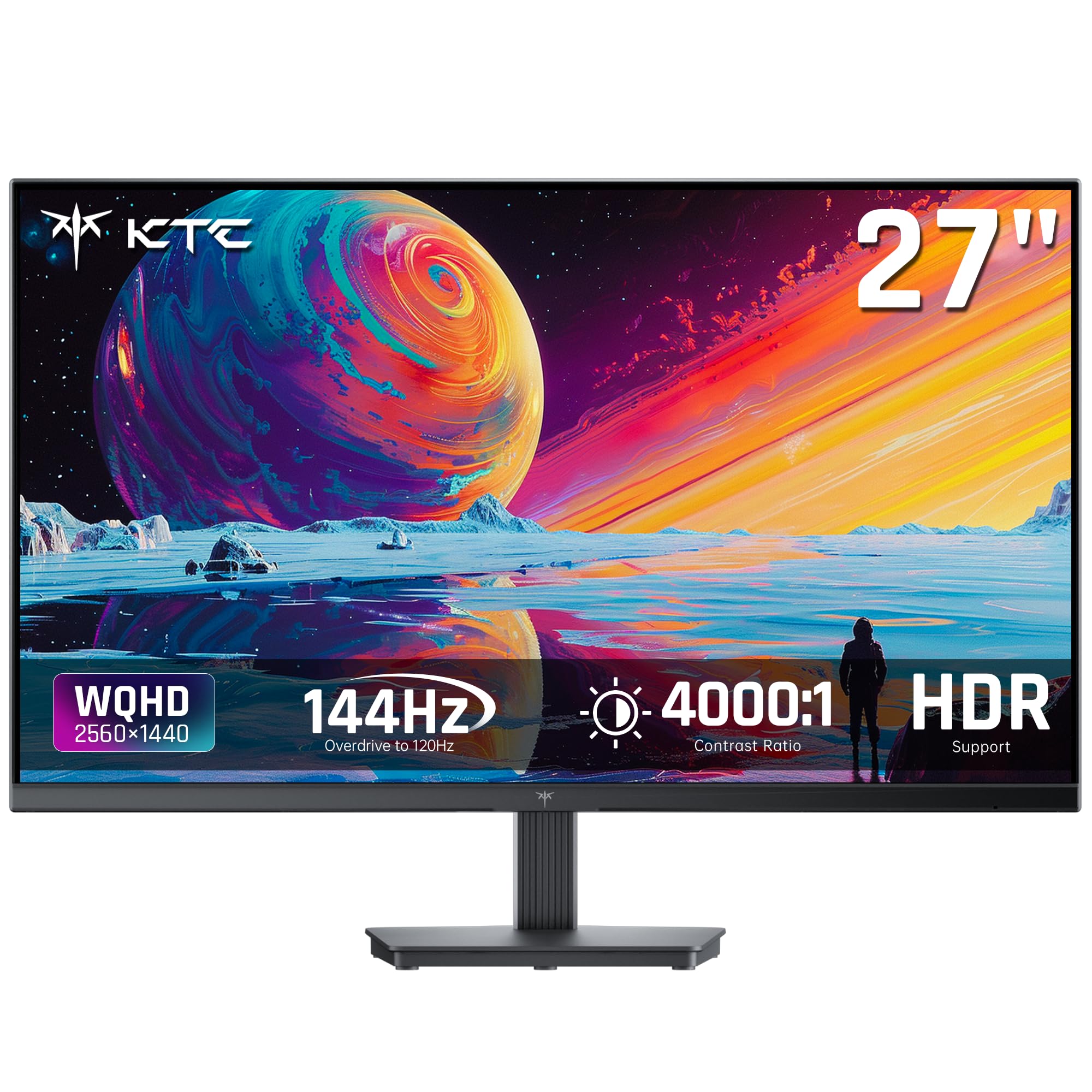
A QHD 144Hz with 4000:1 contrast that undercuts the competition.
This KTC uses an HVA (High Vertical Alignment, a type of VA panel) that delivers a 4000:1 contrast ratio, while many IPS monitors are rated at 1000:1. The difference shows in dark games and movies: shadows retain detail and blacks look truly deep, not gray. The 144Hz refresh and Adaptive Sync (a technology that matches the monitor’s refresh rate to the graphics card’s frame output, eliminating screen tearing) — both FreeSync and G-Sync compatible — make motion feel fluid for casual shooters and open-world titles.
Shoppers say excellent colors and brightness with no dead pixels after 6 months of heavy use, calling it highly recommended for the price. The 129% sRGB (standard Red Green Blue color space) and 109% DCI-P3 color coverage mean factory-calibrated accuracy from the start — no tweaking needed. At 2560 x 1440, the text is razor-sharp for code and spreadsheets. If you want deeper blacks than the LG 27GR83Q-B or Acer Nitro XV272U deliver, this panel does it without jumping to OLED prices.
The stand is tilt-only (-5° to 15°), so you will want a VESA (Video Electronics Standards Association) arm for height adjustment. Two HDMI 2.0 and one DisplayPort 1.4 give good connectivity, and KTC offers a three-year warranty. Some buyers warned about customer support responsiveness outside the Amazon return window, so keep that in mind.
Why the contrast wins
- 4000:1 native contrast — deeper blacks than any IPS in this round
- 144Hz with both FreeSync and G-Sync support
- Wide color gamut (129% sRGB, 109% DCI-P3)
- Three-year warranty included
Stand limitations
- Only tilt adjustment on the included stand
- Some buyers reported difficulty with post-Amazon support
Reach for this if: you watch movies or play dark-themed games and want deep blacks without jumping to OLED (Organic Light Emitting Diode) prices.
Look elsewhere if: you need a height-adjustable stand included or you require guaranteed responsive post-sale customer support.
6. ViewSonic VS2725-2K 27 Inch 1440p

A low-cost way to get QHD resolution and a 100Hz refresh rate.
This ViewSonic gives you a 27-inch 2560 x 1440 panel for a very low entry price. The 100Hz refresh rate is enough to make desktop scrolling smooth and light gaming viable, and the Variable Refresh Rate technology (FreeSync) reduces tearing without needing a top-tier GPU (graphics processing unit).
Buyers call it a good value for office work. The frameless edge-to-edge design looks clean on a desk, and setup is fast via HDMI or DisplayPort.
The biggest complaints center on the joystick control — multiple buyers report it is awkwardly placed on the back, too sensitive, and the menu is not intuitive. The stand is tilt-only and slightly wobbly, and the monitor is not rotatable. Some users initially struggled to get 1440p without drivers, though that resolved after a Windows update. The KTC H27T27S runs at 144Hz, while this ViewSonic runs at 100Hz, so motion is less fluid for gaming.
Entry-level QHD: If your budget is tight but you want the sharpness of 1440p and a 100Hz refresh rate, this is one of the most affordable routes in the list.
Ergonomics gap: The wobbly tilt-only stand means you will likely want a VESA arm or monitor stand, which adds to the total cost.
Best for: budget-conscious shoppers who prioritize resolution and contrast over build quality and stand adjustability.
it’s not for you if: you need a solid stand from the start or you get frustrated by fiddly menu controls.
7. Acer SB273 G0bi 27″ Full HD

A 27-inch 1080p with a 120Hz refresh that costs less than a dinner out for two.
For the price, this Acer gives you a 27-inch Full HD (1920 x 1080) IPS (In-Plane Switching) panel with Adaptive-Sync (FreeSync compatible) and up to 120Hz refresh — specs you usually see on pricier office screens. The 1ms VRB (Visual Response Boost) response time keeps motion sharp, and the zero-frame design makes the screen look edge-to-edge when placed next to another monitor.
Owners mention the picture quality is great and the refresh rate is excellent for casual gaming and everyday use. One buyer mentioned using it for engineering work with a dual-display setup and found the picture quality identical to their HP work monitor. Setup is simple with included HDMI cable.
At 1080p on a 27-inch screen, the pixel density (pixels per inch) is lower than QHD options — text won’t look as sharp up close. The stand is tilt only (no height adjustment), and the contrast ratio at 100,000,000:1 is a dynamic figure (an artificial boost, not the native panel contrast), not the actual panel performance. Some buyers received units in oversized boxes with no padding, so inspect yours on arrival. For the same price range, the ViewSonic VS2725-2K gives you QHD resolution, though at 100Hz instead of 120Hz.
What you get for the spend
- 27-inch IPS at 120Hz with Adaptive Sync
- 1ms VRB response for clean motion
- Zero-frame bezel for multi-monitor setups
- Easy plug-and-play setup with included HDMI cable
Resolution trade-off
- 1080p on 27-inch means lower pixel density than QHD
- Tilt-only stand; no height or pivot adjustment
- Some units shipped with poor packaging padding
Best for: budget builders who want a big 27-inch screen with a smooth 120Hz refresh for light gaming and general desktop use.
Pass if: you need QHD sharpness for text work or you require a fully adjustable stand from the start.
8. Dell SE2725HM 27″ Full HD

Enterprise-grade uniformity and a matte coating that kills reflections.
Dell’s SE2725HM is built for consistency across multiple units. Customers note uniform color temperature across monitors, a matte anti-glare coating that handles bright rooms well, and a dead-center VESA mount for balanced articulation and flawless 90° pivot when mounted on an arm. The 100Hz refresh rate makes scrolling in documents noticeably smoother than a standard 60Hz screen.
The 27-inch Full HD (1920 x 1080) IPS (In-Plane Switching) panel covers 72% color gamut (a standard color range called sRGB) with a 1000:1 contrast ratio, so colors look accurate if not punchy. One buyer specifically praised it for fine detail work on plans with tiny text, saying it helped their aging eyes. The ComfortView Plus reduces blue light without washing out colors, and it is TÜV Rheinland 3-star certified (a German standard for eye comfort).
The lean input-output (IO) is the main limitation: one HDMI and one VGA (Video Graphics Array, an older analog connector) in, with no USB-C, no USB hub, and no built-in speakers. The basic stand offers tilt only, though the built-in cable holder keeps the desk tidy. If you want QHD sharpness, the Dell S2725DSM delivers that for a higher price.
Multi-monitor consistency: If you need two or three matching displays for a professional setup, this Dell delivers uniform color and a matte finish that matches across units.
Connection gaps: No USB-C means you need a separate dock or adapter for modern laptops, and VGA feels dated.
Best for: offices or multi-monitor workstations where uniform color and a rock-solid VESA mount matter more than flashy specs.
look elsewhere if: you need USB-C connectivity, built-in speakers, or a height-adjustable stand included.
9. ViewSonic VA2456A-MHD 24″ 1080p

A 24-inch IPS at 120Hz that cost less than your weekly coffee run.
For the absolute lowest entry price in this round, ViewSonic delivers a 24-inch Full HD (1920 x 1080) IPS (In-Plane Switching) display with a 120Hz refresh rate and Adaptive Sync (FreeSync). The SuperClear IPS technology provides accurate colors and consistent brightness from wide angles, and the 1500:1 contrast ratio gives deeper blacks than typical 1000:1 IPS panels. Reviewers point out it works perfectly in server racks due to its thin bezels, and one called it a good, cheap monitor that does the job well — don’t overpay.
The VA2456A-MHD includes HDMI, DisplayPort, and VGA (Video Graphics Array) inputs, so it connects to older hardware easily. Flicker-Free technology and a Blue Light Filter reduce eye fatigue during long sessions. The monitor offers five optimized presets for Game, Movie, Web, Text, and Mono — handy for switching between work modes.
The basic stand lacks height adjustment, and the 250-nit brightness (a measure of screen luminance) is fine for indoor use but weak in very bright rooms. VGA feels dated, but it is there for legacy compatibility. Multiple buyers remarked on ViewSonic’s reliability over years of use, with some reporting 10-year-old units still running. If you need a larger 27-inch screen, the Acer SB273 G0bi offers the same 120Hz at that size, though at a lower pixel density.
Why it is a bargain
- 120Hz IPS for smooth scrolling and light gaming
- Flexible connectivity with HDMI, DP (DisplayPort), and VGA
- ViewSonic’s long-term reliability praised by buyers
- Compact size fits well in tight desks or racks
Where it cuts corners
- No height adjustment; tilt only
- 250 nits is dimmer than most 27-inch models
- VGA input feels outdated for modern laptops
Best for: a secondary monitor, a small desk, or a tight budget where you still want a 120Hz IPS panel with reliable brand backing.
steer clear if: you need QHD sharpness, a larger 27-inch screen, or height adjustment from the start.
Understanding the Specs
Resolution: 1080p vs QHD (1440p)
Full HD (1920 x 1080) is fine for browsing, documents, and casual gaming. QHD (2560 x 1440) gives you 3,686,400 pixels instead of 2,073,600 on the same 27-inch space, making text noticeably sharper and giving you more room for windows side by side. If you read a lot of text or edit photos, QHD is worth the jump.
Refresh Rate: 60Hz, 100Hz, 144Hz, 240Hz
Refresh rate is how many times per second the screen updates the image. 60Hz (60 updates per second) is standard for office work. 100Hz makes scrolling feel smoother. 144Hz is the balance for gaming — fast enough for competitive play without the premium price of 240Hz. The higher the number, the less motion blur you see.
Panel Type: IPS vs VA
IPS (In-Plane Switching) panels give you consistent color and brightness from wide viewing angles so two people can see the screen clearly. VA (Vertical Alignment) panels can deliver deeper blacks and higher contrast ratios, such as 4000:1 instead of 1000:1, which makes dark scenes in movies or games look richer. Pick IPS for working with others, VA for dark content.
Adaptive Sync: FreeSync vs G-Sync
Adaptive Sync matches your monitor’s refresh rate to your graphics card’s frame output, eliminating screen tearing (a visual glitch where the image splits horizontally) without stuttering. FreeSync works with AMD GPUs and many modern monitors. G-Sync is NVIDIA’s system and often costs more. Some monitors support both, which gives you flexibility regardless of your GPU brand.
FAQ
Is 1080p still good enough on a 27-inch monitor?
What refresh rate do I need for office work?
What is the difference between IPS and VA panels for gaming?
Do I need G-Sync or FreeSync if I am not a gamer?
What does 1ms response time mean in real use?
Can I use a QHD monitor with a console?
What is VESA mount compatibility and why does it matter?
How important is color gamut for non-designers?
Do built-in monitor speakers sound good enough?
What should I check before mounting a monitor on an arm?
Final Thoughts: The Verdict
For most people, the computer monitor value winner is the KTC H27T27S because it delivers QHD resolution, a 144Hz refresh rate, and deep 4000:1 VA contrast at a price that undercuts the competition — an unbeatable combo for work and play. If you want Acer Nitro XV272U for its full ergonomic stand and 240Hz speed, it earns its premium. And for ViewSonic VA2456A-MHD reliable 120Hz IPS at the lowest entry cost, it is the budget pick that surprises everyone.
How We Picked
We do not accept paid placement. Every pick is matched to a real buyer and a real use-case; we do not hands-on test units.
Sources & Methodology
Specifications: manufacturer listings and product documentation. Review insights: verified customer reviews, as of July 2026. Pricing: not shown on this page (it changes often); check the current price via the retailer link.
As an Amazon Associate, WellFizz earns from qualifying purchases. This does not affect which products we feature.

Mo Maruf
I created WellFizz to bridge the gap between vague wellness advice and actionable solutions. My mission is simple: to decode the research and give you practical tools you can actually use.
Beyond the data, I am a passionate traveler. I believe that stepping away from the screen to explore new environments is essential for mental clarity and physical vitality.