Our readers keep the lights on and my smoothie glass nicely filled. As an Amazon Associate, I earn from qualifying purchases.
Specs are compiled from manufacturer listings and verified buyer reviews and can change over time — please confirm the key details on the product page before buying.
You spend time setting up your stream — your game, your lighting, your sound — but if the camera makes you look like a blurry silhouette, viewers click away. A streaming webcam that delivers sharp video, reliable autofocus, and usable audio straight from the start changes that. This guide finds the camera that does all three without forcing you to build a studio around it.
I’m Mohammad Maruf — the founder and writer behind WellFizz. This guide is built by comparing the manufacturers’ published specifications and the patterns across verified customer reviews, so you get each pick’s real strengths and trade-offs instead of marketing spin.
Every option here meets 1080p resolution or higher, covering a range from dual-camera innovation to pro-grade sensors. Use this breakdown to find the best computer camera for streaming that fits your space, your budget, and your lighting reality.
Quick Picks
- Insta360 Link 2C Pro — Pro Grade
- NexiGo N680E Pro 4K Webcam with Ring Light — Best Value
- Razer Kiyo V2 X Streaming Webcam — High Frame Rate
- EMEET Piko 4K Webcam — Dual-Camera
- Anker PowerConf C200 2K Webcam — Budget Champion
- Logitech HD Pro Webcam C920 — Classic Workhorse
How To Choose The Best Computer Camera For Streaming
Picking the right streaming webcam is about matching specs to your real-world setup — your room’s lighting, how close you sit to the monitor, and if you need a built-in mic. Here are the three specs that matter most.
Resolution and Frame Rate
Resolution (how many pixels make up the picture) and frame rate (how many frames the camera captures per second) work together. 1080p is the standard for sharp video, while 60 FPS gives you that silky-smooth motion that makes fast head movements or gaming reactions look natural. If you are a casual streamer, 1080p at 30 FPS is fine. For action-heavy content, 1440p or 4K at 60 FPS is a real upgrade — viewers will notice the difference in clarity.
Autofocus Technology
A camera that loses focus when you lean forward or reach for a drink will frustrate your audience. Standard contrast-based autofocus can hunt and lag. Phase Detection Autofocus (PDAF) is faster and more precise — it locks onto your face and stays with you as you move, so you stay sharp even during dynamic streams.
Audio and Low-Light Performance
Your viewers might forgive a slightly soft image, but they will click away from tinny, distant audio. Dual microphones with noise canceling filter out the hum of a PC fan or an air conditioner. Low-light performance is another big factor — a larger sensor (like a 1/2.8″ or 1/1.3″) pulls in more light, which means you do not have to sit under a bright ring light to avoid looking like a shadow.
Quick Comparison
| Model | Best For | Resolution | Autofocus | Microphone | Amazon |
|---|---|---|---|---|---|
| Insta360 Link 2C Pro | Pro-Grade Quality | 4K | Yes | Dual-Mic, Beamforming | Amazon |
| NexiGo N680E Pro | Built-In Lighting | 4K / 1080p 60FPS | PDAF | Dual Noise-Canceling | Amazon |
| Razer Kiyo V2 X | High Frame Rate | 1440p 60FPS | Yes | Built-In | Amazon |
| EMEET Piko | Unique Dual-Camera | 4K | Yes | 3-Mic Array, 3 Modes | Amazon |
| Anker PowerConf C200 | Budget Clarity | 2K | No | Stereo Mics, AI Noise-Canceling | Amazon |
| Logitech C920 | Proven Reliability | 1080p | Yes | Stereo | Amazon |
In‑Depth Reviews
1. Insta360 Link 2C Pro
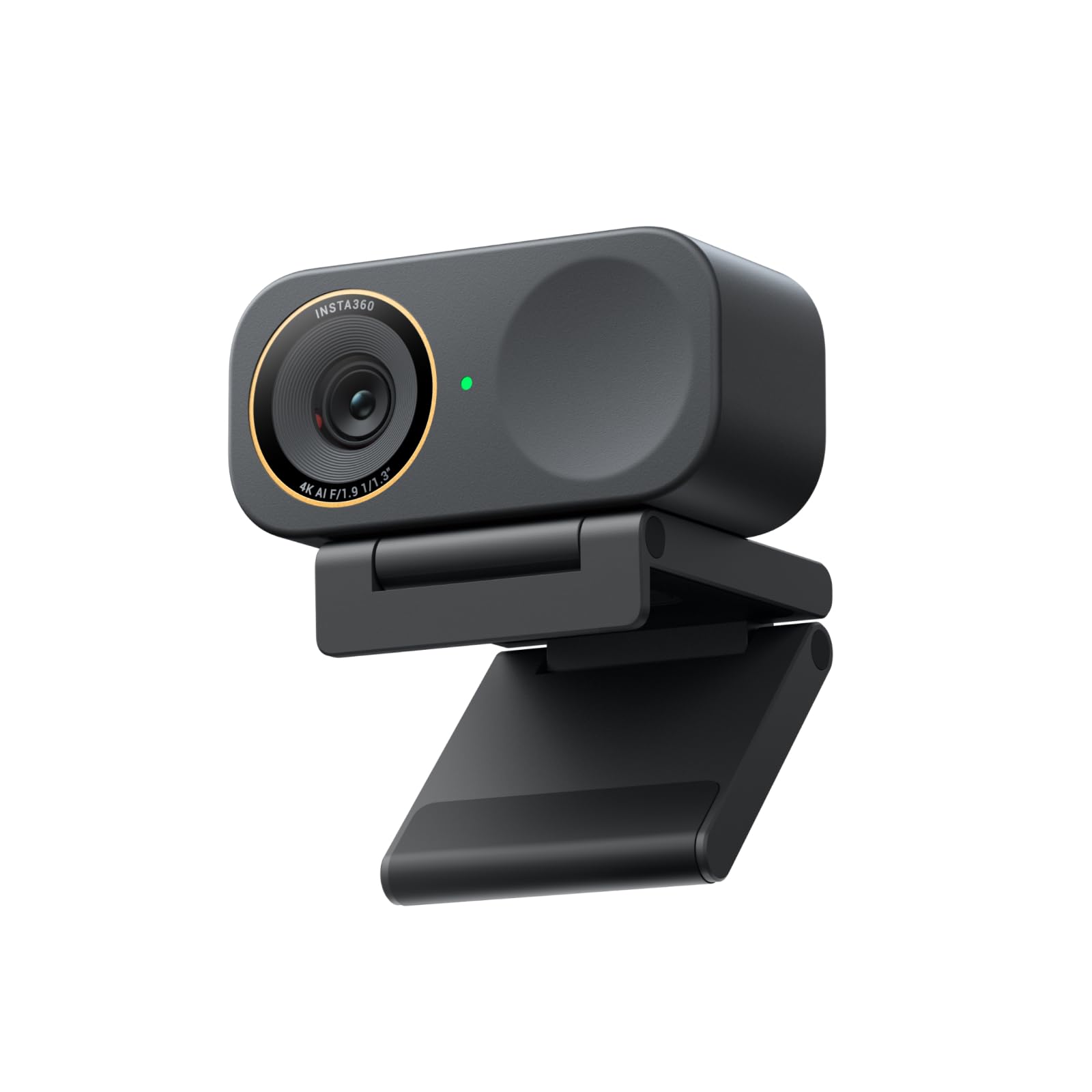
The closest thing to a DSLR for your streaming setup, packed into a magnetic mount.
You get flagship image quality because the 1/1.3″ sensor (the physical chip that captures light) pulls in cleaner video and handles dim rooms better than most webcams can. It delivers full 4K resolution, plus HDR (High Dynamic Range), which balances bright windows and dark shadows so your face stays properly exposed. The dual-mic system uses beamforming (a directional pickup pattern) to isolate your voice and reduce the hum of a PC fan or air conditioner — a real step up from standard omni-directional mics.
Buyers report that the auto-framing and gesture controls are genuinely useful, especially when you need to move around or show something to the camera without touching the software. One reviewer noted it is a “huge upgrade from Anker C200,” praising the picture quality and the sleek magnetic mount that lets you pan and tilt easily. Unlike the NexiGo N680E Pro, which relies on a ring light, this camera’s larger sensor means you may not need extra lighting at all — it handles contrasty scenes with more grace. The trade-off is latency: some users note a slight lag, and the color accuracy can lean slightly red under mixed lighting. Buyers also note the defaults are “already impressive” before running the tuning app.
If your budget stretches and you want the most professional-looking image, this pick beats everything else on sensor size and low-light handling. It is not for budget buyers, and streamers who need zero latency for fast-paced games might notice the delay.
Flagship image quality: 4K video, 1/1.3″ sensor, HDR, and beamforming mics make this the most capable webcam on the list for mixed lighting and professional streaming.
One real limitation: A few buyers saw a red/magenta tint under mixed lighting, and latency is slightly higher than simpler models.
Reach for this if: Your room has tricky lighting or you want the best image quality money can buy in a webcam.
Look elsewhere if: You need zero-lag for competitive gaming or your budget is under.
2. NexiGo N680E Pro 4K Webcam with Ring Light

A streaming webcam that brings its own soft lighting so you look polished even in a dim room.
The Sony 1/2.5″ 4K sensor inside delivers ultra-sharp video, but the real headline is the adjustable ring light built right into the front. It offers three color temperature modes (warm, cool, mixed) and stepless brightness control — you just rotate the outer dial to dial in the perfect look. That means you do not need a separate ring light or softbox cluttering your desk. When you stream fast-paced content, you can switch to 1080p at 60 FPS for silky-smooth motion that viewers will notice.
Buyers describe the setup as “plug and play” and love the different lighting options. The PDAF (Phase Detection Autofocus) is noticeably quicker than standard contrast autofocus — it locks onto your face and stays with you even if you lean forward or back. Unlike the Razer Kiyo V2 X which offers 1440p at 60FPS, the NexiGo gives you the option for 4K resolution even if your software can only handle 30 FPS at that resolution. The built-in privacy shutter slides over the lens when you are done, and the 80° FOV (field of view) is wide enough for a clean head-and-shoulders shot. One limitation: a reviewer noted the camera feels “very zoomed in” and cannot zoom out further, giving you a face-only view. The “small 1/2.5″ sensor causes some graininess” in low light compared to the larger sensor on the Insta360.
For streamers who do not have great lighting and want an all-in-one solution, this camera saves you money on accessories. The catch: if you prefer a wider room shot, the fixed zoom may feel restrictive.
Why it stands out
- Built-in tri-tone ring light with stepless brightness
- PDAF autofocus for fast, precise face tracking
- Switchable between 4K and 1080p 60FPS
What holds it back
- Too zoomed in for wide-room shots
- Small sensor can show graininess in very low light
Best for: Streamers without a dedicated lighting setup who want crisp 1080p 60FPS playback and a simple all-in-one build.
skip it if: You want a wider FOV to show off your full desk setup or need zero grain in pitch-black rooms.
3. Razer Kiyo V2 X Streaming Webcam

Smooth 1440p at 60 frames per second, built for streamers who hate choppy video.
If you stream fast-paced gameplay or react quickly on camera, this webcam delivers 1440p resolution at 60 FPS (frames per second) — giving you noticeably smoother motion than the standard 30 FPS that most webcams cap out at. The wide-angle lens gives you flexibility: zoom out to show your full desk setup or get in close for a face cam. The auto focus is fast and accurate, keeping you sharp whether you are making a clutch play or doing an unboxing.
Buyers describe the video quality as “good until 2K resolution” and note the “great pink color” from the design. The integrated privacy shutter is a quick twist to cover the lens when you step away. Reviewers also note that it works well with OBS and other streaming software right from the start, and the slimline design “fits perfectly on a 1440p monitor” without protruding. A common buyer observation is that the camera can be “fuzzy in the dark,” and one buyer mentioned experiencing a “random black screen/flickering” issue. Compared to the NexiGo N680E Pro, the Kiyo V2 X lacks a built-in ring light, so you will need good ambient lighting to avoid that fuzziness.
If you stream games at high frame rates and want a clean, smooth image that keeps up with your motion, this is a strong mid-range pick. The catch: you will need to sort out your own lighting because the camera struggles in dim rooms.
Smooth motion specialist: 1440p 60FPS with a wide-angle lens and fast auto focus, ideal for active streamers.
Ideal for: Gamers and vloggers who prioritize high frame rates for smooth motion on camera.
Not ideal for: Users in dark rooms without a dedicated light source, where the image turns fuzzy.
4. EMEET Piko 4K Webcam

A tiny dual-camera webcam that uses AI to keep you in focus and well-lit.
The EMEET Piko is a 4K webcam with a unique dual-camera design — a primary camera with a 1/2.8″ sensor for clarity and an AI-assisted camera that handles rapid autofocus and face lighting. This means your face stays bright even when your room lighting is less than ideal. It is smaller and lighter than most phones, making it highly portable for streamers who move between setups. The 3-microphone array offers three sound modes: Noise Canceling (for busy rooms), Original Sound (for quiet spaces like bedrooms), and Live Mode (which reduces AC hum for streaming).
Owners mention it is “well worth the money” and that the image quality is “great even in not so good light.” One owner reported it was “plug and play” on both Mac Studio and MacBook Pro. However, a more alarming review reports: “One customer observed the camera stopped working after 6 live streams within 2 weeks.” — a durability concern that gives us pause. It also lacks a built-in privacy cover, which one buyer called “crazy in 2025.” Unlike the Logitech C920, which has a long track record of reliability, the Piko’s longevity is unproven. It lists an 8 MP effective still resolution, while the Anker PowerConf C200 lists 2 MP, so still photos are sharper, but the durability risk is a serious factor.
For a budget-friendly entry into 4K streaming with clever dual-camera AI, this is a tempting option. The catch: reliability reports are mixed, with some units failing quickly — not a safe bet if you need a daily driver for streaming.
Innovative design
- Dual-camera AI autofocus keeps face sharp and well-lit
- 3-mic array with dedicated sound modes for different rooms
- Small and lightweight, easy to pack
Reliability concerns
- Some units failed after a few weeks of use.
- No built-in privacy cover — must buy separately
Best for: Price-conscious streamers who want 4K and a compact design, willing to gamble on early reliability.
pass on it if: You need a rock-solid daily driver — The durability reports are too scattered to ignore..
5. Anker PowerConf C200 2K Webcam

A smart budget pick that delivers a clean 2K image even when your room lighting is poor.
If you are on a tight budget but still want a step above basic 1080p, this webcam delivers 2K resolution (1440p) for sharp video calls and streaming. It shines in low light — the sensor handles dim conditions without needing a separate light, so you look clear even during a late-night stream. The dual microphones use AI noise cancellation to filter out background chatter, which buyers confirm delivers a “clean, crisp 1080p image” even though the sensor can output higher resolution.
Buyers call it a “fantastic webcam” and note “excellent low-light performance” with stable colors and adjustable zoom. The built-in privacy shutter slides over the lens for security. You can adjust the field of view between 65°, 78°, or 95° via software, making it easy to frame your shot. One regular limitation: the effective still resolution is 2 MP, while the Logitech C920 lists 15 MP, so this is strictly for video, not for taking still photos. Reviewers also note a minor software login bug. If you need 4K or professional-grade stills, look elsewhere — this is a value play that gets the basics very right for the price.
For casual streamers or those who mostly do video calls and want a noticeable upgrade from a laptop webcam, this is a strong entry-level pick. The catch: the microphone quality and low-light performance are good for the price but not competitive with mid-range or premium options.
Great value for video: 2K resolution, adjustable FOV, and a privacy cover at a price that undercuts most competitors in this list.
Grab this if: Your streaming is occasional and your main priority is a sharp, reliable image without spending much.
Pass on this if: You need 4K resolution, high-quality stills, or pro-level audio.
6. Logitech HD Pro Webcam C920

The veteran that just works — proven reliability across every major platform.
The Logitech C920 is the most battle-tested webcam on this list. It delivers Full HD 1080p video with autofocus, auto low-light correction, and auto noise reduction. It is not the highest resolution here — 1080p video versus 1440p on the Anker PowerConf C200 — but its reliability is its superpower. The effective still resolution is 15 MP (software-enhanced from a 3-5 MP sensor), which means you can capture cleaner still images than the Anker C200, which lists 2 MP.
Customers note it “works flawlessly on Mac Mini and MacBook Air with Skype, Zoom, FaceTime, etc.” and is “going strong two years later.” The ingenious mount fits flat screens, flat surfaces, or a mini tripod. Reviewers point out that the 1080p video is “clear even in low light” and that the stereo mics pick up sound well, though they can pick up reverb. One user highlighted it is “much better than the older Logitech 4000” and “clear video even in low light.” The hinge tilts up and down but does not pan side-to-side, so you cannot adjust horizontally without moving the whole camera. The white balance can also lean slightly blue, according to some.
If you want a webcam you can plug in and confidently use for years without compatibility surprises, this is the safest bet. The catch: the 1080p resolution is dated compared to the 4K options above, and the autofocus can be slightly laggy.
class-leading reliability
- Proven compatibility across Mac, Windows, and all major apps
- 15 MP effective still resolution for sharp photos
- Durable build holds up over years of daily use
Resolution ceiling
- Only 1080p video — no 4K or 1440p option
- No side-to-side horizontal panning
Perfect for: Anyone who wants a low-maintenance 1080p camera with a track record of cross-platform compatibility.
Not for: Streamers needing high frame rates or 4K resolution for modern streaming standards.
Understanding the Specs
Sensor Size
A larger sensor (measured in inches, e.g., 1/1.3″) captures more light for cleaner video in dim conditions with less grain. It also helps create a natural background blur — called bokeh — that makes you stand out from your messy room. A bigger sensor is the single biggest upgrade you can make for low-light streaming without buying a separate light.
Frame Rate (FPS)
Frame rate (FPS) measures how many still images the camera captures per second. 30 FPS is standard and looks natural for talking heads. 60 FPS looks much smoother and is ideal for fast movements like gaming reactions or lively vlogging. If your stream has lots of action, 60 FPS is the spec to target.
FAQ
Is 4K worth it for streaming, or is 1080p enough?
Do I need a separate microphone if the webcam has built-in mics?
What is the difference between standard autofocus and PDAF?
How important is a privacy shutter on a streaming webcam?
Will my old computer work with a 4K webcam?
Can I use a streaming webcam with my gaming console?
What is the best field of view (FOV) for streaming?
How long should a streaming webcam last?
Final Thoughts: The Verdict
For most streamers, the computer camera for streaming winner is the NexiGo N680E Pro because it combines 4K resolution, 1080p 60FPS support, and a built-in ring light at a mid-range price — solving lighting and video quality in one box. If you want professional-grade image quality with the best low-light performance, grab the Insta360 Link 2C Pro. And for a tried-and-true budget workhorse that refuses to die, the standout is the Logitech C920.
How We Picked
We do not accept paid placement. Every pick is matched to a real buyer and a real use-case; we do not hands-on test units.
Sources & Methodology
Specifications: manufacturer listings and product documentation. Review insights: verified customer reviews, as of July 2026. Pricing: not shown on this page (it changes often); check the current price via the retailer link.
As an Amazon Associate, WellFizz earns from qualifying purchases. This does not affect which products we feature.

Mo Maruf
I created WellFizz to bridge the gap between vague wellness advice and actionable solutions. My mission is simple: to decode the research and give you practical tools you can actually use.
Beyond the data, I am a passionate traveler. I believe that stepping away from the screen to explore new environments is essential for mental clarity and physical vitality.