Our readers keep the lights on and my smoothie glass nicely filled. As an Amazon Associate, I earn from qualifying purchases.
Nothing kills a podcast recording faster than a computer that stutters, fans spinning up mid-sentence, or a DAW that freezes during a guest interview. A machine built for multitrack recording, real-time plugins, and hours-long editing sessions needs more than just a fast boot time — it needs I/O bandwidth, thermal stability, and enough RAM to keep your timeline responsive when you layer in sound effects and compression.
I’m Mohammad Maruf — the founder and writer behind WellFizz. I’ve spent hundreds of hours poring over processor benchmarks, memory configurations, storage interfaces, and real-world audio workflow performance data to separate the machines that deliver reliable recording from the ones that introduce frustration.
Whether you edit interviews in Audacity, produce polished episodes in Logic Pro, or stream live shows, the best computer for podcasting balances CPU headroom with quiet operation and expandability for years of content creation.
How To Choose The Best Computer For Podcasting
Selecting a podcast production machine requires evaluating factors that other productivity buyers often overlook. Thermal design, storage speed, and peripheral support play outsized roles when your sessions involve four microphone tracks, a call-in guest via USB, and a handful of compression plugins running in real time.
CPU Architecture and Clock Speed
Digital audio workstations lean heavily on single-core performance. A processor with a high turbo frequency — 4.5 GHz or above — handles plugin chains and real-time waveform rendering more consistently than a chip with many slower cores. Intel Core i5 and i7 13th or 14th generation processors, or AMD Ryzen 7 and 9 chips, offer the instruction-per-clock efficiency that keeps your timeline responsive during dense editing sessions.
RAM Capacity for Multitrack Sessions
Podcast projects with multiple vocal tracks, background music stems, and dozens of undo states demand RAM beyond what a standard office machine carries. 16 GB is the baseline for comfortable editing, but 32 GB prevents page-file bottlenecks when you keep your browser, recording software, and communication tools open simultaneously. DDR5 memory at 5200 MT/s or faster reduces latency during sample-heavy workflows.
Storage Throughput and Project Management
NVMe Gen 4 and Gen 5 drives load large session files in seconds and let you scrub through long waveform regions without stutter. A 512 GB boot drive paired with a secondary 1 TB or 2 TB NVMe drive for project storage keeps your OS clean and your current episodes immediately accessible. Avoid relying on traditional hard drives for active editing — mechanical drives introduce latency that becomes noticeable during 20-minute interview files.
Connectivity for Audio Interfaces
USB-C and Thunderbolt ports with sufficient bandwidth to handle multi-channel audio interfaces matter more than the number of USB 2.0 ports. A dedicated USB 3.2 Gen 2 port for your interface, plus an HDMI or DisplayPort output for a second monitor, simplifies your editing layout and keeps latency low. Built-in Bluetooth can be useful for wireless headphones during editing, but wired monitoring remains the standard for live recording sessions.
Thermal Acoustics and Form Factor
Fan noise during recording can contaminate a vocal track if your microphone picks up ambient sound. Desktop towers with larger fans running at lower RPMs, or laptops with passive cooling modes, reduce the risk of fan whine in your recordings. Mini PCs with efficient thermal designs also work well for podcasters who record in small studios or shared spaces.
Quick Comparison
On smaller screens, swipe sideways to see the full table.
| Model | Category | Best For | Key Spec | Amazon |
|---|---|---|---|---|
| HP OmniDesk (Ryzen 7 8700G) | Desktop | Mid-Range Production Studio | 32GB DDR5 / 1TB NVMe | Amazon |
| Microsoft Surface Laptop Studio | Laptop | Mobile Editing & Recording | 32GB RAM / 1TB SSD / i7 | Amazon |
| NIMO 17.3″ Gaming Laptop | Laptop | Budget Portable Production | 32GB DDR5 / 1TB SSD | Amazon |
| Lenovo ThinkCentre Tiny M70q | Mini PC | Compact Studio Setup | 16GB DDR5 / 512GB NVMe | Amazon |
| Acer Aspire TC-1780-UR11 | Desktop | Entry-Level Desktop DAW | i5-13400 / 16GB DDR4 | Amazon |
| Lenovo V15 Business Laptop | Laptop | High-RAM Budget Laptop | 40GB RAM / 2TB SSD | Amazon |
| Dell Pro Tower (i7-14700) | Desktop | Reliable Office Workstation | i7-14700 / 16GB DDR5 | Amazon |
| Acer Aspire AI (Ultra 7 258V) | Laptop | AI-Enhanced Workflow Laptop | 32GB LPDDR5X / 2TB SSD | Amazon |
| Dell Tower ECT1250 (Ultra 7-265) | Desktop | Multi-Monitor Production Desk | 32GB DDR5 / 1TB M.2 SSD | Amazon |
| iBUYPOWER Element 9260 | Desktop | Gaming-Spec for Heavy Workloads | GTX 1660 Ti / 16GB DDR4 | Amazon |
| HP Envy Desktop (i9-14900K) | Desktop | High-End Video & Audio Production | 64GB DDR5 / RTX 3050 | Amazon |
| Thermaltake LCGS View 9580S | Desktop | Ultimate Performance & Streaming | RTX 5080 / 32GB DDR5 | Amazon |
| Rode RODECaster Pro II Bundle | Console | All-in-One Podcast Hardware | 9-Channel / 4 Mics Included | Amazon |
In‑Depth Reviews
1. HP OmniDesk Desktop PC (Ryzen 7 8700G)

With a Ryzen 7 8700G processor and 32 GB of DDR5-5200 memory, this desktop handles multi-track podcast sessions without hiccuping during plugin processing. The Radeon 780M integrated graphics free up a PCIe slot for future audio interface or capture card expansion, and the 1 TB Gen4 NVMe drive loads 60-minute project files in seconds. Its mid-tower form factor accommodates larger CPU coolers and quiet 120mm case fans, keeping thermal noise low during live recording.
The 32 GB memory ceiling matches the requirements of serious DAW users who keep browser tabs, communication tools, and Slack channels open alongside their recording software. Wi-Fi 6 and Bluetooth 5.4 provide reliable wireless headphone connectivity for editing sessions, while the included keyboard and mouse get you started immediately without extra purchases.
Some users noted the stock keyboard and mouse feel basic compared to the desktop’s internals, which is a minor trade-off for the overall spec package. The chassis lacks tool-less drive bays, so adding a secondary NVMe requires a screwdriver but is straightforward.
Why it’s great
- Ryzen 7 8700G delivers excellent single-core DAW performance
- 32GB DDR5 memory handles dense plugin chains without page-file dips
Good to know
- Stock peripherals feel entry-level for the price bracket
- No secondary NVMe slot for easy project drive expansion
2. Microsoft Surface Laptop Studio (i7, 32GB)

The Surface Laptop Studio brings 32 GB of RAM and an 11th Gen Core i7 H-series processor — still potent for DAW workloads — into a convertible chassis that folds into a stage mode for microphone-stand proximity during recording. The 14.4-inch PixelSense Flow display at 120 Hz makes waveform editing and plugin parameter adjustments feel fluid, and dual far-field studio mics let you capture scratch tracks or meeting audio clearly without an external mic plugged in.
Its RTX 3050 Ti GPU handles video podcast editing in Premiere Pro or DaVinci Resolve without choking on 4K timelines. The magnetic storage and charging of the Surface Slim Pen 2 is useful for podcasters who mark up scripts or edit audio regions by touch. Battery life around 18 hours means you can edit an entire episode away from a power outlet.
The proprietary Surface Connect port limits charging to Microsoft docks unless you carry the adapter. Only two USB 3 ports and one audio jack mean you will likely need a USB hub for your interface, headphone amp, and SD card reader. The machine is heavy at roughly 4 pounds for a 14-inch device.
Why it’s great
- 32GB RAM and H-series i7 handle heavy DAW sessions on battery
- Stage mode fold keeps screen visible during tabletop recording
Good to know
- Only two USB ports require a hub for multi-peripheral setups
- Proprietary charger limits dock compatibility
3. NIMO 17.3″ Gaming Laptop (Ryzen 7 8745HS)

The NIMO packs a Ryzen 7 8745HS processor, 32 GB of DDR5-5600 memory, and a 1 TB NVMe SSD into a 17.3-inch chassis that weighs under 2.1 kg. For podcasters who need a second editing machine or travel laptop, this spec exceeds what many desktop alternatives offer at a similar price floor. The Radeon 780M integrated graphics handle 1080p video editing for show clips or social media promos without a dedicated GPU.
Its USB4 port supports external GPU docks for future expansion, while the HDMI 2.1 output drives a 4K external monitor for a spacious editing layout. The 100W PD Type-C charging means you can keep it powered with a compact GaN charger during remote recording sessions. The backlit keyboard helps when editing in dim studio lighting.
A minority of users reported units failing after extended light use, which suggests quality control can vary. The 58 Wh battery delivers moderate endurance — expect closer to 6 hours under DAW load rather than the advertised all-day runtime. The built-in SD card reader is limited to UHS-I speeds.
Why it’s great
- 32GB DDR5-5600 and 1TB NVMe at a budget-friendly price point
- USB4 port supports eGPU expansion for high-end audio interfaces
Good to know
- Reported reliability concerns from a small number of users
- Battery life under DAW load is shorter than marketing claims
4. Lenovo ThinkCentre Tiny M70q (i5-14400T)

The ThinkCentre Tiny M70q delivers a 10-core i5-14400T processor and 16 GB of DDR5 memory in a chassis small enough to mount behind a monitor or sit discretely on a desk shelf. For podcasters building a dedicated studio space where every inch counts, this unit provides enough CPU grunt for recording and editing in Audacity or Reaper without taking up desk real estate. Its Intel UHD 770 graphics drive dual 4K displays for an expanded editing layout.
Wi-Fi 6 and Bluetooth 5.1 keep wireless peripherals responsive, and the 3-year Lenovo warranty offers peace of mind for business buyers. The included keyboard and mouse mean zero extra setup steps. The tiny form factor also consumes around 65W under load, contributing to lower electricity costs in a full-time studio.
The 512 GB NVMe drive fills quickly if you store multiple long-form interview projects locally. Lenovo locks the BIOS to limit some upgrade paths, and the integrated graphics won’t accelerate video rendering. You will need a USB-C hub to connect more than one audio interface peripheral.
Why it’s great
- Ultra-compact chassis fits behind a monitor for clean studio setups
- 3-year warranty provides long-term reliability for business buyers
Good to know
- 512GB storage fills quickly with large multi-track projects
- BIOS restrictions limit certain hardware upgrades
5. Acer Aspire TC-1780-UR11 (i5-13400)

The Acer Aspire TC-1780 uses a 13th Gen Core i5-13400 processor — a 10-core design with 6 performance cores hitting 4.6 GHz — which provides enough single-core speed for DAW playback and plugin processing at an accessible price. Its 512 GB NVMe Gen 4 SSD loads project files quickly, though the 16 GB of DDR4-3200 memory sets the ceiling for multi-track sessions with heavy plugin counts.
The tower includes an SD card reader, two HDMI ports for dual-monitor editing, and Wi-Fi 6E for low-latency remote collaboration. The included keyboard and mouse reduce startup costs, and the tool-less side panel makes swapping in a larger NVMe drive later fairly easy. For podcasters on a tight budget starting their first show, this desktop delivers reliable performance without overspending.
The DDR4 memory runs at 3200 MHz rather than faster DDR5, which shows in DAW benchmark comparisons with mid-range machines. A small number of units arrived with defective ports, so checking connectivity immediately after unboxing is advisable. The chassis uses a standard 300W power supply that limits GPU upgrades if you add video editing later.
Why it’s great
- i5-13400 delivers solid single-core DAW performance for the price
- Tool-less panel design simplifies storage upgrades
Good to know
- 16GB DDR4 is the minimum for professional podcast production
- Some units reported defective ports out of the box
6. Lenovo V-Series V15 (Ryzen 7 7730U)

The Lenovo V15 pairs 40 GB of RAM with a fast 2 TB NVMe SSD, making it the highest-capacity budget-friendly laptop on this list for podcasters who keep dozens of projects, sample libraries, and recording sessions locally. The Ryzen 7 7730U processor, with 8 cores and a 4.5 GHz boost, handles multi-track DAW work without thermal throttling in its thin chassis. The 15.6-inch FHD display provides adequate editing space for waveform views.
Its RJ45 Ethernet port ensures stable network connections for remote interviews and cloud backups, while the numeric keypad speeds up keyboard shortcuts in audition software. The 40 GB of RAM allows running multiple Chrome tabs, Discord, and a DAH simultaneously without memory pressure — a real advantage during live-streamed podcast recordings.
Some units have reported SSD failures within the first year, highlighting that warranty responsiveness can vary by seller. The 7730U processor is based on the Zen 3 architecture rather than the newer Zen 4, so single-core performance trails modern Ryzen 7 chips. The included power adapter is bulky for travel.
Why it’s great
- 40GB RAM is exceptional for heavy multi-tasking during live recordings
- 2TB NVMe stores years of podcast projects without external drives
Good to know
- SSD reliability issues reported in some units after several months
- Ryzen 7 7730U uses older Zen 3 architecture
7. Dell Pro Tower (i7-14700)
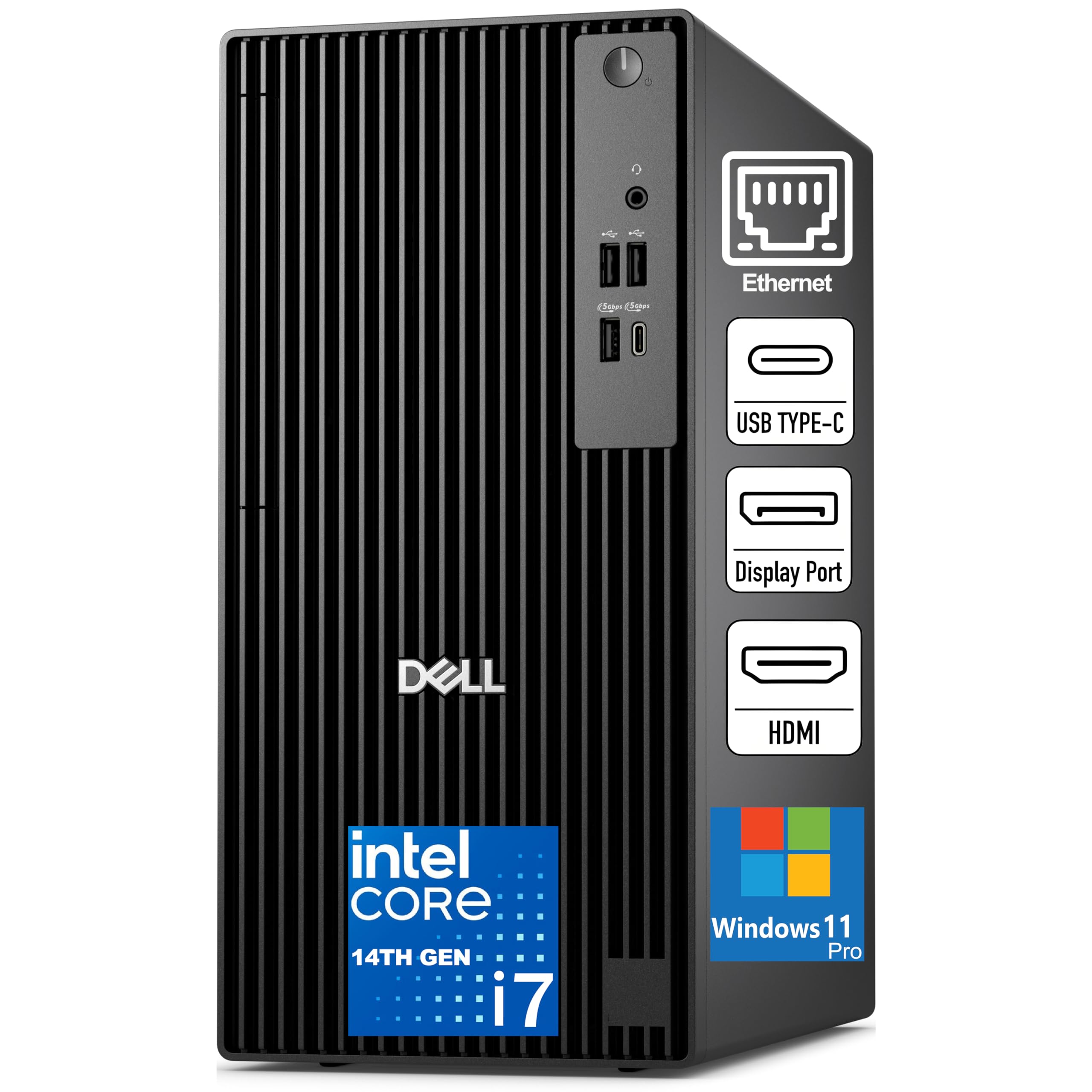
The Dell Pro Tower runs an Intel Core i7-14700 with 20 cores and a 5.4 GHz turbo, delivering the kind of single-core headroom that real-time DAW plugins demand. Its 16 GB of DDR5-5600 memory provides fast data transfer for session files, though the 512 GB SSD fills rapidly when archiving high-resolution interview recordings. The TPM 2.0 chip and chassis intrusion switch make it suitable for corporate or professional environments where data security matters.
HDMI 2.1 and DisplayPort 1.4a support dual 4K monitors, giving podcast editors a spacious timeline view on one screen and mixer controls on the other. The compact tower design with a 180W Bronze PSU keeps power draw modest during long editing sessions. Gigabit Ethernet provides stable remote interview connectivity.
The 16 GB memory is adequate for recording but may limit heavy post-production work with many plugins active. Some users found the built-in Wi-Fi controller weak compared to add-in cards. The lack of an optical drive is standard but worth noting if you still import CDs for music beds.
Why it’s great
- i7-14700 delivers exceptional single-core speed for plugin processing
- HDMI 2.1 and DP 1.4a support dual 4K editing monitors
Good to know
- 16GB RAM and 512GB storage are minimal for heavy production use
- Integrated Wi-Fi controller is weaker than expected for the tier
8. Acer Aspire AI Laptop (Ultra 7 258V)

The Acer Aspire AI features an Intel Core Ultra 7 258V processor with a 47 TOPS NPU, enabling local AI features like background noise removal and automatic transcription without uploading audio to the cloud. Its 32 GB of LPDDR5X memory and 2 TB PCIe SSD provide ample headroom for large Reaper or Audacity sessions, while the Intel Arc 140V graphics accelerate video podcast color grading and effects. The 14-inch FHD touchscreen at just 3.09 pounds makes this a strong option for podcasters who work from co-working spaces or coffee shops.
The included USB-C hub provides HDMI, USB-A, USB-C, SD card, and Ethernet ports, eliminating the need for multiple dongles. The NPU handles real-time background blur and auto-framing during live-streamed shows, freeing the CPU to keep your DAW stable. Long battery life supports editing sessions that last through a full workday.
Some units shipped without the advertised Lifetime Office 365 license, substituting the free web-based version instead — check the listing details before purchasing. The 1920×1200 resolution display is sharp but lacks the vertical real estate of a 16:10 screen for waveform editing. The soldered RAM cannot be upgraded later.
Why it’s great
- NPU enables local noise removal and transcription tasks
- 32GB LPDDR5X and 2TB SSD handle large project files easily
Good to know
- Lifetime Office 365 offer may not match advertised version
- Soldered RAM means no memory upgrades after purchase
9. Dell Tower ECT1250 (Ultra 7-265)

The Dell Tower ECT1250 comes with an Intel Core Ultra 7-265 processor, 32 GB of DDR5 memory, and a 1 TB M.2 SSD, providing the RAM capacity that video podcast producers need for simultaneous timeline editing and audio mixing. Its support for up to four FHD monitors via daisy chaining, or two 4K displays through HDMI 2.1 and DisplayPort, makes it a strong choice for podcasters running a dedicated editing workstation with separate waveform, mixer, and script windows.
The tool-less side panel and removable chassis let you swap out storage or add a dedicated audio interface card without sending the machine to a shop. Dell includes a 1-year onsite service plan, which means a technician will visit your studio for hardware issues. The 180W Bronze PSU keeps power consumption reasonable for a workstation that runs for hours during editing marathons.
The front audio jack only supports output, not microphone input, which forces you to plug your interface into rear USB ports. The 180W power supply limits GPU upgrade options if you later decide to add a high-end video card for game streaming alongside your podcast. Some users noted the absence of monitor cables in the box.
Why it’s great
- 32GB DDR5 and 1TB NVMe handle multi-track video podcast editing
- Daisy chain support for up to four monitors creates a spacious editing desk
Good to know
- Front audio jack does not support microphone input
- 180W PSU limits future GPU upgrades
10. iBUYPOWER Element 9260 (i7-9700F, GTX 1660 Ti)

The iBUYPOWER Element 9260 packs a Core i7-9700F and NVIDIA GTX 1660 Ti into a tempered glass chassis with RGB lighting — specs that matter little for audio recording but help if you also edit video promos or live-stream your podcast on Twitch. The 16 GB of DDR4-2666 memory meets the baseline for professional podcast production, and the 240 GB NVMe boot drive plus 1 TB HDD provides fast OS response with bulk storage for archived episodes.
The included gaming keyboard and mouse reduce peripheral costs, while the 7.1 channel audio output through the motherboard supports surround monitoring for sound design. The GTX 1660 Ti handles hardware encoding for streaming your podcast feed without taxing the CPU, preserving audio processing headroom.
The i7-9700F lacks hyper-threading, meaning it has 8 cores and 8 threads rather than 16 threads found in newer i7 chips — this shows during heavily multi-tracked sessions with dozens of plugins. The 240 GB boot drive fills quickly after installing a DAW, office suite, and sample libraries. Shipping inside the branded box risks theft during transit.
Why it’s great
- Dedicated video card hardware-encodes live podcast streams smoothly
- RGB case and included peripherals reduce initial setup costs
Good to know
- i7-9700F lacks hyper-threading, limiting multi-track heavy load handling
- 240GB boot drive fills quickly; need an extra SSD for projects
11. HP Envy Desktop (i9-14900K, RTX 3050)

The HP Envy Desktop runs a 14th Gen Core i9-14900K processor reaching 6.0 GHz turbo, combined with 64 GB of DDR5 memory and a 2 TB NVMe SSD. This configuration handles the most demanding podcast production workflows — running Pro Tools with 50+ tracks, streaming 4K video to a second monitor, and voice processing real-time EQ, compression, and de-essing without breaking a sweat. The NVIDIA RTX 3050 with 8 GB of dedicated VRAM accelerates video encoding for video podcast editing in Premiere Pro.
The i9-14900K’s 24 cores include 8 performance cores for DAW tasks plus 16 efficiency cores for background processes, keeping the timeline responsive even when running YouTube Music, a browser, and communication apps simultaneously. Wi-Fi 6 and Bluetooth 5.3 ensure reliable connectivity for wireless editing peripherals.
This machine generates significant heat under sustained load, requiring effective desktop ventilation to prevent thermal throttling during long editing sessions. The 2 TB SSD fills faster than expected for heavy archives of 4K video podcasts. The price floor is considerably higher than most podcasters need for pure audio work.
Why it’s great
- 64GB DDR5 RAM and 2TB SSD provide unrivaled headroom for large projects
- i9-14900K turbo at 6.0 GHz delivers the fastest single-core DAW performance available
Good to know
- Generates significant heat requiring good desktop airflow
- Overkill for podcast workflows that don’t include heavy video editing
12. Thermaltake LCGS View 9580S (Ryzen 9 9950X3D, RTX 5080)
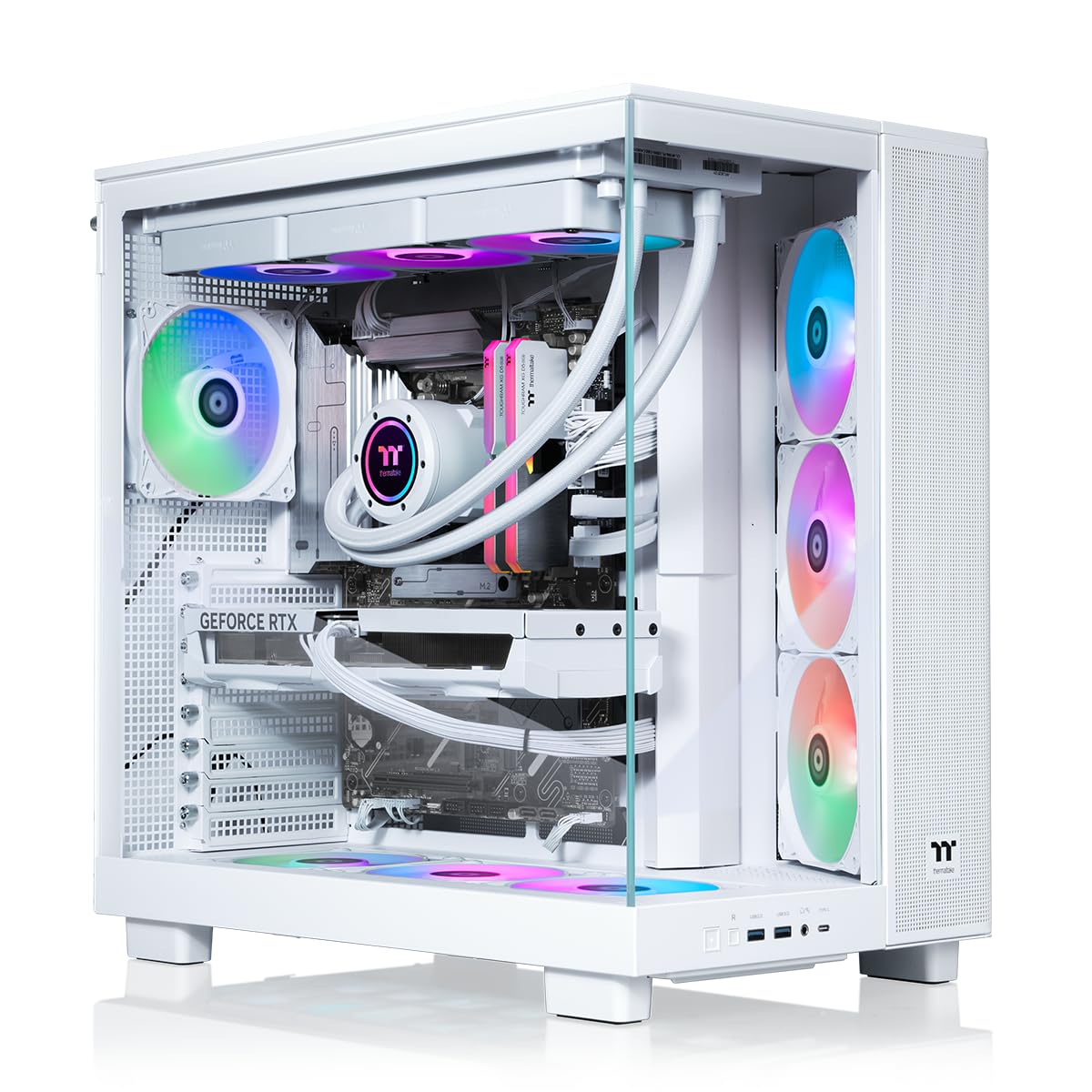
The Thermaltake LCGS View 9580S combines an AMD Ryzen 9 9950X3D processor with an NVIDIA RTX 5080 GPU, 32 GB of DDR5-6000 memory, and 2 TB of NVMe Gen 5 storage. This is a gaming-first machine, but its specs make short work of any podcast production task. The 16 CPU cores (8 performance, 8 efficiency) clock up to 5.7 GHz, handling dense plugin chains in Cubase or Logic Pro without latency. The RTX 5080 accelerates offline rendering of video podcast episodes at 4K resolution.
The closed-loop liquid cooling with a 360mm radiator keeps the system thermally stable and acoustically quiet during long recording sessions — fan noise stays well below microphone pickup thresholds. The panoramic tempered glass side panels show off the RGB lighting, which may appeal to streamers who want their production rig to look visually engaging on camera.
The price point exceeds the budget of nearly all pure podcast producers, making this system appropriate only for professional content creators who also stream video games or produce high-budget video content alongside their audio work. Some units arrived with shipping-related fan cable disconnections, requiring minor reassembly on arrival. The chassis is large and heavy, taking up significant desk space.
Why it’s great
- 9950X3D CPU and RTX 5080 handle any DAW task with massive headroom
- Liquid cooling keeps thermal noise low during recording sessions
Good to know
- Expensive for podcasting unless you also do heavy video/streaming work
- Shipping-related cable disconnections reported with some units
13. Rode RODECaster Pro II Bundle

The Rode RODECaster Pro II Bundle is not a computer — it is a dedicated 9-channel podcast console that bypasses the need for a powerful DAW for live recording. By combining the RCPII mixer with four Zoom ZDM-1 dynamic microphone packs (each with ZHP-1 headphones, TPS-4 tripods, XLR cables, and windscreens), this bundle gives you a complete four-host tabletop studio. The Revolution preamps deliver 76 dB of clean gain without inline boosters, and the APHEX DSP chain processes compression, EQ, de-essing, and reverb directly on the console.
Dual USB-C interfaces connect to both a capture computer and a streaming rig simultaneously, while the onboard Wireless GO II receiver pairs with Rode Series IV transmitters for wireless guest mics. Bluetooth handles phone call-in guests, and Rode CallMe brings in remote callers over Wi-Fi or Ethernet. The 9-channel layout lets you record each host, phone guests, and sound pads to isolated tracks for post-production editing.
This bundle removes the need for a high-performance computer during the recording phase — any modest laptop can serve as a multitrack recorder, letting you spend your budget elsewhere. The console has a learning curve for its routing and sound pad system. The included ZDM-1 mics are good for the bundle price but not at the level of a dedicated SM7B or RE20 for professional broadcast audio.
Why it’s great
- Complete 4-host recording studio in one box reduces computer performance demands
- APHEX DSP processes all audio in hardware, reducing DAW plugin load
Good to know
- Console has a learning curve for routing and pad management
- Bundle microphones are good for the price but not professional broadcast grade
FAQ
Does a podcast computer need a dedicated graphics card?
Is a desktop better than a laptop for podcast editing?
How much RAM is actually needed for multi-track podcast production?
Can I use a Mac Mini for podcast recording and editing?
Final Thoughts: The Verdict
For most users, the best computer for podcasting winner is the HP OmniDesk Desktop (Ryzen 7 8700G) because it balances 32GB of DDR5 memory, a fast 1TB Gen4 NVMe drive, and a processor that handles dense DAW sessions at a price point that fits a podcast production budget. If you want portable editing and recording mobility, grab the Microsoft Surface Laptop Studio. And for all-in-one hardware that reduces the load on your computer entirely, nothing beats the Rode RODECaster Pro II Bundle.

Mo Maruf
I created WellFizz to bridge the gap between vague wellness advice and actionable solutions. My mission is simple: to decode the research and give you practical tools you can actually use.
Beyond the data, I am a passionate traveler. I believe that stepping away from the screen to explore new environments is essential for mental clarity and physical vitality.