Our readers keep the lights on and my smoothie glass nicely filled. As an Amazon Associate, I earn from qualifying purchases.
A blurry, washed-out feed kills a stream faster than any technical glitch. The challenge is finding a webcam that delivers clean, smooth video without the premium price tag. You need a lens that handles fast motion, autofocus that won’t hunt, and a microphone that picks up your voice, not the hum of your PC.
I’m Mohammad Maruf — the founder and writer behind WellFizz. For this guide, I analyzed the video processing, sensor quality, and frame rate specs of each model to find the seven webcams that offer the most streaming-ready features for the money.
After comparing autofocus systems, low-light correction, and noise-reduction microphones, I found the models that consistently deliver smooth 1080p or higher video without the usual budget compromises. These are the picks that earn a spot on any list of the best cheap webcam for streaming.
How To Choose The Best Cheap Webcam For Streaming
A streaming-focused webcam needs to prioritize frame rate, autofocus speed, and low-light handling — not just resolution. High megapixel counts mean little if the sensor struggles in typical room lighting or the lens can’t track your movement. Focus on the specs that directly impact your broadcast quality.
Frame Rate: 30fps vs. 60fps
Standard 1080p at 30fps is fine for talking-head streams or meetings, but fast movements like gaming or unboxing look choppy. A 60fps option delivers significantly smoother motion with less ghosting, making the stream feel more professional. Some models offer 4K at 30fps as an alternative, but 1080p 60fps is the sweet spot for most streamers on a budget.
Autofocus: Speed and Accuracy
Fixed-focus lenses require you to stay within a narrow distance range. For dynamic streams where you lean in, hold objects close, or move around, a responsive autofocus system is crucial. Phase Detection Autofocus (PDAF) locks focus faster than traditional contrast-detect systems, eliminating the frustrating blur-hunt that can ruin a shot.
Microphone and Light Handling
Built-in microphones vary widely. Look for dual-omnidirectional mics with noise cancellation to reduce keyboard clicks and fan hum. Also check for automatic low-light correction or HDR — these features prevent the image from going dark and grainy when your room isn’t perfectly lit.
Quick Comparison
On smaller screens, swipe sideways to see the full table.
| Model | Category | Best For | Key Spec | Amazon |
|---|---|---|---|---|
| Logitech C920x | Mid-Range | Reliable all-around streaming | 1080p 30fps with autofocus | Amazon |
| OBSBOT Tiny SE | Premium | AI tracking and 100fps motion | 1080p up to 100fps | Amazon |
| Razer Kiyo V2 X | Premium | 1440p high-refresh streaming | 1440p 60fps | Amazon |
| NexiGo N660P | Mid-Range | Entry-level 60fps value | 1080p 60fps with autofocus | Amazon |
| Angetube 967Pro | Mid-Range | Streaming with built-in ring light | 1080p 60fps with autofocus | Amazon |
| N newline 4K | Budget | 4K resolution for less | 4K 30fps with PDAF autofocus | Amazon |
| EMEET C960 | Budget | Low-cost basic streaming | 1080p 30fps fixed focus | Amazon |
In‑Depth Reviews
1. Logitech C920x HD Pro

The Logitech C920x is the benchmark that every budget webcam is measured against for a reason. Its HD autofocus and automatic light correction produce consistently sharp, well-exposed 1080p video even when your room lighting is less than ideal. The dual stereo mics capture natural, clear audio without excessive background hiss, making it a reliable all-in-one solution for streaming, video calls, and content creation.
Setup is genuinely plug-and-play — it works instantly with Windows, macOS, and even the Nintendo Switch 2’s new GameChat mode. The universal clip and compact design fit securely on any monitor or laptop lid, and the 3-month XSplit VCam license adds background removal without a green screen. Reviewers consistently praise its balance of build quality and image performance at this tier.
Low-light performance, while improved over earlier generations, still produces some grain in very dark conditions. The lack of a built-in privacy shutter means you will need to cover the lens manually or unplug the camera when not in use. For streamers who want a proven, no-fuss 1080p camera that just works, the C920x remains the gold standard.
Why it’s great
- Autofocus is fast and very reliable in typical room light
- Dual mics deliver clear, natural audio for streaming
- Universal clip and compact build fit any monitor or laptop
Good to know
- No built-in privacy shutter, requires manual lens cover
- Video is capped at 30fps, not ideal for fast motion
- Low-light grain is noticeable in dimmer environments
2. OBSBOT Tiny SE

The OBSBOT Tiny SE brings AI-powered pan-tilt-zoom tracking to an affordable price point. Its 1/2.8-inch stacked CMOS sensor with Dual Native ISO and Staggered HDR delivers exceptional low-light clarity that rivals cameras costing twice as much. You get 1080p video at up to 100fps — a massive upgrade over the standard 30fps for ultra-smooth streaming.
What sets the Tiny SE apart is its intelligent tracking. The camera automatically follows your movements, keeps you centered in the frame, and can be controlled with simple hand gestures for zoom and lock-on. The customizable presets let you save different positions and tracking modes for different stream segments, so switching between a close-up and a full-body shot is instant.
The USB-C connectivity and included USB-C to USB-A adapter ensure wide compatibility. The software suite supports hotkey control, Stream Deck integration, and OSC/API control for advanced users. A rare software glitch reported by some users causes the camera to occasionally face downward, requiring a restart, but this is minor given the overall feature depth. This is the most future-proof cheap streaming webcam for those who want high frame rate and AI features.
Why it’s great
- AI auto-tracking with gesture control keeps you perfectly framed
- 1080p 100fps is smoother than most webcams on the market
- Low-light clarity is exceptional with Dual Native ISO and HDR
Good to know
- Occasional tracking glitch requires a software restart
- Gesture controls can be accidentally triggered
- Premium price compared to basic 1080p 30fps options
3. Razer Kiyo V2 X

The Razer Kiyo V2 X pushes past the 1080p ceiling with native 1440p at 60fps, giving streamers noticeably more detail and fluidity in their broadcasts. The fast, accurate autofocus system locks onto subjects quickly without the constant hunting that plagues budget cameras. This is especially useful for dynamic content like unboxing or close-up demos where the distance to the lens changes frequently.
Razer Synapse software provides intuitive control over color tuning, exposure, and presets, letting you dial in the perfect look for your stream. The wide-angle lens offers flexibility: zoom out for a full desk shot or zoom in for an intimate face cam view. The slimline design sits flush on even the thinnest monitors without obscuring the display.
The built-in integrated privacy shutter is a thoughtful touch, activated by a quick twist on the lens. Some users report occasional flickering or blackouts, likely tied to USB bandwidth or specific software settings, so a stable USB 3.0 port is recommended. For streamers after the highest resolution in this price bracket without jumping to 4K, the Kiyo V2 X delivers.
Why it’s great
- 1440p 60fps video is sharp and fluid for streaming
- Fast autofocus with no hunting in good lighting
- Integrated privacy shutter via twist lens ring
Good to know
- Occasional blackouts or flickering on some USB ports
- Low-light performance is average
- Requires Razer Synapse for full customization
4. NexiGo N660P (Gen 2)
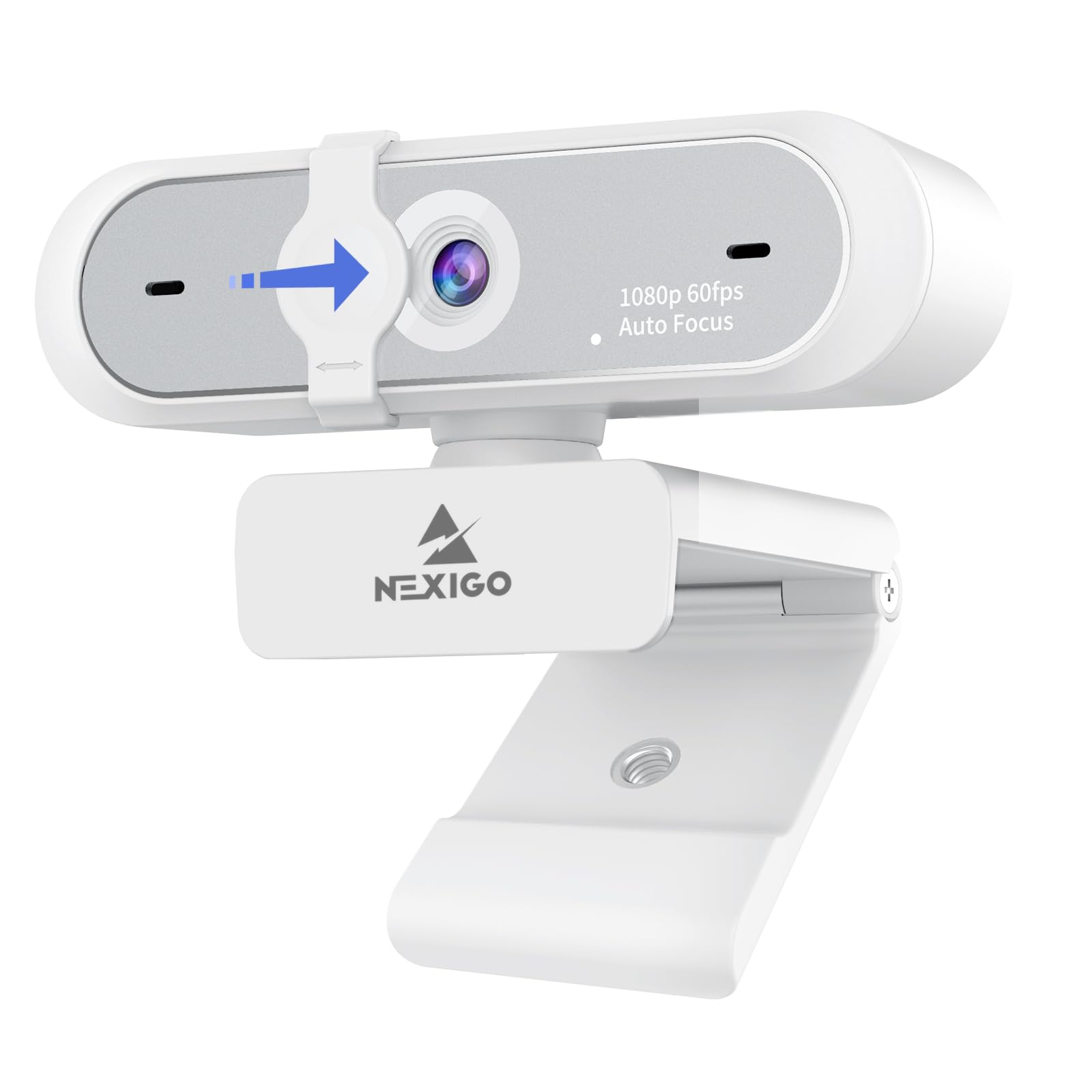
The NexiGo N660P Gen 2 proves that you don’t need to spend a premium to get 1080p at 60fps. This webcam delivers the frame rate that streamers need for smooth motion at a price that undercuts many competitors. The autofocus and auto-white balance work reliably to keep the image sharp and color-accurate across different lighting conditions.
The built-in stereo noise-reduction microphone effectively filters out background noise, making it suitable for streaming in open or busy rooms. Plug-and-play compatibility with Windows, macOS, and Chrome OS means no driver hassle — just connect and select it in OBS or Zoom. The 6.5-foot USB cable offers generous reach for most desk setups, and the universal clip with a threaded tripod mount provides flexible mounting options.
Customer feedback notes that the wide FOV can include more background than desired, and the software zoom doesn’t narrow the field of view. The privacy cover has also been reported to loosen over time with frequent use. Despite these minor build concerns, the N660P delivers core performance where it matters most for the money.
Why it’s great
- 1080p 60fps performance at a very aggressive price point
- Stereo noise-cancelling mics work well in busy rooms
- Long USB cable and tripod-ready mount for flexible setup
Good to know
- Privacy shutter may loosen over time
- Wide FOV cannot be narrowed with software zoom
- Image sharpness is good but not top-tier for the spec
5. Angetube 967Pro

The Angetube 967Pro is built for streamers who need better face lighting without buying a separate ring light. Its integrated three-level adjustable ring light provides soft diffused illumination that reduces shadows and enhances facial detail in dim environments. The 3DNR digital noise reduction technology further improves dark areas, reducing grain and preserving detail.
Video performance is flexible with HDR at 30fps or standard 60fps at 1080p. HDR mode balances highlights and shadows for a more cinematic look during rich-color streams, while 60fps mode keeps motion crisp. The 5X digital zoom, controlled by a button on the camera body, lets you punch in or out without moving the camera, and the autofocus can be toggled off for manual focus if needed.
The H.264 compression encoding delivers high-quality video with lower bandwidth consumption, beneficial for streaming with limited upload speeds. Compatibility includes USB-A and USB-C via the included adapter, and software control from Angetube’s website allows fine-tuning of exposure and white balance. The blue-spectrum ring light can cause eye fatigue for sensitive users, and the privacy shutter is reported to be somewhat loose.
Why it’s great
- Built-in ring light with three brightness levels for face lighting
- Switchable between HDR 30fps and standard 60fps modes
- 5X digital zoom and manual focus override options
Good to know
- Ring light is blue-spectrum, not warm, may cause eye strain
- Privacy shutter fits loosely
- Accompanying software is less useful than manual camera controls
6. N newline 4K Webcam

The N newline 4K webcam is an outlier: a sub-premium camera that offers true 4K resolution with a Sony 1/2.5-inch sensor. It captures ultra-detailed video at 30fps, and can be switched to 1080p at 60fps for smoother motion when needed. The PDAF autofocus system locks focus in about one second, a significant speed advantage over contrast-detect autofocus in its price class.
Automatic light correction adjusts exposure to balance shadows and highlights, helping maintain clarity in mixed lighting. The dual microphones with noise reduction capture voice clearly within a 9.8-foot range. The 79-degree field of view is narrower than some competitors, which actually helps keep the focus on the streamer rather than the background.
The privacy cover is integrated into the design, and the build quality from clip to joint feels robust for the price. User feedback indicates the autofocus and 60fps performance are solid, though some found the image clarity in 4K to be less crisp than expected, possibly due to compression. This camera is ideal for streamers who want 4K headroom on a strict budget.
Why it’s great
- True 4K resolution via a quality Sony sensor at a low price
- PDAF autofocus is faster than most budget webcams
- Dual noise-cancelling mics with good 9.8-foot range
Good to know
- 4K clarity may vary due to compression
- 79-degree FOV is relatively narrow
- No dedicated software for fine-tuning
7. EMEET C960

The EMEET C960 is the most straightforward entry point into streaming — a no-frills 1080p camera that gets the job done without extra expense. Its 5-layer anti-glare lens provides clear, sharp video within the fixed focal range of 11.8 to 118 inches, making it suitable for a streamer who sits consistently at their desk. The automatic low-light correction does a decent job of brightening dim scenes without washing out the image.
Two omnidirectional noise-reduction microphones work together to focus on the speaker’s voice while filtering out background noise. Plug-and-play compatibility covers Windows, macOS, Linux, and Android TV, and the camera works with all major streaming and conferencing apps. The included privacy shutter slides easily to block the lens when not in use.
The fixed-focus design means you can’t zoom in on objects or adjust focus dynamically, and low-light performance is noticeably grainier than cameras with better sensors. Some users found the monitor clip needed a separate stand to secure it firmly. For the absolute lowest entry cost to 1080p streaming, the C960 offers reliable baseline performance.
Why it’s great
- Very low entry price for full 1080p video quality
- Privacy shutter is built-in and easy to slide
- Dual noise-cancelling mics improve audio clarity
Good to know
- Fixed focus makes close-up object shots impossible
- Low-light performance is grainy compared to pricier models
- Monitor clip may need a separate stand for secure fit
FAQ
Is 1080p 60fps worth it over 1080p 30fps for streaming?
Can I use a budget webcam with OBS and other streaming software?
Does a built-in microphone sound good enough for streaming?
Final Thoughts: The Verdict
For most users, the best cheap webcam for streaming winner is the Logitech C920x because it combines proven autofocus, reliable low-light correction, and durable build quality at a price that doesn’t break the bank. If you want AI auto-tracking and ultra-smooth 100fps motion, grab the OBSBOT Tiny SE. And for high-resolution 1440p streaming without stepping up to 4K, nothing beats the Razer Kiyo V2 X.

Mo Maruf
I created WellFizz to bridge the gap between vague wellness advice and actionable solutions. My mission is simple: to decode the research and give you practical tools you can actually use.
Beyond the data, I am a passionate traveler. I believe that stepping away from the screen to explore new environments is essential for mental clarity and physical vitality.