Our readers keep the lights on and my smoothie glass nicely filled. As an Amazon Associate, I earn from qualifying purchases.
Keeping a modern processor cool without emptying your wallet is the central challenge of budget PC building. A cheap CPU cooler used to mean loud, inefficient aluminum blocks, but today’s entry-level market is flooded with dual-tower designs, nickel-plated copper heat pipes, and PWM fans that rival high-end air coolers from just a few years ago.
I’m Mohammad Maruf — the founder and writer behind WellFizz. My research process involves cross-referencing thousands of customer reviews against measurable specs like fin stack density, heat pipe diameter, and decibel ratings to separate genuine value from marketing noise.
This buying guide focuses on five air coolers that deliver serious thermal performance for the money, helping you find the best cheap cpu cooler without overspending on features your build doesn’t need.
How To Choose The Best Cheap CPU Cooler
Budget coolers look similar on a store page, but three factors separate usable performance from thermal throttling: the tower configuration, the heat pipe architecture, and the fan’s noise curve at typical speeds.
Single-Tower vs. Dual-Tower Design
Dual-tower coolers double the fin surface area without requiring a much larger fan. At the sub- price point, a dual-tower design typically delivers 15–20% better heat dissipation than a single-tower cooler of the same height. The trade-off is width — dual-tower coolers often overhang the first RAM slot, so check your motherboard’s DIMM placement before buying.
Heat Pipe Count and Diameter
Six 6mm copper heat pipes is the sweet spot for budget coolers targeting CPUs under 200W TDP. Four pipes can handle an i5 or Ryzen 5, but six pipes provide headroom for an i7 or Ryzen 7 under sustained all-core loads. Direct-touch heat pipes (where pipes contact the CPU lid directly) are standard at this price and work well if the base is flat — check reviews for comments about uneven mounting pressure.
Noise Level and Fan Quality
Look for a rated noise level of 27 dB(A) or lower at maximum RPM. At the 1500–1650 RPM range typical of budget coolers, a 25 dB fan is genuinely quiet — you will hear airflow before motor noise. PWM control is essential; a non-PWM fan runs at full speed constantly, which defeats the purpose of buying a quiet cooler.
Quick Comparison
On smaller screens, swipe sideways to see the full table.
| Model | Category | Best For | Key Spec | Amazon |
|---|---|---|---|---|
| Thermalright Phantom Spirit 120SE | Air Cooler | High-TDP CPUs | 7 heat pipes, 66.17 CFM | Amazon |
| ID-COOLING FROZN A620 PRO SE | Air Cooler | Value + Performance | 6 pipes, 2000 RPM PWM | Amazon |
| upHere UE2KC6 | Air Cooler | Entry-Level Dual Tower | 6 pipes, 25 dB noise | Amazon |
| upHere UE2K6 | Air Cooler | Budget Dual Tower | 6 pipes, 1650 RPM fan | Amazon |
| SCYTHE Big Shuriken 4 | Low Profile | Small Form Factor | 6 pipes, 67mm height | Amazon |
In‑Depth Reviews
1. Thermalright Phantom Spirit 120SE

The Phantom Spirit 120SE sits at the premium end of budget cooling, and for good reason: seven 6mm copper heat pipes with AGHP 4.0 gravity-defying technology allow this dual-tower cooler to handle CPUs pulling 200W or more. The 154mm height fits almost any mid-tower case, and the offset design provides excellent clearance above the RAM slots on most boards.
Real-world performance backs up the spec sheet. Users report idle temperatures in the low 40s°C and gaming loads around 50–60°C on a Ryzen 7800X3D, while an i7-12700K maxes out at 78°C in Cinebench. The dual TL-C12B V2 fans push 66.17 CFM at a very quiet 25.6 dB(A), making this cooler competitive with entry-level 240mm AIOs in both thermal and acoustic performance.
The only consistent complaint involves the stock fans producing audible resonance at high PWM percentages — several users swapped in Noctua NF-A12x25 or Arctic P12 fans and saw further noise reduction. The mounting system for Intel LGA 1700/1851 and AMD AM5 is straightforward but requires firm pressure to seat the backplate. For anyone wanting AIO-rivaling cooling at air-cooler pricing, this is the clear winner.
Why it’s great
- Seven heat pipes handle CPUs above 200W TDP
- 66 CFM airflow at only 25.6 dB
- Compact 154mm height fits most cases
Good to know
- Stock fans may develop noise after several months
- Large footprint blocks access to M.2 slot on some boards
2. ID-COOLING FROZN A620 PRO SE

ID-COOLING’s FROZN A620 PRO SE packs a 270W TDP rating into a 157mm-tall dual-tower body, making it one of the highest-capacity coolers available at this price bracket. The six Φ6mm copper heat pipes combine with dual 120mm PWM fans that spin up to 2000 RPM, generating 58 CFM of airflow at a maximum noise level of 27.2 dB.
Customer data reinforces the thermal claims. On an Intel Core Ultra 7 270K, idle temperatures sit in the low-to-mid 30s°C with load staying under 65°C. A Ryzen 5 5600X dropped from 90°C to 40–50°C during gaming sessions. The 40mm RAM clearance with the standard fin stack is adequate for most non-RGB memory, and the cut-out design allows up to 63mm for taller modules.
The mounting hardware includes separate brackets for Intel LGA 1851/1700 and AMD AM5/AM4. Some reviewers noted that the crossbar screws can be difficult to align with the backplate studs on tight ITX builds. At this price, the cooling performance rivals coolers costing twice as much, making it a strong alternative for builders who need extra thermal headroom without stepping up to a premium cooler.
Why it’s great
- Rated for 270W TDP at a budget price
- 2000 RPM fans provide excellent airflow
- 63mm RAM clearance with cut-out design
Good to know
- Screw alignment can be fiddly during installation
- Fin stack is wide and may overhang some ITX boards
3. SCYTHE Big Shuriken 4
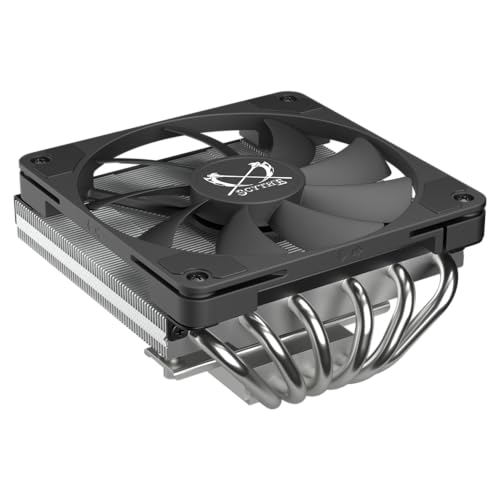
The Big Shuriken 4 is a low-profile cooler purpose-built for mini-ITX cases where vertical clearance is the primary constraint. At just 67mm tall, it fits inside slim SFF chassis that reject standard tower coolers, yet it crams six heat pipes into a compact 120mm fan footprint. The 51.98 CFM airflow at 1900 RPM is modest compared to full-size coolers, but for a 67mm-tall unit, it punches above its weight.
Reviewers running Ryzen 5 and Core Ultra 5 processors report idle temperatures around 38–40°C and gaming loads between 50–60°C. One user tested an Intel Core Ultra 245K at 125W TDP and saw 65°C under load, which is impressive for the form factor. The fan is genuinely quiet up to 75% duty cycle, though it becomes audible above that threshold — a non-issue for most gaming and productivity tasks.
Intel compatibility is the main caveat. The rear bracket can contact components on some LGA 1851 ITX boards — users reported safe clearance on ASRock B860I, but noted risk on certain ASUS and X870 boards. AMD AM5 builds have no such issues. If you are building a compact system and need the cooling density that six heat pipes in a low-profile frame provide, this is the most capable option at this price.
Why it’s great
- Exceptionally low 67mm height for SFF cases
- Six heat pipes outperform previous Shuriken generation
- Fan remains silent below 75% speed
Good to know
- Intel bracket can touch motherboard components on some ITX boards
- Not suitable for high-TDP CPUs like i9 or Ryzen 9
4. upHere UE2KC6
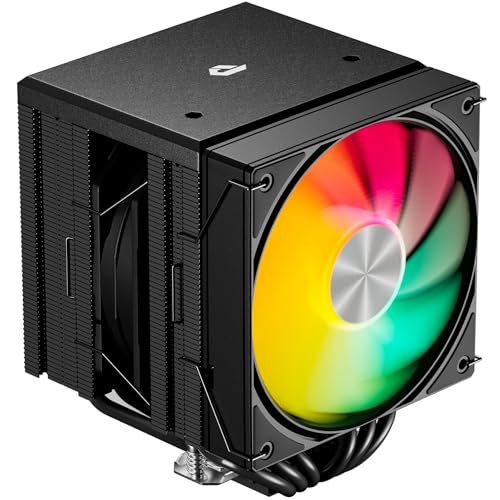
The upHere UE2KC6 is a dual-tower ARGB cooler that focuses on providing solid thermal performance alongside customizable lighting at a very accessible price point. Its dual 120mm PWM fans spin at 1650 RPM and are rated at ≤25 dB — genuinely quiet for this class. The six copper heat pipes are direct-touch and paired with an aluminum fin stack that mirrors designs costing significantly more.
Thermal results from buyers show a Ryzen 9 5900X staying between 50–60°C during high CPU loads in a mid-tower ATX case. One long-time builder reported overclocking a 3.4 GHz CPU to 5.1 GHz with stable temperatures. The included long screwdriver and clear instructions make installation simpler than many competitors — multiple reviewers noted it was easier than assembling a Hyper 212.
RAM clearance is well-managed thanks to an offset fin stack that avoids the first DIMM slot entirely. The ARGB lighting connects via a standard 3-pin 5V header and syncs with most motherboard software. The included fans do not have daisy-chain connectors, which can clutter cable management slightly. For builders who want a quiet, cool system with lighting effects, this cooler delivers without demanding a premium.
Why it’s great
- Bright ARGB lighting syncs with motherboard software
- Extremely easy installation with included screwdriver
- Off-center design avoids RAM slots completely
Good to know
- Fans lack daisy-chain connectors for cable management
- Too large for micro-ATX or smaller cases
5. upHere UE2K6

The upHere UE2K6 is the non-ARGB sibling of the UE2KC6, offering the same dual-tower architecture and six heat pipes in a clean black finish for builders who do not need lighting. The two 120mm PWM fans share the same 1650 RPM speed and ≤25 dB noise rating, making this one of the quietest dual-tower coolers available at its price point.
Performance mirrors the RGB version closely. Buyers report a Ryzen 9 5900X remaining at 50–60°C under sustained loads, and one user measured a drop from 90°C to 35°C on an older CPU under heavy load. The installation process is identical — the included long screwdriver and universal backplate made it easier to mount than many competitor coolers, according to several long-time builders.
The all-black aesthetic fits well in builds without a glass side panel or where the cooler is obscured by a GPU. RAM clearance is full, with the offset design ensuring no interference with tall DIMMs. The main downside is the same as the RGB version: the fans use individual 4-pin connectors rather than a daisy-chain, requiring a PWM splitter or extra motherboard headers. For a straightforward, effective, and nearly silent cooling solution, this is the most accessible option here.
Why it’s great
- Same performance as RGB version at a lower entry point
- Full RAM clearance with offset fin stack
- Very easy installation with included tools
Good to know
- No daisy-chain on fan cables
- May be too wide for compact cases
FAQ
How do I know if a dual-tower cooler fits inside my case?
Will a cheap CPU cooler interfere with tall RAM modules?
What TDP should my cooler be rated for?
Is a cheap air cooler better than a budget 120mm AIO?
How many heat pipes do I really need?
Final Thoughts: The Verdict
For most users, the best cheap cpu cooler winner is the Thermalright Phantom Spirit 120SE because its seven heat pipes and 66 CFM fans deliver premium-tier cooling at a mid-range price. If you want ARGB lighting and easier installation, grab the upHere UE2KC6. And for small form factor builds where every millimeter counts, nothing beats the SCYTHE Big Shuriken 4.

Mo Maruf
I created WellFizz to bridge the gap between vague wellness advice and actionable solutions. My mission is simple: to decode the research and give you practical tools you can actually use.
Beyond the data, I am a passionate traveler. I believe that stepping away from the screen to explore new environments is essential for mental clarity and physical vitality.