Our readers keep the lights on and my smoothie glass nicely filled. As an Amazon Associate, I earn from qualifying purchases.
A cheap PC case shouldn’t feel like a compromise you have to live with for the next five years. The reality is that the budget bracket is crowded with thin metal, sharp edges, and missing features, but a few designs prove you don’t need to spend big to get solid steel, real airflow, and a tempered glass panel that doesn’t rattle. The right choice means more room for your GPU, better cable routing, and fans that keep temps in check without sounding like a hair dryer.
I’m Mohammad Maruf — the founder and writer behind WellFizz. I’ve spent countless hours cross-referencing spec sheets, studying customer build photos, and weighing the real trade-offs between cooling support, material gauge, and fan count to find the cases that deliver genuine value at the lowest possible price.
After comparing dozens of models across price tiers, these seven towers stand out for their specific strengths in airflow, layout, and build quality. This is the definitive guide to the best cheap pc case options that actually deliver on their promises.
How To Choose The Best Cheap PC Case
Picking a budget case that doesn’t feel cheap requires knowing exactly which corners manufacturers cut and which ones actually matter. The trick is to prioritize structural rigidity, airflow design, and feature set over flashy looks or a high fan count alone. A case with a solid steel frame, a mesh front, and at least one included exhaust fan will outperform a thin, glass-fronted box with three cheap RGB fans every time. Focus on these three factors, and you’ll end up with a tower that lasts through multiple upgrades.
Airflow Design and Front Panel Material
The front panel determines how much air your components actually get. Solid glass or plastic fronts look clean but choke intake fans, forcing them to spin faster and louder to move the same volume of air. A mesh or perforated front panel, especially one with a washable dust filter, allows unrestricted airflow so your single included fan can actually keep a mid-range build cool. On a tight budget, never sacrifice a mesh front for looks — your GPU and CPU temperatures will thank you.
Material Gauge and Structural Rigidity
Cheap cases use thin steel that flexes under the weight of a large air cooler or GPU. Check the product weight and read reviews about panel flex or vibration. A case weighing around 10 to 13 pounds in the mid-tower category usually indicates 0.5mm to 0.6mm steel that holds its shape once components are installed. Anything significantly lighter may wobble or make installation difficult as the motherboard tray bends under pressure. Pay attention to how the side panels attach — swinging tempered glass doors with hinges feel premium, but a simple screw-in panel is often more stable in the long run.
Expansion and Front I/O Value
Budget cases often strip out modern I/O to cut costs. A front USB-C port, even a Type-C 3.0, is becoming essential for modern motherboards and peripherals. Also consider internal drive bays: if you plan on reusing old 3.5-inch hard drives, make sure the case has at least two dedicated trays. Many low-cost towers hide the PSU under a shroud, which hides cables but can block bottom fan mounts — check clearance before you buy. A case with a PSU shroud, a single USB-C port, and two USB-A ports offers the best balance of modern connectivity for the price.
Quick Comparison
On smaller screens, swipe sideways to see the full table.
| Model | Category | Best For | Key Spec | Amazon |
|---|---|---|---|---|
| GAMDIAS AURA GC1 ELITE | Mid-Range | First Build with RGB | 4 pre-installed ARGB fans | Amazon |
| Thermaltake View 270 Plus | Premium | Showcase & Large GPUs | 420mm GPU support | Amazon |
| DARKROCK EC2 | Mid-Range | High Airflow & USB-C | Type-C ready front I/O | Amazon |
| FOIFKIN F300 | Mid-Range | Panoramic View & Quiet Build | 270° glass panel | Amazon |
| Okinos Aqua 3 | Value | Compact MATX Build | Vertical airflow design | Amazon |
| Zalman T6 | Budget | Workstation with Optical Drive | 5.25″ ODD bay | Amazon |
| Thermaltake Versa H21 | Budget | NAS & High-Drive Server | 6 internal drive bays | Amazon |
In‑Depth Reviews
1. GAMDIAS AURA GC1 ELITE

The fan count alone usually signals a to price jump, so seeing four addressable RGB fans included out of the box is rare in this tier. The mesh front ensures those fans actually pull air, and the white colorway offers a clean alternative to the sea of black budget boxes.
Build quality is better than expected for the price point — the steel frame feels a bit thin during handling, but once you mount the motherboard and GPU, the whole structure tightens up nicely. The interior offers 340mm of GPU clearance and support for a 360mm radiator up front, which is generous for a case that targets entry-level budgets. Cable management space behind the motherboard tray is adequate, but the included zip ties help keep things tidy.
One minor drawback is the lack of a USB-C port on the front I/O, and the included fans are not PWM-controlled, so their speed is fixed. Still, at this price level, those are acceptable trade-offs when you’re getting four ARGB fans and a mesh panel that breathes. For a first build or a gift for a new PC gamer, this case delivers an unbeatable blend of features and value.
Why it’s great
- Four pre-installed ARGB fans eliminate the need for extra purchases
- Mesh front panel with magnetic dust cover ensures high airflow
- Supports 360mm radiator and 340mm GPU for future upgrades
Good to know
- No front USB-C port
- Fans are non-PWM, run at a fixed speed
- Steel feels slightly flimsy until components are installed
2. Thermaltake View 270 Plus TG ARGB

The Thermaltake View 270 Plus pushes into premium territory with its pillarless dual tempered glass design on the front and side, giving you an unobstructed view of your components from nearly every angle. It ships with three 120mm ARGB fans pre-installed, supports up to a 420mm GPU — enough for even the chunkiest RTX 40-series cards — and includes both a USB-C 3.2 Gen 2 port and two USB 3.0 ports on the front I/O. For a case that sits at the upper edge of the budget bracket, the feature list is remarkably complete.
Build quality is a clear step up from cheaper options. The steel frame feels robust during installation, and the hinged glass side panel swings open for tool-free access. Cable management is well thought out with ample tie-down points and a deep channel behind the motherboard tray. The included ARGB fans are PWM, so you can control speed curves, and they produce minimal noise at low to medium RPM.
The main sacrifice is that you get only one rear exhaust fan and the front intake fans have to pull air through a narrow side intake due to the glass front panel, which isn’t ideal for high-TDP components under sustained load. Still, for a mid-range gaming build that prioritizes aesthetics, the View 270 Plus offers a premium experience without pushing past the budget ceiling.
Why it’s great
- Pillarless dual glass panels for an uninterrupted view of your build
- Supports GPUs up to 420mm, accommodating the largest modern cards
- Includes USB-C 3.2 Gen 2 and two USB 3.0 ports
Good to know
- Glass front panel restricts airflow compared to mesh designs
- Only includes one rear exhaust fan
- HDD mounting could be more tool-friendly
3. DARKROCK EC2

The DARKROCK EC2 is a masterclass in balancing cost and features. It offers a fully mesh front panel with magnetic dust filters on the top and bottom, support for up to eight 120mm fans, and a generous 360mm radiator mount on the front. The front I/O includes a USB-C port alongside two USB 3.0 ports, making it one of the most forward-looking budget cases available. It ships with a single rear 120mm fan, but the mesh panel makes it easy to add your own intake fans without worrying about static pressure.
Build quality is genuinely impressive for the price. The steel chassis feels dense and doesn’t flex when you’re mounting a large air cooler. The tempered glass side panel is hinged, swinging open on a secure magnetic latch, and there’s a PSU shroud that hides cables and includes a dedicated 3.5-inch HDD cage. Cable management tie-down points are plentiful, and the rubber grommets along the routing holes look more premium than the price suggests.
The main drawback is the lack of included intake fans — you get only a single rear exhaust fan, which means you’ll need to budget for a couple of 120mm fans to take full advantage of the mesh front. The design is also fairly compact for a mid-tower, so routing cables behind the motherboard tray can be tight with a non-modular PSU. Still, for a case that offers USB-C, a 360mm radiator mount, and solid steel construction at this price, the EC2 is hard to beat.
Why it’s great
- Mesh front panel with magnetic dust filters for easy cleaning
- Includes front USB-C port, rare in this price range
- Hinged tempered glass side panel with magnetic closure
Good to know
- Only includes one rear exhaust fan, no intake fans
- Compact interior can feel cramped for cable routing
- Front mesh panel is difficult to remove without prying
4. FOIFKIN F300 (2025)
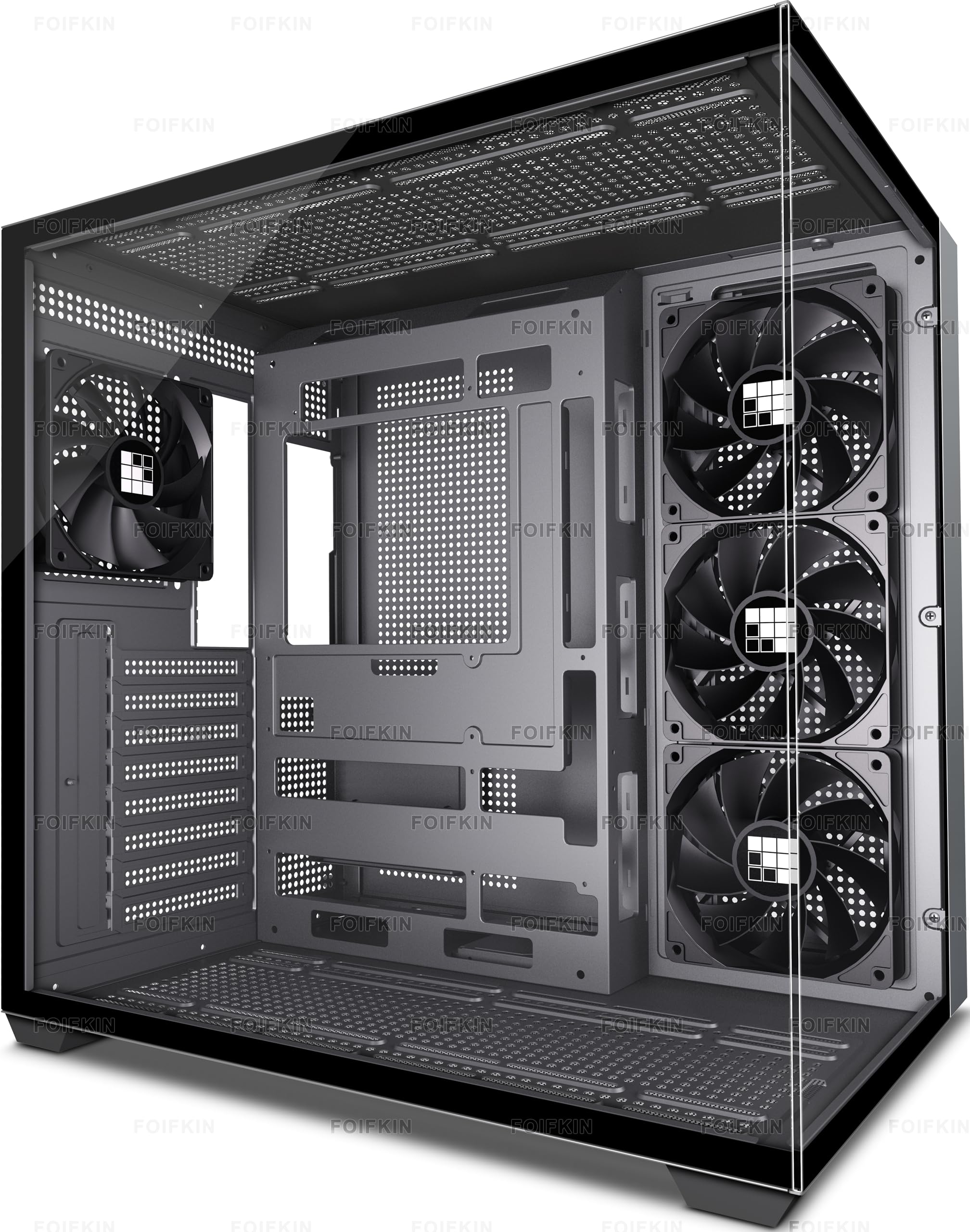
The FOIFKIN F300 goes all-in on the panoramic glass trend with a full 270-degree tempered glass panel that wraps around the front and side. It comes with four pre-installed non-LED 120mm fans, supports up to ten 120mm fans total, and accommodates radiators up to 360mm in three positions. The front I/O features one USB-C 3.0, one USB 3.0, and one USB 2.0 port, giving you a decent mix of modern and legacy connections. For a case that emphasizes visual display, it still manages to keep cooling options wide open.
The dual-cabin interior layout hides the PSU behind a separate compartment, which keeps the main chamber clean and spacious. GPU clearance is rated at 400mm, so even the longest RTX 4090 cards fit without issue. The included fans are quiet at idle and produce only a faint hum under load, though they use a non-standard connector that may require an adapter for motherboard control. Cable management is adequate, with Velcro straps and routing holes in sensible positions.
The biggest trade-off is the front glass panel, which, despite the case advertising “high airflow,” still chokes the intake fans compared to a full mesh design. The included fans are also non-PWM and non-addressable, so you won’t get any RGB effects unless you replace them. For builders who prioritize a clean, modern look and plan to add their own high-quality fans later, the F300 offers a fantastic foundation at an entry-level price.
Why it’s great
- 270-degree panoramic glass for an immersive view of components
- Four pre-installed fans reduce immediate additional costs
- Supports GPUs up to 400mm and large CPU coolers up to 170mm
Good to know
- Glass front panel restricts airflow compared to mesh
- Included fans use non-standard connectors and lack RGB
- Removing the glass side panel requires prying, not gentle lifting
5. Okinos Aqua 3

The Okinos Aqua 3 takes a different approach by focusing on a micro-ATX form factor with a vertical airflow path. It ships with three 120mm ARGB fans — two on top and one at the rear — and includes a built-in 4-port ARGB fan controller. The front and side panels are both tempered glass, giving a 270-degree view similar to pricier cases, but in a more compact 15.4-inch tall chassis. The front I/O adds a Type-C 3.2 Gen 2 port capable of 10Gbps, which is excellent for a case at this price.
The interior layout supports GPUs up to 320mm and CPU coolers up to 164mm, which means most mid-range cards and tower air coolers fit comfortably. The vertical airflow design draws cool air from the bottom and exhausts through the top, which works well with a blower-style GPU but can struggle with a traditional open-air card if the case doesn’t have bottom intake clearance. The magnetic dust filters on the top and bottom make cleaning straightforward, and the tool-less glass removal is a nice touch.
The included fans and ARGB controller are functional but feel cheap — the fans produce noticeable motor noise at higher speeds, and the ARGB control button on the front I/O overrides motherboard control completely, which some users find frustrating. The power button is also reported as finicky, requiring a deep press to register. Despite these quirks, the Aqua 3 offers a unique vertical layout, a genuine USB-C port, and three ARGB fans for a price that makes it an excellent pick for a compact MATX build.
Why it’s great
- Compact MATX design fits neatly on smaller desks
- Three pre-installed ARGB fans plus a 4-port controller
- Type-C 3.2 Gen 2 port delivers 10Gbps transfer speeds
Good to know
- Fans and controller feel cheap, with noticeable motor noise
- Power button requires a firm press, inconsistent feel
- Vertical airflow may not suit all GPU cooling styles
6. Zalman T6

The Zalman T6 is a no-frills ATX mid tower designed for builders who still need a 5.25-inch optical drive bay. It features a hairline pattern mesh front and side panel, a pre-installed 120mm rear fan, and support for up to four fans total. The front I/O includes one USB 3.0 and two USB 2.0 ports, along with audio jacks. It’s built from powder-coated steel that resists corrosion, and the interior can house two 2.5-inch and two 3.5-inch drives, plus the external 5.25-inch bay.
Assembly is straightforward but requires patience. The metal panels are thin and can flex, and the PCIe slot covers are stamped metal that must be broken out with pliers — they don’t unscrew. The PSU mounts at the top of the case, which is an older design that can interfere with long optical drives and makes cable routing trickier. The included rear fan is quiet but moves modest air, so adding a front intake fan is strongly recommended for any gaming build.
Where the T6 shines is in its practicality. The 5.25-inch bay is a godsend for anyone still using an optical drive for DVD/Blu-ray playback or legacy software. The hairline mesh provides decent airflow for a workstation or office PC, and the lightweight build makes it easy to move around. For a pure productivity or media-center build that needs an optical drive, the Zalman T6 is one of the last affordable options that doesn’t compromise on that specific feature.
Why it’s great
- Includes a 5.25-inch optical drive bay, increasingly rare in modern cases
- Powder-coated steel resists rust and scratches
- Lightweight and compact for a full ATX case
Good to know
- Thin metal flexes during installation; careful handling required
- PCIe slot covers must be broken out, not unscrewed
- Top-mounted PSU can interfere with optical drive and cable routing
7. Thermaltake Versa H21

The Thermaltake Versa H21 is a veteran budget case that prioritizes storage capacity above all else. It offers three external 5.25-inch bays, three internal 3.5-inch bays, and three 2.5-inch mounting positions, giving you a total of six internal drive slots. The front panel is a perforated metal mesh with a tool-free design, and the case includes one rear 120mm fan. The top panel includes a single USB 3.0 port and a standard USB 2.0 port alongside headset jacks.
Build quality is typical for an entry-level Thermaltake product: the SPCC steel is thin but functional, and the interior is spacious enough for full ATX boards and long GPUs. The lack of a PSU shroud means cables will be visible, but the tool-less drive bays make installing multiple hard drives fast and easy. The only included fan is the rear exhaust, so you’ll need to add your own front intakes to keep a multi-drive NAS or server cool under sustained load.
The main downsides are the tight cable management space behind the motherboard tray and the front bezel that doesn’t have a dust filter, meaning dust accumulates quickly in the drive bays. The PCIe slot covers are also stamped metal that must be broken out rather than unscrewed. For anyone building a home server, a NAS, or a high-drive workstation, the Versa H21 offers an unbeatable storage-to-price ratio that no modern glass-focused case can touch.
Why it’s great
- Six internal drive bays make it ideal for server and NAS builds
- Perforated mesh front provides good airflow for the price
- Tool-less drive installation saves time during setup
Good to know
- No PSU shroud, cables remain visible in the main chamber
- Only one rear fan included; front intake fans not provided
- PCIe slot covers must be broken out, not unscrewed
FAQ
Can I fit a 360mm radiator in a cheap PC case?
How important is a PSU shroud in a budget case?
Why do some cheap cases feel flimsy and others solid?
Final Thoughts: The Verdict
For most users, the best cheap PC case winner is the GAMDIAS AURA GC1 ELITE because it packs four ARGB fans, a mesh front, and a tempered glass panel at a price that makes it the complete package for a value-focused build. If you want modern USB-C connectivity and a solid steel frame, grab the DARKROCK EC2. And for a high-storage server or a compact MATX showpiece, nothing beats the Thermaltake Versa H21 or the Okinos Aqua 3, depending on your form factor.

Mo Maruf
I created WellFizz to bridge the gap between vague wellness advice and actionable solutions. My mission is simple: to decode the research and give you practical tools you can actually use.
Beyond the data, I am a passionate traveler. I believe that stepping away from the screen to explore new environments is essential for mental clarity and physical vitality.