Our readers keep the lights on and my smoothie glass nicely filled. As an Amazon Associate, I earn from qualifying purchases.
Choosing the absolute cheapest CPU often feels like a gamble between saving money and sacrificing the performance you actually need. The market is flooded with entry-level processors, refurbished office PCs, and “value” bundles that promise a lot but can leave you with a system that chokes on basic multitasking or games your family enjoys. The real pain isn’t the price tag—it’s spending on a chip that isn’t powerful enough for your actual workload, forcing an upgrade sooner than you planned.
I’m Mohammad Maruf — the founder and writer behind WellFizz. I specialize in cutting through the confusion of hardware specifications, analyzing benchmarks, and dissecting real user feedback to find the processors that deliver tangible value without the premium markup.
This guide is built for the savvy shopper who wants maximum performance at the lowest possible entry point. After hours of research into core counts, clock speeds, and chipset compatibility, I’ve isolated the genuinely smart buys that won’t break your budget. This is the definitive look at the best cheapest cpu options worth your time and money.
How To Choose The Best Cheapest CPU
Navigating the low-cost processor market requires a shift in perspective. You are not looking for raw power; you are looking for the best price-to-performance ratio for your specific use case. The goal is to find a CPU that avoids being a bottleneck for your primary tasks—whether that’s office work, light gaming, or media streaming—without paying for features you will never use.
Core Count vs. Single-Thread Performance
For the absolute cheapest options, you will primarily find dual-core and quad-core processors. A dual-core chip is sufficient for basic web browsing and document editing, but it will struggle with modern operating system background tasks. A quad-core processor, even from older generations like the Intel Core i5-3570K, offers a much smoother experience for multitasking and light gaming. Prioritize single-thread performance for older software, but aim for at least 4 cores for Windows 10 or 11.
Integrated Graphics or Dedicated GPU
This is the single biggest decision point. CPUs with integrated graphics (APUs like the AMD Ryzen 3 3200G) allow you to build a functional PC without any separate graphics card, saving a significant amount of money. However, their graphics performance is limited to older or less demanding games. If you plan to add a dedicated GPU later, a CPU without integrated graphics (like the Intel Core i5-14400F) often offers better raw processing power for the same price, but requires a separate GPU from day one.
Platform (Socket) Longevity and Upgrade Path
The motherboard socket determines your future upgrade options. Older sockets like LGA 1155 (for the i5-3570K) are a dead end, meaning you would need a new motherboard for any future CPU upgrade. Modern sockets like AMD’s AM4 offer a much wider range of compatible processors, from entry-level chips to performance behemoths, making a cheap AM4 CPU today a smart stepping stone to a faster chip later without replacing the entire system.
Quick Comparison
On smaller screens, swipe sideways to see the full table.
| Model | Category | Best For | Key Spec | Amazon |
|---|---|---|---|---|
| AMD Ryzen 5 5600X | Premium | High-FPS Gaming & Productivity | 6 Cores / 12 Threads at 4.6 GHz | Amazon |
| Intel Core i5-14400F | Premium | Modern Gaming & Multitasking | 10 Cores (6P+4E) at 4.7 GHz | Amazon |
| Intel Core Ultra 9 285K | Enthusiast | Professional Workstation & Heavy Rendering | 24 Cores (8P+16E) at 5.7 GHz | Amazon |
| AMD Ryzen 3 3200G | Mid-Range | Office Work & Light Gaming (no GPU) | 4 Cores / 4 Threads at 4.0 GHz | Amazon |
| Intel Core i5-3570K | Mid-Range | Legacy System Upgrades & Light Gaming | 4 Cores / 4 Threads at 3.4 GHz | Amazon |
| INLAND AMD Ryzen 5 5500 + Mobo | Value | Budget Build (CPU + Motherboard) | 6 Cores / 12 Threads at 4.2 GHz | Amazon |
| Dell Optiplex 3050 SFF (i5-6500) | Budget | Home Office & Web Browsing | 16 GB DDR4 RAM Included | Amazon |
| HP ProDesk 600 G3 Mini (i5-6500) | Budget | Ultra-Compact Desktop & 4K Media | 256 GB PCIe SSD | Amazon |
| Lenovo ThinkCentre M710 SFF (i3-6100) | Budget | Basic Office & Document Editing | 6th Gen Dual Core i3-6100 | Amazon |
In‑Depth Reviews
1. AMD Ryzen 5 5600X

The AMD Ryzen 5 5600X sits in a sweet spot where price meets performance for budget-conscious gamers and productivity users. With 6 cores and 12 threads capable of boosting to 4.6 GHz, this chip delivers elite 100+ FPS performance in popular titles without breaking a sweat. Its 65W TDP means it runs cool and quiet with the included Wraith Stealth cooler, making it an efficient choice for compact builds.
Users praise its exceptional single-core performance, which rivals and often beats Intel’s 10th and 11th gen offerings in gaming scenarios. The AM4 platform support provides a wide motherboard selection, from budget A520 boards to feature-rich X570 options with PCIe 4.0 support. The chip handles multitasking with ease, from streaming while gaming to light video editing workloads.
The absence of integrated graphics is the main catch, requiring a dedicated GPU from day one. However, for anyone planning a gaming or productivity build with a discrete graphics card, the 5600X offers unbeatable value. Its 35MB cache and DDR4-3200 support ensure snappy system responsiveness that justifies its position as the top pick for budget performance seekers.
Why it’s great
- Excellent single-core gaming performance at 1080p/1440p
- Low 65W TDP runs cool even with stock cooler
- AM4 platform offers wide upgrade path and board options
Good to know
- No integrated graphics; requires a separate GPU
- Stock cooler adequate but aftermarket recommended for overclocking
2. Intel Core i5-14400F

The Intel Core i5-14400F represents a compelling modern option in the budget CPU space, leveraging a hybrid architecture with 6 Performance-cores and 4 Efficiency-cores for a total of 10 cores and 16 threads. This design intelligently distributes workloads, prioritizing demanding tasks to the P-cores while background processes run on the E-cores, resulting in smooth multitasking and responsive system behavior even under load.
Users upgrading from older i7 processors report noticeable improvements in gaming frame rates and video editing stability. The chip runs cool during gaming sessions, hitting about 67°C with a basic air cooler, and stays quiet under normal operation. Its compatibility with both DDR4 and DDR5 memory on 600-series and 700-series motherboards gives builders flexibility to choose between budget and future-proofing.
The unlocked multiplier allows for easy overclocking, pushing the chip towards its 4.7 GHz boost ceiling. As a “F” series chip, it lacks integrated graphics, so a discrete GPU is mandatory. For builders seeking a modern platform with excellent price-to-performance ratio for gaming and content creation, the i5-14400F is a stellar choice that outperforms many older i7 and i9 processors.
Why it’s great
- Hybrid architecture delivers excellent multitasking performance
- Compatible with DDR4 and DDR5 memory for flexibility
- Runs cool at 60-75°C under gaming and editing loads
Good to know
- Requires a dedicated graphics card; no integrated graphics
- Motherboard BIOS update may be needed for 600-series chipsets
3. Intel Core Ultra 9 285K

The Intel Core Ultra 9 285K represents the absolute pinnacle of consumer desktop processing power, aimed squarely at professional workloads and uncompromising gaming. With 8 Performance-cores and 16 Efficiency-cores reaching up to 5.7 GHz, this 24-core monster handles the most demanding tasks—4K video rendering, AI model training, complex simulations—with effortless authority. Its 40MB cache and support for PCIe 5.0 ensure data flows without bottlenecks.
Professional users in engineering and content creation environments report rock-solid stability, with Cinebench stress tests showing temperatures in the 73-78°C range under sustained loads when paired with high-end cooling. The chip handles 128GB of DDR5 RAM without issues, making it a favorite for Solidworks workstations and video editing rigs. Reviews consistently highlight its reliability compared to previous generations that suffered from instability issues.
The sheer cost and platform requirements (800-series motherboards) push this far beyond the “cheapest” category, but for those who need the absolute best performance without compromise, it delivers. The chip draws significant power under load and requires robust cooling like a 360mm AIO. For mainstream budget builds, it is overkill, but for professional users where time is money, the investment pays dividends daily.
Why it’s great
- Unmatched multi-core performance for professional workloads
- Stable and reliable even under 24/7 sustained loads
- Integrated graphics for basic display output without a GPU
Good to know
- Expensive; overkill for gaming-only or basic productivity builds
- Requires high-end cooling solution; no cooler included
4. AMD Ryzen 3 3200G

The AMD Ryzen 3 3200G is the definitive choice for the budget builder who wants a fully functional PC without spending a penny on a discrete graphics card. Its built-in Radeon Vega 8 graphics delivers smooth 1080p performance in popular games like Fortnite, Destiny 2, and Call of Duty: Modern Warfare, handling them at 50-60% CPU usage. This APU eliminates the biggest hurdle for entry-level building—the GPU cost.
With 4 cores running at a 4.0 GHz boost clock and support for DDR4-2933 memory, the processor handles office work, media streaming, and light multitasking with ease. Users have successfully deployed it for Plex media servers and compact home theater PCs, enjoying low power consumption and silent operation. The included Wraith Stealth cooler keeps temperatures in check without adding noise.
While it won’t compete with dedicated CPUs for heavy rendering or the latest AAA titles at high settings, the 3200G offers remarkable bang for the buck. The AM4 socket provides an upgrade path to faster Ryzen processors later. For the most affordable entry into a modern computing experience with playable graphics, this is the undisputed champion.
Why it’s great
- Excellent integrated Vega 8 graphics for budget gaming
- No dedicated GPU required, saving significant upfront cost
- Low power consumption and very quiet operation
Good to know
- Limited to lighter games and older AAA titles at lower settings
- Not suitable for heavy multi-threaded productivity tasks
5. Intel Core i5-3570K

The Intel Core i5-3570K is a legendary processor from the Ivy Bridge era that remains surprisingly relevant for budget builds, thanks to its excellent single-threaded performance and aggressive overclocking headroom. Users routinely push this quad-core chip to 4.3-4.8 GHz with decent cooling, delivering performance that beats many newer budget processors in gaming scenarios that rely on single-core speed.
Its 6MB Intel Smart Cache and HD 4000 integrated graphics make it a competent chip for a home theater PC or basic productivity machine without needing a GPU. The low power draw of the 22nm lithography means it runs cool in well-ventilated cases. Reviews highlight its ability to run CPU-intensive games like Total War smoothly, outperforming even some more expensive options of its era.
The significant downside is the LGA 1155 platform, which is completely obsolete. There is no upgrade path without replacing the motherboard and RAM. It also lacks modern features like M.2 NVMe support or USB 3.2 Gen 2 natively. For builders with an old motherboard or those seeking an ultra-budget secondary PC, it is a fantastic deal, but not for a new primary system.
Why it’s great
- Incredible overclocking potential for price (4.5 GHz+ common)
- Excellent single-core performance for older games
- Includes HD 4000 graphics, usable without a dedicated GPU
Good to know
- LGA 1155 platform is dead; no upgrade path
- Stock cooler is inadequate for overclocking
6. INLAND AMD Ryzen 5 5500 + MSI A520M-A PRO

The INLAND bundle pairing the AMD Ryzen 5 5500 with the MSI A520M-A PRO motherboard is a brilliant shortcut for first-time builders seeking a complete platform at a rock-bottom price. The 5500 processor offers 6 cores and 12 threads, boosting to 4.2 GHz, and is paired with a capable Micro-ATX motherboard featuring M.2 NVMe support and DDR4-3200 compatibility. The bundle simplifies the build process, ensuring compatibility out of the box.
Users praise the plug-and-play experience, reporting that the system booted on the first attempt with Windows 11 installing in under five minutes. The MSI board includes useful features like EZ Debug LEDs for troubleshooting and Audio Boost for better sound quality. The CPU’s 19MB cache and unlocked multiplier allow for basic overclocking, providing a performance uplift for gaming and productivity tasks.
The primary caveat is the motherboard’s A520 chipset, which lacks PCIe 4.0 support for the primary M.2 slot and graphics card, limiting future upgrade potential. Additionally, some users experienced DOA (dead on arrival) units, though positive reviews significantly outnumber negatives. For a budget gaming PC where every dollar counts, this bundle offers exceptional value and simplicity.
Why it’s great
- Simplified build process with guaranteed compatibility
- 6-core/12-thread CPU delivers strong gaming performance
- Includes pre-applied thermal paste and Wraith Stealth cooler
Good to know
- A520 chipset lacks PCIe 4.0 for future graphics cards
- Some units may arrive DOA; buy from reputable seller
7. Dell Optiplex 3050 SFF (i5-6500)

The Dell Optiplex 3050 SFF is a refurbished business-class desktop that offers incredible value for home office use and casual computing. Powered by a quad-core Intel Core i5-6500 capable of boosting to 3.6 GHz, it comes with a generous 16GB of DDR4 RAM and a fast 256GB SSD. This combination ensures snappy boot times and smooth multitasking with multiple browser tabs, Office applications, and video calls running simultaneously.
Users consistently praise its compact, quiet design and clean appearance, noting it integrates well into a home workspace. The small form factor saves desk space while still providing expansion options with USB 3.0 and DisplayPort connections. The included keyboard, mouse, and WiFi adapter mean you can be productive right out of the box. It supports 4K dual-monitor setups, making it great for spreadsheet warriors and stock traders.
The main trade-off is the older 6th generation processor, which lacks modern instruction set extensions and may feel dated for heavy multitasking. The small form factor limits GPU upgrades to low-profile cards only, preventing serious gaming. For dedicated office work, web browsing, and media consumption, this is a phenomenal bargain that outperforms many new budget laptops.
Why it’s great
- 16GB RAM and SSD provide excellent multitasking performance
- Compact SFF design saves desk space; very quiet operation
- Includes keyboard, mouse, and WiFi adapter for immediate use
Good to know
- 6th gen i5 is showing its age for modern workloads
- SFF chassis limits GPU upgrades to low-profile models
8. HP ProDesk 600 G3 Mini (i5-6500)

The HP ProDesk 600 G3 Mini is the ultimate space-saving solution for desk workers and server enthusiasts. Its ultra-compact chassis measures just a few inches across, allowing it to be mounted behind a monitor or tucked away on a shelf. Despite its size, it packs a quad-core Intel Core i5-6500, 8GB of DDR4 RAM, and a 256GB PCIe SSD, delivering snappy performance for office productivity and web browsing.
Users highlight its ability to support dual 4K displays via DisplayPort and the included USB-C adapter, making it ideal for multitasking across large screens. The machine has been successfully deployed as a Linux web server, handling WordPress installations that load pages instantly compared to previous hosts. The built-in WiFi and Bluetooth connectivity eliminate cable clutter, while the included keyboard and mouse complete the package.
The primary limitation is the small form factor, which offers no room for a dedicated graphics card or additional storage drives. The 8GB RAM is sufficient for office tasks but may feel constrained for heavy multitasking or virtual machines. For a clean, minimalist desk setup focused on productivity, web browsing, or as a home server, this mini PC offers unbeatable value and footprint.
Why it’s great
- Ultra-compact design saves significant desk space
- Supports dual 4K displays for productive multitasking
- Fast PCIe SSD ensures snappy boot and app loading
Good to know
- No room for a discrete GPU or additional storage
- 8GB RAM may limit heavy multitasking scenarios
9. Lenovo ThinkCentre M710 SFF (i3-6100)
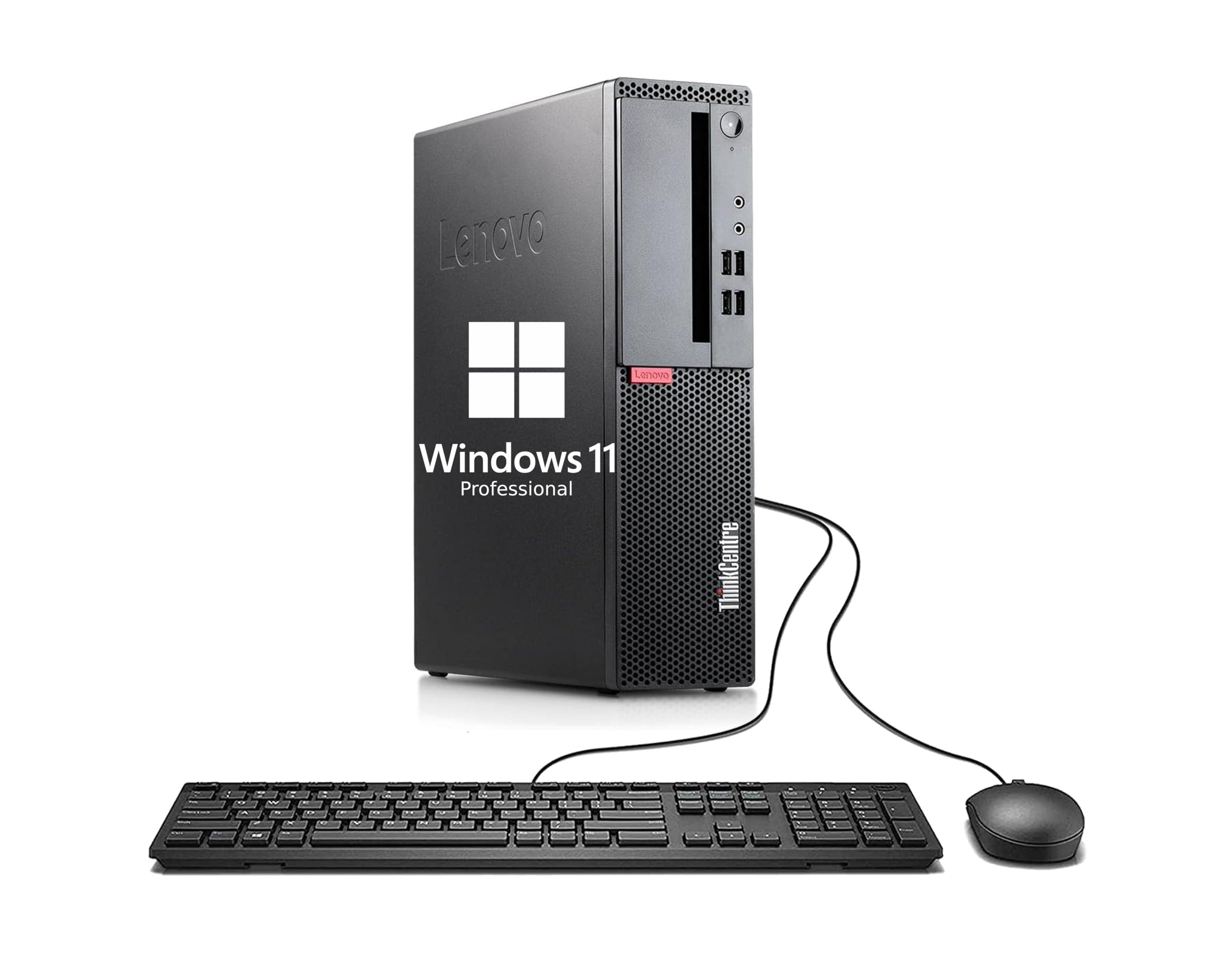
The Lenovo ThinkCentre M710 SFF is the most affordable entry point into a functional Windows desktop experience for basic computing needs. Powered by a 6th generation dual-core Intel Core i3-6100 running at 3.7 GHz, it handles web browsing, document editing, and email with acceptable responsiveness. The 8GB RAM and 256GB SSD combination provides enough memory for light multitasking and fast boot times.
Users appreciate the straightforward setup and inclusion of a keyboard and mouse, making it ready for immediate use. The small form factor design fits easily on crowded desks or in tight spaces. Its connectivity options, including USB 3.1 Gen1 and DisplayPort, allow for easy connection to modern monitors and peripherals. For basic office tasks and as a dedicated workstation for a single application, it does the job.
The dual-core processor is the biggest limitation, struggling with modern operating system overhead and any form of multitasking beyond a few browser tabs. Professional applications like photo editing or video conferencing will feel sluggish. For a secondary PC for a child, a basic point-of-sale system, or a dedicated device for simple data entry, the price point makes this a viable choice, but expectations must be kept grounded.
Why it’s great
- Extremely low cost of entry for a complete desktop system
- Includes keyboard, mouse, and all necessary cables
- Compact SFF design fits in small spaces
Good to know
- Dual-core i3-6100 struggles with modern multitasking
- Limited upgrade potential; no dedicated GPU support
FAQ
Can I run Windows 11 on a cheap CPU from 2015?
Is a dual-core CPU enough for basic home use in 2024?
What is the difference between a CPU and an APU?
Does a cheaper CPU always mean worse gaming performance?
How long can I expect a cheap CPU to last before needing an upgrade?
Final Thoughts: The Verdict
For most users seeking the best cheapest cpu, the winner is the AMD Ryzen 5 5600X because it offers a perfect blend of gaming performance, productivity power, and platform longevity at a price that undercuts its competitors. If you need integrated graphics to avoid buying a GPU today, grab the AMD Ryzen 3 3200G instead. And for the absolute lowest entry point into a complete desktop for basic office work, nothing beats the value of the Dell Optiplex 3050 SFF.

Mo Maruf
I created WellFizz to bridge the gap between vague wellness advice and actionable solutions. My mission is simple: to decode the research and give you practical tools you can actually use.
Beyond the data, I am a passionate traveler. I believe that stepping away from the screen to explore new environments is essential for mental clarity and physical vitality.