Our readers keep the lights on and my smoothie glass nicely filled. As an Amazon Associate, I earn from qualifying purchases.
Running large language models and AI diffusion workloads locally is no longer a luxury reserved for massive server rooms—it’s a new standard for serious creators and developers. The bottleneck has shifted from raw CPU speed to unified memory bandwidth, NPU acceleration, and the ability to keep an entire model’s weights resident in VRAM without swapping.
I’m Mohammad Maruf — the founder and writer behind WellFizz. I’ve spent hundreds of hours analyzing GPU memory pools, AMD vs. Intel NPU architectures, thermal performance under sustained compute loads, and the real-world compatibility of each system with tools like LM Studio, Ollama, and PyTorch.
Whether you are fine‑tuning a 70B parameter model or generating 4K concept art in seconds, the right hardware determines whether inference is snappy or agonizingly slow. This guide breaks down the most capable machines for the job so you can match your budget to the right computer for ai generation.
How To Choose The Best Computer For AI Generation
Generative AI workloads — from running local LLMs with large context windows to generating images with Stable Diffusion — place unique demands on a system. You need to prioritize memory capacity and bandwidth over traditional gaming benchmarks. Here are the critical factors that separate a capable AI workstation from a system that constantly hits out‑of‑memory errors.
VRAM or Unified Memory Capacity
This is the single most important spec for AI generation. A model like Llama 3 70B at 4‑bit quantization requires roughly 35GB of memory just for weights; a 120B Qwen model needs over 64GB. Discrete GPUs with 16GB of VRAM (like the RTX 5080) can handle 7B and 13B models comfortably but hit a wall with larger quantizations. Systems with unified memory — like the GMKtec EVO‑X2 or NVIDIA DGX Spark — can allocate 96GB or more across the CPU and GPU pool, enabling large models that simply won’t fit on consumer graphics cards.
NPU Architecture and TOPS Rating
Modern processors from AMD (Ryzen AI with XDNA 2) and Intel (Core Ultra with AI Boost) include dedicated neural processing units rated in TOPS. These NPUs offload lightweight AI tasks — such as background removal, audio enhancement, or simple classification — freeing the GPU and CPU for heavy inference. While NPU performance matters for ongoing daily acceleration, it does not replace the GPU for intensive generation workloads; look for a combination of a capable NPU and a discrete GPU with high VRAM.
Sustained Thermal Performance
AI generation runs at 100% utilization for minutes or hours at a time. A system that throttles after 30 seconds of heavy compute will ruin your workflow. Pay attention to cooling solutions — vapor chamber coolers on high‑end GPUs, dual turbo fan configurations on mini PCs, and the physical size of the heatsink. Card designs like the ASUS ROG Astral with a quad‑fan setup and patented vapor chamber maintain lower junction temperatures under continuous load, which directly translates to faster and more reliable inference.
Memory Bandwidth and Interface
Bandwidth dictates how fast model weights can be fed into the compute units. GDDR7 on RTX 50 series cards provides massive bandwidth for discrete GPUs. For unified memory systems, LPDDR5X at 8000MT/s (as in the GMKtec EVO‑X2) offers nearly double the bandwidth of standard DDR5 SODIMMs, which is critical when the same memory pool serves both CPU and GPU. PCIe 5.0 lanes also matter if you plan to attach external GPUs for expansion.
Quick Comparison
On smaller screens, swipe sideways to see the full table.
| Model | Category | Best For | Key Spec | Amazon |
|---|---|---|---|---|
| GMKtec EVO-X2 | Mini PC | Running 70B+ LLMs locally | 128GB LPDDR5X unified (96GB allocatable) | Amazon |
| NVIDIA DGX Spark | Desktop Supercomputer | Enterprise‑scale fine‑tuning on desktop | 1 PFLOPS FP4 / 128GB unified memory | Amazon |
| ASUS ROG Astral RTX 5080 | Graphics Card | High‑FPS image generation & neural rendering | 16GB GDDR7 / 4‑fan vapor chamber cooling | Amazon |
| NVIDIA RTX 5080 FE | Graphics Card | DLSS 4 and RTX‑accelerated AI workflows | 16GB GDDR7 / Blackwell architecture | Amazon |
| ASRock Radeon AI PRO R9700 | Professional GPU | Multi‑GPU server & 24/7 compute clusters | 32GB GDDR6 / RDNA 4 AI Accelerators | Amazon |
| Acer Predator Helios Neo 16 | Laptop | Portable AI generation & gaming | RTX 5070 Ti / Ultra 9 275HX + 13 NPU TOPS | Amazon |
| Reatan AI Mini PC (HX 470) | Mini PC | Mid‑range LLM inference & creative tasks | 48GB DDR5 / Radeon 890M / XDNA 2 NPU | Amazon |
| GEEKOM IT15 | Mini PC | Compact AI workstation for 4K generation | Intel Ultra 9 285H / 99 TOPS Arc 140T | Amazon |
| WIWB Desktop (i9-14900HX / RTX 5060 Ti) | Desktop Tower | Entry‑level AI generation & streaming | 8GB GDDR7 / i9-14900HX 5.4GHz | Amazon |
In‑Depth Reviews
1. GMKtec EVO-X2 AI Mini PC

The GMKtec EVO-X2 is built around the AMD Ryzen AI Max+ 395, a Strix Halo APU that combines 16 Zen 5 cores with a Radeon 8060S iGPU and a 50+ TOPS XDNA 2 NPU. Its eight‑channel LPDDR5X memory at 8000MT/s delivers 1.5x the bandwidth of standard SODIMMs, and the full 128GB pool can be allocated up to 96GB as VRAM through AMD software — enabling inference on models like Qwen3 235B at 8 tokens per second.
Real‑world performance is striking: it runs 70B parameter LLMs comfortably and supports 120‑130B MoE models at around 12 t/s. The triple‑fan cooling system keeps the unit at 35dB in Quiet Mode, and the switchable power profiles (54W, 85W, 140W) let you balance noise with throughput. Users report excellent compatibility with LM Studio and ROCm, though Nvidia‑focused AI tools may require minor workarounds.
One reviewer noted that after driver updates, token throughput actually improved from 8.7 t/s to 47 t/s on Debian with Vulkan — meaning this machine scales well with software maturity. The built‑in SD 4.0 card reader and Wi‑Fi 7 add real utility for content creators who move large datasets frequently.
Why it’s great
- 96GB VRAM allocation fits massive LLMs that consumer GPUs cannot touch
- Eight‑channel memory bandwidth eliminates the typical unified memory bottleneck
- Triple cooling system stays quiet under sustained compute loads
Good to know
- Tools built specifically for Nvidia CUDA may need Vulkan or ROCm configuration
- Heavier than expected for a mini PC at over 2.5 lbs
- Some BIOS tuning required for peak VRAM allocation on certain operating systems
2. NVIDIA DGX Spark

The DGX Spark is a purpose‑built personal AI supercomputer powered by the NVIDIA GB10 Grace Blackwell superchip. It delivers up to 1 petaFLOP of FP4 AI performance in a compact, energy‑efficient desktop chassis. With 128GB of coherent unified system memory and a 4TB NVMe SSD, it can run models with up to 200 billion parameters at FP4 quantization entirely locally — something no consumer GPU configuration can claim.
Its ARM‑based Grace CPU (Cortex‑X925 and Cortex‑A725 cores) is paired with a high‑performance Blackwell GPU, all connected via NVIDIA’s high‑speed NVLink‑C2C interconnect. This eliminates the typical data copy overhead between CPU and GPU memory, which is the primary bottleneck on conventional x86 systems for large model inference. The DGX Spark runs the full NVIDIA AI software stack, making it trivial to develop and test locally before deploying to cloud or data center.
Early adopters report running Qwen 3.6 27B models locally for ITAR‑compliant codebase review and achieving acceptable inference speeds for mapping and tracing tasks. The unit is essentially silent and has no external power indicator light, which some users found confusing during initial boot. The main trade‑off is that it runs a proprietary DGX OS; while the software ecosystem is mature, some users are concerned about long‑term support beyond the NVIDIA stack.
Why it’s great
- 128GB unified memory allows 200B parameter models on a desktop
- NVLink‑C2C interconnect eliminates CPU‑GPU data transfer latency
- Full NVIDIA AI stack integration for seamless local‑to‑cloud deployment
Good to know
- Proprietary OS may limit long‑term hardware flexibility
- Single inference throughput is lower than a discrete RTX 5090 for smaller models
- Premium price positions it beyond most individual budgets
3. ASUS ROG Astral RTX 5080 OC Edition

The ASUS ROG Astral RTX 5080 is a 3.8‑slot brute of a graphics card designed for sustained compute loads. Its quad‑fan Axial‑tech design — a unique fourth fan on the rear — combined with a patented vapor chamber and milled heatspreader keeps GPU junction temperatures significantly lower than reference designs. For AI generation, lower temperatures directly translate to higher sustained boost clocks and faster inference without throttling.
Equipped with 16GB of GDDR7 memory on a 256‑bit bus, this card is ideal for running 7B to 13B parameter models. In real‑world testing, users report achieving over 200 FPS in demanding games with DLSS 4 and maintaining 120‑240 FPS at 1440p with ray tracing enabled. For Stable Diffusion, the raw compute power of the Blackwell architecture with fourth‑gen RT Cores and fifth‑gen Tensor Cores ensures image generation is extremely snappy.
The card comes with a phase‑change GPU thermal pad that improves heat transfer from the die. Overclocking potential is excellent — one user reached 3200 MHz core and +1286 MHz on the memory. The main downsides are its weight (nearly 6 lbs, requiring a support bracket) and the fan noise at high RPM, though limiting fans to 70% still holds 65°C under load.
Why it’s great
- Quad‑fan and vapor chamber cooling for zero throttling under sustained AI loads
- GDDR7 memory bandwidth feeds large model weights efficiently
- Exceptional overclocking headroom with high‑end silicon lottery results
Good to know
- Massive 3.8‑slot footprint limits case compatibility
- Fan noise becomes noticeable above 70% speed
- 16GB VRAM is insufficient for 30B+ parameter models
4. NVIDIA GeForce RTX 5080 Founders Edition

The RTX 5080 Founders Edition marks a significant generational leap over the RTX 4070 in AI performance. Its Blackwell architecture brings dedicated FP4 Tensor Cores and DLSS 4 Multi Frame Generation, which directly accelerate inference for neural rendering and image generation tasks. The card delivers 2806 MHz boost clock speed and uses a triple‑slot blower design that exhausts heat out of the chassis, making it suitable for multi‑GPU workstation builds.
For AI generation, this card excels at running quantized 7B and 13B LLMs with exceptional token throughput. Users upgrading from RTX 3080 or 4070 cards report massive gains — one reviewer noted 200+ FPS in max‑settings gaming and 120‑240 FPS at 1440p with ray tracing active. The card is remarkably compact for its performance tier and does not require a support bracket, unlike many partner cards.
The main limitation is the 16GB VRAM ceiling: it cannot accommodate larger models like Qwen 32B at higher quantizations. It also uses PCIe 4.0 rather than 5.0, which is less of an issue for inference but may limit bandwidth in certain multi‑GPU configurations. Pricing was noted as well above MSRP at launch, though availability has improved.
Why it’s great
- DLSS 4 Multi Frame Generation for real‑time AI rendering
- Excellent thermal performance at 1440p and 4K loads
- Compact size fits in standard desktop cases without supports
Good to know
- 16GB VRAM limits model size to under 20B parameters
- PCIe 4.0 interface reduces expansion bandwidth for multi‑GPU setups
- Street prices can be hundreds over MSRP
5. ASRock Radeon AI PRO R9700 Creator 32GB

The ASRock Radeon AI PRO R9700 is a professional‑grade GPU built for AI and creator workloads. It offers 32GB of GDDR6 memory on a 256‑bit bus with a 2920 MHz boost clock — enough VRAM to run large language models like Qwen 32B at 4‑bit quantization entirely on the GPU without offloading to system memory. The card uses AMD’s RDNA 4 architecture with 64 Compute Units and dedicated second‑gen AI Accelerators.
This card’s blower cooler design is specifically optimized for multi‑GPU workstation configurations. It exhausts heat directly out of the chassis, preventing thermal buildup in dense server racks or tightly packed workstations. The vapor chamber heatsink with Honeywell PTM7950 thermal interface ensures reliable temperature control under the sustained 100% load typical of AI training and inference. Users report solid LLM serving performance with ROCm support, though some tinkering is expected for newer card bugs.
The R9700 is particularly well‑suited for developers running local code‑generation agents. One reviewer noted that 32GB works well for Qwen models generating code in Python, C#, and Java. The card uses a standard 2‑slot form factor and includes a 12V‑2×6 to 3×8‑pin power adapter. It does produce noticeable fan noise under load — comparable to an air purifier — but the trade‑off for rack‑optimized airflow is worth it for multi‑GPU systems.
Why it’s great
- 32GB VRAM fits 30B+ LLMs at 4‑bit quantization entirely on GPU
- Blower cooler enables dense multi‑GPU workstation configurations
- Vapor chamber and PTM7950 thermal interface for sustained 24/7 operation
Good to know
- Blower fan is noticeably loud under heavy compute loads
- ROCm support for new cards may require troubleshooting
- Some units reported missing fan screws — check packaging immediately
6. Acer Predator Helios Neo 16 AI Gaming Laptop

The Acer Predator Helios Neo 16 brings genuine desktop‑class AI generation to a laptop form factor. It pairs an Intel Core Ultra 9 275HX (with 13 NPU TOPS for lightweight AI offload) with an NVIDIA GeForce RTX 5070 Ti laptop GPU (992 AI TOPS on the Blackwell architecture). The 16‑inch WQXGA 240Hz G‑SYNC display with 100% DCI‑P3 makes on‑device image and video generation look vibrant and responsive.
For portable AI work, this laptop runs Stable Diffusion and 7B to 13B LLMs effectively. The NPU offloads background removal and audio tasks during streaming, preserving GPU cycles for generation. DLSS 4 Multi Frame Generation ensures that even while running AI tools, gaming performance remains smooth. Users report Time Spy scores around 17,600 and real‑world gaming at 100+ FPS at 3440×1440 with DLSS enabled.
The main compromises for AI are battery life and the 16GB soldered RAM. During sustained AI generation on battery, runtime drops dramatically. The 16GB DDR5 is also insufficient for larger models and cannot be upgraded past 32GB. A cooling pad is strongly recommended for extended inference sessions — the chassis heat under continuous GPU load is considerable.
Why it’s great
- 992 AI TOPS in a laptop form factor for on‑the‑go generation
- 240Hz 100% DCI‑P3 display ideal for real‑time AI rendering previews
- Combined NPU + GPU architecture handles background AI tasks efficiently
Good to know
- 16GB RAM is limiting for large model inference
- Battery life is poor under sustained AI workloads
- Blower fan noise and chassis heat are significant under load
7. Reatan AI Mini PC (AMD Ryzen HX 470)
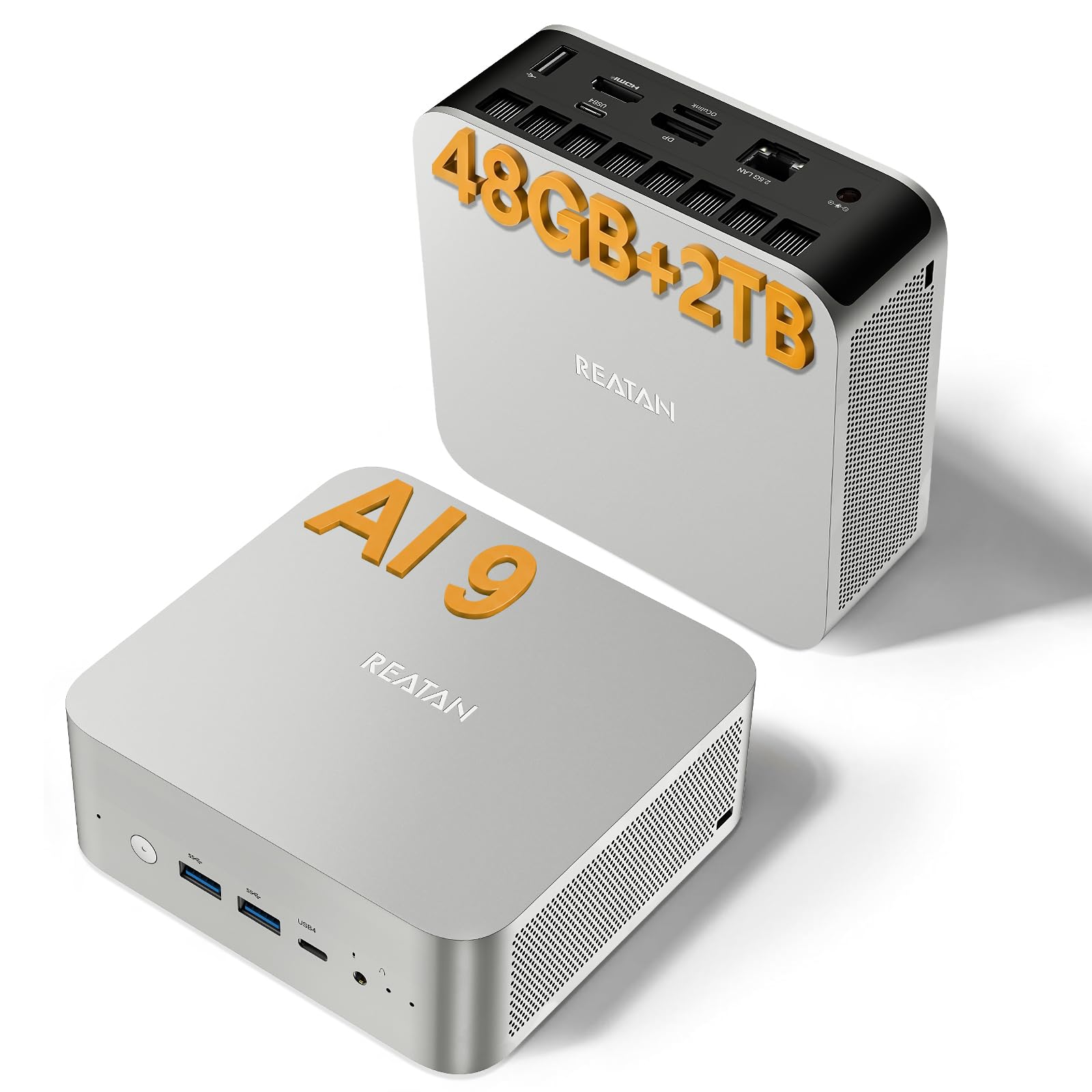
The Reatan AI Mini PC is built around the AMD Ryzen AI 9 HX 470 processor, a 12‑core / 24‑thread Zen 5 chip with a 55 TOPS XDNA 2 NPU and an integrated Radeon 890M iGPU with 16 RDNA 3.5 Compute Units. It comes with 48GB of DDR5 RAM (upgradeable to 96GB) and a 2TB NVMe SSD. The 890M iGPU delivers performance between an RTX 4060 and 4070 laptop GPU, making it capable of running many local LLMs and image generation models.
The system is well‑suited for mid‑range AI creation tasks. It handles LM Studio and smaller LLM inference comfortably — models up to around 20‑30B parameters are feasible at reduced context lengths. The built‑in USB4 40Gbps ports support eGPU expansion if more graphics power becomes necessary, and the dual 2.5GbE LAN ports are useful for network‑attached AI workflows. The unit itself stays quiet during normal use and manages heat well in compact enclosures.
Build quality is solid with a metal chassis and clean lines. One significant caution is customer support: multiple user reports indicate that units that died after a few weeks took months to repair or replace, with long delays due to parts or technician availability. This makes the unit a strong value for upfront performance but a risk for mission‑critical AI work where reliability is paramount.
Why it’s great
- 48GB DDR5 with upgrade path to 96GB fits mid‑range LLM workloads
- USB4 with 40Gbps bandwidth allows eGPU expansion for future AI demands
- Powerful 890M iGPU handles local inference without a discrete card
Good to know
- Customer support and RMA turnaround times are reported as unreliable
- Integrated GPU cannot match dedicated VRAM bandwidth for larger models
- Some units experienced failure within weeks of purchase
8. GEEKOM IT15 AI Mini PC

The GEEKOM IT15 leverages Intel’s latest Core Ultra 9 285H processor with a combined 99 TOPS of AI performance (13 TOPS NPU + 77 TOPS Arc GPU + 9 TOPS CPU). This mini PC can generate 4K concept art in 8.3 seconds using its NPU‑accelerated workflow, making it a strong option for designers and visual artists who need a compact desk footprint. It ships with 32GB DDR5 RAM (upgradeable to 128GB) and a 2TB Gen 4 NVMe SSD.
For local LLM inference, the IT15 handles models up to about 13B parameters reasonably well, though the Arc 140T integrated GPU lacks the raw bandwidth of a discrete card. Where it excels is in productivity acceleration — Adobe plugins, Blender, and Unreal Engine all benefit from the NPU offload for tasks like background removal and smart object recognition. The unit supports 8K quad display output via two HDMI 2.1 ports and two USB4 ports with 40Gbps bandwidth.
Build quality is noteworthy: the PC+ABS metal frame is rated for 200kg pressure, and the advanced cooling keeps noise below 35dB even under load. Reviewers consistently praise its quiet operation and small footprint. The 3‑year warranty is generous for a mini PC, though some users noted that out‑of‑box driver updates are needed for optimal HDMI compatibility and fan curve settings.
Why it’s great
- 99 TOPS total AI performance for on‑device NPU‑accelerated generation
- 8K quad display output ideal for multi‑screen AI development setups
- Metal frame and 3‑year warranty add durability and peace of mind
Good to know
- Integrated Arc 140T GPU limits large local LLM inference
- Default fan curve and drivers require initial BIOS tweaking
- HDMI cable quality can affect display stability
9. WIWB Desktop (i9-14900HX / RTX 5060 Ti)

The WIWB desktop is an entry‑level prebuilt tower that pairs an Intel Core i9-14900HX processor (24 cores / 32 threads up to 5.8GHz) with a GeForce RTX 5060 Ti 8GB graphics card. The RTX 5060 Ti uses the latest GDDR7 memory and supports DLSS 4.0, making it capable of running smaller Stable Diffusion models and 7B parameter LLMs with decent token throughput for the price.
This machine is best suited for users entering generative AI who don’t need to run large models. For 1080p or 1440p AI image generation, the 8GB VRAM buffer is sufficient for batch sizes of 1‑2 with standard Stable Diffusion checkpoints. The system also doubles as a solid gaming and streaming rig, with Wi‑Fi 6 and a full array of USB ports for peripheral connectivity. Setup is plug‑and‑play with a clean Windows install and minimal bloatware.
The biggest limitation is the 8GB VRAM ceiling — you cannot run 13B LLMs or large diffusion models without heavy quantization and offloading. Some users reported shipping damage or DOA units, and the internal layout appears to be glued rather than modular, making future upgrades difficult. It is a functional starting point for AI, but serious users will quickly hit the memory wall.
Why it’s great
- RTX 5060 Ti with GDDR7 provides good performance for entry‑level AI generation
- Ready‑to‑use with clean Windows install and minimal setup
- i9-14900HX CPU handles multi‑tasking alongside AI workloads
Good to know
- 8GB VRAM is a hard ceiling for anything beyond small AI models
- Non‑modular glued construction prevents user upgrades
- Some units arrived DOA or with missing ports
FAQ
Can I run a 70B LLM locally on a 16GB VRAM GPU?
Does the NPU in modern Intel or AMD chips help with Stable Diffusion?
Final Thoughts: The Verdict
For most users, the computer for ai generation winner is the GMKtec EVO-X2 because its 96GB allocable VRAM through the Ryzen AI Max+ 395 APU enables running massive LLMs that no consumer GPU can match, all in a quiet mini PC form factor. If you need the raw speed of discrete GPU compute for smaller models and real‑time rendering, grab the ASUS ROG Astral RTX 5080. And for enterprise‑grade local AI development with the full NVIDIA software stack, nothing beats the NVIDIA DGX Spark.

Mo Maruf
I created WellFizz to bridge the gap between vague wellness advice and actionable solutions. My mission is simple: to decode the research and give you practical tools you can actually use.
Beyond the data, I am a passionate traveler. I believe that stepping away from the screen to explore new environments is essential for mental clarity and physical vitality.