Our readers keep the lights on and my smoothie glass nicely filled. As an Amazon Associate, I earn from qualifying purchases.
The compact PC market has exploded, offering desktop-level performance in a chassis that fits in the palm of your hand. But navigating the trade-offs between processor generation, memory types like soldered LPDDR5 versus upgradeable DDR4, and the real-world impact of integrated graphics can feel overwhelming. This guide cuts through the noise to help you find the right machine for your specific workflow.
I’m Mohammad Maruf — the founder and writer behind WellFizz. I’ve spent hundreds of hours analyzing the hardware specifications, thermal designs, and real-world performance of the latest compact PCs to build this detailed guide.
Whether you need a silent office workhorse, a media server powerhouse, or a capable machine for light creative work, this breakdown of the best compact pc options will steer you toward the right balance of size, power, and value.
How To Choose The Right Compact PC
The key to a successful compact PC purchase is matching the hardware to your workload without overpaying for features you’ll never use. Focus on the CPU and its integrated GPU, the type and amount of RAM, storage expandability, and the port selection for your monitors.
CPU & Integrated Graphics
This is the heart of your compact PC. For office tasks and media streaming, an Intel N100 or a Ryzen 5 3500U is sufficient. For significant multitasking, video conferencing, and light photo editing, step up to a Ryzen 5 3550H or Intel Core i5. If you need to handle light gaming, 3D modeling, or video editing, prioritize a machine with a Ryzen 7 (7735HS or better) for its powerful Radeon 680M graphics, or the Intel Core Ultra 9 with Arc graphics.
Memory (RAM) & Storage
16GB of RAM is the sweet spot for most users. Check if the RAM is soldered (like LPDDR5) which prevents future upgrades, or if it’s a standard SO-DIMM module you can swap. For storage, a 512GB NVMe SSD is a good starting point. Look for an extra M.2 slot or a 2.5-inch SATA bay if you plan to add more drives later for media or project files.
Port Selection & Display Outputs
The whole point of a compact PC is to be a connectivity hub. Ensure the model has enough USB-A ports for your peripherals and at least one USB-C port for modern accessories. For monitors, confirm the number and type of video outputs (HDMI, DisplayPort, USB-C with DP Alt Mode) match your display setup, especially if you require triple 4K displays for stock trading or data analysis.
Quick Comparison
On smaller screens, swipe sideways to see the full table.
| Model | Category | Best For | Key Spec | Amazon |
|---|---|---|---|---|
| GEEKOM IT13 Mini PC | Premium | Business & 4K Workflows | 13th Gen i5-13600H | Amazon |
| GEEKOM A5 Mini PC | Mid-Range | Reliable Office Home | Ryzen 5 7430U | Amazon |
| ACEMAGICIAN M1 Mini PC | Mid-Range | Light Creative Work | Ryzen 7 7735HS | Amazon |
| KAMRUI Hyper H1 Mini PC | Mid-Range | Home Theatre & Steam | Ryzen 7 7735HS | Amazon |
| Lenovo ThinkCentre neo 50q | Mid-Range | Corporate Workstations | Core i5-13420H | Amazon |
| BOSGAME E2 Mini PC | Budget | Daily Office & School | Ryzen 5 3550H | Amazon |
| GMKtec Nucbox G10 | Budget | Home Server & Firewall | Ryzen 5 3500U | Amazon |
| ACEMAGIC K1 Mini PC | Budget | Cost-Effective Home Office | Ryzen R2544 | Amazon |
| HP Pro 400 G9 Mini PC | Budget | Simple, Trusted Computing | Intel Celeron G6900T | Amazon |
| Dell Slim Desktop ECS1250 | Budget | Home & Basic Office | Core Ultra 5-225 | Amazon |
| GEEKOM GT15 Max Mini PC | Premium | AI & AAA Gaming | Core Ultra 9 285H | Amazon |
In‑Depth Reviews
1. GEEKOM IT13 Mini PC

The GEEKOM IT13 earns the top spot for delivering a premium, versatile experience that bridges powerful office productivity and light creative work. Its 13th Gen Intel Core i5-13600H, a 12-core hybrid processor, provides the raw grunt needed to chew through 4K video conferencing, large spreadsheets, and even compiling code without a hitch. The included 1TB Gen4 NVMe SSD is a massive time-saver for file transfers and boot times, putting it ahead of the 512GB competition.
What truly sets the IT13 apart is its connectivity. The dual USB4 ports are a future-proofing masterstroke, supporting 8K displays and the ability to connect an external GPU, which dramatically extends the machine’s gaming and rendering lifespan. The build quality is equally impressive, with a reinforced metal frame rated to withstand significant pressure, making it feel far more robust than its budget rivals.
The 3-year warranty is the final nail in the coffin for competitors offering only one year of coverage. While configuring the fan curve in the BIOS is recommended for the quietest experience, the hardware foundation is rock-solid. The inclusion of WiFi 6E and a 2.5GbE port ensures top-tier networking for any connected workflow.
Why it’s great
- 13th Gen i5 offers excellent multi-core performance for business apps.
- Dual USB4 with up to 40Gbps supports eGPU and 8K monitors.
- Spacious 1TB Gen4 NVMe SSD is a major convenience, not a compromise.
- 3-year warranty provides exceptional long-term peace of mind.
Good to know
- Fan curve may require BIOS adjustment to achieve whisper-quiet operation out of the box.
- Integrated Iris Xe graphics is fine for esports but not for heavy AAA gaming without eGPU.
2. GEEKOM GT15 Max Mini PC

The GEEKOM GT15 Max is the undisputed performance king for users who need an incredibly small footprint without compromising on raw power. Packing the Intel Core Ultra 9 285H, this machine isn’t just fast—it’s smart. The integrated NPU delivers up to 99 TOPS for AI acceleration, enabling on-device tasks like background blur, smart effects, and faster creative rendering. The Intel Arc 140T GPU is a clear step up in integrated performance, capable of handling 1080p medium AAA gaming and smooth 8K video editing.
With 32GB of non-soldered DDR5 RAM expandable to 128GB and dual NVMe slots, this is built for longevity and heavy lifting. You can run multiple virtual machines, large datasets for analysis, or a complex video editing timeline without batting an eye. The dual USB4 and dual 2.5GbE ports cater perfectly to professionals handling large media files or requiring a network-connected storage server.
The all-aluminum alloy chassis and the advanced IceBlast 3.0 cooling system work in tandem to keep the components running cool and quiet, even during sustained loads. The 3-year warranty reinforces the premium commitment. It’s the most expensive machine here, but for anyone whose time is money, the GT15 Max’s raw processing and AI capabilities are unmatched in this form factor.
Why it’s great
- Intel Core Ultra 9 285H with NPU delivers top-tier CPU, GPU and AI performance.
- Powerful Intel Arc 140T GPU enables 1080p gaming and 8K editing.
- Non-soldered 32GB DDR5 RAM and dual SSD slots for maximum future upgrades.
- Advanced cooling system (IceBlast 3.0) maintains performance under sustained loads.
Good to know
- Represents a significant investment compared to office-focused models.
- Top-tier performance may require a clean Windows install to obtain specific drivers.
3. GEEKOM A5 Mini PC

The GEEKOM A5 is the definition of a balanced mid-range mini PC. Powered by the AMD Ryzen 5 7430U, it skips the low-power Intel N-series parts for a truly capable mobile processor. This 8-core, 16-thread CPU shreds through heavy office multitasking, video conferencing, and 4K streaming with effortless grace. It comes with a generous 512GB NVMe SSD, but the real story is its expansion: it features dual M.2 slots and a dedicated 2.5-inch SATA bay for up to 10TB total storage.
This machine was engineered with reliability in mind. GEEKOM highlights a 3x-reinforced shell and vibration-damping feet, making it suitable for 24/7 business operation. The self-developed IceBlast cooling system is remarkably effective, with owners noting the system is virtually silent under typical office loads. Connectivity is current-generation with WiFi 6 and Bluetooth 5.2, and the four display outputs (2x HDMI, 2x USB-C) natively support quad 4K monitors without active adapters.
The 3-year warranty is a huge advantage over the 1-year policies offered by many competitors. While the Radeon Vega 7 graphics are perfectly fine for productivity and 4K video, they are not designed for demanding 3D games. For a reliable, silent, and expandable office hub from a reputable brand, the A5 is a phenomenal choice.
Why it’s great
- Ryzen 5 7430U offers superior multi-core performance for demanding office tasks.
- Excellent expandability with dual M.2 and a 2.5-inch drive bay.
- Quad 4K display support via HDMI and USB-C right out of the box.
- Whisper-quiet operation and a robust 3-year warranty for business.
Good to know
- Radeon Vega 7 graphics are not suitable for anything other than light gaming.
- Initial Windows set-up can take over an hour, which is standard but worth noting.
4. ACEMAGICIAN M1 Mini PC

The ACEMAGICIAN M1 makes a compelling case for itself with an excellent component balance for its tier. At its heart is the AMD Ryzen 7 7735HS, which combines a powerful Zen 3+ CPU core with the best-in-class Radeon 680M integrated graphics. This combination isn’t just good for office work; it can handle light video editing in DaVinci Resolve and play many modern games at 1080p medium settings, making it a true affordable multimedia powerhouse.
The 24GB of LPDDR5 RAM is a double-edged sword. It offers incredible bandwidth that the Radeon 680M loves for gaming, but it is soldered to the board, meaning no future upgrade. This is a big decision point if you plan on keeping the machine for more than 4-5 years. The storage is more flexible, with a primary 512GB NVMe slot and an accessible secondary M.2 slot for easy expansion.
Connectivity is well-covered with WiFi 6, Bluetooth 5.2, and a 2.5GbE LAN port. The triple display support via HDMI, DisplayPort, and USB-C is standard for this class. Customer feedback consistently praises the machine’s quiet fan and fast boot times. It’s an ideal pick for the user who wants a compact PC that can do a bit of everything—from office spreadsheets to indie gaming—without stepping up to premium pricing.
Why it’s great
- Radeon 680M graphics are excellent for light 1080p gaming and video editing.
- 24GB of high-speed LPDDR5 RAM provides a big multitasking buffer.
- Quiet operation and consistently fast performance for its class.
- Excellent price-to-graphics-performance ratio for a compact PC.
Good to know
- RAM is soldered (LPDDR5) and cannot be upgraded, limiting future-proofing.
- The Ryzen 7 7735HS is a previous-gen chip, not the latest 7×40 series.
5. KAMRUI Hyper H1 Mini PC
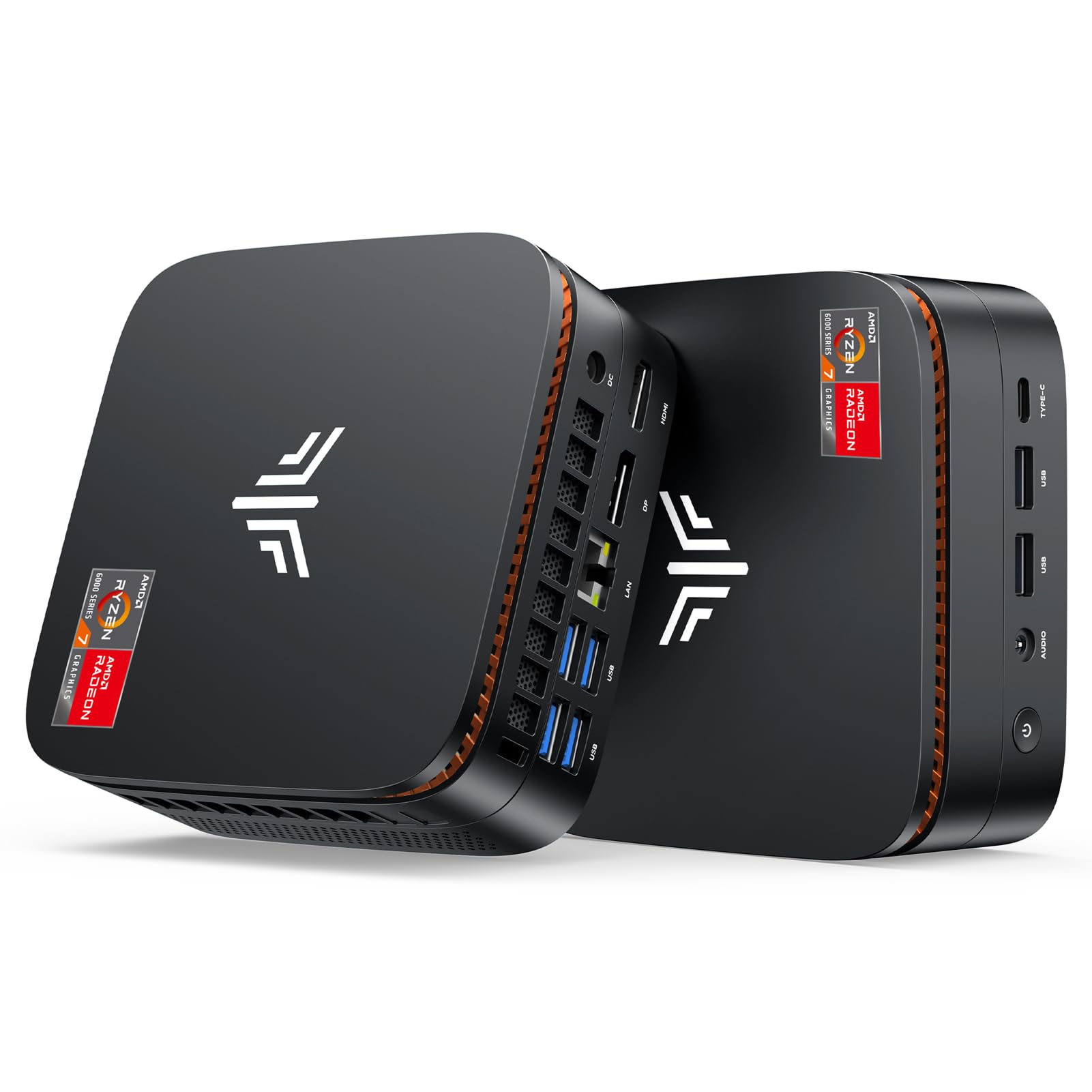
The KAMRUI Hyper H1 shares the same powerful AMD Ryzen 7 7735HS and Radeon 680M DNA as the ACEMAGICIAN M1, making it another strong contender for graphics-intensive workflows in a small box. Users have praised it for its snappy performance in Steam indie games, and with the addition of a second SSD, it works well as a primary PC for those with moderate 3D expectations. The 24GB of LPDDR5 RAM is again a key feature, feeding the iGPU effectively.
A unique strength reported by owners is the machine’s versatility as a Home Theater PC. It is consistently described as ultra-silent, which is critical for a living room setup. The dual HDMI ports make it a breeze to connect a TV and a monitor simultaneously. The inclusion of a SATA port for a 2.5-inch SSD adds welcome, inexpensive storage expansion for a media library, a feature some rivals lack.
Where the H1 falls into a secondary category is in its BIOS. Users note it is difficult to navigate and that driver support relies on downloading the correct files from KAMRUI’s website. The performance/noise setting in the BIOS is a welcome feature, allowing you to prioritize silence or raw performance. For the budget-conscious gamer or the media enthusiast wanting dual storage in a tiny, quiet chassis, the H1 is a fantastic value.
Why it’s great
- Radeon 680M graphics provide surprising gaming power for the size.
- Ultra-silent operation makes it perfect for a home theater environment.
- Dual HDMI ports for easy connection to TV and monitor.
- Includes internal SATA port for a 2.5-inch drive for easy media storage expansion.
Good to know
- BIOS interface is reported as basic and not very user-friendly.
- Driver support requires manual download from the manufacturer’s website.
6. Lenovo ThinkCentre neo 50q Gen 5

The Lenovo ThinkCentre neo 50q brings enterprise-grade build quality and serviceability to the compact PC market. Powered by the 13th Gen Intel Core i5-13420H, it provides robust, predictable performance for standard business software, video conferencing, and office productivity. It’s one of the slimmest chassis in this guide, making it a dream to mount behind a monitor or tuck away in a kiosk or retail environment.
Lenovo’s focus on business features shines through. Windows 11 Pro comes standard, granting access to BitLocker encryption, Remote Desktop, and Hyper-V for virtual machines. The port selection is generous for such a slim machine, including both HDMI 2.1 and DisplayPort 1.4 for dual 4K monitors, plus a total of 8 USB ports. Support for WiFi 6E and Bluetooth 5.3 ensures connectivity is current and stable.
The main trade-off for this premium, reliable design is the standard 8GB of RAM, which is on the low side for heavy multitasking. Upgrading it is easy due to the non-soldered SO-DIMM slots, but it adds to the initial cost. Also, some batches have reportedly come without a valid Windows license, an important thing to verify immediately upon setup. For a company buying a fleet of zero-client replacements, the Lenovo’s build and features are hard to beat.
Why it’s great
- Ultra-slim design and Lenovo enterprise build quality for reliability.
- Windows 11 Pro with advanced security and management features.
- Excellent connectivity with WiFi 6E, BT 5.3, and full-size display ports.
- Non-soldered RAM and storage for easy field upgrades.
Good to know
- Base configuration comes with only 8GB of RAM, which may need upgrading.
- Avoids top-level consumer storage and RAM specs for a higher business price.
- Some units have reported issues with pre-installed Windows license validity.
7. BOSGAME E2 Mini PC

The BOSGAME E2 effectively smashes the price-to-performance ratio for entry-level compact PCs. Its Ryzen 5 3550H with Radeon Vega 8 Graphics is a massive step up from the Intel N100 and Celeron processors found in similarly priced units. The real-world difference is night and day: it can handle heavier multitasking, snappier web browsing, and even light photo editing without bogging down. 16GB of DDR4 RAM and a 512GB NVMe SSD are the right specs for a worry-free experience.
Triple display support is a key feature at this price point. The combination of one USB-C and two HDMI 2.0 ports allows you to run a productive multi-monitor setup for stock trading or data entry. The cooling system is praised for being silent during office use, and its compact footprint (5 x 5 inches) takes up almost no space. The included VESA mount makes for a clean, cable-managed setup behind a monitor.
The biggest caveat comes from its build quality. While many units work flawlessly, there is a notable minority of customer reports citing a high failure rate, especially in business deployments of multiple units. This suggests inconsistent quality control. If you buy one unit for your home office, the risk is low, but the value proposition is sky-high. It’s an excellent, low-risk gamble for a budget-conscious user who needs solid Ryzen performance.
Why it’s great
- Ryzen 5 3550H offers excellent performance relative to its budget price point.
- Good standard configuration with 16GB RAM and 512GB SSD.
- Triple 4K display support via USB-C and dual HDMI for a productive multi-monitor setup.
- Near-silent operation under typical office workloads.
Good to know
- Customer feedback indicates some inconsistency in build quality and reliability.
- Not suitable for heavy gaming due to older Vega 8 graphics.
8. GMKtec Nucbox G10
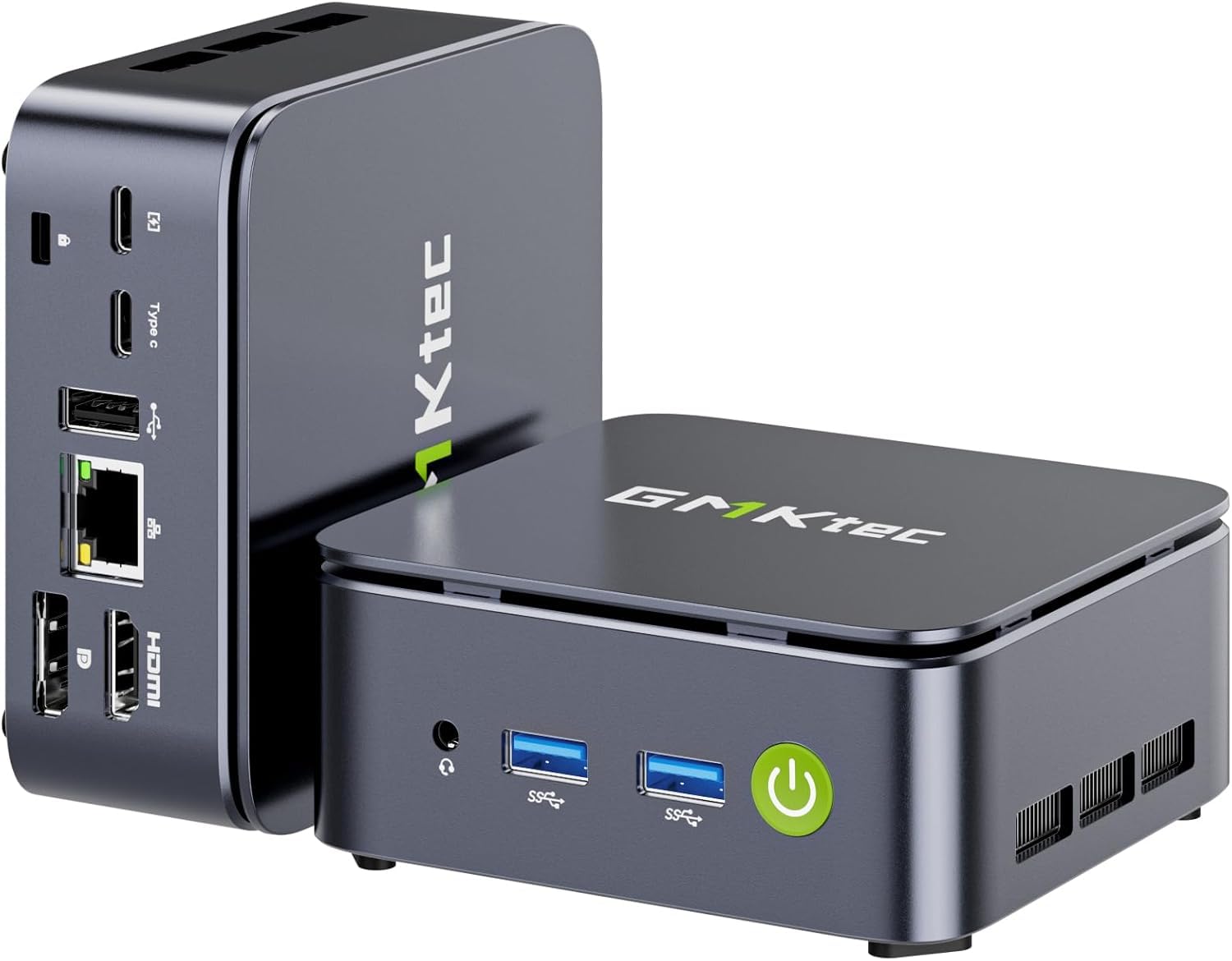
The GMKtec Nucbox G10 is a specialized pick, uniquely suited for the enthusiast who wants a home server, firewall, or network appliance. Its standout feature is the inclusion of a 2.5GbE Intel LAN port, which is a rarity in this price range. This makes it an ideal candidate for running pfSense, OPNsense, or a Proxmox virtualization host for network services, allowing for fast data transfers on a local network.
Under the hood, the Ryzen 5 3500U is a competent quad-core processor for office tasks and media streaming. The configurable TDP in BIOS (12W to 35W) lets you tune the machine for maximum power efficiency and silence as a dedicated server. The dual M.2 2280 SSD slots provide plenty of storage expansion for your media library or VM images. Triple 4K display output via HDMI 2.1, DP, and USB-C is a nice bonus for desktop use.
However, the wireless connectivity is a generation behind with WiFi 5, which is a non-issue if it will primarily run on the wired 2.5GbE connection. Some users also note the internal NVMe slot slightly off-length, but this is generally resolved with a bit of care. For a general-use desktop, other Ryzen options offer a better balance. But if you’re building a compact, low-power server with a fast wired connection, the Nucbox G10 is the budget specialist.
Why it’s great
- Includes a 2.5GbE LAN port, excellent for router/firewall and server applications.
- Configurable TDP in BIOS for optimized power efficiency and low noise.
- Dual M.2 2280 SSD slots provide great storage expansion for servers.
- Triple 4K display support for productivity when used as a standard PC.
Good to know
- Uses older WiFi 5, which is a downgrade from modern standards.
- NVMe slot can be a tight fit for some drives. It is not a desktop gaming PC.
9. ACEMAGIC K1 Mini PC

The ACEMAGIC K1 defines the entry-level smart buy. It uses a specific AMD Ryzen R2544 chip, which is realistically a rebranded Ryzen 3 4300U. This is a substantial leap over the Intel N100/N150 parts in terms of multi-core grunt, and with 16GB of DDR4 RAM, it handles a typical day of web browsing, office apps, and streaming without stuttering. The 256GB SSD is fine for a boot drive and basic file storage.
A clever design choice is the built-in power supply. Instead of a bulky external power brick, the K1 integrates the power circuitry directly into the chassis, requiring only a standard figure-8 power cable. This makes cable management much cleaner, especially when mounted behind a monitor. The metal body feels nicer than the all-plastic competition, and the axial fan is noted to be very quiet, even under moderate load.
The WiFi 5 and Bluetooth 4.2 are clearly last-gen, but they are functional for basic peripherals and internet connectivity. You won’t get top-speed file transfers, but for a secondary office computer or a PC for a family member doing basic tasks, it’s perfectly adequate. The 3-year warranty from ACEMAGIC is a great safety net. It’s an ideal, cost-effective first foray into compact PCs for non-demanding users.
Why it’s great
- Ryzen R2544 outperforms the common Intel N100/N150 for entry-level tasks.
- Integrated internal power supply eliminates a messy external brick.
- Attractive metal body and quiet cooling fan.
- Long 3-year warranty adds confidence to the budget buy.
Good to know
- Uses outdated wireless standards (WiFi 5, BT 4.2).
- Modest 256GB SSD will fill up quickly with large files.
- Not suitable for gaming, video editing, or heavy multitasking.
10. HP Pro 400 G9 Mini PC

The HP Pro 400 G9 is the trusted, no-nonsense workhorse for the most basic of computing needs. It is built by a major OEM with the reliability and after-sales support that implies. Its Intel Celeron G6900T processor is a dual-core chip strictly for light duties: word processing, web browsing, and email. It will not handle heavy multitasking or any form of modern gaming, but it will do its simple job reliably for years.
This machine shines in its simplicity and form factor. It provides a full-fledged Windows 11 Pro experience in a chassis that weighs under 3 pounds. The HP build quality means is has enterprise-grade components and is designed for longevity. It supports up to 32GB of DDR5 RAM and up to 4TB of SSD storage, but the included configuration gets the job done out of the box. Being an HP, business security features and driver support are a given.
The biggest drawback is the Celeron processor. In an age where even phones have octa-core chips, the 2.8GHz dual-core is a stark reminder of its low cost. It will feel slow if you are used to a modern laptop. This machine is best for a senior user, a dedicated kiosk, a reception desk, or an educational setting where the task is simple and the priority is stability, not speed. The included keyboard and mouse make it a complete, ready-to-go package.
Why it’s great
- Rock-solid HP enterprise build quality and reliability.
- Includes a wired keyboard and mouse for a complete out-of-box setup.
- Supports DDR5 RAM and comes with Windows 11 Pro.
- Extremely compact and whisper-quiet for simple office environments.
Good to know
- Dual-core Celeron CPU is very weak for modern multitasking and web browsing.
- Does not include a VESA mount for monitor mounting.
- Integrated graphics are only suitable for text and basic video output.
11. Dell Slim Desktop ECS1250

The Dell Slim Desktop ECS1250 is a modern take on the traditional desktop tower, offering robust performance in a significantly smaller chassis. Its key selling point is the inclusion of the new Intel Core Ultra 5 processor. This chip isn’t just about raw speed; its built-in NPU (Neural Processing Unit) accelerates AI-powered tasks like background blur in video calls and on-device photo editing, offering a taste of the next generation of PC features.
With 16GB of DDR5 RAM and a 512GB SSD, the standard configuration is perfectly balanced for a home office or general family use. It handles web browsing, video streaming, and office suites with complete fluidity. The inclusion of a 3-in-1 SD card reader is a welcome, practical feature for photographers and content creators who work with camera files regularly. Dell also provides 1 year of onsite service, which is a premium support offering.
While its slim tower design is much smaller than a traditional ATX computer, it is not truly a “compact PC” in the same sense as the palm-sized mini PCs reviewed here. It is larger and will take up more desk space. It’s best suited for users who want upgradability (easy access, standard components) and a modern, AI-capable processor but don’t need the ultra-small footprint of a NUC-style machine. Its general focus on home use makes it a solid, but slightly different, category entry.
Why it’s great
- Intel Core Ultra 5 with NPU enables new AI-powered features and efficiency.
- Well-balanced 16GB DDR5 and 512GB SSD for general home use.
- Tool-less chassis makes upgrades and future maintenance very easy.
- Includes a built-in SD card reader and 1 year of Dell onsite service.
Good to know
- True “slim desktop” tower is physically larger than a palm-sized mini PC.
- Uses standard desktop components, which means it won’t be as silent as passively cooled minis.
FAQ
Can a compact PC handle 4K video editing?
Is it worth paying more for an AI-ready NPU in a mini PC?
How important is a 2.5GbE LAN port on a compact PC?
Can I use a compact PC for gaming?
Final Thoughts: The Verdict
For most users, the best compact pc winner is the GEEKOM IT13 because it offers a brilliant balance of modern Intel performance, top-tier connectivity like USB4, and a generous 1TB SSD—all backed by a 3-year warranty. If your priority is raw graphics horsepower for gaming and AI tasks, the GEEKOM GT15 Max is the ultimate powerhouse. And for a budget-friendly workhorse that handles daily office tasks with Ryzen efficiency, the BOSGAME E2 delivers sensational value.

Mo Maruf
I created WellFizz to bridge the gap between vague wellness advice and actionable solutions. My mission is simple: to decode the research and give you practical tools you can actually use.
Beyond the data, I am a passionate traveler. I believe that stepping away from the screen to explore new environments is essential for mental clarity and physical vitality.