Our readers keep the lights on and my smoothie glass nicely filled. As an Amazon Associate, I earn from qualifying purchases.
Watching your CPU temperature spike under a heavy gaming load or a demanding render is a specific kind of anxiety every PC builder knows. The stock cooler that came in the box often struggles to keep pace, leading to thermal throttling, reduced performance, and a noisy desk setup. Upgrading is one of the most effective ways to unlock your processor’s full potential, but the sheer number of air towers, closed-loop liquid coolers, and all-in-one systems makes choosing the right one a project in itself.
I’m Mohammad Maruf — the founder and writer behind WellFizz. I’ve spent countless hours combing through thermal performance benchmarks, pump and fan noise data, socket compatibility lists, and user experiences to separate the cooling solutions that genuinely deliver from those that just look good in a product render.
From whisper-quiet low-profile air coolers for small form factor builds to high-performance 360mm AIOs with LCD screens, this guide breaks down the top options to help you find the best cooler for cpu that matches your system’s needs and your noise tolerance.
How To Choose The Best Cooler For CPU
Selecting a cooler requires balancing three factors: your CPU’s thermal output, your case dimensions, and your tolerance for fan noise. When you know the heat load you need to manage, you can sort through the market with confidence rather than guesswork.
Air Cooler vs AIO Liquid Cooler
Air coolers, like the Noctua NH-L9x65, are simpler, cheaper, and have no risk of pump failure or leakage. They rely on heat pipes and a large fin stack to dissipate heat. AIO liquid coolers, such as the Thermalright Aqua Elite 240 V3 or the NZXT Kraken Plus 240, use a pump to circulate liquid through a radiator. AIOs generally handle higher TDPs more efficiently and can keep fans at lower speeds during moderate loads, but they add a point of mechanical failure.
Radiator Size and Case Compatibility
A 240mm radiator (two 120mm fans) is the sweet spot for most mid-tower builds and high-TDP CPUs. A 360mm radiator like the CORSAIR Nautilus 360 RS or the PCCOOLER DC360 offers more surface area for heat exchange, ideal for overclocked flagship processors, but it requires a case with sufficient clearance — usually a mid-tower or full-tower. A 120mm AIO generally underperforms compared to a budget air tower, so aim for 240mm or larger if you’re going liquid.
Noise Level and Fan Specs
Check the noise rating in decibels and the fan’s static pressure (mmH₂O) versus airflow (CFM). Higher static pressure fans are better at pushing air through dense radiator fins. For a quieter build, look for coolers with fans rated under 30 dBA at full speed. Models like the ARCTIC Liquid Freezer III Pro and the Noctua low-profile cooler are noted for their excellent acoustic profiles under normal usage.
Quick Comparison
On smaller screens, swipe sideways to see the full table.
| Model | Category | Best For | Key Spec | Amazon |
|---|---|---|---|---|
| Thermalright Aqua Elite 240 V3 | Mid-Range | Great value 240mm AIO | 240mm Radiator, 66.17 CFM | Amazon |
| MSI MAG Coreliquid A13 360 | Mid-Range | Quiet 360mm for high TDP | 360mm Radiator, 14.4 dBA | Amazon |
| CORSAIR Nautilus 360 RS | Premium | Low-noise 360mm AIO | 360mm Radiator, 20 dBA Pump | Amazon |
| ARCTIC Liquid Freezer III Pro 240 | Premium | Thick rad & VRM cooling | 38mm Radiator, 77 CFM | Amazon |
| Noctua NH-L9x65 chromax.Black | Premium | SFF/ITX low-profile air | 65mm Height, 92mm Fan | Amazon |
| PCCOOLER CPS DC360 | Premium | 360mm with IPS display | 2.4″ IPS Screen, 90.56 CFM | Amazon |
| NZXT Kraken Plus 240 | Premium | 240mm with LCD screen | 1.54″ LCD, 240mm Radiator | Amazon |
In‑Depth Reviews
1. Thermalright Aqua Elite 240 V3

The Thermalright Aqua Elite 240 V3 delivers a compelling mix of solid thermal performance and vibrant ARGB lighting for a price that punches well above its tier. Its fourth-generation pump head spins at up to 2800 RPM, while the dual TL-C12B-S V2 fans move 66.17 CFM of air through the 240mm radiator at a quiet 25.6 dBA. Users report keeping a Ryzen 5800X3D in the low 70°C range under load and dropping a 5600X from 90°C to the mid-60s—numbers that rival coolers costing significantly more.
The octagonal cold pump head features an ARGB halo that syncs with your motherboard via a standard 5V 3-pin header, and the included mounting hardware supports all modern sockets, including AM5 and LGA 1700/1851. Customers note that the installation is straightforward, and the compact water block works well even in smaller cases like the Lian Li A4. The 40,000-hour pump lifespan adds confidence for long-term use.
One consistent observation is that the tubes feel stiffer than some premium competitors, which can make routing in tight spaces a minor challenge. A few users also mention a subtle pump whine above 60% speed, but most find it drowned out by case fans during gaming or work. The included manual is tiny, though the installation process is simple enough to follow. For a mid-range 240mm AIO that cools effectively and looks sharp, this is the benchmark.
Why it’s great
- Excellent price-to-performance ratio for 240mm AIO cooling.
- Bright, motherboard-syncable ARGB on both pump and fans.
- Quiet operation under normal loads at 25.6 dBA.
Good to know
- Tubes are stiff and require careful planning in smaller cases.
- Pump can produce a whine when set above 60% speed.
2. MSI MAG Coreliquid A13 360

If low noise is your priority alongside high thermal capacity, the MSI MAG Coreliquid A13 360 stands out with a pump that runs at only 14.4 dBA — barely perceptible in a quiet room. Its split-flow aluminum radiator integrates a three-phase pump with ceramic bearings running up to 3800 RPM, and the triple 120mm PWM fans are daisy-chained for a cleaner build. A user replacing a Thermalright air cooler on a 5800X3D saw thermal throttling disappear entirely, with max package temps hitting just 75°C during gaming.
The 360mm radiator provides ample surface area for high-TDP CPUs, and the triple-layered evaporation-proof tubing adds durability. The cooler includes pre-applied thermal paste and supports LGA 1851 out of the box, along with AM5/AM4. Installation is simple thanks to the preinstalled fans and straightforward mounting bracket. Multiple users note that the system has kept their CPUs cool through months of demanding gaming and AI computing workloads without issue.
A minor build-quality detail: the MSI logo on the pump cover may not be perfectly aligned with AM4/AM5 brackets, though it doesn’t affect performance or fit. The daisy-chained fan connection and single breakout cable reduce cable clutter significantly compared to traditional AIOs. For a 360mm cooler that delivers strong thermal headroom with whisper-quiet acoustics, this is a serious contender for noise-sensitive builders.
Why it’s great
- Exceptionally quiet pump at 14.4 dBA.
- 360mm radiator handles high TDP CPUs with ease.
- Tool-free mounting and pre-applied thermal paste simplify installation.
Good to know
- Logo alignment may be slightly off on AMD brackets.
- Requires a case with 360mm radiator support.
3. CORSAIR Nautilus 360 RS

CORSAIR’s Nautilus 360 RS builds on a reputation for reliable all-in-one cooling with a focus on low-noise operation and straightforward connectivity. The pump operates at a whisper-quiet 20 dBA, while the included RS120 fans leverage CORSAIR AirGuide technology and Magnetic Dome bearings to generate strong static pressure for pushing air through the dense 360mm radiator. Users with a Ryzen 9 9950X report excellent temperatures and near-silent operation during light loads, with fans ramping up only under sustained heavy work.
The convex cold plate design with pre-applied thermal paste ensures maximum contact with the CPU’s integrated heat spreader, and one user saw a 10°C drop in gaming temps after replacing the stock paste with a high-performance alternative. The daisy-chain fan connections reduce cable clutter to a single 4-pin PWM header. The long 15.59-inch radiator fits comfortably in most mid-tower and full-tower cases, and the spring-loaded mounting screws make installation simple even for first-time builders.
One note for noise-sensitive users: while the cooler is very quiet at standard fan curves, the fans are audible under heavy loads at 36 dBA. The pump itself remains consistent and low in tone. Users also highlight that the all-black design without RGB is a refreshing option for those building a stealth-themed rig. After nearly a year of use, one customer reported rock-solid performance while gaming on a 5900X.
Why it’s great
- Very quiet pump at 20 dBA with strong flow rate.
- Convex cold plate ensures optimal CPU contact.
- Daisy-chain fans reduce cable mess significantly.
Good to know
- Fans become audible under heavy loads at 36 dBA.
- Replacing pre-applied thermal paste can improve temps by up to 10°C.
4. ARCTIC Liquid Freezer III Pro 240 A-RGB
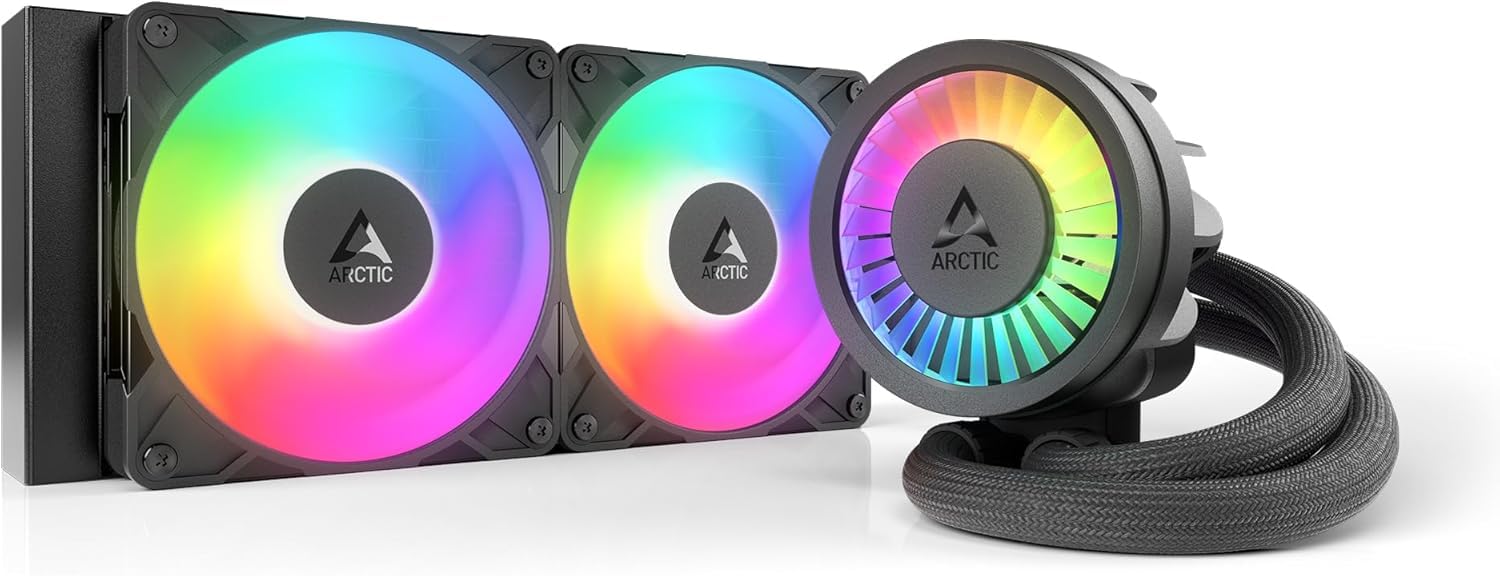
The ARCTIC Liquid Freezer III Pro 240 distinguishes itself with a 38mm thick radiator — noticeably beefier than the standard 27mm found on most 240mm AIOs. This extra surface area translates into substantial thermal headroom. The P12 Pro fans push up to 77 CFM and are designed to be quieter than the standard P12 at low speeds, though they can get loud at maximum RPM. An integrated VRM fan on the pump helps lower temperatures around the CPU socket, which is a rare and welcome addition for motherboard longevity.
The cooler includes a contact frame for LGA 1851 and LGA 1700 to optimize pressure distribution and improve heat transfer. The native offset mounting shifts the cold plate center toward the CPU hotspot — a design choice that particularly benefits AMD AM5 processors like the 7800X3D. Users upgrading from a Coolermaster ML240 saw a 4°C drop in load temps on their 7800X3D, and one builder with a Ryzen 9 3900 reported a massive 30°C reduction from the stock cooler. The integrated cable management within the hose sheathing keeps the build looking clean.
Installation requires careful attention to case clearance, as the combined radiator and fan thickness is about 12mm more than typical 240mm units. A few users note that applying the cooler to the CPU required more force than expected, particularly when securing the mounting plate. The PWM-controlled pump and fans can be tuned to near-silent operation with a custom fan curve in the BIOS. If you can accommodate its deeper radiator, the thermal performance is genuinely class-leading for the size.
Why it’s great
- 38mm thick radiator provides excellent cooling capacity for a 240mm AIO.
- Integrated VRM fan and contact frame improve overall system thermals.
- Offset mounting design targets CPU hotspot for better efficiency.
Good to know
- Thicker radiator requires more case clearance than standard 240mm units.
- Installation can feel tight, especially when securing the cold plate.
5. Noctua NH-L9x65 chromax.Black
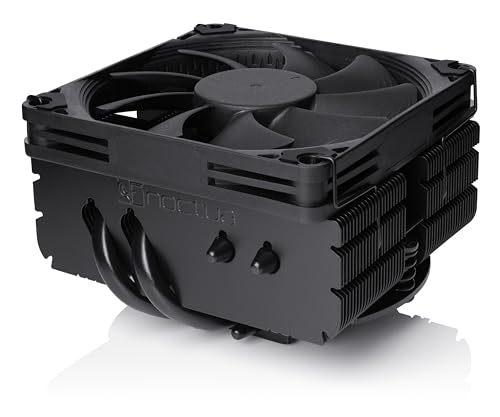
For small form factor builds, space is the most precious resource, and the Noctua NH-L9x65 chromax.Black delivers strong air cooling in a 65mm tall package. Its 95x95mm footprint means it clears RAM slots and PCIe lanes on virtually any ITX motherboard, and the all-black design fits the aesthetic of modern SFF cases perfectly. The four copper heat pipes and slim NF-A9x14 92mm PWM fan handle CPUs with moderate heat output — users report keeping a Ryzen 7 7700X at 75°C peak load and an i5-12600KF at 60-63°C during gaming.
The included SecuFirm2 mounting system is a joy to work with in tight spaces, supporting Intel LGA 1851, 1700, 1200, 115x, and AMD AM5/AM4 with an offset option for optimal efficiency. The Low-Noise Adaptor and PWM support let you fine-tune the balance between cooling and acoustics. One user built a mini server with a 14700K using this cooler and reported very low noise even without case fans, while another fitted it into a 2U chassis for a TrueNAS build.
This cooler is not designed for extreme overclocking or high-TDP chips like the 14900K under full load — its thermal capacity is limited by the slim fan and compact fin stack. You’ll need to check the CPU compatibility list before buying. But for HTPCs, ITX gaming rigs, and home servers where every millimeter counts, the NH-L9x65 is the gold standard. The included NT-H1 thermal paste is top-tier as well.
Why it’s great
- Ultra-compact 65mm height fits almost any SFF/ITX case.
- Full RAM and PCIe clearance with 95x95mm footprint.
- Quiet operation with PWM control and Low-Noise Adaptor.
Good to know
- Limited thermal capacity — not suitable for high-TDP overclocked CPUs.
- Requires cross-referencing the CPU compatibility list for optimal performance.
6. PCCOOLER CPS DC360
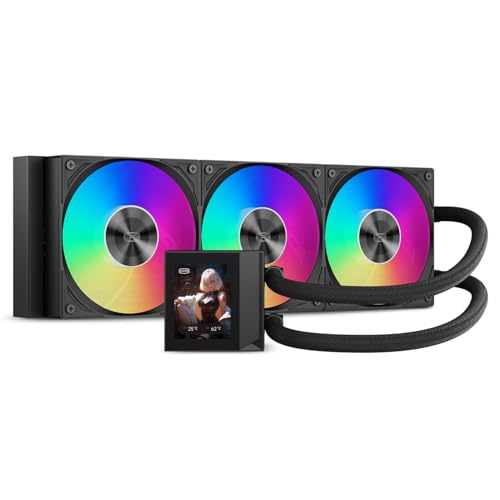
The PCCOOLER CPS DC360 brings enthusiast-grade features to a mid-range price bracket, headlined by a bright 2.4-inch IPS LCD that displays CPU temperature, custom images, or animated GIFs. Under the hood, a next-generation pump runs at 2600 RPM at only 15 dBA, while three F5 R120 ARGB fans spin up to 2500 RPM, generating 90.56 CFM of airflow with 4.07 mmH₂O static pressure. That combination keeps a Ryzen 9 7950X3D under 73°C under full load and an overclocked 13900KS barely touching 90°C.
The aluminum CNC waterblock housing and sleeved 400mm tubes give the unit a premium feel that belies its price. ARGB synchronization works with all major motherboard ecosystems, and the daisy-chained fans simplify wiring. Users who set a custom fan curve in the BIOS find the cooler quiet during idle and gaming, with the loudest scenario being sustained 100% load benchmarks where the fans ramp up to their full 2500 RPM for maximum cooling. The display software, while functional, can be slightly finicky to set up initially.
One consistent tradeoff is noise at maximum fan speed — multiple users describe it as a “jet engine” at full tilt. This is easily managed by capping the fan speed in BIOS or motherboard software if you prioritize quiet over peak thermal performance. The 90.56 CFM airflow is among the highest in this roundup, making this an excellent choice for builders who want to push overclocks and show off their hardware. Six months of use from a customer with a Ryzen 9 5900XT shows consistent performance and no pump degradation.
Why it’s great
- Vibrant 2.4-inch IPS display for real-time system info and custom content.
- High 90.56 CFM airflow and 4.07 mmH₂O static pressure.
- Excellent thermal performance for high-TDP overclocked CPUs.
Good to know
- Fans are very loud at maximum speed without a fan curve adjustment.
- Display software can be finicky to set up initially.
7. NZXT Kraken Plus 240
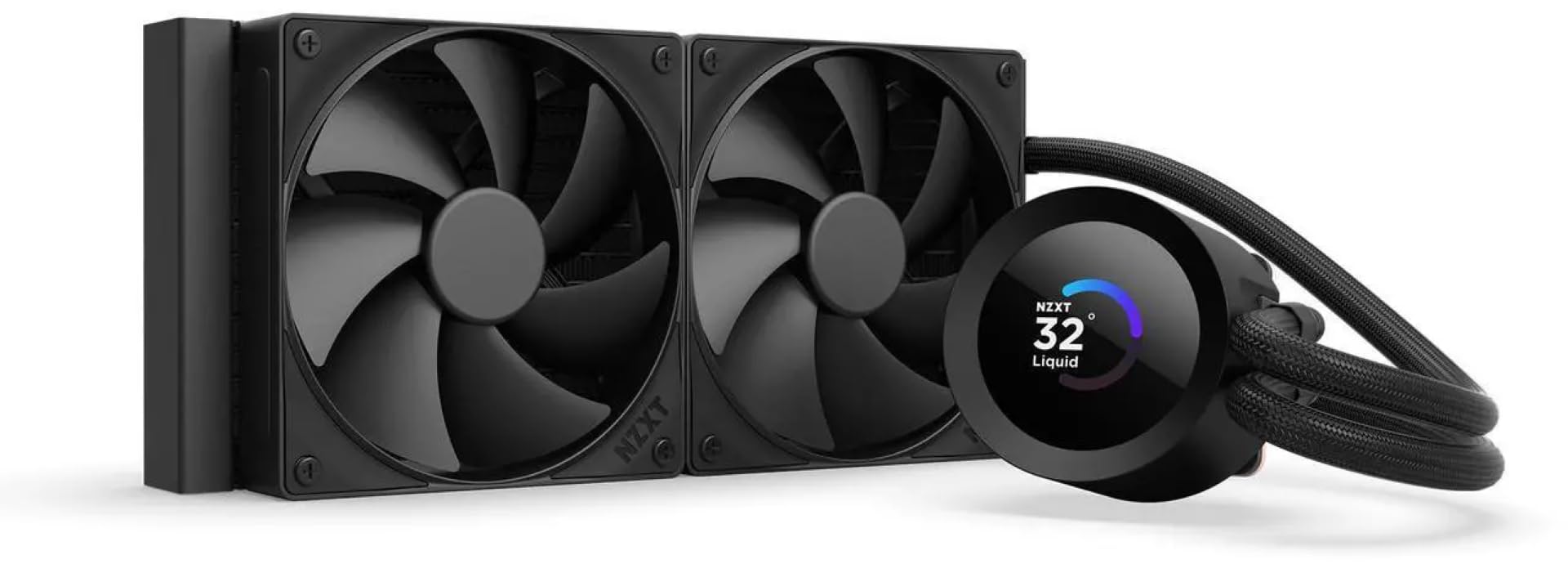
The NZXT Kraken Plus 240 is the choice for builders who want a compact 240mm AIO with the visual flair of a customizable LCD screen. The 1.54-inch square display can show real-time system temperatures, animated GIFs, or even Spotify and YouTube integrations through the NZXT CAM software. The Turbine pump is engineered for high flow and head pressure while staying quiet under normal operation, and the two F120P high-static-pressure fans move air efficiently through the 240mm radiator. Users with a Ryzen 9 system report idle temperatures in the high 30s and excellent performance under gaming loads.
The installation is streamlined with a tool-free mounting bracket, pre-applied thermal paste, and a single breakout cable from the pump that reduces wiring complexity. The Zero RPM Mode stops the fans entirely at low loads for silent operation. The Kraken Plus supports the latest sockets including LGA 1851 and AM5, making it a future-proof option for new builds. The all-black design with subtle RGB on the fan ring looks clean in any case.
A small but notable portion of users have experienced pump issues that required software intervention or a full power drain to resolve. The CAM software is essential for pump control and display customization, which some users consider a dependency rather than a feature. Additionally, a few reviews note that the pump can be noisy at full speed if not properly configured. If you enjoy tinkering with software and want a premium aesthetic, the Kraken Plus 240 delivers, but it’s worth being aware of the potential for software-related quirks.
Why it’s great
- Customizable 1.54-inch LCD screen shows system stats and custom content.
- Tool-free mounting and breakout cable simplify installation.
- Zero RPM Mode for silent low-load operation.
Good to know
- CAM software required for full control; occasional pump/software issues reported.
- Pump can be noisy at full speed without proper configuration.
FAQ
Is a 240mm AIO enough for a high-TDP CPU like the i7-14700K?
How do I know if an AIO cooler will fit in my PC case?
What does pump speed (RPM) mean for cooling performance?
Air cooler vs AIO: which is more reliable long-term?
Does an LCD display on a cooler affect cooling performance?
Final Thoughts: The Verdict
For most users, the best cooler for cpu winner is the Thermalright Aqua Elite 240 V3 because it delivers outstanding 240mm AIO cooling performance and vibrant ARGB at a price that undercuts the competition without cutting critical corners. If you want whisper-quiet operation with more thermal headroom for a high-end CPU, grab the MSI MAG Coreliquid A13 360. And for a small form factor build where every millimeter counts, nothing beats the Noctua NH-L9x65 chromax.Black.

Mo Maruf
I created WellFizz to bridge the gap between vague wellness advice and actionable solutions. My mission is simple: to decode the research and give you practical tools you can actually use.
Beyond the data, I am a passionate traveler. I believe that stepping away from the screen to explore new environments is essential for mental clarity and physical vitality.