Our readers keep the lights on and my smoothie glass nicely filled. As an Amazon Associate, I earn from qualifying purchases.
You’ve spent hours designing a custom decal on your Cricut, only to have the printer deliver colors that bleed outside the score lines or look faded after layering. That mismatch between screen and vinyl isn’t a skill gap—it’s a compatibility problem between your print technology and the cutting mat’s registration system. The wrong ink formulation (dye versus pigment) can cause smudging when the Cricut’s rollers grip the paper, ruining projects you cannot restart.
I’m Mohammad Maruf — the founder and writer behind WellFizz. I’ve cross-referenced hundreds of real user reports on ink adhesion, page curl, and color accuracy with Cricut Design Space’s print-then-cut workflow to find which models actually survive the roller test.
Whether you are working with printable vinyl, sticker paper, or cardstock, pairing a machine with the right ink type and media path is the single biggest factor determining whether your projects come out crisp or crooked. That is precisely what this guide to the best color printer for cricut aims to solve by breaking down the specifications that matter most to cutters.
How To Choose The Best Color Printer For Cricut
A printer that works flawlessly for office documents can fail catastrophically when feeding sticker paper into a Cricut. The key differences lie in ink chemistry, paper handling, and the path the sheet travels after printing. Your Cricut Maker, Explore Air, or Joy relies on crisp black registration marks and paper that lies flat—any curl or shift throws off the blade path.
Ink Technology: Pigment vs. Dye
Pigment-based inks sit on top of the paper rather than soaking in, creating a water-resistant surface that does not smudge when your Cricut rollers apply pressure. Dye-based inks absorb into fibers and can fade or run when exposed to moisture. For stickers or labels that will be handled, pigment is the safer choice. Some high-end photo printers use multiple dye inks for a wider color gamut but require careful drying time before cutting.
Paper Path and Sheet Curl
Printers with a straight-through rear feed or a flat output tray produce less page curl than machines that bend the sheet 180 degrees around a roller. Curled paper lifts the registration marks above the Cricut sensor plane, causing misreads. Models with a rear paper tray or a top-exit path are better suited for the heavy cardstock and adhesive-backed media that Cricut users often load.
Ink Cost per Page and Page Yield
If you produce dozens of sticker sheets weekly, cartridge-based printers can quickly cost more each year than the printer itself. Refillable tank systems (MegaTank, EcoTank, INKvestment) lower the per-page ink cost dramatically. Consider whether your Cricut projects are occasional or high-volume—the up-front price difference between a budget cartridge model and a tank model is usually recovered within the first few hundred prints.
Quick Comparison
On smaller screens, swipe sideways to see the full table.
| Model | Category | Best For | Key Spec | Amazon |
|---|---|---|---|---|
| Canon MegaTank MAXIFY GX2020 | Tank Inkjet | High-volume pigment sticker sheets | 3,000-page color yield per ink set | Amazon |
| Canon MegaTank GX6120 | Tank Inkjet | Fast duplex for layered cardstock | 24 ppm black; 15.5 ppm color | Amazon |
| Canon PIXMA PRO-200S | Photo Inkjet | Borderless 13×19-inch photo decals | 8-color dye-based ink system | Amazon |
| Brother MFC-L3780CDW | Color Laser | Waterproof, smudge-proof professional labels | 31 ppm color laser output | Amazon |
| Brother MFC-J1800DW | Inkjet with Cutter | Auto-trimmed half-letter invitations | Integrated auto paper blade | Amazon |
| Brother HL-L3220CDW | Color Laser | Budget-conscious high-volume documents | 19 ppm duplex laser engine | Amazon |
| Brother MFC-J1365DW | INKvestment Inkjet | Low intervention starter projects | 1,200-page black cartridge yield | Amazon |
| Brother MFC-J1410DW | Inkjet All-in-One | Mid-volume scanning + simple stickers | 2.7-inch color touchscreen | Amazon |
| Canon PIXMA TR7120 | Budget Cartridge | Low-volume occasional Cricut tasks | Hybrid 2-cartridge color system | Amazon |
In‑Depth Reviews
1. Canon MegaTank MAXIFY GX2020

The GX2020 uses pigment-based ink that resists water and smudging, which means your Cricut stickers stay intact even after the rollers run over them. Its refillable tank system delivers up to 3,000 color pages per bottle set, eliminating the constant cartridge swaps that interrupt workflow. The 2.7-inch color touchscreen makes calibration and ink level checks quick, and the 35-sheet auto document feeder handles scanning bulk sticker sheets without manual intervention.
Several users report that the front output tray keeps printed sheets flat enough for the Cricut sensor to read registration marks on the first pass. Plain paper output is sharp with deep blacks, and the printer maintains consistent color across the page, which is critical for designs that extend to the edge of printable vinyl. The duplex printing runs automatically, saving paper when prototyping multi-layer decals.
The only consistent complaint is that heavy cardstock can emerge with a slight curl after duplex printing, though single-sided printing on the rear feed reduces this issue. Some reviewers also mention that the initial setup of the ink bottles requires care to avoid spills, but the long-term savings and reliability far outweigh this minor inconvenience.
Why it’s great
- Pigment ink resists roller smudging on sticker paper
- Extremely low per-page cost due to the MegaTank system
- Flat front output tray helps maintain registration mark accuracy
Good to know
- Cardstock can curl slightly after duplex printing
- Ink bottle filling requires careful handling at setup
2. Canon MegaTank GX6120
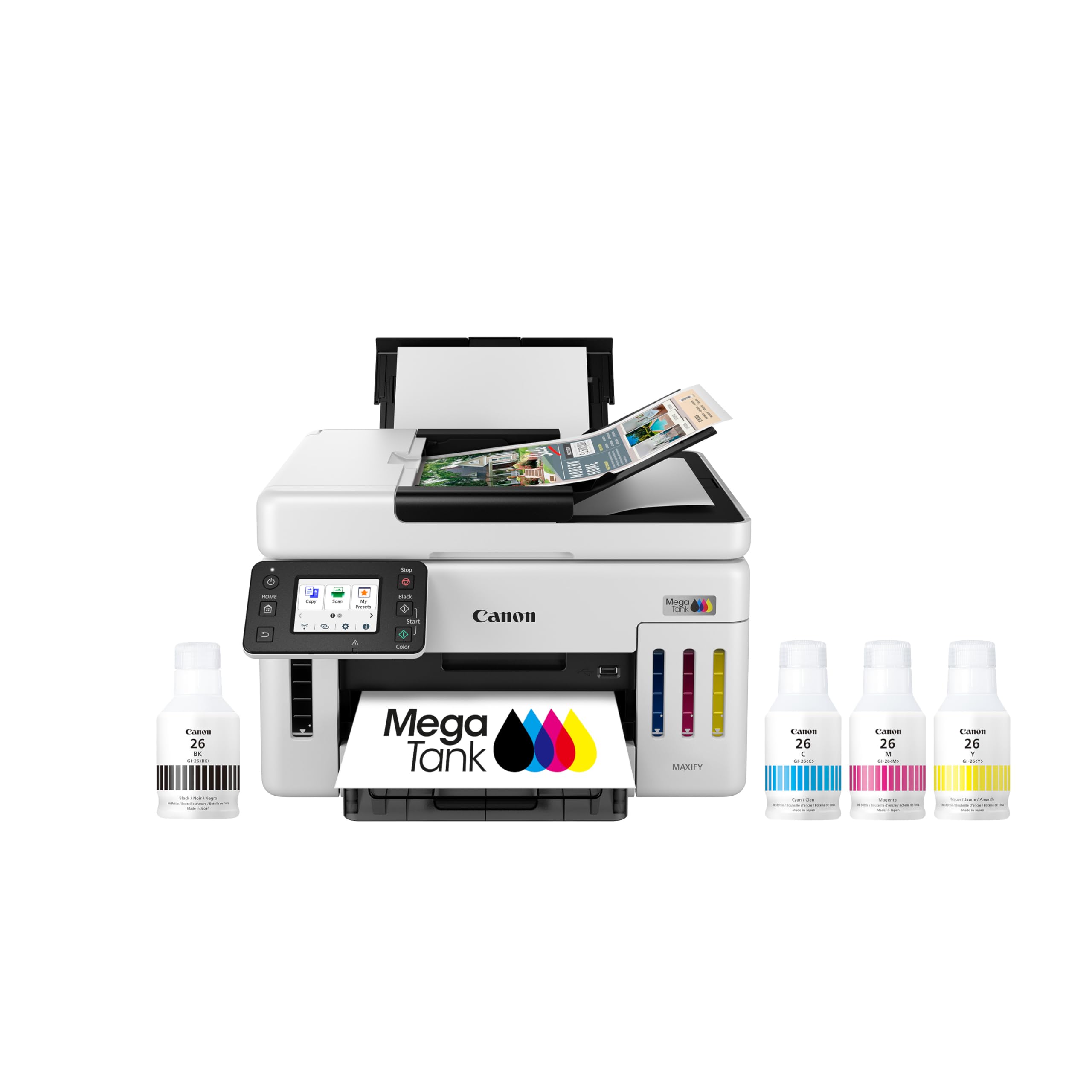
If your Cricut projects involve printing multiple cardstock layers or test sheets before a final run, the GX6120’s speed makes a noticeable difference. It cranks out black pages at 24 pages per minute and color at 15.5 pages per minute, substantially faster than most cartridge-based competitors. The refillable tank system also ships with enough ink to produce thousands of pages out of the box, and many users report the ink level barely drops after months of moderate use.
The 2.7-inch LCD touchscreen makes connecting to Wi-Fi and selecting print modes intuitive without needing a computer. Reviewers consistently praise the quiet operation and the fact that the rear paper tray can handle glossy photo paper and heavyweight cardstock without jamming. The duplex (two-sided) printing is automatic, which saves paper when printing double-sided sticker sheets or instruction cards.
On the downside, the GX6120 does not include a rear straight-through feed for very thick media, so some heavy cardstock users report occasional curl if they print on both sides. The price is higher than the GX2020, making sense only if you prioritize speed and higher monthly volume. A few users also note the absence of an ethernet port, relying solely on Wi-Fi for connectivity.
Why it’s great
- Print speed is among the fastest in its class for color Cricut tasks
- Refillable ink system with high page yield out of the box
- Quiet operation and reliable Wi-Fi connectivity
Good to know
- No rear straight-through paper path for thick media
- Higher initial price compared to the GX2020
3. Canon PIXMA PRO-200S

The PRO-200S is built for users who need gallery-quality photo decals, large 13×19-inch poster stickers, or fine art reproductions. Its eight individual dye-based ink tanks produce a very wide color gamut with smooth gradients, making it a strong pairing for Cricut projects that require professional photo realism. Borderless printing is supported from 3.5 x 3.5 inches up to 13 x 19 inches, which opens up large-format label possibilities that smaller printers cannot handle.
Reviewers who print glossy sticker paper consistently note that colors appear vibrant and skin tones look natural without banding. The printer runs quietly and the ink consumption after initial setup is reasonable given the image quality. The unit is heavy at 32 pounds, which indicates a robust internal chassis that keeps paper alignment stable over years of use.
However, this is a print-only device—no scanner, copier, or fax. The print speed is also slow at about 2 pages per minute for color, so it is not suited for bulk project printing. Dye-based ink can run if exposed to moisture, so printed sheets must be sealed or kept dry before cutting. The ink cartridges themselves are expensive and deplete faster than pigment-based alternatives when printing full-coverage designs.
Why it’s great
- Exceptional color accuracy and wide gamut for photo-quality decals
- Can print borderless up to 13×19 inches for large decals
- Very quiet operation during long print sessions
Good to know
- Print-only device with no scanning or copying capability
- Dye-based ink not water-resistant; needs sealing for stickers
4. Brother MFC-L3780CDW

Laser printers apply toner using heat and pressure, which means the output is completely dry the moment it exits the machine. For Cricut users who print water-resistant labels, product tags, or iron-on transfers that must survive handling, the MFC-L3780CDW eliminates any concern about smudging or bleeding. It prints color at up to 31 pages per minute with single-pass duplex scanning, making it one of the fastest document-oriented printers on this list.
Users who switch from inkjet to this model report that registration marks print darker and more consistently, which helps the Cricut sensor track the black squares without errors. The built-in dual-band Wi-Fi and Gigabit Ethernet ensure stable connections even in busy workshops. The machine also includes an automatic document feeder for scanning multiple pages of layered design instructions at once.
The downsides are typical of color lasers: the machine is larger and heavier than inkjets, and the initial toner cartridges are expensive to replace. Some users dislike the required subscription trial for the Refresh program, though it is optional. Additionally, the color output, while sharp for text and graphics, does not match the photographic smoothness of a dedicated photo inkjet—it is better suited for graphic stickers and labels than for photo-realistic decals.
Why it’s great
- Toner is waterproof and smudge-proof immediately after printing
- Blazing fast 31 ppm color speed for bulk project runs
- Consistent, dark registration marks aid Cricut sensor reading
Good to know
- Not ideal for photo-realistic stickers due to laser color gamut limits
- Large footprint and heavy weight require dedicated desk space
5. Brother MFC-J1800DW

The J1800DW distinguishes itself with a built-in auto paper cutter that trims letter-size sheets down to half-letter size (8.5 x 5.5 inches) after printing. This is a niche but valuable feature for Cricut users who produce invitation sets, small tags, or business cards that need clean, straight edges before cutting. The blade sensor technology automates the cutting process, saving manual trimming time on repetitive batches.
Print quality is solid for an inkjet in this range, with fast color output at up to 16.5 pages per minute. The 150-sheet tray and 20-page auto document feeder keep the workflow moving without constant reloading. Wireless connectivity via the Brother Mobile Connect app allows you to send print jobs from your design tablet while you prepare the cutting mat, streamlining the entire production line.
Several users note that the small LCD display can be hard to read from a standing position, and the lack of a rear straight-through feed means heavy cardstock can jam if it is even slightly curled. The automatic cutter also adds mechanical complexity, and a few reviewers found the paper path confusing to clear when a jam occurs. Ink consumption is higher than tank-based alternatives, so heavy users should budget for more frequent cartridge replacements.
Why it’s great
- Auto paper cutter saves time on invitation and tag production
- Fast color print speeds keep up with batch cutting workflows
- Reliable Wi-Fi connectivity with mobile app control
Good to know
- Small LCD is difficult to read in bright workshop lighting
- Ink cartridges can be expensive for high-volume use
6. Brother HL-L3220CDW

If you want the smudge-proof, waterproof advantages of laser printing but do not need scanning or copying, the HL-L3220CDW offers the most compact color laser chassis in Brother’s current lineup. At 15.7 inches cubed, it fits on a shelf or small desk without dominating the workspace. The 19-page-per-minute speed in color with automatic duplex keeps sticker production moving efficiently without the wet drying delays of inkjet.
Users who have made the switch from inkjet to this laser report that the color registration marks print with consistent density, which virtually eliminates the Cricut sensor failing to read them during the cut process. The 250-sheet paper tray reduces the frequency of reloading, and the manual feed slot handles envelopes and thicker cardstock for specialty projects. The toner cartridges last significantly longer than typical ink cartridges, especially when using the black-only mode for monochrome designs.
The main drawback is that this is a print-only unit—there is no scanner, copier, or fax functionality, so you need a separate device for those tasks. Some Mac users encountered significant setup difficulties with the certificate validation during driver installation, requiring technical workarounds. The color gamut also cannot match a dedicated photo inkjet for smooth gradients, making it better suited for graphics with solid colors than photo-realistic images.
Why it’s great
- Compact footprint ideal for small craft rooms
- Smudge-proof laser output perfect for Cricut stickers and labels
- Duplex printing and high-yield toner reduce replacement frequency
Good to know
- No scanner or copier—print-only device
- Mac setup may require technical troubleshooting
7. Brother MFC-J1365DW

The MFC-J1365DW is part of Brother’s INKvestment line, which ships with a 1,200-page black cartridge and 500-page color cartridges—enough ink to get a new Cricut hobbyist through dozens of sticker sheets before the first replacement. It functions as a compact all-in-one with print, copy, and scan capabilities, making it a practical entry point for users who need versatility without committing to a tank system. The 1.8-inch color display provides clear on-screen menus for Wi-Fi setup and ink monitoring.
Reviewers appreciate the plug-and-play simplicity and the quiet operation compared to older inkjet models. The print speed reaches 16 pages per minute in black and 9 pages per minute in color, which is adequate for small batches of sticker sheets or iron-on transfers. The 150-sheet input tray and 20-page ADF allow for hands-off copying of reference materials or scanning multi-page design templates.
The most prominent complaint is that this model consumes ink more aggressively than previous Brother printers, with some users reporting that the cartridges deplete up to ten times faster than expected. The setup process is also more involved than a simple plug-and-play, as the printer prompts you to sign up for the Refresh subscription service during initial configuration. For Cricut users focused on high-volume output, the ink cost over time can approach that of a tank-based system without the same long-term economy.
Why it’s great
- Starter cartridges provide solid page yield for beginners
- Compact all-in-one saves desk space in small craft areas
- Quiet operation and simple Wi-Fi setup via the color display
Good to know
- Ink consumption can be much higher than expected with full-color prints
- Setup includes prompts to enroll in the Refresh subscription service
8. Brother MFC-J1410DW

The MFC-J1410DW fills the gap between budget cartridge printers and premium tank models with a 2.7-inch color touchscreen that makes cloud app integration unusually smooth for an inkjet at this level. You can print sticker designs directly from Google Drive or Dropbox without touching a computer, which speeds up the workflow when your Cricut design is already saved in the cloud. The automatic duplex printing and 20-sheet ADF keep administrative tasks out of the way.
Print quality is good for an office-oriented inkjet, with crisp text and acceptable photo reproduction suitable for craft stickers and labels. Many reviewers switched to this model from HP or Canon units and reported that the Brother software felt less intrusive and did not force firmware updates as frequently. The printer also handles the Brother Mobile Connect app well, giving you ink level warnings and scan-to-phone functionality from across the room.
Some users found the initial network setup took longer than expected, particularly if the router uses a 5 GHz band exclusively. A few reviews mention that the printer can be a bit loud during operation, which might be distracting in a quiet home office or craft room. The ink cartridges are also relatively small, so if you print full-color sticker sheets daily, you may find yourself replacing them every few weeks, making this a better fit for moderate-volume users rather than daily production.
Why it’s great
- Color touchscreen with direct cloud app printing saves steps
- Automatic duplex and ADF for efficient multi-page handling
- Well-regarded software that stays out of your way
Good to know
- Network setup can be finicky on 5 GHz-only routers
- Audible during printing compared to quieter tank models
9. Canon PIXMA TR7120

The PIXMA TR7120 is the most budget-friendly entry point for Cricut users who need a color printer but cannot justify a larger investment upfront. Despite its low entry cost, it includes automatic duplex printing and an auto document feeder—features usually reserved for more expensive models. The 1.42-inch monochrome OLED display provides basic ink and status information without taking up much desk space, and the compact white design fits neatly on a shelf.
Print speed is respectable at 14 pages per minute in black and 9 pages per minute in color, and the hybrid 2-cartridge system (one black, one tri-color) delivers adequate color for sticker sheets and labels. Reviewers who replaced older HP and Canon printers noted that the TR7120 rarely shows the “offline” error that plagued their previous machines, and the Wi-Fi connectivity via dual-band (2.4 GHz or 5 GHz) is stable once configured. The paper tray holds 50-100 sheets, which is sufficient for light to moderate Cricut project sessions.
The biggest drawback is the ink cost: the tri-color cartridge means that when one color runs out, you must replace the entire cartridge, wasting the other colors. This makes the per-page cost much higher than tank-based alternatives over time. The starter cartridges included in the box also run out quickly, often in under 100 pages, so you should budget for replacement cartridges right away.
Why it’s great
- Very low purchase price with duplex and ADF included
- Compact footprint fits in small craft spaces
- Reliable Wi-Fi with minimal connection issues
Good to know
- Tri-color cartridge wastes ink when one color runs out first
- Starter ink runs out quickly; factor in immediate cartridge cost
FAQ
Can I use a laser printer with a Cricut?
Why do my Cricut registration marks keep failing to scan?
Do I need a printer that prints borderless for Cricut projects?
Final Thoughts: The Verdict
For most users, the best color printer for cricut winner is the Canon MegaTank MAXIFY GX2020 because its pigment-based ink tank system delivers waterproof, smudge-resistant prints at the lowest per-page cost, and the flat output path helps keep registration marks readable on the first scan. If you need faster speeds for high-volume layered cardstock projects, grab the Canon MegaTank GX6120. And for photo-realistic, borderless large-format decals that demand professional color accuracy, nothing beats the Canon PIXMA PRO-200S.

Mo Maruf
I created WellFizz to bridge the gap between vague wellness advice and actionable solutions. My mission is simple: to decode the research and give you practical tools you can actually use.
Beyond the data, I am a passionate traveler. I believe that stepping away from the screen to explore new environments is essential for mental clarity and physical vitality.