Our readers keep the lights on and my smoothie glass nicely filled. As an Amazon Associate, I earn from qualifying purchases.
Pushing a high-performance CPU to its limits generates a tremendous amount of thermal energy. Without an effective cooling solution, performance throttles, stability suffers, and component lifespan shortens. An AIO liquid cooler is the definitive answer, channeling heat away from the processor with far greater efficiency than traditional air coolers, enabling sustained boost clocks and quieter operation under load.
I’m Mohammad Maruf — the founder and writer behind WellFizz. My process for this guide involved analyzing thermal performance metrics, pump architecture, radiator densities, and fan static pressure across dozens of models to pinpoint the solutions that genuinely deliver on their thermal promises.
Whether you are overclocking a flagship Intel or AMD chip, this deep dive into the best computer water cooling solutions will help you match the right hardware to your specific thermal demands.
How To Choose The Best Computer Water Cooling
Selecting the right AIO involves balancing cooling capacity, noise levels, and aesthetics. The primary factor is the radiator size — 360mm models (triple 120mm fans) offer the best thermal overhead for modern high-core-count CPUs, while 240mm and 280mm units fit smaller cases but at a slight performance penalty. Beyond size, the pump design and cold plate material determine how efficiently heat is moved from the CPU IHS to the radiator.
Radiator Size and Case Compatibility
A 360mm radiator provides the most surface area for heat dissipation, making it ideal for overclocked CPUs or power-hungry chips like the Intel Core i9-14900K or AMD Ryzen 9 7950X. Always check your case specifications for supported radiator positions (top, front, or side) and clearance for the radiator thickness plus fan stack. A 420mm radiator, like on the ARCTIC Liquid Freezer III Pro 420, requires a full-tower chassis but delivers class-leading thermal performance.
Pump Technology and Cold Plate Material
The pump is the heart of any AIO. Look for ceramic bearings and multi-phase motors — these offer better durability and quieter operation. An Asetek pump design (used by many premium brands) is proven reliable. The cold plate should be copper with a dense micro-fin array to absorb heat quickly. A nickel-plated cold plate resists corrosion over time.
Quick Comparison
On smaller screens, swipe sideways to see the full table.
| Model | Category | Best For | Key Spec | Amazon |
|---|---|---|---|---|
| AsiaHorse WK-A360 | Mid-Range | Value-focused builds with ARGB | Dual chamber pump (3000/4500 RPM) | Amazon |
| Thermalright FW360 SE | Mid-Range | Compact LCD display on a budget | 2″ LCD screen, 68.9 CFM fans | Amazon |
| PCCOOLER DC360 | Mid-Range | Quiet operation with IPS display | 2.4″ IPS display, 15 dBA pump | Amazon |
| ARCTIC Liquid Freezer III Pro 420 | Premium | Maximum thermal performance | 38mm thick 420mm radiator | Amazon |
| be quiet! Light Loop 360 | Premium | Quiet premium builds with RGB | Refillable, 64 total LEDs | Amazon |
| MSI MAG CoreLiquid I360 | Premium | Subtle infinity mirror aesthetics | Split-flow radiator, 400mm tubes | Amazon |
| ASUS ROG RYUO III 360 | Premium | High-end builds with anime display | Anime Matrix LED, Asetek 8th gen | Amazon |
| NZXT Kraken Elite 360 RGB | Premium | Brilliant display and easy software | 2.72″ IPS LCD, 690 cd/m² | Amazon |
| TRYX Panorama SE 360 | Premium | Ultimate visual impact AMOLED | 6.67″ curved AMOLED, 280W TDP | Amazon |
In‑Depth Reviews
1. AsiaHorse WK-A360 ARGB AIO Liquid CPU Cooler
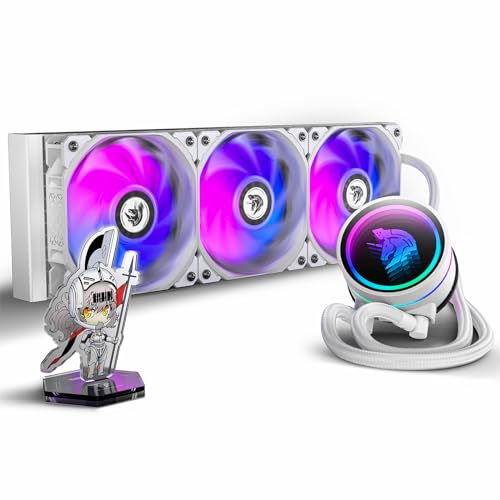
This 360mm AIO punches well above its price segment. The standout feature is the dual-chamber pump system — an internal pump running at 3000 RPM paired with an inter-tube pump at 4500 RPM that pushes flow rates up to 300 L/h. This aggressive architecture ensures rapid heat transfer even when paired with high-TDP chips like the Ryzen 9 7950X3D. The copper cold plate and high-density aluminum fin array on the radiator provide excellent surface area for heat exchange, and the ceramic bearing in the pump head eliminates the risk of chemical corrosion over time.
Noise levels are impressively controlled at 21-33 dBA from the three 120mm PWM fans, which deliver up to 65 CFM each. The PWM control allows for a steep fan curve that ramps only under heavy load, keeping idle operation nearly silent. The 360-degree rotatable pump top and wide socket support (including LGA 1700/2066 and AM5) make installation straightforward across most modern platforms. The included ARGB lighting syncs with major motherboard software, adding a customizable visual flair.
Users consistently report a 9-degree drop in CPU temperatures compared to air coolers, with many noting it outperforms more expensive units from established brands. The only trade-off is the need for ample case space — a full-tower or spacious mid-tower is recommended to accommodate the 360mm radiator comfortably. The 3-pin fan headers require careful planning with your motherboard’s fan header count.
Why it’s great
- Exceptional dual-pump design for high flow rates
- Very quiet operation with effective PWM control
- Excellent cooling performance that rivals premium brands
Good to know
- Requires multiple ARGB and fan headers for full control
- Large radiator needs a case with sufficient clearance
2. Thermalright FW360 SE ARGB V2
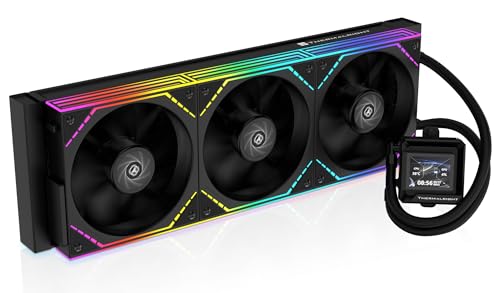
Thermalright brings a compelling package with the FW360 SE V2, integrating a 2-inch LCD screen into the pump housing for system monitoring and custom GIF display. The 3000 RPM pump is paired with three TL-M12Q 120mm PWM daisy-chain fans that spin up to 2000 RPM, moving 68.9 CFM at 2.21 mmH2O static pressure. The daisy-chain design significantly reduces cable clutter — a welcome feature for builders aiming for a clean interior. The 27mm thick aluminum radiator is standard for a 360mm unit, and the pre-applied thermal paste simplifies the installation process.
The LCD screen, controlled via Thermalright’s software, can display real-time CPU temperature, load %, custom images, or animated GIFs. While the software is functional, some users note that the screen customization options are less polished than premium-tier competitors, but at this price point, the value is undeniable. The fans remain quiet during normal operation, with a measured noise level of 28.2 dBA, making it suitable for noise-sensitive environments.
On a Ryzen 7 7800X3D, reviewers report excellent thermal headroom, with the chip staying well within its operating limits even under sustained Cinebench loads. The silver bracket on the pump head may require painting for full color matching in all-white builds. The 5-year warranty provides peace of mind. The primary downside reported is the LCD screen failing in rare instances, but Amazon’s return policy mitigated that issue for affected users.
Why it’s great
- Affordable entry point into LCD AIO coolers
- Daisy-chain fans simplify cable management
- Quiet operation even at higher RPMs
Good to know
- LCD software customization can be finicky
- Pump/screen durability has occasional reports of failure
3. PCCOOLER CPS DC360 ARGB AIO Liquid Cooler
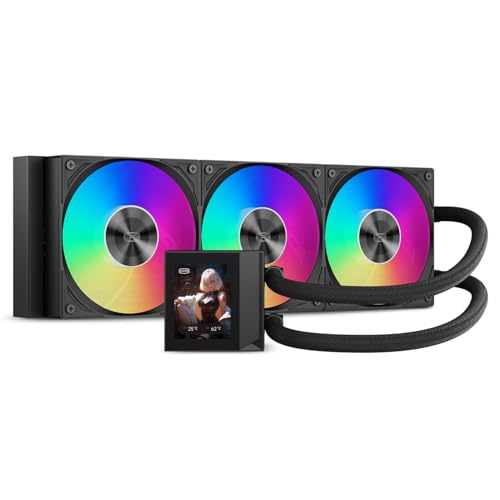
PCCOOLER aims for the sweet spot between silent operation and high-performance display features with the DC360. The pump is rated at a mere 15 dBA, making it one of the quietest in this roundup, while still pushing coolant through a copper cold plate and 360mm aluminum radiator. The 2.4-inch IPS display is bright and easy to customize, showing CPU temperature, system stats, or custom logos and animations. The display adds a high-tech centerpiece to the build without requiring the premium outlay of top-tier models.
The included F5 ARGB fans are where the performance really shines — they spin up to 2500 RPM, generating 90.56 CFM of airflow and 4.07 mmH2O of static pressure. This is considerably higher static pressure than many competitors, which means the fans can push air efficiently through the dense radiator fins even at lower RPMs. However, at maximum speed, these fans become noticeably loud (39.8 dBA). PCCOOLER advises adjusting the fan curve in BIOS to balance noise and cooling, which is a sensible approach for daily use.
On a Ryzen 9 7950X3D, temperatures never exceed 73°C under full load, demonstrating the DC360’s capability for high-end chips. Overclocked Intel Core i9-13900KS chips also stay within safe thermal limits, with temps barely reaching 90°C. The CNC aluminum waterblock housing and sleeved 400mm tubes add to the premium feel. The main caveat is the software — finding it and getting it to work reliably can be a challenge, but once configured, the display and ARGB lighting sync seamlessly with motherboard software like ASUS Aura Sync.
Why it’s great
- Exceptionally quiet pump for near-silent operation
- High static pressure fans handle dense radiators well
- Large, bright IPS display for system monitoring
Good to know
- Fans can be loud at maximum RPM without curve adjustment
- Configuration software can be difficult to locate and install
4. ARCTIC Liquid Freezer III Pro 420

The ARCTIC Liquid Freezer III Pro 420 is a serious thermal solution that leverages a massive 38mm thick 420mm radiator to dissipate heat from even the most power-hungry CPUs. The thicker radiator (standard is 27mm) provides significantly more surface area for coolant to shed heat, which translates directly into lower temperatures. It supports native offset mounting for both Intel and AMD CPUs, shifting the cold plate toward the hotspot for more efficient heat transfer. The integrated, PWM-controlled VRM fan is a unique addition that actively cools the motherboard’s voltage regulation modules, ensuring stable power delivery during extreme overclocks.
The three P14 PRO fans deliver up to 110 CFM of airflow, pushing substantial volume through the thick radiator. Despite their power, they remain quiet at lower RPMs, with users reporting acceptable noise levels around 1400 RPM under load. The pump is also PWM-controlled, allowing system customization to balance noise and cooling. Cable management is simplified by integrating the radiator fan cables into the hose sheathing, resulting in only a single visible cable to the motherboard. The included MX-6 thermal paste is high-performance, though some users found it thick and preferred their own compound.
On an AMD Ryzen 9 9950X, temperatures stay around 68°C under a 200W load, while a Core i9-14900K dropped from 100°C to a peak of 70°C under full load. This is class-leading performance. The only downsides are the size — it requires a full-tower case like the NZXT H7 Flow or larger — and some users noted that the pump mounting screws require precise alignment during installation. The pre-mounted fans are a time-saver, though the included instructions could be clearer.
Why it’s great
- Exceptional thermal headroom for extreme overclocking
- Integrated VRM fan improves motherboard stability
- Pre-mounted fans and integrated cables simplify installation
Good to know
- Very large radiator requires a spacious full-tower case
- Installation requires careful alignment and patience
5. be quiet! Light Loop 360mm White

The be quiet! Light Loop 360mm is engineered for low noise without sacrificing performance. It features three Light Wings LX 120mm PWM high-speed fans, each with 16 LEDs that scatter across 9 airflow-optimized blades. These blades are designed to reduce noise-generating turbulence while maintaining ample airflow (61.8 CFM). The cold plate uses a high-density fin stack, and the metal jet plate increases the flow speed of the coolant for better heat transfer. A progressive IC in the motor reduces switching noise, keeping the pump whisper-quiet. The refillable design and included coolant bottle extend the lifespan of the unit, a feature rare in AIO coolers.
The ARGB-PWM Hub allows synchronization of up to six fans and six ARGB components, connecting to just one motherboard header each. This vastly reduces cable clutter. The 64 total LEDs across the fans and pump block create a vibrant, unified lighting effect that syncs with motherboard software and third-party apps like OpenRGB. The all-white aesthetic complements white-themed builds perfectly. Reviewers consistently praise its quiet operation on Ryzen 7 9800X3D chips, keeping temperatures below 65°C during extended gaming sessions and idling inaudibly.
The 3-year manufacturer warranty is backed by German engineering, giving confidence in the build quality. The only minor considerations are the slightly complex installation of the heatsink mount (though the website guide helps) and the need for a SATA power connection for the hub. Overall, this is a top-tier choice for those prioritizing silence and aesthetics without compromising on cooling.
Why it’s great
- Extremely quiet operation for noise-sensitive builds
- Refillable design prolongs AIO lifespan
- Vibrant ARGB with hub for easy cable management
Good to know
- SATA power required for the ARGB/PWM hub
- Heatsink mount installation may need website reference
6. MSI MAG CoreLiquid I360 Black

MSI’s MAG CoreLiquid I360 combines a unique split-flow radiator design with an integrated three-phase pump. The split-flow system directs coolant through two channels in the radiator, increasing the effective surface area for heat exchange. The pump is housed in the radiator rather than the CPU block, which reduces vibration and noise at the motherboard level. The rotatable blockhead features a dual-sided infinite mirror ARGB effect, creating a striking visual centerpiece. The 400mm evaporation-proof tubing is reinforced with triple-layered mesh sheathing to prevent leaks and coolant loss over time.
The three 120mm ARGB PWM fans spin up to 2500 RPM, pushing ample air through the aluminum radiator. MSI’s UNI Bracket system makes installation quick and tool-free across both Intel (LGA 1851/1700/1200/115X) and AMD (AM5/AM4) sockets. The pump is very quiet during operation, and the LDB (Liquid Dynamic Bearing) fans minimize bearing noise. At 32.8 dBA, the system is suitable for most environments without being intrusive. The included thermal paste is pre-applied to the copper cold plate, further simplifying setup.
On an Intel Core i7-14700K, users report temperatures of 65-70°C under gaming loads, a significant improvement over air coolers. The 5-year warranty is a strong indicator of MSI’s confidence in durability. Some users noted that the RGB lighting on the fans leans cool white rather than pure white, which may be a consideration for all-white builds. The pump-in-radiator design makes the CPU block smaller and easier to fit in tight cases, though the tube routing requires some care to avoid kinks.
Why it’s great
- Pump-in-radiator design reduces motherboard vibration
- Tool-free UNI Bracket for quick installation
- Attractive infinity mirror ARGB block
Good to know
- Fan RGB white color may appear blue-tinted
- Cable routing requires careful planning for tube length
7. ASUS ROG RYUO III 360 ARGB White Edition

The ROG RYUO III 360 represents the pinnacle of ASUS’s cooling design, leveraging the proven Asetek 8th generation pump with a 3-phase motor for ultimate flow and lower impedance. The cold plate is copper and the radiator is aluminum, finished with a vacuum-coated lens on the pump housing. The unique feature is the Anime Matrix LED array on the pump block — a mini LED display that can show ROG-exclusive anime content, core system stats (CPU temp, frequency), or custom animations. It is a true statement piece for themed builds, especially in the white edition finish.
The three ROG AF 12S ARGB fans provide 70.07 CFM of airflow at 2200 RPM, with a noise level of 36.45 dBA. They are thick and sturdy, with magnetic fan blades that reduce vibration at higher speeds. Installation is straightforward, and the included USB header cable powers the matrix display. The 6-year warranty is the longest in this roundup, reflecting ASUS’s confidence. CPU support spans both modern (LGA 1700/AM5) and legacy sockets, making it a future-proof investment.
On an Intel Core i9-12900K overclocked to 5.2 GHz, the RYUO III keeps idle temperatures at 26°C and gaming loads below 60°C. The fans are quiet during typical use, with the pump being nearly inaudible. The major trade-off is the Armoury Crate software — users consistently report it as buggy, causing audio conflicts, RGB synchronization issues, and the matrix screen staying on when the PC is off unless USB power is disabled in BIOS. For users willing to manage the software, the hardware performance and aesthetics are top-tier.
Why it’s great
- Proven Asetek 8th gen pump for reliable performance
- Customizable Anime Matrix LED display is visually unique
- Excellent cooling high-end Intel and AMD CPUs
Good to know
- Armoury Crate software can be resource-heavy and buggy
- Matrix LED screen may stay on when PC is off
8. NZXT Kraken Elite 360 RGB 2024

NZXT’s Kraken Elite 360 RGB 2024 refines the AIO experience around an exceptional display. The 2.72-inch IPS LCD boasts a 640×640 resolution, 60 Hz refresh rate, and an extremely bright 690 cd/m² backlight, making it readable even in direct lighting. The 24-bit color and wide viewing angles ensure content looks vibrant from any angle. The custom-designed NZXT Turbine pump delivers a 10% performance improvement over previous generations, with higher flow rate and head pressure that efficiently cools the most heat-prone CPUs.
The F360 RGB Core fan uses a single-frame design for the three 120mm fans, reducing cable clutter and simplifying installation. The fans move 78.86 CFM at 2400 RPM, with a noise rating of 30 dBA — very competitive for the performance. The tool-free mounting brackets and pre-applied thermal paste make installation a breeze on both AMD (AM5, AM4) and Intel (LGA 1851/1700, 1200/115X) platforms. A single breakout cable connects the pump and fans to the motherboard, further cleaning up the build. The software integration with NZXT CAM provides intuitive control over pump speed, fan curves, and display content, including integration with Google Photos, Spotify, and YouTube.
On a Ryzen 7 7800X3D, the Kraken Elite runs quietly under idle and light loads, ramping only when needed. The display shows system performance metrics or custom GIFs with stunning clarity. The only notable issue is the hose length may be tight for some case configurations, particularly for side-mount radiator positions without tension or kinking. The single 3x120mm fan unit uses four corner screws, which is a slight change from traditional individual fans. Overall, it represents a premium, integrated solution that balances cooling, noise, and aesthetics.
Why it’s great
- Best-in-class 2.72″ IPS display with high brightness
- Excellent NZXT Turbine pump performance
- Easy installation with tool-free brackets and pre-applied paste
Good to know
- Hose length may be restrictive for certain case layouts
- Premium price reflects the display and brand
9. TRYX Panorama SE 360 ARGB
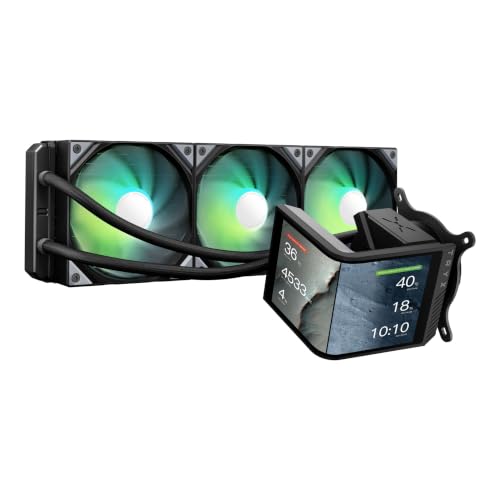
The TRYX Panorama SE 360 is an audacious entry in the AIO market, centered around a rotatable 6.67-inch curved AMOLED screen. This is not a small status display — it is a massive, immersive panel with a 2K resolution, 400 nits brightness, 372 PPI, and a 1,000,000:1 contrast ratio. The G2 curvature enhances viewing angles, and the full adhesion technology eliminates air gaps for clearer visuals without backlight bleeding. It supports 3D anamorphic effects with custom-formatted 3D videos, creating a depth illusion that typical flat screens cannot match. The screen can be rotated to fit your preferred orientation, and the tempered glass cover provides scratch resistance.
Under the hood, the Asetek Adela pump provides reliable cooling for up to 280W TDP, handling video encoding, AI workloads, and gaming without issue. The 27mm high-density fin radiator and three pre-installed ROTA ARGB fans with FDB bearings deliver 66.09 CFM at up to 3600 RPM, with noise levels as low as 27.86 dBA. The fans include damping pads in their corners to minimize vibration-induced noise. The all-metal mounting hardware ensures solid contact pressure on Intel LGA 1851/1700 and AMD AM5/AM4 sockets, with a pre-applied thermal paste and an extra tube included.
On a Ryzen 9 9950X3D, the Panorama SE keeps idle temps around 40-45°C and gaming temps at 50-55°C, with maximum loads reaching 73°C. The pump at full speed is noticeably loud, though the fans are quiet in normal operation. The TRYX KANALI software is required for screen customization and has had a mixed reception — some updates initially caused GIF compression issues, though fixes have improved stability. The screen connects via USB 2.0, and auto-launch of KANALI is needed for the screen to power on. For pure cooling performance per dollar, other options are stronger, but for sheer visual impact and display quality, the Panorama SE is unmatched.
Why it’s great
- Massive, brilliant curved AMOLED display with 3D effects
- Asetek pump provides reliable, high TDP cooling
- Rotatable screen design for flexible case orientation
Good to know
- Software can be buggy and requires auto-launch for screen
- Pump is loud at maximum speed
- Premium price is largely for the display, not pure cooling
FAQ
Is a 360mm AIO necessary for a mid-range CPU like a Ryzen 5 7600?
Does pump placement matter in an AIO liquid cooler?
How long do AIO coolers typically last before needing replacement?
Final Thoughts: The Verdict
For most users, the best computer water cooling winner is the AsiaHorse WK-A360 because it delivers dual-pump performance and excellent cooling at a mid-range price that outperforms many premium competitors in raw thermal metrics. If you want the ultimate visual spectacle with a massive, customizable AMOLED display, grab the TRYX Panorama SE 360. And for maximum thermal headroom on an overclocked flagship CPU in a large case, nothing beats the ARCTIC Liquid Freezer III Pro 420.

Mo Maruf
I created WellFizz to bridge the gap between vague wellness advice and actionable solutions. My mission is simple: to decode the research and give you practical tools you can actually use.
Beyond the data, I am a passionate traveler. I believe that stepping away from the screen to explore new environments is essential for mental clarity and physical vitality.