Our readers keep the lights on and my smoothie glass nicely filled. As an Amazon Associate, I earn from qualifying purchases.
The allure of a full-size gaming tower is undeniable, but the reality of desk space, portability, and a clean aesthetic often demands a smaller footprint. A compact gaming PC delivers the raw frame rates and graphical fidelity you crave without dominating your room, but finding the right balance of cooling, component fit, and raw performance requires more than just a small case—it demands precise engineering. We have dissected the specs and community feedback on the latest small form factor (SFF) and space-optimized prebuilts to find the ones that truly deliver desktop-class power.
I’m Mohammad Maruf — the founder and writer behind WellFizz. This guide is the result of hours spent comparing CPU clock speeds, GPU thermal designs, RAM latencies, and real-world upgrade paths across the most popular compact gaming desktops available today.
Whether you are upgrading from a laptop or building your first dedicated gaming station, finding the right best compact gaming pc means weighing cooling efficiency against raw power to ensure your frames stay high and your fans stay quiet.
How To Choose The Best Compact Gaming PC
Selecting a compact gaming PC is a trade-off between thermal headroom, GPU class, and physical size. Unlike full towers, SFF systems have limited airflow paths and stricter power supply constraints. You need to pay close attention to the discrete graphics tier and the cooling solution to avoid thermal throttling under load.
GPU Tier and Form Factor
The graphics card is the heart of any gaming rig. In compact PCs, you will either find a full-size desktop GPU like the RTX 5060 or 5070, or a mobile variant like the RTX 4060 laptop GPU. Desktop GPUs offer superior thermal mass and raw speed, but mobile GPUs allow for a significantly smaller chassis. Check the specific model number—a “RTX 4060” in a mini PC is often a mobile chip with lower TDP and different cooling requirements than its desktop counterpart.
Cooling Architecture
Airflow in a small case is everything. Look for systems with dual-fan or 360mm AIO liquid cooling, especially if the CPU is a high-core-count i9 or Ryzen 9. Systems with poor thermal design will cause the fans to run loud and the CPU to drop clock speeds. A compact case should have clear intake and exhaust paths—mesh front panels and top exhaust vents are strong indicators of good thermal engineering.
Upgradeability and Expansion
Even in a compact build, upgrade paths matter. Check whether the RAM is SODIMM or desktop DIMM, how many M.2 slots are free, and if the PSU is a standard SFX unit. Some mini PCs also offer OCuLink ports for external GPU enclosures, giving you a future path to a more powerful graphics card without replacing the entire system.
Quick Comparison
On smaller screens, swipe sideways to see the full table.
| Model | Category | Best For | Key Spec | Amazon |
|---|---|---|---|---|
| Alienware Aurora ACT1250 | Premium Tower | High-end AAA Gaming | RTX 5070, Ultra 7 265F | Amazon |
| Lenovo Legion Tower 5i | Mid-Tower | 1440p/4K Gaming | RTX 5070 Ti, Ultra 7 265F | Amazon |
| MSI Codex Z2 | Mid-Tower | VR & Streaming | RTX 5070, R7-8700F | Amazon |
| Horizon Autherium Dragon | Full Tower | Heavy Multitasking | 64GB DDR5, 5TB Storage | Amazon |
| HP OMEN 16L | Compact Tower | Balanced Performance | RTX 5060, Ultra 7 265F | Amazon |
| KOTIN Prebuilt 5060 Ti | Mid-Tower | 1080p/1440p Gaming | RTX 5060 Ti 8GB GDDR7 | Amazon |
| Thermaltake LCGS Quartz i1460 | Compact Tower | Entry-Level Gaming | RTX 5060, i5-14400F | Amazon |
| MINISFORUM MS-01 | Mini Workstation | Home Lab & CAD | 10G SFP+, i9-13900H | Amazon |
| ACEMAGIC M1A Pro | Mini PC | AI & Creators | ARC A770 Discrete GPU | Amazon |
| TOPGRO T1-Pro | Mini Gaming PC | Space-Saving Gaming | RTX 4060 Mobile, i9-13900HX | Amazon |
| GMKtec K11 | Mini PC | eGPU Ready Gaming | OCuLink, R9 8945HS | Amazon |
| GEEKOM A8 MAX | Mini PC | Quiet AI Workflow | R9 8945HS, 36dB Noise | Amazon |
| HP OmniDesk 8700G | Compact Desktop | Light Gaming & Media | Radeon 780M iGPU | Amazon |
In‑Depth Reviews
1. Lenovo Legion Tower 5i

The Lenovo Legion Tower 5i strikes an exceptional balance between compact sizing and raw gaming power. Its transparent, tool-less side panel allows you to showcase the internal components while keeping the overall footprint smaller than a traditional full tower. The RTX 5070 Ti with 16GB of GDDR6 VRAM is a beast at 1440p and fully capable at 4K, while the Intel Core Ultra 7 265F provides enough CPU muscle for streaming and content creation.
Thermals are a highlight here—the 180W optimized air-cooling solution keeps the GPU in the mid-60s°C and the CPU in the low-60s°C under sustained load, with fans that remain remarkably quiet. The system supports up to 128GB of 5600MHz DDR5 RAM, giving you plenty of room for future upgrades. The included 2.5G Ethernet and WiFi 6E provide ultra-fast connectivity for both online gaming and large file transfers.
Some users noted that the GPU’s “GEFORCE” text lighting is fixed white instead of RGB, a minor cosmetic point. The build quality feels premium, and the included 3-month PC Game Pass adds immediate value. For most gamers wanting a strong, quiet, and upgradeable compact system, this is the clear winner.
Why it’s great
- Excellent thermal performance with quiet fans
- Tool-less side panel for easy upgrades
- Strong 1440p and 4K gaming capability
Good to know
- GPU logo lighting is white, not RGB
- Premium pricing tier
- No included keyboard or mouse
2. Alienware Aurora Gaming Desktop ACT1250

The Alienware Aurora ACT1250 continues the legacy of premium prebuilts with a distinctive stadium lighting design and a compact, optimized chassis. It comes equipped with an NVIDIA GeForce RTX 5070, which handles AAA titles at high settings with ray tracing enabled, and a 1000W Platinum-rated PSU that provides ample headroom for future upgrades. The Intel Core Ultra 7 265F processor is well-suited for multitasking while gaming.
The Alienware Command Center allows for comprehensive control of AlienFX lighting and performance modes. The 1-year Dell Onsite Service adds peace of mind, especially for users who prefer not to troubleshoot hardware issues themselves. The air-cooled system runs quietly enough for extended gaming sessions, and the matte basalt black finish resists fingerprints well.
Customer experiences have been positive, though some units have arrived with minor cosmetic issues like a broken front ring light. The boot time can be a bit slow at around two minutes. For those who value build quality, a clean aesthetic, and reliable support, the Alienware Aurora is a solid mid-tower choice.
Why it’s great
- High-quality 1000W Platinum PSU
- Distinctive and clean stadium lighting
- 1-year on-site service included
Good to know
- Boot time can be slow
- Some quality control issues reported
- Premium price point
3. MSI Codex Z2

The MSI Codex Z2 is a powerful mid-tower that fits a full desktop RTX 5070 and an AMD R7-8700F into a chassis that is smaller than most gaming towers. The airflow design is excellent, with three front intake fans and one rear exhaust, keeping the system cool even during extended VR sessions. The 2TB M.2 NVMe SSD provides ample storage for a large game library without needing to manage drives immediately.
Connectivity is solid with USB Type-C on the front panel and support for up to 4K resolution. The included keyboard and mouse are usable, though most gamers will want to upgrade those. The MSI Center software allows for easy RGB customization and performance monitoring. The 32GB of DDR5 RAM ensures smooth multitasking even with streaming software running in the background.
Reports of Bluetooth issues are common across units, often requiring a PCIe card upgrade for stable connectivity. Some users have experienced SSD failures or sleep/shutdown problems that were resolved with a factory recovery. For the price, the Codex Z2 offers a strong CPU+GPU combo in a well-ventilated compact design.
Why it’s great
- Strong RTX 5070 performance in a compact tower
- Excellent airflow with four cooling fans
- Large 2TB NVMe SSD included
Good to know
- Bluetooth module may need upgrading
- Some reliability issues reported
- Fans can get loud under load
4. The Horizon Autherium Dragon RGB I9 RTX Gaming PC

The Horizon Autherium Dragon is a full tower that offers an extreme specification for users who want maxed-out RAM and storage in a single prebuilt. With 64GB of DDR5 RAM and a combined 5TB of storage (1TB NVMe + 4TB HDD), it is built for heavy multitasking, video editing, and large game installations. The RTX 5070 OC delivers high frame rates at 1440p and strong 4K performance with DLSS 4.0 support.
The cooling setup is extensive—a 360mm AIO liquid cooler for the CPU and a total of 11 fans create excellent airflow, keeping the system quiet during most workloads. The Dragon front panel with ARGB lighting adds a bold aesthetic. The 850W 80+ Gold PSU with six extra SATA connectors provides plenty of room for additional drives.
Customer support is a strong suit here, with responsive assistance and a 3-year parts warranty. The 4TB HDD is slower than an SSD, so users who need the fastest load times should consider using the NVMe drive for active games. For those who need maximum RAM and storage from day one, this is a compelling option.
Why it’s great
- Massive 64GB RAM and 5TB storage
- 360mm AIO liquid cooling system
- Excellent customer support with long warranty
Good to know
- Full tower size, not truly compact
- HDD is slower for game loading
- Premium price point
5. HP OMEN 16L Desktop PC
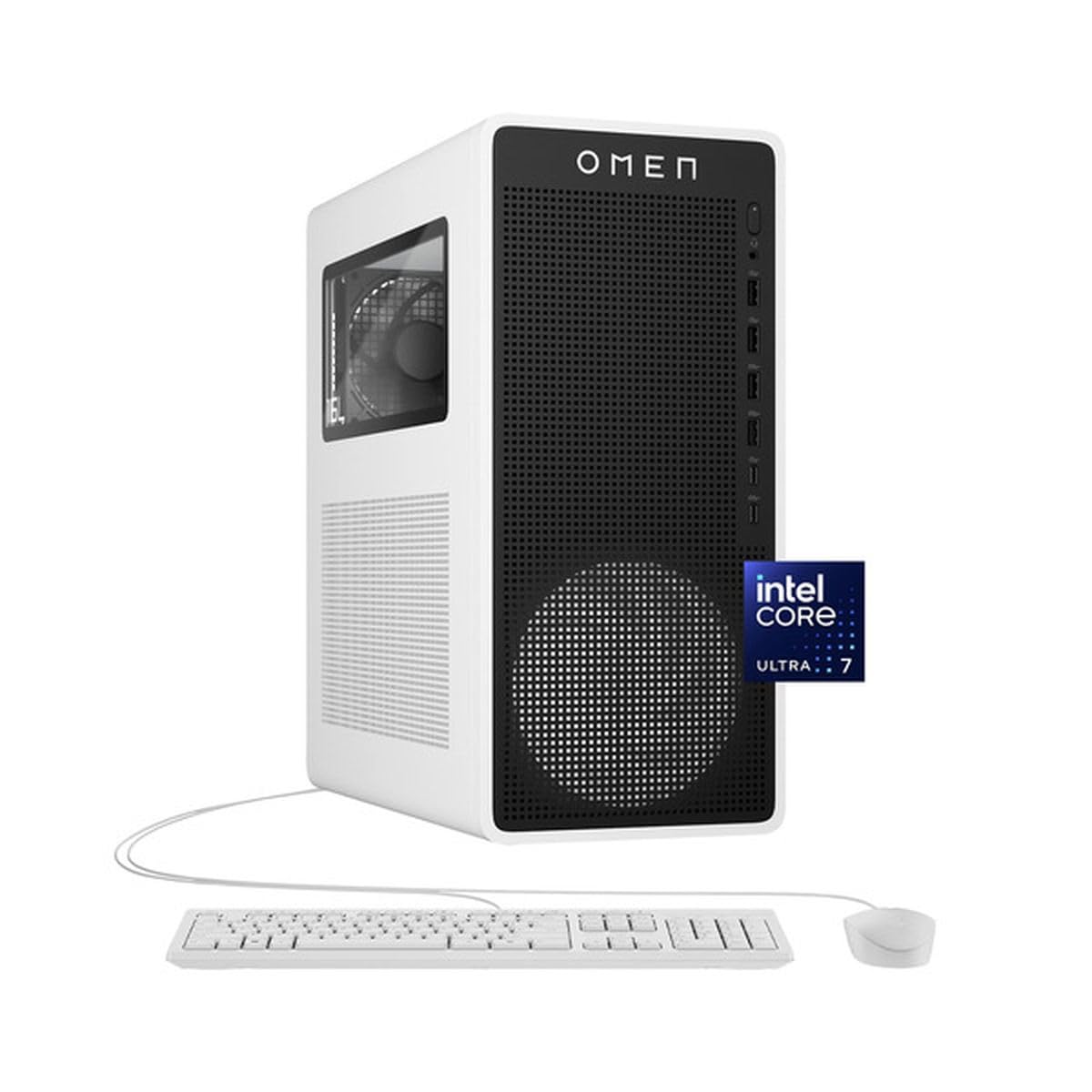
The HP OMEN 16L is designed specifically for users who want a genuine gaming experience in a truly compact tower that fits on a desk or in a media cabinet without dominating the space. The Intel Core Ultra 7 265F paired with the RTX 5060 provides excellent 1080p and solid 1440p gaming performance. The 32GB of DDR5 RAM ensures smooth multitasking for streaming and productivity apps.
The compact size does not sacrifice connectivity—plenty of USB ports and a combo audio jack are available, and the discreet design with clean cable management looks professional. The included keyboard and mouse are basic but functional. The AI Copilot integration is a nice bonus for productivity tasks.
Some users have reported issues with the system waking from sleep, requiring a hard reset. Others have experienced instability after several months of use, with crashes becoming frequent. For those who prioritize a balanced, compact system with a good GPU, the OMEN 16L is a solid mid-range choice.
Why it’s great
- Truly compact 16L chassis
- Well-balanced CPU/GPU for 1080p gaming
- Clean, minimal design
Good to know
- Potential sleep/wake issues reported
- Some long-term reliability concerns
- No optical drive included
6. KOTIN Prebuilt Gaming PC

The KOTIN Prebuilt Gaming PC delivers exceptional value by pairing the new GeForce RTX 5060 Ti with 8GB of GDDR7 VRAM and the AMD Ryzen 5 9600X. This combination handles modern AAA titles at high settings in 1080p and 1440p with ease, thanks to DLSS 4 and 4th-gen ray tracing. The 16GB of DDR5-6000MHz dual-channel RAM keeps load times fast and multitasking smooth.
The ARGB build includes five addressable fans and a unique digital display on the air cooler that shows real-time CPU temperature. The tempered glass side panel and tidy cable management create a clean modern look. WiFi 7 and Bluetooth 5.3 are included for cutting-edge wireless connectivity. The 650W 80+ Gold PSU provides stable power for the components.
The unspecified brand of the PSU and motherboard may be a concern for those who want known component quality. The system can get warm under sustained load, but within acceptable limits. For budget-conscious gamers who want the latest tech without breaking the bank, the KOTIN is a top contender.
Why it’s great
- Excellent 1080p/1440p gaming performance
- WiFi 7 and Bluetooth 5.3 included
- Unique CPU temp display on cooler
Good to know
- PSU and motherboard brands are unspecified
- Gets warm under load
- Limited customization options
7. Thermaltake LCGS Quartz i1460

The Thermaltake LCGS Quartz i1460 is a well-balanced entry-level compact gaming PC that hits a sweet spot for 1080p gaming. The Intel Core i5-14400F and RTX 5060 combo provides solid FPS in modern titles like Fallout 76 at max settings, and the 16GB of DDR4 3600MHz RGB memory is adequate for most current games. The 1TB NVMe M.2 SSD offers fast boot times and ample storage.
The white chassis with a 3mm thick tempered glass side panel is visually appealing and allows for easy viewing of the ARGB tower air cooler and RGB memory. The full-length PSU power cover keeps cables tidy for a professional look. The system is quiet during normal operation, and the build quality is solid for the price point.
Some units have arrived with faulty built-in WiFi on the ASrock motherboard, requiring a USB adapter. There have also been reports of DOA units with bent PCIe slots. For those looking for a solid entry point with good upgrade potential, the Quartz i1460 is a strong mid-range option.
Why it’s great
- Solid 1080p gaming performance
- Clean white aesthetic with tempered glass
- Good value for the component set
Good to know
- Potential WiFi issues on some units
- DOA risk reported by some users
- DDR4 RAM instead of DDR5
8. MINISFORUM MS-01 Mini Workstation

The MINISFORUM MS-01 is not your typical gaming PC; it is a mini workstation designed for professionals who need powerful compute in a small footprint with unparalleled networking. The Intel Core i9-13900H (14 cores, 20 threads) delivers desktop-class CPU performance, and the built-in Intel Iris Xe Graphics can handle light gaming and CAD work. The standout feature is the dual 10G SFP+ ports, which are perfect for home lab environments, NAS access, and high-speed local file transfers.
Storage expandability is exceptional: support for M.2 2280, enterprise-class 22110, and U.2 SSDs via the included adapter, with RAID0/RAID1 support. The system also features a standard PCIe x16 slot (PCIe 4.0 x8 compatible) for adding a discrete GPU like an RTX 3050. The 32GB DDR5 RAM ensures smooth operation for virtual machines and intensive multitasking.
The Intel X710 SFP+ ports have been reported to intermittently disconnect for some users, which can be a significant issue for demanding network workloads. The system runs quiet and cool for most tasks. For networking professionals or home lab enthusiasts who also want decent gaming capability via an added GPU, the MS-01 is a unique and powerful choice.
Why it’s great
- Dual 10G SFP+ ports for ultra-fast networking
- Excellent storage expansion (M.2, U.2, PCIe slot)
- Powerful i9 CPU in a mini form factor
Good to know
- SFP+ ports may have disconnection issues
- Integrated GPU only for light gaming
- Requires adding a GPU for serious gaming
9. ACEMAGIC M1A Pro AI Mini PC

The ACEMAGIC M1A Pro is a unique mini PC that integrates a discrete Intel ARC A770 GPU, placing it a step above typical integrated-graphics mini PCs. The Intel Core i9-13900HK (14 cores, 20 threads) combined with the ARC A770’s Xe HPG architecture delivers reliable performance for AI workloads, Blender renders, and 1080p gaming. The system excels at multi-monitor setups, supporting up to six displays via USB4, DP 2.0, and HDMI 2.0.
The 32GB of DDR5 RAM and 1TB PCIe 4.0 SSD provide fast access to creative project files. The 54W sustained TDP cooling keeps the system stable during long rendering sessions. The compact chassis easily mounts behind a monitor using the VESA mount, saving desk space.
Driver support is a notable weakness—the factory Windows image can have bad drivers that cause poor performance, and a clean install is often necessary for tech-savvy users. Not recommended for non-tech-savvy users. For creators who need a compact system with a discrete GPU and great multi-display support, the M1A Pro is a compelling option.
Why it’s great
- Discrete ARC A770 GPU in a mini PC
- Supports up to six displays
- Strong performance for AI and creative tasks
Good to know
- Driver support is poor initially
- Requires clean Windows install for best performance
- Not recommended for non-tech-savvy users
10. TOPGRO T1-Pro Mini Gaming PC

The TOPGRO T1-Pro is a true mini gaming PC that packs an RTX 4060 mobile GPU and a Core i9-13900HX into a chassis smaller than a shoebox. The mobile RTX 4060, with Ada Lovelace architecture and DLSS 3.0, can handle modern games at medium-high settings in 1080p and even some 1440p titles. The 32GB of DDR5 RAM and 1TB PCIe 4.0 SSD are standard for a system in this class.
Adjustable RGB lighting and fan speed control buttons let you customize the look and cooling profile. The dual M.2 slots allow for storage expansion up to 8TB. The system supports 4K output at 60Hz via HDMI 2.0 and DisplayPort 1.4, and connectivity includes WiFi 6E and Bluetooth 5.3. The included recovery USB is a nice touch for troubleshooting.
The fans can become very loud under gaming load, and the SSD performance has been noted as slower than some competitors. The RGB lighting is not fully customizable—only on/off toggling is available. For those who need a truly tiny system that can actually game, the T1-Pro delivers in a very compact package.
Why it’s great
- Truly mini footprint with discrete mobile GPU
- Adjustable fan speed control
- Good 1080p gaming performance
Good to know
- Fans can be loud under load
- RGB lighting is not fully customizable
- SSD performance is mid-range
11. GMKtec K11 AMD Ryzen 9 Mini PC

The GMKtec K11 is an AMD-based mini PC designed with upgradability in mind. The Ryzen 9 8945HS is a powerful mobile CPU, but the star of the show is the OCuLink port, which allows you to connect an external GPU enclosure for desktop-class gaming performance. This makes the K11 a fantastic long-term investment, as you can start with the integrated Radeon 780M graphics for light gaming and add a powerful eGPU later.
The 32GB dual-channel DDR5 RAM at 5600 MT/s and 1TB PCIe 4.0 SSD provide fast performance out of the box. The dual Intel i226V 2.5GbE LAN ports are excellent for networking applications. Three performance modes (Quiet 35W, Balance 54W, Performance 65W) let you balance noise and performance. The cooling system is solid, with dual fans keeping temperatures in check.
The BIOS can be tricky to navigate for less experienced users, and the factory thermal paste application has been reported to be suboptimal on some units, leading to higher temperatures. The included fan is static RGB, not addressable. For forward-thinking gamers who want a mini PC that can grow with them, the K11 is a smart choice.
Why it’s great
- OCuLink port for external GPU expansion
- Three performance modes for customization
- Dual 2.5GbE LAN for networking
Good to know
- BIOS can be complex for beginners
- Factory thermal paste may be suboptimal
- Static RGB fan, not addressable
12. GEEKOM A8 MAX Mini PC
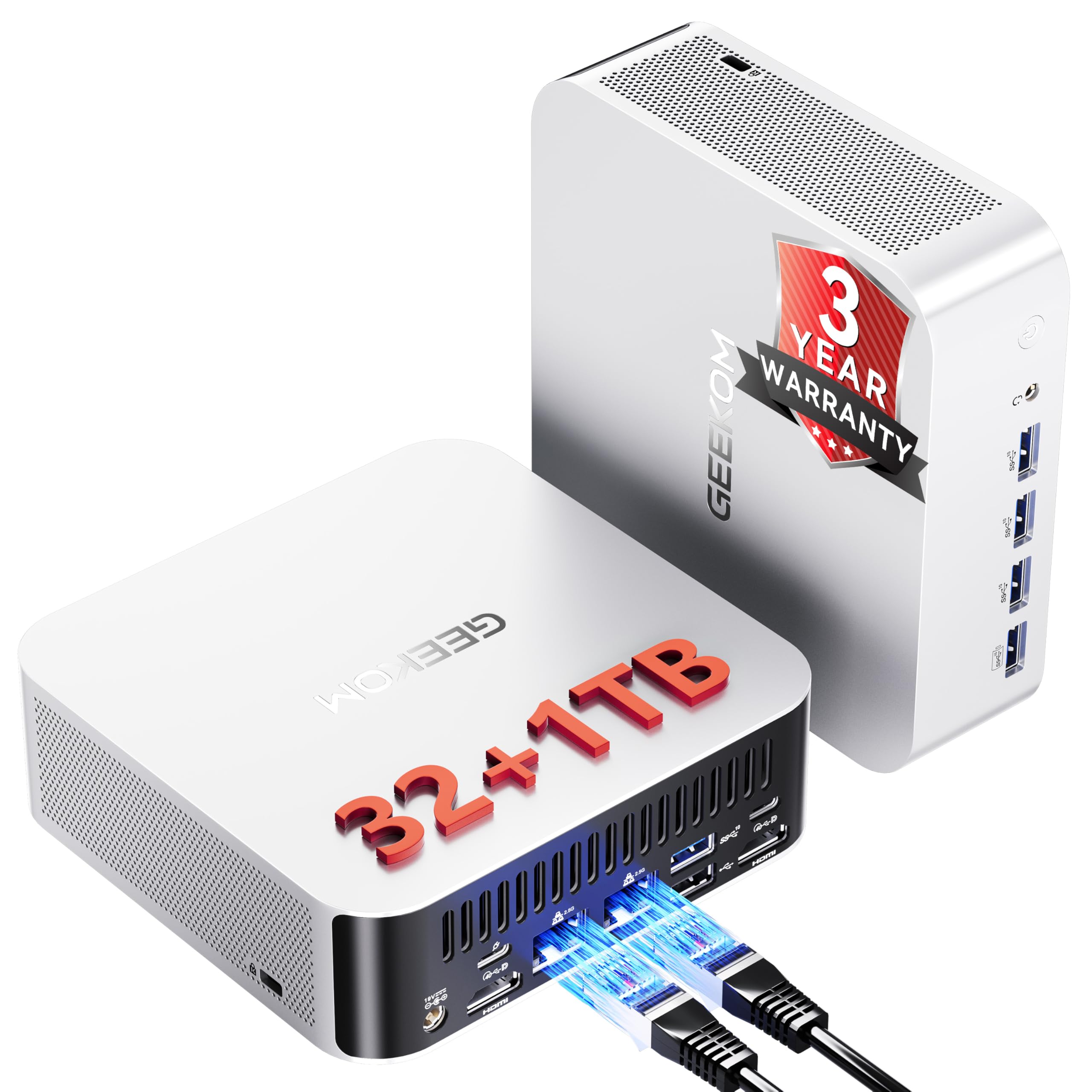
The GEEKOM A8 MAX is designed for users who prioritize a silent workspace without sacrificing performance. The AMD Ryzen 9 8945HS paired with the Radeon 780M integrated graphics is capable of handling creative workflows, AI tasks, and light gaming. The IceBlast 2.0 Cooling System keeps operating noise under a whisper-quiet 36dB, making it ideal for shared offices, recording studios, or late-night gaming sessions.
The system comes with 32GB of DDR5 RAM and a 1TB PCIe 4.0 SSD, with expandable storage options. Dual 2.5GbE LAN ports are perfect for networking tasks, and the USB4 port supports 40Gbps data transfers and 8K display output. The VESA mount allows for clean under-desk installation.
The 32GB is in a single stick configuration, which means it does not run in dual-channel mode, reducing memory bandwidth performance. The internal Wi-Fi adapter may have poor signal due to the metal chassis design, requiring an external USB adapter. For those who value a silent, discreet, and powerful mini PC, the A8 MAX is a top choice.
Why it’s great
- Exceptionally quiet 36dB operation
- Powerful R9 8945HS CPU
- Excellent IceBlast 2.0 cooling system
Good to know
- RAM is single-channel configuration
- Wi-Fi signal may be weak due to chassis
- Not for heavy AAA gaming without eGPU
13. HP OmniDesk Desktop Computer PC

The HP OmniDesk is an entry-level compact desktop that leverages the powerful Radeon 780M integrated graphics, making it a fantastic living room media PC or a starter rig for less demanding games. The AMD Ryzen 7 8700G with 16 NPU TOPS of AI capability handles productivity tasks and light gaming like indie titles, MOBAs, and older AAA games at 1080p low settings. The 32GB of DDR5 RAM ensures smooth multitasking.
The 1TB PCIe Gen4 NVMe SSD provides fast boot times and ample storage for media files and games. Connectivity options are comprehensive, with Wi-Fi 6, Bluetooth 5.4, and multiple USB ports. The included keyboard and mouse are functional, though they may feel cheap compared to the rest of the system.
The system is not designed for modern AAA gaming without an eGPU, and the included keyboard and mouse have been described as below average in quality. For users who need a compact, quiet, and capable media center or office PC with light gaming capabilities, the HP OmniDesk is an excellent budget-friendly choice.
Why it’s great
- Excellent integrated Radeon 780M graphics
- 32GB DDR5 RAM for smooth multitasking
- Great for media center and light gaming
Good to know
- Included keyboard and mouse are low quality
- Not suitable for modern AAA gaming
- Limited upgrade path for GPU
FAQ
Can a compact gaming PC compete with a full-sized tower?
What is the difference between a mobile GPU and a desktop GPU in a compact PC?
How important is an OCuLink port for a mini gaming PC?
Will a compact gaming PC be loud under load?
Final Thoughts: The Verdict
For most users, the best compact gaming pc winner is the Lenovo Legion Tower 5i because it delivers an outstanding balance of RTX 5070 Ti power, quiet thermal performance, and a tool-less upgrade-friendly chassis in a compact mid-tower. If you want the ultimate in space-saving with a dedicated mobile GPU and customizable cooling, grab the TOPGRO T1-Pro. And for a long-term eGPU upgrade path and fantastic value, nothing beats the GMKtec K11.

Mo Maruf
I created WellFizz to bridge the gap between vague wellness advice and actionable solutions. My mission is simple: to decode the research and give you practical tools you can actually use.
Beyond the data, I am a passionate traveler. I believe that stepping away from the screen to explore new environments is essential for mental clarity and physical vitality.