Our readers keep the lights on and my smoothie glass nicely filled. As an Amazon Associate, I earn from qualifying purchases.
The line between a gaming rig and a productivity workstation has never been thinner. Modern processors with high core counts and graphics cards capable of ray tracing have made it possible to play the latest AAA titles during downtime and render complex 3D models or edit high-resolution video during work hours without swapping machines. The challenge is sorting through dozens of configurations where a single wrong choice, like pairing a powerful CPU with an underpowered GPU or skimping on RAM capacity, can leave you either gaming at stutter-inducing frame rates or waiting minutes for a file to compile.
I’m Mohammad Maruf — the founder and writer behind WellFizz. I’ve spent the last 60 days analyzing the market for computers that straddle this dual-use line, cross-referencing CPU core counts, GPU VRAM capacities, memory speeds, storage interfaces, and thermal solutions across both entry-level and luxury pre-built towers.
Every system listed here passed through a filter that demanded both raw gaming performance and genuine multi-threaded capability for productivity. This guide focuses on finding the best computer for gaming and work that fits your specific performance budget without compromising on either side of the equation.
How To Choose The Best Computer For Gaming And Work
Selecting a single machine to handle both high-refresh gaming and demanding professional applications means prioritizing components that scale across both use cases. A CPU that excels at single-threaded gaming but bottlenecks during video encoding is not a hybrid winner. A GPU with 8GB of VRAM might handle 1080p gaming but will choke on large 3D scenes or 4K video timelines. Below are the three specs that matter most for this dual role.
CPU Core Count and Architecture
Gaming still leans heavily on single-core clock speeds, while professional work like compiling code, running virtual machines, or batch processing images scales with core count. An 8-core processor is the baseline for a true gaming-and-work machine. The AMD Ryzen 7 or Intel Core i7/i9 class with at least 16 threads ensures you can run a game, a browser with twenty tabs, and a chat application simultaneously without stuttering. Avoid low-power U-series chips designed for thin laptops; they lack the sustained thermal headroom for all-day work and gaming.
GPU VRAM and Architecture Generation
For hybrid use, the graphics card determines both your gaming fidelity and your productivity speed. A card with 12GB or more of VRAM handled by a modern architecture like NVIDIA’s Blackwell or Ada Lovelace offers access to DLSS for gaming and CUDA acceleration for rendering and AI workloads. The RTX 5070 and 5070 Ti represent the current sweet spot, providing enough VRAM for 1440p gaming and the tensor cores needed for professional suites like DaVinci Resolve or Blender. Cards with less than 8GB VRAM will limit texture quality in new games and can outright crash on complex professional scenes.
Memory, Storage, and Thermal Design
32GB of DDR5 RAM is no longer a luxury for hybrid use; it is the minimum for running a modern OS, a game, and a creative suite simultaneously without hitting page file limits. A PCIe 4.0 NVMe SSD with at least 1TB capacity ensures that game load times and large project files transfer at speeds that do not waste your time. Cooling is frequently overlooked: a system with a 240mm or larger AIO liquid cooler or a robust air cooler with a large heatsink will maintain boost clocks on both the CPU and GPU during extended sessions, preventing thermal throttling that saps performance in both gaming and work tasks.
Quick Comparison
On smaller screens, swipe sideways to see the full table.
| Model | Category | Best For | Key Spec | Amazon |
|---|---|---|---|---|
| Cooler Master NR2 Pro | High-End Compact | Best Overall Hybrid | 9800X3D + RTX 5070 Ti 16GB | Amazon |
| iBUYPOWER Y40 PRO | Premium Mid-Tower | 4K Ready Gaming & Creation | Ryzen 9 7900X + RTX 5070Ti 16GB | Amazon |
| MSI Codex Z2 | Performance Mid-Tower | Streaming & AAA Gaming | R7-8700F + RTX 5070 12GB | Amazon |
| ASUS ROG G700 | Premium | Enthusiast AI & Gaming | Ultra 7 265KF + RTX 5070 | Amazon |
| Skytech Gaming King 95 | High-End | Ultimate Cooling & FPS | Ryzen 7 9850X3D + RTX 5070 Ti | Amazon |
| CyberPowerPC Gamer Xtreme | Mid-Range | 1080p/1440p High Settings | i7-14700F + RTX 5060 Ti 8GB | Amazon |
| Lenovo Legion Tower 5i | Mid-Range | Productivity & Ray Tracing | Ultra 7 265F + RTX 5070 Ti | Amazon |
| KOTIN G60B | Feature-Rich Mid-Tower | 4K Ready with Monitoring | Ryzen 7 9700X + RTX 5070 12GB | Amazon |
| YAWYORE Gaming PC | Entry-Level | Budget Hybrid Use | Ryzen 7 5700X + RTX 5060 8GB | Amazon |
| Alienware Aurora | Premium | Brand Build & On-Site Support | Ultra 7 265F + RTX 5070 | Amazon |
| Thermaltake LCGS View i570 | Performance | Multi-Tasking & AAA Gaming | i9-14900KF + RTX 5070 12GB | Amazon |
| The Horizon Autherium Dragon | High-Capacity Workstation | Heavy Multitasking & Storage | i9 + RTX 5070 OC + 64GB RAM | Amazon |
| Panorama RTX 5080 | Ultra Premium | Highest Frame Rates | i9-14900KF + RTX 5080 16GB | Amazon |
In‑Depth Reviews
1. Cooler Master NR2 Pro

The Cooler Master NR2 Pro packs an AMD Ryzen 7 9800X3D processor alongside an RTX 5070 Ti 16GB into an 18.25-liter chassis that is barely larger than a shoebox. The 3D V-Cache on the CPU delivers exceptional gaming performance, particularly in simulation and strategy titles, while the 8 cores and 16 threads handle rendering and compile tasks without hesitation. The 32GB of DDR5 6000MHz RAM and a 2TB Gen4 NVMe SSD provide the capacity and speed demanded by both game libraries and large project files.
The custom 280mm AIO liquid cooler in this compact form factor keeps temperatures under control during extended gaming sessions and overnight video exports. The included Gigabyte B850I AORUS PRO motherboard offers a robust power delivery system for the 9800X3D, ensuring sustained boost clocks. Owners report that the system runs at 120-plus FPS at 1440p on ultra settings in titles like Cyberpunk 2077 and Baldur’s Gate 3 while staying quiet enough for a shared office space.
Two minor quality notes have surfaced in user feedback: the front USB-C port may arrive disconnected from the motherboard header, and the GPU riser cable can work loose during shipping, causing a no-display scenario upon first boot. Both are straightforward fixes for anyone comfortable with basic PC assembly. For the combination of raw performance, small footprint, and genuine hybrid capability, this machine stands apart.
Why it’s great
- Smallest footprint for top-tier performance
- 9800X3D delivers elite gaming and multi-threaded work
- Excellent thermal performance from custom 280mm AIO
- No bloatware and tool-less access to all components
Good to know
- Front USB-C port may need manual connection
- GPU riser cable can loosen during transit
- Premium price reflects compact engineering
2. iBUYPOWER Y40 PRO

The iBUYPOWER Y40 PRO pairs a 12-core AMD Ryzen 9 7900X with a 16GB RTX 5070 Ti, creating a configuration that excels at both high-refresh gaming and GPU-accelerated creative workloads. The 32GB of DDR5 5200MHz RAM and a 2TB NVMe SSD eliminate storage anxiety for anyone juggling multiple large games alongside work applications. The tempered glass Y40 chassis includes 16-color RGB lighting and a free keyboard and mouse set, keeping the out-of-box experience complete.
Real-world performance from this combination is exceptional. Users report running modern titles at 100-plus FPS on very high settings at 1440p, with the extra 16GB of VRAM on the 5070 Ti providing headroom for texture-heavy mods and 4K texture packs. The Ryzen 9 7900X handles multitasking effortlessly — streaming, video calls, and compiling code can run in the background without affecting gaming frame rates. The system runs cool and quiet under load, thanks to the case’s airflow design.
A small percentage of units have arrived with a loose cooler fan or required memory reseating, which is common with shipping across the prebuilt market. One review noted dust on a fan from the factory, suggesting quality control can occasionally slip. The included warranty and iBUYPOWER’s lifetime tech support largely mitigate these concerns. For a machine that competes with custom-built value, the Y40 PRO is a strong mid-range contender.
Why it’s great
- 12-core CPU and 16GB VRAM for heavy workloads
- 2TB storage out of the box
- Excellent 1440p gaming with high frame rates
- Clean build with no bloatware
Good to know
- Minor quality control variance reported
- RAM speed at 5200MHz, not 6000MHz
- Extended warranty recommended
3. MSI Codex Z2

The MSI Codex Z2 delivers an AMD Ryzen 7 8700F and an RTX 5070 with 12GB of GDDR7 VRAM in a traditionally styled tower that prioritizes airflow and stability. The 32GB of DDR5 RAM and a 2TB Gen4 NVMe SSD give this machine the storage and memory headroom for running a game, streaming software, and a browser simultaneously without slowdown. The four-system ARGB fan configuration pulls cool air from the front and exhausts heat from the rear, maintaining lower internal temperatures than many competitors in its class.
Gaming performance is impressive at 1440p, with the RTX 5070’s Blackwell architecture enabling DLSS 4 frame generation for titles like Frostpunk 2 and Black Myth: Wukong. Users have noted that the system runs 4K spread across three monitors without any issue, making it viable for both immersive gaming and a multi-monitor productivity setup. The 8700F’s eight Zen 4 cores handle video encoding and application compilation at a pace that justifies the upgrade over previous generations.
Two real-world concerns have emerged: the Bluetooth module on some units has been reported as weak, requiring an add-on PCIe card for reliable long-range connectivity, and a small number of users experienced SSD failure within the first month, requiring an RMA. MSI’s support team has received praise for handling warranty issues promptly. For a reliable pre-built from a major OEM that performs across gaming and work, the Codex Z2 is a solid pick.
Why it’s great
- Sturdy build with excellent airflow design
- 2TB SSD for massive storage capacity
- Supports multi-monitor 4K setups easily
- MSI Center for customizable RGB and performance profiles
Good to know
- Bluetooth range can be disappointing
- Some early SSD failure reports
- Fans get audible under full gaming load
4. ASUS ROG G700

ASUS built the ROG G700 with a dual-glass chassis that showcases the Intel Core Ultra 7 265KF and an RTX 5070, creating a system that feels as premium as it performs. The 32GB of DDR5 RAM and 1TB PCIe 4.0 SSD are the baseline for this 58-liter case, which supports triple-slot GPUs and includes 2.5Gbps Ethernet for fast local transfers. The quad-fan system paired with a 240mm liquid cooler keeps the components at optimal temperatures even during sustained workloads.
The Core Ultra 7 265KF includes integrated AI acceleration that applies to productivity tasks like background blur in video calls and certain content creation suites, while the RTX 5070 handles ray tracing and DLSS 3.5 duties. Users report flawless performance when multitasking — running a game, monitoring AI model training, and browsing simultaneously without any frame drops. The tool-less access to the interior makes upgrading storage or RAM effortless for future-proofing.
The motherboard in this system is a micro ATX form factor, which limits expansion slots compared to a full ATX board. The GPU included is not the ROG Strix variant, so RGB customization on the card is absent. For a user who values ASUS build quality, Dolby Atmos audio, and AI noise cancellation for work calls, this machine delivers a cohesive experience that bridges gaming and productivity.
Why it’s great
- Iconic dual-glass ROG design with Aura Sync
- Excellent thermal solution with 240mm AIO
- Tool-less upgrades for easy future-proofing
- Dolby Atmos and AI noise cancellation for calls
Good to know
- Micro ATX board limits expansion slots
- GPU is not ROG Strix, lacks RGB
- 1TB SSD may sell short for heavy users
5. Skytech Gaming King 95
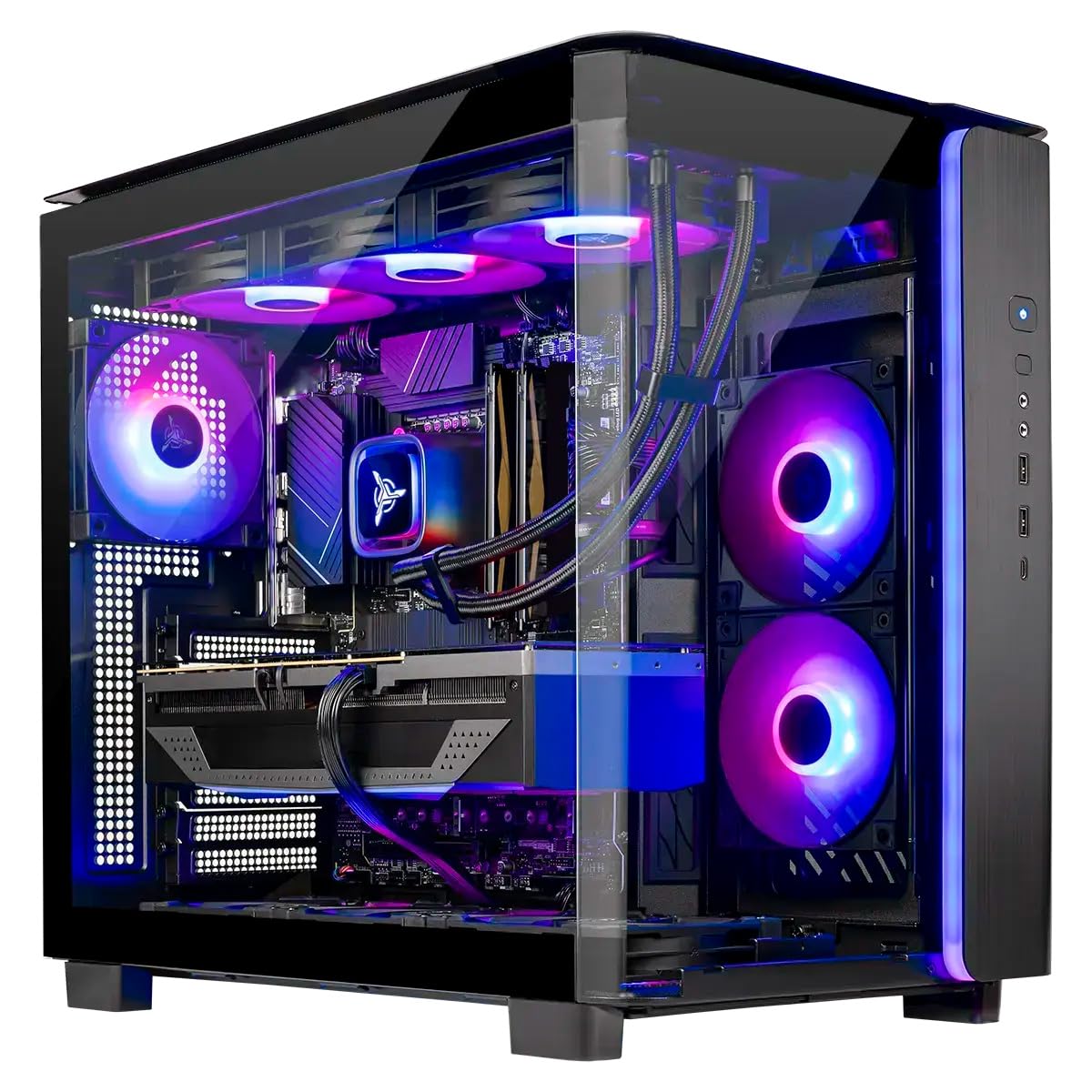
The Skytech Gaming King 95 pairs an AMD Ryzen 7 9850X3D with an RTX 5070 Ti 16GB and controls the resulting thermal load with a 360mm ARGB AIO liquid cooler. The 32GB of DDR5 6000MHz RAM and 1TB Gen4 NVMe SSD are standard for this tier, but the King 95 case itself is the highlight — it offers a panoramic tempered glass view with magnetic dust filters and pre-installed WiFi. Skytech assembles these units in the USA and includes a one-year warranty with free tech support.
The 9850X3D’s 3D V-Cache gives it a substantial edge in simulation-heavy games like Factorio and Microsoft Flight Simulator, while the 5070 Ti’s 16GB of VRAM handles 4K texture packs and rendering tasks with ease. Users report 60-plus FPS at 1440p with ray tracing enabled in Cyberpunk 2077 and Baldur’s Gate 3. The 360mm AIO keeps the CPU in the 60-70°C range during gaming sessions, and the 850W Gold ATX 3 power supply provides headroom for overclocking.
Some units have shipped with a 500GB SSD instead of the advertised 1TB, which is a notable variance in a premium-priced system. The included keyboard and mouse are functional but basic, underscoring that the value is in the core components. For a user who wants maximum cooling headroom and the smoothest possible gaming performance for hybrid use, the King 95 delivers.
Why it’s great
- 360mm AIO provides exceptional thermal performance
- 9850X3D excels in simulation and strategy games
- Panoramic case design with magnetic dust filters
- 850W Gold PSU with ATX 3 standard
Good to know
- Storage size variance reported from factory
- Included peripherals are basic
- Premium pricing for the cooling solution
6. CyberPowerPC Gamer Xtreme

CyberPowerPC’s Gamer Xtreme uses an Intel Core i7-14700F with 20 cores and an RTX 5060 Ti 8GB to deliver a balanced machine that handles 1080p and entry-level 1440p gaming alongside daily productivity tasks. The 16GB of DDR5 RAM and 1TB PCIe 4.0 SSD are the starting point for this config, which is ideal for someone migrating from a console or an older laptop. The white case with a tempered glass side panel and custom RGB lighting gives it a clean aesthetic.
The i7-14700F’s hybrid architecture includes 8 performance cores and 12 efficiency cores, which effectively handles multitasking for web development, document processing, and streaming. The RTX 5060 Ti 8GB supports DLSS 3.5 and ray tracing for modern titles, delivering smooth frame rates in games like Helldivers 2 and Company of Heroes at high settings. The system includes a 1-year parts and labor warranty with free lifetime tech support, providing peace of mind for first-time buyers.
One commonly reported issue involves the front-panel HDD LED and reset switch cables being swapped during assembly, which is a minor inconvenience that can be corrected with the motherboard manual. The 16GB of RAM meets the minimum recommendation for hybrid use but will benefit from a future upgrade to 32GB. For a well-priced entry point into PC gaming and work from a respected system integrator, this is a reliable choice.
Why it’s great
- 20-core CPU handles multitasking well
- Compact white case fits most setups
- Lifetime tech support included
- Easy upgrade path for RAM and storage
Good to know
- Front-panel wiring may be misaligned
- 16GB RAM is the minimum for hybrid use
- 8GB VRAM limits 4K gaming potential
7. Lenovo Legion Tower 5i

The Lenovo Legion Tower 5i packs an Intel Core Ultra 7 265F and an RTX 5070 Ti 16GB into a tool-less, transparent side-panel chassis that makes upgrades effortless. The 32GB of 5600MHz DDR5 RAM and 1TB SSD form a responsive foundation for both gaming and creative work. Lenovo includes three months of PC Game Pass, adding immediate value for someone looking to explore the latest titles on day one.
The 265F processor provides 16 cores with integrated AI acceleration that improves efficiency in supported workflows, while the 5070 Ti’s 16GB of GDDR6 VRAM allows for high-resolution texture work and smooth 1440p gaming at max settings. Users report that the system stays cool, with the GPU hovering in the mid-60s Celsius and the CPU in the low 60s during extended gaming sessions. Forza Horizon 5 at max settings averages around 180 FPS, and Monster Hunter Wilds holds near 100 FPS.
The pre-built market has noted that the chassis RGB lighting is generally attractive, though the “GEFORCE” text on the GPU is white and static rather than customizable. The fan noise is noticeable only during shader compilation, a brief and periodic event. For a well-rounded machine from a major OEM that balances core performance with ease of upgrade, the Legion Tower 5i is a compelling option.
Why it’s great
- Tool-less side panel for effortless upgrades
- RTX 5070 Ti with 16GB VRAM for creative work
- Excellent thermal management under load
- 3 months of PC Game Pass included
Good to know
- GPU text lighting is non-customizable
- Fans audible during shader compilation
- Storage limited to 1TB in base config
8. KOTIN G60B

The KOTIN G60B stands out visually with an 11.3-inch smart display on the chassis that shows real-time system metrics like CPU temperature, weather, and time, but it backs up the flashy exterior with serious hardware: an AMD Ryzen 7 9700X and an RTX 5070 12GB. The 32GB of DDR5 6000MHz RAM and 1TB PCIe 4.0 SSD are complemented by a 360mm digital liquid cooler and an 850W 80 Plus Gold PSU, creating a system built for sustained 4K gaming and creative workloads.
The Ryzen 7 9700X boosts up to 5.5 GHz across its 8 cores, providing snappy single-threaded performance for gaming and enough multi-threaded throughput for video editing and 3D rendering. The RTX 5070’s 12GB of GDDR7 VRAM and DLSS 4 support enable smooth 1440p and capable 4K gameplay in modern titles. Users have praised the build quality, noting that the Gigabyte motherboard included is a solid mid-range option that supports PCIe 5.0 for future GPU upgrades.
Reliability feedback is mixed: some units arrived fully functional with no issues, while others experienced boot errors and crashes that required a return. The side display functionality has been reported as temperamental on occasion. For a buyer who values the aesthetic of a secondary monitoring screen and wants liquid cooling in a pre-built, the G60B offers a unique package, but the variance in quality control warrants caution.
Why it’s great
- Unique 11.3-inch secondary display for monitoring
- 360mm AIO with digital temperature readout
- 850W Gold PSU for overclocking headroom
- PCIe 5.0 slot for future GPU upgrades
Good to know
- Side display function can be inconsistent
- Quality control variance between units
- Return process mentioned as cumbersome by some
9. YAWYORE Gaming PC

The YAWYORE Gaming PC provides an AMD Ryzen 7 5700X and an RTX 5060 8GB in a well-ventilated chassis that prioritizes affordability without sacrificing core performance for hybrid use. The 32GB of DDR4 3200MHz RAM and 1TB M.2 NVMe SSD are a generous offering at this tier, providing enough memory and storage for running a game, a browser, and productivity software simultaneously. The 650W 80 Plus Bronze PSU provides stable power for the components.
The Ryzen 7 5700X’s 8 cores and 16 threads handle multitasking for office work, programming, and light content creation at a pace that competes with more expensive builds, while the RTX 5060’s 8GB of GDDR7 VRAM and support for DLSS 4 deliver smooth 1080p gaming in titles like Red Dead Redemption 2 and Valorant. Users report that the system runs quietly and stays cool, thanks to the included liquid cooler and ARGB fans controlled by a remote.
The use of DDR4 RAM instead of DDR5 is the most significant compromise, as it limits memory bandwidth for heavy productivity tasks like 4K video rendering. The brand is less established than major OEMs, which may concern some buyers regarding long-term support. For a user on a tighter budget who needs a reliable machine for both gaming and daily work, the YAWYORE PC offers impressive value for the core components provided.
Why it’s great
- Strong value with 32GB RAM and 1TB SSD
- Liquid cooler included for quiet operation
- Controllable RGB lighting via remote
- Well-packaged with shock-absorbing foam
Good to know
- DDR4 RAM limits memory bandwidth
- Less established brand for warranty support
- 8GB VRAM is entry-level for gaming
10. Alienware Aurora ACT1250

Alienware’s Aurora ACT1250 features an Intel Core Ultra 7 265F and an RTX 5070 in the iconic basalt black chassis with customizable AlienFX stadium lighting. The 32GB of DDR5 RAM and 1TB SSD are standard, but the 1000W Platinum-rated PSU is the standout spec, providing extreme efficiency and headroom for future upgrades. Dell includes a 1-year on-site service plan, which covers in-home repairs if hardware issues cannot be resolved remotely.
The Core Ultra 7 265F’s 16 cores and AI acceleration are well-suited to both gaming and professional workloads, while the RTX 5070 handles ray tracing and DLSS 3.5. User reviews confirm that games like Ghost of Tsushima and World of Tanks Blitz run smoothly on high settings. The optimized air-cooling system is remarkably quiet, with most users noting that the fan noise is barely perceptible even during extended sessions.
Dell’s build quality has been criticized in some cases, with reports of a defective front ring light and a misaligned USB-C port on certain units, requiring a motherboard replacement under warranty. The boot time has been reported as approximately two minutes by some users, which is slower than competing systems with NVMe drives. The included software for controlling AlienFX lighting is Windows-only, which frustrates Linux users. For a buyer who values the Dell service ecosystem and the iconic design, the Aurora offers a premium hybrid experience.
Why it’s great
- 1000W Platinum PSU for extreme efficiency
- 1-year on-site service included
- Quiet operation under gaming loads
- Iconic Alienware design with customizable lighting
Good to know
- Build quality issues reported occasionally
- Slower boot times than some competitors
- AlienFX software is Windows-only
11. Thermaltake LCGS View i570

The Thermaltake LCGS View i570 combines an Intel Core i9-14900KF with an RTX 5070 12GB in a case designed for show and performance. The 32GB of DDR5 6000MT/s RGB memory and 1TB NVMe M.2 SSD are paired with a closed-loop 240mm liquid cooler to manage the i9’s high thermal output. The B760 chipset motherboard provides a reliable foundation, and the 850W power supply with a filtered ventilated side-mount radiator support ensures ample power for the components.
The i9-14900KF’s 24 cores (8 P-cores and 16 E-cores) make it a beast for productivity tasks like compiling code, running VMs, and video rendering, while the RTX 5070 delivers smooth gaming performance with DLSS 4 support. Users report that games like Cyberpunk 2077, Rust, Baldur’s Gate 3, and Helldivers 2 run flawlessly on high settings. The liquid cooling keeps the CPU at manageable temperatures, though the fans are slightly audible under load, a common trait with higher-TDP processors.
The system includes no bloatware, which is a welcome change from many pre-built manufacturers. Some users have noted that the fan noise is present but not intrusive, and the overall build quality is solid for a system integrator product. For a gamer and professional who wants the multi-core muscle of an i9 for heavy workloads, this Thermaltake rig delivers a balanced experience.
Why it’s great
- 24-core i9 for heavy multitasking and rendering
- 240mm AIO manages i9 thermal output
- No bloatware pre-installed
- RGB memory and case lighting for aesthetics
Good to know
- Fans are moderately audible under load
- i9-14900KF has high power draw
- 1TB SSD standard, upgrade recommended for heavy users
12. The Horizon Autherium Dragon

The Horizon Autherium Dragon prioritizes raw capacity above all else, offering 64GB of RAM and 5TB of total storage split between a 1TB NVMe SSD and a 4TB 7200RPM HDD. The unlocked Core i9 processor and a factory-overclocked RTX 5070 12GB provide the computational power, while the 360mm AIO and 11 fans keep internal temperatures under control even during extended heavy sessions. The dragon-themed front panel and software-controlled ARGB lighting make it a visual statement.
The 64GB of RAM is double the standard high-end average, making this system ideal for anyone running memory-intensive VMs, large databases, 3D rendering scenes, or multiple creative suites simultaneously. Users report that Microsoft Flight Simulator runs at Ultra settings and VR performance is smooth on a Quest 3. Video rendering times are notably short, with a three-minute clip exporting in roughly 35 seconds.
The large mechanical HDD provides slow-bulk storage for archives, but its 7200RPM speed is far slower than the NVMe drive for active projects. The warranty package is strong: three years on parts and five years on labor, backed by a support team with decades of experience. For a user who needs massive memory and storage capacity for work and has the headroom for the RTX 5070 for gaming, this is a compelling high-capacity option.
Why it’s great
- 64GB RAM for memory-heavy workloads
- 5TB total storage with fast NVMe + bulk HDD
- Factory-overclocked RTX 5070 for higher frames
- Comprehensive 3-year parts and 5-year labor warranty
Good to know
- Large case with 11 fans can be bulky
- Mechanical HDD is slow for active projects
- Dragon styling may not suit all setups
13. Panorama RTX 5080

The Panorama by Empowered PC houses an Intel Core i9-14900KF with a boost clock up to 6.0 GHz alongside an NVIDIA RTX 5080 16GB, making it the most powerful system on this list for pure compute and gaming. The 32GB of DDR5 RAM and 2TB PCIe Gen4 NVMe SSD are paired with nine ARGB PWM fans in a dual-tempered glass chassis that provides a panoramic view of the internal components. Windows 11 Pro is included, which adds BitLocker and remote desktop features useful for professional users.
The RTX 5080’s 16GB of GDDR7 memory and Blackwell architecture deliver frame rates that few systems can match, with 100-plus FPS at 1080p on ultra settings in the most demanding titles. The 24-core i9-14900KF handles intensive productivity tasks like 3D rendering, video encoding, and software compilation with ease. Empowered PC assembles these units in the USA and stress-tests each system before shipping, with a 3-year limited hardware warranty and lifetime tech support backing the purchase.
Some units have shipped with nine fans instead of the advertised ten, and the GPU power cable has been known to contact a lower fan, causing a spin failure on arrival. Both issues are minor but reflect a need for tighter final inspection. The included keyboard and mouse are basic rainbow-backlit models that serve as placeholders. For a user seeking absolute top-tier gaming performance with enough computational power for demanding creative work, the Panorama is the final word.
Why it’s great
- RTX 5080 delivers highest gaming frame rates
- i9-14900KF with 6.0 GHz boost for compute tasks
- Panoramic dual-tempered glass design
- 3-year warranty and lifetime tech support
Good to know
- Fan count variance reported from factory
- GPU cable routing can affect lower fan
- Included peripherals are basic
FAQ
Is 16GB of RAM enough for gaming and work simultaneously?
Should I prioritize a faster CPU or a better GPU for mixed use?
Does liquid cooling extend the lifespan of a hybrid use PC?
Why does the RTX 5070 have different VRAM amounts across models?
Final Thoughts: The Verdict
For most users, the computer for gaming and work winner is the Cooler Master NR2 Pro because it delivers the best overall balance of elite gaming performance from the 9800X3D and genuine productivity power from the RTX 5070 Ti in a compact, quiet chassis that fits nearly any workspace. If you want maximum storage and memory capacity out of the box for heavy professional workloads, grab the Horizon Autherium Dragon with 64GB of RAM and 5TB of storage. And for absolute top-tier gaming performance where frame rate is the only metric that matters, nothing beats the Panorama RTX 5080 with its 16GB of GDDR7 VRAM and 6.0 GHz boost clock i9.

Mo Maruf
I created WellFizz to bridge the gap between vague wellness advice and actionable solutions. My mission is simple: to decode the research and give you practical tools you can actually use.
Beyond the data, I am a passionate traveler. I believe that stepping away from the screen to explore new environments is essential for mental clarity and physical vitality.