Our readers keep the lights on and my smoothie glass nicely filled. As an Amazon Associate, I earn from qualifying purchases.
A keyboard that slows you down during a debugging session or delivers a mushy, inconsistent keystroke is the last thing a developer needs. The right switch feel, layout efficiency, and build quality directly impact typing speed and accuracy over long coding marathons. Choosing a board that prioritizes tactile feedback or a smooth linear travel can make the difference between a productive day and a frustrating one.
I’m Mohammad Maruf — the founder and writer behind WellFizz. I’ve spent countless hours analyzing switch actuation points, gasket mounting structures, and keycap material properties to find the boards that truly serve a developer’s workflow.
Whether you need a full-size layout with a number pad for data entry or a compact tenkeyless design for desk space, this guide breaks down the top models to help you find your ideal best coding mechanical keyboard.
How To Choose The Best Coding Mechanical Keyboard
Selecting a coding keyboard is different from choosing a gaming board. Developers value consistent switch weighting, a layout that keeps navigation keys within easy reach, and a build that remains quiet enough for open offices. The three factors below will guide your decision.
Switch Type and Actuation Feel
Tactile switches like Cherry MX Brown provide a small bump at the actuation point, giving you confirmation without needing to bottom out. Linear switches like Gateron Red offer a smooth, uninterrupted travel that some coders prefer for rapid typing. Magnetic Hall Effect switches allow you to adjust the actuation distance per key from 0.4mm up to 3.6mm, giving you total control over responsiveness. For pure typing accuracy, tactile or magnetic switches often win out over clicky blues in shared workspaces.
Layout, Programmability, and Key Rollover
A full-size board includes a dedicated number pad, which is useful for data-heavy work. A 75% or tenkeyless (TKL) layout saves desk space and reduces hand travel distance to the mouse. Hot-swap capability lets you replace switches without soldering, which is valuable if you want to experiment with different feels. Full N-key rollover (NKRO) ensures every keypress registers even during fast typing bursts, and QMK/VIA firmware gives you complete control over macros and layer remapping.
Build Materials and Sound Dampening
An aluminum top plate or full metal case adds rigidity and weight, preventing the board from sliding during use. Multi-layer foam and silicone gasket mounts absorb internal vibrations and eliminate hollow pinging sounds. PBT keycaps resist shine and fading over years of use, while double-shot molding ensures legends never wear off. These materials determine whether the board feels premium and sounds satisfying or cheap and clattery.
Quick Comparison
On smaller screens, swipe sideways to see the full table.
| Model | Category | Best For | Key Spec | Amazon |
|---|---|---|---|---|
| ASUS ROG Azoth | Premium | Customization & quiet coding | 75% TKL / Hot-Swap NX Snow / Tri-Mode | Amazon |
| Corsair K70 PRO TKL | Premium | Adjustable actuation coding | MGX Magnetic Switches / Rapid Trigger / TKL | Amazon |
| Das Keyboard Prime 13 | Premium | Minimalist office coding | Cherry MX Brown / Full-Size / Aluminum Top | Amazon |
| Logitech G PRO X TKL Rapid | Premium | Competitive speed & accuracy | Magnetic Analog / Rapid Trigger / TKL | Amazon |
| AULA F99 Pro | Mid-Range | Long battery life & creamy sound | 96% Layout / 8000mAh / Tri-Mode / Gasket | Amazon |
| Keychron V6 | Mid-Range | Full-size QMK/VIA programming | Full-Size / Hot-Swap K Pro Brown / Wired | Amazon |
| AULA F75 Pro | Budget | Compact wireless coding | 75% Layout / Reaper Switches / 4000mAh | Amazon |
In‑Depth Reviews
1. ASUS ROG Azoth

The ROG Azoth stands out for its three-layer foam dampening, silicone gasket mount, and pre-lubed ROG NX Snow linear switches that deliver a smooth, thocky typing experience right out of the box. The 75% layout keeps navigation keys accessible while saving desk space, and the integrated 2-inch OLED display lets you monitor CPU/GPU stats or media playback without alt-tabbing. With tri-mode connectivity (Bluetooth, 2.4GHz, USB-C) and over 2000 hours of battery life with the OLED and RGB off, this board can last weeks of heavy coding without needing a charge.
The hot-swap PCB supports 3-pin switches, and the included professional lubricating kit with Krytox GPL-205-GD0, switch puller, keycap puller, and lube station makes customization effortless. The PBT double-shot keycaps resist shine and the aluminum top plate provides a rigid, flex-free typing base. ROG SpeedNova wireless technology ensures a latency-free connection, making it a reliable choice for both wireless and wired coding sessions.
While the Armoury Crate software can feel bloated compared to open-source alternatives, the board’s hardware performance is exceptional. The OLED screen is more useful in wired mode for showing system stats, but it still displays battery level and custom animations wirelessly. For a coder who values silence, a premium feel, and long battery life, the Azoth is a strong investment.
Why it’s great
- Exceptional three-layer sound dampening with gasket mount for a quiet, thocky feel
- Hot-swappable PCB with included professional lubrication kit for easy customization
- Tri-mode connectivity with 2000+ hours battery life in 2.4GHz mode (OLED/RGB off)
Good to know
- Armoury Crate software can be buggy and resource-heavy
- OLED screen is less functional for system stats in wireless mode
2. Corsair K70 PRO TKL

The K70 PRO TKL uses CORSAIR MGX Hyperdrive magnetic switches, which are pre-lubricated and feature a dual-rail design that reduces key wobble to near zero. The tenkeyless layout saves desk space while keeping arrow and navigation keys, and the Rapid Trigger function dynamically adjusts actuation and reset points based on how far you release the key. This is especially useful for rapid repeated keystrokes in coding shortcuts or Vim navigation, as you don’t need to fully lift your finger between presses.
Each key’s actuation distance is adjustable in 0.1mm steps from a shallow 0.4mm to a deep 3.6mm, allowing you to set a very light touch for frequently used keys or a firmer feel for keys you want to avoid accidental activation. The anodized aluminum chassis gives the board a substantial 2.1-pound weight that stays planted on the desk. The included removable USB-C cable and volume roller make it easy to integrate into any setup.
The iCue software is notoriously resource-heavy and complex to navigate, but once configured, the per-key profiles can be stored onboard for use on any PC. A few users note that the volume knob sits close to the PgUp and Home keys, which can lead to accidental presses during fast typing. For developers who want the most adjustable switch feel available, this board is hard to beat.
Why it’s great
- Rapid Trigger and per-key actuation from 0.4mm to 3.6mm for total responsiveness control
- Pre-lubed MGX Hyperdrive magnetic switches with dual-rail design reduce wobble
- Sturdy anodized aluminum chassis with tenkeyless layout saves desk space
Good to know
- iCue software is complex, resource-heavy, and occasionally buggy
- Volume knob position can interfere with navigation key presses
3. Das Keyboard Prime 13
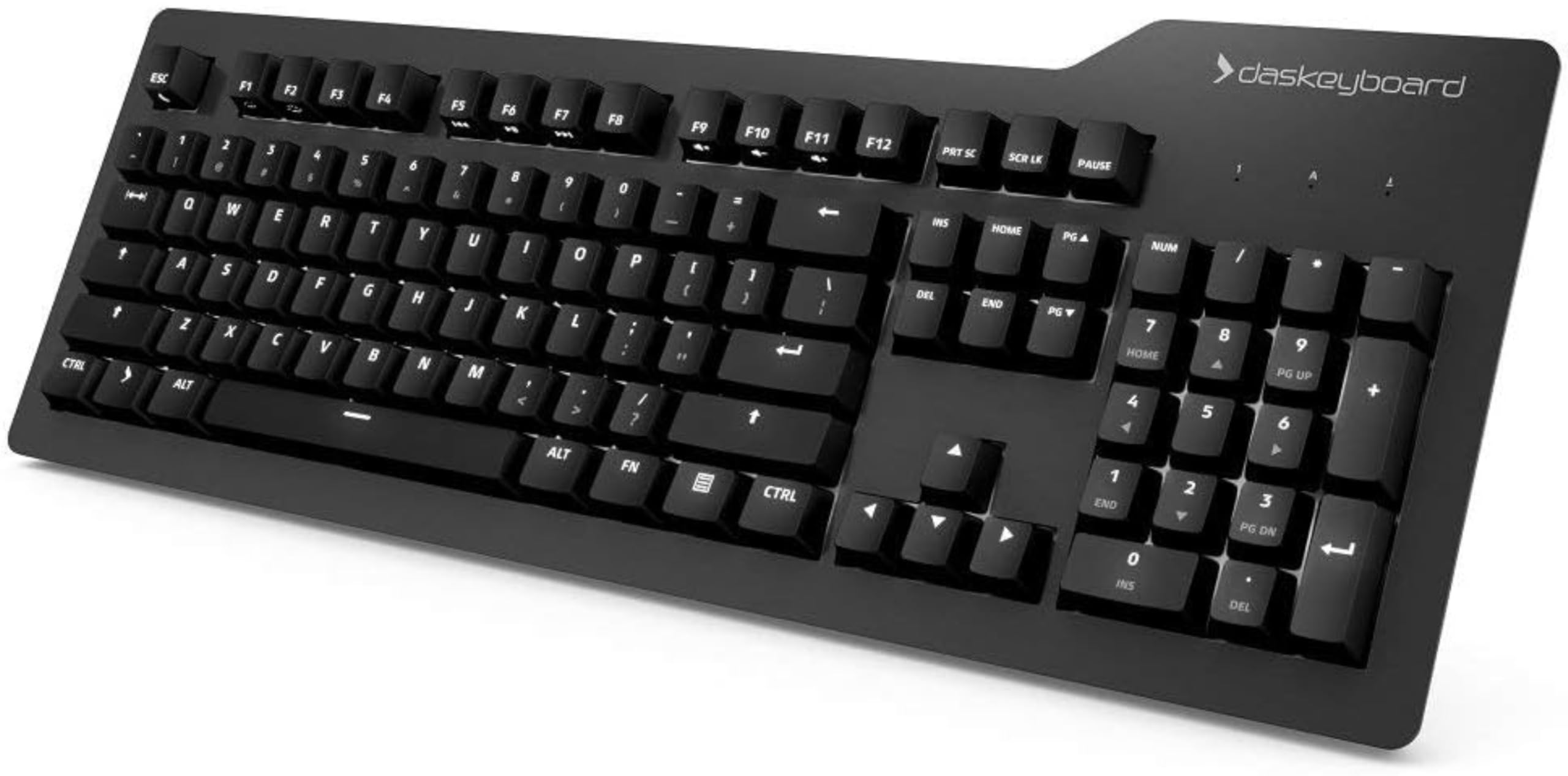
The Prime 13 takes a no-frills approach with Cherry MX Brown tactile switches that provide a medium bump at actuation, just enough to confirm each press without being loud. The full-size layout includes a dedicated number pad, which is useful for data entry, and the white LED backlight offers six brightness levels without any distracting RGB effects. The anodized aluminum top panel combined with an injection-molded plastic bottom gives the keyboard a dense, solid feel that resists desk movement during intense typing sessions.
Factory-lubricated stabilizers on the larger keys (space bar, Shift, Enter, Delete) eliminate the rattling sound common on many stock keyboards, and the laser-etched keycaps are rated for up to 50 million keystrokes. Full N-key rollover (NKRO) over USB ensures that every keypress registers even when you’re typing at high speeds, and the dedicated Windows key disable switch helps avoid accidental menu pops during full-screen coding or gaming sessions.
The dual-legend keycaps place the shifted symbols below the primary characters, which can be confusing when first transitioning to this keyboard. The white backlight does not illuminate the shifted symbols, so you’ll need to memorize their positions. For a developer who wants a quiet, professional board without any flashy features, the Prime 13 delivers consistent, reliable performance.
Why it’s great
- Cherry MX Brown switches provide balanced tactile feedback with moderate sound
- Anodized aluminum top panel and lubricated stabilizers for a solid, quiet typing feel
- Full NKRO over USB and dedicated Windows key disable switch
Good to know
- Dual-legend keycaps place shifted symbols below primary characters, not backlit
- Lowest backlight level still too bright in a dark room for some users
4. Logitech G PRO X TKL Rapid

The PRO X TKL Rapid features Logitech’s magnetic analog Hall Effect switches with Rapid Trigger technology, which allows key reactivation without a full release. This is a game-changer for coding workflows that involve repeated keystrokes, such as scrolling through code or using Vim keybindings, as it can register new presses faster than traditional mechanical switches. The actuation force is set at a light 35g, reducing finger fatigue during long coding sessions.
KEYCONTROL lets you assign specific commands, multi-action combos, and macros across multiple layers on every single key, all customizable through G HUB software. The FN key modes let you adjust actuation points and Rapid Trigger sensitivity on the fly without opening the software, which is convenient for making quick adjustments between tasks. The tenkeyless layout and Volume Roller keep the desk tidy while maintaining essential media controls.
Some users report that the USB-C port on the keyboard feels shallow and fragile, and that the included cable has limited strain relief. A wired disconnection issue that requires a full PC reboot has been noted by a few customers, which is a significant inconvenience for a board at this tier. For developers who prioritize adjustable, fast-response switches and don’t mind potential connectivity quirks, the PRO X TKL Rapid delivers excellent performance.
Why it’s great
- Rapid Trigger mode allows key reactivation without full release for faster repeated presses
- Magnetic analog switches with 35g actuation for light, comfortable typing
- KEYCONTROL provides deep per-key macro and layer customization via G HUB
Good to know
- USB-C port design may be fragile with limited strain relief
- Some users experience a disconnection issue requiring a full PC reboot
5. AULA F99 Pro

The F99 Pro offers an impressive 8000mAh battery that can last weeks between charges, making it one of the longest-lasting wireless boards in this guide. The 96% layout keeps the number pad and arrow keys while trimming the overall footprint to save desk space. The gasket mount and five-layer silicone dampening produce a deep, creamy sound signature that many coders find satisfying without being loud enough to distract an office.
Hot-swap support allows you to replace the pre-lubed linear switches with any 3-pin or 5-pin switch, giving you flexibility to experiment with tactile or clicky alternatives later. The multi-function knob can toggle between lighting control and volume adjustment, while the 16 RGB lighting effects include music-synced modes. The PBT double-shot keycaps are side-printed, so the legends won’t fade, and the indicator for remaining battery life is accessible via a keyboard shortcut.
The plastic enclosure feels sturdy but lacks the weight of an aluminum frame, and the Bluetooth connection can occasionally drop out, though the 2.4GHz dongle and wired USB-C modes are rock-solid. For a developer on a budget who wants wireless convenience, long battery life, and a pleasant typing sound, the F99 Pro punches well above its tier.
Why it’s great
- 8000mAh battery provides exceptional wireless run time between charges
- Gasket mount and five-layer dampening deliver a creamy, quiet sound signature
- 96% layout and hot-swappable switches offer great flexibility for the price
Good to know
- Plastic build feels less premium than aluminum-frame competitors
- Bluetooth connection can be inconsistent; 2.4GHz dongle is more reliable
6. Keychron V6

The V6 is a full-sized wired keyboard that prioritizes customization through open-source firmware support in QMK and VIA. You can remap any key, create complex macros, and save two different layouts for macOS and Windows, switching between them with the system toggle. The hot-swap PCB supports 3-pin and 5-pin switches, and the pre-lubed K Pro Brown tactile switches provide a light bump that many coders find perfect for extended typing sessions.
The double-shot PBT keycaps with an OSA profile offer a comfortable finger surface that resists shine over time, and the south-facing RGB eliminates interference with Cherry-profile keycaps. The anodized aluminum plate combined with a silicone acoustic pad creates a solid, dampened typing feel with minimal pinging. At roughly 5 pounds, the steel weight ensures the board never moves on your desk during fast typing.
The V6 is wired-only, so you won’t have the clutter of charging cables, but the USB-C connection is straightforward. The top-right keycaps (Print Screen, Scroll Lock, Pause) are not very useful for coding, and the edge glow from the RGB can be distracting if you prefer a clean look. For a developer who wants full control over every key’s function and doesn’t need wireless features, the Keychron V6 is a reliable workhorse.
Why it’s great
- Full QMK and VIA firmware support for deep key remapping and macro creation
- Hot-swap PCB supports 3-pin and 5-pin switches for easy customization
- Double-shot PBT keycaps and anodized aluminum plate for long-lasting durability
Good to know
- Wired-only design may not suit users who want a clean wireless desk
- RGB edge glow can be distracting, and top-right keycaps have limited utility for coders
7. AULA F75 Pro

The F75 Pro packs a 75% layout with 81 keys, including arrow keys and a multi-function knob, into a compact frame that saves significant desk space. The pre-lubed LEOBOG Reaper linear switches produce a creamy, thocky sound right out of the box, and the gasket mount with five layers of silicone filling eliminates cavity noise. The side-printed PBT keycaps offer a soft texture and won’t fade over time, giving the board a clean, modern look.
Tri-mode connectivity over Bluetooth 5.0, 2.4GHz, and USB-C gives you flexibility to switch between devices, and the 4000mAh battery provides a week of typical use with RGB on. The hot-swap PCB supports 3-pin and 5-pin switches, allowing future upgrades. The multi-function knob can toggle between lighting control and media playback, and the 16.8 million RGB backlight includes 16 preset effects plus music-synced modes.
The plastic build feels lighter and less premium than aluminum boards, but at this price point, the typing experience and feature set are difficult to beat. The gradient pink-black color scheme may not suit everyone’s taste, and the side-printed legends take a few days to get used to. For a budget-conscious developer who wants a wireless mechanical keyboard with a pleasant sound profile, the F75 Pro is an excellent starting point.
Why it’s great
- 75% layout saves desk space while keeping arrow keys and a knob
- Pre-lubed Reaper linear switches and gasket mount deliver a creamy, quiet sound
- Tri-mode connectivity with a 4000mAh battery for week-long wireless use
Good to know
- Plastic build feels less premium than metal-frame alternatives
- Color scheme and side-printed legends may not appeal to everyone
FAQ
What switch type is best for long coding sessions?
Is a full-size or tenkeyless layout better for programming?
Why do many coders prefer PBT keycaps over ABS?
Final Thoughts: The Verdict
For most users, the best coding mechanical keyboard winner is the ASUS ROG Azoth because it combines a quiet gasket-mount typing feel, hot-swap customization, and exceptional wireless battery life in a premium build. If you want fully adjustable per-key actuation with magnetic switches, grab the Corsair K70 PRO TKL. And for a budget-friendly wireless option with long battery life, nothing beats the AULA F99 Pro.

Mo Maruf
I created WellFizz to bridge the gap between vague wellness advice and actionable solutions. My mission is simple: to decode the research and give you practical tools you can actually use.
Beyond the data, I am a passionate traveler. I believe that stepping away from the screen to explore new environments is essential for mental clarity and physical vitality.