Our readers keep the lights on and my smoothie glass nicely filled. As an Amazon Associate, I earn from qualifying purchases.
Finding the right thermal solution for your AMD Ryzen 7 9700X means balancing cooling headroom, noise levels, and case compatibility. The 9700X runs efficiently, but a quality cooler unlocks its full potential for sustained workloads and quiet operation. While many coolers claim compatibility, the specific thermal density and socket layout of AM5 demand a targeted approach.
I’m Mohammad Maruf — the founder and writer behind WellFizz. I’ve spent countless hours analyzing thermal performance specs, fan acoustics, and real-world feedback to find the coolers that genuinely match the 9700X’s profile.
This guide breaks down the top contenders to help you find the best cooler for 9700x based on your noise tolerance, case size, and budget.
How To Choose The Best Cooler For 9700X
Selecting a cooler for the Ryzen 7 9700X involves more than just looking at TDP ratings. The 9700X’s 65W TDP can spike higher under boost, so you need a cooler that handles transient loads quietly. Focus on three core areas to narrow your options.
Cooling Performance & TDP Headroom
A cooler rated for at least 150W TDP gives you comfortable margin for sustained all-core workloads without hitting thermal limits. Air coolers like the dual-tower designs excel here, while 240mm AIOs offer similar capacity with different mounting considerations.
Noise Level & Fan Quality
The 9700X rarely needs maximum fan speed, so a cooler with high-quality bearings and low decibel ratings (under 30 dB) will deliver a near-silent experience. Look for fluid-dynamic or magnetic dome bearings for longevity and quiet operation.
RAM Clearance & Case Fit
Large air coolers can overhang RAM slots, blocking tall RGB memory. AIOs avoid this issue entirely. Check your case’s CPU cooler height limit for air coolers, and radiator support (top or front) for liquid coolers. Offset heat sink designs help maintain PCIe clearance on AM5 boards.
Quick Comparison
On smaller screens, swipe sideways to see the full table.
| Model | Category | Best For | Key Spec | Amazon |
|---|---|---|---|---|
| Noctua NH-D15 G2 chromax.black | Air | Ultimate Quiet Air Cooling | 8 Heat Pipes, 155.6 m³/h | Amazon |
| ARCTIC Liquid Freezer III Pro 240 | AIO | Thick Radiator, VRM Cooling | 38 mm Radiator, 77 CFM | Amazon |
| NZXT Kraken Plus 240 | AIO | Custom LCD Display | 1.54″ Square LCD, 31.9 dB | Amazon |
| Corsair Nautilus 360 RS | AIO | Low-Noise 360mm Cooling | 20 dBA Pump, 2100 RPM Fans | Amazon |
| ID-COOLING FX360 INF | AIO | 360mm ARGB Infinity Effect | 350W TDP, 27.2 dB | Amazon |
| be quiet! Dark Rock 5 | Air | Silent Mid-Range Air Cooler | 6 Heat Pipes, 29.8 dB | Amazon |
| Thermalright Phantom Spirit 120SE | Air | Budget Dual Tower Value | 7 Heat Pipes, 66.17 CFM | Amazon |
In‑Depth Reviews
1. Noctua NH-D15 G2 chromax.black

The NH-D15 G2 is the quintessential high-end air cooler, now in an all-black chromax finish. Its 8 heat pipes and increased fin surface area provide exceptional thermal capacity, easily taming the 9700X even during extended all-core loads. The offset design clears the top PCIe slot on most AM5 boards, a thoughtful improvement.
The included NF-A14x25r G2 140mm fans are a marvel of acoustics. With a maximum noise rating of 24.8 dB, this cooler remains whisper-quiet during typical gaming and productivity sessions. The bundled NT-H2 thermal paste and SecuFirm2+ mounting system with a Torx screwdriver make installation nearly foolproof.
Its sheer size is the primary constraint — you need a wide case with at least 168mm of clearance. RAM clearance is limited to 32mm with both fans, forcing you to use low-profile memory or run a single fan. For users who prioritize absolute quiet and long-term reliability, this is the benchmark.
Why it’s great
- Unmatched quiet cooling for the 9700X
- Premium build quality and all-black aesthetic
- Includes high-quality thermal paste and screwdriver
Good to know
- Very large; check case clearance and RAM height
- Premium price point
- Requires careful motherboard compatibility check
2. ARCTIC Liquid Freezer III Pro 240 A-RGB
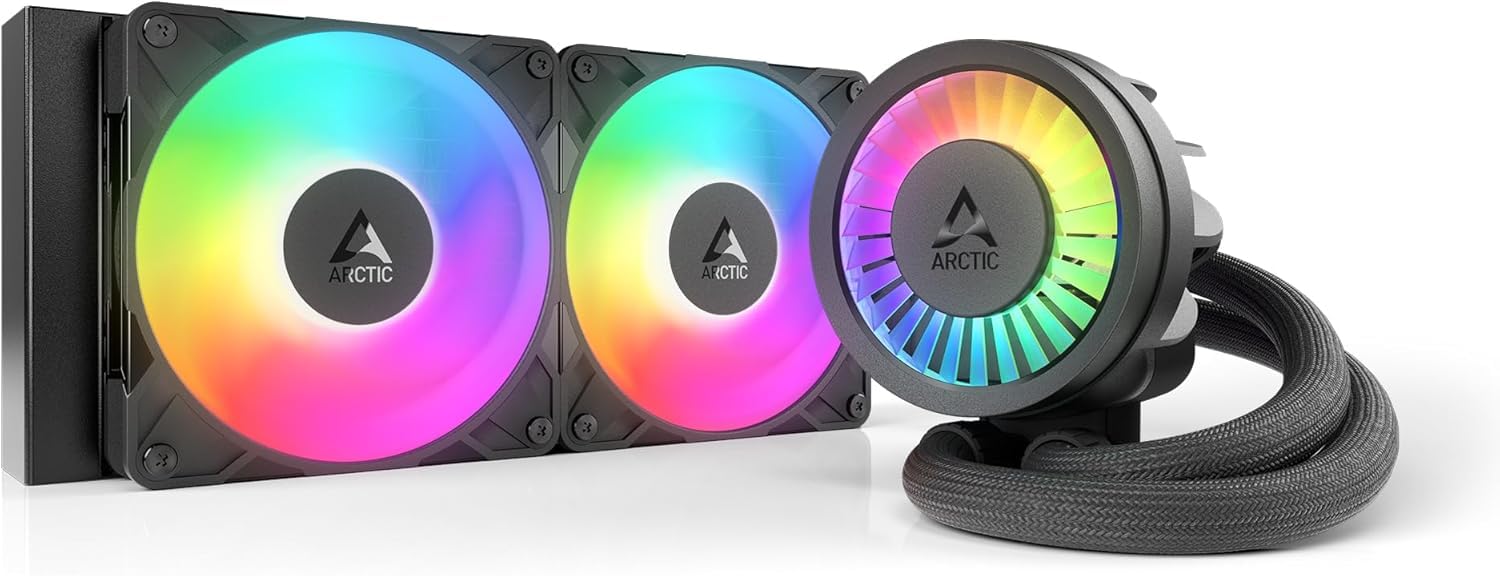
The Liquid Freezer III Pro 240 stands out with its 38mm thick radiator, which is significantly larger than the standard 27mm units. This increased density allows for effective heat dissipation with quieter fan speeds. The included VRM fan on the pump actively cools motherboard voltage regulators, a unique touch for demanding AM5 builds.
The P12 Pro fans deliver up to 77 CFM of airflow, providing ample headroom for the 9700X. The pump runs at a fixed high speed, but users report it remains quiet enough for a mid-tower build. The integrated cable management, where fan cables run through the hose sheathing, dramatically simplifies the build process.
Installation on AM5 is straightforward with the offset mounting that shifts the cold plate to the CPU’s hotspot. However, the thicker radiator can cause clearance issues in compact cases, so measure your available space carefully. The fans can become loud if pushed to maximum RPM without a custom curve.
Why it’s great
- Thick radiator offers excellent thermal mass
- Integrated VRM fan improves motherboard cooling
- Clean cable management with daisy-chained fans
Good to know
- Thicker radiator may not fit all cases
- Fans can be loud at 100% speed
- Pump runs at full speed, no PWM control
3. NZXT Kraken Plus 240
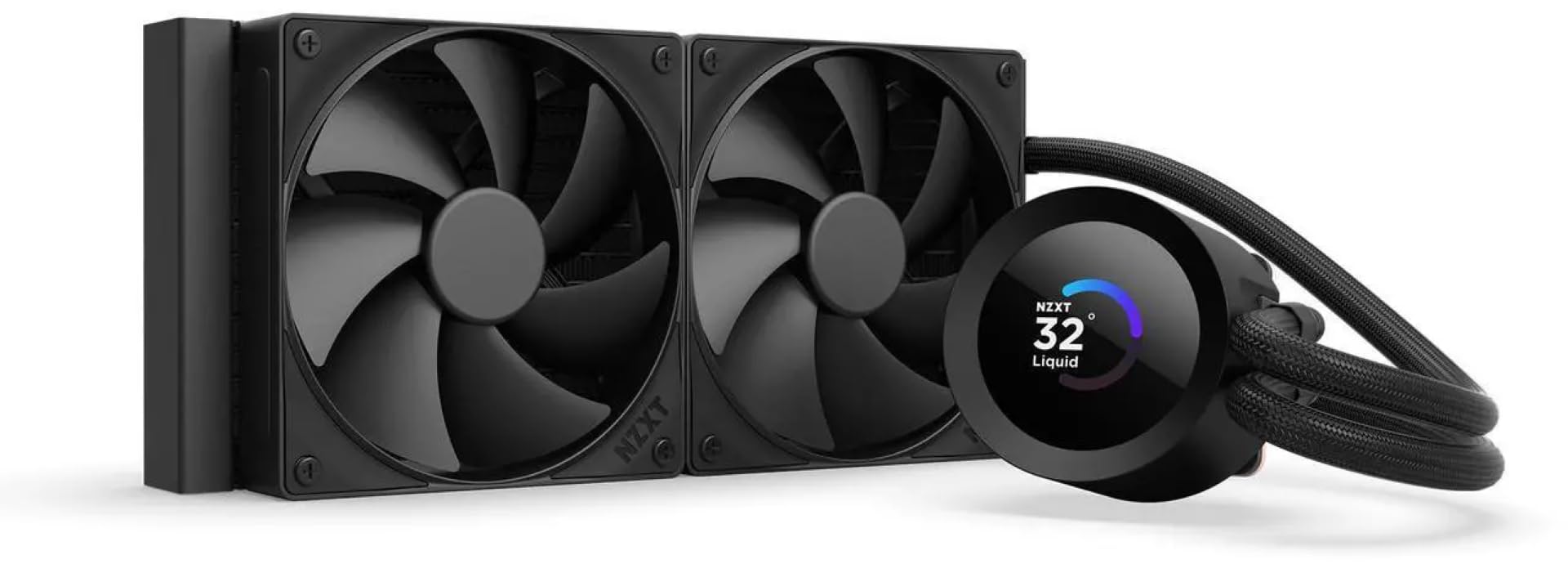
The Kraken Plus 240 brings a sharp 1.54-inch square LCD to the pump block, allowing you to display CPU temperatures, custom GIFs, or Spotify data through NZXT CAM software. For builders who want real-time system stats on the cooler itself, this is a compelling feature that blends function with personalization.
Under the hood, the Turbine pump provides high flow and head pressure, keeping the 9700X cool during sustained loads. The dual F120P fans are high-static-pressure units designed to push air through the 240mm radiator efficiently. Zero RPM mode stops fans entirely at low loads, making the system nearly silent when browsing or working.
Installation is tool-free, with pre-applied thermal paste and a single breakout cable from the pump. One reviewer on a 9800X3D noted idling in the high 30s°C, which bodes well for the 9700X. However, the reliance on CAM software for pump control and some reports of pump noise or failure after months of use warrant consideration for long-term reliability.
Why it’s great
- Customizable LCD screen for temps and media
- Zero RPM mode for silent operation at idle
- Tool-free mounting and pre-applied thermal paste
Good to know
- Requires CAM software for full functionality
- Some reports of pump noise or failure
- Premium price for the LCD feature
4. Corsair Nautilus 360 RS

The Nautilus 360 RS delivers a 360mm radiator solution without RGB, focusing purely on low-noise performance. The pump is rated at a whisper-quiet 20 dBA, making it an excellent choice for noise-sensitive builds. The slightly convex cold plate design ensures maximum contact pressure with the 9700X’s integrated heat spreader.
The three RS120 fans use AirGuide technology and Magnetic Dome bearings, generating strong static pressure for the radiator while keeping noise under 36 dB at max speed. The daisy-chain connection simplifies wiring to a single 4-pin header. Users report excellent temperatures for Ryzen 9 processors, indicating plenty of headroom for the 9700X.
Build quality is solid, with a pre-applied thermal paste pattern for quick installation. Note that one review mentioned replacing the pre-applied paste with a premium alternative dropped gaming temps by 10°C — a worthwhile consideration for optimizing performance. The 360mm radiator requires a case with top or front support for triple 120mm fans.
Why it’s great
- Very quiet pump operation at 20 dBA
- 360mm radiator provides massive cooling area
- Daisy-chain fans for clean cable routing
Good to know
- Pre-applied thermal paste may be sub-optimal
- Larger radiator footprint, check case support
- No RGB lighting for users wanting effects
5. ID-COOLING FX360 INF

The FX360 INF provides a 360mm AIO with a show-stopping infinity mirror effect on the pump block. With a 350W TDP rating, it has considerable overhead for the 9700X. The triple 120mm fans rotate at up to 2900 RPM and produce only 27.2 dB max, making this a reasonably quiet high-performance option.
The GEN 7 pump operates at 2900 RPM and includes a 27mm thick radiator with 12 waterways for improved heat exchange. The daisy-chained fan connectors simplify cable management, and the ARGB lighting is customizable through standard motherboard software. Users have reported eliminating thermal throttling on an i9-14900K, which suggests excellent capacity for the 9700X.
Some users noted the fans can produce a slight wobble at certain speeds, and the pump may emit a high-frequency whine above 64% speed. The pump uses a 3-pin DC connector rather than 4-pin PWM, which limits voltage-based control. Overall, it offers strong performance at a competitive price point for a 360mm solution.
Why it’s great
- Stunning infinity mirror ARGB pump effect
- High 350W TDP rating for future-proofing
- Quiet fan operation at 27.2 dB
Good to know
- Pump uses 3-pin DC, not 4-pin PWM
- Some reported fan wobble or pump whine
- Build quality feels less premium than competitors
6. be quiet! Dark Rock 5

The Dark Rock 5 is a single-tower air cooler designed for excellent noise control. Its 6 heat pipes and dense aluminum fin array provide solid cooling for the 9700X, and the ceramic-particle black coating improves heat transfer. The asymmetrical design provides generous RAM and VRM clearance, a practical advantage over larger dual-tower coolers.
The Silent Wings 4 120mm fan uses a fluid-dynamic bearing and a 6-pole motor for smooth, quiet rotation. At a maximum of 29.8 dB, it remains unobtrusive even under load. The included long-neck screwdriver simplifies installation, and the pre-installed mounting bridge speeds up the process. A second fan can be added for extra performance.
One reviewer specifically called it “just about perfect for a Ryzen 9700x,” praising its simplicity and low noise during gaming. Its compact size makes it compatible with a wide range of cases, though it lacks the sheer thermal headroom of a 360mm AIO or the NH-D15. It suits users who want quiet, reliable air cooling without clearance headaches.
Why it’s great
- Very quiet operation for mid-range builds
- Good RAM and VRM clearance
- Easy installation with included screwdriver
Good to know
- Not suitable for extreme overclocking
- Single fan by default, second fan optional
- Less thermal capacity than dual-tower coolers
7. Thermalright Phantom Spirit 120SE

The Phantom Spirit 120SE is a dual-tower air cooler that punches well above its price point. With 7 heat pipes using AGHP 4.0 technology to mitigate gravity effects in vertical or horizontal orientations, it handles the 9700X’s thermal output with ease. The 154mm height is compatible with most mid-tower cases, and the all-aluminum fin stack with a pure copper base provides efficient heat transfer.
The dual TL-C12B V2 fans are 120mm PWM units operating at up to 1500 RPM and 66.17 CFM. The S-FDB bearings ensure a long lifespan, and the maximum noise level of 25.6 dB is impressively low. Many users have reported this cooler rivals 280mm AIOs in performance, keeping CPUs like the 7800X3D and 9900X cool under sustained load for a fraction of the cost.
Some users noted the stock fans can develop noise after several months, but the standard 120mm size makes replacement with Arctic P12 or Noctua fans easy. The cooler’s large size can also obstruct M.2 drive access on some motherboards. For its price, it offers exceptional value and thermal performance for the 9700X.
Why it’s great
- Excellent value, rivaling expensive coolers
- Low noise at 25.6 dB with good airflow
- 7 heat pipes provide strong thermal capacity
Good to know
- Stock fans may develop noise over time
- Large size can obstruct M.2 access
- RAM clearance is limited in dual-fan mode
FAQ
Is a 240mm AIO enough for the 9700X?
Do I need to worry about RAM clearance with a dual-tower cooler?
Will a 360mm AIO fit in my mid-tower case?
What is the advantage of the AGHP technology in Thermalright coolers?
How often should I replace thermal paste on my 9700X cooler?
Final Thoughts: The Verdict
For most users, the best cooler for 9700x winner is the Noctua NH-D15 G2 chromax.black because it delivers unmatched air cooling performance, near-silent operation, and the highest build quality for long-term peace of mind. If you want the stunning ARGB infinity mirror effect and a 360mm radiator, grab the ID-COOLING FX360 INF. And for the absolute best value without sacrificing dual-tower cooling, nothing beats the Thermalright Phantom Spirit 120SE.

Mo Maruf
I created WellFizz to bridge the gap between vague wellness advice and actionable solutions. My mission is simple: to decode the research and give you practical tools you can actually use.
Beyond the data, I am a passionate traveler. I believe that stepping away from the screen to explore new environments is essential for mental clarity and physical vitality.