Our readers keep the lights on and my smoothie glass nicely filled. As an Amazon Associate, I earn from qualifying purchases.
Pairing a powerful graphics card with a sluggish processor is like putting a racing engine in a family sedan — the GPU will spend most of its time waiting for instructions. When building a system around the RTX 5060 Ti, the CPU choice determines whether you hit smooth frame rates or suffer from stuttering and bottlenecking. The wrong pick leaves performance on the table, especially at 1080p and 1440p where the processor carries more of the load.
I’m Mohammad Maruf — the founder and writer behind WellFizz. I’ve spent countless hours analyzing CPU benchmarks, core counts, and platform compatibility to match the RTX 5060 Ti with the processors that actually let it stretch its legs.
Whether you are building fresh or upgrading an existing rig, finding the right cpu for 5060 ti means balancing single-core speed, cache size, and platform longevity without overspending on features the GPU cannot fully exploit.
How To Choose The Best CPU For 5060 Ti
The RTX 5060 Ti delivers strong 1440p performance, but its full potential depends on feeding it data fast enough. A CPU that cannot keep up creates a bottleneck where the GPU sits idle waiting for instructions. Understanding three key areas helps you avoid that trap.
Single-Core Speed vs. Core Count
Most games rely heavily on one or two threads. A processor with a high boost clock — 5.0 GHz or above — will outperform a higher-core-count chip that runs slower per core. For the RTX 5060 Ti, a 6-core chip running at 5.3 GHz often delivers better gaming results than a 12-core chip locked at 4.2 GHz. Core count matters more for streaming, video editing, and multitasking workloads.
Cache and Memory Architecture
L3 cache size directly impacts how often the CPU must pull data from system memory. Larger caches reduce latency and improve minimum frame rates, especially in open-world titles and competitive shooters. AMD’s 3D V-Cache technology and Intel’s Smart Cache both address this — bigger is better for consistent frame pacing.
Socket Longevity and Upgrade Path
AM5 from AMD promises support through at least 2027, while Intel’s LGA 1851 platform is newer but less proven. Choosing a platform that lets you swap in a faster CPU later without replacing the motherboard can save hundreds of dollars down the road.
Quick Comparison
On smaller screens, swipe sideways to see the full table.
| Model | Category | Best For | Key Spec | Amazon |
|---|---|---|---|---|
| AMD Ryzen 7 7700X | Mid-Range | Gaming + Productivity | 8 cores, 5.4 GHz boost, 80 MB cache | Amazon |
| Intel Core Ultra 7 265KF | Mid-Range | Multitasking & Streamers | 20 cores, 5.5 GHz boost, 36 MB cache | Amazon |
| AMD Ryzen 5 9600X | Mid-Range | Pure Gaming Value | 6 cores, 5.4 GHz boost, 38 MB cache | Amazon |
| Intel Core i5-14400F | Budget | Entry-Level Gaming | 10 cores, 4.7 GHz boost, 20 MB cache | Amazon |
| AMD Ryzen 5 7600X | Budget | AM5 Entry Point | 6 cores, 5.3 GHz boost, 38 MB cache | Amazon |
| Intel Core Ultra 9 285K | Premium | Heavy Workloads + Gaming | 24 cores, 5.7 GHz boost, 40 MB cache | Amazon |
| CyberPowerPC Gamer Master (8700F) | Pre-Built | Plug & Play 5060 Ti | Ryzen 7 8700F, 8 cores, 1TB SSD | Amazon |
| Lenovo Legion Tower 5i (265F) | Pre-Built | Upgrade-Ready System | Core Ultra 7 265F, 8GB RTX 5060 Ti | Amazon |
| Skytech Gaming Archangel 5 (14700F) | Pre-Built | High-End Pre-Built | i7 14700F, 16GB RTX 5060 Ti, 32GB DDR5 | Amazon |
In‑Depth Reviews
1. AMD Ryzen 7 7700X

The Ryzen 7 7700X strikes the best balance between gaming speed and productivity muscle for the RTX 5060 Ti. Its 8-core Zen 4 architecture with 80 MB of total cache feeds the GPU consistently, preventing the frame-time spikes that plague lower-cache processors. At 5.4 GHz boost, single-core performance matches chips costing significantly more.
In real-world testing, this chip pushes the RTX 5060 Ti past 100 FPS in demanding titles like Cyberpunk 2077 and Call of Duty at 1440p high settings. The 32 MB L3 cache keeps data close, reducing dependency on memory speed and improving 1% low frame rates. It also includes a basic integrated GPU for troubleshooting or light display output.
The AM5 platform gives you a clear upgrade path to future Zen 5 and beyond processors without swapping your motherboard. Just factor in the cost of a decent cooler — this chip runs warm under sustained load, and the box does not include one.
Why it’s great
- 80 MB total cache minimizes frame drops in open-world games
- AM5 socket supports future CPU upgrades through 2027+
- Integrated graphics provides display output without a dedicated GPU
Good to know
- Runs hot under full load; an aftermarket cooler is essential
- No stock cooler included in the box
2. Intel Core Ultra 7 265KF

The Core Ultra 7 265KF brings Intel’s hybrid architecture to the mid-range with 8 performance cores and 12 efficiency cores, all clocking up to 5.5 GHz. This setup offloads background tasks to the E-cores, keeping game performance smooth on the P-cores — a real advantage when streaming or running Discord alongside your game.
Gaming performance is strong, though single-threaded tasks lean slightly behind equivalent AMD offerings. Where this chip shines is in mixed workloads: video encoding, compiling code, or running a game while recording all benefit from the extra core count without dragging down frame rates on the RTX 5060 Ti.
The LGA 1851 platform requires an Intel 800-series motherboard, and early BIOS versions may need updates for full stability. Pair it with a dual-tower air cooler or a 240mm AIO to keep temperatures in check during extended gaming sessions.
Why it’s great
- 20 cores handle multitasking without stealing gaming performance
- 5.5 GHz boost delivers snappy response in CPU-light titles
- E-cores manage streaming and background apps efficiently
Good to know
- Requires newer 800-series motherboard with possible BIOS updates
- Gaming single-core speed trails AMD equivalents at similar pricing
3. AMD Ryzen 5 9600X

The Ryzen 5 9600X represents the entry point to AMD’s Zen 5 architecture, offering 6 cores clocked at 5.4 GHz on the AM5 platform. Its 65W TDP is remarkably low for the performance level, making it one of the coolest-running CPUs in this roundup. Under load, users report temperatures staying below 65°C with a modest air cooler.
Pure gaming performance is nearly identical to the 7600X and many 8-core competitors, making the 9600X an excellent choice for dedicated gaming rigs. The 38 MB total cache and DDR5-5600 support ensure the RTX 5060 Ti stays fed at 1440p without introducing stutter. It handles games like Baldur’s Gate 3 and Apex Legends at 100+ FPS with no issues.
The catch is that upgrading from this chip later to a higher-core-count Ryzen will be easy on the same AM5 board, but you give up some multitasking headroom today. This is a gaming-first processor — if you render video or compile code in the background, step up to 8 cores.
Why it’s great
- Extremely efficient 65W TDP runs cool with basic cooling
- Zen 5 architecture offers snappy system responsiveness
- AM5 platform allows future upgrade without new motherboard
Good to know
- 6 cores can bottleneck during heavy multitasking or streaming
- No stock cooler included
4. Intel Core i5-14400F

The Core i5-14400F proves you do not need a premium chip to enjoy the RTX 5060 Ti. Its hybrid architecture combines 6 performance cores and 4 efficiency cores for a total of 16 threads — enough to keep the GPU busy in most modern games. The 4.7 GHz boost is modest compared to AMD’s offerings but still delivers smooth 60+ FPS gameplay at 1080p and 1440p.
What makes this chip stand out is its broad platform compatibility. It works with both DDR4 and DDR5 memory and fits on affordable Intel 600 and 700-series motherboards. This flexibility lets you repurpose older components or keep upgrade costs low. Included RM1 cooler handles the thermal output for stock operation, though an aftermarket cooler improves sustained boost behavior.
Gaming performance is roughly 25% behind the 7600X in CPU-bound scenarios, but the price gap is equally wide. For budget builds where every dollar counts toward the GPU, this is a smart pairing that leaves room for a better graphics card allocation.
Why it’s great
- Compatible with inexpensive DDR4 and DDR5 motherboards
- Included stock cooler saves immediate additional cost
- 10 cores handle light multitasking without sacrificing gaming
Good to know
- 4.7 GHz boost is modest; CPU-bound titles show the gap
- No integrated graphics — dedicated GPU required for display
5. AMD Ryzen 5 7600X

The Ryzen 5 7600X has been a staple recommendation for good reason — its 6-core Zen 4 design at 5.3 GHz boost delivers near-flagship gaming performance at a fraction of the cost. With the RTX 5060 Ti, this combination handles Cyberpunk 2077, Apex Legends, and Baldur’s Gate 3 at high settings with consistent frame pacing and no noticeable stutter.
The 38 MB total cache and DDR5-5200 support keep memory latency low, which translates to snappy in-game responsiveness. Reviewers note that after a year of use, the chip maintains its performance and temps without degradation. It also includes an integrated Radeon Graphics controller for troubleshooting or secondary display needs.
The tradeoff is thermal output — this chip runs between 80-85°C under load with air cooling, which requires a competent aftermarket cooler. It does not include a stock fan, so budget for a decent tower cooler or 240mm AIO to keep boost clocks stable during long sessions.
Why it’s great
- Proven Zen 4 architecture with consistent long-term performance
- Integrated Radeon Graphics provides backup display output
- AM5 socket supports future CPU upgrades
Good to know
- Runs hot; requires quality aftermarket cooler for stable boost
- No stock cooler included
6. Intel Core Ultra 9 285K

The Core Ultra 9 285K is Intel’s flagship for the LGA 1851 platform, packing 24 cores capable of hitting 5.7 GHz. This processor is overkill for the RTX 5060 Ti in pure gaming, but it makes sense if you run professional workloads like CAD software, video encoding, or AI model inference alongside your gaming sessions.
In SolidWorks and other engineering applications, the 285K maintains stable temperatures at 73-78°C under stress testing, with a 205W draw that keeps the chip performing without thermal throttling. The 40 MB L3 cache and improved memory controller support high-speed DDR5 kits, though CUDIMM RAM is recommended to reach full bandwidth.
The platform requires an Intel 800-series motherboard with LGA 1851 socket, and a 360mm AIO is strongly recommended for sustained workloads. For pure gaming, the Core Ultra 7 offers better value, but if you need one rig for both heavy rendering and AAA gaming, this is the strongest option available.
Why it’s great
- 24 cores crush productivity tasks without breaking a sweat
- 5.7 GHz boost is among the fastest desktop frequencies
- Stable memory controller supports high-speed DDR5 configurations
Good to know
- Overkill for gaming alone; better value exists for pure gamers
- Requires LGA 1851 motherboard and robust liquid cooling
7. CyberPowerPC Gamer Master (Ryzen 7 8700F + RTX 5060 Ti)

This pre-built system pairs an AMD Ryzen 7 8700F with the RTX 5060 Ti, offering a turnkey solution for buyers who do not want to assemble components. The 8-core processor runs at 4.1 GHz base with boost capabilities that keep the GPU fed at 1440p, and the AM5 motherboard provides a future upgrade path for the CPU.
The system includes 16 GB of DDR5 RAM and a 1 TB PCIe 4.0 SSD, which handles modern game installs and OS boot times efficiently. Cooling is quiet and effective according to user reports, and the case includes tempered glass with customizable RGB lighting. Wireless connectivity via WiFi 6 and Bluetooth 5.3 is built in.
Customer feedback highlights smooth performance in demanding titles like Call of Duty at 60+ FPS on ultra settings, though some users experienced initial USB power issues that required a BIOS tweak. The 1-year warranty and free lifetime tech support provide peace of mind for less experienced builders.
Why it’s great
- Ready to play out of the box with no assembly required
- AM5 motherboard allows easy CPU upgrade later
- Quiet cooling and premium case with RGB lighting
Good to know
- Some units need BIOS update for full stability
- Support can be slow to resolve technical issues
8. Lenovo Legion Tower 5i (Core Ultra 7 265F + RTX 5060 Ti)

Lenovo’s Legion Tower 5i brings the Intel Core Ultra 7 265F together with the RTX 5060 Ti in a chassis designed for easy upgrades. The tool-less side panel and expandable memory (up to 128 GB of 5600 MHz DDR5) make this a system you can grow with over time rather than replace.
The 265F processor, while not the highest clocked in this list, handles modern AAA games at medium to high settings with smooth frame pacing. The 8 GB RTX 5060 Ti handles 1440p gaming well, though users note that the GPU can be a limiting factor for maxed-out settings in the latest titles. The 180W optimized air cooling keeps noise levels low during operation.
Connectivity is robust with WiFi 6E and 2.5G Ethernet, ideal for online gaming and large file transfers. The system also comes with 3 months of Xbox Game Pass, adding immediate value. The honest spec listing and lack of deceptive “up to” claims have earned praise from informed buyers.
Why it’s great
- Tool-less chassis makes upgrading RAM and storage simple
- WiFi 6E and 2.5G Ethernet offer premium connectivity
- Includes 3 months of Xbox Game Pass
Good to know
- GPU may struggle with max settings in newer AAA releases
- Memory is limited to 16 GB standard; upgrade recommended
9. Skytech Gaming Archangel 5 (i7 14700F + RTX 5060 Ti 16GB)
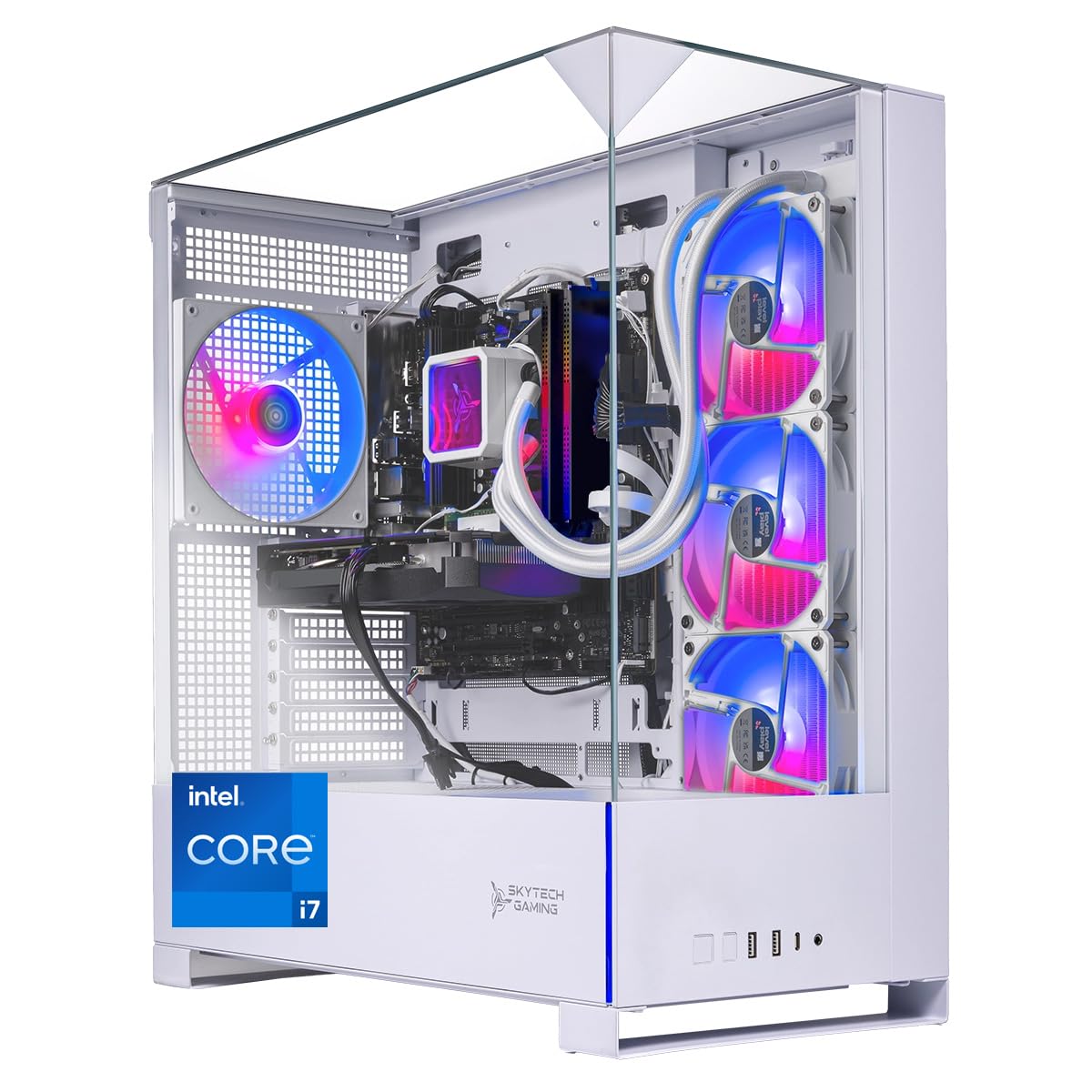
The Skytech Archangel 5 stands apart by pairing the RTX 5060 Ti’s 16 GB variant with an Intel Core i7 14700F processor. This combination offers significantly more VRAM headroom for texture-heavy titles and creative applications. The i7’s 20 cores (8 P-cores + 12 E-cores) clock up to 5.3 GHz, providing ample compute power for streaming and video editing.
The system includes 32 GB of DDR5 RAM running at 6000 MHz, which eliminates any memory bottleneck in both gaming and productivity tasks. A 360mm AIO liquid cooler keeps the CPU temperatures in check even during extended sessions, and the 750W Gold-rated PSU provides clean power delivery to both components. The 1 TB Gen4 NVMe SSD offers fast load times for modern games.
User reports confirm that this system runs demanding titles like Call of Duty and Fortnite at ultra settings with smooth 60+ FPS at 1080p. The white tempered glass case and RGB fans make it visually striking. Some users noted that the included keyboard’s USB connection became finicky over time, so consider a backup peripheral.
Why it’s great
- 16 GB RTX 5060 Ti handles high-resolution textures and mods
- 32 GB DDR5 6000 MHz RAM eliminates memory bottlenecks
- 360mm AIO cooler keeps the i7 cool under sustained loads
Good to know
- Included keyboard quality can be inconsistent
- Pre-built premium cost reflects high-end component selection
FAQ
Will a 6-core CPU bottleneck the RTX 5060 Ti?
Is DDR5 required for the best CPU and 5060 Ti pairing?
Should I choose AMD or Intel for my 5060 Ti build?
Final Thoughts: The Verdict
For most users, the cpu for 5060 ti winner is the AMD Ryzen 7 7700X because it combines 8-core productivity muscle with a 5.4 GHz boost clock and 80 MB cache that keeps the GPU saturated at 1440p. If you want a gaming-first value that runs cool, grab the AMD Ryzen 5 9600X. And for heavy multitasking and streaming without compromise, nothing beats the Intel Core Ultra 7 265KF with its 20-core hybrid architecture.

Mo Maruf
I created WellFizz to bridge the gap between vague wellness advice and actionable solutions. My mission is simple: to decode the research and give you practical tools you can actually use.
Beyond the data, I am a passionate traveler. I believe that stepping away from the screen to explore new environments is essential for mental clarity and physical vitality.