Our readers keep the lights on and my smoothie glass nicely filled. As an Amazon Associate, I earn from qualifying purchases.
Balancing high frame rates with fast render times means picking a processor that doesn’t force you to choose one over the other. The best chips for this dual workload must combine single-core speed for gaming with abundant cores for encoding, timeline scrubbing, and multi-threaded exports.
I’m Mohammad Maruf — the founder and writer behind WellFizz. After combing through thousands of customer reviews, spec sheets, and benchmark data across the latest Intel and AMD lines, I’ve isolated what separates a true hybrid performer from a compromised shortcut.
Whether you build from scratch or buy a pre-configured rig, this guide to finding the absolute best cpu for gaming and video editing covers core count strategy, platform longevity, and real-world thermal behavior.
How To Choose The Best CPU For Gaming And Video Editing
A processor that excels in gaming typically favors high clock speeds on a handful of cores, while video editing leans on many cores working in parallel. The ideal chip delivers both without forcing you to buy two separate rigs. Here is what to focus on when comparing models.
Core Count And Thread Count
For video editing, software like Premiere Pro, DaVinci Resolve, and Final Cut relies heavily on multi-threaded performance during rendering and exporting. A chip with at least 12 threads is the baseline for smooth 1080p editing, while 16 to 24 threads handle 4K timelines without stuttering. Gaming still prefers fewer, faster cores, so a hybrid approach — fast single-core performance on top of a high thread count — is the sweet spot.
Single-Core Boost Clock And Cache Size
Gaming frame rates depend on how fast each individual core can execute instructions. Look for boost clocks above 5.0 GHz for modern AAA titles. Large L3 caches, like AMD’s 3D V-Cache technology, reduce memory latency and improve game responsiveness without needing higher clock speeds. For editing, a larger cache also helps when scrubbing through high-bitrate footage.
Platform And Upgrade Path
Intel’s LGA1700 platform supports both DDR4 and DDR5 memory, giving budget-conscious builders flexibility. AMD’s AM5 platform uses only DDR5 but promises multi-generation CPU support, meaning you can drop in a future chip without replacing the motherboard. PCIe 5.0 support on both platforms ensures fast GPU and NVMe SSD bandwidth for large video files.
Thermal Design Power And Cooling Requirements
High-core-count chips generate substantial heat under sustained load. A processor with a 125W base power and 250W+ peak draw demands a quality 240mm or 360mm liquid cooler to maintain boost clocks during long renders. Mid-range chips with lower TDPs can often run on high-end air coolers, saving cost and complexity in smaller cases.
Quick Comparison
On smaller screens, swipe sideways to see the full table.
| Model | Category | Best For | Key Spec | Amazon |
|---|---|---|---|---|
| Intel i9-14900K | Premium Desktop CPU | High-end gaming and 4K video exports | 24 cores (8P+16E), up to 6.0 GHz | Amazon |
| iBUYPOWER Y40 PRO (Ryzen 9 7900X) | Prebuilt Gaming PC | Plug-and-play 1440p gaming and editing | Ryzen 9 7900X, RTX 5070 Ti 16GB | Amazon |
| Corsair Vengeance i7500 (i9-14900KF) | Prebuilt Gaming PC | Ultra-high FPS and AI-assisted editing | i9-14900KF, RTX 5080, 32GB DDR5 | Amazon |
| Skytech King 95 (Ryzen 7 9850X3D) | Prebuilt Gaming PC | Top-tier 4K gaming without compromise | Ryzen 7 9850X3D, RTX 5080 16GB | Amazon |
| MSI Codex Z2 (Ryzen 7 8700F) | Prebuilt Gaming PC | Mid-range 1440p performance with RTX 5070 | AMD Ryzen 7 8700F, RTX 5070 12GB | Amazon |
| AMD Ryzen 9 7900 | Mid-Range Desktop CPU | SFF builds and efficient multitasking | 12 cores, 24 threads, 65W TDP | Amazon |
| Intel i7-14700KF | Mid-Range Desktop CPU | Value-balanced gaming and productivity | 20 cores (8P+12E), up to 5.6 GHz | Amazon |
| CyberPowerPC Gamer Master (Ryzen 7 8700F) | Prebuilt Gaming PC | Budget-friendly entry into 1080p editing | Ryzen 7 8700F, RTX 5060 Ti 8GB | Amazon |
| STGAubron Prebuilt (i5 + RX 550) | Budget Prebuilt PC | Light browsing and casual indie games | Intel Core i5 up to 3.6GHz, RX 550 4GB | Amazon |
In‑Depth Reviews
1. Intel i9-14900K Desktop Processor

The 14900K represents Intel’s peak hybrid architecture, combining eight Performance-cores with sixteen Efficient-cores for a total of 24 threads. At stock settings, single-core boost reaches 6.0 GHz, giving it an edge in frame-rate-limited titles like CS2 and Valorant. During video exports in DaVinci Resolve, the multi-core score translates to noticeably shorter render times compared to previous-gen i9 models, especially when paired with DDR5 memory.
Thermal management is the big trade-off. Under a sustained all-core workload, the chip can draw over 250W, requiring a robust 360mm AIO liquid cooler to avoid throttling. The LGA1700 platform also supports both DDR4 and DDR5 motherboards, offering flexibility if you want to reuse older RAM. Several customer reports note the importance of updating the motherboard BIOS to address microcode stability fixes — a simple but critical step for long-term reliability.
For a builder who wants maximum single-core gaming performance without sacrificing multi-threaded editing power, the 14900K is the current Intel flagship. The 24-core count handles simultaneous game streaming, OBS encoding, and background editing tasks without breaking a sweat, though the power draw means you need a premium cooling solution and a high-wattage PSU.
Why it’s great
- 6.0 GHz boost clock delivers elite gaming frame rates
- 8 P-cores handle heavy single-threaded tasks with ease
- Compatible with both DDR4 and DDR5 for budget flexibility
Good to know
- Requires high-end liquid cooling to sustain boost under load
- Stability reports rely on updated BIOS with microcode 0x12F
- Power consumption spikes above 250W in multi-core workloads
2. AMD Ryzen 9 7900 12-Core Processor

The Ryzen 9 7900 is a 12-core, 24-thread processor based on Zen 4 architecture, but unlike its X-series sibling, it ships with a 65W TDP. This makes it an exceptional choice for small form factor builds where cooling space is limited. The included Wraith Prism RGB cooler is sufficient for everyday gaming and moderate rendering, though a tower air cooler will keep boost clocks higher during longer export sessions.
Benchmarks show the 7900 delivering nearly identical multi-core performance to the 7900X while consuming roughly 40% less power under load. In video editing suites, the 76 MB of total cache helps with timeline scrubbing and effects previewing, and the chip supports PCIe 5.0 on AM5 motherboards for fast NVMe storage. Customer reviews highlight its quiet operation in home lab and workstation environments, with some users running 10–12 virtual machines without thermal issues.
The AM5 platform is a long-term investment: AMD has committed to supporting the socket through multiple future generations, allowing an easy CPU upgrade later. For editors building a compact but capable rig, the 7900 offers a rare blend of low heat output, strong multi-threaded performance, and a clear upgrade path — all without needing a custom loop.
Why it’s great
- 65W TDP keeps thermals low in SFF cases
- 76 MB cache improves editing responsiveness
- AM5 platform guarantees future CPU upgrade support
Good to know
- Single-core boost lower than X variant for gaming extremes
- Included cooler is adequate but limits sustained turbo
- DDR5-only platform increases build cost vs DDR4 options
3. iBUYPOWER Y40 PRO (Ryzen 9 7900X + RTX 5070 Ti)

This prebuilt from iBUYPOWER pairs a Ryzen 9 7900X with an NVIDIA RTX 5070 Ti 16GB, giving you a balanced 1440p gaming and 4K editing machine out of the box. The 7900X boosts up to 5.6 GHz, delivering strong single-core performance for shooters and strategy games, while the 12 Zen 4 cores handle Premiere Pro exports efficiently. The 32GB of DDR5 5200MHz RAM provides enough headroom for large timelines and After Effects compositions.
Cooling comes from an integrated liquid loop, which keeps the CPU under 80°C during extended rendering. The Y40 case features a tempered glass panel and ARGB lighting, but the real advantage is the non-proprietary motherboard layout, making future upgrades straightforward. Customer feedback notes excellent 100+ FPS performance at high settings in titles like Call of Duty and Cyberpunk 2077, with the GPU handling ray tracing without dropping below 60 FPS.
The 2TB NVMe SSD offers fast project load times, and the power supply is sized to handle both the GPU and CPU at peak draw. Some users reported early software glitches that were resolved with driver updates. For anyone who wants a turnkey system that can edit 4K footage today and game at high refresh rates, this build avoids the typical prebuilt pitfalls of proprietary parts and weak PSUs.
Why it’s great
- RTX 5070 Ti 16GB handles 4K preview and GPU-accelerated effects
- Liquid cooling keeps CPU temps manageable during exports
- Non-proprietary parts allow easy RAM and storage upgrades
Good to know
- Some units may require BIOS updates for full stability
- Wi-Fi dongle rather than onboard Wi-Fi 6 in some builds
- Premium pricing compared to self-built equivalent
4. Corsair Vengeance i7500 (i9-14900KF + RTX 5080)

The Corsair Vengeance i7500 combines a liquid-cooled Intel Core i9-14900KF with the new RTX 5080 16GB GPU, making it one of the most powerful prebuilts for both gaming and AI-assisted video editing. The 14900KF offers the same 24-core, 32-thread count as the 14900K but without integrated graphics — irrelevant for a system with a dedicated GPU. The Corsair NAUTILUS RS ARGB cooler keeps the CPU under control during prolonged rendering.
The RTX 5080 supports DLSS 4 and NVIDIA Studio drivers, accelerating denoising, upscaling, and AI effects in apps like DaVinci Resolve and Blender. The 32GB of Corsair Vengeance DDR5 memory runs at high speeds, reducing stutter when scrubbing through 6K RED footage or multiple 4K streams. Storage is handled by a 2TB Corsair MP600 NVMe SSD, offering sequential read speeds over 7,000 MB/s for instant project loading.
Build quality is a mixed bag based on customer reports: some units arrived with non-working fans or cosmetic issues, though Corsair’s support team generally resolved replacements within days. The 3500X case offers excellent airflow with three front intake fans, but the system has limited USB ports compared to custom builds. For users who need top-tier performance without assembling components, the i7500 delivers where it counts — raw frame rates and render speed.
Why it’s great
- RTX 5080 with DLSS 4 transforms AI-heavy editing workflows
- Liquid-cooled 14900KF sustains turbo during long exports
- 2TB Gen4 NVMe SSD provides massive fast storage
Good to know
- Inconsistent quality control on initial units
- Limited rear USB connectivity for peripherals
- Requires BIOS update for 14th-gen stability fix
5. Skytech King 95 (Ryzen 7 9850X3D + RTX 5080)
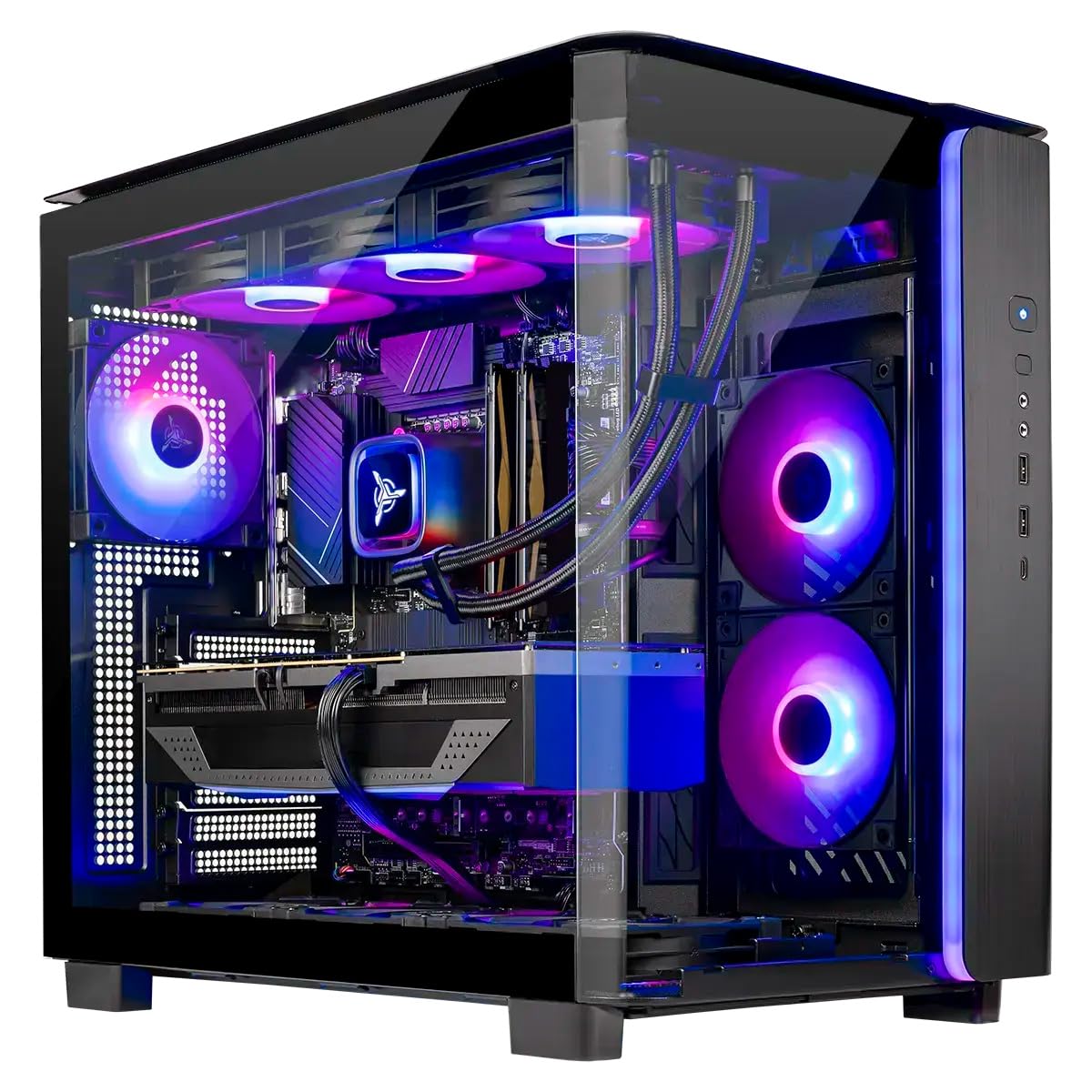
The Skytech King 95 is built around the Ryzen 7 9850X3D, which features AMD’s 3D V-Cache technology that stacks extra L3 cache directly onto the chip. This design dramatically reduces memory latency, boosting gaming frame rates in CPU-bound titles like Counter-Strike 2 and Baldur’s Gate 3. With a 5.6 GHz boost clock and 8 high-performance cores, it also handles video encoding and effects processing efficiently, though the core count is lower than the i9 or Ryzen 9 options.
The RTX 5080 16GB pairs well with the 9850X3D, delivering smooth 4K gameplay at ultra settings. The prebuilt includes a 360mm AIO liquid cooler, which keeps the CPU cool during extended rendering sessions. The 32GB of DDR5 6000MHz memory offers fast read and write speeds for large project files, and the 2TB NVMe SSD ensures quick boot and load times. Customer reports praise the clean cable management and the robust King 95 case, which includes magnetic dust filters.
Skytech assembles these units in the USA and backs them with a 1-year parts and labor warranty. The 850W Gold-rated ATX 3.0 power supply provides ample headroom for overclocking or future GPU upgrades. While the 9850X3D isn’t the absolute best for all-core rendering (Intel’s i9 series typically edges ahead in exports), it offers the best gaming performance per frame in this list — ideal if gaming is your primary activity with editing as a secondary task.
Why it’s great
- 3D V-Cache technology gives elite gaming frame rates
- 360mm AIO cooler keeps temps low during render loads
- 850W ATX 3.0 PSU ready for future GPU upgrades
Good to know
- 8 cores limit multi-threaded export speed vs 24-core i9
- Wi-Fi 5 instead of Wi-Fi 6/6E in a premium build
- Premium price reflects RTX 5080 and X3D chip
6. MSI Codex Z2 (Ryzen 7 8700F + RTX 5070)

The MSI Codex Z2 is a well-balanced prebuilt targeting 1440p gaming and 4K video editing without reaching flagship prices. Inside is an AMD Ryzen 7 8700F with 8 cores and 16 threads, boosting up to 5.0 GHz, paired with an NVIDIA GeForce RTX 5070 12GB GPU. The 32GB of DDR5 memory provides enough capacity for multi-track timelines and background tasks, while the 2TB NVMe SSD stores large media libraries without external drives.
Cooling is handled by an ARGB fan air cooler with four system fans — three front intakes and one rear exhaust. This configuration keeps the 8700F well within its thermal limits during gaming sessions, though sustained all-core rendering will push fan speeds higher. The MSI Center software allows you to tweak RGB lighting and performance profiles. Customer feedback notes that the prebuilt runs modern titles like Frostpunk 2 smoothly across three 4K monitors, though the included Bluetooth module has weaker range than expected.
The Codex Z2 uses an MSI branded motherboard with proprietary elements, but the case layout still allows GPU and RAM upgrades. MSI includes a keyboard and mouse combo, making it a complete starter package. For a buyer who wants RTX 5070 performance and a 2TB drive at a mid-range price, this system avoids the budget bottlenecks of smaller SSDs and 16GB RAM limits.
Why it’s great
- RTX 5070 12GB handles 1440p gaming and 4K preview well
- 2TB NVMe SSD offers massive storage out of the box
- Quad-fan cooling keeps temps under gaming load
Good to know
- Bluetooth module may need third-party upgrade for range
- Proprietary motherboard limits case-swap options
- Air cooler gets audible during long renders
7. Intel i7-14700KF 20-Core Processor

The i7-14700KF is often called the sweet spot of Intel’s 14th gen lineup, offering 20 cores (8 P-cores and 12 E-cores) and 28 threads for a price well below the i9. The 5.6 GHz boost clock ensures strong single-core gaming performance, while the additional E-cores handle background tasks like streaming, Discord, and OBS recording without impacting frame rates. For video editing, the multi-core throughput is close to the last-gen i9, making it a smart choice for budget-conscious creators.
This KF variant requires a discrete GPU, which is standard for any gaming and editing build. The chip supports both DDR4 and DDR5, giving you the freedom to choose memory based on your motherboard budget. Customer reviews consistently highlight its performance in business databases, AI generation, and CPU-intensive titles like Battlefield 6, often paired with RTX 4080-class GPUs. One reviewer noted it runs cool enough with a 360mm AIO to avoid thermal throttling even during extended rendering.
The LGA1700 platform is mature, with wide motherboard availability and affordable DDR4 options. The 33 MB of L3 cache is sufficient for most editing workloads, though not as generous as AMD’s X3D offerings. For builders who want near-i9 performance without the i9 price tag, the 14700KF is the most cost-effective hybrid processor in Intel’s current lineup.
Why it’s great
- 20 cores provide excellent multi-threaded render performance
- DDR4 and DDR5 compatibility lowers build cost
- 5.6 GHz boost rivals i9 in single-core gaming tasks
Good to know
- Requires BIOS update on 600-series boards for stability
- No integrated graphics requires dedicated GPU
- Power draw still requires good tower cooler or AIO
8. CyberPowerPC Gamer Master (Ryzen 7 8700F + RTX 5060 Ti)

The CyberPowerPC Gamer Master offers an accessible entry point into Ryzen 7 performance with the RTX 5060 Ti 8GB GPU. The Ryzen 7 8700F provides 8 cores and 16 threads with a 4.1 GHz base clock and 5.0 GHz boost, making it capable of 1080p gaming and light 4K video editing. The 16GB of DDR5 memory is sufficient for most editing suites at 1080p, though heavier After Effects work may require an upgrade to 32GB.
This prebuilt includes a 1TB PCIe 4.0 NVMe SSD, which offers fast boot times and reasonable project load speeds. The B850 chipset motherboard supports PCIe 5.0 for future GPU upgrades, and the 650W Gold PSU provides a solid baseline for the RTX 5060 Ti. Customer reviews note that the system runs popular games like Call of Duty and Fortnite at 60+ FPS on ultra settings, and the Ryzen 7 handles video exports faster than any entry-level Intel i5 build.
CyberPowerPC backs this system with a 1-year parts and labor warranty and lifetime tech support. The tempered glass case includes custom RGB lighting and adequate airflow for the components. Some users reported early USB issues that required BIOS adjustments, but most found the system stable after initial setup. For a first-time builder or someone on a tighter budget, this is a capable starting point for both gaming and editing.
Why it’s great
- Ryzen 7 8700F delivers solid multi-core editing performance
- DDR5 memory and PCIe 4.0 SSD at an entry-level price point
- Warranty and lifetime tech support from CyberPowerPC
Good to know
- 16GB RAM may need upgrade for complex 4K timelines
- RTX 5060 Ti 8GB struggles with heavy ray tracing
- Some units require BIOS tweaks for USB stability
9. STGAubron Prebuilt (i5 + RX 550 4GB)

The STGAubron prebuilt is a budget-oriented system aimed at light gaming and basic productivity rather than serious video editing. It features an Intel Core i5 (up to 3.6 GHz) paired with an AMD Radeon RX 550 4GB GPU, 16GB of RAM, and a 512GB SSD. The system is advertised for games like Fortnite and Valorant at 60+ FPS, and it can handle simple video cuts and 1080p exports in apps like Shotcut or DaVinci Resolve Lite.
The included components are distinctly entry-level: the RX 550 lacks hardware encoding support for modern video codecs, meaning exports will rely heavily on the CPU. The 512GB SSD fills up quickly with even a few games and project files. Customer reviews mention that the system works well for schoolwork, browsing, and casual gaming with friends, but several users reported hardware failures — particularly LED lights, audio jacks, and the graphics card — within the first six months.
STGAubron provides a 1-year parts and labor warranty and free lifetime tech support, which some customers successfully used to get replacements for failed components. For a child’s first PC or an office computer that occasionally runs Minecraft, this price point makes sense. However, for anyone intending to edit video regularly or play modern AAA titles, the CPU and GPU combination will be a significant bottleneck.
Why it’s great
- Extremely low barrier to entry for gaming and basic editing
- Includes RGB gaming keyboard and mouse
- Lifetime tech support and 1-year warranty
Good to know
- RX 550 lacks hardware encoding for modern video codecs
- Component longevity concerns based on customer reports
- CPU limited to 3.6 GHz cannot handle heavy multitasking
FAQ
Is an Intel i9 or AMD Ryzen 9 better for video editing and gaming?
How many cores do I need for 4K video editing and gaming?
Should I buy a prebuilt or build my own PC for this workload?
Final Thoughts: The Verdict
For most users, the best cpu for gaming and video editing winner is the Intel i9-14900K because it offers the highest single-core boost clock for gaming and the most threads for rendering in a single package. If you want an ultra-efficient chip that runs cool and keeps the AM5 upgrade path open, grab the AMD Ryzen 9 7900. And for a turnkey system that needs zero assembly and delivers great 1440p performance, nothing beats the iBUYPOWER Y40 PRO.

Mo Maruf
I created WellFizz to bridge the gap between vague wellness advice and actionable solutions. My mission is simple: to decode the research and give you practical tools you can actually use.
Beyond the data, I am a passionate traveler. I believe that stepping away from the screen to explore new environments is essential for mental clarity and physical vitality.