Our readers keep the lights on and my smoothie glass nicely filled. As an Amazon Associate, I earn from qualifying purchases.
The right wired mouse eliminates one variable from competitive play: input lag. Unlike wireless models that juggle battery life and connection stability, a corded gaming mouse offers a direct, uninterrupted data path to your PC, guaranteeing that every flick, click, and drag registers exactly when you intend it. This guide focuses on seven models that prioritize raw performance, sensor accuracy, and build integrity over wireless convenience.
I’m Mohammad Maruf — the founder and writer behind WellFizz. My research approach for this guide involves cross-referencing sensor specifications, switch durability ratings, and chassis weight distributions across dozens of models to isolate the units that deliver measurable advantages in latency-sensitive scenarios.
Whether you are an FPS competitor needing a sub-60g frame or an MMO raider requiring 17 programmable inputs, selecting the best corded gaming mouse comes down to matching the sensor’s polling rate and DPI range with your preferred grip style and game genre.
How To Choose The Best Corded Gaming Mouse
Selecting a wired gaming mouse requires more than picking the lightest option. The interplay between sensor resolution, switch type, weight distribution, and cable flexibility determines whether a mouse enhances your gameplay or becomes a source of frustration. Focus on these three factors to narrow your choices.
Sensor Performance and Polling Rate
The optical sensor dictates tracking accuracy. Look for a native DPI range that aligns with your in-game sensitivity — competitive FPS players typically operate between 400 and 1600 DPI, while MMO and productivity users may prefer higher ceilings for broad cursor movement. Polling rate, measured in Hz, indicates how often the mouse reports its position to the computer. Standard gaming mice offer 1000Hz (1 ms response), but premium models now reach 8000Hz (0.125 ms response), reducing input lag to near-imperceptible levels. Higher polling rates demand more CPU resources, so ensure your system can handle the overhead without stuttering.
Switch Type and Durability Rating
Mechanical switches, commonly rated between 50 million and 80 million clicks, provide tactile feedback that many gamers prefer for precise double-taps. Optical switches use light beams instead of physical contact, eliminating debounce delay and virtually erasing the risk of double-clicking issues over time. An 80-million-rated mechanical switch offers a crisp feel, while a 90-million-rated optical switch guarantees faster actuation and longer service life. Match the switch type to your clicking habits — rapid-fire shooters benefit from optical, while deliberate button mashers may prefer the feel of mechanical.
Weight, Shape, and Cable Construction
Ultralight mice (under 60 grams) reduce fatigue during long sessions and allow faster flick movements, but they can feel unstable for users accustomed to weighted models. Some mice include adjustable weight systems — typically 3.6-gram cartridges — that let you tune the center of gravity. Shape is equally critical: symmetrical designs accommodate claw and fingertip grips, while ergonomic right-handed contours with thumb rests support palm grips. Finally, cable quality matters more than most buyers realize. Paracord-style cables, often called Speedflex or HyperFlex, resist snagging and mimic wireless freedom, whereas standard rubber cables create noticeable drag that disrupts smooth tracking.
Quick Comparison
On smaller screens, swipe sideways to see the full table.
| Model | Category | Best For | Key Spec | Amazon |
|---|---|---|---|---|
| Razer Basilisk V3 35K | Premium | Versatile FPS & Productivity | 35K DPI / 8000Hz Polling | Amazon |
| Corsair Scimitar RGB Elite | Premium | MMO / MOBA Keybinds | 17 Buttons / 18K DPI | Amazon |
| Corsair M65 RGB Ultra | Mid-Range | Precision FPS Aiming | 26K DPI / Aluminum Frame | Amazon |
| Logitech G502 Hero | Mid-Range | Adjustable Weight Tuning | 25.6K DPI / 11 Buttons | Amazon |
| HyperX Pulsefire Haste 2 | Mid-Range | Ultralight FPS Movement | 53g / 8000Hz Polling | Amazon |
| Redragon M811 Aatrox | Value | MMO Side-Key Layout | 15 Buttons / 12.4K DPI | Amazon |
| Glorious Model O Eternal | Value | Symmetrical Ultra-Light | 55g / Honeycomb Shell | Amazon |
In‑Depth Reviews
1. Razer Basilisk V3 35K

The Razer Basilisk V3 35K occupies a unique sweet spot between competitive FPS precision and everyday productivity comfort. Its Focus Pro 35K optical sensor delivers 1-DPI step adjustments, allowing granular sensitivity tuning that matters when you need to micro-correct crosshair placement at long range. The Gen-3 optical switches actuate at 0.2 ms with no debounce delay, effectively eliminating the double-click failure mode that plagues mechanical switches after extended use. With 13 customizable controls including a multi-function trigger paddle, this mouse adapts to shooters, MOBAs, and desktop workflows equally well.
The HyperScroll tilt wheel provides two distinct scrolling modes: tactile notched scrolling for weapon switching and free-spin for rapid document navigation. Smart-Reel mode auto-toggles between these based on scroll speed, which feels intuitive after a short adjustment period. The Speedflex cable minimizes drag without requiring a bungee, though users who prefer zero cable interference should still consider a mouse bungee accessory. Eleven-zone Chroma underglow adds aesthetic depth, though the primary value lies in the sensor-readiness of the 8000Hz polling rate for systems that can sustain it.
Ergonomically, the right-handed contour with a pronounced thumb rest suits palm and claw grips for medium to large hands. The 101-gram weight feels planted without being sluggish, offering a middle ground between featherweight FPS mice and weighted productivity units. Some users find the multi-function trigger positioned slightly too far forward, requiring a deliberate thumb reach rather than a natural curl. Overall, the Basilisk V3 35K earns its place as the most versatile wired contender for gamers who play across multiple genres in a single session.
Why it’s great
- 35K DPI optical sensor with 1-DPI adjustment steps for precise aim tuning
- Gen-3 optical switches rated for 90 million clicks with zero debounce delay
- HyperScroll wheel with tactile and free-spin modes for game and work versatility
Good to know
- Right-handed shape only, not suitable for left-handed users
- Multi-function trigger may feel too far forward for smaller hands
- Requires Razer Synapse software for full customization and profile storage
2. Corsair Scimitar RGB Elite

The Corsair Scimitar RGB Elite was engineered for a single purpose: delivering 17 programmable buttons in a layout that doesn’t sacrifice comfort. The patented Key Slider Control System lets you shift the 12-button side panel forward or backward by up to 0.5 inches, accommodating different thumb positions and hand sizes. This adjustability directly addresses the most common complaint about MMO mice — accidental side-button presses during critical rotations. The PixArt PMW3391 optical sensor, with native 18,000 DPI adjustable in 1-DPI steps, provides enough resolution for both high-APM MMO gameplay and precise cursor control in strategy titles.
Build quality centers on 50 million-click Omron mechanical switches paired with a braided cable that withstands the abrasion of extended gaming sessions. The contoured right-handed shape includes a dedicated finger rest on the right side, reducing fatigue during multi-hour raid nights. At 147 grams, this is a heavier mouse — intentional for stability when executing complex macro sequences without accidental mouse movement. The iCUE software ecosystem enables per-game profile binding, DPI presets, and RGB synchronization across other Corsair peripherals, though initial setup can require troubleshooting if iCUE fails to detect the device on first connection.
One limitation is the relatively modest native tracking speed compared to newer sensors. The PMW3391 caps at 450 IPS, which remains adequate for all but the fastest flick movements in competitive shooters. The braided cable, while durable, produces more drag than paracord-style offerings, so a mouse bungee is recommended for desktop setups with limited clearance. For MMO and MOBA players who need immediate access to 10+ keybinds without looking away from the screen, the Scimitar RGB Elite remains the reference standard in its category.
Why it’s great
- Adjustable side button panel fits different thumb positions and hand sizes
- 17 programmable buttons eliminate the need for keyboard macro keys
- iCUE software enables per-game profiles with onboard memory storage
Good to know
- 147g weight feels heavy for FPS players who prefer sub-80g frames
- Braided cable creates more drag than paracord; a bungee improves feel
- Sensor IPS tracking (450 IPS) lags behind newer 650 IPS competitors
3. Corsair M65 RGB Ultra

The Corsair M65 RGB Ultra differentiates itself through structural rigidity. Its anodized aluminum frame eliminates the flex common in all-plastic ultralight designs, providing a solid foundation for the MARKSMAN 26,000 DPI optical sensor. Sensor Fusion Control combines a six-axis gyroscope with an accelerometer to maintain ultra-low lift-off distance, meaning the cursor stops moving the instant you raise the mouse — critical for repositioning during flick shots without unintentional screen drift. The AXON Hyper-Processing Technology enables a native 8000Hz polling rate, transmitting position data eight times per millisecond for near-instantaneous cursor response in high-refresh-rate gaming.
The tunable weight system accepts up to five 3.6-gram cartridges arranged inside the chassis, allowing you to shift the center of gravity forward, backward, or neutral. This level of weight distribution control is rare at this tier and benefits players who prefer a front-heavy feel for stability during tracking shots. The eight programmable buttons include a dedicated sniper button that temporarily reduces DPI while held — useful for scoped aiming, though the button’s position under the thumb can trigger accidentally during frantic movement. Optical switches on the left and right clicks eliminate mechanical wear, ensuring consistent actuation force over years of use.
At 97 grams without weights, the M65 feels dense and planted rather than airy. The right-handed ergonomic shape suits palm grips, but the narrower waist may feel restrictive for claw-grip users. The braided USB cable is thicker than paracord alternatives, which increases cable drag. Some users report that the DPI shift button function resets after firmware updates unless profiles are saved to onboard memory. Despite these quirks, the M65 RGB Ultra remains a durable, high-precision option for FPS players who prioritize sensor accuracy and build longevity over featherlight portability.
Why it’s great
- Anodized aluminum frame provides zero chassis flex during aggressive movements
- Sensor Fusion Control enables ultra-low lift-off distance for precise repositioning
- Tunable weight system allows granular center-of-gravity adjustment
Good to know
- Sniper button position under thumb may cause accidental DPI shifts
- Braided cable produces more drag than paracord alternatives
- Weighted feel at 97g may not suit ultralight FPS preferences
4. Logitech G502 Hero

The Logitech G502 Hero is arguably the most recognizable wired gaming mouse on the market, and its enduring relevance stems from the Hero 25K sensor’s zero-smoothing tracking at up to 25,600 DPI. This sensor detects sub-micron movements, translating to pixel-perfect cursor placement even on high-resolution displays. The 11 programmable buttons include a dual-mode hyper-fast scroll wheel that toggles between indexed notching and frictionless free-spin — the latter ideal for quickly cycling through inventory lists or long web pages without repetitive finger motion.
The adjustable weight system includes five 3.6-gram cartridges that slot into the chassis base. This allows you to distribute mass between the front, rear, and center sections, adapting the mouse to different lifting and flicking styles. Mechanical switch button tensioning uses a metal spring system and pivot hinges to reduce pre-travel and deliver a crisp, click feel that remains consistent across millions of actuations. The G Hub software provides per-game profile binding, though some users find the transition from the older Logitech Gaming Software interface disruptive.
The G502 Hero weighs 121 grams without any weights installed, making it one of the heavier options in this guide. This heft provides stability for low-sensitivity tracking but can cause fatigue during extended sessions if you lift the mouse frequently for repositioning. The right-handed ergonomic shape accommodates palm grips well, but the pronounced thumb rest and aggressive contours may feel cramped for smaller hands. Dual-zone RGB lighting adds aesthetic polish, though the primary draw remains the sensor accuracy and weight customization that have kept this model relevant for years.
Why it’s great
- Hero 25K sensor provides zero smoothing and sub-micron tracking accuracy
- Adjustable weight system with five cartridges for tailored center of gravity
- Dual-mode scroll wheel offers indexed and free-spin scrolling options
Good to know
- 121g base weight is heavy for players who prefer ultralight frames
- Right-handed ergonomic shape may feel too large for small hands
- G Hub software interface differs significantly from older Logitech Gaming Software
5. HyperX Pulsefire Haste 2

The HyperX Pulsefire Haste 2 achieves a 53-gram chassis weight through a solid-shell design that avoids the honeycomb cutouts used by competitors — meaning it stays lightweight without collecting dust or compromising structural rigidity. The HyperX 26K sensor tracks up to 26,000 DPI natively at 650 IPS, ensuring zero tracking loss during fast flick movements. The 8000Hz polling rate transmits position data every 0.125 milliseconds, reducing input lag to the point where cable drag becomes the primary remaining bottleneck.
HyperX addressed cable drag directly with the HyperFlex 2 cable, constructed from paracord material that bends freely without retaining kinks. Combined with 100% virgin PTFE skates, the Haste 2 glides across cloth pads with minimal friction, making it ideal for low-sensitivity arm-aiming styles. The included grip tape set covers the left and right buttons plus the side panels, providing extra traction for sweaty hands without adding measurable weight. HyperX switches rated for 100 million clicks deliver tactile and audible feedback that feels snappier than Omron alternatives, though the actuation force is slightly stiffer.
The ambidextrous shape accommodates palm, claw, and fingertip grips equally well, though the symmetrical design means no thumb rest for right-handed palm grippers. Some units have exhibited scroll wheel step skipping and double-clicking issues after extended use, which suggests quality control variance across production batches. The NGENUITY software offers macro binding and DPI adjustment, but lacks debounce time and polling rate toggle options that power users may want. At 53 grams, the Haste 2 feels almost weightless during fast swipes, making it a strong contender for competitive FPS players who prioritize speed over heft.
Why it’s great
- 53g solid-shell design avoids dust ingress while keeping weight ultra-low
- HyperFlex 2 paracord cable and PTFE skates minimize drag for smooth gliding
- 100 million-click HyperX switches provide crisp tactile feedback
Good to know
- Scroll wheel may skip steps; quality control varies between production batches
- No adjustable weight system — cannot fine-tune center of gravity
- NGENUITY software lacks advanced options like debounce time adjustment
6. Redragon M811 Aatrox

The Redragon M811 Aatrox targets MMO and MOBA players who need extensive side-button access without spending on premium-tier peripherals. The 2+8 layout — two top row buttons plus eight side thumb buttons — provides 15 total programmable inputs, with the side keys spaced far apart to minimize accidental presses. This spacing is a deliberate design choice that improves on the dense 12-button grids found on some MMO mice, where misclicks are common during high-pressure boss mechanics. The dedicated software allows full remapping of all buttons except the Mode Switch, and configurations can be saved onboard.
The ergonomic right-handed contour follows the natural curve of the palm, reducing wrist strain during marathon gaming sessions. At roughly 100 grams, the M811 avoids the featherlight trend, instead offering a planted feel that helps stabilize cursor movement during precise keybind sequences. The RGB backlighting spans five modes with 16.8 million color options, though some users report that the matte coating absorbs hand oils over time and may develop a shiny patina. The braided USB cable is generous in length — approximately 6 feet — providing ample reach for tower-under-desk setups without requiring an extension.
The optical sensor supports DPI levels up to 12,400, which is sufficient for most gaming scenarios but falls short of the 26,000+ ceilings offered by premium competitors. The software interface is functional but unintuitive — saving profiles requires clicking a button labeled “Stop,” and the macro creator cannot reorder recorded actions. Some units have exhibited double-clicking on the main buttons after several months, though the overall build quality punches above its price point. For players who need a large number of easily accessible side keys and are willing to tolerate software quirks, the M811 delivers strong value.
Why it’s great
- Well-spaced 2+8 side button layout reduces accidental misclicks during MMO rotations
- Ergonomic right-handed contour supports long gaming sessions with less fatigue
- Onboard profile storage retains keybinds even when software is not running
Good to know
- Matte coating absorbs hand oils and may wear shiny over time
- Software interface is unintuitive with confusing labeling and limited macro options
- 12,400 DPI sensor ceiling is lower than premium competitors’ offerings
7. Glorious Model O Eternal
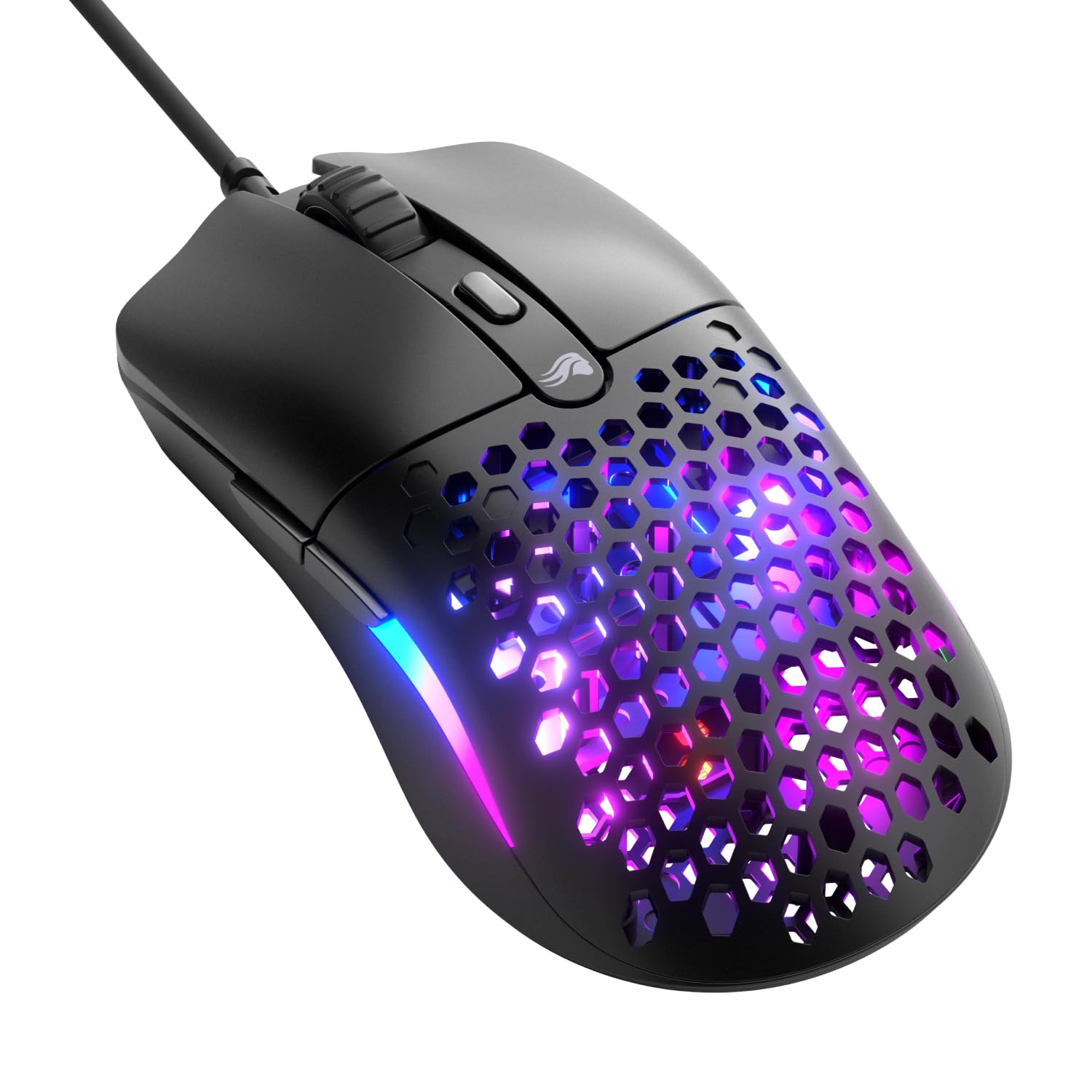
The Glorious Model O Eternal achieves its 55-gram weight through a signature honeycomb shell that removes material where structural support is not needed. This design reduces mass by up to 35% compared to solid-shell competitors, translating to faster swipe initiation and quicker stop response during flick shots. The symmetrical shape accommodates both right- and left-handed users, making it one of the few genuinely ambidextrous options in this guide. The 12,000 DPI optical sensor is lower resolution than premium alternatives but remains responsive at the sensitivity ranges most FPS players actually use.
Dual-zone RGB lighting extends across the side panels rather than just the logo, providing more surface-level illumination that matches PC case lighting schemes. The 80-million-rated mechanical switches deliver crisp clicks with minimal pre-travel, though some users note that the honeycomb shell creates a slightly hollow sound on each press. The paracord-style cable reduces drag significantly compared to braided alternatives, though the cable is thinner and may feel less durable over years of use. The Glorious CORE software allows DPI adjustment, debounce time tuning, and button remapping in a straightforward interface without excessive bloat.
The primary trade-off with the honeycomb design is ingress protection — dust and debris can collect inside the shell cavities, requiring periodic cleaning with compressed air. At 55 grams, the Model O feels extremely light, and players accustomed to heavier mice may experience overshooting during initial tracking adjustments. The 12K DPI sensor lacks the tracking speed of 650 IPS sensors found on newer models, though it remains adequate for 99% of gaming scenarios. For budget-conscious esports players who want the fastest possible mouse movement without breaking into premium price tiers, the Model O provides a compelling entry point.
Why it’s great
- 55g honeycomb shell enables faster flick initiation and quicker stop response
- Symmetrical ambidextrous design works for both left- and right-handed users
- Paracord-style cable minimizes drag without requiring additional accessories
Good to know
- Honeycomb shell collects dust and debris; requires periodic compressed air cleaning
- 12K DPI sensor lacks the tracking speed (IPS) of newer 650 IPS sensors
- Ultralight weight may cause overshooting for players accustomed to heavier mice
FAQ
Is a higher DPI sensor always better for gaming?
Does a paracord cable actually reduce drag compared to braided cables?
Should I choose mechanical or optical switches for my gaming mouse?
Does a wired gaming mouse eliminate all input lag compared to wireless?
How do I know if an ambidextrous or ergonomic shape suits me better?
Final Thoughts: The Verdict
For most users, the best corded gaming mouse winner is the Razer Basilisk V3 35K because it combines a top-tier 35K DPI optical sensor with a versatile HyperScroll wheel that bridges gaming and productivity without compromise. If you need dedicated MMO side-button access for complex macros, grab the Corsair Scimitar RGB Elite. And for ultra-lightweight FPS performance where every gram counts toward faster swipes, nothing beats the HyperX Pulsefire Haste 2 at 53 grams with 8000Hz polling.

Mo Maruf
I created WellFizz to bridge the gap between vague wellness advice and actionable solutions. My mission is simple: to decode the research and give you practical tools you can actually use.
Beyond the data, I am a passionate traveler. I believe that stepping away from the screen to explore new environments is essential for mental clarity and physical vitality.