Our readers keep the lights on and my smoothie glass nicely filled. As an Amazon Associate, I earn from qualifying purchases.
Nothing kills a smooth gaming session or a fast render export like a CPU that suddenly pulls back its speed to save itself from melting. Your processor’s thermal ceiling isn’t a suggestion—it’s a hard stop. An air cooler that can’t keep up means you leave performance on the table, and the constant whine of a fan spinning at max speed is a constant remind of a bad match. This guide cuts through the noise to find coolers that deliver real thermal headroom for your specific build, whether you’re running an all-core workload or just want a silent desktop.
I’m Mohammad Maruf — the founder and writer behind WellFizz. After analyzing hundreds of hours of thermal testing data and user reports, I’ve broken down exactly how heat pipe count, fin density, and fan pressure affect your CPU’s real-world temperature.
The wrong cooler can bottleneck even the best processor. This guide to the best cpu air cooler is built on real specs and verified performance data to help you match the right thermal solution to your build.
How To Choose The Best CPU Air Cooler
Selecting a cooler goes beyond just picking a brand name. You need to match the cooler’s dissipation capacity to your CPU’s thermal output, while ensuring it physically fits inside your case and clears your memory modules. Ignoring any one of these three factors can lead to poor performance or a build that simply won’t close.
Heat Pipe Count and Configuration
Heat pipes are the core of any air cooler. They use a phase-change liquid to move heat from the CPU base to the fin stack. More pipes generally mean more heat can be moved, but the diameter and layout matter just as much. A cooler with six 6mm pipes in a dual-tower design will usually outperform a similar unit with four pipes, especially on higher-TDP processors like an Intel Core i7 or AMD Ryzen 9.
Fan Size, Speed, and Bearing Quality
A 120mm fan is the standard, moving a good balance of air and noise. A 140mm fan can move more air at lower RPMs, often resulting in quieter operation. Look for fluid-dynamic or S-FDB bearings; they last longer and run quieter than sleeve bearings. PWM control is essential for automatically adjusting fan speed based on CPU temperature, keeping noise down during light use.
Clearance: Case, RAM, and Motherboard
Measure your case width to confirm the cooler’s height will fit. Pay close attention to RAM clearance. Dual-tower coolers often overhang the first memory slot, forcing you to use low-profile RAM or shift the front fan upward. Some coolers offer offset mounting for AMD AM5 to center the heat pipes directly over the CPU’s hot spots, improving thermal contact.
Quick Comparison
On smaller screens, swipe sideways to see the full table.
| Model | Category | Best For | Key Spec | Amazon |
|---|---|---|---|---|
| Thermalright PS120SE ARGB | Dual Tower | High TDP CPUs | 7x 6mm heat pipes | Amazon |
| be quiet! Dark Rock Elite | Premium Dual Tower | Silent high-end builds | 7 copper heat pipes | Amazon |
| Cooler Master Hyper 620S | Mid-Range Dual Tower | Ryzen 9 / Core i7 | 6 heat pipes | Amazon |
| be quiet! Pure Rock 3 Black | Single Tower | Quiet mainstream builds | 4 heat pipes, 190W TDP | Amazon |
| ID-COOLING IS-55 Black | Low Profile | Mini-ITX / SFF cases | 57mm total height | Amazon |
In‑Depth Reviews
1. Thermalright PS120SE ARGB

The Thermalright PS120SE ARGB packs seven 6mm heat pipes with AGHP 4.0 technology to overcome gravity-related performance loss in vertical or horizontal orientations. The dual TL-C12B-S V2 PWM fans push 66.17 CFM of airflow each, with a noise rating of just 25.6 dB(A) — nearly silent during standard loads. At 154mm tall, it slides into most mid-tower cases without issue.
Users report dramatic temperature drops—one reviewer saw a Ryzen 9 9950x3d peak at only 78°C under a sustained all-core load. The fans can be adjusted upward slightly to clear taller RAM modules when necessary. The anodized black frosted top and ARGB lighting with 17 modes allow you to match your build’s aesthetic without sacrificing cooling performance.
The included thermal paste is thick and requires a generous pea-sized application for best results. The S-FDB bearings on both fans promise up to 20,000 hours of service life, making this a durable choice for a daily driver. It supports Intel LGA1700, 1851, and AMD AM4/AM5 sockets out of the box.
Why it’s great
- Exceptional cooling on high-TDP processors
- Quiet operation even under heavy load
- Excellent value with ARGB support
Good to know
- Height may block some tall RAM with fan in default position
- Requires careful pea-sized paste application
2. be quiet! Dark Rock Elite
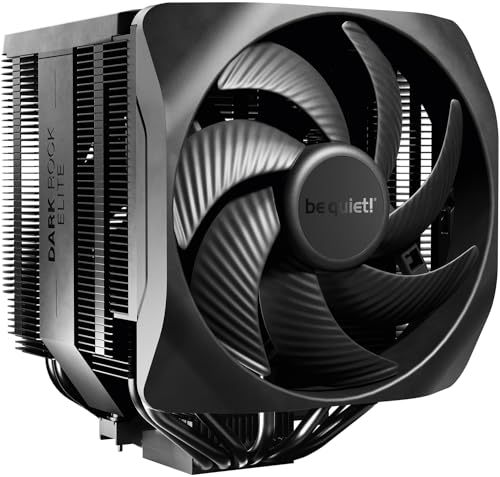
The be quiet! Dark Rock Elite is a premium dual-tower air cooler built around seven high-performance copper heat pipes and two Silent Wings 135mm PWM fans. It features a unique Speed Switch that lets you toggle between a silent 1500 RPM mode and a performance-oriented 2000 RPM mode. In its quiet mode, the noise level stays at just 25.8 dB(A), making it essentially inaudible in a standard case.
One standout design element is the front fan rail system, which allows you to adjust the fan height in five steps for RAM clearance. This eliminates a major pain point common with large dual-tower coolers. The entire unit is finished with a ceramic particle coating that aids heat transfer and gives it a sleek, high-end appearance.
Under load, users report that the cooler handles a 16-core CPU at 100% utilization, peaking around 87°C without thermal throttling. The included mounting kit is straightforward, but the fan cables are on the shorter side, which may require careful routing. The ARGB top cover adds a subtle lighting effect that can be synced with your motherboard.
Why it’s great
- Extremely quiet operation even in Performance mode
- Adjustable front fan increases RAM compatibility
- Ceramic coating enhances heat dissipation
Good to know
- Short fan cables may complicate routing in large cases
- Tall design requires case clearance check
3. Cooler Master Hyper 620S

The Cooler Master Hyper 620S carries the legacy of the Hyper 212 into a modern dual-tower package. It uses six nickel-plated copper heat pipes and two 120mm ARGB PWM fans to deliver strong thermal performance for CPUs like the AMD Ryzen 9 and Intel Core i7. The fans spin between 650 and 1,750 RPM, allowing a good balance of cooling and noise depending on your workload.
At 154.9mm tall, it fits in many mid-tower cases without clearance issues, and the redesigned brackets simplify installation on the latest LGA 1851 and AM5 platforms. Users running a 7700X report consistent low temperatures after a year of heavy use. The 27.2 dB(A) noise rating keeps it unobtrusive during gaming sessions.
One minor quibble from users is the RGB wiring, which can be somewhat finicky to connect cleanly. The tower overhangs the RAM slots, so sticking with low-profile memory modules is advised. For the price, this dual-tower cooler punches above its weight class and is a reliable upgrade from any stock or single-tower cooler.
Why it’s great
- Excellent price-to-performance ratio for a dual tower
- Easy installation on modern sockets
- Silent operation at low RPMs under light loads
Good to know
- RGB cable routing can be messy
- May block first RAM slot on some boards
4. be quiet! Pure Rock 3 Black

The be quiet! Pure Rock 3 Black is a single-tower cooler rated for 190W TDP, making it capable of handling mainstream gaming and media builds without breaking a sweat. It uses four black 6mm heat pipes with direct-touch (HDT) technology to transfer heat efficiently from the CPU to the aluminum fin stack. The 120mm Pure Wings 3 PWM fan uses optimized blade angles to generate high air pressure and features a funnel-shaped outlet to maximize airflow.
A key advantage of this cooler is its slim design, which provides unlimited RAM clearance. There is no overhang over the memory slots, so you can use any height of DIMMs without issue. On an AM4 3800X, users saw stress test temperatures drop from 84°C to 72°C compared to the stock cooler, all while remaining nearly silent.
The pre-applied thermal paste simplifies installation, and for AM5 users, the offset mounting option lets you center the heat pipes directly over the CPU’s hot spots. At 6.1 inches tall, it’s compact enough to fit in smaller cases like the NZXT H510. The all-black finish offers a clean, professional look that pairs well with non-RGB builds.
Why it’s great
- Excellent noise-to-performance ratio
- Full RAM clearance due to slim single-tower design
- Offset mounting for AM5 hot spots
Good to know
- Not ideal for high-overclocked i9 or Ryzen 9 chips
- Pre-applied paste may break during shipping
5. ID-COOLING IS-55 Black

The ID-COOLING IS-55 Black is built specifically for the tight confines of Mini-ITX and Small Form Factor (SFF) cases, standing at just 57mm tall. Despite its low profile, it is packed with five heat pipes and a 120mm x 15mm slim PWM fan. The fan spins up to 3300 RPM and delivers 54.6 CFM of airflow, with noise levels ranging from 13.8 to 31.2 dB(A) depending on speed.
Users report impressive results—one reviewer saw CPU temperatures drop more than 40°C on a pre-built desktop, going from over 90°C down to the low 50s under 100% load. It fits well in cases like the S300 or SG13BQ, though RAM clearance requires using modules under 33mm tall. The slim 120mm fan is reversible, which can help manage airflow direction in constrained spaces.
Installation is straightforward, but some users note the mounting hardware feels less refined than premium brands like Noctua. The stock fan can get loud at max RPM without proper fan curve tuning in software. For anyone building a compact system that still needs real cooling power, the ID-COOLING IS-55 is one of the most effective options in its size class.
Why it’s great
- Best-in-class cooling for its ultra-low 57mm height
- Excellent memory clearance in ITX builds
- Dramatic temperature drop over stock coolers
Good to know
- Mounting hardware feels less premium
- Stock fan can be loud without FanControl software
FAQ
Do I need a dual-tower cooler for my CPU?
What is the maximum height my case can support?
Will the cooler fit over my RAM modules?
Final Thoughts: The Verdict
For most users, the best cpu air cooler winner is the Thermalright PS120SE ARGB because it provides dual-tower, seven-heat-pipe performance at a price that undercuts much of the competition while remaining quiet and highly compatible. If you want a virtually silent high-end build, grab the be quiet! Dark Rock Elite. And for a compact Mini-ITX system, nothing beats the ID-COOLING IS-55 Black.

Mo Maruf
I created WellFizz to bridge the gap between vague wellness advice and actionable solutions. My mission is simple: to decode the research and give you practical tools you can actually use.
Beyond the data, I am a passionate traveler. I believe that stepping away from the screen to explore new environments is essential for mental clarity and physical vitality.