Our readers keep the lights on and my smoothie glass nicely filled. As an Amazon Associate, I earn from qualifying purchases.
A CPU radiator that can’t keep up turns a powerhouse build into a thermal throttle mess. The difference between smooth gaming sessions and stuttering frame drops often comes down to how well your cooler handles peak loads — and the radiator is the heart of that fight.
I’m Mohammad Maruf — the founder and writer behind WellFizz. My research digs into pump specifications, fan static pressure, and thermal performance data so you see exactly where your upgrade money goes.
Whether you assemble a quiet workstation or a high-frequency gaming rig, choosing the right cpu radiator directly determines your system’s long-term stability and noise levels.
How To Choose The Best CPU Radiator
Choosing a CPU radiator isn’t just about picking a pretty pump block. The radiator size, fan quality, and pump design determine whether your processor runs cold under sustained loads or creeps toward thermal throttling. Focus on these three areas first.
Radiator Size and Case Compatibility
A 360mm radiator offers the largest surface area for heat exchange, making it ideal for high-TDP CPUs like the Intel Core i7-13700K or Ryzen 9 series. A 240mm unit fits most mid-tower cases and still handles mid-range processors well. Always measure your case’s fan mounts and clearance before buying — a radiator that doesn’t fit means wasted money.
Pump Design and Noise Profile
Pump speed measured in RPM directly affects coolant flow rate. Dual-chamber pumps, like Cooler Master’s Gen S design, improve water pressure and reduce cavitation noise. For quiet builds, look for pumps with ceramic bearings or multi-chamber designs that minimize vibration.
Fan Static Pressure vs. Airflow
Radiators need high static pressure fans to push air through dense fin stacks, not just high CFM airflow fans. Check the fan’s static pressure rating in mmH₂O — anything above 2.0 mmH₂O is effective for most AIO radiators. Low static pressure leads to poor heat transfer, especially at lower fan speeds.
Quick Comparison
On smaller screens, swipe sideways to see the full table.
| Model | Category | Best For | Key Spec | Amazon |
|---|---|---|---|---|
| ARCTIC Liquid Freezer III Pro 280 | 280mm AIO | High TDP CPUs | 38mm thick radiator + VRM fan | Amazon |
| NZXT Kraken Elite 360 RGB 2024 | 360mm AIO | Enthusiast builds + LCD display | 2.72” IPS LCD 640×640 | Amazon |
| Thermalright Frozen Notte 360 Black V2 | 360mm AIO | Price-to-value 360mm | 5300 RPM pump + 72.37 CFM fans | Amazon |
| be quiet! Silent Loop 3 240mm | 240mm AIO | Ultra-quiet builds | 3-chamber pump + refillable | Amazon |
| MSI MAG Coreliquid A13 360 | 360mm AIO | Builders who want simplicity | 5200 RPM integrated pump | Amazon |
| Cooler Master 240L Core | 240mm AIO | Entry-level AIO upgrade | 1800 RPM fans + Gen S pump | Amazon |
| CORSAIR Nautilus 360 RS | 360mm AIO | Easy daisy-chain setups | Convex cold plate + 2100 RPM fans | Amazon |
In‑Depth Reviews
1. ARCTIC Liquid Freezer III Pro 280

The ARCTIC Liquid Freezer III Pro 280 stands apart with its 38mm thick radiator — significantly thicker than the standard 27mm AIO radiators. That extra thickness increases surface area without expanding the footprint, allowing it to rival 360mm units in thermal performance while fitting in more compact cases. The 280mm form factor strikes a balance between cooling capacity and case compatibility.
The integrated VRM fan on the pump block actively cools motherboard voltage regulators, a feature rarely seen on other AIOs. Combined with the 2500 RPM P14 PRO fans delivering 110 CFM of airflow, this unit handles high-TDP processors like the Ryzen 9 9900X with ease. Users report load temperature drops of 12-14°C compared to smaller 240mm coolers.
Installation requires care — the AMD mounting bracket demands firm pressure and the VRM fan can interfere with some cases. However, the pre-installed fans and integrated cable management simplify the overall process. This is a performance-first cooler that rewards users who plan their build layout carefully.
Why it’s great
- Exceptional 38mm thick radiator improves heat dissipation
- VRM fan lowers motherboard component temperatures
- Powerful 2500 RPM P14 PRO fans with high static pressure
Good to know
- AMD bracket installation requires more force than expected
- VRM fan may contact radiator fans in tight cases
- No printed manual included
2. NZXT Kraken Elite 360 RGB 2024

The NZXT Kraken Elite 360 RGB 2024 brings a massive 2.72-inch IPS LCD to the pump block, running at 640×640 resolution with a 60 Hz refresh rate and 690 cd/m² brightness. You can display system stats, GIFs, or YouTube integration directly on the cooler. The Turbine pump delivers a 10% performance improvement over previous generations with lower noise output.
The 360mm radiator uses three F360 RGB Core fans that push 78.86 CFM of airflow at 2400 RPM. In real-world testing on a Ryzen 7800X3D, users report quiet operation at idle and load, with the pump remaining nearly inaudible. The pre-applied thermal paste and tool-free mounting brackets make installation straightforward for first-time AIO buyers.
The main trade-off is the premium price point and the relatively short hose length, which can cause routing tension in larger cases. Additionally, the three 120mm fans come as a single-frame unit, reducing cable clutter but limiting replacement options. This cooler is best for users who want both top-tier cooling and a customizable display.
Why it’s great
- Large high-resolution IPS LCD for custom content
- NZXT Turbine pump boosts performance 10%
- Tool-free mounting with pre-applied paste
Good to know
- Premium pricing reflects the LCD feature
- Hose length can be tight for some case layouts
- Fans are a single-frame unit, limiting modding
3. Thermalright Frozen Notte 360 Black V2

The Thermalright Frozen Notte 360 Black V2 delivers enthusiast-grade cooling at a mid-range price point. The pump spins at 5300 RPM, moving coolant aggressively through a full copper cold plate and 360mm aluminum radiator. Users report idle temperatures in the mid-20s°C for an i7-13700K and load temps staying in the upper 50s to low 60s°C during intensive workloads.
The three TL-E12B-S V2 fans push 72.37 CFM at 2.87 mmH₂O static pressure, making them effective against dense radiator fins. S-FDB bearings reduce fan chatter in vertical mounting orientations, a common issue with cheaper sleeve bearing fans. The ARGB lighting on both pump and fans syncs via standard 5V 3-pin headers for easy motherboard integration.
One drawback is the ARGB fan lighting quality — the mirrored design has fewer LEDs, resulting in less vibrant effects compared to premium competitors. The pump also lacks a daisy-chain option for fan cables, requiring more careful routing. Still, the cooling performance per dollar ratio is hard to beat for a 360mm AIO.
Why it’s great
- Excellent thermal performance for the price
- High 5300 RPM pump with copper cold plate
- S-FDB bearings prevent fan chatter in vertical mounts
Good to know
- Fan ARGB lighting is dimmer than premium alternatives
- No fan daisy-chain option increases cable clutter
- Thin radiator may not match thicker units at high TDP
4. be quiet! Silent Loop 3 240mm
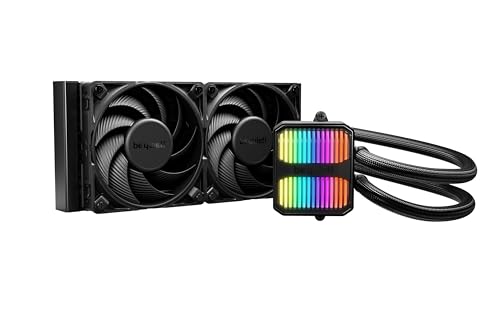
The be quiet! Silent Loop 3 240mm focuses on acoustic performance without sacrificing cooling capability. Its 3-chamber pump design reduces fluid turbulence and vibration, making the pump nearly silent during operation. The unit ships with two Silent Wings 4 120mm PWM fans that use a 6-pole motor for smoother operation and lower electrical noise.
One standout feature is the refillable design — an easy-access port and included coolant bottle allow you to top off the loop over time, extending the AIO’s lifespan beyond typical sealed units. The wide cold plate also supports Threadripper sockets, offering flexibility for workstation builds. Users on Ryzen 9 7900X reported temperature drops from the 80-90°F range down to 65-74°F.
The 240mm radiator limits maximum cooling capacity compared to 360mm units, and the stiff tubing can make routing difficult in smaller cases. RGB lighting is discreet, which may appeal to builders seeking a clean, understated aesthetic rather than a flashy look. This cooler rewards noise-sensitive users who prioritize low decibel levels.
Why it’s great
- 3-chamber pump design minimizes noise
- Refillable port extends product lifespan
- 6-pole Silent Wings 4 fans for quiet operation
Good to know
- 240mm size may not cool high-TDP CPUs under full load
- Stiff tubing requires careful case routing
- Minimal RGB for users wanting more lighting
5. MSI MAG Coreliquid A13 360

The MSI MAG Coreliquid A13 360 uses a split-flow radiator design with an integrated three-phase pump running at 5200 RPM. Ceramic bearings in the pump reduce friction and extend longevity while keeping noise down to 14.4 dBA. The triple-layered evaporation-proof tubing prevents coolant loss over time, a critical factor for AIO reliability beyond the first year.
This cooler excels in simplicity — the fans come daisy-chained and connected to a single 4-pin PWM header, reducing cable management work. Users running a 5800X3D reported no thermal throttling under load, with max package temperatures staying at 75°C. The pre-installed thermal paste and easy-to-fit brackets make this a solid choice for builders who want plug-and-play performance.
The MSI logo alignment on the pump block can be slightly off on AMD AM4/AM5 sockets, which may bother users who want the logo perfectly straight. The pump’s rated speed of 5200 RPM is impressive, but some users report that the actual pump speed reporting can be inconsistent. Overall, this is a dependable AIO that prioritizes ease of use over flashy extras.
Why it’s great
- 5200 RPM pump with ceramic bearings for longevity
- Daisy-chained fans simplify cable management
- Evaporation-proof tubing prevents coolant loss
Good to know
- MSI logo alignment may be off on AMD boards
- Pump speed reporting can be inconsistent
- Only aluminum radiator, not copper/brass
6. Cooler Master 240L Core

The Cooler Master 240L Core offers a budget-friendly entry into AIO liquid cooling without cutting core features. The Gen S dual-chamber pump improves water flow and targets heat spots with greater precision than single-chamber designs. The included CryoFuze thermal paste with 14 W/mK conductivity enhances heat transfer from the IHS to the cold plate.
The two 120mm ARGB PWM fans spin at 1800 RPM, pushing 71.93 CFM of airflow while keeping noise at 27.2 dBA. Users upgrading from older 120mm AIOs or stock air coolers report temperature drops of up to 68°C under load — from 100°C throttling down to 32°C idle on an i7-9700. The frosted blade design disperses ARGB lighting evenly for a clean aesthetic.
The main caveat is fan noise under load — the stock fans are audible and not ideal for HTPC or quiet environments. The ARGB connector uses a 3-pin header, which is incompatible with 4-pin RGB headers without an adapter. Despite these limitations, the 240L Core provides genuine liquid cooling performance at a price that competes with high-end air coolers.
Why it’s great
- Gen S pump improves heat spot targeting
- Included CryoFuze paste with 14 W/mK conductivity
- Affordable entry point into AIO cooling
Good to know
- Stock fans are audible under load
- ARGB uses 3-pin header, not 4-pin compatible
- 240mm size limits cooling for high-TDP CPUs
7. CORSAIR Nautilus 360 RS

The CORSAIR Nautilus 360 RS brings familiar CORSAIR engineering to a mid-range 360mm AIO. The pump features a convex cold plate that bows slightly outward, ensuring maximum contact pressure against the CPU’s integrated heat spreader. Pre-applied thermal paste in an optimized pattern speeds up installation and reduces the chance of uneven coverage.
The three RS120 fans use AirGuide technology with Magnetic Dome bearings to create high static pressure for driving air through the radiator, while keeping noise low. Daisy-chaining the fans to a single 4-pin PWM header reduces cable clutter significantly. Users report CPU temperatures dropping by 10°C after replacing stock thermal paste, with gaming loads staying under 65°C on mid-range CPUs.
The 36 dBA noise rating is higher than some competitors, especially under heavy load, though the sound profile remains low-pitched and less intrusive. Pump noise is rated at just 20 dBA, making it one of the quieter pumps available. This cooler is a solid choice for builders who want reliable CORSAIR quality without the premium pricing of their flagship models.
Why it’s great
- Convex cold plate ensures maximum CPU contact
- Daisy-chained fans reduce cable management
- Quiet 20 dBA pump operation
Good to know
- Fan noise reaches 36 dBA under heavy load
- No RGB version available
- Pre-applied paste may be improved with aftermarket paste
FAQ
Is a 360mm radiator always better than a 240mm?
Can I mount my AIO radiator at the bottom of the case?
What does pump RPM tell me about cooling performance?
Final Thoughts: The Verdict
For most users, the cpu radiator winner is the ARCTIC Liquid Freezer III Pro 280 because its 38mm thick radiator and integrated VRM fan deliver performance that rivals 360mm units while fitting in more cases. If you want vibrant visuals and a customizable display, grab the NZXT Kraken Elite 360 RGB 2024. And for the quietest operation with a refillable design, nothing beats the be quiet! Silent Loop 3 240mm.

Mo Maruf
I created WellFizz to bridge the gap between vague wellness advice and actionable solutions. My mission is simple: to decode the research and give you practical tools you can actually use.
Beyond the data, I am a passionate traveler. I believe that stepping away from the screen to explore new environments is essential for mental clarity and physical vitality.