A corner gaming desk is the only layout that naturally wraps your gear around you, putting your primary monitor dead-center and your secondary screen at a comfortable glance. The problem is that most L-shaped desks are designed for office paperwork, not for holding a heavy ultrawide monitor, a PC tower, and a cable jungle without wobbling. The wrong corner desk leaves you with a cramped knee hole, a monitor stand that slips, or RGB lighting that looks cheap after a week. This guide exists to filter out those wasted builds.
I’m Mohammad Maruf — the founder and writer behind WellFizz. I’ve spent hundreds of hours reverse-engineering the spec sheets, load tests, and real owner feedback on every corner gaming desk worth considering, so you only see the builds that pass a serious stability and ergonomics check.
Whether you need room for a triple-monitor setup, a sit-stand frame that survives daily height changes, or a compact corner desk that fits a dorm budget, this list of the best corner gaming desk models breaks down exactly which ones earn their place in your space.
How To Choose The Best Corner Gaming Desk
Not every L-desk is built for the specific demands of a gaming rig. The corner geometry changes how your monitor arms mount, how your tower fits, and how much legroom you actually get. Understanding the right specs upfront saves you from buying a desk that looks good in photos but fails in daily use.
Center Depth and Monitor Arm Compatibility
Standard L-desks often have a center corner depth of only 20 inches, which is too shallow for a monitor clamp mount with a 24-inch-deep base. You need at least 26 inches from the corner point to the back wall to fit a C-clamp arm without the arm arching awkwardly. The best corner gaming desks extend that center section to 30 inches or more, giving you full freedom to position your screens exactly where your natural eye line falls.
Frame Sturdiness Under Load
A corner desk’s long unsupported spans — typically 55 to 65 inches on each wing — create leverage that weak frames can’t resist. Look for desks with a crossbar underneath the main desk and at least three legs (one in the corner and one on each wing). Budget-tier desks often skip the corner leg, relying entirely on a thin metal frame that introduces a noticeable wobble during intense gameplay. A proper steel frame with a 1.5-inch-thick top panel eliminates that movement entirely.
Built-In Power and Cable Management
Corner desks hide cables better than straight desks, but only if the design routes them cleanly. Desks with a pre-installed power strip tray that mounts flush to the underside let you plug everything — monitors, PC, speakers, charging docks — into a single surge protector that stays hidden. Wireless charging pads built into the desktop surface are a recent premium feature that eliminates a clutter source altogether.
Quick Comparison
On smaller screens, swipe sideways to see the full table.
| Model | Category | Best For | Key Spec | Amazon |
|---|---|---|---|---|
| SIAGO L-Shaped Standing Desk | Premium | Heavy triple-monitor + sit-stand | 250 lb load, 50k lift cycles | Amazon |
| HUANUO 63″ L-Shaped Standing Desk | Premium | Remote work + gaming combo | 220 lb capacity, flush power strip | Amazon |
| RedLemon 60″ Electric L-Shaped Desk | Premium | Feature-rich corner setup | Drawers, keyboard tray, cup holder | Amazon |
| AODK Electric L Shaped Standing Desk | Mid-Range | Budget sit-stand entry | 28-47″ height range, 3 memory | Amazon |
| Elephance Large L-Shaped Desk | Mid-Range | Large tower + monitor mount | 0.39″ grommet, removable shelf | Amazon |
| ODK 66″ L Shaped Gaming Desk | Mid-Range | Dual-monitor carbon-fiber look | 36″ center depth, 10 LED modes | Amazon |
| AODK 61″ L Shaped Desk with Drawer | Mid-Range | Small-item organization | 4 fabric drawers, CPU stand | Amazon |
| SEDETA 58″ L Shaped Corner Desk | Budget | Small space + bookshelf storage | 7 open shelves, glass cabinet | Amazon |
| Aheaplus L Shaped Gaming Desk | Budget | Compact RGB starter build | 60k colors, music sync app | Amazon |
In‑Depth Reviews
1. SIAGO L-Shaped Standing Desk

The SIAGO desk sits at the top of this list because its engineering targets the two biggest pain points of a corner gaming setup: wobble-free height adjustment and a true triple-monitor footprint. The 63-by-55-inch surface gives you a 42-inch primary wing that easily holds a 49-inch ultrawide plus a vertical secondary, and the three-equal-leg design eliminates the corner sag that cheaper L-desks develop over time. The motor lifts 250 pounds at a noise level of 48 dB, so you can switch from sitting to standing mid-stream without your teammates hearing the grind.
The smart memory controller stores three custom heights from 27.5 to 45.7 inches, and the child-safety lock prevents accidental activation — a thoughtful addition if your setup shares space with kids or pets. The built-in power station includes three AC outlets plus dual USB-A and USB-C fast-charging ports, all routed through a cable management tray that keeps the underside clean. Owners who run triple-monitor arms report zero tipping even at maximum height, thanks to the wide leg base that spans the full corner arc.
Assembly runs about 45 minutes with two people, and the step-by-step manual uses labeled parts so you aren’t guessing which screw goes where. The 2-year warranty and 12-hour support window give you a safety net that budget desks simply don’t offer.
Why it’s great
- Industrial-grade motor rated for 50,000 lift cycles
- Three equal legs eliminate corner wobble
- Integrated USB-C fast charging on the desktop
Good to know
- Single cable basket feels undersized for multi-PC builds
- Required two-person flip during assembly
2. HUANUO 63″ L-Shaped Standing Desk
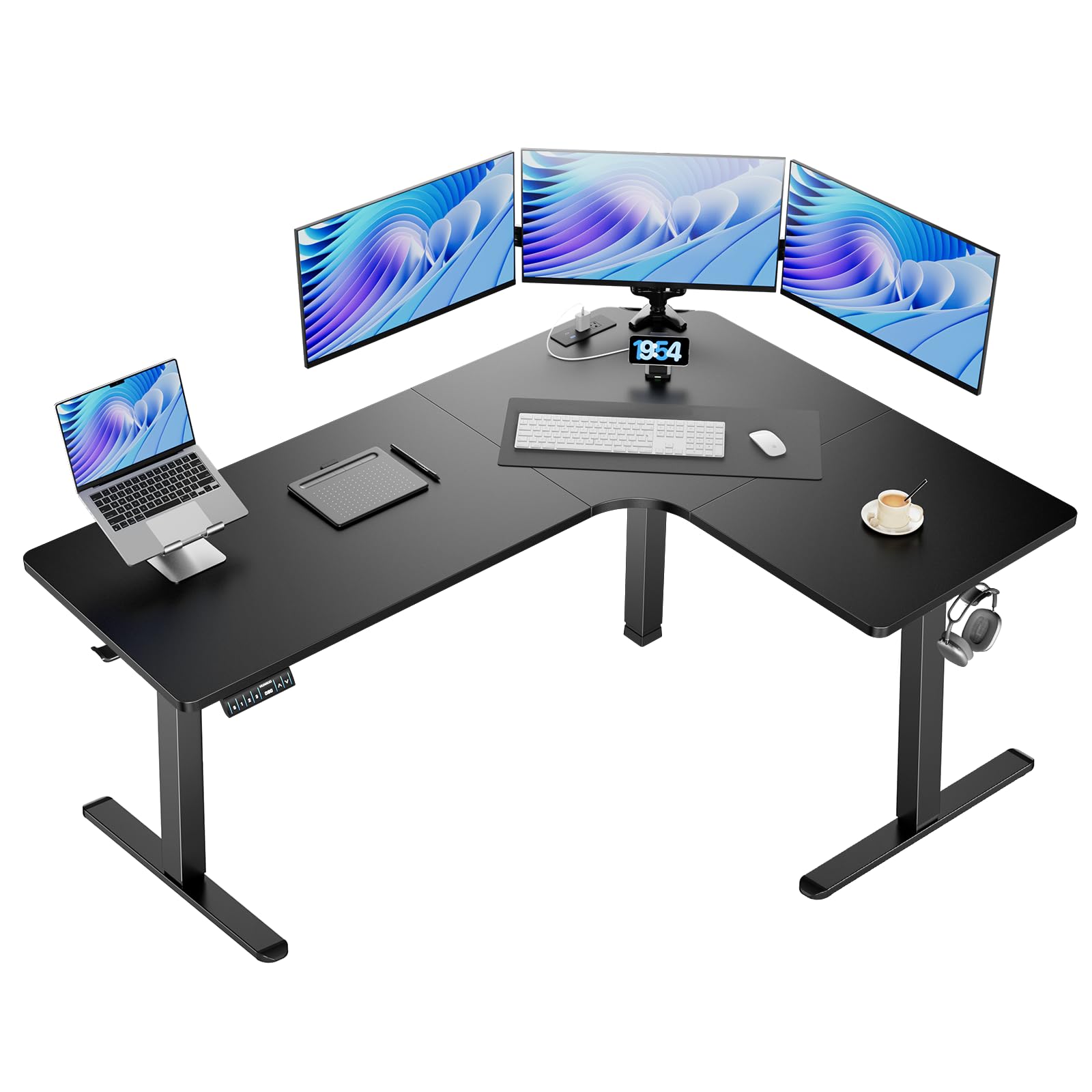
The HUANUO stands out for its flush-mounted power strip that integrates directly into the main desktop surface rather than dangling off the side. That single design choice makes it easier to keep cables short and hidden, especially when your corner setup includes a monitor arm that needs clean wire routing. The height range of 28 to 46 inches with three memory presets covers most users from 5’3” to over six feet, and the carbon steel frame supports 220 pounds without significant deflection.
The included cable management tray runs the full length of the shorter wing, giving you a dedicated cavity to hide a surge protector and all the excess cable loops. The two side hooks handle headphone and bag storage, freeing the desktop surface for your keyboard and mouse pad. Owners consistently note that the motor lifts smoothly and quietly, with no noticeable lag or grinding even after several months of daily use.
Assembly is straightforward with numbered parts, but the instructions could be clearer on which screws go into the motor brackets — expect about 90 minutes with a helper. For the price, you get a certified ETL/FCC power system and a frame that feels more premium than its mid-range positioning suggests.
Why it’s great
- Flush power strip keeps the desktop surface uncluttered
- Long cable management tray holds a full surge protector
- Quiet motor suitable for shared office spaces
Good to know
- Height adjust controller can conflict with some chair armrests
- Motor cable is short; may need an extension for some layouts
3. RedLemon 60″ Electric L-Shaped Desk
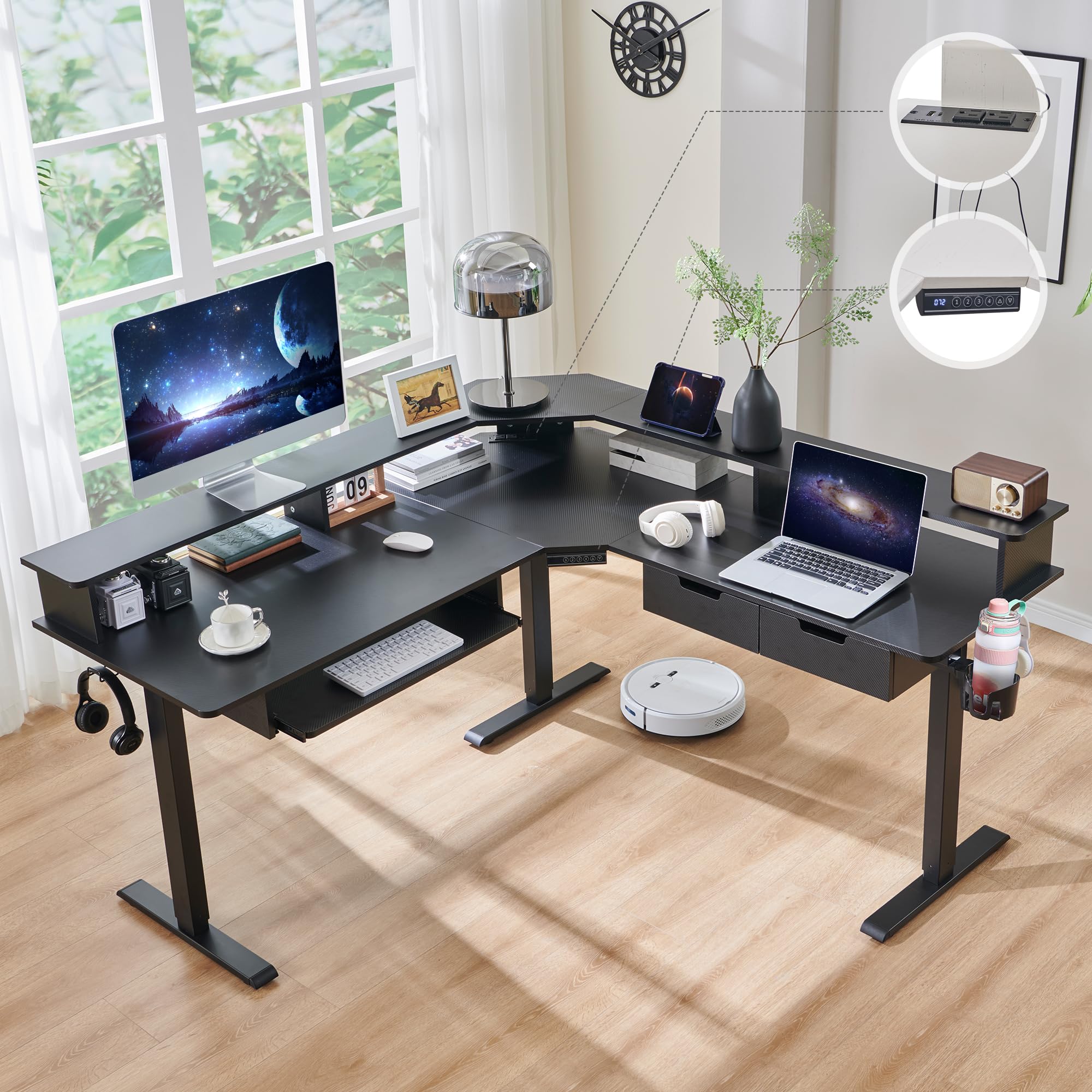
The RedLemon desk packs more integrated accessories than any other corner desk at this tier: two fabric drawers, a pull-out keyboard tray, a 360-degree rotating cup holder, and a monitor shelf that doubles as a cable management channel. That feature density makes it ideal if you want a complete workstation out of the box without buying separate add-ons. The electric height adjustment travels from 28 to 46 inches and stores four height presets, letting you switch between gaming and standing work modes with a single button press.
The RGB LED light strip offers 12 scene modes that cycle through static colors, breathing effects, and a music-sync mode triggered by an onboard microphone. The monitor shelf elevates your primary screen by 3.5 inches, aligning your eye level with the upper third of the display — a key ergonomic point that many corner desks ignore. The drawers are shallow and better suited for pens, cables, and small accessories than for files or full-size notebooks.
Assembly takes about four hours solo, as the drawer hardware requires careful alignment. The carbon-fiber finish looks clean but shows fingerprints and dust quickly, so plan on a quick wipe every few days. Once built, the frame feels solid and the motor runs silently enough for use during voice calls.
Why it’s great
- Integrated rotating cup holder and keyboard tray save desk space
- 4 programmable height presets for instant position switching
- RGB music sync creates immersive lighting without extra gear
Good to know
- Drawers are too small for standard file folders
- Keyboard tray may conflict with deep monitor arm bases
4. AODK Electric L Shaped Standing Desk

The AODK electric desk is the most affordable sit-stand corner option that doesn’t feel flimsy. The motor lifts smoothly through a 28-to-47-inch range at a noise level of 45-55 dB, which is quieter than many similarly priced standing desks. The memory controller stores three favorite heights, so you can save your seated gaming position and your standing work position and transition between them without fiddling with buttons.
The built-in power block includes three standard outlets, one USB-A port, and one USB-C port — enough to charge your phone, headset, and a tablet simultaneously without a separate adapter. The reversible L-shape lets you position the short wing on either side, which is essential if your room layout forces the corner to face a specific direction. The 59-inch desktop is slightly smaller than the premium models, but the 26-inch center depth still accommodates a 32-inch monitor on a clamp arm.
Owners report assembly taking under two hours with clear instructions, though a few users noted that two of the bolts can strip if overtightened by hand. Going slowly with the included Allen key avoids that issue entirely. For the price, this desk delivers 90% of the functionality of a model at roughly half the cost.
Why it’s great
- Lowest price point for a sit-stand corner desk with motor
- USB-C port eliminates the need for a separate phone charger
- Quiet motor won’t disrupt voice chat or calls
Good to know
- Desktop feels smaller than the 63-inch premium alternatives
- Some bolts are prone to stripping if overtightened
5. Elephance Large L-Shaped Computer Desk

The Elephance desk targets gamers who need to mount a monitor arm on a corner desk without drilling. The 0.39-inch pre-drilled grommet hole is positioned on the main wing, letting you thread a C-clamp mount cleanly through the desktop. The 56.9-inch wings provide a full 21.6 inches of depth, which is deep enough for a 34-inch ultrawide with a keyboard tray pulled out beneath it. The removable middle shelf on the storage wing gives you the option to create a taller cavity for a full-tower PC case, a feature that many L-desks at this price point lack.
The construction uses P2-class particle board with a black oak wood-grain finish that resists scratches better than raw MDF. The adjustable leg pads let you level the desk on uneven floors, which is critical for preventing wobble in older homes or carpeted rooms. Owners who purchased two units to form a U-shaped workstation report that the veneer matches consistently across batches, making this a viable option for a multi-desk setup.
Assembly instructions are picture-based and could be clearer, but the hardware is well-labeled and includes spare screws. The absence of built-in power outlets or RGB lighting keeps the price lower, but it also means you’ll need to buy a separate power strip and LED kit if you want those features.
Why it’s great
- Pre-drilled grommet hole works with standard monitor arms
- Removable shelf accommodates a full-size PC tower
- Deep 21.6-inch wings support large ultrawide monitors
Good to know
- No built-in power outlets or RGB lighting
- Instructions are picture-only and skip a few assembly steps
6. ODK 66″ L Shaped Gaming Desk

The ODK desk’s defining feature is its 36-inch center section, which is 10 inches longer than the typical corner desk center. That extra length gives you room to place a 49-inch ultrawide monitor exactly in the corner without the bezels spilling onto the side wings. The carbon fiber texture on the desktop surface provides a low-gloss, scratch-resistant finish that feels cooler to the touch than standard laminated particle board, and it resists the sweat and oil buildup that can stain black MDF over time.
The LED strip offers 10 colors and 10 flashing modes with a memory function that remembers your last setting when you power the desk back on. The four-tier storage shelf is adjustable, letting you customize the heights to fit a printer on one level and a console on another. The reversible design works for left- or right-corner placement, and the included CPU stand keeps your tower off the carpet for better airflow.
Assembly is rated at 2-3 hours solo, and owners recommend using a ratcheting screwdriver rather than the included Allen key to speed things up. The actual dimensions are closer to 58 inches on the long side and 40 inches on the short side, so measure your space instead of relying on the “66-inch” marketing number.
Why it’s great
- 36-inch center section fits large ultrawide monitors centered
- Carbon fiber texture resists scratches and fingerprints better than standard MDF
- Adjustable four-tier shelf accommodates varying equipment heights
Good to know
- Actual desktop dimensions are shorter than the 66-inch listing claims
- LED lights lack a convenient on/off button; must unplug or use app
7. AODK 61″ L Shaped Desk with Drawer

The AODK desk solves the problem of where to put your small accessories with four fabric drawers mounted under the main desktop. Each drawer is deep enough for a full-size mechanical keyboard, a stack of games, or a tablet, and the fabric construction keeps them lightweight even when fully loaded. The CPU stand on the side wing lifts your tower off the floor, which improves bottom intake fan airflow and reduces dust accumulation compared to a floor-placed case.
The desktop includes three standard outlets and two USB ports built into the frame, so you can charge your phone and headset without reaching under the desk. The LED lighting offers 7 colors and 20 modes with a memory function, and the reversible configuration lets you switch the long wing from left to right depending on your room layout. The monitor shelf included with this model elevates your screen by 2.5 inches, which helps align your eye level with the upper bezel.
The fabric drawers are not designed for heavy items — a ream of paper is about their limit — and the under-shelf storage is shallow enough that you’ll mainly use it for flat items like notebooks. Assembly runs about 3 hours solo, and the picture-only instructions require careful study to avoid reversing the drawer alignment.
Why it’s great
- Four fabric drawers keep small accessories organized and dust-free
- CPU stand improves tower airflow and reduces carpet dust pull
- Built-in power outlets with USB charging at a mid-range price
Good to know
- Fabric drawers cannot hold heavy items like full file folders
- Picture-only assembly instructions require careful study
8. SEDETA 58″ L Shaped Corner Desk

The SEDETA desk prioritizes vertical storage over raw desktop space, making it a smart choice for small rooms where you need to store books, collectibles, and a printer without a separate shelving unit. The 7-tier open shelf tower rises above the short wing, offering dedicated spots for a monitor, a laptop, a gaming console, and decorative items. The enclosed glass cabinet at the bottom provides dust-free storage for controllers, cables, or drinkware.
The desk uses P2 particle board with a powder-coated steel frame, and the reversible design lets you place the shelf tower on either the left or right side. The RGB LED strip is app-controlled with 29 flashing modes and a music-sync function that responds to the room’s ambient sound. The desktop area is 58 by 21.6 inches, which is narrower than most gaming-specific L-desks, but the shelving compensates by keeping your secondary devices off the main surface.
Assembly is rated at about an hour with two people, but the instructions can be confusing because the left and right configurations use different screw patterns. Owners praise the sturdy feel once assembled, noting that the steel crossbars eliminate the wobble that affected earlier versions of this design.
Why it’s great
- Vertical shelving saves floor space in small rooms or dorms
- Glass cabinet keeps small electronics dust-free
- App-controlled RGB with music sync at a budget price
Good to know
- Desktop surface is narrower than dedicated gaming L-desks
- Assembly instructions use different screw patterns for left/right configurations
9. Aheaplus L Shaped Gaming Desk
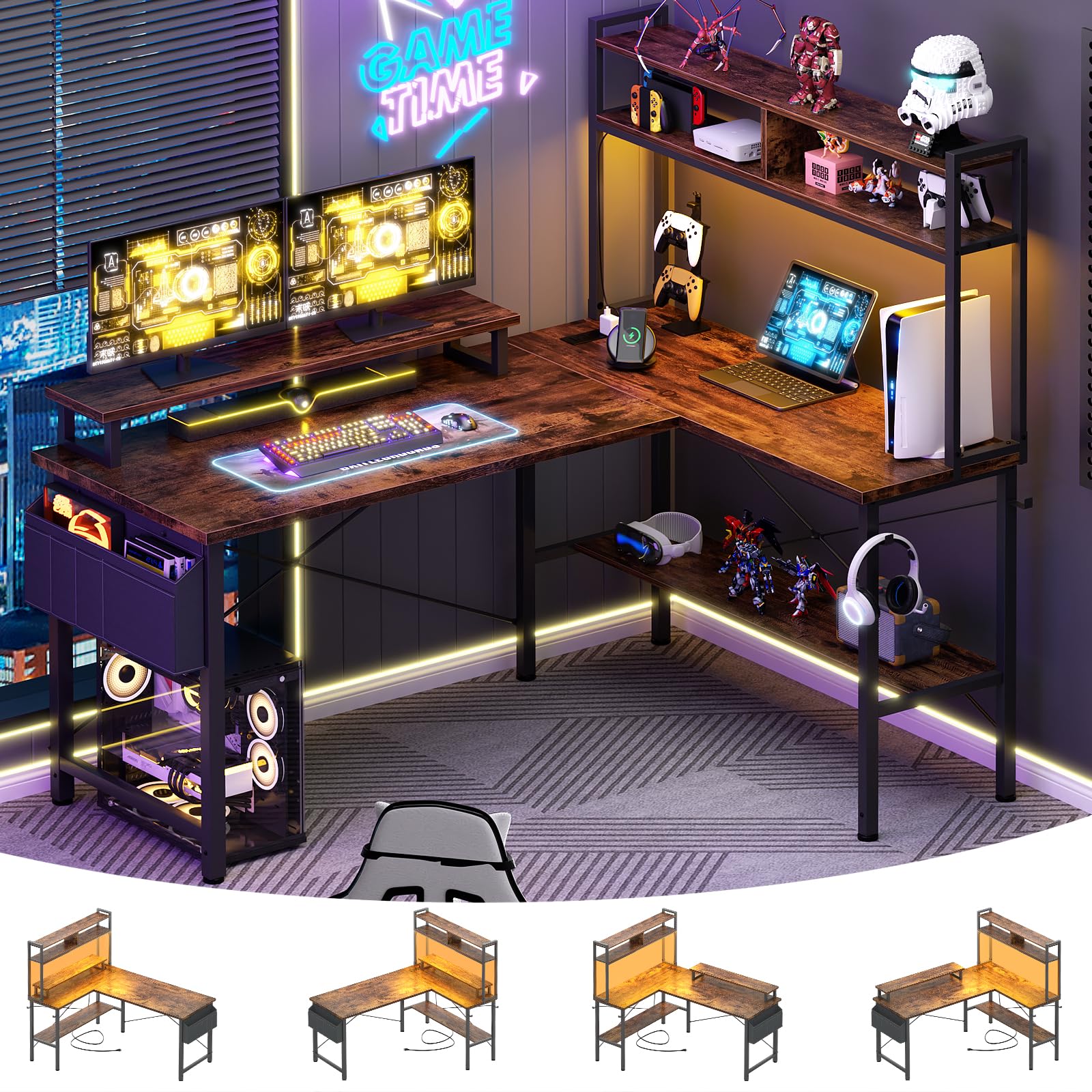
The Aheaplus desk offers the most RGB lighting flexibility at the most accessible price point. The app-controlled LED strip covers 60,000 colors with multiple flashing modes, a timer, and music-sync capability that turns your gameplay audio into a light show. The three outlets and two USB ports are integrated into the frame, so you can plug in a monitor, a PC, and phone charger without a power strip.
The movable monitor stand elevates your screen to reduce neck strain, and the reversible hutch can be fixed on the left or right side. The X-shaped crossbar underneath the main desktop adds structural rigidity that helps prevent the wobble common in budget corner desks. The desktop measures 48.82 by 18.9 inches, which is smaller than most entries on this list, but the 4-tier open shelf tower provides ample storage for a laptop, gaming peripherals, and decor.
Assembly is straightforward and can be completed solo in under two hours. The MDF surface is waterproof and easy to clean, but the rustic brown finish may not match all gaming setups. Owners note that the desk is slightly shorter than expected — about 29 inches tall, which is standard for a writing desk but may feel low if you pair it with a tall gaming chair.
Why it’s great
- App-controlled RGB with 60,000 colors and music sync
- Built-in power outlets and USB ports at a budget price
- X-crossbar underframe reduces wobble on uneven floors
Good to know
- Desktop is smaller than most gaming L-desks (48.8 inches wide)
- 29-inch height may feel low for taller gamers with high-back chairs
FAQ
Can I use a monitor arm on a corner gaming desk?
What is the ideal height for a corner gaming desk?
Is MDF or particle board better for a gaming desk?
How much weight can a corner gaming desk realistically hold?
Should I get a sit-stand corner desk for gaming?
Final Thoughts: The Verdict
For most users, the best corner gaming desk winner is the SIAGO L-Shaped Standing Desk because its three-leg design, 250-pound load capacity, and full-surface lift eliminate the stability and ergonomic compromises that plague lesser corner desks. If you want integrated drawers, a keyboard tray, and a cup holder without buying add-ons, grab the RedLemon 60″ Electric Desk. And for a budget-friendly RGB entry that still includes power outlets and a monitor stand, nothing beats the Aheaplus L Shaped Gaming Desk.

Mo Maruf
I created WellFizz to bridge the gap between vague wellness advice and actionable solutions. My mission is simple: to decode the research and give you practical tools you can actually use.
Beyond the data, I am a passionate traveler. I believe that stepping away from the screen to explore new environments is essential for mental clarity and physical vitality.