Our readers keep the lights on and my smoothie glass nicely filled. As an Amazon Associate, I earn from qualifying purchases.
Choosing the wrong one means wrestling with paper jams, sky-high consumable costs, and frustrated employees who just need a clean double-sided print. The right unit glues your office together, delivering crisp copies and scans without demanding constant attention or a second mortgage on toner.
I’m Mohammad Maruf — the founder and writer behind WellFizz. I have spent hundreds of hours analyzing small-business hardware specifications, reading real customer experiences, and comparing the long-term cost-of-ownership data that most buyers overlook.
After reviewing the top contenders, the best copier for small business buyers balances fast output speed, low running costs, and reliable network connectivity without forcing you into a proprietary ecosystem that locks you out of affordable supplies.
How To Choose The Best Copier For Small Business
A copier that works for a solo freelancer will suffocate under a five-person workload. Before scrolling through spec sheets, lock in three priorities: monthly print volume (pages you actually run each month), connection complexity (how many users need wired or wireless access), and media size (letter/legal or tabloid). Ignore the marketing duty cycle—look for the recommended monthly volume, which is typically one-fourth of the maximum figure.
Print Technology: Laser vs. Ink Tank
Monochrome laser dominates the small-business space because toner cartridges sit idle for weeks without drying out, and the cost per page (CPP) for black text stays under two cents. Color laser adds four toner cartridges and a waste toner unit, raising both CPP and maintenance complexity. Ink tank systems like the Epson EcoTank Pro slash per-page ink costs for color-heavy workflows, but the liquid ink can clog printheads during infrequent use—a real risk if your office only prints presentations twice a month.
Paper Handling & Auto Document Feeder
The base paper tray capacity should match your daily print volume—a 150-sheet cassette works for low-volume home offices, while a 250-sheet tray is the minimum for a team of three to five. The auto document feeder (ADF) matters most for copying: a 35-sheet ADF handles a typical contract stack, but a 50-sheet ADF with single-pass duplex scans both sides of a document in one pass, cutting copy time in half. Avoid machines that only offer duplex printing without duplex scanning, because your employees will still have to manually flip the original stack.
Connectivity and Security
Ethernet remains the gold standard for office copiers—Wi-Fi can drop during large scans or high-volume print jobs, creating workflow bottlenecks. Dual-band Wi-Fi (2.4 GHz and 5 GHz) improves stability for mobile printing, but if your team exceeds four people, hardwire the copier and use the wireless radio only for guest access. Security features sit on the other end of the spectrum: HP’s Wolf Pro Security and Lexmark’s built-in device protection prevent unauthorized access to scanned documents—a legitimate consideration if you handle sensitive client data or bank records.
Quick Comparison
On smaller screens, swipe sideways to see the full table.
| Model | Category | Best For | Key Spec | Amazon |
|---|---|---|---|---|
| Brother MFC-L3720CDW | Color Laser | Color output for small teams | 19 ppm color, 3.5″ touchscreen | Amazon |
| HP Color LaserJet Pro MFP 3301fdw | Color Laser | Vibrant presentation printing | 26 ppm color, TerraJet toner | Amazon |
| Epson EcoTank Pro ET-16600 | Ink Tank | High-volume color on tabloid | 25 ppm B&W, 4.3″ touchscreen | Amazon |
| Lexmark MX431adw | Monochrome Laser | Ultra-fast monochrome scanning | 42 ppm, single-pass duplex ADF | Amazon |
| Xerox C235dni | Color Laser | Entry-level color for occasional use | 24 ppm color, smartphone setup | Amazon |
| Canon MegaTank MAXIFY GX2020 | Ink Tank | Low-cost color printing | 3000-page ink yield | Amazon |
| HP LaserJet Pro MFP 3101fdw | Monochrome Laser | Reliable B&W for teams of 5-7 | 35 ppm, HP Wolf Pro Security | Amazon |
| Brother MFC-L2820DW | Monochrome Laser | Compact B&W for tight desks | 36 ppm, 2.7″ touchscreen | Amazon |
| Canon imageCLASS MF275dw | Monochrome Laser | Budget B&W for home offices | 30 ppm, 6-line touchscreen | Amazon |
In‑Depth Reviews
1. Brother MFC-L3720CDW

The Brother MFC-L3720CDW hits the sweet spot for a small team that needs sharp color without the monthly subscription trap. Print speeds of 19 pages per minute in both black and color mean you are never waiting long for a marketing handout or a color invoice. The 3.5-inch color touchscreen with 48 customizable shortcuts lets employees bypass nested menus and jump straight to the most-used copy or scan functions—a small time saver that adds up across a shared machine.
Connectivity is generous: dual-band Wi-Fi (2.4/5 GHz), Wi-Fi Direct for walk-up printing from a guest laptop, and a USB port for a directly connected workstation. The 250-sheet adjustable paper tray and 50-sheet ADF handle a full morning of scanning without reloading. Automatic duplex printing is standard, but note that the ADF is duplex-scan-capable only in a single pass if you use the optional duplex ADF attachment; the built-in ADF scans one side per pass. Real-world owners report crisp, water-resistant output and reliable operation over years, though the waste toner unit replacement around 1,000 pages has frustrated some users.
Choose the MFC-L3720CDW if your office prints color documents daily and you prefer a Brother ecosystem that does not require expensive OEM-only toner chips. The XL toner cartridges drop the cost per page significantly, and the machine supports generic cartridges without firmware pushback—a flexibility that HP and Canon have recently restricted.
Why it’s great
- Fast 19 ppm color and B&W
- Intuitive 3.5″ touchscreen with shortcuts
- Works with third-party toner cartridges
Good to know
- Standard ADF is single-pass duplex scan (one side at a time)
- Waste toner unit may need replacement around 1,000 pages
2. HP Color LaserJet Pro MFP 3301fdw

HP’s TerraJet toner technology in the MFP 3301fdw delivers noticeably richer color saturation on plain paper compared to previous generations—brochures and client-facing documents look closer to professional print shop output. Print speeds reach 26 pages per minute in both black and color, and the automatic single-pass duplex ADF scans both sides of a stack of originals in one pass, cutting multi-page copy jobs nearly in half.
Build quality feels solid, with a sturdy chassis and a responsive touchscreen control panel. Dual-band Wi-Fi with self-reset automatically reconnects when the network signal dips, a minor but appreciated feature in a busy office where the printer sits far from the router. The 3301fdw also supports Ethernet, USB, and Bluetooth connectivity, making it compatible with virtually any desktop or mobile setup. HP Wolf Pro Security gives administrators granular control over who can scan to email or access stored documents—valuable for businesses handling confidential records.
The major drawback is HP’s aggressive firmware policy: the printer will block non-HP toner cartridges, so you must buy original HP toner, which carries a premium cost per page. Some early users reported streaks and missing toner on color prints, and HP support struggled to supply replacement toner for the newly launched model. If your budget can absorb OEM toner costs and you need the best color fidelity your clients will notice, this machine delivers—but be prepared for higher ongoing consumable expenses.
Why it’s great
- Excellent color saturation with TerraJet toner
- Single-pass duplex ADF for fast double-sided scanning
- Dual-band Wi-Fi with automatic self-reset
Good to know
- Locks out third-party toner cartridges via firmware
- Replacement toner can be hard to find at launch
3. Epson EcoTank Pro ET-16600
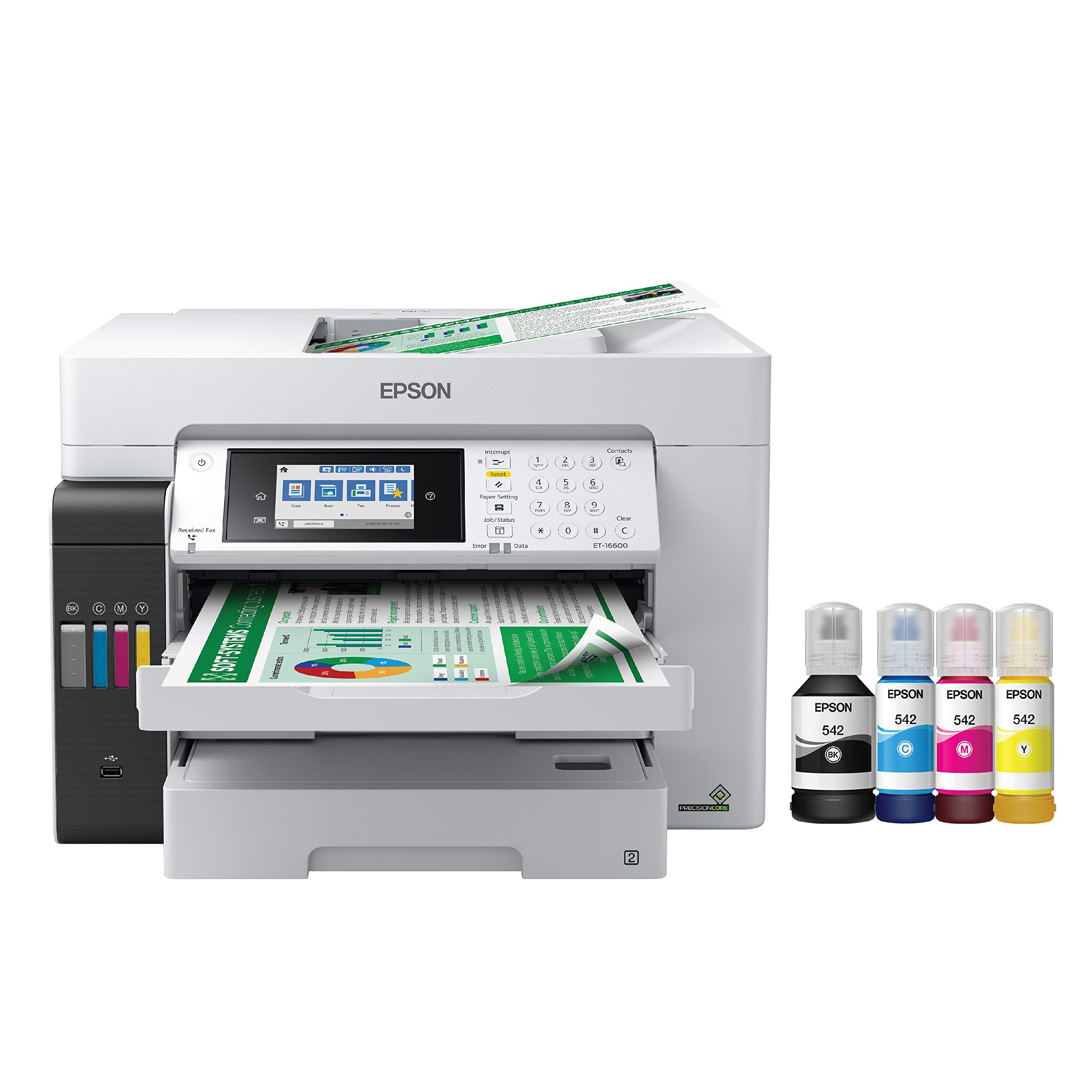
The Epson EcoTank Pro ET-16600 is the only machine in this lineup that prints on tabloid-size paper (11×17 inches), making it the right choice for architectural drawings, large spreadsheet printouts, or A3 marketing materials. It uses an ink tank system rather than cartridges—one set of refill bottles delivers thousands of pages, with Epson claiming up to two years of ink included in the box. Print speeds of 25 pages per minute in black and 12 in color are slower than laser competitors, but the per-page cost for color documents is dramatically lower, often falling below one cent per color page.
Paper handling is robust: two 250-sheet cassettes (both support tabloid), a 50-sheet ADF, and automatic duplex printing and scanning. The 4.3-inch touchscreen is large and responsive, and the printer supports Ethernet, Wi-Fi, and USB connectivity. The motorized output tray extends automatically when a print job arrives—a small convenience that prevents prints from piling on the floor. The unit is physically large (20.3 inches wide, 19.7 inches deep) and requires dedicated floor space or a very sturdy desk.
Color print quality is excellent for inkjet, with vivid hues and smooth gradients, though it does not match the sharpness of color laser on plain text. The ink tank system saves money in the long run, but the initial fill ink drops by about 20 percent during the setup priming cycle, which is normal. Some owners report that Epson’s warranty support can be difficult if a printhead fails after the first year, and the replacement cost for a printhead approaches the price of a new machine. Consider an extended warranty if you plan to push the ET-16600 to its monthly volume limit.
Why it’s great
- Prints on tabloid (11×17) paper
- Extremely low cost per color page
- Two 250-sheet trays for high-volume paper capacity
Good to know
- Inkjet printhead can fail and is expensive to replace
- Large footprint—needs dedicated space
4. Lexmark MX431adw

The Lexmark MX431adw is a monochrome workhorse built around speed: 42 pages per minute with a first-page-out time of 5.9 seconds. That pace matters when three employees are waiting to copy a 30-page contract before a meeting. The automatic duplex ADF scans both sides of an original in a single pass—a genuine time-saver that most copiers in this class reserve for color models. The steel-frame chassis feels denser and more durable than the plastic bodies of Brother and Canon alternatives, suggesting a longer service life in a shared office environment.
Security is a highlight: Lexmark includes built-in device protection that encrypts stored documents, secures the network communication, and allows administrators to set permission levels for scanning to email or USB drives. This level of control is rare in the sub-premium tier and matters for legal practices, accounting firms, or any business handling personally identifiable information. Connectivity is limited to USB and Ethernet—there is no built-in Wi-Fi—so plan to run a cable or use a wireless bridge. The touchscreen interface is responsive, though the LCD is smaller than the color touchscreens on comparable Brother and HP units.
Toner cost per page is the trade-off: Lexmark toner is expensive, and the machine does not accept third-party cartridges without compatibility workarounds. The starter toner yield is low (around 700 pages), so budget for a high-yield cartridge early. Some users report quality control issues, including units that arrived defective or failed within the first few months. If raw speed and duplex scanning are your top priorities and you can manage the higher consumable budget, the MX431adw is a fast, secure option.
Why it’s great
- Blazing 42 ppm print and copy speed
- Single-pass duplex ADF scans both sides at once
- Steel-frame build and advanced security features
Good to know
- No built-in Wi-Fi; Ethernet only
- OEM toner is expensive and third-party options are limited
5. Xerox C235dni

The Xerox C235dni brings color laser printing to small offices that do not want to spend heavily on a color machine. Print speeds of 24 pages per minute in both black and color are competitive with the mid-range, and the output quality for text and graphics is crisp enough for internal memos and client-facing flyers. Setup is guided through the Xerox Easy Assist App, which walks you through Wi-Fi configuration and driver installation without needing a computer—a welcome simplification for teams without an IT person.
Paper handling includes a 250-sheet tray and a 50-sheet ADF, with automatic duplex printing. The touchscreen is a basic color LCD, not the larger high-res panels found on Brother’s MFC-L3720CDW, but the menus are logically organized and responsive. Connectivity covers Wi-Fi, Ethernet, and USB, plus support for Apple AirPrint and Mopria for mobile printing. The starter toner set yields only about 500 pages, so factor in a high-yield cartridge purchase immediately to avoid running dry within the first week.
The scanner has drawn criticism: some users report extremely light scans even at maximum darkness settings, which makes document archiving nearly unusable. Windows driver installation can also fail if the automatic SmartStart utility does not discover the printer on the network. Paper quality matters more than usual with this model—using generic copy paper can produce faded prints, while premium inkjet/laser paper eliminates the issue. The C235dni works well for a light-duty color office that uses high-quality paper and can tolerate occasional setup quirks, but it is not a set-and-forget machine.
Why it’s great
- Affordable entry point for color laser
- App-based setup simplifies initial configuration
- Compact footprint for a color all-in-one
Good to know
- Starter toner yields only 500 pages
- Scanner output can be too light for professional archiving
6. Canon MegaTank MAXIFY GX2020

The Canon MAXIFY GX2020 uses a MegaTank ink system that delivers up to 3,000 black and 3,000 color pages from the included ink bottles—an extraordinary yield for the upfront price. For a small business that prints a high volume of color documents like invoices, flyers, or training materials, the per-page cost is far lower than any cartridge-based laser. Print speeds of 15 pages per minute black and 10 color are slower than laser alternatives, but the continuous ink system eliminates the scramble to replace toner in the middle of a job.
The 2.7-inch color touchscreen is intuitive, and the 35-sheet ADF handles multi-page copy jobs without manual feeding. Automatic duplex printing is standard, and the printer supports Wi-Fi, Ethernet, and USB connectivity for flexible placement. Setup is straightforward on both Mac and Windows, and the Canon PRINT app provides reliable mobile printing and scanning. The pigment-based ink resists smudging on plain paper, which is a clear advantage over dye-based ink tank systems that can bleed on standard office stock.
The main limitation is print speed—at 15 ppm black, this machine will not keep up with a busy team that needs heavy copying. Cardstock printing suffers from pronounced curl, and some users report that color photos appear grayish after extended idle periods due to clogged printhead nozzles. The ink tank system also means you cannot switch to laser toner later; you are committed to liquid ink for the life of the machine. The GX2020 is best suited for a color-focused office where volume is moderate and speed is secondary to low operating cost.
Why it’s great
- Extremely low cost per color page with included ink
- 3,000-page black and color ink yield per bottle set
- Pigment ink resists smudging on plain paper
Good to know
- Slow 15 ppm print speed limits high-volume copying
- Cardstock prints show curl; extended idle periods may clog nozzles
7. HP LaserJet Pro MFP 3101fdw

The HP LaserJet Pro MFP 3101fdw is designed for a team of up to seven people who rely on crisp, fast black-and-white printing. Speeds of 35 pages per minute keep the workflow moving, and the automatic duplex printing and 50-sheet ADF handle multi-page documents efficiently. Intelligent Wi-Fi automatically switches between bands to maintain a stable connection—a practical solution for offices where the printer location competes with other wireless devices.
HP Wolf Pro Security provides customizable security settings that protect sensitive documents and prevent unauthorized changes to the printer configuration. This is a clear differentiator for businesses that handle financial records, legal documents, or employee data. The 3101fdw also supports Ethernet, USB, and Bluetooth connectivity, ensuring compatibility with older desktops that lack wireless adapters. The control panel is straightforward, with a simple LCD display rather than a full touchscreen, which some users prefer for quick operation.
The machine worked reliably for tens of thousands of pages in several verified long-term use cases, with Economode doubling toner life. However, HP’s firmware updates can render third-party toner cartridges unusable—a well-known pattern that forces users into OEM supplies. A small number of units have reported early failures, including unresponsive control panels and Wi-Fi dropout within weeks of purchase. The 3101fdw is a solid choice for a B&W-focused office that values speed and security and is comfortable with HP’s cartridge ecosystem.
Why it’s great
- Fast 35 ppm black-and-white printing
- HP Wolf Pro Security for document protection
- Intelligent Wi-Fi self-stabilizes connection
Good to know
- Firmware updates may block third-party toner
- Some units experienced early hardware failures
8. Brother MFC-L2820DW

The Brother MFC-L2820DW packs 36 pages per minute of monochrome output into a chassis that fits comfortably on a corner desk, making it one of the most space-efficient copiers for a small office that prints primarily in black and white. The 2.7-inch touchscreen is responsive and provides easy access to cloud print-and-scan apps like Google Drive, Dropbox, and OneNote directly from the panel—without needing a computer. The 50-sheet ADF handles batch copying and scanning without manual intervention, and automatic duplex printing is standard.
Dual-band Wi-Fi (2.4/5 GHz) plus Ethernet and USB connectivity give you flexibility to place the machine anywhere within the network. The Brother Mobile Connect App allows remote printing, toner monitoring, and supply ordering from a smartphone—a practical feature when the printer is down the hall and you need a quick status check. Setup has been reported as straightforward once the network configuration is completed manually, though the printed instructions are sparse and may confuse first-time users.
Print quality is crisp and consistent, with no banding or toner scatter on standard office paper. The MFC-L2820DW uses Brother Genuine TN830 or TN830XL toner cartridges, and the machine does not block third-party alternatives, giving you cost-saving options. The 250-sheet paper tray is adequate for a small team but may need refilling mid-day in a busy office. Some users mention that the default toner density is slightly light, but adjusting the setting via the touchscreen resolves that. For a budget-friendly B&W laser that saves desk space and prints quickly, the MFC-L2820DW is a top contender.
Why it’s great
- Fast 36 ppm printing in a compact frame
- Direct cloud app access from the touchscreen
- Does not lock out third-party toner
Good to know
- Setup instructions are minimal and can be confusing
- 250-sheet tray requires refilling during heavier days
9. Canon imageCLASS MF275dw

The Canon imageCLASS MF275dw is the most budget-friendly entry in this guide, but it does not feel cheap in daily use. Print speeds of 30 pages per minute and a first-page-out time of 5.3 seconds keep the workflow moving for a solo office or a two-person team. The 6-line adjustable LCD touchscreen is not a full-color panel, but it is clear and tiltable, making it easy to navigate menus from a seated or standing position. Wireless setup is simple and can be completed without a computer—just use the Canon PRINT Business app on your phone.
The 150-sheet paper cassette is small compared to the 250-sheet trays on most competitors, which means you will reload more frequently during a busy day. Automatic duplex printing is included, but the 35-sheet ADF only scans one side per pass—you have to manually flip the stack for double-sided originals. Customer reviews consistently highlight the reliable print quality, cost-effective toner (the Canon 071 cartridge yields about 1,200 pages with the standard cartridge, and high-yield options push that higher), and dependable wireless connectivity that does not drop mid-job.
Print results are sharp, with clean text that looks professional on standard copy paper. The scanner works well for both the flatbed and the ADF, though some users note that black-and-white scans appear slightly faded compared to color scans. There is no envelope feeder, so printing envelopes requires manual paper selection through the cassette. The MF275dw is ideal for a micro business or a home office that needs a reliable, low-cost black-and-white copier without the complexity and cost of a larger machine.
Why it’s great
- Great value with fast 30 ppm output
- Easy wireless setup via the Canon app
- Sharp, professional text quality on plain paper
Good to know
- 150-sheet cassette may need frequent refills
- No duplex scanning and no dedicated envelope feeder
FAQ
Should I buy a monochrome or color copier for my small business?
What size paper cassette do I need for a team of 3 to 5 people?
How do I calculate the true cost per page of a copier?
Is Wi-Fi reliable enough for a business copier?
What does ‘single-pass duplex ADF’ mean and why should I care?
Final Thoughts: The Verdict
For most small businesses, the best copier for small business is the Brother MFC-L3720CDW because it balances fast color printing, low ongoing costs with third-party toner support, and a touchscreen that makes daily copying simple without forcing you into a proprietary supply chain. If your priority is vibrant color output for client-facing materials, grab the HP Color LaserJet Pro MFP 3301fdw. And for a budget-friendly monochrome machine that saves desk space and delivers 36 ppm reliably, the Brother MFC-L2820DW is the smart choice.

Mo Maruf
I created WellFizz to bridge the gap between vague wellness advice and actionable solutions. My mission is simple: to decode the research and give you practical tools you can actually use.
Beyond the data, I am a passionate traveler. I believe that stepping away from the screen to explore new environments is essential for mental clarity and physical vitality.