Our readers keep the lights on and my smoothie glass nicely filled. As an Amazon Associate, I earn from qualifying purchases.
Your processor pushes out heat like a furnace, and the stock air cooler that came in the box is barely keeping up. A high-performance liquid cooler is the only way to maintain stable clock speeds under sustained loads, whether you’re rendering 4K video or grinding through a competitive gaming session. The difference between a mid-range 240mm unit and a premium 360mm setup can be the difference between a system that throttles and one that runs flat-out all day.
I’m Mohammad Maruf — the founder and writer behind WellFizz. I’ve spent hundreds of hours cross-referencing pump flow rates, radiator thickness, fan static pressure ratings, and real-world thermal test data to separate the coolers that actually deliver from those that just look the part.
This buying guide breaks down the thermal performance, build quality, and real-world noise levels of the best liquid coolers on the market today, helping you find the right balance of cooling capacity and value for your specific build. Here you will find the best cpu liquid cooler options for every budget and case size.
How To Choose The Best CPU Liquid Cooler
Choosing an AIO liquid cooler is about matching the thermal solution to your processor’s TDP and your case dimensions. The biggest mistake buyers make is picking a cooler based on looks rather than radiator surface area and pump specs. A 240mm unit can handle most mid-range CPUs, but high-core-count chips like the Intel i9 or AMD Ryzen 9 really need a 360mm radiator to stay below throttle thresholds during sustained all-core loads.
Radiator Size and Case Compatibility
The radiator is where heat leaves the system. A 360mm radiator has about 50% more surface area than a 240mm unit, which means it can dissipate more heat at lower fan speeds — quieter operation with better cooling. Before buying, measure your case’s top or front mounting clearance. Check for clearance between the radiator and the motherboard VRM heatsinks, as well as GPU length if you front-mount the radiator. The ARCTIC Liquid Freezer III Pro 240 has a thicker 38mm radiator that outperforms many standard 27mm 360mm units, but it demands more interior space.
Pump Design and Cold Plate Coverage
Not all pumps are equal. Higher pump RPM generally means better flow rate, but also increased noise. The NZXT Kraken Core 360 runs at 3100 RPM while the MSI MAG Coreliquid A13 pushes up to 3800 RPM with ceramic bearings for vibration reduction. Cold plate material matters — copper conducts heat roughly 40% better than aluminum, so copper cold plates with micro-skived fins (as found on the ARCTIC and be quiet! models) are the gold standard for heat transfer. The offset mounting design on the ARCTIC cooler shifts the cold plate’s center over the CPU hotspot, which is particularly beneficial for chips with offset die layouts like the Intel Core Ultra series and AM5 processors.
Fan Static Pressure and Noise
Radiator fans need static pressure (measured in mmH2O) to push air through the dense fin stack, not just high CFM. The ID-COOLING FX360 PRO fans deliver 2.55 mmH2O static pressure, which is strong for a value-oriented 360mm kit. Premium fans like the Silent Wings 4 on the be quiet! Silent Loop 3 use 6-pole motors and specialized radiator corners to reduce turbulence noise even at higher RPMs. Always check the decibel rating — the Thermaltake TH240 V2 is impressively quiet at 25.8 dBA, while the MSI MAG Coreliquid A13 sits at just 14.4 dBA, making it one of the quietest closed-loop coolers available.
Quick Comparison
On smaller screens, swipe sideways to see the full table.
| Model | Category | Best For | Key Spec | Amazon |
|---|---|---|---|---|
| ARCTIC Liquid Freezer III Pro 240 A-RGB | Mid-Range | Best Overall Value | 38mm thick radiator, contact frame | Amazon |
| NZXT Kraken Core 360 RGB | Premium | High-Performance Gaming | 3100 RPM pump, single-frame fans | Amazon |
| be quiet! Silent Loop 3 360mm | Premium | Silence-Focused Builds | 3-chamber pump, refillable design | Amazon |
| CORSAIR iCUE Link H100i LCD | Premium | RGB & LCD Customization | 2.1″ IPS LCD, 480×480 resolution | Amazon |
| MSI MAG Coreliquid A13 360 | Mid-Range | Quiet 360mm Performance | 14.4 dBA noise, 3800 RPM pump | Amazon |
| ID-COOLING FX360 PRO | Entry-Level | Budget 360mm Cooling | 350W TDP, daisy-chain fans | Amazon |
| Thermaltake TH240 ARGB Sync V2 | Entry-Level | Compact Mid-Tower Builds | 25.8 dBA, infinity mirror cap | Amazon |
In‑Depth Reviews
1. ARCTIC Liquid Freezer III Pro 240 A-RGB
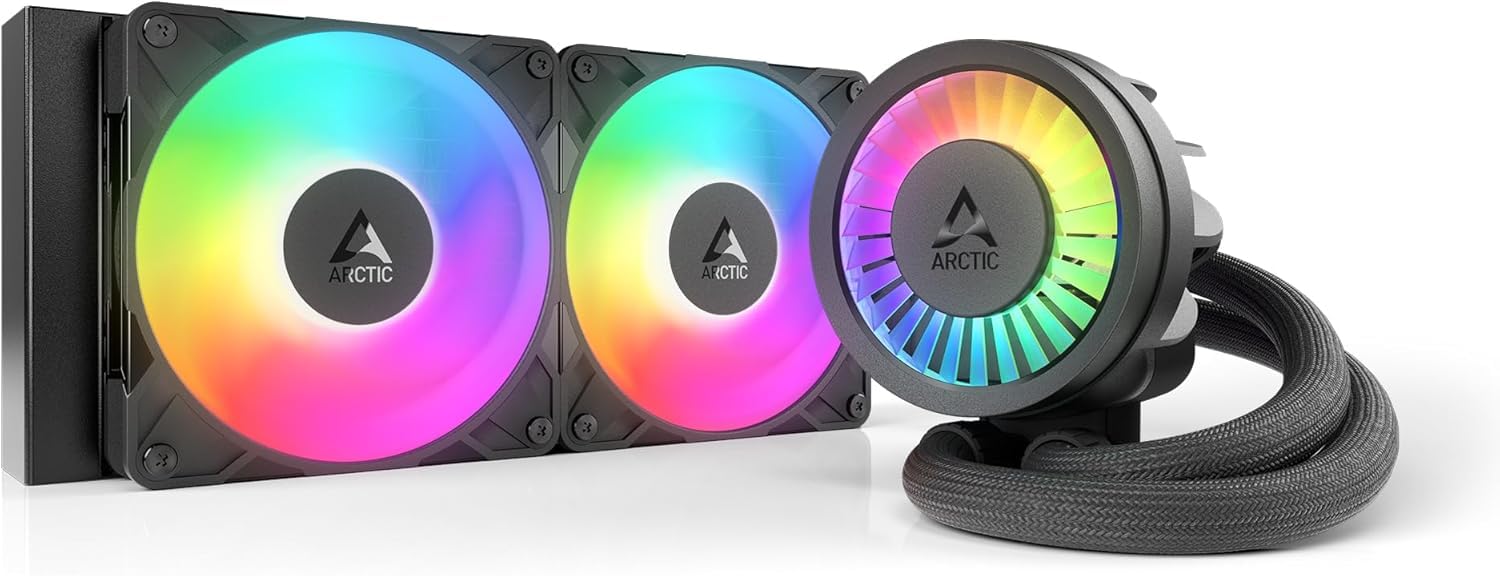
The ARCTIC Liquid Freezer III Pro 240 is a standout in the mid-range category largely because of its 38mm thick radiator — a full 11mm thicker than standard 240mm units. That additional fin surface area allows it to rival many 360mm coolers in thermal performance while taking up less case space. The PWM-controlled pump and integrated VRM fan both use a single 4-pin cable, significantly reducing wiring complexity compared to coolers with separate pump and fan headers.
Real-world testing with a Ryzen 9 3900X showed a 30°C drop from a stock air cooler, maxing out around 65°C under sustained stress tests. On an AM5 5800X3D, load temperatures dropped from 72°C to 68°C versus a Coolermaster ML240. The included LGA1851 and LGA1700 contact frame optimizes pressure distribution across the CPU IHS, reducing the risk of bending and improving thermal transfer across the entire surface.
The P12 Pro fans deliver 77 CFM at full speed, and while some users report audible noise at max RPM, the fans rarely need to spin that fast during normal gaming loads. The primary drawback is the thicker radiator requiring more case clearance — measure carefully if you have a compact mid-tower or a motherboard with tall VRM heatsinks near the top mounting point.
Why it’s great
- 38mm radiator delivers 360mm-level performance in a 240mm form factor.
- Includes Intel contact frame and offset AM5 mounting for hotspot alignment.
- Integrated VRM fan helps lower motherboard voltage regulator temperatures.
- Single visible cable design keeps the build looking clean.
Good to know
- Thicker radiator needs extra case clearance; not compatible with all mid-towers.
- Fans can get loud at 100% speed; a custom fan curve is recommended.
- Mounting the cold plate requires significant downward force compared to other AIOs.
2. NZXT Kraken Core 360 RGB
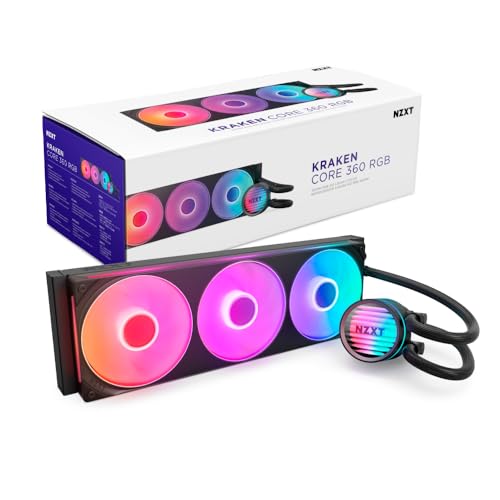
NZXT’s Kraken Core 360 brings solid thermal performance at a competitive mid-range price point. The pump operates at 3100 RPM, providing strong flow through the 360mm aluminum radiator. The standout feature here is the single-frame fan design that mounts three 120mm fans as one unit, reducing screws and cable clutter during installation. At 75.05 CFM with high static pressure blades, these fans push effectively through the radiator fins even at lower PWM settings.
Overclocked i7-11700K builds running at 5GHz on all cores reported stable temperatures under load, with the cooler handling the increased wattage without throttling. The i9-10900KF also stayed cool during sustained workloads, though users note it’s not the absolute quietest AIO in its class. The pump connects directly to the motherboard without a separate controller, though the RGB requires a standard 5V ARGB header — not the older 12V RGB standard, so check your motherboard specs before buying.
Cable management is streamlined thanks to pre-connected fans, eliminating the need for daisy-chaining individual fan wires. The installation guide is straightforward, and the included mounting hardware covers LGA1851, LGA1700, LGA1200, and AM5/AM4 sockets. The only minor disappointment is the lack of a temperature readout on the pump block, which competing models offer at similar price points.
Why it’s great
- Single-frame fan design reduces installation time and cable mess.
- 3100 RPM pump provides strong flow for sustained all-core loads.
- No extra controller needed — connects directly to motherboard headers.
- Broad socket support including LGA1851 and AM5 out of the box.
Good to know
- Not the quietest option; fan noise is noticeable under heavy load.
- RGB requires a 5V ARGB header, not compatible with 12V RGB ports.
- No pump-mounted temperature display for quick at-a-glance monitoring.
3. be quiet! Silent Loop 3 360mm
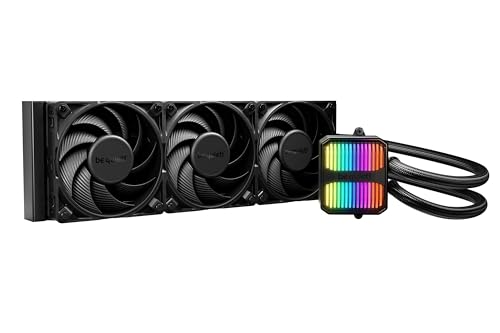
The be quiet! Silent Loop 3 is engineered from the ground up for acoustically sensitive builds. Its three-chamber pump design reduces fluid turbulence and vibration noise, while the 6-pole motor runs smoother than standard 4-pole pump motors. The included Silent Wings 4 120mm high-speed fans feature specialized radiator corners that minimize the whistling sound other fans produce when pulling air through tight fin spacing. At 38.8 dBA max, this is the quietest high-performance 360mm unit tested.
Thermal performance is excellent, with a Ryzen 9 7900X dropping from 80-90°C range on a high-end air cooler to 65-74°C under load. The copper cold plate offers broad coverage that even supports Threadripper sockets (TR5/TR4), giving this cooler unusual versatility for high-core-count workstation builds. The easy-access refill port and included coolant bottle extend the unit’s lifespan well beyond typical sealed-loop AIOs, making it serviceable rather than disposable when coolant levels slowly deplete over years of use.
Build quality is notably robust — the sleeved tubing is stiff but durable, and the mounting mechanism feels substantial. Discreet ARGB lighting on the pump adds a touch of style without overwhelming the build with LEDs. The dampened adjustable pump mount further reduces vibration transfer to the case. The main trade-off is the higher price point, but for users prioritizing whisper-quiet operation at 360mm performance levels, the Silent Loop 3 justifies the investment.
Why it’s great
- 3-chamber pump and 6-pole motor deliver exceptionally quiet pump operation.
- Refillable design with included coolant bottle extends the cooler’s useful life.
- Silent Wings 4 fans minimize turbulence noise through radiator fins.
- Threadripper socket support adds workstation-grade versatility.
Good to know
- Sleeved tubing is stiff and may be harder to route in tight spaces.
- Premium pricing places it above many comparable 360mm options.
- Heavier overall weight requires careful case mounting to avoid stress.
4. CORSAIR iCUE Link H100i LCD

The CORSAIR iCUE Link H100i LCD is the most feature-dense 240mm cooler on the market, combining a 2.1-inch 480×480 IPS LCD screen with 24-bit color depth (16.7 million colors) and ultra-bright 600 cd/m² backlight. You can display real-time CPU temperatures, animated GIFs, or team logos directly on the pump block. The iCUE LINK ecosystem uses universal connectors and a single port on the included system hub, dramatically reducing the usual rat’s nest of cables behind the motherboard tray.
QX120 RGB fans use a patent-pending Magnetic Dome bearing for quiet operation and deliver 34 RGB LEDs per fan, creating vivid lighting effects. On a 7800X3D, the idle temperatures sit in the high 40s to low 50s range with load temps in the 70s under 100% utilization. The pump and fans operate quietly at balanced settings, though some users report a slight whine at higher speeds. The 240mm radiator size limits raw thermal capacity compared to 360mm units, so this cooler is best paired with mid-range to high-end CPUs rather than flagship 16+ core processors.
The main caveat is the iCUE software dependency. Some users experience intermittent device recognition, crashes, or settings resets, and the pump and fans won’t operate at full configuration until the system boots into Windows — meaning the CPU can briefly hit high temperatures during POST on certain motherboards. The LCD customization is fantastic when it works, but the software reliability is a point of friction for users who prefer set-and-forget cooling solutions.
Why it’s great
- 2.1″ IPS LCD with full customization for GIFs, temps, or logos.
- iCUE Link system reduces cables to a single hub connection.
- QX120 fans deliver strong lighting with 34 LEDs per fan.
- Magnetic Dome bearing keeps fan noise low at normal speeds.
Good to know
- iCUE software can be buggy with device recognition and crashes.
- Pump/fans may not work at full speed until Windows loads.
- 240mm radiator limits thermal headroom for top-tier CPUs.
- Premium price is the highest in this lineup.
5. MSI MAG Coreliquid A13 360

The MSI MAG Coreliquid A13 360 delivers a compelling combination of whisper-quiet operation and strong 360mm thermal performance. With a noise rating of just 14.4 dBA, it’s nearly silent during normal operation — the triple-layered evaporation-proof tubing and ceramic bearing pump work together to eliminate most mechanical and fluid noise. The integrated pump within the split-flow radiator design reduces motor resonance, a common source of annoying buzzing in cheaper AIOs.
On a 5800X3D that was previously thermal throttling with a high-end air cooler, the A13 kept maximum package temperatures at 75°C under sustained load. Users report excellent results with 5800XT chips staying cool even during demanding gaming and AI computing workloads over extended periods. The daisy-chained fans come pre-assembled on the 360mm radiator, making installation straightforward — a single 4-pin connection handles both power and PWM control for the trio of 120mm fans.
The 390mm reinforced mesh tubing provides flexibility while maintaining structural integrity against fluid evaporation over time. The included mounting bracket supports LGA1851 out of the box, as well as LGA1700 and AM5/AM4 sockets. The only noted issue is a slight misalignment of the MSI logo when installed on AM4/5 brackets, which is purely cosmetic. For builders who want 360mm cooling capacity without the acoustic footprint, this is one of the quietest options available.
Why it’s great
- Industry-leading 14.4 dBA noise level for near-silent operation.
- 3800 RPM ceramic bearing pump with triple-layered tubing resists evaporation.
- Split-flow radiator design with integrated pump reduces motor resonance.
- Pre-assembled daisy-chain fans simplify installation significantly.
Good to know
- MSI logo may appear slightly misaligned on AMD socket brackets.
- Pump and radiator integration means less flexibility for custom loop upgrades.
- Limited fan speed range may not suit extreme overclocking scenarios.
6. ID-COOLING FX360 PRO

The ID-COOLING FX360 PRO is the entry-level 360mm champion, offering a 350W TDP rating that covers everything from mid-range Ryzen 5 to high-end Ryzen 9 and Core i7 processors. The pump operates at 2900 RPM, and the three 120mm fans push 82.5 CFM with 2.55 mmH2O static pressure — respectable numbers that translate to real-world performance. Users report a 10-15°C drop compared to stock air coolers, with a 5900X idling at 29°C in a 17°C ambient room.
The CD-pattern water block adds visual appeal without price-inflating RGB components — this is a clean, all-black aesthetic that blends into any build. The daisy-chain fan connector reduces cable clutter, making installation in tight cases less frustrating. At full speed, the noise level is 35.2 dBA, which is noticeable but not obtrusive for an entry-level AIO. The included Frost FX45 thermal grease delivers good thermal transfer when applied with the pea-dot method.
The all-metal, plastic, and rubber construction feels solid for the price bracket, though the build materials don’t match the premium heft of higher-end units. Intel LGA1851 support alongside LGA1700, 1200, and AMD AM4/AM5 ensures broad compatibility. The primary limitation is the lack of any RGB lighting or software control, which is a non-issue for builders who prioritize pure cooling performance over visual customization.
Why it’s great
- 350W TDP rating covers most consumer CPUs at a budget-friendly price point.
- Daisy-chain fan connectors reduce cable clutter during installation.
- Clean all-black aesthetic with no RGB for minimalist builds.
- Effective cooling with 82.5 CFM airflow and 2.55 mmH2O static pressure.
Good to know
- No RGB or software control for visual customization.
- Build materials feel less premium compared to mid-range and high-end options.
- Pump noise is audible at maximum RPM.
7. Thermaltake TH240 ARGB Sync V2

The Thermaltake TH240 ARGB Sync V2 is a 240mm AIO designed for compact builds where space is at a premium. At 25.8 dBA, it’s one of the quietest 240mm coolers tested, making it an excellent choice for silent HTPCs or noise-sensitive office builds. The pump uses a high-performance copper base plate for efficient heat transfer, and the reliable pump design ensures consistent water circulation to keep the cold plate continuously cool.
On AMD FX-8350 and FX-9370 platforms, users reported idle temperatures around 33-38°C with full load maxing at 52-53°C at 21.7°C ambient — a 12-14°C improvement over previous cooling solutions. The 2000 RPM maximum fan speed keeps noise low while maintaining adequate airflow through the 240mm radiator. The infinity mirror pump cap with 360-degree rotation adds visual interest with motherboard ARGB synchronization via ASUS Aura Sync, Gigabyte RGB Fusion, MSI Mystic Light Sync, and ASRock Polychrome.
Installation is straightforward, though some users found the included instructions confusing regarding cable routing for the many connectors. The 2-year warranty provides reasonable coverage for the entry-level price point. The build quality feels functional rather than premium, with some users noting the fan’s 4-pin connector compatibility issues with older motherboard headers. For budget builders upgrading from stock air cooling in a compact mid-tower, the TH240 V2 offers a notable thermal improvement at a great value.
Why it’s great
- Very quiet operation at 25.8 dBA, suitable for noise-sensitive environments.
- Infinity mirror pump cap adds attractive ARGB visual effects.
- Copper base plate provides good thermal conductivity at an entry-level price.
- Compact 240mm size fits most mid-tower and small-form-factor cases.
Good to know
- Installation instructions can be confusing with many unused connectors.
- Build quality feels functional rather than robust or premium.
- Fan header compatibility issues reported with older motherboard models.
- 240mm radiator limits thermal capacity for high-TDP CPUs.
FAQ
Is a 360mm cooler always better than a 240mm cooler?
Can I mount a CPU liquid cooler in any position inside my case?
How long does an AIO liquid cooler last before needing replacement?
Do I need to apply additional thermal paste with a new AIO cooler?
Final Thoughts: The Verdict
For most users, the best cpu liquid cooler winner is the ARCTIC Liquid Freezer III Pro 240 A-RGB because it delivers 360mm-level thermal performance in a compact 240mm package with a contact frame and VRM fan — all at a mid-range price point. If you want whisper-quiet 360mm performance with a refillable design, grab the be quiet! Silent Loop 3 360mm. And for an unbeatable value in 360mm cooling that doesn’t break the bank, nothing beats the ID-COOLING FX360 PRO.

Mo Maruf
I created WellFizz to bridge the gap between vague wellness advice and actionable solutions. My mission is simple: to decode the research and give you practical tools you can actually use.
Beyond the data, I am a passionate traveler. I believe that stepping away from the screen to explore new environments is essential for mental clarity and physical vitality.