Our readers keep the lights on and my smoothie glass nicely filled. As an Amazon Associate, I earn from qualifying purchases.
Choosing a payment processing setup for your business feels like a high-stakes gamble — the wrong terminal slows down your line, the wrong processor eats your margins, and the wrong contract locks you into monthly fees for hardware you barely use. A proper system balances fast chip and contactless transactions with clear pricing and hardware that matches your actual floor plan, whether you run a food truck, a retail counter, or a mobile service.
I’m Mohammad Maruf — the founder and writer behind WellFizz. To build this guide, I analyzed transaction speeds, hardware dimensions, battery life claims, processor compatibility, contract requirements, and customer feedback across nine distinct setups spanning portable terminals, all-in-one stations, and specialty ID scanners.
After sorting through dozens of configurations and reading hundreds of real user experiences, I compiled the most reliable options into this focused roundup of the best credit card system for small business. Each entry here targets a specific sales environment so you can match the hardware to your actual day-to-day operations.
How To Choose The Best Credit Card System For Small Business
The right payment system depends less on brand loyalty and more on three variables: where you sell, how fast you need to move customers, and whether you can tolerate long-term contracts. A mobile vendor needs battery runtime measured in shifts, while a brick-and-mortar retailer needs a receipt printer that feeds reliably and a cash drawer that pops on every transaction.
Contract Flexibility vs. Hardware Investment
Some systems — like Square products — operate with no long-term contract and a flat per-swipe rate. Others, especially integrated terminals paired with a merchant services account, may lock you into a multi-year agreement with monthly minimums. Read the fine print before buying a bundled system: a hardware discount means nothing if the processing rate is 50 basis points higher than the market average.
Portability and Power Supply
If you process payments at farmers markets, delivery points, or curbside, a handheld device with a lithium-ion battery rated for a full shift (at least eight hours of intermittent use) is non-negotiable. Countertop terminals rely on wall power, so check the cord length and whether the unit supports a backup battery for power outages.
Software Ecosystem and Integrations
Standalone POS hardware that bundles its own inventory management, employee clock-in, and sales reporting saves you from paying for a separate subscription. Conversely, a simple terminal that only processes cards leaves you managing inventory and sales data through a separate app. Decide whether you want an all-in-one platform or a lean pay-only device before you sort through the options.
Quick Comparison
On smaller screens, swipe sideways to see the full table.
| Model | Category | Best For | Key Spec | Amazon |
|---|---|---|---|---|
| Square Terminal | Portable Terminal | Mobile retail & pop-up markets | All-day battery, 2-second chip | Amazon |
| Square Handheld | Mobile POS | Tableside ordering & line busting | 0.62″ thin, offline mode | Amazon |
| EOM-POS Hardware Bundle | Peripheral Kit | Square Stand/Register owners | Autocut thermal printer | Amazon |
| FD150 + RP10 Bundle | Countertop Terminal | High-security retail environments | PCI 5.0, 256MB flash | Amazon |
| IDetect ID Scanner | Age Verification | Bars, clubs, age-restricted sales | 600 dpi, USB, Windows 7+ | Amazon |
| Clover Station Duo | All-in-One POS | Restaurants & busy counter service | 14″ + 8″ dual touch screens | Amazon |
| ZHONGJI POS SET04 | All-in-One POS | Retail with no monthly software fees | I5, 8GB RAM, 128G SSD | Amazon |
| MEETSUN POS SET02 | All-in-One POS | Supermarkets & convenience stores | Built-in 2 1/4″ thermal printer | Amazon |
| SmartPOS 129 | All-in-One POS | Full-service retail with promo display | 15″ dual screens, 50+ integrations | Amazon |
In‑Depth Reviews
1. Square Terminal

Square Terminal packs a receipt printer, touch screen, and all-day lithium-ion battery into a 14.7-ounce package that works cordlessly at the counter or on a pop-up table. The chip read completes in roughly two seconds, and the device accepts tap, dip, and swipe without needing a separate PIN pad. Users report 20-plus transactions per charge over two days, making it viable for mobile markets where wall power is unavailable.
Setup requires only a free Square account and a bank account — no contract, no monthly minimum, and no hidden fees. The built-in printer uses 3-inch thermal paper and can also email or text receipts, which saves paper for digital-first customers. The interface lets you upload products directly on the device or through the Square Dashboard, and inventory syncs in near real-time across online and in-person sales channels.
A few users note that the signature screen occasionally glitches when used with a stylus, but this does not prevent transaction completion. The device relies on Wi-Fi or phone hotspot for connectivity, so signal strength in your selling location matters. Overall, this is the most balanced portable terminal for small businesses that want professional payment acceptance without long-term commitments.
Why it’s great
- No long-term contract or monthly fees
- Battery supports a full selling day
- Prints, emails, or texts receipts
Good to know
- Requires Wi-Fi or phone tether
- Signature screen may glitch with stylus
2. Square Handheld POS

At 2.11 ounces and 0.62 inches thick, the Square Handheld fits in a pocket or apron and accepts tap, chip, and swipe payments from wherever the customer stands. The built-in barcode scanner lets you ring up inventory by scanning items rather than searching a catalog, which speeds up lines in retail stores and restaurants alike. Offline payment support means transactions continue even when the internet drops, with funds settling once the connection restores.
The battery is designed to last through a full shift, and the device carries an IP rating against water splashes and dust — useful for counter service areas and outdoor markets. It uses the same flat-rate processing and no-contract structure as the Square Terminal, and it can switch between multiple business names and locations from the same device. Setup is quick: link a Square account, enter inventory descriptions with photos, and start accepting payments.
The main trade-off is the lack of a built-in receipt printer — receipts are delivered by email or text only. A few users reported that the protective case can peel up a screen protector during installation if not applied carefully. For sellers who prioritize mobility and line busting over paper receipts, this is the lightest full-function POS on the market.
Why it’s great
- Ultra-lightweight and pocketable
- Barcode scanner built in
- Offline payment processing
Good to know
- No built-in receipt printer
- Case can lift screen protectors
3. EOM-POS Hardware Bundle for Square
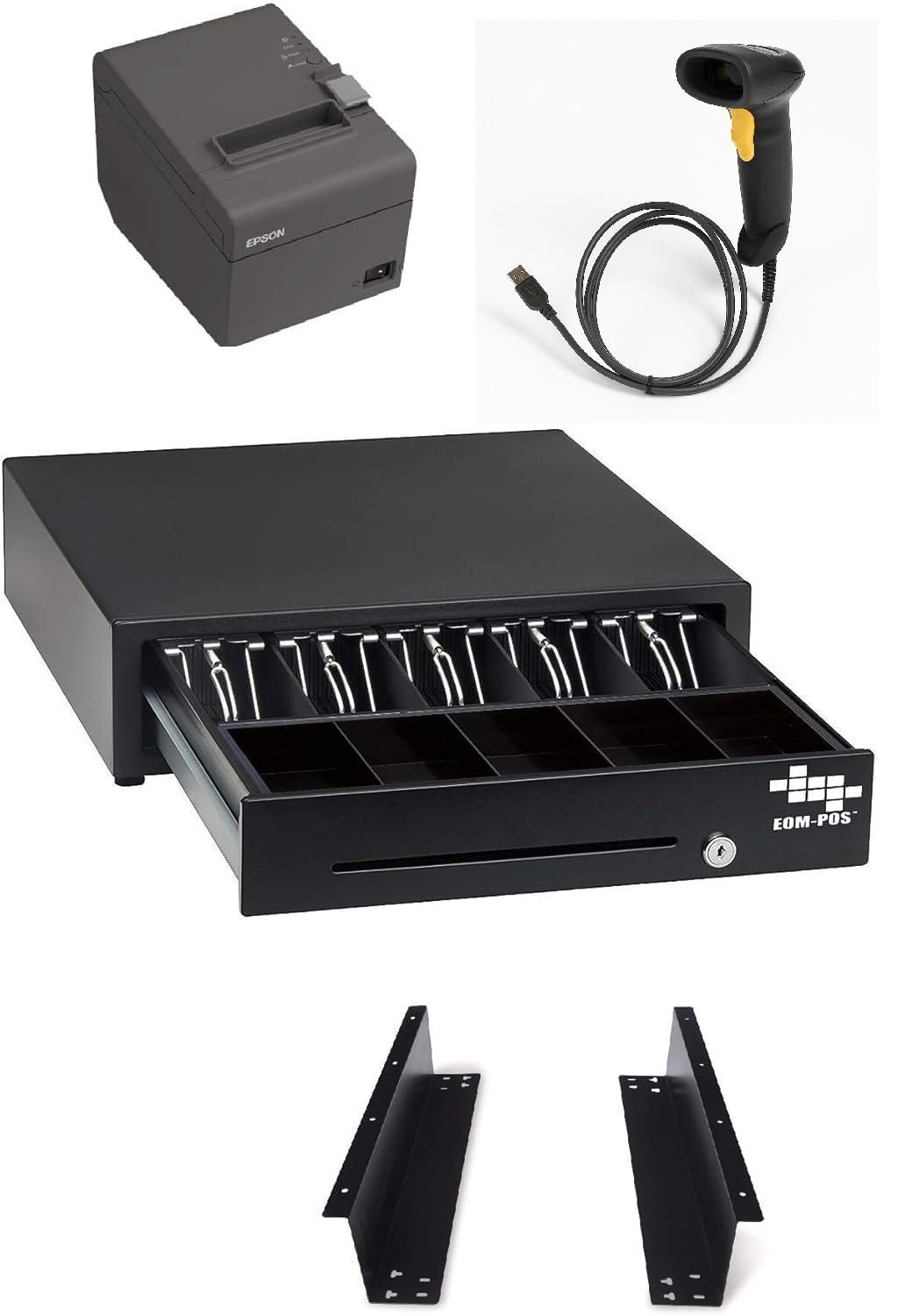
This bundle adds a thermal receipt printer with autocut, a Symbol USB barcode scanner, and a cash drawer with mounting brackets to any Square Stand or Square Register setup. The printer uses 80mm thermal paper and requires no ink or toner, which reduces recurring supply costs compared to impact printers. The cash drawer connects to the printer via RJ12 cable and opens automatically on each transaction.
Installation is essentially plug-and-play — the printer and scanner plug into the USB hub on the Square Stand, and the Square app recognizes them without driver downloads. The bundle includes a two-year full warranty and lifetime tech support from EOM-POS. Users running school stores and small retail shops report that the printer feeds reliably and the scanner reads barcodes on the first pass, even on wrinkled or curved packaging.
A small number of users experienced printer connectivity failures after extended use, and one reported that the printer stopped communicating with the Square hardware entirely. The unit weighs roughly five pounds with all components combined, so it suits a fixed countertop rather than a mobile setup. For Square ecosystem users who need a complete countertop station, this bundle saves the hassle of sourcing individual peripherals.
Why it’s great
- Plug-and-play with Square Stand/Register
- Thermal printer eliminates ink costs
- Lifetime tech support included
Good to know
- Printer may lose connectivity over time
- Not suitable for mobile use
4. FD150 EMV CTLS Terminal + RP10 PIN Pad Bundle

The FD150 countertop terminal paired with the RP10 PIN pad delivers enterprise-grade security with PCI 5.0 compliance and 256MB of flash memory for storing transaction data and firmware updates. It supports EMV chip, contactless NFC, and swipe payments, making it compatible with the full range of modern card types. The bundle is designed for businesses that need a dedicated PIN pad for customer-facing input while keeping the main terminal behind the counter.
Setup requires a merchant processing account — typically through a provider like First Data or Fiserv — and the terminal must be activated by the processor before it will function. Users with existing merchant accounts report a straightforward activation process, and the terminal prints receipts cleanly through the integrated thermal printer. The RP10 PIN pad connects via a standard cable and provides a separate touch surface for tips, PIN entry, and receipt preferences.
The main drawback is the dependency on a specific processor — you cannot use this terminal with a different merchant account without re-provisioning. The hardware itself is solid, with a 4.59-pound combined weight typical of rugged countertop terminals. This bundle is a smart choice for established retailers who already have a processing relationship and want PCI 5.0 without switching ecosystems.
Why it’s great
- PCI 5.0 for latest security standards
- Separate PIN pad improves customer flow
- 256MB flash for reliable performance
Good to know
- Tied to specific merchant processor
- Requires professional activation
5. IDetect ID Scanner

The IDetect ID Scanner reads and validates driver licenses from all 50 states, Canada, Mexico, and many other countries in under a second, calculating the patron’s age and flagging expired, tampered, or blacklisted IDs on the POS screen. It connects via USB to any Windows-based POS system with minimum Windows 7 support, and the included software logs each scan for age-verification records. Bars, clubs, and age-restricted businesses use it to demonstrate 100% due diligence during compliance inspections.
Setup is instant out of the box — plug in the USB cable, install the software, and the scanner is operational. The unit does not detect holograms or watermarks, so it cannot catch certain sophisticated fakes, but it does provide a documented scan trail that protects the business in liability situations. Users report that it significantly reduces unauthorized entry and shoplifting at retail locations, and the audible age alert lets staff process IDs without staring at the screen.
The scanner is stationary and designed for a countertop — not portable. It does not process payments itself; it is a peripheral that feeds data into your existing POS or PC. For businesses that require strict ID checks, this device fills a gap that standard credit card terminals ignore completely.
Why it’s great
- Instant ID validation from 50 states
- Audible age alert for quick processing
- Documented scan trail for compliance
Good to know
- Does not detect holograms/watermarks
- Windows-only software
6. Clover Station Duo

The Clover Station Duo pairs a 14-inch HD cashier-facing display with an 8-inch customer-facing touch screen, allowing guests to confirm items, add tips, redeem rewards, and pay without the cashier handing over the terminal. The all-in-one system includes a built-in receipt printer, a cash drawer, and Clover’s intuitive POS software, which covers menu setup, sales reporting, and employee management. It is designed to keep lines moving in restaurants, cafes, and busy retail counters where every second counts.
This unit requires a new merchant processing account through Powering POS and cannot be used with a different processor — that is the most important purchase condition. Users praise the easy menu setup and the included 24/7 support, which covers hardware and software issues. The dual-screen design lets customers see their total and tip options, which can increase average tip size in hospitality settings.
A significant concern is the contract structure: some users reported that setup delays caused monthly service fees to accrue before the terminal was functional, and the promised seasonal hold pricing was not applied. The unit weighs 45 pounds, making it a permanent countertop fixture. If you are comfortable with a tied processor and want a polished dual-screen experience, this is a strong contender.
Why it’s great
- Dual screens speed up checkout
- Built-in printer and cash drawer
- 24/7 support included
Good to know
- Tied to Powering POS processing only
- Heavy — 45 pounds countertop only
7. ZHONGJI POS SET04

The ZHONGJI SET04 bundles a 15-inch touch screen, an 11.6-inch customer display, an 80mm thermal receipt printer, a cash drawer, a desktop barcode scanner, and a keyboard-mouse set into a single shipment — all running Windows 10 on an Intel I5 processor with 8GB RAM and a 128GB SSD. The POS software covers sales, inventory management, promotions, and reports with no monthly subscription fee: you own the license for life. This makes it a compelling option for retail stores, bakeries, and convenience shops that want to avoid recurring software costs.
Users running high-volume convenience stores report that the system handles hundreds of transactions daily with only occasional restarts needed every few months. The 6 USB ports, HDMI, VGA, and LAN connections allow easy integration with existing peripherals like card readers and additional printers. Customer support is responsive even after the warranty period, with one user purchasing a second system from the same company after four years of reliable service.
The system does not include a built-in credit card processor, so you will need to connect an external card reader (USB or serial) and set up a merchant account separately. The package weighs roughly 14 inches cubed and is designed for permanent countertop installation. For business owners who want a full retail POS without ongoing fees, this setup delivers strong hardware for the investment.
Why it’s great
- No monthly software fees — lifetime license
- I5 processor with 8GB RAM runs Windows smoothly
- Includes scanner, printer, cash drawer, and displays
Good to know
- Requires separate card reader and merchant account
- Occasional manual restarts in high-volume use
8. MEETSUN POS SET02

The MEETSUN SET02 integrates a 15-inch touch screen, an 11.6-inch customer display, a built-in 2 1/4-inch thermal receipt printer, a cash drawer, and a barcode scanner into a single compact frame. The industrial control motherboard runs an Intel Celeron I5 with 8GB RAM and a 128GB SSD, and the pre-installed Windows-based POS software handles sales, inventory, promotions, and taxation reports with no recurring license fees. The built-in printer saves counter space compared to separate printer units.
Users report easy setup and intuitive operation for retail applications like strawberry markets and small grocery stores. The software supports multiple languages, including English and Spanish, which broadens its usability in bilingual environments. The 90-day hardware warranty covers the machine, while after-sale software support is provided for life.
The POS software does not natively integrate with credit card processing companies — you will need an external card reader connected to one of the USB ports and a separate merchant account. One user noted that the system lacks a built-in slot or bracket for a card reader, so you will have to find a spot on the counter for the reader. For businesses that prioritize a compact all-in-one design and want to avoid subscription software, this system offers a clean countertop footprint.
Why it’s great
- Built-in printer saves counter space
- No monthly software fees
- Multilingual software support
Good to know
- No native credit card integration
- No built-in card reader slot
9. SmartPOS 129 All-in-One

The SmartPOS 129 arrives as a complete bundle with a 15-inch cashier touch screen, a matching 15-inch customer-facing promo display, a cash drawer, a handheld 2D barcode scanner, and a thermal receipt printer. It integrates with over 50 card processors, so you can choose your own merchant account without being locked to a single provider. The system includes a free initial setup call with specialists and a free mobile app (Retail360) for scanning products and updating price books from a phone.
Users report reliable performance over two-plus years of use, with easy programming and responsive technical support via phone. The system works offline when the internet drops — transactions queue and sync when the connection restores — which is critical for businesses in areas with spotty connectivity. The 15-inch customer-facing display can run promotional content, which doubles as a marketing tool during checkout.
Some advanced features — such as detailed sales breakdowns by lottery, scratch-off, or cigarette categories — require a separate monthly subscription, despite the product advertising no hidden fees. The mobile inventory app also received mixed reviews for effectiveness. For businesses that want processor freedom and a premium dual-display setup, this system offers the most flexibility, provided you understand which features require the subscription tier.
Why it’s great
- Works with 50+ card processors
- Offline payment queuing
- Customer-facing promo display included
Good to know
- Advanced reporting requires monthly subscription
- Mobile inventory app has limited functionality
FAQ
Do I need a merchant account for every credit card system?
Can I use a Square Terminal with a different POS software?
What happens to my transactions if the internet goes down?
Final Thoughts: The Verdict
For most users, the best credit card system for small business winner is the Square Terminal because it combines a built-in printer, all-day battery, and no-contract processing into a single lightweight device that works for both counter sales and pop-up events. If you want a pocketable solution with offline payments and a barcode scanner, grab the Square Handheld POS. And for a full countertop POS with no monthly software fees and an I5 processor, nothing beats the ZHONGJI POS SET04.

Mo Maruf
I created WellFizz to bridge the gap between vague wellness advice and actionable solutions. My mission is simple: to decode the research and give you practical tools you can actually use.
Beyond the data, I am a passionate traveler. I believe that stepping away from the screen to explore new environments is essential for mental clarity and physical vitality.