Our readers keep the lights on and my smoothie glass nicely filled. As an Amazon Associate, I earn from qualifying purchases.
In Counter-Strike 2, a single frame can separate a round-winning headshot from a pixel-thin miss. Your monitor is no longer a display — it’s your latency pipeline. The difference between a 144Hz panel and a 360Hz OLED is the difference between seeing the enemy’s shoulder peek and the enemy’s head already on your crosshair. CS2’s subtick engine demands motion clarity, low persistence, and a refresh rate that keeps pace with your muscle memory.
I’m Mohammad Maruf — the founder and writer behind WellFizz. I’ve spent hundreds of hours analyzing panel technologies, response time measurements, motion blur reduction implementations, and real-world CS2 performance data to separate marketing specs from competitive advantage.
Whether you main the AWP on Dust2 or entry-fragged through Inferno banana, the right display directly impacts your rank. This guide breaks down nine monitors rigorously tested for CS2’s unique demands, delivering the definitive resource for finding the best cs2 monitors your setup deserves.
How To Choose The Best CS2 Monitors
CS2 rewards monitors that combine high refresh rates with sub-1ms response times and motion blur elimination. But not every high-Hz panel delivers equal clarity. The panel type, backlight technology, and resolution all affect how well you track enemies through smoke, spot peeker’s advantage, and maintain flick accuracy during spray transfers.
Refresh Rate vs. Motion Clarity
A 360Hz refresh rate only matters if the pixels transition fast enough to keep up. OLED panels achieve 0.03ms gray-to-gray response, virtually eliminating ghosting and overshoot that plague even the fastest IPS displays. For CS2, where enemies slide around corners at 90-degree angles, OLED’s instant pixel response provides a tangible competitive edge — you see the model one frame sooner than on any LCD.
Resolution choice: 1080p vs. 1440p
Professional CS2 players overwhelmingly favor 1080p for its direct pixel mapping at 1280×960 stretched resolutions, which maximize model width and reduce GPU load for maximum frame rates. However, 1440p offers visibly sharper image quality for players who value clarity over pixel-count advantage and run hardware that sustains 360+ FPS. The choice depends entirely on your rank goals and GPU ceiling.
Motion Blur Reduction Technologies
BenQ’s DyAc2 (Dynamic Accuracy) uses dual-backlight strobing to reduce perceived motion blur on TN panels without the brightness penalty of older implementations. ASUS ELMB Sync achieves similar backlight strobing while allowing variable refresh rate to remain active — a rare combination. OLED monitors need no strobing because their per-pixel response eliminates persistence blur at the source.
Quick Comparison
On smaller screens, swipe sideways to see the full table.
| Model | Category | Best For | Key Spec | Amazon |
|---|---|---|---|---|
| LG 27GX790A-B | OLED | Ultimate speed with 480Hz | 480Hz / 0.03ms / DP 2.1 | Amazon |
| Samsung Odyssey OLED G6 | QD-OLED | Best QD-OLED feature set | 360Hz / 0.03ms / Anti-Glare | Amazon |
| Alienware AW2725DF | QD-OLED | Balanced competitive + HDR | 360Hz / 0.03ms / 3yr warranty | Amazon |
| MSI MPG 271QRX | QD-OLED | KVM + premium build | 360Hz / 0.03ms / HDMI 2.1 | Amazon |
| MSI MAG 271QPX | QD-OLED | Best value OLED entry | 360Hz / 0.03ms / Delta E≤2 | Amazon |
| BenQ Zowie XL2566X+ | Fast TN | Pro CS2 1080p with DyAc2 | 400Hz / DyAc2 / FHD | Amazon |
| ASUS ROG Strix XG27UCG | Fast IPS | 4K + dual mode flexibility | 4K 160Hz / FHD 320Hz / 1ms | Amazon |
| ASUS TUF VG27AQL5A | Fast IPS | Budget 1440p 210Hz | 210Hz / 0.3ms / ELMB Sync | Amazon |
| SANSUI 27″ 280Hz Curved | Curved VA | Entry-level high Hz on budget | 280Hz / 1ms MPRT / 1500R | Amazon |
In‑Depth Reviews
1. LG 27GX790A-B Ultragear OLED

The LG 27GX790A-B is the only monitor on this list pushing 480Hz at QHD resolution — a refresh rate that makes even 360Hz feel pedestrian. Its W-OLED panel delivers the same 0.03ms GtG response as QD-OLED competitors but with a different subpixel structure that some users find slightly better for text sharpness after disabling ClearType. The included DisplayPort 2.1 cable delivers full 480Hz bandwidth without needing Display Stream Compression, eliminating the 1-2 second black screen on alt-tab that DSC-required monitors suffer.
In CS2, 480Hz translates to a new frame arriving every 2.08 milliseconds. That’s 0.7ms faster than 360Hz and 1.4ms faster than 240Hz — noticeable when tracking a moving target through smoke or reacting to a wide peek from pit on A site. The anti-glare matte coating keeps reflections manageable even in bright rooms, and the 98.5% DCI-P3 coverage makes HDR nades and maps pop without oversaturating competitive presets.
LG includes Dynamic Action Sync for input lag reduction, Black Stabilizer for dark corner visibility, and a useful RGB hexagonal backlight for desk ambiance. The 2-year OLED panel warranty covers burn-in, and the built-in OLED Care tools — pixel cleaning, logo dimming, and screen saver — automate long-term protection. The stand provides full height, tilt, swivel, and pivot adjustments, and the 4-pole headphone jack with DTS HP:X delivers spatial audio for pinpoint footsteps.
Why it’s great
- 480Hz without DSC — instant alt-tab, full bandwidth
- 0.03ms response eliminates ghosting completely in CS2
- DP 2.1, FreeSync Premium Pro, G-Sync Compatible
- Excellent anti-glare coating and full ergonomic stand
Good to know
- Initial vertical banding reported, fades after use
- Matte coating causes minor grain on bright static pages
- 2-year warranty shorter than some 3-year OLED options
2. Samsung Odyssey OLED G6 G60SD

Samsung’s Odyssey OLED G6 brings QD-OLED to the competitive space with a feature set that directly addresses the two biggest OLED concerns for CS2 players: brightness and burn-in. The Dynamic Cooling System uses a pulsating heat pipe that diffuses heat five times better than graphite sheets, keeping the panel cooler during long FACEIT sessions. The Thermal Modulation System predicts surface temperature and adjusts brightness automatically to prevent heat-induced degradation.
The 360Hz QD-OLED panel delivers 0.03ms GtG response with 1,000,000:1 contrast ratio, making dark corners on Ancient and Nuke truly black without any backlight bleed. Glare Free technology eliminates reflections better than any matte coating I’ve seen, preserving the QD-OLED’s color volume even with a window behind the desk. Logo and Taskbar Detection automatically dims static UI elements — critical for CS2’s HUD that sits in the same spot for hours.
The stand is fully ergonomic with height, tilt, swivel, and pivot adjustments. At 3.9mm at its thinnest point, the panel design is remarkably slim. The 99% DCI-P3 color gamut and DisplayHDR True Black 400 certification mean that when you’re not fragging, movies and single-player games look stunning. The 3-year warranty and Samsung OLED Safeguard+ suite provide comprehensive burn-in protection.
Why it’s great
- Pulsating Heat Pipe cooling reduces burn-in risk long-term
- Glare Free coating — best-in-class reflection handling
- 3-year warranty with comprehensive OLED protection
- 360Hz QD-OLED with 0.03ms and True Black 400
Good to know
- HDMI 2.1 port is capped at 2.0 spec despite advertising
- Requires DSC for 360Hz, causing 1-2 sec alt-tab blackout
- Brightness measured at 250 nits typical
3. Alienware AW2725DF QD-OLED

The Alienware AW2725DF strikes an exceptional balance between competitive performance and visual fidelity. Its 26.7-inch QD-OLED panel runs 360Hz at QHD resolution with 0.03ms response time, placing it directly alongside the fastest OLEDs for CS2. But where Alienware differentiates is calibration: Delta E<2 color accuracy out of the box and 99.3% DCI-P3 coverage mean you get both plasma-speed response and reference-grade color.
In practical CS2 use, the AW2725DF delivers infinite contrast that makes enemy models pop against dark backgrounds. The VESA DisplayHDR True Black 400 certification ensures that flash bangs and molotovs render with punchy luminance without crushing shadows. The 3-year burn-in warranty is the longest in this class, giving competitive players confidence to leave the monitor on for extended practice sessions without anxiety.
The stand provides full height, tilt, swivel, and pivot adjustment with a clean design and included I/O cover for cable management. The built-in USB 3.2 Gen1 hub supports KVM functions, though the MPG 271QRX does it better. AMD FreeSync Premium Pro and VESA AdaptiveSync handle frame synchronization, while the pixel refresh and logo dimming tools automate OLED maintenance. The anti-glare screen works well, though some users report a faint purple tint in reflections.
Why it’s great
- Delta E<2 factory calibration perfect for competitive presets
- 360Hz QD-OLED with 3-year burn-in warranty
- Excellent ergonomic stand with full 4-way adjustment
- FreeSync Premium Pro + G-Sync Compatible support
Good to know
- Subtle purple tint visible in bright reflections
- Text clarity slightly less sharp than W-OLED alternatives
- Requires periodic pixel refresh, 5-min process
4. MSI MPG 271QRX QD-OLED

The MSI MPG 271QRX shares the same 3rd Gen QD-OLED panel as the MAG 271QPX but adds a Gaming Intelligence App and built-in KVM switch — making it the best choice for players who also use the same monitor for work or streaming. The KVM lets you control two devices (PC and console or laptop) with a single keyboard, mouse, and monitor, reducing desk clutter during transitions between CS2 practice and production tasks.
The 360Hz QD-OLED panel with 0.03ms response time delivers identical competitive performance to the Alienware and Samsung options. MSI OLED Care 2.0 includes pixel shift, taskbar detection, and a screen saver that automatically dims after 10 minutes — all adjustable through the Gaming Intelligence desktop app. The Delta E≤2 color accuracy ensures consistent visual output across gaming and creative workloads.
The stand supports height and tilt adjustment, though the lack of swivel and pivot compared to some competitors is a minor trade-off. HDMI 2.1 with full 48 Gbps bandwidth means console-mode QHD at 360Hz works without issues. The HDR True Black 400 certification delivers deep blacks that make Inferno’s dark corners and Mirage’s shadowy palace truly challenging to hide in — you’ll see enemies before they see you.
Why it’s great
- Built-in KVM switch — seamless PC/console control
- Gaming Intelligence App for in-OS monitor tuning
- HDMI 2.1 with 48 Gbps full bandwidth
- 0.03ms QD-OLED with True Black 400
Good to know
- Stand lacks swivel and pivot adjustment
- No built-in speakers
- Glossy screen finish may reflect bright room light
5. MSI MAG 271QPX QD-OLED

The MSI MAG 271QPX is the most affordable entry into genuine 3rd Gen QD-OLED performance without removing critical features. It carries the same 360Hz panel, 0.03ms GtG response, VESA DisplayHDR True Black 400 certification, and MSI OLED Care 2.0 suite as the pricier MPG variant. The only omissions are the KVM switch and Gaming Intelligence app — features irrelevant to pure competitive CS2 gameplay.
In CS2, the MAG 271QPX performs identically to monitors costing more. The QD Premium Color ensures Delta E≤2 accuracy, and the 98% DCI-P3 coverage means the monitor looks vibrant for content consumption without needing calibration. Console Mode with HDMI 2.1 full 48 Gbps bandwidth lets you switch between PC and PS5/Xbox without compromise. The 3-year burn-in warranty provides the same peace of mind as premium-tier OLEDs.
Response time consistency is where the MAG shines — 0.03ms GtG means zero perceivable ghosting in fast flicks or spray transfers. The adjustable stand provides height and tilt adjustment, though the 16:9 27-inch form factor is standard. The anti-glare coating handles typical room lighting well. For players who want OLED-tier motion clarity without paying for peripheral features they don’t need, this is the optimal choice.
Why it’s great
- Full 3rd Gen QD-OLED performance at lower cost
- 0.03ms GtG with 360Hz — zero motion blur in CS2
- HDMI 2.1 full 48 Gbps for console compatibility
- 3-year burn-in warranty included
Good to know
- No KVM or Gaming Intelligence app
- Requires DSC for 360Hz, causing alt-tab blackout
- Stand does not swivel or pivot
6. BenQ Zowie XL2566X+
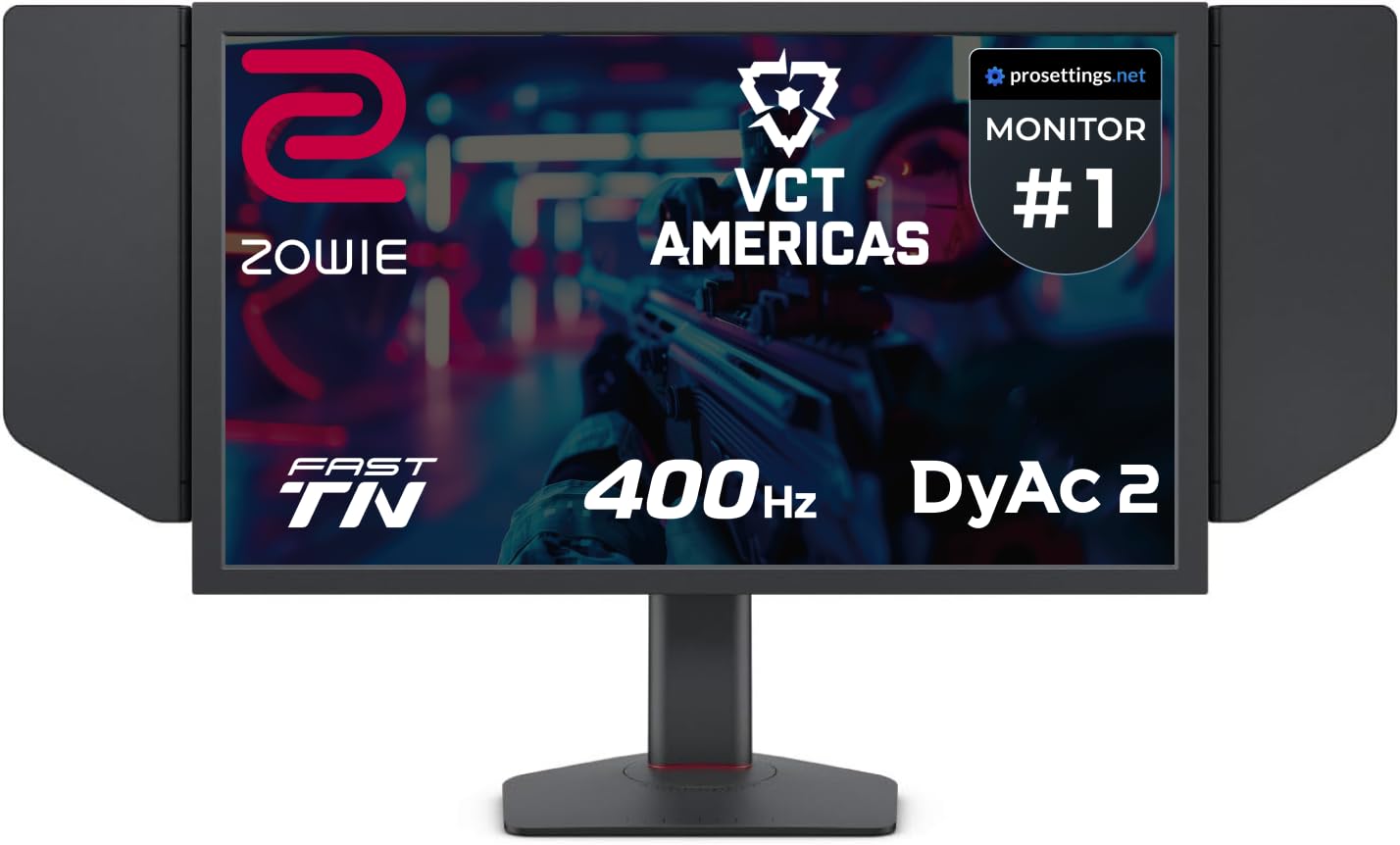
The BenQ Zowie XL2566X+ is the only Fast TN panel in this roundup, and it exists for one reason: CS2 professionals. The XL2566X+ delivers 400Hz on a 24.1-inch 1080p Fast TN panel with DyAc2 — BenQ’s proprietary dual-backlight strobing technology that reduces perceived motion blur more effectively than any LCD-based implementation. For players running 1280×960 stretched, this monitor maps pixels natively with zero scaling artifacts.
DyAc2 is the star feature. Unlike OLED’s per-pixel persistence elimination, DyAc2 strobes the backlight in sync with frame delivery, reducing the sample-and-hold blur that makes fast-moving enemies appear as smears on standard LCDs. The effect is especially dramatic in CS2’s subtick movement — spray patterns stabilize visually, and crosshair placement during wide peeks feels more precise. BenQ redesigned the Fast TN panel to reduce electrical overshoot, improving color performance over previous Zowie generations.
The included shielding hood blocks ambient light from the sides and top, essential for tournament environments or bright rooms. The new industrial-grade ball bearing height adjustment is the smoothest in its class. The XL Setting to Share feature lets you carry your monitor configuration on a USB drive between LAN events. Colors remain TN’s weak point, but BenQ’s latest panel update delivers noticeable improvement — enough that even competitive players who previously dismissed TN colors find the trade-off acceptable for DyAc2’s motion clarity advantage.
Why it’s great
- DyAc2 — best-in-class motion blur reduction on LCD
- 400Hz at native 1080p for stretched CS2 resolutions
- Included shielding hood for distraction-free play
- Industrial-grade ball bearing height adjustment
Good to know
- 24.1-inch screen feels small for non-CS2 games
- TN panel colors still inferior to IPS and OLED
- No built-in speakers, no USB hub
7. ASUS ROG Strix XG27UCG

The ASUS ROG Strix XG27UCG solves the resolution dilemma with a dual-mode panel that switches between 4K at 160Hz and FHD at 320Hz. In CS2, you can run 4K for casual play or single-player immersion, then toggle to FHD 320Hz with one OSD click for ranked matchmaking. The Fast IPS panel delivers 1ms GtG response — not OLED tier, but fast enough that most players won’t perceive ghosting at 320Hz.
ASUS Extreme Low Motion Blur Sync (ELMB Sync) is the key competitive feature here. It enables backlight strobing simultaneously with variable refresh rate, eliminating ghosting and tearing without the usual trade-off between strobing and VRR. At 320Hz in FHD mode, ELMB Sync provides motion clarity that approaches DyAc2, though the sample-and-hold blur inherent to IPS remains slightly higher than OLED or strobed TN.
The 95% DCI-P3 color gamut and advanced gray-scale tracking make this monitor excellent for both competitive and content consumption. DisplayWidget Center allows mouse-based OSD adjustment — useful for swapping between dual modes without memorizing button combinations. The stand provides full height, swivel, and tilt adjustment, and the included 3-month Adobe Creative Cloud subscription adds value for content creators who also game.
Why it’s great
- Dual-mode: 4K 160Hz for immersion, FHD 320Hz for CS2
- ELMB Sync works simultaneously with VRR
- 95% DCI-P3 with excellent gray-scale uniformity
- DisplayWidget Center for easy mode switching
Good to know
- 1ms GtG is slower than OLED’s 0.03ms
- HDMI port limited to 4K 120Hz on 40-series GPUs
- No built-in speakers
8. ASUS TUF Gaming VG27AQL5A

The ASUS TUF VG27AQL5A proves that high-refresh 1440p gaming is accessible without sacrificing essential competitive features. Its 27-inch Fast IPS panel overclocks to 210Hz with a 0.3ms GtG response time — the lowest response time among non-OLED options here. The 1300:1 contrast ratio is strong for IPS, providing better black depth than typical budget panels without the smearing of VA.
ELMB Sync works alongside FreeSync Premium to eliminate ghosting and tearing simultaneously, a feature usually reserved for premium monitors. In CS2, the 210Hz refresh rate at QHD resolution hits a sweet spot: the pixel density makes long-range engagements on Dust2 mid or Mirage window clearer than 1080p, while the refresh rate outpaces typical GPU output for players with mid-range hardware. The 130% sRGB color gamut ensures vibrant colors without oversaturation.
The stand provides full height, swivel, pivot, and tilt adjustment — best-in-class ergonomics at this tier. The built-in speakers are usable but thin, and the DisplayWidget Center software makes adjusting monitor settings with a mouse far easier than digging through OSD menus. The 3-year warranty covers the panel, and the bundle includes a DisplayPort cable, L-shaped screwdriver, and power cord.
Why it’s great
- 0.3ms GtG response — fastest non-OLED in CS2
- ELMB Sync with FreeSync Premium for blur-free gameplay
- Full ergonomic stand with 4-way adjustment
- 210Hz QHD with 3-year warranty
Good to know
- Built-in speakers are poor quality
- Controls on back right edge, awkward in dual setup
- HDR mode disables shadow boost
9. SANSUI 27″ 280Hz Curved Gaming Monitor
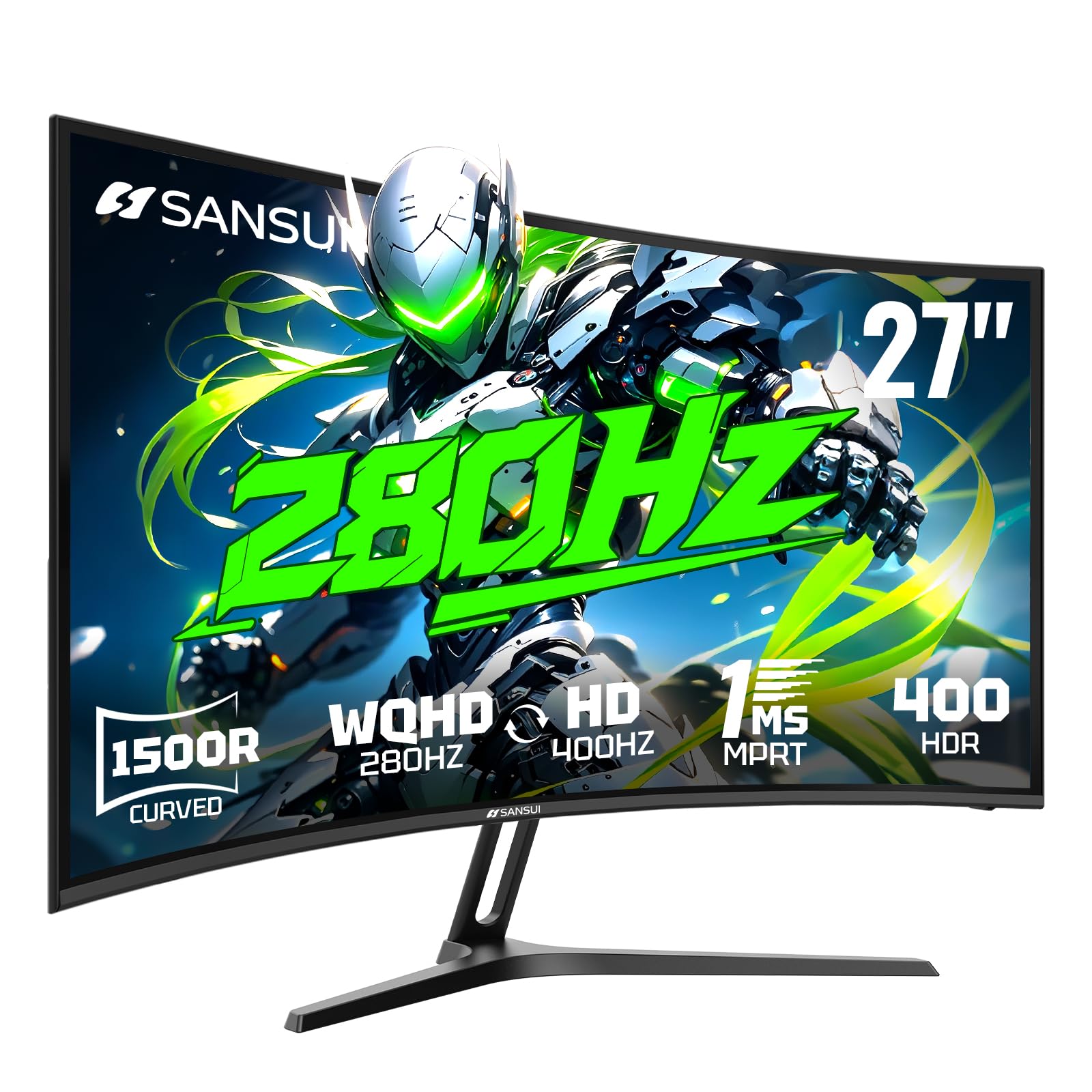
The SANSUI 27-inch curved monitor brings 280Hz gaming to a price point that undercuts most competition without major sacrifices. The 1500R curvature wraps around your peripheral vision, which some CS2 players find helpful for maintaining spatial awareness during quick flicks. The dual-mode feature switches between WQHD 280Hz and HD 400Hz — useful for players who want 400Hz at a lower resolution for maximum frame rate.
The 5000:1 contrast ratio from the VA-like panel provides deeper blacks than IPS, though the 1ms MPRT response time is marketing-speak — real-world pixel transition is slower than the 0.3ms Fast IPS options. In CS2, this means some visible dark trailing during fast horizontal movement, particularly on maps with high-contrast environments like Overpass. The HDR400 support and 135% sRGB gamut deliver solid color performance for the price.
The monitor includes AI Crosshair, Sniper Scope, Night Vision, and Timer features accessible via OSD — welcome extras for players who prefer built-in crosshairs over third-party overlays. Tilt adjustment is the only ergonomic option, and there are no built-in speakers. The free replacement warranty covers 30 days, with lifetime technical support. For players on a strict budget who want to experience 280Hz without OLED or premium IPS costs, this is a functional entry point.
Why it’s great
- 280Hz WQHD / 400Hz HD dual mode flexibility
- 1500R curve enhances peripheral awareness
- 5000:1 contrast ratio for deep blacks
- Includes AI Crosshair and Night Vision tools
Good to know
- 1ms MPRT response shows visible dark trailing
- No height adjustment on stand
- Runs warm during extended use
FAQ
Does 1080p or 1440p give a competitive advantage in CS2?
Is OLED burn-in a real concern for CS2 players?
What refresh rate is actually necessary for CS2?
Can I use a 4K monitor for CS2 competitively?
Final Thoughts: The Verdict
For most CS2 players, the best cs2 monitors winner is the LG 27GX790A-B because 480Hz with DisplayPort 2.1 eliminates alt-tab black screens while delivering the fastest refresh rate available in QHD. If you want the best motion clarity for stretched 1280×960 play, grab the BenQ Zowie XL2566X+ with DyAc2. And for the best value entry into QD-OLED performance, nothing beats the MSI MAG 271QPX — full 360Hz OLED with a 3-year burn-in warranty at the lowest price in its class.

Mo Maruf
I created WellFizz to bridge the gap between vague wellness advice and actionable solutions. My mission is simple: to decode the research and give you practical tools you can actually use.
Beyond the data, I am a passionate traveler. I believe that stepping away from the screen to explore new environments is essential for mental clarity and physical vitality.