Our readers keep the lights on and my smoothie glass nicely filled. As an Amazon Associate, I earn from qualifying purchases.
Choosing the right payment terminal for your small business involves more than just comparing hardware costs. The device you pick directly impacts transaction speed, customer experience, and the range of payment methods you can accept, from chip and contactless to magnetic stripe and mobile wallets. A mismatch here can slow down your checkout line or lock you into a processing agreement that eats into your margins.
I’m Mohammad Maruf — the founder and writer behind WellFizz. I’ve spent countless hours analyzing merchant processing requirements, hardware encryption standards, and real-world reliability reports to build this guide around what actually matters for a small business owner investing in payment infrastructure.
This guide breaks down the key specs, integration flexibility, and real user feedback you need to confidently choose the best credit card terminal for small business operations today.
How To Choose The Best Credit Card Terminal For Small Business
Selecting the right payment terminal requires matching the hardware to your specific sales environment and processing needs. A food truck operator, a retail boutique owner, and a service professional each need a different set of features.
Connectivity and Portability
Countertop terminals rely on a wired Ethernet or USB connection, making them stable but fixed to one spot. Mobile terminals use Bluetooth, WiFi, or cellular 4G to let you accept payments anywhere in your store, at a farmers market, or at a client’s home. If your business moves, look for a device with a built-in battery and wireless connectivity.
Payment Method Support
Modern terminals should accept EMV chip cards, NFC contactless payments (Apple Pay, Google Pay), and traditional magnetic stripe cards. Some specialized devices also offer magnetic stripe encoding for loyalty card writing, but for most small businesses, standard EMV and NFC support covers over 95% of transactions. Confirm the terminal supports the payment types your customers actually use.
Integrated vs. Separate Peripherals
All-in-one terminals combine a payment reader, receipt printer, and sometimes a barcode scanner in a single unit. This saves counter space and simplifies setup, but if one component fails, the entire terminal may need replacement. Separate components let you upgrade or repair individual pieces, offering more flexibility over time.
Quick Comparison
On smaller screens, swipe sideways to see the full table.
| Model | Category | Best For | Key Spec | Amazon |
|---|---|---|---|---|
| Square Terminal | Mid-Range | All-in-one countertop + mobile use | Built-in receipt printer & 2-second chip processing | Amazon |
| Square Handheld | Premium Mobile | Tableside orders & on-the-go sales | Pocketable design with built-in barcode scanner | Amazon |
| Clover Station Duo | Premium Countertop | High-volume retail with dual displays | 14″ + 8″ touchscreens, printer & cash drawer included | Amazon |
| SmartPOS-129 Bundle | Premium All-in-One | Full countertop replacement with 50+ processor integrations | 15″ cashier display + 15″ customer display + scanner | Amazon |
| FD150 + RP10 Bundle | Premium Countertop | High-security processing with PCI 5.0 compliance | 256MB flash, PCI 5.0, paired PIN pad | Amazon |
| Epson TM-T20III | Mid-Range | Reliable receipt printing for Square Stand | USB-only thermal printer, 7 ppm | Amazon |
| Clover Go | Mobile | Portable reader for existing Clover users | EMV + NFC portable dongle | Amazon |
| Multzo Android 14 POS | Budget Android | Android-based inventory management with NFC | Android 14, 3GB RAM, built-in 58mm printer | Amazon |
| MiniDX MSR X6 | Budget Specialized | Magnetic stripe read/write for specialized needs | Bluetooth + USB, 3-track read/write | Amazon |
In‑Depth Reviews
1. Square Terminal

The Square Terminal combines a payment reader, receipt printer, and touchscreen interface into a single compact unit that works both at the counter and cordlessly throughout your store. Its built-in battery lasts a full business day, and the device processes chip cards in just two seconds, significantly reducing wait times during rush periods.
Setup is straightforward with a Square account, and the device syncs inventory and sales data directly with the Square dashboard. Users consistently report reliable performance at pop-up markets, food trucks, and retail counters, with the ability to print, email, or text receipts to customers. The terminal also handles refunds without requiring the original card to be present.
One caveat: the signature screen can sometimes glitch when used with a stylus. However, for most small businesses looking for a polished, all-in-one solution with no long-term contracts and transparent processing rates, this terminal delivers exceptional value and daily reliability.
Why it’s great
- Processes chip cards in two seconds
- Built-in battery for cordless use all day
- Prints, emails, or texts receipts
Good to know
- Requires a Square account for operation
- Signature screen can be finicky with stylus input
2. Square Handheld

The Square Handheld is a slim, pocket-sized POS device designed for businesses that need to accept payments away from a fixed counter. It features a built-in barcode scanner for inventory management, a comfortable grip for tableside ordering, and water and dust resistance for durability in food service environments.
Users love the battery life that powers through an entire shift, and the ability to accept payments even when the internet goes down — transactions store locally and process when connectivity returns. The device accepts tap, chip, and swipe payments, and it can switch between multiple business locations or names directly from the interface.
The main limitation is the lack of a built-in receipt printer; receipts are emailed or texted instead. This is fine for many modern businesses but may be a dealbreaker for customers who expect a printed slip. For mobile sellers, farmers market vendors, and restaurant staff taking tableside payments, the Square Handheld is a premium, friction-reducing upgrade.
Why it’s great
- Pocketable design with built-in barcode scanner
- Offline payment processing capability
- All-day battery life
Good to know
- No built-in receipt printer
- Premium price point relative to basic readers
3. Clover Station Duo

The Clover Station Duo features a 14-inch HD display for the cashier and a separate 8-inch touchscreen for the customer, allowing guests to confirm orders, add tips, and pay independently. The system includes a built-in receipt printer and cash drawer, making it a complete countertop solution right out of the box.
Users praise the intuitive software that requires minimal staff training and the robust sales reporting that tracks performance across shifts. The expandable ecosystem lets you add additional terminals, printers, and scanners as your business grows. Setup is designed for quick deployment, with most functions ready immediately after powering on.
The critical catch is that this unit requires a new merchant processing account through Powering POS and cannot be used with a different processor. Several users reported unexpected monthly fees during setup delays. If you’re comfortable with the locked processing relationship and the premium investment, the Duo delivers a polished, dual-screen experience that speeds up checkout significantly.
Why it’s great
- 14-inch + 8-inch dual touchscreens speed up checkout
- Includes printer, cash drawer, and software
- Expandable with additional terminals and accessories
Good to know
- Requires new processing account through Powering POS
- Setup delays can trigger unexpected monthly charges
4. SmartPOS-129 Bundle

The SmartPOS-129 from Petrosoft is a complete POS bundle that includes a 15-inch cashier touchscreen, a matching 15-inch customer-facing promotional display, a cash drawer, a thermal receipt printer, and a handheld 2D barcode scanner. It is designed as a turn-key countertop replacement for retail, convenience stores, and small grocery operations.
This system integrates with over 50 card processors, giving you freedom to choose your payment partner rather than being locked into a single provider. A free initial setup call with a specialist ensures the hardware and software are configured correctly, and the optional Retail360 mobile app allows remote inventory management and price adjustments.
Users appreciate the reliable offline functionality when the internet drops and the responsive technical support. The main concern is the subscription model: some advanced reporting features, including individual sales figures for specific product categories like lottery tickets, require a monthly fee. For businesses that need deep data granularity, factor this recurring cost into your total investment.
Why it’s great
- Complete bundle with dual 15-inch displays and scanner
- Integrates with 50+ card processors
- Operates offline when internet is unavailable
Good to know
- Advanced sales reporting requires a monthly subscription
- Retail360 mobile app has limited inventory functionality
5. FD150 EMV CTLS + RP10 PIN Pad Bundle

The First Data FD150 terminal paired with the RP10 PIN pad is an industry-standard countertop solution built for high security and reliability. It is upgraded to PCI 5.0 compliance, the latest payment security standard, and features 128MB of memory with 256MB of flash storage for smooth transaction processing and software updates.
This bundle includes a separate PIN pad, which is ideal for environments where the customer needs to enter their PIN without reaching over the counter. The terminal supports EMV chip cards, NFC contactless payments, and traditional magnetic stripe swipes, covering all major payment methods. Installation with major processors like FiServ is straightforward, as reported by users who successfully replaced older FD130 units.
The main consideration is that this is a dedicated countertop terminal without built-in receipt printing or a touchscreen interface. You will need a separate printer and likely a merchant account through a traditional processor. For businesses that prioritize security compliance and already have a processing relationship, this bundle offers proven, upgradeable hardware.
Why it’s great
- PCI 5.0 compliant for latest security standards
- Separate PIN pad improves customer experience
- Reliable replacement for aging FD130 terminals
Good to know
- No built-in receipt printer
- Requires existing merchant processing account
6. Epson TM-T20III Thermal Printer

The Epson TM-T20III is a dedicated thermal receipt printer designed specifically for use with Square Stand and Square Register. It connects via USB only, with no Bluetooth or WiFi capability, making it a straightforward wired companion for Square’s countertop hardware.
Users consistently rate this printer highly for its reliable output in food trucks, retail stores, and other busy environments. The thermal printing is quiet and fast, with no ink or toner to replace. Setup with Square Stand requires a software update, but once configured, it prints receipts reliably without frequent disconnections.
The main drawback is that some units have developed connectivity issues after several months, and Epson support has been inconsistent in resolving these under warranty. Additionally, the 3-inch paper roll width may be smaller than what some businesses expect from a full-size POS printer. For Square users who need a dependable, wired thermal printer at a reasonable cost, this is a solid choice.
Why it’s great
- Quiet thermal printing with no ink costs
- Reliable wired connection for Square Stand
- Fast print speed suitable for busy counters
Good to know
- USB only — no Bluetooth or WiFi
- Some units develop connectivity issues over time
7. Clover Go Contactless Reader
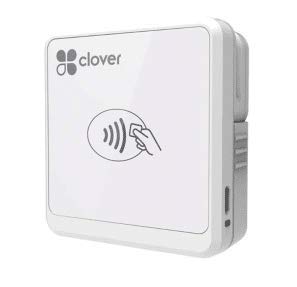
The Clover Go is a portable, Bluetooth-connected card reader that works with iOS and Android devices, allowing you to accept chip, contactless, and magnetic stripe payments on the go. It is designed as a companion terminal for existing Clover users who need a mobile option for offsite sales or tableside service.
Users who already have a Clover Station report that the Go syncs seamlessly, scanning barcodes, entering cash and check payments, and syncing transaction data back to the main station. The device is lightweight at 4.8 ounces and fits easily in a bag or apron pocket. Setup is fast, with Bluetooth pairing taking just seconds on most modern smartphones.
The main issue is that the Clover Go app may not allow account creation if you already have an active Clover device, essentially bricking the reader for new users without existing Clover accounts. Several users also reported Bluetooth connectivity failures after six months of use. For established Clover merchants, this is a convenient mobile addition. For first-time buyers, the setup hurdles can be frustrating.
Why it’s great
- Lightweight and highly portable
- Seamless sync with existing Clover Station
- Accepts chip, tap, and swipe payments
Good to know
- Account creation issues for new Clover users
- Bluetooth connectivity may degrade after several months
8. Multzo Android 14 POS with Printer
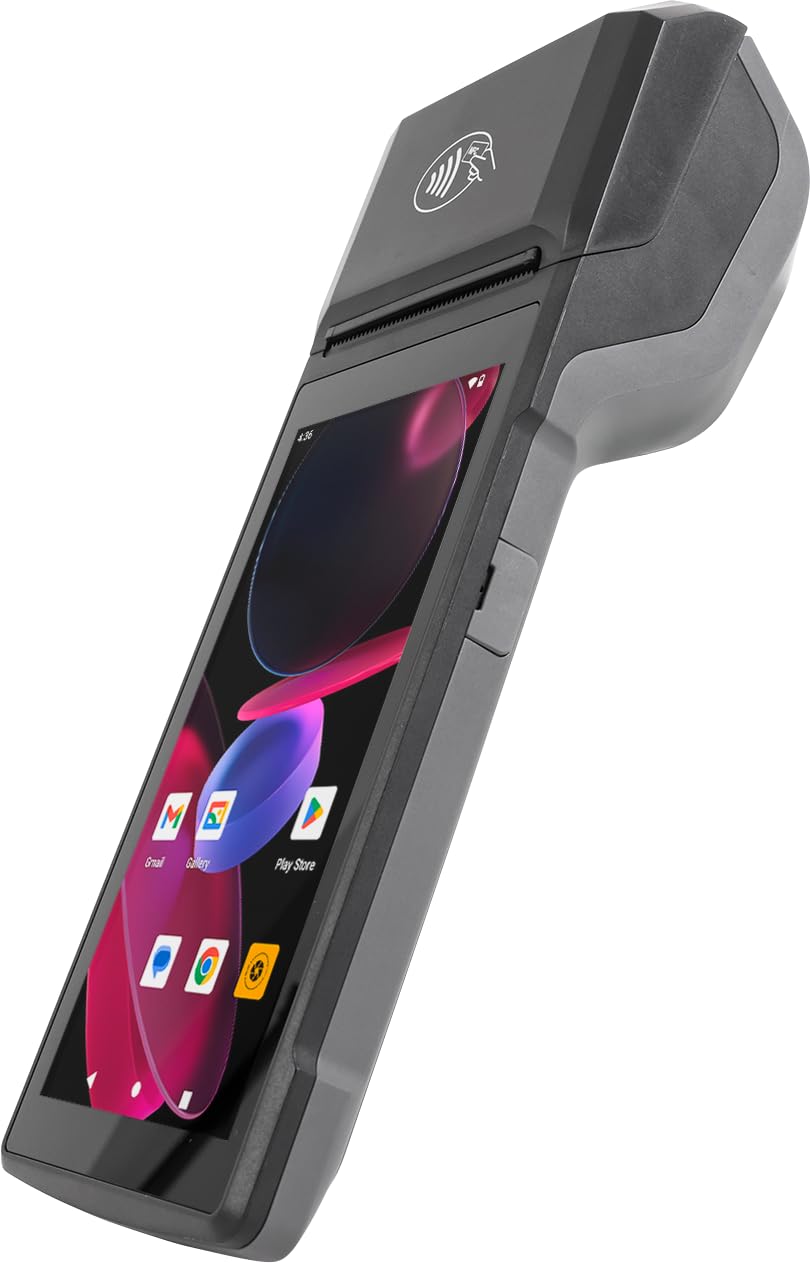
The Multzo Android 14 POS is a handheld all-in-one device that combines a 5.5-inch touchscreen, a built-in 58mm thermal receipt printer, and an NFC reader for contactless payments. It runs on the latest Android 14 operating system with an octa-core 2.0GHz processor, 3GB RAM, and 32GB storage, ensuring smooth operation of POS apps from the Google Play Store.
This terminal is designed for businesses that need inventory management and payment processing in a single portable device. The auto-focus 5MP rear camera with LED flash serves as a barcode and QR code scanner, and connectivity options include 4G LTE, dual-band WiFi, and Bluetooth 5.3. A free SDK is included for custom software integration, appealing to developers and businesses with specific needs.
However, user reports indicate that this device works best as an inventory management terminal rather than a general-purpose payment processor. It lacks a magnetic stripe reader and card dip slot, meaning tap-to-pay requires a separate processing service. Some users could not connect it to popular POS apps, and the software compatibility appears limited to Android 9.0 or below for certain applications. For businesses with a dedicated, compatible app, it offers good value.
Why it’s great
- Latest Android 14 OS with robust processor and RAM
- Built-in 58mm thermal printer and barcode scanner
- Free SDK for custom software integration
Good to know
- No magnetic stripe or card dip reader
- Compatibility issues with some POS apps
9. MiniDX MSR X6 Bluetooth Reader/Writer

The MiniDX MSR X6 is a specialized Bluetooth magnetic stripe reader and writer capable of reading, writing, and erasing all three tracks of a magnetic stripe card. It supports both Hi-Co and Lo-Co coercivity (300-4000 Oe), making it compatible with standard credit cards and high-security rewritable cards. The device connects via Bluetooth or USB Type A to Windows, Mac, Android, and iOS devices.
This is not a general-purpose payment terminal; it is a tool for encoding loyalty cards, hotel key cards, and membership cards. The free software for Windows and Mac supports basic read/write operations, while the EasyMSR mobile app is available for a fee on Android and iOS. Users report solid performance for both reading and writing operations.
The significant limitation is that the mobile app requires Android 9.0 or below to install, making it incompatible with modern smartphones. Additionally, it does not work with EMV chip cards — it is strictly for magnetic stripe cards. For businesses that need to encode or read magnetic stripe cards for loyalty programs or access control, this is a capable, budget-friendly tool. For standard payment processing, look elsewhere.
Why it’s great
- Reads and writes all three tracks of magnetic stripe cards
- Supports both Hi-Co and Lo-Co coercivity
- Bluetooth and USB connectivity for cross-platform use
Good to know
- Mobile app incompatible with Android 10 and above
- Does not support EMV chip cards
FAQ
Can I use any credit card terminal with my existing merchant account?
Do I need a separate receipt printer or can the terminal print receipts itself?
What does PCI 5.0 compliance mean for my small business?
Final Thoughts: The Verdict
For most users, the overall credit card terminal for small business winner is the Square Terminal because it combines a receipt printer, touchscreen interface, and all-day battery in a single reliable unit that works with transparent, no-contract processing. If you need a pocketable device for tableside ordering and barcode scanning, grab the Square Handheld. And for a full countertop replacement with dual displays and no processor lock-in, nothing beats the SmartPOS-129 Bundle.

Mo Maruf
I created WellFizz to bridge the gap between vague wellness advice and actionable solutions. My mission is simple: to decode the research and give you practical tools you can actually use.
Beyond the data, I am a passionate traveler. I believe that stepping away from the screen to explore new environments is essential for mental clarity and physical vitality.