Our readers keep the lights on and my smoothie glass nicely filled. As an Amazon Associate, I earn from qualifying purchases.
A credit card terminal is the physical heartbeat of any retail transaction. But choosing the wrong one can mean slow checkouts, locked machines, or compatibility headaches that cost you real sales. The market is flooded with locked processors, missing features, and terminals that simply don’t work with your business bank.
I’m Mohammad Maruf — the founder and writer behind WellFizz. I’ve spent hundreds of hours analyzing merchant account requirements, EMV certification lists, and processor-specific programming to build this guide around the payments hardware that actually works in the real world.
Whether you run a pop-up market, a busy restaurant, or a brick-and-mortar retail store, finding the best credit card terminals means balancing EMV compliance, NFC tap support, and receipt printing speed with the processor you already use.
How To Choose The Best Credit Card Terminals
Business owners often assume every terminal works with every processor. The reality is that terminals come pre-programmed or processor-locked, meaning a Verifone built for First Data won’t activate on Square. Before you buy, you need to match the hardware to your payment provider or choose a universal device like an Android-based POS that lets you install any app.
EMV and NFC Support
EMV chip readers are mandatory for liability protection, and NFC contactless support (tap-to-pay) is now expected by most customers. Terminals without these features may still accept magstripe swipes, but you assume fraud liability. Always confirm the terminal includes a certified EMV slot and NFC antenna if you want modern checkout speed.
Connectivity and Battery Life
Countertop terminals use Ethernet or dial-up, while portable units rely on Wi-Fi, Bluetooth, or cellular data. If you attend farmers markets or pop-up events, you need a battery-powered unit with offline queuing that captures payments when the internet drops and processes them later. Restaurants prefer handheld units with all-day batteries for tableside ordering.
Built-in Printer vs. External Printer
All-in-one terminals with integrated thermal printers reduce counter clutter and improve mobility. But those printers are typically 58mm wide and use thermal paper rolls that require a separate purchase. If you need high-volume or larger receipt sizes, a dedicated external receipt printer or a terminal with a fast 80mm printer might serve you better.
Quick Comparison
On smaller screens, swipe sideways to see the full table.
| Model | Category | Best For | Key Spec | Amazon |
|---|---|---|---|---|
| Square Terminal | All-in-One | Pop-ups and counter sales | 2-sec chip processing | Amazon |
| Square Handheld | Mobile POS | Tableside and on-the-go | Offline payment queuing | Amazon |
| SumUp Solo + Printer | Portable Bundle | Mobile receipt printing | Free SIM + unlimited data | Amazon |
| Clover Compact | Countertop | Retail with Clover Dashboard | Cloud sync with Mini/Station | Amazon |
| Verifone VX520 | Countertop EMV | Bank-programmed retail | SAM card security module | Amazon |
| Multzo POS Android 14 | Android All-in-One | Developers and custom POS | 58mm built-in thermal printer | Amazon |
| First Data FD150 | Countertop EMV | Established storefronts | PCI 5.0 compliant | Amazon |
| Bodno Seaory S25 | ID Card Printer | Badge and ID printing | Direct-to-card color printing | Amazon |
| NRS POS System | Full Register Bundle | Retail with kitchen modifiers | Dual touchscreen monitors | Amazon |
In‑Depth Reviews
1. Square Terminal

The Square Terminal processes chip cards in just two seconds — genuinely faster than most countertop units we benchmarked. That speed matters when you have a line at a pop-up market or a busy retail counter. It also includes a built-in thermal printer that supports receipt-by-text or email, giving customers a paperless option they actually appreciate.
The battery is rated for a full day of transactions, and real-world use from market vendors confirms 20-plus transactions per charge with two-day intervals between charges. Setup involves creating a Square account and linking a bank account, then you are accepting payments within ten minutes. The device works over Wi-Fi or tethered to a phone hotspot, making it truly portable.
One quirk is the signature screen that occasionally glitches when you tap with a stylus. Overall, Square Terminal offers the best balance of speed, portability, and ease of use for most small businesses — especially those just starting with card acceptance.
Why it’s great
- Lightweight and very portable at 14.7 ounces
- Two-second EMV chip processing minimises wait times
- Built-in printer can text or email receipts
Good to know
- Signature screen input can be finicky with a stylus
- Requires a Square merchant account — not universal
- Screen is relatively small for detailed inventory work
2. Square Handheld

Square Handheld is the newest device in the premium tier and it addresses a critical pain: accepting payments when your internet goes down. The device queues transactions offline and processes them once Wi-Fi or cellular returns, which is a lifesaver at farmers markets, food trucks, or any venue with spotty connectivity.
The slim form factor weighs just 2.11 ounces, fits in a pocket, and includes a built-in barcode scanner for inventory lookup or line-busting. It handles tap, chip, and swipe, and it switches between multiple business names or locations without reconfiguration. For restaurants, servers can take tableside orders and process payment right at the table.
The main trade-off is the lack of a built-in receipt printer. Receipts are delivered via email or text, which works for most modern shoppers but might frustrate customers who expect a physical slip. The initial cost is higher than the standard Square Terminal, but offline payment capability justifies the premium for mobile-heavy businesses.
Why it’s great
- Offline payment queuing prevents lost sales
- Very lightweight and truly pocketable
- Built-in barcode scanner for inventory management
Good to know
- No integrated receipt printer — digital only
- Premium pricing relative to the standard Terminal
- Case may peel screen protector during installation
3. SumUp Solo + Printer Bundle
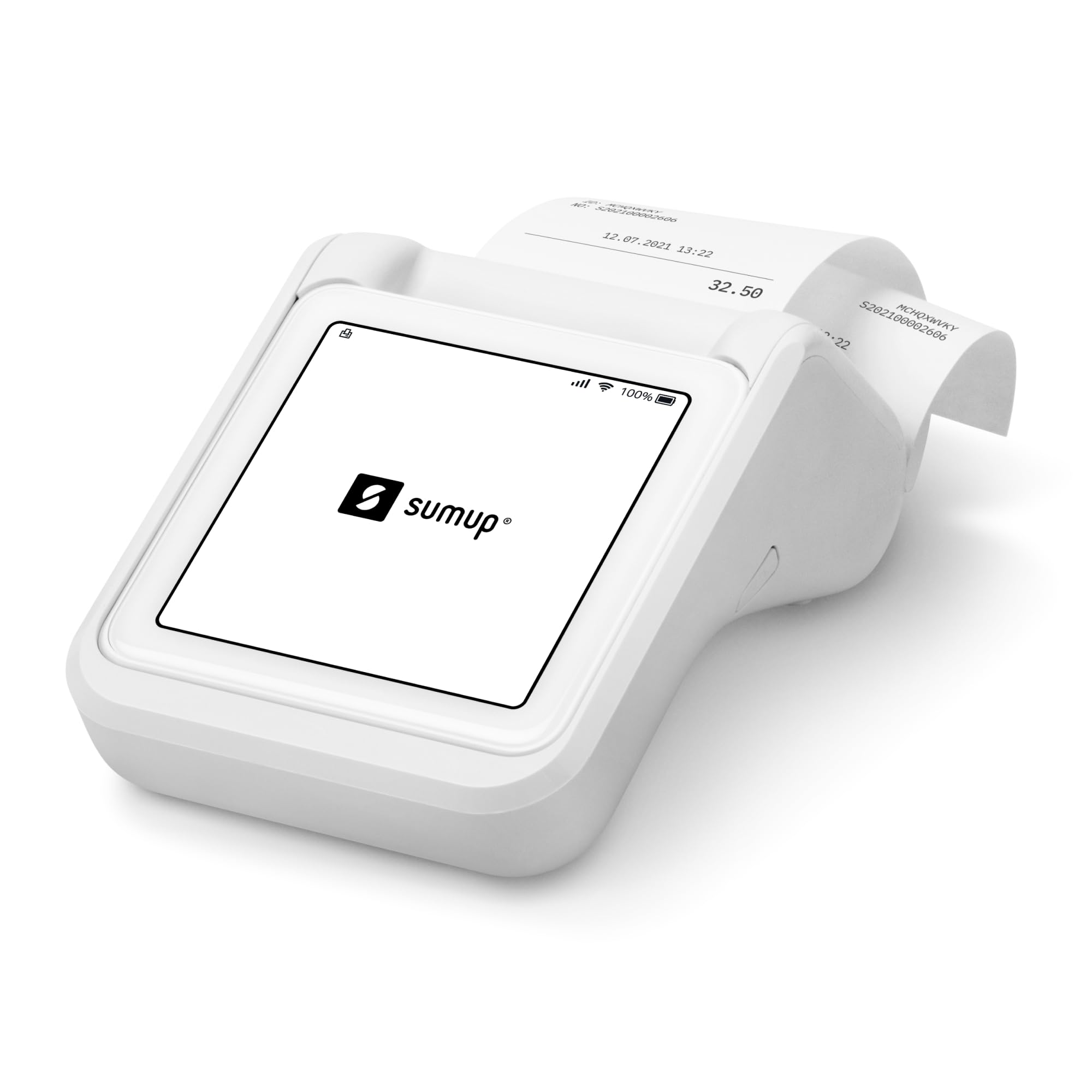
SumUp Solo comes with a free SIM card and unlimited mobile data, which eliminates the need to tether to a phone or rely on a store’s Wi-Fi. That is a standout feature for businesses that move between locations — food trucks, craft fairs, seasonal kiosks — because the terminal stays online without any monthly data plan cost.
The bundle includes a pocket-sized thermal printer that holds up to 800 receipts per charge and also doubles as a battery pack for the Solo reader. The reader itself has a full touch-screen interface, accepts chip, contactless, Google Pay, and Apple Pay, and connects to the free SumUp mobile app for reporting and refunds. Transaction fees are straightforward at 2.6 percent plus a flat fee per transaction with zero monthly minimums.
Customer experiences show that account approval can take weeks for some businesses, and the printer paper loading procedure requires partially removing the screen, which is less convenient than a top-loading design. Once approved, the device works reliably, but the approval friction is a real hurdle.
Why it’s great
- Free unlimited mobile data with included SIM card
- Printer doubles as a power bank for the reader
- No monthly fees or minimum transaction requirements
Good to know
- Account approval process can be slow and frustrating
- Printer paper loading is cumbersome
- Must be paired with a smartphone via SumUp app
4. Clover Compact Payment Terminal

The Clover Compact integrates tightly with the Clover ecosystem, syncing sales data, inventory, and employee management across Mini, Station, and Dashboard devices. If you already use Clover software, the Compact is a natural extension that keeps everything in one cloud-based network without manual reconciliation.
However, this terminal is strictly locked to Powering POS merchant processing. Three critical warnings appear in the product description: it cannot be used with a different processor, it requires a new processing account, and it is not a battery-powered mobile device. Several reviews confirm that buying a Clover Compact from a third-party seller can result in an unactivatable terminal if the seller is not an authorized Clover reseller.
For businesses fully committed to the Clover platform, the Compact offers a clean wired countertop experience with tap/dip/swipe support. For anyone considering switching processors down the road, the processor lock makes this terminal a dead end — you cannot resell or repurpose it.
Why it’s great
- Seamless cloud sync with Clover Dashboard
- Accepts tap, dip, and swipe payments
- Clean countertop design with small footprint
Good to know
- Permanently locked to Powering POS processing
- Cannot be activated if purchased from unauthorized sellers
- Wired-only — no battery for mobile use
5. Verifone VX520 Dual Comm

The Verifone VX520 is a workhorse countertop terminal that has been deployed across thousands of retail locations since 2012. It supports dial-up and Ethernet connectivity, includes a SAM card slot for enhanced security modules, and features a small footprint with a cable management system that keeps cords organized under the counter.
The terminal is EMV-compliant but does not support contactless tap payments — it is strictly chip and magstripe. Several reviews report that the unit arrives pre-programmed for a specific processor and may be locked to that provider. Users who successfully paired it with their bank describe a ten-minute setup and reliable daily performance. Others received a locked unit that could not be reprogrammed, leading to frustration with both the seller and Verifone support.
If you need a basic EMV terminal for a fixed retail counter and your processor supports Verifone programming, the VX520 delivers rugged build quality at a reasonable hardware cost. The absence of NFC and the risk of processor lock make it better suited to established businesses with consistent processing partners.
Why it’s great
- Compact design with good cable management
- SAM card slot for additional security modules
- Proven reliability after years of commercial deployment
Good to know
- No contactless/NFC tap support
- Can be permanently locked to one processor
- Slow receipt printing speed reported by users
6. Multzo POS Android 14
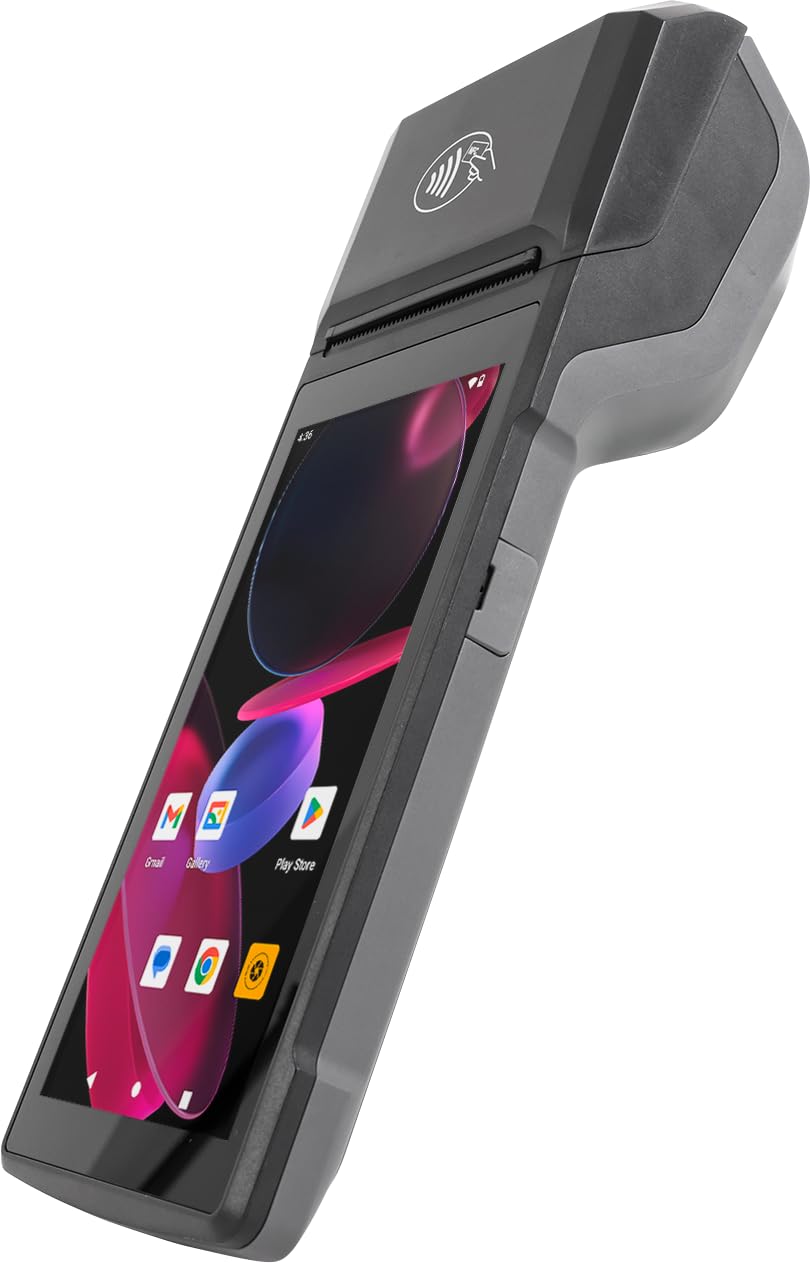
The Multzo Android 14 POS runs a full Octa-Core 2.0GHz processor with 3GB RAM and 32GB ROM, making it one of the most powerful handheld terminals in this list for running demanding POS applications. It includes a built-in 58mm thermal printer that prints at 80mm per second, a 5.0MP rear camera for barcode scanning, and an integrated NFC reader for contactless payments.
The device gives you full access to the Google Play Store, so you can install Square, Toast, Clover, or any Android POS app. A free SDK is included for developers who want to build custom payment interfaces. The 5.5-inch HD multi-touch screen is comfortable for one-handed operation, and USB-C fast charging keeps downtime short.
The major caveat is that tap-to-pay requires a separate payment processing service — the NFC reader does not inherently process payments on its own. Several users returned the unit after discovering it could not replace their existing credit card terminal out of the box. For businesses with a dedicated merchant account and a custom POS setup, this is a flexible tool. For plug-and-play payment acceptance, look elsewhere.
Why it’s great
- Android 14 with Google Play Store access
- Built-in 58mm thermal printer and barcode scanner
- Free SDK for custom POS software integration
Good to know
- NFC reader requires a separate payment service provider
- No magstripe or card dip slot included
- Not a plug-and-play credit card terminal
7. First Data FD150 EMV CTLS

First Data FD150 is a commercial-grade countertop terminal upgraded to PCI 5.0 compliance, which is the latest security standard for payment data protection. It uses a Cortex A5 500MHz processor, 128MB of memory, and 256MB of flash storage, providing enough overhead for software updates and caching transaction data during peak hours.
This unit supports chip card (EMV) and NFC contactless payments, but it does not include a built-in printer. The design is nearly identical to the older FD130 model, so existing users will find the button layout familiar. Initial setup requires an internet connection for downloading firmware updates — users who attempted setup over dial-up reported hours-long delays and some failures.
Several reviews report debit card chip failures after setup, where the terminal gives a chip-failed error across multiple cards. That is a recurring defect pattern to consider before purchasing. The FD150 works best for established storefronts that already have a First Data merchant account and want PCI 5.0 compliance without changing terminals.
Why it’s great
- PCI 5.0 compliant — most current security standard
- Cortex A5 processor handles software updates well
- Familiar layout for FD130 upgraders
Good to know
- Debit card chip failures reported across multiple units
- No built-in receipt printer included
- Setup requires internet connection, not dial-up
8. Bodno Seaory S25 ID Card Printer

The Bodno Seaory S25 is not a standard credit card payment terminal — it is a direct-to-card ID card printer that prints professional badges with sharp text, clear photos, and vibrant colors. The package includes a Seaory 11011 color ribbon (100 prints), PVC cards, and the Bodno Bronze Edition software with a lifetime license.
The printer uses a manual feed system that prints one card at a time, which is ideal for low-volume on-demand badge printing in offices, schools, or membership organizations. The software offers drag-and-drop template design, Excel import for batch data, and pre-made layouts that make setup straightforward even for non-designers. Print speed is about 18 seconds per full-color card with consistent quality across hundreds of prints.
Customer reviews consistently praise the print quality and responsive support, particularly from a representative named Byron. The 2-year hardware warranty and lifetime software support add long-term value. This is not a replacement for a payment terminal — it fills a specific need for businesses that print their own ID badges or membership cards.
Why it’s great
- Professional print quality with sharp text and photos
- Lifetime Bodno software license included
- 2-year hardware warranty and responsive support
Good to know
- Manual feed — prints only one card at a time
- Not a payment terminal — separate purpose entirely
- Premium cost for the all-inclusive starter kit
9. NRS POS System for Small Business

The NRS POS System is a complete retail bundle that includes a dual touchscreen monitor setup, receipt printer, barcode scanner, and cash drawer — everything a small retail store or restaurant needs to operate from day one. The dual screens allow customers to see their total while staff navigates orders on the main display, a setup commonly seen in fast-casual dining and retail counters.
This system is locked to NRS Pay merchant processing, which means you commit to their payment services. Users report that the hardware is sturdy and theft-resistant, the POS software includes kitchen modifier options for hot food items, and the company provides one-on-one training and responsive support. The bundle represents a significant upfront investment but covers the full hardware stack.
Negative reviews highlight defective cash drawers, error messages misattributed to the merchant, and a forced upsell to merchant services. Missing items in some shipments also created delays. For businesses that want a single-provider solution and accept the NRS Pay lock, this is a turnkey option. For businesses wanting flexibility in merchant processing, the lock-in is a serious drawback.
Why it’s great
- Complete hardware bundle — printer, scanner, drawer included
- Dual touchscreen monitors for customer-facing display
- One-on-one training and ongoing support from provider
Good to know
- Locked to NRS Pay — cannot switch processors
- Defective cash drawers and missing items reported
- Premium upfront investment for the full bundle
FAQ
Can I use any credit card terminal with my existing merchant account?
What is the difference between PCI 5.0 and older PCI standards?
Do I need a terminal with a built-in printer?
Final Thoughts: The Verdict
For most users, the best credit card terminals winner is the Square Terminal because it combines a 2-second chip read, a built-in printer, all-day battery life, and the simplest setup for small businesses. If you need offline payment capability and a pocketable form factor, grab the Square Handheld. And for a low-cost mobile solution with free cellular data and receipt printing, nothing beats the SumUp Solo + Printer Bundle.

Mo Maruf
I created WellFizz to bridge the gap between vague wellness advice and actionable solutions. My mission is simple: to decode the research and give you practical tools you can actually use.
Beyond the data, I am a passionate traveler. I believe that stepping away from the screen to explore new environments is essential for mental clarity and physical vitality.