Our readers keep the lights on and my smoothie glass nicely filled. As an Amazon Associate, I earn from qualifying purchases.
The family schedule has migrated from the wall-mounted dry-erase board to a place where it can sync with the phones in everyone’s pocket. A smart touchscreen display centralizes appointments, chores, meal plans, and even photo memories into a single interactive hub that updates in real time, eliminating the friction of missed meetings and forgotten tasks.
I’m Mohammad Maruf — the founder and writer behind WellFizz. This guide is built on hundreds of hours analyzing customer feedback, cross-referencing specification sheets, and mapping the mounting options, screen resolutions, and calendar-integration protocols that define this specific product category.
Whether you are wrangling a busy household or coordinating a shared workspace, this evaluation of the best digital wall calendar touch screen models will help you match the right screen size, subscription model, and feature set to your daily reality.
How To Choose The Best Digital Wall Calendar Touch Screen
Selecting the right digital wall calendar touch screen means balancing screen real estate, ecosystem compatibility, and the features that actually reduce friction in your home. Below are the critical factors to weigh before you buy.
Screen Size and Mounting Flexibility
The diagonal measurement matters more here than for a TV. A 15.6-inch display suits a kitchen shelf or a narrow wall space, while a 27-inch model like the Skylight Max commands attention from across a living room. Check whether the device ships with a wall-mount kit, a table stand, or magnetic strips — not all units support portrait orientation, and some are limited to a single mounting style.
Calendar Syncing and App Ecosystem
Two-way sync is the feature that separates a digital calendar from a glorified to-do list. Look for a unit that pushes edits made on the screen back to your phone. Google, iCloud, and Outlook are the standard trio, but families with youth sports may need TeamSnap compatibility. The companion app should allow remote edits and invite other family members without requiring them to download a separate paid plan.
Subscription Costs vs. One-Time Purchase
The sticker price is only half the equation. Several prominent brands charge a monthly or annual fee for features like unlimited photo storage, advanced chore rewards, and meal-planning databases. Many alternatives in the mid-range and premium tiers offer all core features — sync, tasks, meal planning, and photo display — with no subscription required. Calculate the total cost over two years to see the real difference.
Chore and Reward Systems for Behavior Tracking
If your goal includes motivating children, examine how the chore chart functions. The best systems allow color-coded assignment, recurring deadlines, star or point accumulation, and redeemable rewards. Some units even include a prize wheel animation that kids find genuinely engaging, turning daily tasks into a game.
Photo Frame and Ambient Display Features
When the calendar is idle, the screen becomes a piece of decor. Look for a device that lets family members upload photos and videos remotely via the app, set automatic slideshows, and adjust brightness or sleep schedules. A model with 32GB of internal storage will hold thousands of images without cloud dependency, while others rely on cloud storage that may eventually require payment.
Quick Comparison
On smaller screens, swipe sideways to see the full table.
| Model | Category | Best For | Key Spec | Amazon |
|---|---|---|---|---|
| Airzeen 15.6″ | Premium | Customizable Dashboard | 1080p / 32GB storage | Amazon |
| Apolosign 15.6″ | Premium | Android App Flexibility | Dual Mode (Calendar/Android) | Amazon |
| Skylight Calendar Max 27″ | High-End | Large Family Displays | 27″ HD / Portrait & Landscape | Amazon |
| Akimart 21.5″ | Premium | Extra-Large Viewing Area | 21.5″ / 22″H x 17″W frame | Amazon |
| Westsee 15.6″ | Mid-Range | No Subscription Core Features | 32GB built-in memory | Amazon |
| Anyuse 16″ | Mid-Range | Large Family with Seniors | 16″ / 4-stage font adjustment | Amazon |
| AVIFOX 15.6″ | Mid-Range | Meal Planning & Recipes | 15.6″ / Custom Lists | Amazon |
| Dragon Touch 15.6″ | Mid-Range | Reward-Based Chore Tracking | 1080p FHD Touchscreen | Amazon |
| JSUSOU 15.6″ | Budget-Friendly | Magnetic Fridge Mounting | Magnetic back / Vinyl cover | Amazon |
In‑Depth Reviews
1. Airzeen 15.6″ Digital Calendar
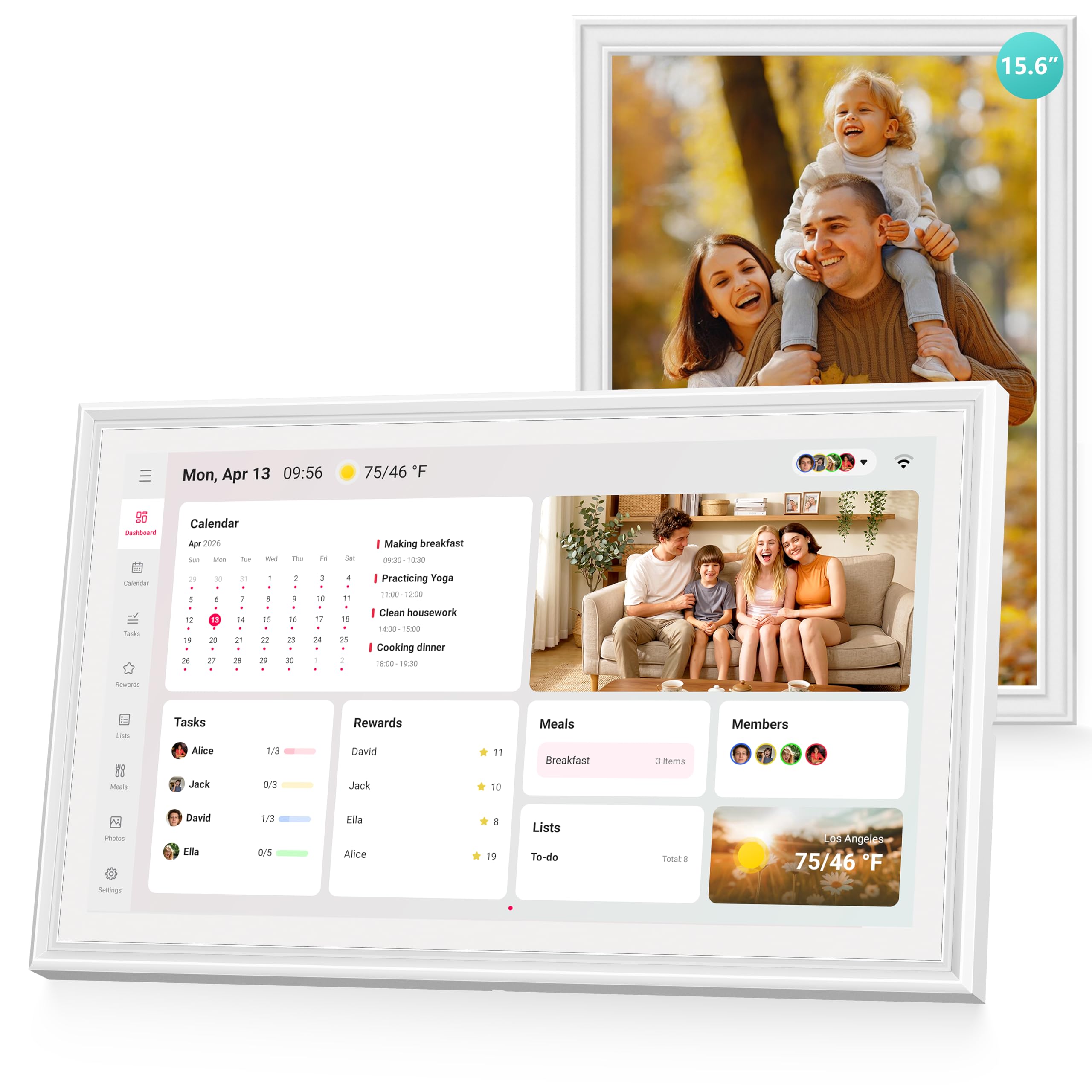
The Airzeen 15.6″ strikes an impressive balance between a rich feature set and a zero-subscription model. Its customization goes deeper than most — you can add widgets for weather, to-do lists, meal plans, and photos onto a multi-page dashboard rather than being locked into a single- screen layout. The 1080p touchscreen produces sharp text that remains readable from across a kitchen, and the 32GB of onboard storage means thousands of family photos live locally without depending on a cloud server.
Two-way sync with Google, iCloud, Outlook, Cozi, and Yahoo works reliably, and edits made on the screen propagate back to the connected phone instantly. The chore and reward system uses color-coded avatars and smart reminders, making it simple to assign recurring tasks to each family member. Meal planning is integrated with shared grocery lists, so nothing slips between the weekly menu and the shopping trip.
The frame is sleek enough to blend into a living room wall or sit on a desk stand without looking like a utilitarian gadget. Portrait and landscape orientations are supported, and the sleep mode can be programmed to match your household’s rhythm. For a family that wants every feature without monthly fees, this is the most complete package on the list.
Why it’s great
- Fully customizable multi-page dashboard with widgets
- No subscription required for any core feature
- 32GB internal photo storage eliminates cloud reliance
- Reward system with redeemable points motivates children effectively
Good to know
- Some users report the initial setup requires patience
- Screen resolution is good but not Retina-grade for photo purists
2. Apolosign 15.6″ Digital Family Calendar
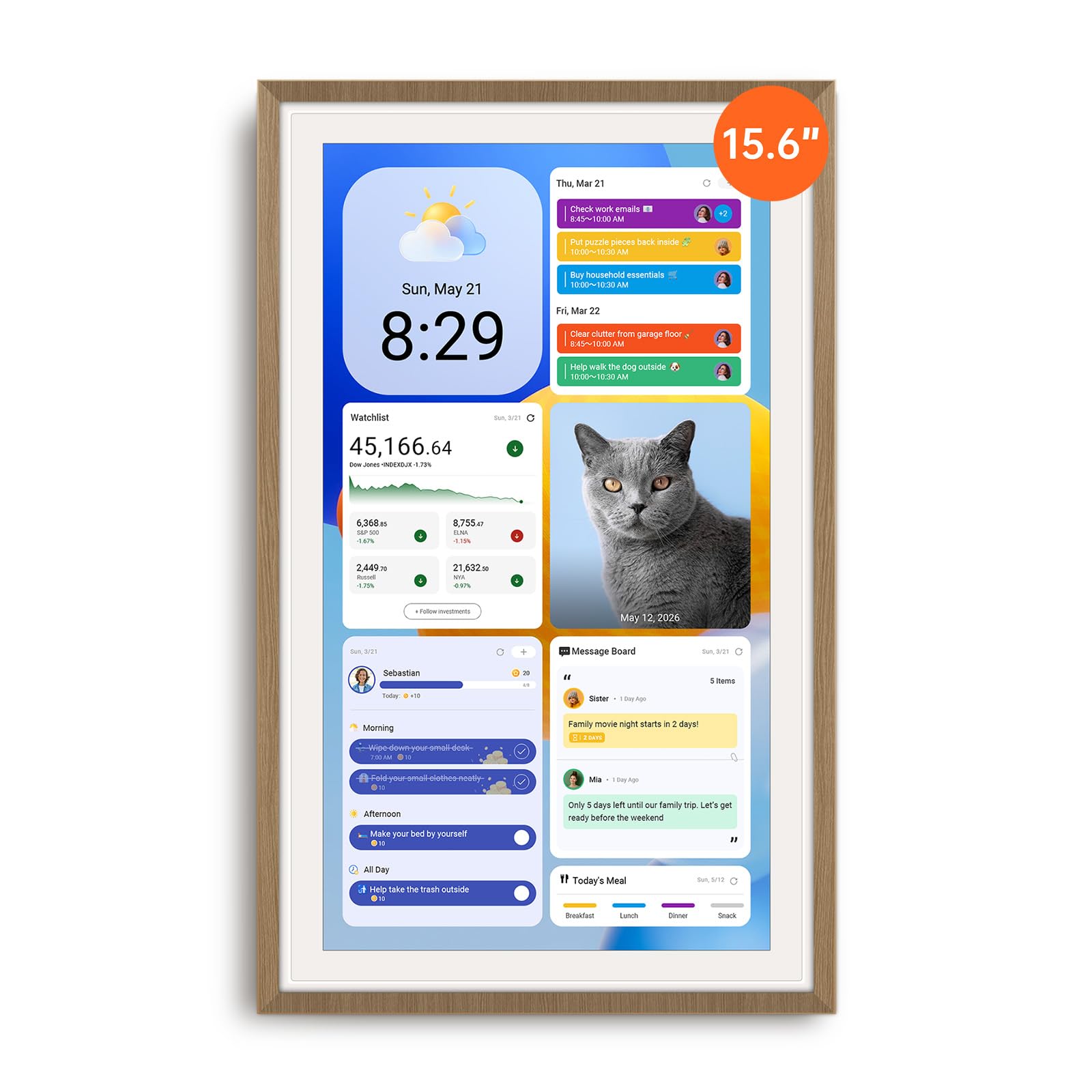
The Apolosign stands apart because it runs a full Android interface underneath its calendar skin. Toggle into Android Mode and you can install apps from the Google Play Store — Netflix, YouTube, smart home controls, even security camera feeds — turning the device into a versatile family hub rather than a single-purpose screen. The dual-mode architecture means less tech-savvy users can stay in Calendar Mode, while power users can pull up widgets and streaming apps on the same 15.6-inch display.
Calendar sync covers Google, iCloud, and Outlook with reliable two-way propagation. The interactive chore chart includes a reward system with a prize wheel animation that children find genuinely engaging, and the built-in Google Gemini voice assistant allows hands-free schedule checks and smart home commands. Wall-mount and table-stand hardware ship in the box, and the anti-glare coating keeps the screen legible in bright kitchens.
One subtle advantage is the active Facebook support community — if you run into an issue, the company responds quickly with step-by-step guidance. The unit must stay plugged in (no battery), but the auto-brightness and scheduled sleep mode manage power efficiently. For households that want a digital calendar and a light Android tablet in one device, this is a compelling option.
Why it’s great
- Full Android Mode with Google Play app access
- Google Gemini voice assistant for hands-free use
- No subscription fees for any calendar or chore feature
- Anti-glare screen with auto-brightness adjustment
Good to know
- Cable routing is limited to down or left in portrait orientation
- Requires constant power connection — no internal battery
3. Skylight Calendar Max 27″

The Skylight Calendar Max is the largest dedicated digital wall calendar touch screen on this list, measuring 27 inches diagonally. Its HD panel auto-adjusts between portrait and landscape orientation based on how you mount it, and the included wall template, level, and bracket make installation straightforward even for one person. The screen is bright enough to read from across a living room, which is critical for a display meant to be the family’s central scheduling node.
Syncing is effortless — connect to Wi-Fi and it pulls events from Google, Apple, Outlook, Yahoo, and Cozi. The companion app allows edits from anywhere, and the optional Plus Plan unlocks Magic Import (photograph a paper calendar to auto-add events), meal planning, and a premium star-and-rewards system. Even without the Plus Plan, the core calendar and chore functions work well and are color-coded per family member.
The design philosophy here is simplicity: the interface is clean, intuitive, and typography-focused, which reduces the learning curve for older users and young children. The swappable frame styles let you match the unit to your decor, and the 35-pound weight (due to the large panel) means you need a solid wall anchor. For large families or shared offices where the screen must be legible from a distance, the Max provides the biggest canvas.
Why it’s great
- 27-inch screen readable from across a large room
- Auto-adjusts portrait or landscape with included mount hardware
- Intuitive interface reduces setup frustration
- Swappable frame styles blend into home decor
Good to know
- Requires monthly Plus Plan for full meal and reward features
- Heavy unit demands a strong wall anchor for secure mounting
4. Akimart 21.5″ Wall Planner
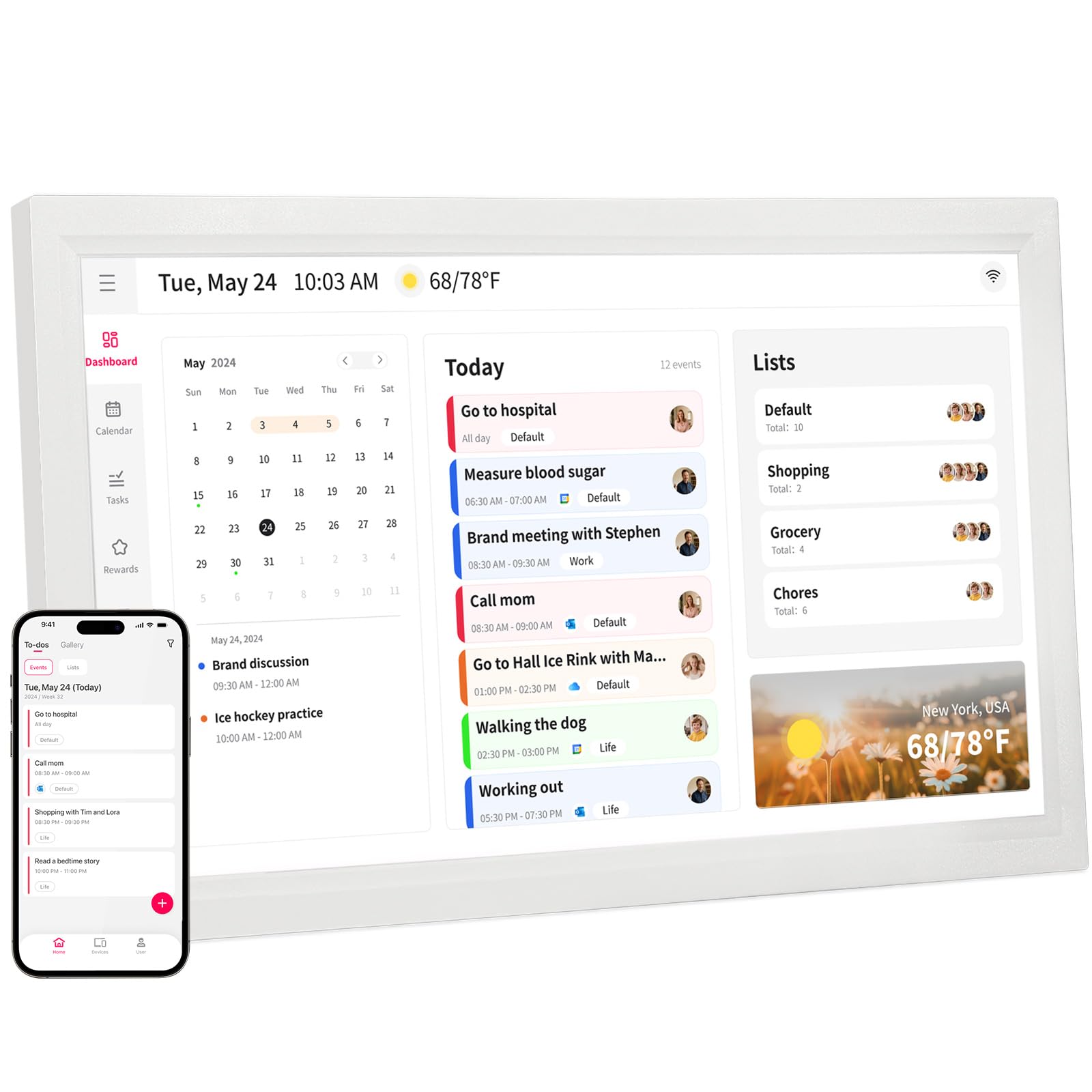
The Akimart 21.5-inch model fills the gap between the standard 15.6-inch screens and the massive 27-inch Skylight. Its larger format accommodates more events and tasks per view without feeling overwhelming, and the touchscreen remains responsive even in portrait orientation. The unit connects to smart home apps, allowing you to control lights, thermostats, and cameras directly from the calendar interface — a convenience that sets it apart from simpler planners.
Calendar sync covers Google, iCloud, Outlook, Cozi, and Yahoo, and events added on the screen propagate back to your phone via the free app. The chore chart includes color-coded task assignment and a dinner planner with embedded recipes and cooking tutorials. When idle, the screen transforms into a digital photo frame that cycles through family images stored locally or uploaded remotely.
The build quality is solid, with a plastic frame that feels durable, and the 22-inch height makes it a focal point on any wall. One minor friction point: some users report that the initial app connection can be temperamental, though the steps are clearly documented. For households that want a generous display size without jumping to the premium Skylight price tier, the Akimart offers strong value.
Why it’s great
- 21.5″ screen provides ample viewing space for large families
- Smart home app control from the calendar interface
- Photo frame slideshow cycles local and uploaded images
- Dinner planner with recipes and cooking tutorials
Good to know
- App setup can require a few connection attempts
- Video playback quality is average due to lighting limitations
5. Westsee 15.6″ Smart Family Calendar
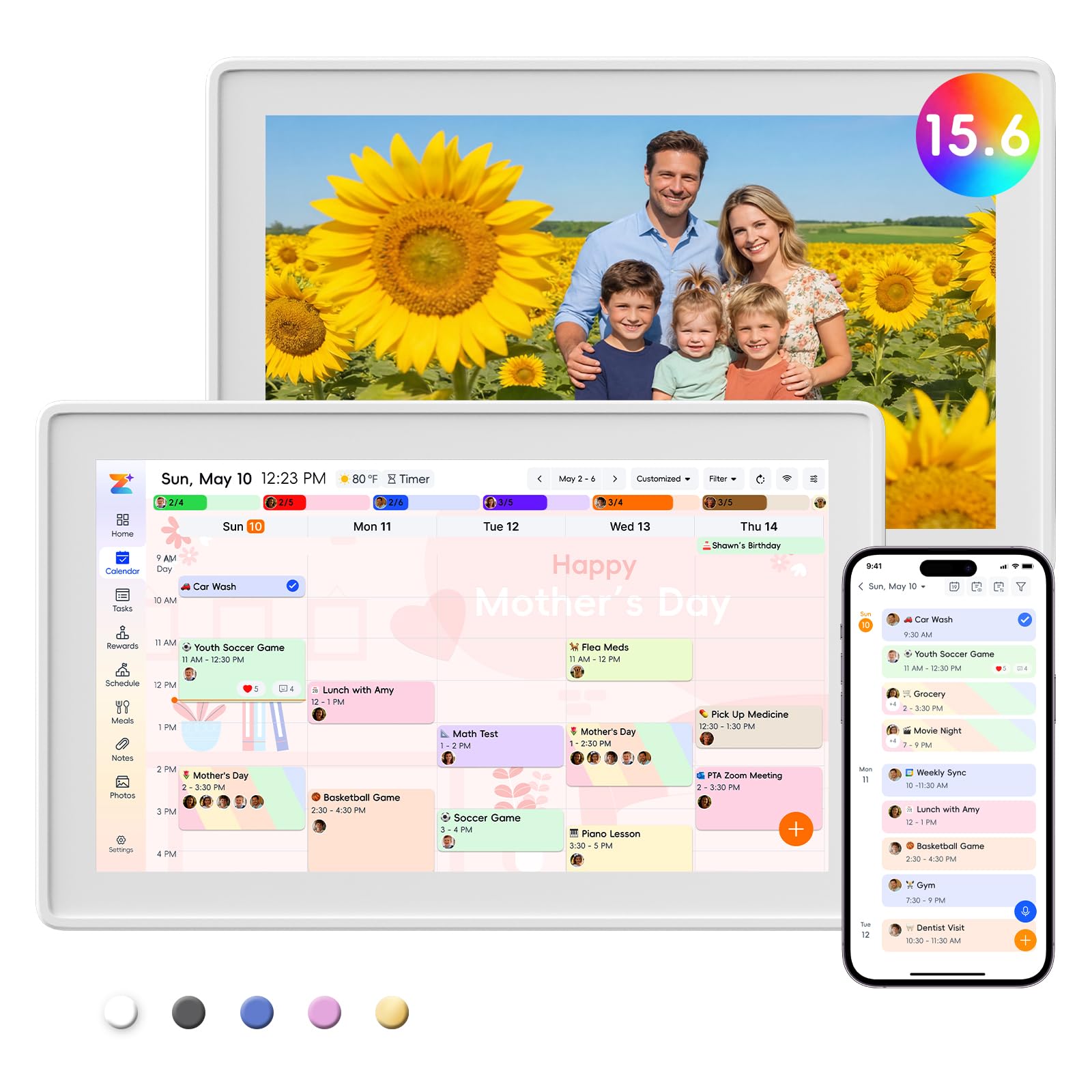
The Westsee 15.6″ distinguishes itself with a generous 32GB of built-in storage, enough to hold thousands of family photos and short videos without any cloud subscription. All core functions — calendar syncing, chore tracking with rewards, weekly meal planning, grocery lists, and photo display — are included with no monthly fee. The company only flags advanced AI tools as a potential future subscription, leaving the everyday features permanently free.
The touchscreen is responsive, and the Zical companion app allows you to add or edit events from your phone with instant cross-device updates. Color-coded task assignment lets you see at a glance who is responsible for which chore, and the reward system can be tied to allowance or privileges. Weather forecasts and automated sleep mode round out the ambient feature set without cluttering the interface.
The included table stand and wall-mount kit give you placement flexibility, and several users specifically note that the screen is easy to read from across a kitchen. The only functional gap mentioned by some owners is that the sleep mode (which activates at night) can temporarily hide upcoming appointments until you tap the screen to wake it — a minor trade-off for reduced power consumption.
Why it’s great
- 32GB internal memory eliminates cloud subscription dependency
- No monthly fees for calendar, chore, meal, or photo features
- Color-coded schedules and tasks simplify household coordination
- Includes both wall-mount hardware and a sturdy table stand
Good to know
- Sleep mode hides appointments until screen is tapped to wake
- AI Assistant features may require future subscription
6. Anyuse 16″ Smart Digital Calendar

The Anyuse 16″ is optimized for multi-generational households where eyesight varies. Its 4-level font size adjustment and brightness control let seniors read schedules without squinting, while the 16-inch screen provides more real estate than the standard 15.6-inch models. Four placement modes — wall, desk, horizontal, and vertical — give you flexibility to mount it in a kitchen, entryway, or home office based on your available space.
Calendar syncing is seamless with Google, iCloud, Outlook, Cozi, Yahoo, and TeamSnap, making it a strong choice for families juggling youth sports schedules. The app allows bulk filtering of events by family member or category, and sound reminders ring for each important block. The chore and reward system uses star accumulation with redeemable prizes, and virtual member accounts let children participate without needing an email address.
The build quality feels solid, and the pre-installed app auto-calibrates time via the internet. One smart design choice: a 48-hour QR code invitation system that keeps non-family members from accessing your calendar. The 24-hour time format option is a nice touch for international households. The only downside is that the sleep mode can interfere with late-night schedule checks if the wake touch sensor is a bit slow to respond.
Why it’s great
- 4-level font and brightness adjustment helps seniors and children
- 16″ screen offers more viewing area than standard 15.6″ models
- Syncs with TeamSnap for youth sports schedules
- Virtual member accounts let kids participate without email
Good to know
- Wake-from-sleep touch response can lag at times
- Some users wanted better video uploading options for photo frame mode
7. AVIFOX 15.6″ Digital Calendar
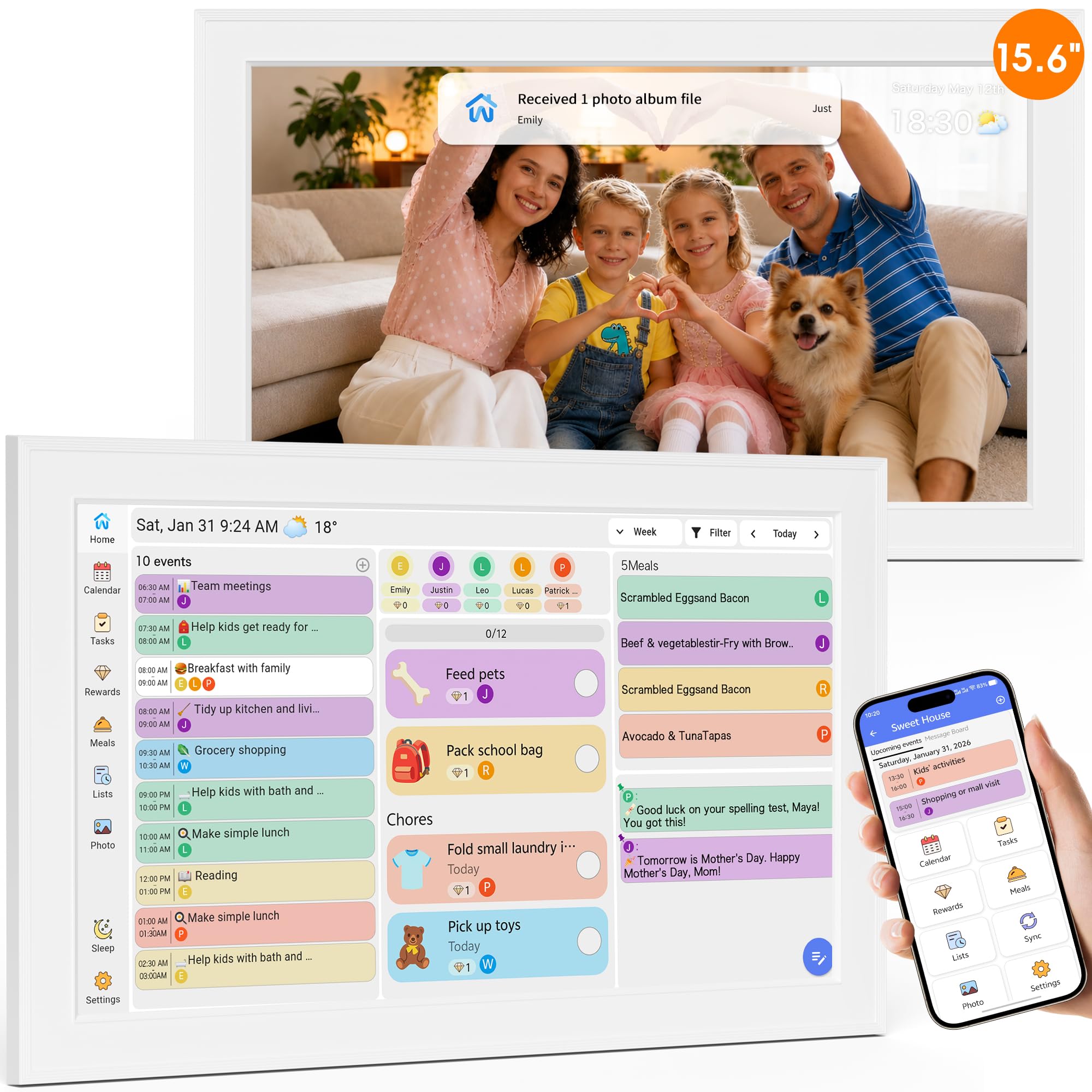
The AVIFOX 15.6″ packs an unusual amount of lifestyle features into a subscription-free package. Beyond the standard calendar sync and chore chart, it includes a built-in recipe database that you can assign to weekly meal plans, plus custom list creation for everything from beach packing to holiday shopping. The screen switches between calendar mode and a digital photo frame automatically, cycling through family photos uploaded via the free app.
Syncing covers Google, iCloud, Outlook, Cozi, and Yahoo, and the touchscreen is responsive enough for young children and seniors to interact with. The chore reward system uses stars that unlock predetermined prizes, which parents can customize to fit their household rules. The weather forecast displays on the home screen based on your location, though some users reported that the location cannot be manually adjusted after initial setup.
Mounting is straightforward with the included desk stand and wall bracket, and the programmed sleep/wake mode saves power during off-hours. The 15.6-inch size is ideal for a kitchen counter or a narrow wall space. The primary complaint from owners is the inability to change the weather location — if you travel frequently, the forecast may not reflect where you are. That aside, the feature depth at this price point is impressive.
Why it’s great
- Embedded recipe library integrates with weekly meal planning
- Custom list creation for shopping, packing, and holidays
- Star-based reward system with customizable prize redemption
- No subscription fees for any calendar or photo feature
Good to know
- Weather location cannot be changed after initial setup
- Setup can be slightly confusing for first-time users
8. Dragon Touch 15.6″ Digital Calendar

Dragon Touch has carved out a reputation for affordable digital calendars that do not skimp on the features that parents actually use. The 15.6-inch 1080p FHD touchscreen is crisp and bright, and the interactive chore chart with star rewards triggers a brief chime when a child completes a task — a small detail that provides immediate positive reinforcement. The meal planner and grocery list are accessible directly from the home screen, eliminating the need to hunt through menus.
Calendar sync is straightforward: plug in, connect to Wi-Fi, and link your Google or iCloud account through the eCalendar app. The app allows remote management, so you can add an appointment from work and see it appear on the wall screen instantly. The photo frame mode cycles through uploaded family images, and the screen orientation can be toggled between landscape and portrait.
The standout advantage is the price-to-feature ratio. Multiple customer reviews note that this unit delivers the same core functionality as brands that cost significantly more, without monthly fees. The only drawback is that the companion app’s interface is less polished than premium competitors, requiring a few extra taps for advanced tasks like bulk event editing. If your priority is a no-subscription workhorse that gets the basics right, this is a strong candidate.
Why it’s great
- 1080p FHD screen delivers sharp text and vivid photos
- Chime-based reward system motivates children immediately
- No subscription fees for any feature
- Remote calendar management via free companion app
Good to know
- App interface is less polished than premium-brand companions
- Bulk event editing requires extra navigating inside the app
9. JSUSOU 15.6″ Smart Calendar

The JSUSOU 15.6″ is designed for households that want to mount their digital calendar directly onto a refrigerator. The back panel houses strong magnets that grip metal surfaces securely, and the vinyl cover material adds a layer of durability against kitchen splashes. This mounting flexibility is unique on this list — no other model offers a magnetic fridge attachment as a primary installation method, which makes it ideal for renters who cannot drill into walls.
Calendar sync covers Google, iCloud, and Outlook with one-click setup, and the 15.6-inch HD touchscreen is bright enough to read in typical kitchen lighting. The companion app allows both adults to add events and photos from their phones, and the digital photo frame mode cycles through uploaded memories when the calendar is idle. The chore tracking system is functional but simpler than the reward-heavy systems found on pricier models.
Some owners noted that the instruction booklet is sparse, and syncing a second phone occasionally requires extra troubleshooting. However, once the device is configured, it maintains a stable connection and updates reliably. For a budget-friendly entry point into the digital wall calendar category — especially for families who want the convenience of a fridge mount — the JSUSOU delivers solid performance without demanding a major investment.
Why it’s great
- Magnetic back allows tool-free fridge mounting
- Vinyl cover resists kitchen moisture and splashes
- Simple one-click calendar sync with Google and iCloud
- Photo frame mode displays family memories when idle
Good to know
- Setup instructions are sparse and may require online research
- Syncing a second phone can be temperamental initially
FAQ
Can a digital wall calendar touch screen work without Wi-Fi?
Do digital calendar touch screens require a monthly subscription?
How do I mount a digital wall calendar on my fridge?
Final Thoughts: The Verdict
For most users, the best digital wall calendar touch screen winner is the Airzeen 15.6″ because it combines a fully customizable dashboard, zero subscription fees, and 32GB of local photo storage into a package that works for both large families and shared households. If you value Android app flexibility and voice assistant integration, grab the Apolosign 15.6″. And for a massive canvas that anchors your home command center from across the room, nothing beats the Skylight Calendar Max 27″.

Mo Maruf
I created WellFizz to bridge the gap between vague wellness advice and actionable solutions. My mission is simple: to decode the research and give you practical tools you can actually use.
Beyond the data, I am a passionate traveler. I believe that stepping away from the screen to explore new environments is essential for mental clarity and physical vitality.