Our readers keep the lights on and my smoothie glass nicely filled. As an Amazon Associate, I earn from qualifying purchases.
You take hundreds of pictures on your phone, but the ones that matter—the first laugh, the family gathering, the sunset on vacation—stay trapped behind a glass screen. A digital photo printer changes that, turning pixels into tangible keepsakes you can frame, gift, or scrapbook. The challenge is picking the right one because print quality, ink costs, and connectivity vary wildly between models.
I’m Mohammad Maruf — the founder and writer behind WellFizz. I’ve spent dozens of hours analyzing the specifications, user feedback, and long-term costs of the current photo printer market to build this guide around what actually matters for real home use.
Whether you want borderless 4×6 prints for a wall gallery or quick snapshots for a travel journal, finding the best digital photo printer comes down to matching your print volume, quality expectations, and budget to the right technology.
How To Choose The Best Digital Photo Printer
The photo printer market splits into two main camps: consumer inkjet all-in-ones that double as document printers, and dedicated dye-sublimation units that produce lab-quality 4×6 snapshots. Each has distinct advantages, and your choice hinges on how you plan to use it.
Print Technology: Inkjet vs. Dye-Sublimation
Inkjet printers like the Epson Expression Photo XP-980 use multiple color cartridges (six or more) for a wider color gamut and finer detail, making them ideal for large-format prints up to 11×17 inches. Dye-sublimation printers such as the Canon SELPHY CP1500 use heat to transfer dye onto paper, producing water-resistant, smudge-proof prints with consistent quality and no ink-drying issues over time.
Ink or Media Cost Per Print
Many buyers focus on the printer’s upfront price, but the real cost is in consumables. A printer like the Epson EcoTank ET-2980 includes bottles that last for thousands of pages, making per-print costs extremely low. Dedicated photo printers often bundle starter paper and ribbon, but replacement media can add up quickly—check the cost per sheet before committing to a system.
Connectivity and Workflow
Printing from a phone is now standard, but the implementation varies. Some printers rely on a direct Wi-Fi hotspot (no router needed), while others require both devices to be on the same network. App quality matters too—look for features like collage templates, border customization, and AR video printing if you want creative control beyond simple snapshots.
Quick Comparison
On smaller screens, swipe sideways to see the full table.
| Model | Category | Best For | Key Spec | Amazon |
|---|---|---|---|---|
| Epson Expression Photo XP-980 | Premium Inkjet | Large format fine art prints | 6-color Claria HD / 11×17 inch | Amazon |
| Canon SELPHY CP1500 | Dye-Sub | Portable event & scrapbook printing | 300×300 dpi dye-sub / battery-ready | Amazon |
| HP Envy Photo 7975 | All-in-One Inkjet | Home office & photo combo | Print/copy/scan / automatic duplex | Amazon |
| Liene M100 Bundle | Dye-Sub Value | High-volume 4×6 snapshot batches | 180 sheets / 5 ink cartridges | Amazon |
| HP Sprocket Studio Plus | Compact Dye-Sub | Instant phone-to-print snapshots | Tear-resistant / waterproof prints | Amazon |
| HPRT CP4100 | Dye-Sub Starter | AR video photo keepsakes | 108 sheets included / AR scan feature | Amazon |
| iDPRT CP4100 | Dye-Sub Portable | Gift-giving & family updates | 300 DPI dye-sub / 108 sheets bundled | Amazon |
| Canon PIXMA TS7720 | Budget All-in-One | Mixed document & casual photo | 2-cartridge system / 2.7-inch touchscreen | Amazon |
| Epson EcoTank ET-2980 | Supertank Inkjet | Ultra-low cost document & photo | 3-year ink supply / 6600-page black | Amazon |
In‑Depth Reviews
1. Epson Expression Photo XP-980

The Epson Expression Photo XP-980 stands apart with its 6-color Claria Photo HD ink system—adding light cyan and light magenta to the standard CMYK set for smoother gradients and reduced grain in skin tones. At 5760 x 1440 dpi resolution, this printer delivers borderless prints up to 11×17 inches, making it the best choice for photographers who want gallery-quality fine art prints at home. The built-in scanner and copier add versatility, and the 4.3-inch color touchscreen simplifies navigation.
Speed is a major advantage here: 4×6 borderless photos print in as fast as 11 seconds, which is significantly quicker than dye-sublimation units. The separate trays for plain and photo paper mean you don’t have to swap media constantly, and the rear feed handles specialty papers like metallic gloss. Wi-Fi Direct allows router-free mobile printing, and the Epson Smart Panel app provides a clean setup experience.
Some users note that the photo tray can be finicky to load, and the six individual ink cartridges mean more replacements than a dual-cartridge system. However, for someone who prints regularly at larger sizes, the per-print cost and quality justify the investment. The maintenance box also helps keep the print head clean between uses.
Why it’s great
- 6-color ink system produces smoother color transitions and less grain than 4-color printers
- Large 11×17 inch borderless capability for fine art or portfolio prints
- Fast 11-second 4×6 prints with separate paper trays for convenience
Good to know
- Photo tray loading can be slightly awkward compared to standard paper trays
- Six ink cartridges to replace means higher ongoing maintenance than dual-cartridge models
2. Canon SELPHY CP1500

The Canon SELPHY CP1500 is a dedicated dye-sublimation printer valued for its portability and consistent output. It supports battery operation (sold separately), so you can print at parties, outdoor events, or while traveling without needing a wall outlet. It prints at 300×300 dpi with the option of gloss, semi-gloss, or satin finishes, and it accepts multiple media sizes including square stickers and postcard sheets via dedicated paper cassettes.
Setup is fast through the SELPHY Layout app for iOS and Android, where you can crop, adjust brightness, and apply filters. The 3.5-inch LCD screen allows for printing directly from an SD card or USB drive without a phone, which is helpful when handing the printer to guests. The included kit packs two KP-108IN ink and paper sets (108 sheets each) for substantial out-of-box capacity.
Because it uses dye-sublimation, prints emerge dry and are resistant to water and fingerprints. The trade-off is that detail reproduction is slightly softer than a high-end inkjet, though most casual users find the results excellent for scrapbooking and framing. Some photographers note color shifts when printing from a computer, but mobile app prints are consistently vivid and accurate.
Why it’s great
- True portability with optional battery support for on-the-go printing
- Dye-sub prints are dry, water-resistant, and smudge-proof immediately
- SD card and USB direct printing without needing a smartphone app
Good to know
- Max print size is 4×6 inches—no larger format option available
- Print detail is slightly softer than 6-color inkjet models
3. HP Envy Photo 7975

The HP Envy Photo 7975 is a wireless all-in-one inkjet designed for families who need a single machine for homework, office documents, and photo projects. Its standout feature is HP AI, which intelligently reformats web pages and emails so you don’t waste paper or ink on unnecessary content. The printer includes a separate photo tray, an auto document feeder for scanning multi-page documents, and automatic two-sided printing.
Print speeds are 15 pages per minute for black and 10 pages per minute for color, which is competitive for a home inkjet. The HP Smart app handles setup in under ten minutes and includes mobile printing, scanning, and ink level monitoring. The three-month Instant Ink trial is a bonus for heavy users who want to avoid running out of cartridges at inconvenient moments.
Some buyers report that the printer can be loud in quiet mode and that certain firmware issues—like false paper jams—occasionally appear. The setup cartridges are starter capacity, so you’ll need to replace them sooner than you might expect. For a household that needs both reliable document printing and decent photo output in one device, this is a strong contender.
Why it’s great
- AI-powered web and email print formatting saves paper and ink
- Separate photo tray and auto document feeder for mixed-media workflows
- Three-month Instant Ink trial reduces early ownership costs
Good to know
- Starter cartridges run out quickly—budget for full-size replacements soon
- Some users experience intermittent false paper jam errors and loud operation
4. Liene M100 Bundle

The Liene M100 is a dye-sublimation printer bundled with 180 sheets of 4×6 photo paper and five ink cartridges—enough media to keep you printing for months without a refill trip. The printer uses thermal dye-sublimation technology, where dyes penetrate the paper surface and are sealed with a protective overlay, resulting in water-resistant, fade-resistant prints that hold up well in frames and albums.
Connectivity is handled via the printer’s own built-in Wi-Fi hotspot, meaning you don’t need a home network to get started. The Liene app guides you through setup and includes step-by-step troubleshooting for common issues like misaligned paper. Up to five devices can connect simultaneously, making it a good option for family gatherings where multiple phones are queuing prints.
At roughly one minute per photo, the M100 isn’t the fastest printer in this list. It also has a slight yellow tint that some users adjust in editing software. However, the included supply bundle brings the effective cost per print down noticeably, and the compact size makes it easy to store between uses. Professional photographers have praised its consistent output for event proofs.
Why it’s great
- Generous 180-sheet bundle with five ink cartridges for low per-print cost out of the box
- Built-in Wi-Fi hotspot allows direct connection without a home network
- Dye-sub prints are waterproof, scratch-resistant, and archival-quality
Good to know
- Print speed is about one minute per photo—not ideal for high-volume events
- Occasional slight yellow tint may require color adjustment in the app
5. HP Sprocket Studio Plus
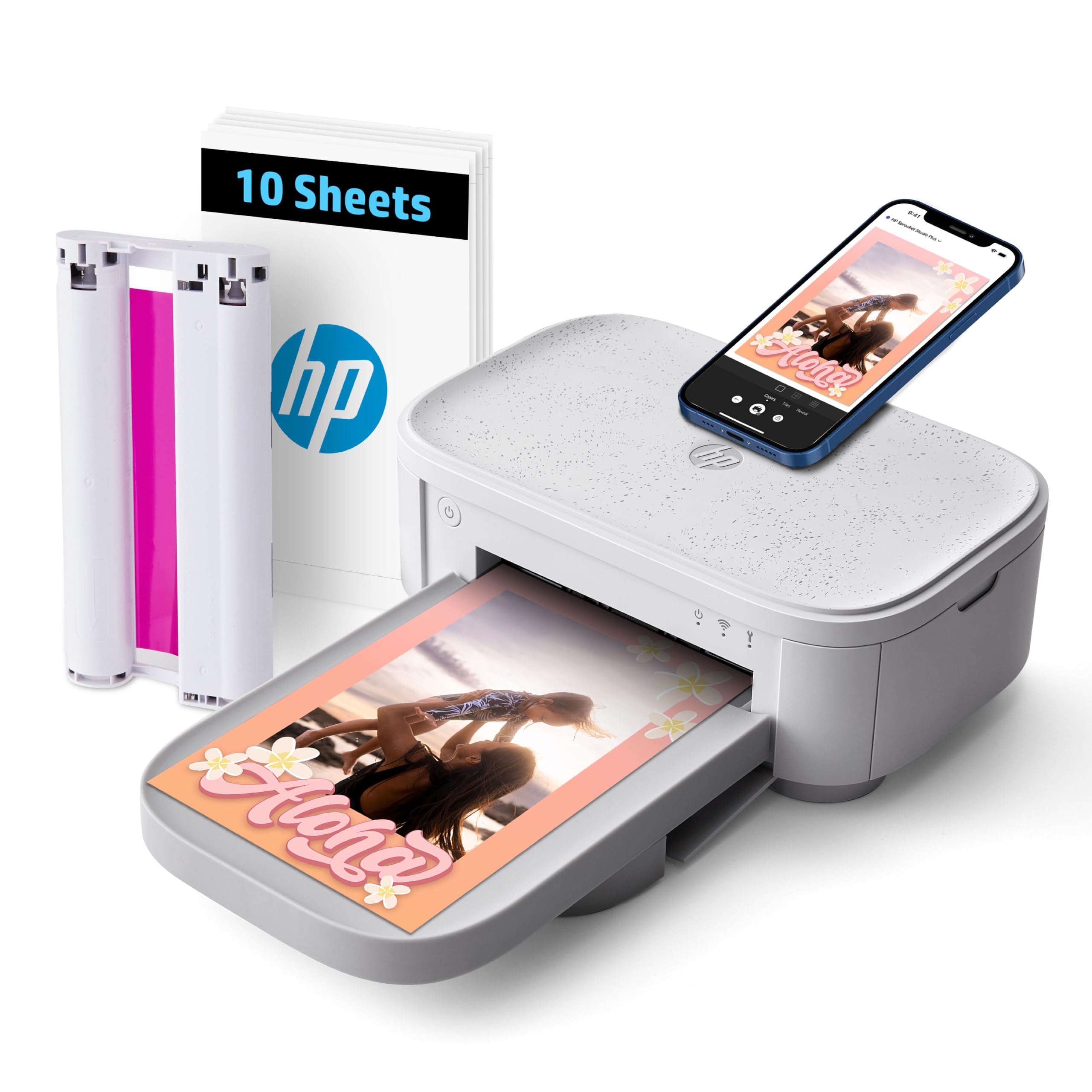
The HP Sprocket Studio Plus is a dedicated 4×6 dye-sublimation printer designed for smartphone-centric users who want prints that can survive real life. The proprietary photo paper is tear-resistant, smudge-proof, and waterproof, so these prints can go in a kitchen frame, a bag, or even a scrapbook that gets handled often without fading or damage.
Setup is handled entirely through the HP Sprocket app, which includes collage templates, photobooth mode, filters, frames, and the ability to make ID photos. The printer connects via Wi-Fi, and prints come out dry to the touch instantly. It’s a compact machine that won’t dominate a desk, and the white finish blends into modern decor.
The Sprocket app has received mixed feedback—some users find it loses connection mid-session or wish for more robust editing tools. Print quality is good for casual snapshots, but users expecting professional-grade color accuracy may be disappointed, particularly with skin tone reproduction. For everyday printing of family moments, however, the convenience and durability are hard to beat.
Why it’s great
- Tear-resistant and waterproof paper is ideal for high-traffic photo frames and gifting
- App includes collages, photobooth, and ID photo modes for creative flexibility
- Instant dry-to-the-touch prints with no warm-up time
Good to know
- App connectivity can drop mid-session and editing features feel limited versus competitors
- Skin tone accuracy is inconsistent compared to 6-color inkjet models
6. HPRT CP4100

The HPRT CP4100 is a dye-sublimation printer that sets itself apart with an augmented reality feature: when you scan a printed photo with the Heyphoto app, the corresponding video clip plays back on your phone. This turns static 4×6 prints into interactive keepsakes, which is particularly engaging for documenting milestones like baby’s first steps or a wedding entrance.
The printer uses thermal dye-sublimation at 300 DPI with a 256-color gradation, and the final layer applies a protective coating that resists water, scratches, and fading. The bundle includes 108 sheets of 4×6 photo paper and two ribbons, providing a solid starter supply. Setup is straightforward via the Heyphoto app on iOS or Android, and the printer supports direct Wi-Fi connection without needing a router.
Print quality is generally very good for casual photo printing, and users report accurate colors and sharp detail for the 4×6 format. The AR feature requires you to keep the original video file on your phone, so it works best for recent photos. The compact beige design is lightweight enough to move between rooms, and the per-print cost is competitive with other dye-sub options.
Why it’s great
- AR video scanning creates interactive prints that play back original video clips
- Includes 108 sheets and two ribbons for immediate out-of-box use
- Lightweight and portable at just over 3 pounds
Good to know
- AR feature relies on keeping the original video file accessible on your phone
- 4×6 size limit—no larger format printing available
7. iDPRT CP4100

The iDPRT CP4100 is a sibling to the HPRT model, using the same thermal dye-sublimation core and bundled with 108 sheets of photo paper and two ribbons. It prints 4×6 photos in about 60 seconds at 300 DPI, and the protective top coat ensures prints resist fading, water, and fingerprints. The beige finish and compact footprint make it desk-friendly and gift-worthy.
Connection is handled through the Heyphoto app, which offers filters, stickers, text overlays, and AR video scanning support. The printer requires Bluetooth to be turned on in phone settings, then connects via Wi-Fi Direct through the app. The kit also includes a power adapter and a quick start guide, so you can be printing within minutes of unboxing.
User feedback highlights the printer as a hit for gifting to family members who aren’t on social media, allowing them to receive printed photos regularly. The only notable limitation is the 4×6 format—there’s no way to print larger than postcard size. Some users also mention the white border on prints is fixed and cannot be removed in the app, requiring manual trimming if you prefer edge-to-edge images.
Why it’s great
- Complete starter bundle with 108 sheets and two ribbons for instant use
- Crystal-clear 300 DPI prints with fade-resistant protective coating
- Excellent gift option for family members who prefer physical photos over digital sharing
Good to know
- Fixed white border on prints requires manual trimming for full-bleed results
- Limited to 4×6 format—no larger print sizes available
8. Canon PIXMA TS7720

The Canon PIXMA TS7720 is a wireless all-in-one inkjet printer aimed at budget-conscious households that need printing, copying, and scanning in a single device. It uses a simple two-cartridge system (one black pigment ink for text, one color dye ink for photos), keeping replacement costs lower than multi-cartridge printers. The 2.7-inch LCD touchscreen provides intuitive control for copying and photo selection without a phone.
Print speeds are rated at 15 pages per minute for black and 10 for color, which is plenty fast for home use. Automatic duplex printing saves paper on multi-page documents, and the compact white design fits easily on a desk or shelf. Wireless setup through the Canon PRINT app is generally smooth, though some Windows 8.1 users report additional configuration steps.
Photo quality from a two-cartridge system is decent but noticeably less vibrant than what you get from five-ink or six-ink models. Colors can appear slightly muted on glossy paper, and the printer lacks a dedicated photo tray, so you have to swap paper manually. For a family that prints school assignments with occasional snapshots, this is a reliable entry point, but photo enthusiasts will want a step up.
Why it’s great
- Affordable two-cartridge ink system reduces replacement complexity and cost
- Print, copy, scan, and automatic duplex in one compact unit
- 2.7-inch touchscreen makes standalone operation easy without a phone or PC
Good to know
- Photo color vibrancy is limited compared to multi-ink or dye-sub printers
- No dedicated photo tray—requires manual paper swaps for different media types
9. Epson EcoTank ET-2980

The Epson EcoTank ET-2980 is a cartridge-free inkjet printer that replaces disposable cartridges with supersized refillable ink tanks. The included ink bottles are rated to print up to 6,600 pages in black and 5,500 in color—roughly equivalent to 90 individual ink cartridges. For users who print documents frequently and photos occasionally, this translates to a dramatically lower cost per page over the printer’s lifetime.
The Epson Smart Panel app handles setup and mobile printing, and Wi-Fi Direct allows router-free connections. The color touchscreen is simple to navigate, and automatic two-sided printing is built in. The printer also functions as a scanner for quick digitization of documents and photos. The EcoFit ink bottles are designed to fit only the correct tank, preventing spills.
The trade-off is that photo quality, while decent for a standard inkjet, doesn’t match dedicated photo printers. The four CMYK inks produce good colors, but the ET-2980 lacks the extra light inks or wide gamut of premium photo models. Some users report that duplex printing occasionally feeds pages as separate jobs, and the output tray requires a manual workflow to close. For high-volume document printing with casual photo use, this is the most economical long-term choice.
Why it’s great
- Up to 3 years of ink included in the box with refillable tanks
- Extremely low cost per page for both black and color documents
- No-mess refilling with keyed bottles that prevent accidental mixing
Good to know
- Photo quality is good but not lab-grade—lacks the color depth of 6-ink or dye-sub printers
- Duplex printing can be finicky, and output tray handling requires menu navigation
FAQ
How many ink cartridges do I need for good photo quality?
Are dye-sublimation prints more durable than inkjet prints?
Can I print without a Wi-Fi network or smartphone?
What is a good per-print cost for a home photo printer?
Do I need a computer to set up a modern photo printer?
Final Thoughts: The Verdict
For most users, the best digital photo printer winner is the Epson Expression Photo XP-980 because its 6-color ink system and 11×17 inch borderless capability deliver lab-quality results for both snapshots and fine art. If you want portability and water-resistant prints for scrapbooking, grab the Canon SELPHY CP1500. And for ultra-low ink costs with decent photo output for a family home, nothing beats the Epson EcoTank ET-2980.

Mo Maruf
I created WellFizz to bridge the gap between vague wellness advice and actionable solutions. My mission is simple: to decode the research and give you practical tools you can actually use.
Beyond the data, I am a passionate traveler. I believe that stepping away from the screen to explore new environments is essential for mental clarity and physical vitality.