Our readers keep the lights on and my smoothie glass nicely filled. As an Amazon Associate, I earn from qualifying purchases.
Cable internet subscribers face a calculated trap: pay monthly rental fees for a device that usually delivers baseline performance, or buy your own hardware and keep every dollar you save. The DOCSIS 3.1 modem router combo solves both problems at once—eliminating the rental charge while replacing two separate boxes with one unified unit that handles modem duties and Wi-Fi routing in a single chassis. Getting the right model matters because a mismatch with your ISP or an underpowered Wi-Fi stage can leave you paying for gigabit speeds you never actually see at your devices.
I’m Mohammad Maruf — the founder and writer behind WellFizz. After analyzing hundreds of user reports and cross-referencing every technical spec, I’ve filtered the noise to find the combos that actually deliver on their labeled speeds without introducing stability headaches.
This guide distills what matters most in a docsis 3.1 modem router combo, from OFDM channel handling to Wi-Fi generation compatibility, so you can walk away knowing exactly which unit pairs best with your plan and your home layout.
How To Choose The Best DOCSIS 3.1 Modem Router Combo
Every DOCSIS 3.1 combo on the market handles the cable-to-Ethernet conversion step similarly—the real differentiator is how well the integrated router stage manages Wi-Fi coverage, wired backhaul, and latency under load. Before clicking buy, lock in three priorities: your ISP’s approved device list, the number of downstream OFDM channels your plan can utilize, and the Wi-Fi generation that matches your device ecosystem. A combo that is not on your ISP’s approved list simply will not activate, regardless of how strong its specs look on paper.
OFDM Channel Count and Multi-Gig Readiness
DOCSIS 3.1 introduces Orthogonal Frequency Division Multiplexing (OFDM), which allows the modem to bond wider channels than the legacy 6 MHz QAM blocks used in DOCSIS 3.0. A modem that supports 2x OFDM downstream channels can theoretically handle multi-gig plans, while a single-OFDM model caps out near 1 Gbps through the cable line. If your ISP offers tiers above 1 Gbps, look for a combo that explicitly advertises 2 OFDM downstream blocks. The same applies to upstream OFDM: two upstream channels unlock the higher upload speeds that fiber-competitive cable plans now offer.
Wi-Fi Generation and Spatial Streams
A modem router combo is only as fast as its weakest wireless hop. A DOCSIS 3.1 modem can pull 2 Gbps from the wall, but if the router side is WiFi 5 (802.11ac) with 3×3 antennas, you will never see that throughput on a wireless client. WiFi 6 brings OFDMA and MU-MIMO for better device density handling, while WiFi 7 (802.11be) adds 320 MHz channels and Multi-Link Operation for true multi-gig wireless. Match the Wi-Fi generation to your primary use case: WiFi 5 is fine for light browsing, WiFi 6 handles 4K streaming across multiple rooms, and WiFi 7 future-proofs a house full of high-bandwidth gaming and VR gear.
Ethernet Port Configuration and WAN Speeds
The modem stage hands off internet to the router stage through an internal bus, then the router exposes physical Ethernet ports for wired devices. A 1 GbE WAN port caps the wired path at roughly 940 Mbps, which negates any multi-gig cable plan. Combos with a 2.5 GbE or 10 GbE port allow the full DOCSIS 3.1 throughput to pass through to a single wired device or to a downstream switch. Check how many LAN ports are gigabit versus multi-gig — some models include one 2.5 GbE port and three standard gigabit ports, which is plenty for most home setups.
Quick Comparison
On smaller screens, swipe sideways to see the full table.
| Model | Category | Best For | Key Spec | Amazon |
|---|---|---|---|---|
| Motorola MG8725 | Premium WiFi 6 | Low-latency gaming and multi-gig cable plans | AX6000, 2.5 GbE port | Amazon |
| ASUS RT-BE88U | WiFi 7 Router | Enthusiast wired networking and 10G LAN | 7200 Mbps, Dual 10G ports | Amazon |
| Netgear Orbi 770 (RBE773) | WiFi 7 Mesh | Large homes needing whole-home mesh coverage | 11 Gbps, 8,000 sq ft | Amazon |
| TP-Link Archer GE800 | WiFi 7 Gaming | Hardcore gamers with multi-gig fiber | BE19000, 2x10G + 4×2.5G ports | Amazon |
| Synology RT6600ax | Prosumer Router | Advanced VLAN segmentation and VPN management | AX6600, 2.5 GbE port | Amazon |
| Arris G36-RB | Mid-Range Combo | Balanced performance for 1 Gbps ISP plans | AX3000, 4 LAN ports | Amazon |
| Netgear Nighthawk CAX30 | WiFi 6 Combo | Replacing ISP rental with a compact combo | AX2700, 2.7 Gbps | Amazon |
| Arris SBG8300-RB | Budget Combo | Entry-level DOCSIS 3.1 with WiFi 5 reliability | AC2350, 1 Gbps max | Amazon |
| GL.iNet GL-XE3000 | 5G Mobile Router | Remote work, events, and failover connectivity | 5G/WiFi 6, dual-SIM | Amazon |
In‑Depth Reviews
1. Motorola MG8725

The Motorola MG8725 earned the first Low Latency DOCSIS (LLD) certification from CableLabs, meaning it can reduce lag in real-time applications once your cable provider enables the feature through a firmware update. The 2.5 GbE WAN port allows the full DOCSIS 3.1 throughput to reach a single wired gaming rig or desktop without bottlenecking at 1 Gbps. Combined with AX6000-class 4×4 antennas, the internal radio array handles up to 6000 Mbps aggregate wireless speed across dual bands.
Setup through the motosync app is straightforward for the modem side, though several users report that ISP activation often requires a phone call to complete provisioning. The admin interface is functional but minimalist — you get speed tests, guest network controls, and malware blocking without the deep customization found in ASUS or Synology firmware. For users who prioritize raw cable throughput and low latency over granular router tweaking, this combo hits a sweet spot.
Some owners note that the 5 GHz range is noticeably shorter than their previous Netgear C7000, likely due to the internal antenna design packing 4×4 streams into a compact shell. Placing the unit centrally in a medium home of around 2000 square feet yields solid coverage, but larger floor plans may need a mesh satellite. The bright front LEDs are a common nitpick — users with the unit in a bedroom often tape over them.
Why it’s great
- LLD certification for reduced gaming and conferencing lag
- 2.5 GbE port handles multi-gig cable plans without bottleneck
- 4×4 antennas deliver strong AX6000 wireless throughput
Good to know
- 5 GHz range is shorter than some previous-generation combos
- ISP activation often requires a phone call despite app support
- Admin interface lacks advanced VLAN and QoS granularity
2. ASUS RT-BE88U

The ASUS RT-BE88U is a WiFi 7 router that leans hard into wired capacity: dual 10G ports (one RJ-45, one SFP+), four 2.5 GbE ports, and four standard gigabit ports give a total WAN/LAN capacity of 34 Gbps. The quad-core 2.6 GHz 64-bit CPU ensures that even with all ports saturated and 30+ clients connected, the control plane does not buckle. For users running a home lab, multi-gig NAS, or multiple gaming PCs, this wired backbone is unmatched among consumer routers.
WiFi 7 implementation includes 4K-QAM and Multi-Link Operation, though the RT-BE88U is only dual-band (no 6 GHz band), so MLO operates across 2.4 GHz and 5 GHz. The 5 GHz signal covers roughly 3000 square feet based on user reports, and the AiMesh feature allows extending coverage with compatible ASUS nodes. AiProtection Pro powered by Trend Micro provides commercial-grade security scanning without a subscription, which is rare in this segment.
A small but notable firmware quirk: the router performs a nightly firmware version check, and if the firmware is outdated, it can briefly drop the internet connection. Some users resolved this by disabling auto-update or flashing the latest firmware manually. The web admin interface is dense, offering VLAN configuration, VPN servers, and adaptive QoS that reward time spent learning the menus.
Why it’s great
- Unrivaled wired port selection with dual 10G and four 2.5G ports
- AiProtection Pro security included at no extra cost
- AiMesh extendable for whole-home coverage
Good to know
- Dual-band only — no 6 GHz band for dedicated WiFi 7 clients
- Nightly firmware check can temporarily drop internet
- Admin interface complexity may overwhelm casual users
3. Netgear Orbi 770 Series (RBE773)

The Netgear Orbi 770 is a tri-band WiFi 7 mesh system that ships with one router and two satellites, covering up to 8,000 square feet and supporting 100+ devices. Tri-band operation dedicates one of the three radios exclusively as a wireless backhaul link between the router and satellites, which prevents the coverage nodes from cutting client throughput in half — a common problem in dual-band mesh systems. Users with 2.5 GbE-capable ISP plans will benefit from the 2.5 G WAN and LAN ports on the main unit.
Setup through the Orbi app is streamlined, and most users report being online within ten minutes. The system handles mixed-device environments well: streaming 4K on three TVs while gaming on a wired PC and running IoT devices causes no perceptible slowdown. The satellites are compact and blend into shelving without looking like networking equipment. For owners of larger homes with plaster walls or multi-story layouts, the 770 series eliminates dead zones without requiring Ethernet backhaul cabling.
Some users note that the Orbi app lacks deep device prioritization controls compared to ASUS or Synology firmware. The wired backhaul support via the 2.5 G port on each satellite is present, but several owners reported instability when using Cat5e cabling — wireless backhaul proved more reliable in those cases. The system is designed as a set-and-forget solution, not a playground for network tinkerers.
Why it’s great
- Dedicated tri-band backhaul prevents speed loss on satellites
- 8,000 sq ft coverage handles large and complex floor plans
- 2.5 G WAN and LAN ports for multi-gig ISP plans
Good to know
- Limited advanced QoS and device prioritization settings
- Wired backhaul can be unstable with older Ethernet cabling
- Premium price point
4. TP-Link Archer GE800

The TP-Link Archer GE800 is a tri-band BE19000 WiFi 7 router designed with gaming as its primary mission: two 10 Gbps ports, four 2.5 Gbps ports, a dedicated gaming port with traffic prioritization, and customizable RGB lighting that syncs with in-game events. The 12-stream radio layout with 8 fixed antennas covers roughly two-thirds of an acre in open-air conditions, according to user measurements, and the quad-core processor with 2 GB RAM handles high client counts without buffering.
Multi-Link Operation across the three bands allows compatible WiFi 7 devices to aggregate bandwidth and reduce latency — iPhone 16 Pro users report seeing around 1.5 Gbps on the 6 GHz band at close range. The dedicated gaming panel on the web interface shows real-time bandwidth per device and allows one-tap turbo acceleration that prioritizes gaming traffic over streaming and downloads. The Tether app handles basic setup and management quickly, though the full feature set requires the web admin panel.
Some reliability concerns appear in long-term usage reports: after roughly a year of operation, a few users experienced random router reboots and AirPlay dropouts that required a factory reset to resolve. The unit also runs warm enough that adding a small USB fan improved stability for one owner. HomeShield, TP-Link’s security suite, offers basic protection for free but requires a subscription for advanced parental controls and IoT scanning.
Why it’s great
- Two 10 Gbps and four 2.5 Gbps ports for extreme wired setups
- Tri-band WiFi 7 with MLO delivers class-leading wireless speed
- Dedicated gaming port and turbo acceleration minimize lag
Good to know
- Long-term reliability issues reported by some users after one year
- HomeShield advanced features require a subscription
- Unit runs hot; may benefit from active cooling
5. Synology RT6600ax

The Synology RT6600ax is a tri-band AX6600 router that puts network management front and center through Synology Router Manager (SRM), a full-featured OS that rivals enterprise-grade firmware. You can create up to five separate networks (guest, IoT, work, gaming, VPN) with VLAN isolation, set time-based parental controls with content filtering, and run a comprehensive VPN server supporting up to 40 clients with 2FA — all without a subscription fee. The 2.5 GbE port handles fast ISP plans, though note that this is a router only, so it requires a separate DOCSIS 3.1 modem.
Setup takes about 30 minutes and includes configuring Threat Prevention, which scans traffic for intrusion attempts without slowing throughput. The tri-band radio design includes expanded 5.9 GHz spectrum support for additional 160 MHz channels, which helps in congested neighborhoods. User reports confirm consistent speeds around 950 Mbps on a 1 Gbps fiber plan while managing 30+ devices including cameras, gaming consoles, and smart home gear.
The hardware has notable limitations: only one USB port, one 2.5 GbE LAN port, and four standard gigabit LAN ports. If your home requires multiple multi-gig wired connections, you will need an external switch. Several users noted that the auto-channel selection on 5 GHz is poor and recommend manually setting the channel based on a Wi-Fi scan. The RT6600ax also lacks WiFi 6E support, so it cannot use the 6 GHz band for dedicated high-speed clients.
Why it’s great
- SRM software provides best-in-class free parental controls and VPN server
- Up to five VLAN-separated networks for IoT and guest isolation
- Threat Prevention included with no ongoing subscription
Good to know
- Only one 2.5 GbE and four gigabit LAN ports
- Requires a separate DOCSIS 3.1 modem — not a combo unit
- No WiFi 6E support for 6 GHz band
6. Arris G36-RB

The Arris G36-RB combines DOCSIS 3.1 modem duties with AX3000 dual-band WiFi 6 in a single chassis, offering 1.2 Gbps maximum throughput through the cable line and four gigabit Ethernet ports for wired connections. The modem stage uses DOCSIS 3.1 with OFDM support that matches well with 1 Gbps ISP plans from Xfinity, Spectrum, and Cox. The dual-band WiFi 6 radio covers roughly 2500 square feet based on user reports, with beamforming that helps reach devices in far corners of the home.
Setup through the Arris app is straightforward for most users, though the web admin interface has a known quirk: HTTPS security warnings can hide the login button until you click “proceed anyway.” Some owners upgrading from older Arris hardware reported that the modem worked immediately after self-activation with Xfinity, while Spectrum users needed a brief call to complete provisioning. The 4 LAN ports are a step up from the 2-port combos at the budget end, making the G36 a better fit for homes with multiple wired devices.
A minority of users experienced intermittent WiFi drops that required a modem restart every few days. This may be related to ISP-side firmware updates rather than a hardware defect, but it is worth noting if you need absolute zero-touch reliability. The G36’s mid-range price makes it a strong contender for anyone moving up from a DOCSIS 3.0 modem who wants WiFi 6 without jumping to premium multi-gig hardware.
Why it’s great
- DOCSIS 3.1 with OFDM handles 1 Gbps cable plans cleanly
- Four gigabit LAN ports accommodate wired gaming PCs and TVs
- Dual-band WiFi 6 with beamforming covers midsize homes well
Good to know
- Some units experience intermittent WiFi drops requiring restarts
- Web admin login hidden behind HTTPS warning in some browsers
- ISP activation may require a brief phone call
7. Netgear Nighthawk CAX30

The Netgear Nighthawk CAX30 is a DOCSIS 3.1 modem and AX2700 WiFi 6 router combined into a single unit that replaces both the ISP rental modem and a separate router. With a 2.7 Gbps aggregate wireless speed and dual-band operation, the CAX30 handles 1 Gbps cable plans without bottlenecking on the wireless side. The compact footprint (smaller than many standalone cable modems) makes it ideal for apartments or media cabinets where space is tight.
Setup from the box is fast: Netgear’s app guides provisioning, and most Xfinity and Spectrum users reported being online within minutes. The WiFi 6 radio includes OFDMA and MU-MIMO, which improves performance when multiple devices are streaming simultaneously — a noticeable upgrade over older WiFi 5 combos. Users in 1300-square-foot homes reported full coverage with no dead zones, while larger homes may need a dedicated range extender or mesh satellite.
The CAX30 is an entry-level WiFi 6 implementation: AX2700 means only 2×2 antenna streams on each band, so it cannot match the throughput of 4×4 routers like the Motorola MG8725. The WAN port is standard gigabit, which caps wired throughput to around 940 Mbps. For households on plans at or below 1 Gbps, this limitation is academic, but anyone planning to upgrade to multi-gig cable within the next few years may feel the ceiling.
Why it’s great
- Small footprint frees up space in entertainment centers
- Fast activation with major ISPs through the Nighthawk app
- WiFi 6 with OFDMA improves multi-device streaming performance
Good to know
- 2×2 antenna streams limit peak wireless throughput
- Gigabit WAN port caps wired speed below multi-gig plans
- Coverage may require a mesh extender in larger homes
8. Arris SBG8300-RB

The Arris SBG8300-RB is a DOCSIS 3.1 modem paired with an AC2350 dual-band WiFi 5 router, making it one of the most affordable ways to access DOCSIS 3.1 modem technology for 1 Gbps cable plans. The modem stage supports 2 OFDM downstream channels, which means it can theoretically handle multi-gig speeds from the cable provider if your plan supports them — though the gigabit Ethernet WAN port limits wired throughput to around 940 Mbps. For Xfinity, Spectrum, and Cox subscribers on plans up to 1 Gbps, this modem handles the heavy lifting reliably.
The WiFi 5 radio is the SBG8300’s limiting factor: AC2350 means 3×3 antenna streams on 5 GHz, which was solid for 2018 but lacks the OFDMA and MU-MIMO efficiency improvements of WiFi 6. In homes with under 15 active devices, this is rarely a problem — users report stable connections for streaming, browsing, and light gaming, with improved latency over their previous DOCSIS 3.0 gear. The unit also supports 4 OFDM channels total (2 downstream, 2 upstream), which is better than many budget DOCSIS 3.1 modems.
Several setup quirks appear in user feedback: the QR code on the unit sometimes mismatches the MAC address required for ISP activation, and the lack of a physical WPS button makes connecting wireless printers or extenders more cumbersome than necessary. As a refurbished unit, the price is attractive, but the WiFi 5 limit means this is best viewed as a DOCSIS 3.1 modem with a free router attached, not a long-term wireless upgrade.
Why it’s great
- 2 OFDM downstream channels handle 1 Gbps cable plans well
- Substantial savings over ISP rental fees
- 4 OFDM total channels exceed most entry-level 3.1 modems
Good to know
- WiFi 5 radio lacks OFDMA and MU-MIMO for dense device environments
- No physical WPS button complicates printer and extender pairing
- Gigabit WAN port prevents multi-gig wired throughput
9. GL.iNet GL-XE3000 (Puli AX)
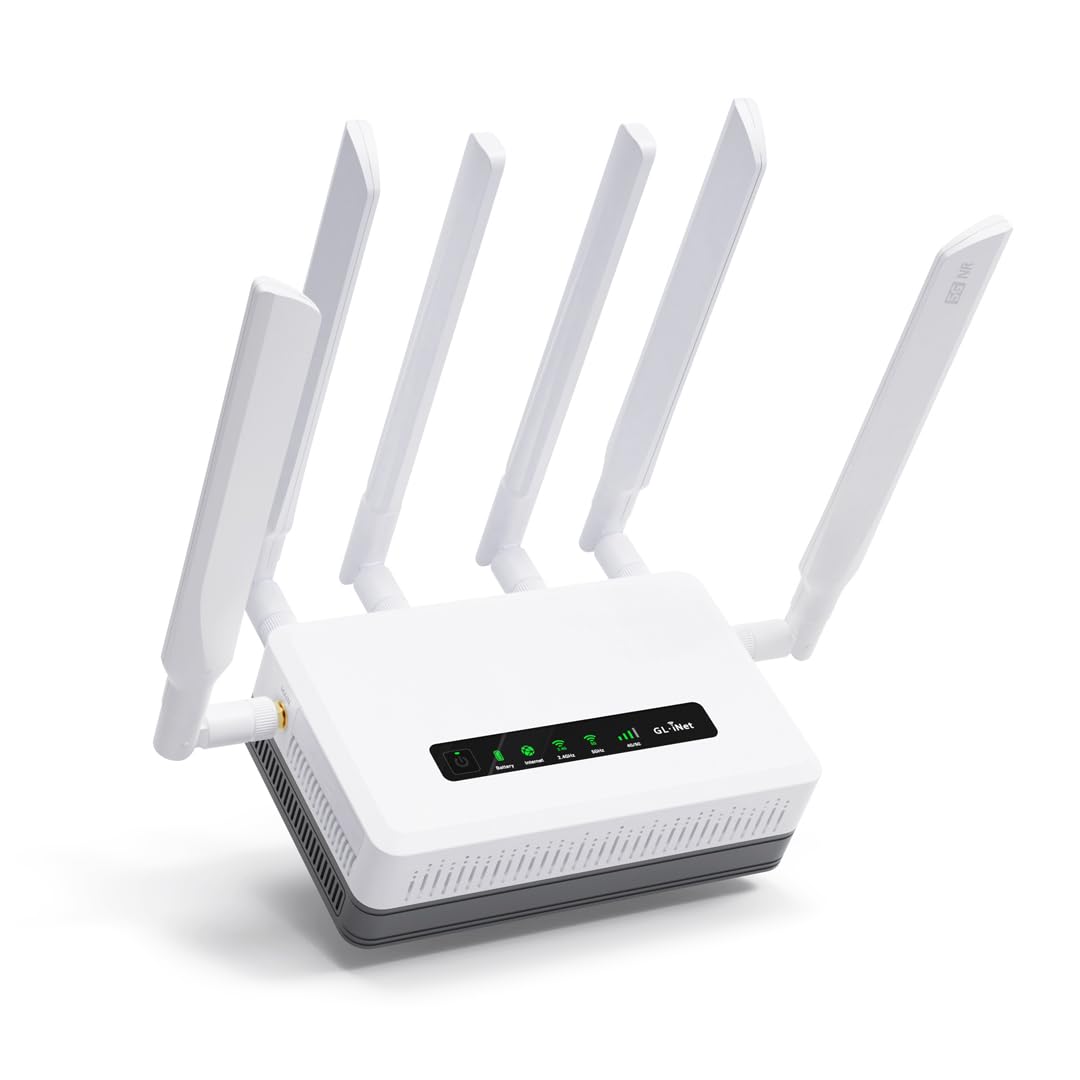
The GL.iNet GL-XE3000 is a 5G mobile router with WiFi 6, dual-SIM card slots, and a built-in 6400 mAh battery that delivers up to 8 hours of untethered operation. This is not a traditional cable modem router combo — it uses cellular data instead of a coaxial cable connection — making it ideal for remote work, RV travel, event WiFi, or as a failover backup when the primary wired ISP goes down. The dual-SIM slot with automatic failover switches between carriers to maintain connectivity in areas with spotty coverage.
Setup is tailored for mobility: insert a SIM, power on, and the router connects within minutes. Users report that the 5 GHz WiFi 6 signal has surprising range for a mobile unit, covering an entire RV park or a small office space without external antennas. The built-in battery keeps the network alive through power outages, which is a unique feature not found in any cable modem router combo. OpenWrt firmware under the hood gives advanced users access to thousands of plugins for VPN, ad blocking, and traffic shaping.
The dual-SIM implementation uses a single modem with a single IMEI, which caused setup confusion for some users whose carriers attempted to register each SIM separately. GL.iNet tech support is responsive but the fix often required multiple restarts. The unit is also noticeably chunky compared to a typical home router, reflecting the cellular modem module and battery inside. For its intended use case — reliable internet where no cable jack exists — the Puli AX is unmatched, but it does not replace a DOCSIS 3.1 combo for a wired home connection.
Why it’s great
- Built-in battery provides 6-8 hours of network uptime during power loss
- Dual-SIM with automatic failover maintains connectivity in weak signal areas
- OpenWrt firmware offers deep customization and VPN tools
Good to know
- Single IMEI can complicate dual-SIM carrier registration
- Larger and heavier than standard home wireless routers
- Uses cellular data, not cable — not a direct DOCSIS 3.1 replacement
FAQ
Will a DOCSIS 3.1 modem router combo work with my fiber optic ISP?
How do I know if a DOCSIS 3.1 combo is approved for my cable ISP?
Can I use a DOCSIS 3.1 modem with a 1 Gbps cable plan?
Is a modem router combo slower than separate devices?
Final Thoughts: The Verdict
For most users, the docsis 3.1 modem router combo winner is the Motorola MG8725 because it combines Low Latency DOCSIS certification with a 2.5 GbE port and AX6000 WiFi 6 in a single device that handles multi-gig cable plans without bottlenecking. If you need granular network control with VLAN segmentation and a built-in VPN server, grab the Synology RT6600ax — but pair it with a separate DOCSIS 3.1 modem. And for whole-home coverage in a large house with challenging construction, nothing beats the seamless tri-band mesh of the Netgear Orbi 770 system.

Mo Maruf
I created WellFizz to bridge the gap between vague wellness advice and actionable solutions. My mission is simple: to decode the research and give you practical tools you can actually use.
Beyond the data, I am a passionate traveler. I believe that stepping away from the screen to explore new environments is essential for mental clarity and physical vitality.