Our readers keep the lights on and my smoothie glass nicely filled. As an Amazon Associate, I earn from qualifying purchases.
You flip the switch expecting a gentle fade to your preferred glow, but instead get a harsh flash or an annoying flicker that ruins the room’s vibe. A quality dimmable smart switch solves this with precise digital control, smooth transitions, and app-based automation that finally matches your daily rhythm.
I’m Mohammad Maruf — the founder and writer behind WellFizz. After combing through hundreds of customer reports and technical datasheets, I’ve broken down exactly what separates a reliable smart dimmer from a frustrating dud.
This guide focuses exclusively on models that deliver consistent, flicker-free performance across LED, CFL, and incandescent loads, helping you find the best dimmable smart switch for seamless integration into your home.
How To Choose The Best Dimmable Smart Switch
A dimmable smart switch is a small device with big consequences for your daily comfort and your home’s electrical safety. Picking the wrong one means flickering lights, buzzing noises, or a switch that simply won’t fit your wiring box. Here are the critical factors to get right.
Neutral Wire Compatibility
This is the single most common compatibility hurdle. Many modern smart switches need a neutral wire (usually white) to power their Wi-Fi radio and control circuits when the light is off. Older homes often lack neutral wires in switch boxes. If your box has no neutral, look for no-neutral-required models like the ELEGRP digital dimmer. If you have a neutral, you open up options with Matter certification and advanced scheduling.
Digital Dimming Curve and Minimum Brightness
Not all dimming is equal. Budget switches often use simple analog circuits that cause LEDs to flicker or buzz at low brightness. Higher-end models use MCU (microcontroller unit) digital circuitry to create a smooth dimming curve from 1% to 100%. The ability to set a minimum brightness floor prevents flicker with sensitive LED loads. Always check if the switch has an adjustable minimum brightness setting.
Load Type and Wattage Limits
Switches are rated for specific bulb types and wattages. Common limits are 150W for dimmable LEDs/CFLs and 300W to 600W for incandescents. Exceeding these ratings can cause overheating and premature failure. If you control fan+light combos, you need a specialized unit like the Meross combo switch that separates fan speed control from dimming.
Quick Comparison
On smaller screens, swipe sideways to see the full table.
| Model | Category | Best For | Key Spec | Amazon |
|---|---|---|---|---|
| ELEGRP ADS01S | Digital Toggle | No-neutral homes with legacy wiring | MCU digital dimmer, no neutral required | Amazon |
| TP-Link Tapo S505D | Matter Smart Switch | Cross-platform smart home ecosystems | Matter-certified, 0-100% dimming, 2-pack | Amazon |
| TP-Link Tapo S500 4-Pack | Wi-Fi Smart Switch | Whole-home voice control on a budget | 15A rating, Alexa/Google, 4-pack value | Amazon |
| Meross MSS710 | Fan+Light Combo | Combined ceiling fan and light control | 4-speed fan + 1-100% dimmer, HomeKit | Amazon |
| Kasa Smart HS220-2 | 2-Gang Dimmer | Controlling two circuits from one location | 2-gang form factor, 1-100% fade on/off | Amazon |
In‑Depth Reviews
1. ELEGRP ADS01S Digital Toggle Dimmer Switch
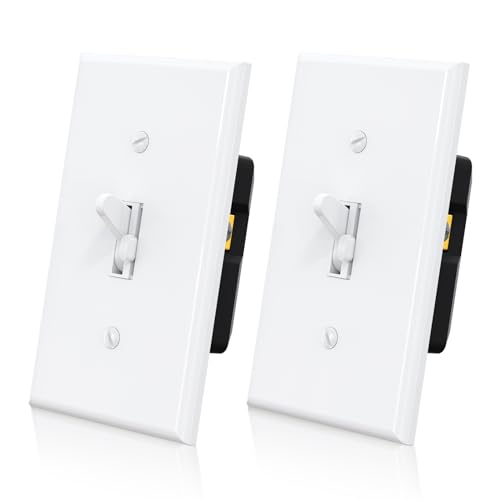
The ELEGRP ADS01S stands out because it solves the single biggest pain point for many homeowners: it works without a neutral wire. Using an MCU digital circuit, it delivers a smooth fade-on that ramps brightness gradually, protecting your eyes and extending bulb life. Its compatibility spans 150W dimmable LED, 150W CFL, and 600W incandescent loads, with an adjustable minimum brightness controller that eliminates flicker even with finicky LEDs.
The physical design is thoughtful — an ultra-slim profile fits easily into crowded electrical boxes, and the included wall plate saves a trip to the hardware store. Users consistently report that the dim setting stays memorized after turning the switch off and on, so you never have to re-adjust. The single-pole or 3-way wiring flexibility means it adapts to stairways, hallways, and living rooms without extra hardware.
One minor compromise is a roughly 1.5-2 second delay between pressing the paddle and the lights responding. This fade-on behavior is intentional for bulb protection, but those expecting instant reaction may notice it. A few reviewers also noted that the slider position can be bumped accidentally in tight multi-gang setups. These are small trade-offs for a no-neutral digital dimmer that actually performs.
Why it’s great
- No neutral wire needed — perfect for older homes
- Adjustable minimum brightness stop prevents LED flicker
- Fade-on extends bulb life and reduces eye strain
Good to know
- 1.5-2 second delay on turn-on is by design but noticeable
- Slider position can be bumped accidentally in tight spaces
2. TP-Link Tapo S505D Matter Smart Dimmer Switch
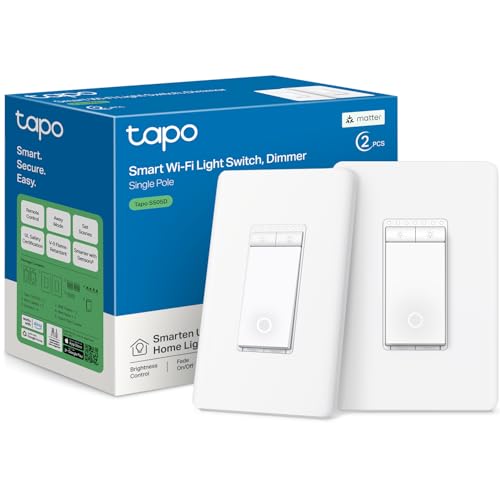
The Tapo S505D is a forward-looking choice thanks to its Matter certification, which means it natively works with Apple HomeKit, Amazon Alexa, Google Home, and Samsung SmartThings without needing a separate bridge. It delivers full 0-100% dimming with a smooth fade-on/fade-off transition, and the Tapo app provides remote access, scheduling, and an “Away Mode” that mimics occupancy for security.
Installation is guided step-by-step through the app, but this switch does require a neutral wire and 2.4 GHz Wi-Fi. The 2-pack configuration includes two wall plates, wire nuts, and screws, making it a strong value for paired setups. Users confirm it works reliably with 24V dimmable LED drivers and FCOB LED strips, with no perceivable flicker or delay after calibration.
A common setup note: the initial calibration routine in the app is critical for smooth dimming across the full range. Some reviewers mentioned that the hidden fastener faceplates look clean but aren’t reusable in multi-gang boxes — you may need a new standard faceplate if installing side-by-side. Also, this is incompatible with smart bulbs; it requires dumb, dimmable bulbs to function correctly.
Why it’s great
- Matter-certified for cross-platform smart home control
- Smooth 0-100% dimming with fade-on technology
- Excellent value with 2-pack, wall plates, and wire nuts included
Good to know
- Neutral wire required — not for older wiring setups
- Not compatible with smart bulbs; needs dimmable dumb bulbs
3. TP-Link Tapo S500 Smart Light Switch 4-Pack

The Tapo S500 4-pack is the straightforward, high-volume workhorse for homeowners who want voice control across multiple rooms without breaking the bank. Each switch supports 15 amps, handles both Alexa and Google Assistant natively, and integrates with the same Tapo app used by the Tapo S505D. The app-guided installation walks you through neutral wire identification and Wi-Fi pairing, and UL certification provides safety assurance.
This is a simple on/off switch — it does not support dimming. That makes it ideal for garages, basements, closets, or rooms where you just want app or voice control for general lighting. The Away Mode feature randomizes on/off cycles to simulate occupancy, which reviewers found useful for vacation security. The 4-pack with 4 wall plates, 16 wire nuts, and screws means zero extra purchases for a full-floor install.
One caveat: these are single-pole (1-way) switches only, so they won’t work in 3-way configurations without additional units or companion switches. A few users also noted occasional unregistered taps when actuating quickly, though this is rare with deliberate presses. For whole-home voice control at a compelling per-unit cost, this pack delivers dependable performance.
Why it’s great
- High-value 4-pack covers multiple rooms in one purchase
- 15A rating handles heavier loads than typical smart switches
- UL certified with responsive Alexa/Google integration
Good to know
- No dimming function — on/off control only
- Single-pole only, not compatible with 3-way wiring
4. Meross MSS710 Smart Ceiling Fan Control & Dimmer Light Switch

The Meross MSS710 is the best option for rooms with a ceiling fan that has separate fan and light load wires. It combines 4-speed fan control with a 1-100% dimmer for the light, all in a single gang form factor. Apple HomeKit support is native, so Siri can independently set the fan speed and light brightness as separate tiles in the Home app — a rare capability at this price point.
Before buying, compatibility checks are essential: the fan must have two separate load wires (fan and light), and it cannot use a built-in remote, DC motor, or its own smart control system. The switch requires a neutral wire and 2.4 GHz Wi-Fi. Installation is straightforward for experienced DIYers, though the 3-inch pigtail wires can feel short in deep or multi-gang boxes. Meross includes wire labels to simplify identification.
User feedback highlights smooth dimming and responsive app control via Meross or HomeKit. The double-click cycle for fan speed (one press to cycle through speeds) works reliably, but there are no dedicated +/- fan speed buttons. Some users noted that a recent app update broke certain automation routines, though manual and voice control remain unaffected. For a fan+light combo that integrates with HomeKit, this is a capable mid-range choice.
Why it’s great
- Combined 4-speed fan control and 1-100% dimming in one switch
- Native Apple HomeKit support with independent fan/light tiles
- Works with Amazon Alexa, Google Home, and SmartThings too
Good to know
- Neutral wire required; short pigtails may need extension
- Double-click fan speed control lacks +/- dedicated buttons
5. Kasa Smart HS220-2 2-Gang Dimmer Switch

The Kasa Smart HS220-2 is purpose-built for installations where you need to control two separate dimmable circuits from a single location, such as a living room with two sets of overhead lights. It comes as a pair of HS220 dimmers pre-packed with a 2-gang wall plate, screws, and wire nuts, so the physical fit is guaranteed. Each switch offers 1% to 100% dimming with gentle fade-on/fade-off transitions that eliminate harsh light changes.
App and voice control are handled through the Kasa (or Tapo) app, with compatibility for Amazon Alexa, Google Assistant, and Samsung SmartThings. The app-guided installation walks you through neutral wire identification and Wi-Fi pairing. The “Away Mode” randomizes on/off schedules for security, and custom schedules let you align lighting with sunrise/sunset. The fade feature is particularly praised — a “Gentle Off” that dims down slowly instead of cutting instantly.
Setup on Android devices can be quirky, with some users reporting confusing Bluetooth/Wi-Fi onboarding steps and a firmware update loop before the dimmer settings stabilize. Once configured, the switches are reliable and snappy. The 2.5-amp rating per switch is adequate for most LED loads but limits total capacity compared to the 15-amp Tapo S500. For a clean 2-gang dimmer solution with good voice integration, this fills a specific physical niche.
Why it’s great
- Purpose-built 2-gang form factor with matching wall plate
- Gentle fade-on/fade-off for eye comfort and bulb protection
- Reliable performance after initial setup, with Away Mode security
Good to know
- Android setup can involve firmware update loops
- 2.5A rating per switch, lower than some competitors
FAQ
Why does my dimmable smart switch flicker with LED bulbs?
Can I use a smart dimmer with a ceiling fan that has a light?
What is Matter and why does it matter for a smart dimmer?
Final Thoughts: The Verdict
For most users, the best dimmable smart switch winner is the ELEGRP ADS01S because it works without a neutral wire, uses digital MCU dimming to eliminate flicker, and supports both single-pole and 3-way wiring with an adjustable minimum brightness. If you live in a smart home with multiple ecosystems and want future-proofing, grab the TP-Link Tapo S505D. And for controlling a ceiling fan and light from one switch, nothing beats the Meross MSS710.

Mo Maruf
I created WellFizz to bridge the gap between vague wellness advice and actionable solutions. My mission is simple: to decode the research and give you practical tools you can actually use.
Beyond the data, I am a passionate traveler. I believe that stepping away from the screen to explore new environments is essential for mental clarity and physical vitality.