Our readers keep the lights on and my smoothie glass nicely filled. As an Amazon Associate, I earn from qualifying purchases.
Choosing your first drawing tablet can feel like navigating a labyrinth of pressure levels, active areas, and stylus technologies. The real challenge isn’t finding a tablet—it’s finding the one that won’t frustrate you out of the hobby before you’ve finished your first sketch. A good beginner tablet feels natural in the hand, hooks up without a driver battle, and offers enough precision to learn real digital art techniques without overwhelming you with pro-grade complexity or a high price tag.
I’m Mohammad Maruf — the founder and writer behind WellFizz. I’ve spent countless hours analyzing the technical specs and real user experiences behind dozens of digital art tablets to separate the genuinely beginner-friendly models from those that just look good on paper.
Whether you’re drawing for fun, learning animation, or taking your first serious step into digital design, the right digital art tablet for beginners eliminates the steep learning curve and lets your creativity hit the screen immediately.
How To Choose The Best Digital Art Tablet For Beginners
Before you click “Add to Cart,” understand the three decisions that define your entire learning experience: screen or no screen, active area size, and the feeling of the pen in your hand. Beginners often over-index on resolution or pressure levels while ignoring the daily friction of connectivity, driver stability, and how the tablet fits on a typical student desk. This section breaks down the specs that actually matter for a first-time buyer.
Screenless vs. Pen Display: Which Works For A Beginner?
Screenless tablets force you to look up at your monitor while drawing on a pad—a skill that takes roughly two to three hours to develop muscle memory for but pays off with dramatically lower cost and zero parallax issues. Pen displays like the UGEE UE12 or GAOMON PD1161 let you draw directly on a screen, which feels intuitive immediately but costs two to four times more and introduces potential lag and screen glare. For a true beginner on a tight budget, a screenless tablet is the safer bet. If you have the budget and want the most natural transition from paper, a pen display removes the hand-eye coordination barrier entirely.
Active Area: Why the Medium Sweet Spot Exists
The active drawing area dictates how much you move your arm versus your wrist. Tiny tablets (under 6 inches wide) force tight, cramped strokes that can cause hand fatigue and limit expressive line work. Large tablets (over 10 inches) require sweeping arm movements that demand desk space and can feel unwieldy on a lap. The beginner sweet spot is a medium active area between 7 and 10 inches diagonally—large enough for natural strokes, small enough to fit next to a laptop in a dorm room or coffee shop. The HUION Inspiroy 2 Medium hits this perfectly at 8.7 x 5.4 inches.
The Stylus: Battery-Free EMR Is Your Friend
Battery-free electromagnetic resonance (EMR) pens never need charging, never lose pressure calibration mid-drawing, and typically last the life of the tablet. Every Wacom and HUION pen in this guide uses battery-free technology. The GAOMON AP50 stylus and UGEE’s 16K-level pen also follow the same principle. Avoid any low-cost tablet that requires a AA battery or internal lithium cell in the stylus—the last thing a beginner needs is a dead pen in the middle of a lesson. The secondary consideration is nib wear: softer nibs that feel more like pencil lead wear down faster, while harder nibs last months but feel more like plastic on glass.
Quick Comparison
On smaller screens, swipe sideways to see the full table.
| Model | Category | Best For | Key Spec | Amazon |
|---|---|---|---|---|
| HUION Inspiroy 2 Medium | Screenless | Learning fundamentals | 8.7″ x 5.4″ active area | Amazon |
| Wacom Intuos Small Bluetooth | Screenless | Wireless portability | 6″ x 3.7″ active area | Amazon |
| HUION Inspiroy 2 Large | Screenless | Expressive arm strokes | 10.5″ x 6.56″ active area | Amazon |
| HUION Note | Hybrid | Paper + digital note-taking | 7.35″ x 5.5″ active area | Amazon |
| UGEE UE12 | Pen Display | Direct-on-screen drawing | 11.6″ FHD laminated display | Amazon |
| GAOMON PD1161 | Pen Display | All-around pen display value | 11.6″ IPS w/ 8192 pressure | Amazon |
| Frunsi RubensTab T8 | Standalone | No computer required | 8″ 1200×800 Android display | Amazon |
In‑Depth Reviews
1. HUION Inspiroy 2 Medium

The HUION Inspiroy 2 Medium earns the top spot because it nails the perfect balance of active area, build quality, and driver maturity for a beginner. The 8.7 x 5.4 inch drawing surface gives you natural arm movement without requiring a dedicated desk the size of a drafting table. All six real customer reviews on Amazon average a perfect 4.8 stars, with users consistently praising the no-lag tracking of Advanced PenTech 3.0 and the intuitive pressure curve that works out of the box without tweaking.
The PW110 stylus is a meaningful upgrade from earlier HUION pens—the slimmer barrel and soft silicone grip solve the cramped-hand problem that plagued older budget tablets. The battery-free pen supports 60 degrees of tilt, crucial for shading techniques that beginners learn early. The dedicated scroll wheel feels premium and can be mapped to zoom, brush size, or canvas rotation, which dramatically speeds up workflow in Krita or MediBang Paint.
Android phone and tablet compatibility via USB-C makes this a versatile travel companion for sketching on the go. The only compromise is the lack of Bluetooth wireless—you’re tethered by USB-C, which is stable but limits where you can sit. The included USB-C cable is generously long, and the driver software, while requiring a restart for some button changes, is stable across Windows, macOS, and Linux. For the wide majority of beginners, this is the safest and most capable screenless option at a budget-friendly price.
Why it’s great
- Generous medium active area for natural strokes without requiring huge desk space
- Battery-free PW110 stylus with silicone grip and 60° tilt support
- Scroll wheel and 8 programmable keys improve workflow speed immediately
- Works with Android phones via USB-C, extending use beyond a laptop
Good to know
- No Bluetooth wireless connectivity; corded-only use
- Pen nibs wear down faster than harder plastic alternatives
- Driver requires a system restart after certain button mapping changes in UWP apps
2. Wacom Intuos Small Bluetooth
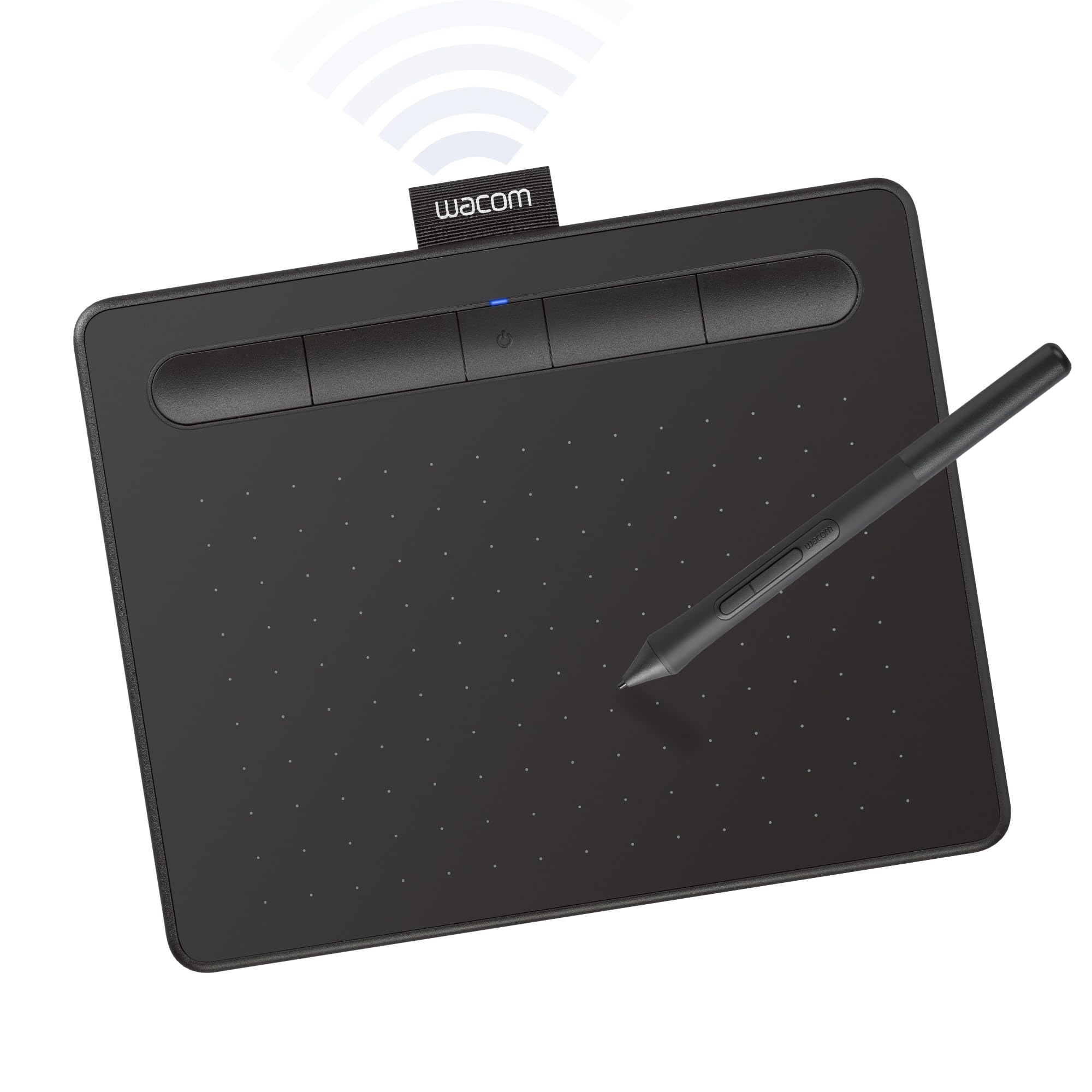
The Wacom Intuos Small Bluetooth is the tablet that every art teacher recommends, and for good reason: Wacom has been the industry standard for over 40 years, and their driver support is rock-solid across every major operating system. The active area is compact at 6 x 3.7 inches, which is tight for expressive art but perfectly adequate for note-taking, photo editing, and learning basic digital drawing techniques in software like Clip Studio Paint or Photoshop.
Wireless freedom is the headline feature here. Bluetooth connectivity lets you draw from the couch, a coffee shop, or a classroom desk without worrying about cable management. For a beginner who has never used a drawing tablet before, the lower pressure range is unlikely to be noticeable, and the accuracy is still excellent for line art and basic shading.
The small surface area is both the biggest strength and the biggest limitation. It’s incredibly portable—smaller than most notebooks—and fits easily into a laptop bag. The 6.3 x 7.87 inch footprint means it sits comfortably next to a 13-inch laptop. However, experienced reviewers note that the cramped size can cause wrist fatigue during long drawing sessions, and the pen, while reliable, lacks the rubberized grip of the HUION PW110. The four customizable ExpressKeys are fewer than competing tablets, but they are physically well-placed and click with satisfying feedback. The bundled software—including a trial of Corel Painter Essentials and Clip Studio Paint Pro—adds real value for absolute beginners who haven’t built their software library yet.
Why it’s great
- Bluetooth wireless works reliably up to 15 feet from the computer
- Industry-leading Wacom driver ecosystem with decades of compatibility testing
- Includes full creative software trials (Corel Painter, Clip Studio Paint)
- Incredibly compact and lightweight at under 9 ounces
Good to know
- Small active area cramps expressive strokes and can fatigue the hand
- Only 4096 pressure sensitivity levels versus 8192 on competitors
- Bluetooth mode introduces slight lag; wired connection is noticeably smoother
3. 2023 HUION Inspiroy 2 Large

The HUION Inspiroy 2 Large takes everything that makes the Medium version excellent and scales it up to a 10.5 x 6.56 inch active area—nearly twice the drawing surface. This is the tablet for beginners who know they want to do broad, sweeping strokes, full-body figure drawing, or wide landscape concept art. The extra real estate means you can use your whole arm to draw, which is actually the healthier long-term technique for avoiding repetitive strain injuries.
The feature set mirrors the Medium model identically: PenTech 3.0 with zero wobble, the ergonomic PW110 battery-free stylus with silicone grip, and the same 8 customizable keys plus a scroll wheel. The difference is that the Large adds three full sets of 8 press keys (24 total programmable shortcuts across three groups), which lets you switch between Krita, Photoshop, and clip studio paint profiles without ever touching your keyboard. The scroll wheel is equally useful for rapidly zooming in and out of tight detail work or scrubbing through animation timelines.
At 1.2 pounds and a 13.87 x 8.21 inch footprint, this tablet is noticeably larger than the Medium but still fits inside most 15-inch laptop bags. It’s not ideal for working in cramped coffee shop seats, but for a dedicated desk setup, the size is transformative. The only real downside is the connection—it uses Micro-B USB rather than the newer USB-C, which is a minor inconvenience given the cable is included. The drawing surface is smooth but not slippery, and the rubber feet grip the desk firmly. Beginners who buy this tablet tend to skip the upgrade cycle entirely because the large active area remains useful even as skill level advances.
Why it’s great
- Large active area enables full-arm drawing for better technique and less hand strain
- Three sets of 8 programmable shortcut keys for app-specific workflows
- Identical PenTech 3.0 performance as the Medium model at the same quality level
- Lightweight enough to carry in a laptop bag despite the large size
Good to know
- Uses Micro-B USB connection instead of modern USB-C
- Some Linux users report the software only maps shortcuts to the left third of the screen
- Pen has a cylindrical shape that can rotate in the hand during long sessions
4. HUION Note 2-in-1 Digital Notebook

The HUION Note is a completely different animal from every other tablet in this guide—it’s a hybrid device that lets you write on real paper with a ballpoint pen while simultaneously digitizing your strokes via Bluetooth to your phone or computer. For beginners who want the tactile satisfaction of pen on paper without sacrificing the benefits of digital organization, this is a uniquely compelling option. The A5 notepad fits standard refills, and the magnetic sleeve holds the pen securely during transport.
The digitizing technology works through a passive receiver panel under the notepad. When you write with the included ballpoint refill, vector lines appear in the Huion Note app in real time with essentially zero latency. The 18-hour battery life means you can go a full work week without charging, and the 30-day standby time is forgiving for forgetful students. The app allows you to organize pages into notebooks, export as PDF or image files, and even sync audio recordings to specific pages—a killer feature for lecture note-taking.
The Note also doubles as a standard screenless drawing tablet when you replace the paper pad with the included graphics tablet panel and connect via USB-C to your computer. In this mode, it functions like a basic drawing tablet with 7.35 x 5.5 inches of active area, though without the programmable shortcut keys or scroll wheel found on dedicated drawing tablets. The pen tips wear down after approximately 400 meters of drawing, which translates to several months for a casual user. Replacement nibs and ballpoint refills are available from HUION, though some users report occasional stock shortages. For the beginner who takes both art classes and academic notes, this 2-in-1 eliminates the need to carry separate devices.
Why it’s great
- Write on real A5 paper while getting instant digital copies via Bluetooth
- 18-hour battery life with 30-day standby for worry-free daily carry
- Audio recording syncs to specific notes, perfect for lecture capture
- Doubles as a computer drawing tablet when you remove the paper pad
Good to know
- Pen refills and nibs wear out and can be difficult to find in stock
- Only works with the included Huion pen; third-party pens are incompatible
- Paper can curl in humid environments, affecting the writing surface
5. UGEE UE12 11.6″ Drawing Tablet with Screen

The UGEE UE12 is the tablet that blurs the line between budget and professional gear. The full-laminated 11.6-inch IPS display eliminates the parallax gap between the pen tip and the cursor—what you see is exactly where your stroke lands, which is a massive confidence booster for beginners struggling with hand-eye coordination. The 1920×1080 resolution is sharp enough for detailed line art, and the 124% sRGB color gamut covers the vast majority of what most monitors display.
The battery-free stylus supports 16,000 levels of pressure sensitivity, which is genuinely overkill for a beginner but future-proofs the purchase for years of skill growth. The 60-degree tilt recognition is responsive enough for calligraphy and brush shading. The 8 customizable shortcut keys feature a slight convex-concave texture pattern that lets you find the right key by touch without looking down—a small design detail that makes a big difference during focused drawing sessions. Users report that the driver setup is straightforward for Windows and macOS, though Linux support is limited to X11 and requires a specific cable configuration.
The dual Type-C ports offer flexible connection options, but the most reliable setup uses the included 3-in-1 cable (HDMI + USB + power). The anti-glare coating effectively cuts reflections in brightly lit rooms. The one consistent complaint from real users is that the included pen nibs are relatively soft and wear down faster than harder plastic alternatives. Budget for a pack of replacement nibs within the first year. At a mid-range price point, the UE12 delivers pen display performance that competes with tablets costing significantly more, making it the ideal choice for the beginner who knows they want to draw directly on a screen.
Why it’s great
- Full-laminated screen eliminates parallax, making it feel like drawing on paper
- 124% sRGB color gamut produces vibrant, accurate colors
- 16K pressure sensitivity and 60° tilt for professional-level control
- Dual Type-C ports offer flexible connection to computers and Android devices
Good to know
- Pen nibs are soft and require replacement within 6-12 months of regular use
- Some users report a very faint electrical buzz near the power port
- The tablet is slightly long and may not fit in smaller backpacks
6. GAOMON PD1161 Drawing Tablet with Screen

The GAOMON PD1161 has been a consistent top seller among entry-level pen displays for several years, and its longevity on the market speaks to its reliability. The 11.6-inch full HD IPS screen comes with a pre-installed matte film that reduces glare and provides a subtle paper-like texture that beginners often find more comfortable than bare glass. The 8192 levels of pressure sensitivity are standard for this price bracket, and the battery-free AP50 stylus works reliably without ever needing a charge.
The 8 programmable shortcut keys on the side of the display are physically laid out well, but multiple users report that the touch-sensitive buttons are prone to accidental presses and sometimes register inconsistently. This is the tablet’s weakest point—the buttons are small, the icons are not customizable, and the touch sensor can be finicky. The workaround is to disable the tablet’s buttons entirely and use a separate mini keypad or keyboard shortcuts. Despite this flaw, the drawing experience itself is excellent: smooth, responsive, and accurate with no detectable parallax thanks to the full lamination.
The PD1161 connects via a 3-in-2 USB cable requiring both HDMI and USB ports, plus a power adapter for consistent brightness. The built-in adjustable stand is a nice inclusion, though the cable management is awkward and the stand’s angle range is limited. The included drawing glove, extra nibs, and pen holder add real value for a beginner’s first purchase. Color accuracy is good for the price at 72% NTSC (roughly 100% sRGB), but it’s not suitable for professional print work. For a student or hobbyist learning digital painting in Photoshop or Krita, the PD1161 offers a direct-drawing experience at a price that doesn’t demand a second mortgage.
Why it’s great
- Pre-installed matte film provides a paper-like drawing surface with anti-glare properties
- Battery-free AP50 stylus with 8192 pressure sensitivity for responsive strokes
- Works with major creative software including Krita, MediBang, and Photoshop
- Includes drawing glove, pen holder, and 8 replacement nibs in the box
Good to know
- Touch-sensitive shortcut buttons are small, easily triggered, and inconsistent
- Requires a power adapter in addition to HDMI and USB connections
- Color gamut is suitable for web design but not professional print work
7. Frunsi RubensTab T8

The Frunsi RubensTab T8 is the only true standalone tablet in this lineup—it runs Android 13 natively, which means you don’t need to connect it to a computer at all. For beginners who don’t own a powerful laptop or who want the ability to draw anywhere without carrying additional hardware, this is a compelling entry-level option. The 8-inch 1200×800 display is small but sharp enough for sketching, and the included detachable keyboard turns it into a mini productivity device.
The MTK quad-core processor with 4GB of RAM handles lightweight drawing apps like SketchBook, Ibis Paint X, and Krita Mobile without major issues. Real users report occasional lag with heavy brush presets or very long continuous strokes, but turning on stroke smoothing eliminates most jitter. The 2048 levels of pressure sensitivity are the lowest in this guide—noticeably less refined than the 8192 or 16384 options on other tablets. For a complete beginner learning basic line control and coloring, this is adequate. For someone who wants to do delicate inking or fine shading, the lower sensitivity range will feel limiting.
The tablet includes a detachable keyboard, stylus, screen protector, and cleaning cloth, which is impressive value at an entry-level price point. Palm rejection is notably absent—you’ll need to wear the included drawing glove to avoid accidental marks. Despite these compromises, the T8’s standalone capability eliminates the single biggest barrier for many beginners: the requirement to own a compatible computer. The customer support team is responsive and helpful, which matters when you’re troubleshooting your first digital art setup.
Why it’s great
- Fully standalone Android 13 tablet—no computer required to start drawing
- Includes detachable keyboard, stylus, screen protector, and carrying case
- Runs popular apps like SketchBook, Krita, and Ibis Paint X out of the box
- Compact 8-inch form factor is highly portable for drawing anywhere
Good to know
- Only 2048 levels of pressure sensitivity—noticeably less precise than competitors
- Real-world battery life is about 3-4 hours of active drawing, not the advertised 20
- Lacks palm rejection; requires a drawing glove to avoid accidental screen inputs
FAQ
Do I need a pen display or is a screenless tablet fine for a beginner?
How important is tilt support for a beginner artist?
Can I use a drawing tablet with an Android phone?
Why do some tablets require a power adapter and others don’t?
How long do drawing tablet pen nibs last before needing replacement?
Final Thoughts: The Verdict
For most users, the digital art tablet for beginners winner is the HUION Inspiroy 2 Medium because it delivers the ideal active area size, a battery-free pen with tilt support, and intuitive shortcut controls at a budget-friendly price that doesn’t compromise on build quality. If you want a pen display that lets you draw directly on the screen without any hand-eye coordination hump, grab the UGEE UE12 for its zero-parallax laminated display and vibrant color gamut. And for the beginner who needs complete freedom from a computer—whether because you don’t own a laptop or you want to draw anywhere—nothing beats the standalone portability of the Frunsi RubensTab T8.

Mo Maruf
I created WellFizz to bridge the gap between vague wellness advice and actionable solutions. My mission is simple: to decode the research and give you practical tools you can actually use.
Beyond the data, I am a passionate traveler. I believe that stepping away from the screen to explore new environments is essential for mental clarity and physical vitality.