Our readers keep the lights on and my smoothie glass nicely filled. As an Amazon Associate, I earn from qualifying purchases.
A digital calendar display does more than just show dates—it replaces the chaos of sticky notes, separate phone calendars, and forgotten chores with a single, shared family screen that everyone can actually see. Whether your household runs on sports schedules, work meetings, or school pickups, having a wall-mounted or countertop touchscreen that syncs everyone’s calendar in real time changes how your home functions.
I’m Mohammad Maruf — the founder and writer behind WellFizz. I’ve spent hundreds of hours analyzing the hardware specs, screen resolutions, sync protocols, and user interfaces of dozens of digital calendar displays to understand which models truly simplify family logistics and which ones just add another screen to power.
The key is to pick a model that balances screen size, calendar platform compatibility, and no-subscription software. This guide cuts through the marketing to help you find the best digital calendar display for your home’s specific needs.
How To Choose The Best Digital Calendar Display
Choosing a digital calendar display isn’t just about picking the biggest screen or the lowest price. You need to evaluate how the device fits your family’s workflow, whether it supports your preferred calendar platforms, and if the software feels natural for daily use. Focus on four primary factors before making your decision.
Screen Size and Viewing Distance
The display size directly determines how much information is readable from across the room. A 10.1-inch screen is excellent for a desk, nightstand, or small kitchen counter where you stand within arm’s reach. A 15.6-inch screen is better for wall mounting in a central hallway or kitchen, where family members read schedules from several feet away. Some models also offer adjustable font sizes and brightness levels, which matter if seniors or children will be the primary viewers.
Calendar Sync and Platform Compatibility
Not all digital calendars sync the same way. The best units provide two-way syncing with Google Calendar, Apple iCloud, Outlook, and Yahoo, meaning an event added on your phone appears on the display instantly and vice versa. Some models only sync one way or require manual refresh. If your household uses a mix of Android and iOS devices, confirm the display supports all your platforms without subscription fees.
Interactive Features: Chore Charts and Meal Planning
A basic digital calendar shows your schedule, but the most helpful models include built-in chore charts with reward systems and meal planners that auto-generate grocery lists. These features turn the display into an interactive family command center rather than a passive screen. Look for color-coded task assignments per family member and the ability to assign star or point rewards that kids can redeem.
Software Ecosystem and Subscription Costs
Some digital calendar displays trap you behind monthly subscriptions to unlock chore tracking or photo sharing. Premium models run on Android and give you access to the Google Play Store, letting you install your own task managers, meal planning apps, or even Netflix and YouTube. Before buying, verify whether the core calendar and chore features require an ongoing fee—many budget-friendly mid-range options already offer these features completely unlocked.
Quick Comparison
On smaller screens, swipe sideways to see the full table.
| Model | Category | Best For | Key Spec | Amazon |
|---|---|---|---|---|
| ApoloSign 15.6-inch | Premium | Android flexibility + smart home | 15.6″ IPS touchscreen, dual-mode OS | Amazon |
| Dragon Touch 15.6″ | Premium | Simple no-subscription chore tracking | 1080p FHD, 15.6″ touchscreen | Amazon |
| Anyuse 16″ Smart Calendar | Premium | Largest screen for wall mounting | 16″ HD, multi-calendar two-way sync | Amazon |
| Cozyla Calendar Plus 2 | Premium | Full Google Play + AI voice input | 15.6″, Android, app store access | Amazon |
| JSUSOU Magnetic Fridge Calendar | Mid-Range | Magnetic refrigerator mounting | 15.6″, teak wood grain, magnetic back | Amazon |
| Annalivkg 10.1″ Calendar | Mid-Range | Budget-friendly family command center | 10.1″ touch, color-coded chore system | Amazon |
| Oqsonwu 10.1″ Calendar | Mid-Range | Simple setup and photo sharing | 10.1″ touch, multi-platform sync | Amazon |
In‑Depth Reviews
1. ApoloSign 15.6-inch Digital Family Calendar
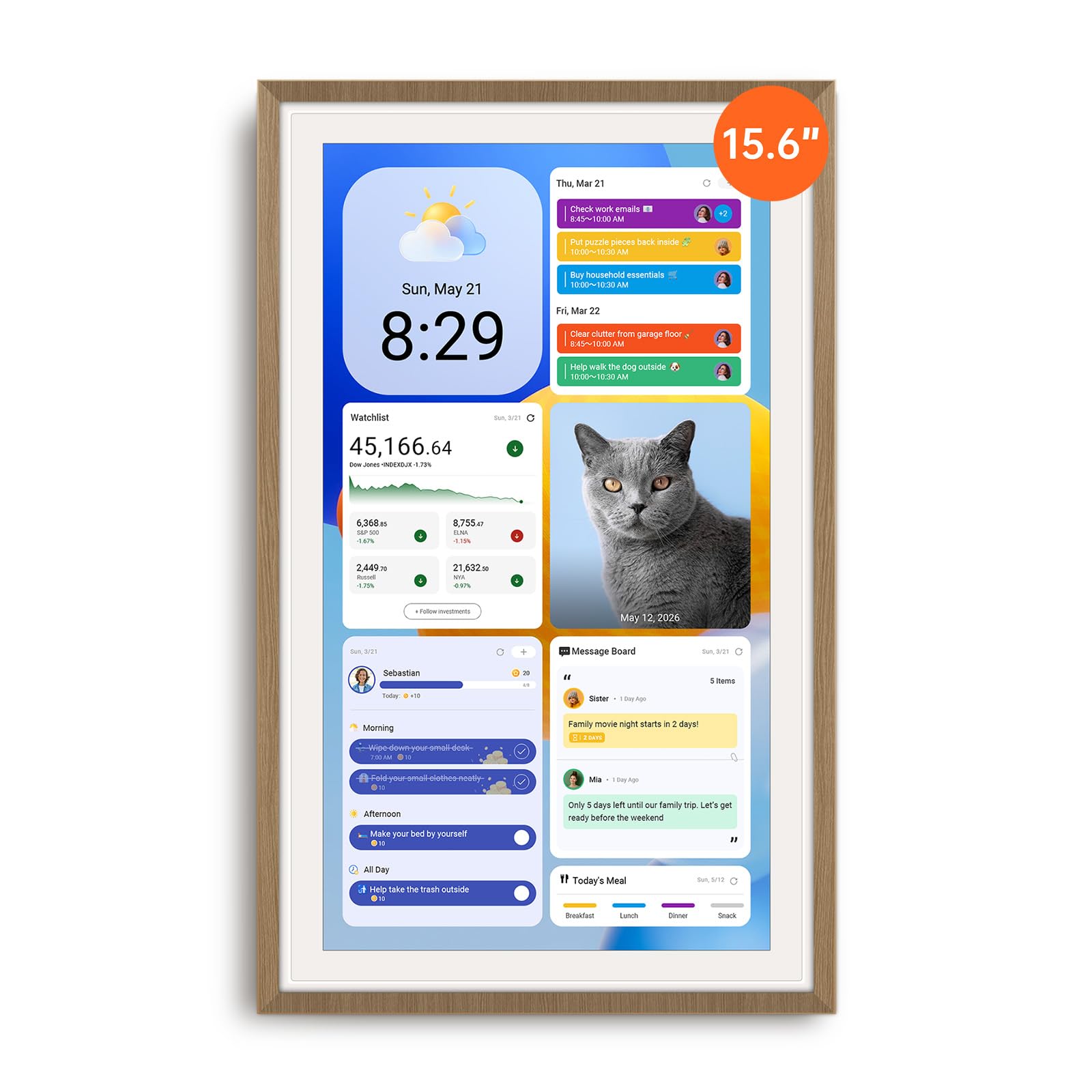
The ApoloSign 15.6-inch strikes the cleanest balance between premium hardware and no-subscription freedom. Its dual-mode system lets you switch between a simplified Calendar Mode that everyone in the family can use and a full Android dashboard where you can add widgets for weather, smart home controls, and even streaming apps. The 15.6-inch IPS screen has an anti-glare coating that keeps schedules readable even in bright kitchens, and the auto-brightness adjusts smoothly throughout the day. Setup takes minutes—plug in, connect to Wi-Fi, sync your Google or iCloud calendars, and the device pulls all events in real time.
The built-in chore chart with a reward-based points system is genuinely engaging for kids. You assign color-coded tasks to each family member, and children earn points they can redeem for pre-set prizes. The Apolopartner app lets you manage everything from your phone, so you can add a grocery item or create a new chore while standing in the store. The custom dashboard also supports widgets for meal planning, to-do lists, and a digital photo frame that pulls from Google Photos. It’s the most versatile option in this roundup for families who want both structure and entertainment from one device.
One minor trade-off is that the device must stay plugged in—there is no battery backup, so the cable routing matters for wall mounting. The included stand works well on a counter, and wall-mount hardware is included. The sound from the built-in speaker is average if you plan to play music or videos, but for calendar alerts and chore chimes it is perfectly adequate. The active Facebook support community is a nice bonus for troubleshooting or finding new widget ideas.
Why it’s great
- Full Android access with Google Play Store for endless app and widget customization
- No subscription fees for calendar sync, chore tracking, or photo display
- Dual-mode OS makes it usable for both tech-savvy users and kids
Good to know
- Requires constant power connection for operation
- Speaker quality is average for media playback
- Bulky power adapter can complicate clean wall mounting
2. Dragon Touch 15.6″ Digital Calendar Chore Chart

The Dragon Touch offers a crisp 1080p Full HD 15.6-inch touchscreen at a price point well below competing premium models. Its focus is on simplicity rather than Android flexibility, which makes it an excellent choice for families who want a plug-and-play experience without complex app setups. The eCalendar app syncs with Google and iOS calendars, and once you link your accounts, the display updates automatically. The interface is straightforward—color-coded events per family member, a chore chart with star rewards, and a meal planning section that keeps dinner decisions visible.
The interactive chore chart is where this device really shines for parents of school-age children. When a child completes a task, the screen plays a satisfying chime and awards stars. The reward system is fully customizable, so you can link star thresholds to screen time, a trip to the park, or a small treat. The dinner planner eliminates the daily “what’s for dinner” question by displaying the week’s meals on the screen. The photo frame mode is attractive, cycling through your uploaded family photos when the calendar is idle.
The biggest limitation is that the eCalendar app does not offer push notifications on your phone for calendar events—you must check the display or open the app manually. The initial setup is straightforward but takes a bit of time to integrate all family members. For the price, though, you get a bright 1080p screen and all the core features without any subscription, making it a smart choice for budget-conscious households that don’t need full Android app access.
Why it’s great
- Full HD 1080p resolution provides sharp text and vibrant photo display
- Star reward system with chime feedback motivates kids effectively
- No subscription fees for any core features including chore chart and meal planner
Good to know
- No push notifications or phone reminders for calendar events
- App requires manual edits for shared tasks across multiple family members
- Limited third-party app integration compared to Android-based models
3. Anyuse 16″ Smart Digital Calendar

The Anyuse 16-inch model delivers the largest screen in this lineup, and the extra diagonal inch makes a noticeable difference when viewing from across the room. The display supports four-level font size adjustment and brightness control, which is particularly useful for seniors or anyone with vision concerns. It offers four placement modes—wall mount, desk stand, horizontal, and vertical—giving you flexibility to install it in a kitchen, entryway, living room, or home office. The two-way sync with Google, iCloud, Outlook, Cozi, Yahoo, and TeamSnap calendars means any change made on your phone appears on the display in seconds, and vice versa.
Family member management is thoughtful. You can invite members via QR code or pairing code that remains valid for 48 hours, and you can create virtual members for children who don’t have email accounts. The event filter by member or category helps keep the screen uncluttered if you have multiple kids with overlapping activities. The chore and reward system uses star-based tracking with color labels per family member, and you can set deadlines and redemption rules. The built-in recipe library lets you save meals with cooking notes and auto-generates a grocery list.
The Whale Framely app powers the photo sharing and slideshow feature, and you can upload up to 50 photos at once or 60-second video clips. The screensaver shows photos with real-time weather and time overlay. Some users note that photo size adjustment options are limited, and the device lacks the full Android app store found on pricier alternatives. It is the best option if your top priority is maximum screen real estate and robust multi-calendar sync over third-party app flexibility.
Why it’s great
- Largest 16-inch screen with adjustable font size for all ages
- Supports two-way sync with Google, Apple, Outlook, Cozi, and TeamSnap
- Virtual member profiles for kids without email addresses
Good to know
- No full Android app store, limited to pre-installed and compatible apps
- Photo size adjustment options are limited in the slideshow mode
- Screen resolution is HD, not Full HD 1080p
4. Cozyla Calendar Plus 2

The Cozyla Calendar Plus 2 is the most fully featured digital calendar in this guide, offering a full Android operating system with Google Play Store access. This means you can install any app that runs on Android—task managers like Todoist, streaming apps like Netflix and Disney+, note-taking apps, and even smart home controllers. The 15.6-inch touchscreen is clear and responsive, and the customizable dashboard lets you drag and drop widgets for calendars, chore charts, meal planners, to-do lists, weather, and media players. Real-time syncing with Google, Apple, Outlook, and Yahoo calendars works seamlessly without a subscription.
The AI assistant is a standout feature for busy households. You can use voice commands to add events or scan a photo of a paper calendar or handwritten recipe to convert it into a digital entry. The chore chart assigns unique colors and avatars to each family member, and children earn points by completing assigned tasks. Meal planning is more advanced here than on other models—you can upload recipe videos and stream them directly on the screen while cooking, and the system auto-generates a shopping list based on your planned meals. The Cozyla+ companion app lets you manage everything from your phone.
The primary drawback is the cost, which sits at the top of the price range. For families who only need basic calendar and chore tracking, a mid-range model would serve just as well. But if you want a device that doubles as a family tablet for streaming, recipe videos, and fully customizable app integration, the Cozyla justifies its premium. The build quality is excellent, and the wall mount looks clean and flush. Customer support is responsive, and the device comes with a one-year warranty.
Why it’s great
- Full Google Play Store access for installing any Android app
- AI voice assistant can scan paper events and recipes to convert them digitally
- Advanced meal planning with video recipe streaming and auto-generated shopping lists
Good to know
- Premium price point is significantly higher than comparable mid-range models
- Some families may not need the full Android app capability
- AI feature usefulness varies depending on household routine complexity
5. JSUSOU Magnetic Fridge Digital Calendar
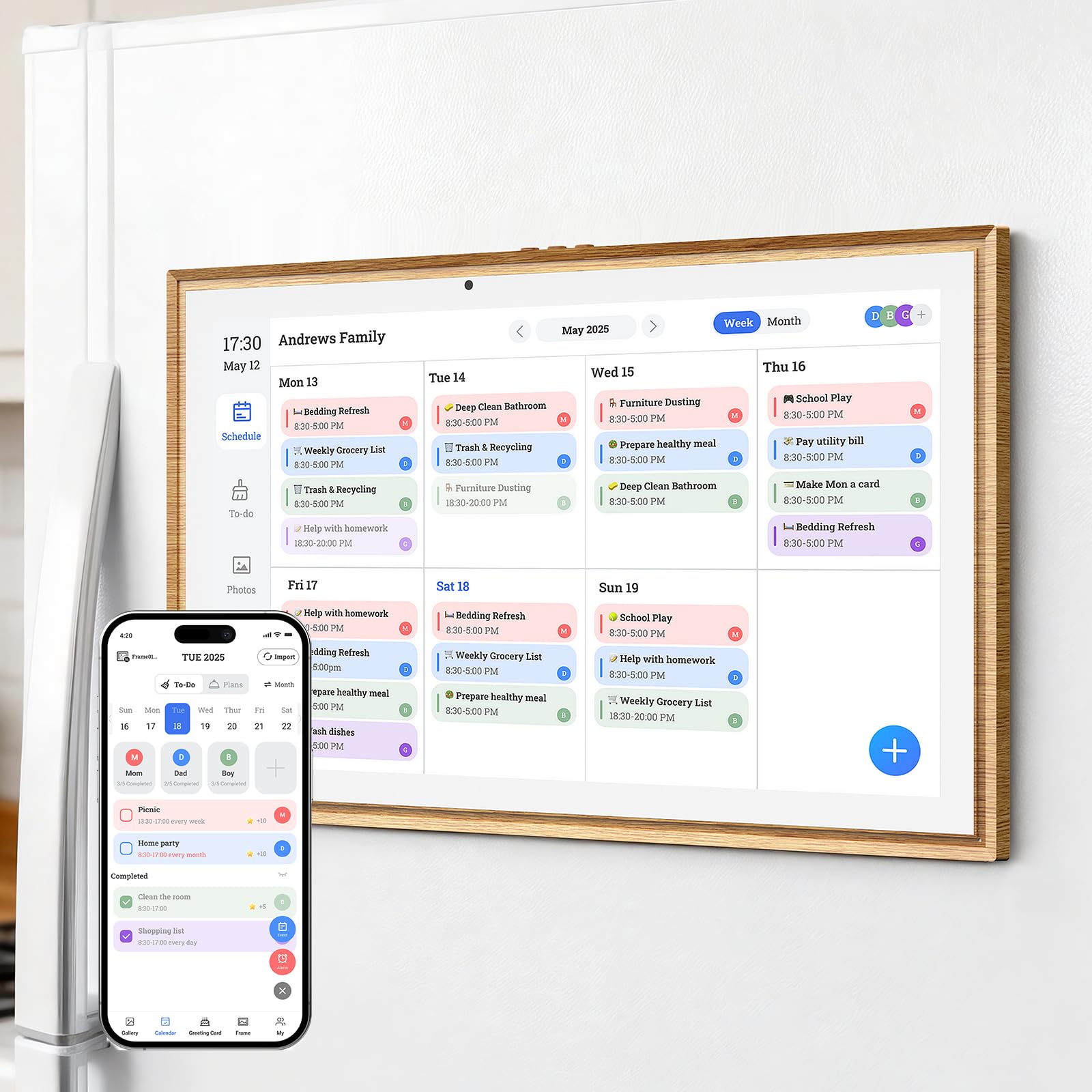
The JSUSOU magnetic digital calendar solves a common placement problem by integrating powerful magnets into its back panel, allowing you to mount the 15.6-inch display directly on your refrigerator. The teak wood grain finish gives it a warm, furniture-like appearance that blends into kitchen decor rather than sticking out as a black slab of tech. The built-in app syncs with Google Calendar and Apple iCloud for two-way event management, and the touchscreen interface is intuitive enough that non-technical family members can scroll through the schedule without assistance. Setup is quick—plug in, connect to Wi-Fi, scan a QR code, and pick your calendars.
The magnetic attachment is surprisingly strong. Several users reported that the magnets held securely even on textured refrigerator surfaces, though a supplemental adhesive strip is included for extra security on uneven finishes. The calendar supports remote photo sharing via the companion app, so grandparents or out-of-state relatives can upload pictures directly to the display. The chore chart and meal planning features are present but more basic than what you get on premium Android-based models. You can assign tasks and view a weekly meal layout, but there is no star reward system or auto-generated grocery list.
One recurring frustration is that the setup app only allows the original phone used during installation to sync with the calendar. Adding a second phone, such as a partner’s device, requires additional steps that are poorly documented in the printed manual. The display itself is bright and clear, but the resolution is not Full HD, so text at small font sizes can appear slightly less sharp than the Dragon Touch or ApoloSign. For families who specifically want a refrigerator-mounted command center with a stylish wood finish, this is the only dedicated option in the roundup.
Why it’s great
- Integrated magnets allow direct mounting on refrigerator without extra hardware
- Teak wood grain design blends naturally with kitchen aesthetics
- Remote photo sharing keeps distant family connected through the display
Good to know
- Second phone syncing is poorly documented and requires extra steps
- No star reward or advanced chore tracking system for kids
- Screen resolution is slightly below Full HD, affecting small text clarity
6. Annalivkg 10.1″ Digital Calendar Wall Planner
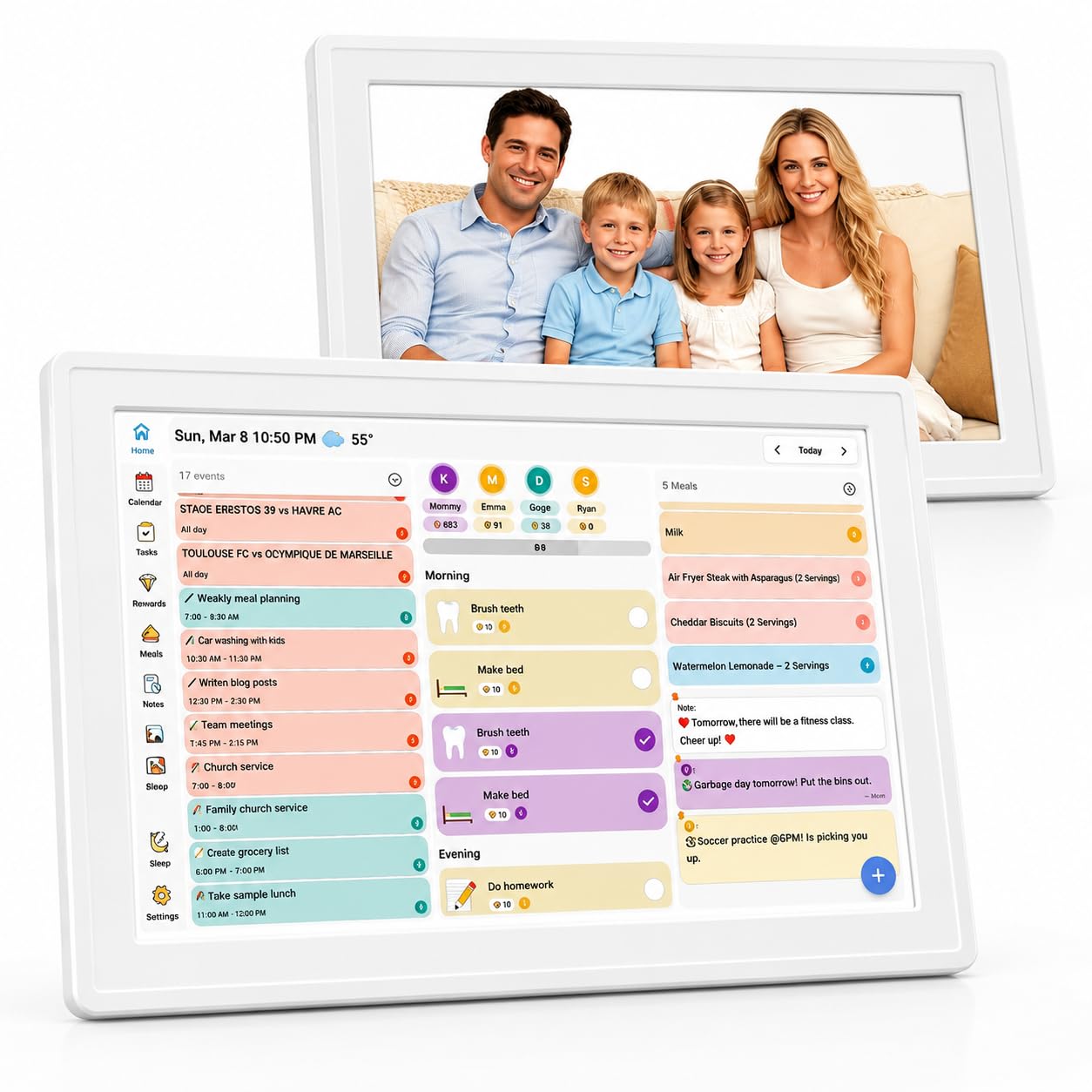
The Annalivkg 10.1-inch digital calendar is the most accessible entry point for families who want to test a smart calendar display without a large investment. The 10.1-inch touchscreen is responsive and easy to navigate, and the setup process through the Wanmine app is straightforward—scan a code, connect to Wi-Fi, and choose your calendar platforms. It supports real-time sync with Google, Apple, Yahoo, Outlook, and Cozi, automatically pulling events from multiple sources into one unified view. The display can be placed horizontally or vertically, giving you flexibility for different countertop or wall positions.
What separates this model from other budget-friendly options is its robust color-coded chore and reward system. You can assign distinct colors to each family member, set up recurring tasks, and establish reward rules that children can track on the screen. The meal planning section includes a one-click recipe saving feature, and the built-in checklist lets you manage groceries and to-do items in one place. When the calendar is idle, the device functions as a digital photo frame with remote upload support, allowing multiple family members to send pictures from their phones.
The screen is bright enough for typical indoor use, but at 10.1 inches, the text and event details are best read from a close distance—about arm’s length. Wall mounting it in a large kitchen where people walk past at several feet may make the schedule hard to read at a glance. The plastic build feels durable for the price, but less premium than the larger metal-framed models. It comes with a one-year warranty from the manufacturer and includes mounting hardware. For smaller households or desk use, it is an excellent value proposition.
Why it’s great
- Color-coded chore and reward system with interactive tracking for kids
- Supports multi-platform calendar sync including Google, Apple, Yahoo, and Cozi
- Remote photo sharing and digital frame mode at no extra cost
Good to know
- 10.1-inch screen is small for reading schedules from across the room
- Plastic build feels less premium than larger metal-framed alternatives
- No full Android access, limited to pre-installed calendar and chore software
7. Oqsonwu 10.1″ Digital Calendar
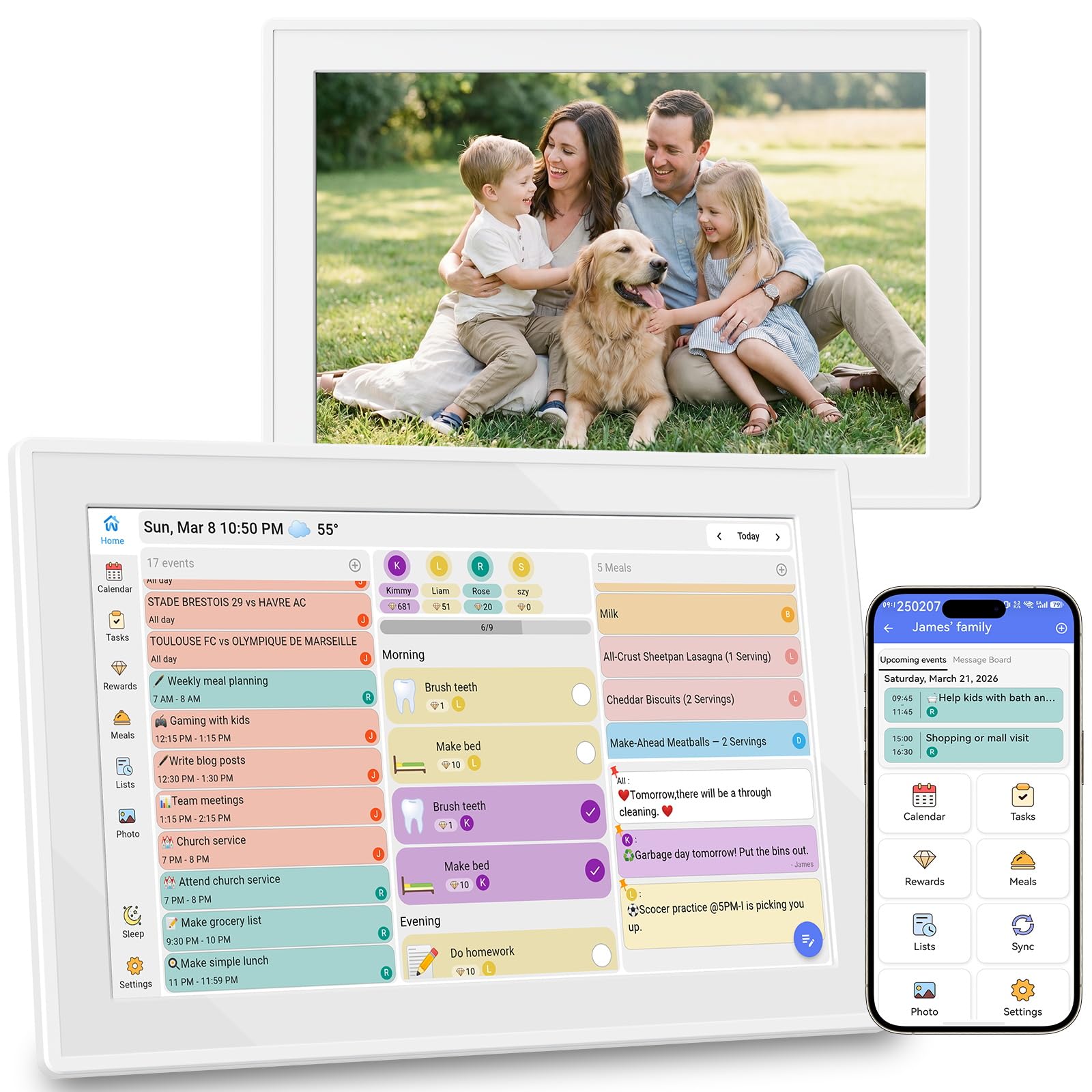
The Oqsonwu 10.1-inch digital calendar is built around the principle of simplicity. It syncs with Google Calendar, iCloud, and Outlook in real time, displaying all family schedules on a single touchscreen interface with no subscription fees. The chore chart is interactive and color-coded per family member, and the meal planner displays your weekly menus clearly. The standout feature here is the Uhale app integration, which enables photo sharing across multiple households. You can send pictures from your phone to the display instantly, making it a great tool for keeping grandparents updated with grandkids’ daily moments.
Setup is fast—users report being up and running within minutes. The touchscreen is responsive, and the interface is straightforward enough that non-tech-savvy family members can navigate it. The photo frame mode cycles through stored images with clear picture quality, and the device supports video uploads as well. The 10.1-inch form factor works well on a desk, nightstand, or small kitchen counter. The manufacturer backs it with a one-year warranty, and customer reviews consistently praise the ease of use and giftability of the unit.
The trade-off for the simplicity is that the software is locked to the pre-installed apps. You cannot install third-party task managers or streaming apps, so the device remains a dedicated calendar and photo frame rather than a multi-purpose Android tablet. The screen resolution is adequate for calendar text but not as sharp as Full HD models. The lack of advanced reward game mechanics may disappoint families who want the deeper chore engagement seen on the Dragon Touch or ApoloSign models. For straightforward calendar syncing and family photo sharing at a budget-friendly price, it gets the job done.
Why it’s great
- Extremely simple setup process, ready to use in under five minutes
- Uhale app enables multi-household photo sharing across different homes
- No subscription fees for calendar sync, chore chart, or meal planning
Good to know
- Software is locked to pre-installed apps with no third-party app support
- Screen resolution is not Full HD, affecting image sharpness
- Chore chart lacks advanced reward mechanics and point redemption systems
FAQ
Do I need a subscription to use the chore chart or meal planner features?
How many family members can I assign tasks to on a single digital calendar display?
Will a digital calendar display work if my internet goes down?
Can I mount these displays flush on the wall or do they need a gap for cables?
Final Thoughts: The Verdict
For most users, the best digital calendar display winner is the ApoloSign 15.6-inch because it combines a large anti-glare touchscreen, full Android flexibility, and zero subscription fees at a mid-range price that undercuts similarly featured competitors. If you want a streamlined, no-fuss experience with a sharp Full HD screen and a proven chore reward system, grab the Dragon Touch 15.6-inch. And for the ultimate customization with Google Play Store access, AI voice input, and advanced meal planning, nothing beats the Cozyla Calendar Plus 2.

Mo Maruf
I created WellFizz to bridge the gap between vague wellness advice and actionable solutions. My mission is simple: to decode the research and give you practical tools you can actually use.
Beyond the data, I am a passionate traveler. I believe that stepping away from the screen to explore new environments is essential for mental clarity and physical vitality.