Our readers keep the lights on and my smoothie glass nicely filled. As an Amazon Associate, I earn from qualifying purchases.
A digital tablet for artists lives or dies by one thing: the feel of the pen on the surface. Hundreds of dollars worth of pressure sensitivity, screen resolution, and color gamut mean nothing if the cursor floats noticeably away from the nib tip, or if the initial activation force requires a deliberate stab to register a mark. Serious illustrators and concept artists learn within minutes whether a tablet becomes an extension of the hand or a frustrating interface to fight against. The divide between a productive tool and a desk ornament comes down to a handful of core spec decisions that most beginners never know to look for.
I’m Mohammad Maruf — the founder and writer behind WellFizz. I’ve spent hundreds of hours analyzing the technical specifications, real-world driver behavior, and surface texture reports from the digital art community to build this guide around measurable performance markers.
After close evaluation across nine models ranging from entry-level to professional-grade, I’ve compiled this guide to the best digital tablet for artists, ranking each based on measurable drawing feel, color accuracy, and workflow integration.
How To Choose The Best Digital Tablet For Artists
Digital art tablets look similar from a distance, but the experience gap between a pen tablet and a pen display is immense. Three decisions define whether you get a tool that accelerates your work or one that fights you on every line.
Pen Display vs. Pen Tablet: The Working Surface Difference
A pen tablet (like the HUION Inspiroy 2 Large) has no screen — you draw on a textured pad while looking at your computer monitor. Your hand-eye coordination adapts over time, but beginners often struggle with the disconnect. A pen display (like the HUION Kamvas 13 Gen 3) puts the image directly under the nib, eliminating the mental translation. The trade-off is price: pen displays cost significantly more per inch of active area and require a more powerful computer to drive the extra monitor.
Full Lamination and Parallax: The Hidden Drawing Killer
Non-laminated screens have an air gap between the LCD panel and the protective glass. That gap creates parallax — a visual offset where the nib appears to touch one spot but the cursor registers another. Full-laminated screens bond the glass directly to the panel, eliminating this gap. For detailed line art, calligraphy, or any precision work, full lamination transforms the experience. Entry-level models skip this, while mid-range and premium options treat it as a standard feature.
Pressure Sensitivity and Initial Activation Force
Pressure level numbers (2048, 8192, 16384) have become marketing numbers — the human hand cannot distinguish beyond about 2000 distinct pressure levels. What matters far more is the initial activation force (IAF), measured in grams. A pen that starts drawing at 2 grams of pressure feels light and responsive. A pen requiring 10 grams feels like drawing with a dull pencil. The Wacom Pro Pen 3 and Huion PenTech 4.0 styluses both achieve around 2g IAF, while budget styli often require much heavier pressure to register the first mark.
Quick Comparison
On smaller screens, swipe sideways to see the full table.
| Model | Category | Best For | Key Spec | Amazon |
|---|---|---|---|---|
| Wacom Cintiq 16 | Pen Display | Professional illustration | 2.5K WQXGA (2560×1600) | Amazon |
| XPPen Magic Drawing Pad | Standalone | Drawing on the go | 16384 pressure levels | Amazon |
| Wacom MovinkPad 11 | Standalone | Sketchbook replacement | 8192 pressure levels | Amazon |
| HUION KAMVAS 16 Gen 3 | Pen Display | Color-critical work | 2.5K QHD (2560×1440) | Amazon |
| XPPen Artist13.3 Pro V2 | Pen Display | Mid-range precision | 16384 pressure levels | Amazon |
| HUION Kamvas 13 Gen 3 | Pen Display | Everyday drawing | 16384 pressure levels | Amazon |
| UGEE UE12 | Pen Display | Entry-level pen display | Full-Laminated Screen | Amazon |
| Frunsi RubensTab T8 | Standalone | Beginner no-computer setup | 2048 pressure levels | Amazon |
| HUION Inspiroy 2 Large | Pen Tablet | Budget-friendly starter | 10.5 x 6.56 inch area | Amazon |
In‑Depth Reviews
1. Wacom Cintiq 16

The Wacom Cintiq 16 delivers a 16-inch IPS display with a native 2560×1600 resolution, which puts it in a different visual class than the 1080p panels common at this price tier. That extra horizontal space reduces zooming and panning during complex compositions. The Pro Pen 3 offers 8192 pressure levels with a claimed initial activation force around 2 grams — light enough for a faint pencil sketch but firm enough to avoid accidental marks. The anti-glare glass minimizes reflections without introducing the rainbow sparkle effect that bothers some artists on etched surfaces.
Color performance hits 99% DCI-P3 and 100% sRGB coverage with 8-bit depth, which covers the majority of professional digital delivery standards. The built-in fold-out legs provide a fixed 20-degree angle — adequate for desk use but not adjustable. The unit weighs 4.5 pounds, making it a semi-permanent studio fixture rather than a portable companion. The USB-C connection with DisplayPort Alt Mode or Thunderbolt 3/4 support simplifies cabling, though computers lacking those ports require additional adapters.
Customer reports highlight the near-zero parallax and crisp image quality as the primary selling points. The most common criticism involves the absence of shortcut buttons on the display itself — users must rely on keyboard shortcuts or a separate remote. Some reviewers note that the Pro Pen 3 lacks the customizable weight and grip options of Wacom’s premium pen line. For artists who want the most natural pen-on-paper feel in a studio display, this model sets the benchmark.
Why it’s great
- 2.5K native resolution reduces zoom fatigue significantly
- Pro Pen 3 achieves excellent initial activation force for light strokes
- 99% DCI-P3 and 100% sRGB coverage for color-accurate work
Good to know
- No shortcut keys on the display body
- Fixed fold-out legs with no angle adjustment built-in
- Relatively heavy at 4.5 pounds for a 16-inch model
2. XPPen Magic Drawing Pad

The XPPen Magic Drawing Pad runs Android 14 natively, which means you can install Clip Studio Paint, ibis Paint X, or SketchBook directly without connecting to a computer. The 12.2-inch screen uses AG-etched glass to create a paper-like texture that reduces finger oil adhesion and provides tactile feedback during pen strokes. The X3 Pro Slim stylus delivers 16384 pressure levels with 60-degree tilt recognition — and it requires no charging or pairing, which eliminates a common frustration with active styli that run out of battery mid-sketch.
The display resolution of 2160×1440 at a 3:2 aspect ratio matches the proportions of traditional sketch pads, giving you a familiar canvas shape. The 8000 mAh battery provides up to 13 hours of continuous drawing time, and the TÜV Rheinland eye comfort certification means less eye strain during extended sessions. Storage starts at 256 GB and expands up to 1 TB via microSD. The unit weighs just 590 grams with a 6.9 mm profile, making it genuinely portable.
Customer reviews consistently praise the matte screen surface and the battery-free pen performance. Some users note that the tilt detection could be more responsive, and the Android app ecosystem lacks a direct equivalent to ProCreate in terms of polish and performance. The included three-month memberships for Clip Studio Paint and ibis Paint X provide enough time to evaluate professional software before committing. This is the best option for artists who want to draw anywhere without cable management.
Why it’s great
- Battery-free X3 Pro Slim stylus with 16384 pressure levels
- AG-etched glass provides excellent paper-like drawing texture
- 13 hours of battery life with 8000 mAh capacity
Good to know
- Tilt sensitivity is less accurate than premium pen displays
- Android art apps lack a direct ProCreate alternative
- No official OS update path beyond factory version
3. Wacom MovinkPad 11

The Wacom MovinkPad 11 is a standalone Android drawing tablet built around the same Pro Pen 3 technology that powers Wacom’s professional pen displays, but in a self-contained device that weighs 1.3 pounds. The 11.45-inch anti-glare etched glass screen provides a matte surface that reduces reflections and simulates the drag of pencil on paper. The Quick Draw feature lets you tap and hold the pen on the locked screen to launch the Wacom Canvas sketching app instantly — a small detail that matters when inspiration hits suddenly.
Under the hood, the MovinkPad runs Android 14 with 8 GB of RAM and 128 GB of storage. The battery-free Pro Pen 3 stores replacement nibs in its back end and offers three programmable side buttons. The Wacom Shelf app organizes all sketches, reference images, and artwork from one interface, supporting common image formats for quick browsing. The device supports third-party pens from STAEDTLER, LAMY, and Dr. Grip, which is rare in the standalone tablet market.
Customer feedback highlights the responsive pen feel and the matte screen as the standout features. Some reviewers note that the processor struggles with heavy effects processing in apps like Clip Studio Paint, particularly with textured brushes or liquefy filters. The lack of a headphone jack and occasionally finicky touch screen are minor drawbacks. For artists who work primarily in sketching, inking, and line art on the go, this is one of the most focused dedicated drawing tools available.
Why it’s great
- Battery-free Pro Pen 3 with replacement nibs stored in-barrel
- Quick Draw feature launches sketching app from locked screen
- Anti-glare etched glass surface reduces reflection and feels like paper
Good to know
- Processor struggles with heavy brush effects and liquefy filters
- No audio jack included on the device
- Touch screen can be occasionally unresponsive
4. HUION KAMVAS 16 (Gen 3)

The HUION KAMVAS 16 (Gen 3) upgrades from the standard 1080p panels to a 2.5K QHD resolution of 2560×1440, achieving 186 PPI on the 15.8-inch diagonal. That pixel density matters for fine line work and small text in user interfaces — you will zoom less and see more of your canvas at once. The PenTech 4.0 stylus delivers 16384 pressure levels with a 2-gram initial activation force and ±60-degree tilt support. The smaller nib design and tilt auto-alignment reduce parallax noticeably compared to previous Huion generations.
Color accuracy is factory-calibrated with an average delta-E under 1.5, covering 99% sRGB, 99% Rec.709, and 90% Adobe RGB. The Nano-Etched Canvas Glass 2.0 uses anti-glare and anti-sparkle technology to create a paper-feel texture without the rainbow sparkle that plagues some etched screens. Dual dial controllers and six silent press keys provide physical shortcut access that reduces reliance on keyboard combinations during fast workflows.
User reviews emphasize the excellent value proposition — a 2.5K color-accurate pen display at a price point well below equivalent Wacom models. The dual-dial system receives mixed feedback, with some users finding the dial configuration for canvas rotation unintuitive. The included ST300 adjustable stand works but feels less premium than the tablet itself. For artists who need a large, color-calibrated display for professional work without paying the Wacom tax, this is the strongest contender.
Why it’s great
- 2.5K QHD resolution at 186 PPI for sharp detail visibility
- Factory-calibrated color with delta-E under 1.5 across multiple gamuts
- Dual dial controllers and six programmable shortcut keys
Good to know
- Dual dial setup for canvas rotation is not intuitive for all users
- Included adjustable stand feels less robust than the tablet itself
- Driver does not automatically switch to pen display mode when turned off
5. XPPen Artist13.3 Pro V2

The XPPen Artist13.3 Pro V2 combines a 13.3-inch full-laminated display with an X3 Pro Smart Chip stylus that communicates 16384 pressure levels at a 90-millisecond response rate. The Red Dial Quick Key simplifies brush size, zoom, and navigation controls for users who prefer tactile adjustments over keyboard shortcuts. Eight customizable shortcut keys on the display side provide additional workflow streamlining. The full-laminated AG film screen reduces parallax to near zero and provides a paper-like drawing resistance.
Color coverage reaches 125% sRGB area ratio and 99% sRGB coverage, with 107% Adobe RGB and 95% DCI-P3 coverage — numbers that exceed many mid-range monitors. The 250 cd/m² brightness and 1000:1 contrast ratio produce adequate dynamic range for most illustration work, though the panel is not as bright as premium Wacom options. The included S01 foldable stand supports the display at multiple angles and promotes better posture during long sessions.
Customer feedback focuses on the exceptional feature-to-price ratio and the quality of the X3 Pro stylus. A recurring note mentions that the driver can produce pen misalignment when using multiple displays at different resolutions, requiring both screens to be set to 1080p to maintain accuracy. Some users report that the pen nibs show wear faster than expected with heavy use. For budget-conscious artists who want a full-laminated pen display with professional-grade color, this is the smartest mid-range choice.
Why it’s great
- Full-laminated AG film screen with near-zero parallax
- Red Dial Quick Key provides convenient brush and zoom control
- Excellent color coverage at 125% sRGB and 107% Adobe RGB
Good to know
- Driver may cause pen misalignment with mixed-resolution multi-monitor setups
- Pen nibs wear relatively fast under heavy use
- Some users experience driver stability issues on initial setup
6. HUION Kamvas 13 (Gen 3)

The HUION Kamvas 13 (Gen 3) brings PenTech 4.0 technology to a portable 13.3-inch form factor, delivering 16384 pressure levels with a 2-gram initial activation force. The new Canvas Glass 2.0 uses anti-sparkle nano-etching to reduce glare while maintaining a smooth glide that balances between paper texture and slick glass. The full lamination eliminates the air gap, keeping the cursor directly under the nib tip regardless of viewing angle. Factory color calibration achieves an average delta-E under 1.5 with 99% sRGB and Rec.709 coverage.
The dual-dial design offers two physical scroll wheels alongside five programmable shortcut keys, giving you eight physical controls without needing to reach for a keyboard. The included ST300 adjustable stand provides multiple working angles and folds flat for transport. Connectivity uses a 3-in-1 cable or a full-featured USB-C cable (sold separately) that handles video, data, and power through a single connection. The display weighs 2 pounds and measures 14.2 inches wide, fitting in most laptop bags alongside a 13-inch notebook.
Customer reviews frequently mention the significant improvement in pen accuracy over the previous Huion generation. The primary tradeoff is screen brightness at approximately 200 nits, which can feel dim in well-lit rooms. The anti-sparkle glass eliminates the rainbow grain effect but produces a slightly softer image than glossy panels. Some Linux users report that the buttons and wheels lack full functionality on Wayland. For artists moving from a pen tablet to a pen display at a reasonable price, this is a well-executed upgrade.
Why it’s great
- PenTech 4.0 with 2g IAF and 16384 pressure levels
- Canvas Glass 2.0 eliminates glare and rainbow sparkle effect
- Factory-calibrated color with delta-E under 1.5
Good to know
- Screen brightness of about 200 nits is dim for bright rooms
- Anti-sparkle glass softens image slightly
- Full-featured USB-C cable sold separately
7. UGEE UE12

The UGEE UE12 delivers full-laminated screen technology at an entry-level price point that undercuts most competitors by a significant margin. The 11.6-inch FHD display uses anti-glare glass with zero parallax, providing a drawing experience that feels much closer to premium models than the price suggests. Color performance reaches 124% sRGB gamut volume with three switchable color spaces (sRGB, Adobe RGB, DCI-P3), offering flexibility for different output requirements. The 16K-level pressure sensitivity and 60-degree tilt recognition on the battery-free stylus provide adequate precision for most illustration and design work.
The UE12 includes eight concave-convex shortcut keys designed for blind operation — the raised and recessed surfaces let you feel each button without looking. Dual Type-C ports provide flexible cable routing options, and a single full-featured USB-C cable can handle the connection for compatible devices. The package includes eight replacement nibs and supports Android devices, Windows, macOS, and ChromeOS. The slim pencil-like stylus body with silicone grip improves comfort during extended use.
User reviews highlight the surprising build quality and low price as the main draws. Some customers report a faint buzzing noise near the power port, though this is only audible in very quiet environments. A small number of users experienced temporary unresponsive screen sections that later resolved. The included nibs wear down relatively quickly for artists who press firmly. For beginners or hobbyists who want a pen display without the investment of premium models, the UE12 provides full-lamination benefits at a fraction of the cost.
Why it’s great
- Full-laminated screen eliminates parallax at a budget price point
- Three switchable color spaces for flexible output matching
- Concave-convex shortcut keys enable touch-based blind operation
Good to know
- Faint electrical buzzing reported near the power port
- Pen nibs wear down relatively fast with firm pressure
- Occasional screen responsiveness issues reported by some users
8. Frunsi RubensTab T8
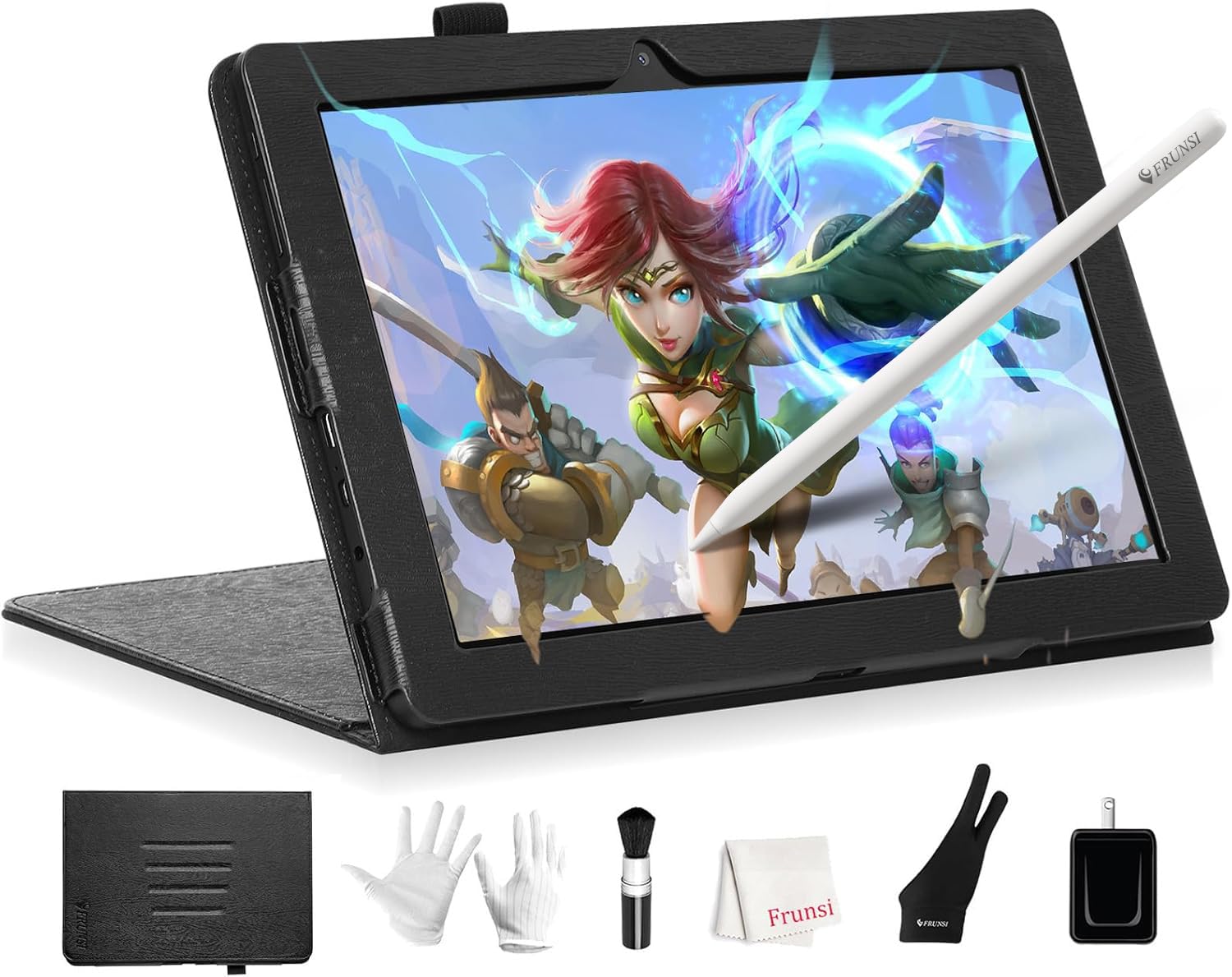
The Frunsi RubensTab T8 is a standalone drawing tablet that runs Android 13 natively, requiring no computer connection for operation. The 8-inch FHD display with 1200×800 resolution provides a compact canvas that fits in small backpacks and works well for young artists or travelers. The included battery-free stylus offers 2048 pressure levels — adequate for basic sketching and note-taking but noticeably less responsive than higher-end options. Pre-installed drawing apps and tutorials reduce the setup friction for complete beginners.
The RubensTab T8 is powered by an MTK quad-core CPU with 4 GB of RAM and 64 GB of storage, expandable via microSD up to 256 GB. The 4000 mAh battery provides up to 20 hours of drawing time, making it suitable for extended sessions without a power outlet. The package includes a detachable keyboard, stylus, screen protector, and cleaning cloth. The Android operating system gives access to the Google Play Store for installing SketchBook, ArtFlow, ibis Paint X, and other art applications.
Customer reviews emphasize the value proposition for young or beginner artists who want a dedicated drawing device without needing a computer. The compact size and included accessories are frequently praised. Some users note drawing delay when the battery is low and the lack of palm rejection as significant limitations. The 2048 pressure sensitivity level is low enough that experienced artists will immediately feel the difference. For its intended audience of beginners and children, the RubensTab T8 serves as a low-commitment entry point into digital art.
Why it’s great
- Standalone Android operation with no computer required
- Long 20-hour battery life for extended drawing sessions
- Includes detachable keyboard, stylus, and screen protector
Good to know
- 2048 pressure sensitivity is low compared to modern standards
- No palm rejection can interrupt drawing flow
- Noticeable drawing delay when battery level drops
9. HUION Inspiroy 2 Large

The HUION Inspiroy 2 Large is a pen tablet (no built-in display) that provides 10.5 x 6.56 inches of active drawing area — comparable to a letter-size sheet of paper. The PenTech 3.0 stylus offers significantly reduced lag and wobble compared to the previous generation, with a slimmer barrel design and soft silicone grip that reduces hand fatigue during extended use. The tablet connects via USB-C and works with Windows, macOS, Linux, and Android devices. The lack of a screen means you draw while looking at your computer monitor, which demands hand-eye coordination adjustment but keeps the cost dramatically lower than pen displays.
The Inspiroy 2 features a unique scroll wheel and eight customizable press keys organized into three sets, allowing you to switch between shortcut configurations for different applications. The tablet weighs 1.2 pounds with a slim profile that slides easily into a laptop bag. The battery-free stylus requires no charging and includes a pen holder with ten replacement nibs. The Android compatibility via OTG adapter makes it possible to use the tablet with phones or tablets for mobile drawing setups.
Customer reviews consistently highlight the price-to-performance ratio as the strongest selling point. The PenTech 3.0 upgrade produces noticeably smoother lines than older Huion models. Some users report that the driver software on Linux lacks button-mapping capabilities, and the stylus has a dead zone in the first 1-40% of pressure sensitivity that requires adjustment in the driver settings. A few customers note the use of Micro-USB instead of USB-C on some units. For artists who want a large drawing surface without the expense of a pen display, this delivers excellent value.
Why it’s great
- Large 10.5 x 6.56 inch active area comparable to letter-size paper
- PenTech 3.0 provides smooth line quality with minimal lag
- Three programmable shortcut sets with scroll wheel for app switching
Good to know
- Requires hand-eye coordination adjustment since there is no screen
- Linux driver lacks button-mapping functionality
- Pressure sensitivity dead zone requires driver calibration
FAQ
Do I need a computer to use a digital tablet for artists?
What does full-laminated screen mean for drawing accuracy?
Final Thoughts: The Verdict
For most users, the best digital tablet for artists winner is the HUION KAMVAS 16 (Gen 3) because it combines a 2.5K color-calibrated display with PenTech 4.0 at a price that undercuts the equivalent Wacom by hundreds. If you want true standalone freedom, grab the XPPen Magic Drawing Pad with its battery-free 16384-level pen and 13-hour battery life. And for studio professionals who prioritize resolution and brand reliability, nothing beats the drawing feel of the Wacom Cintiq 16 with its 2.5K display and Pro Pen 3 technology.

Mo Maruf
I created WellFizz to bridge the gap between vague wellness advice and actionable solutions. My mission is simple: to decode the research and give you practical tools you can actually use.
Beyond the data, I am a passionate traveler. I believe that stepping away from the screen to explore new environments is essential for mental clarity and physical vitality.