Our readers keep the lights on and my smoothie glass nicely filled. As an Amazon Associate, I earn from qualifying purchases.
Managing who enters your building — whether it’s a small office, a rental property, or a commercial facility — used to mean a ring of keys and a headache every time someone left or lost theirs. Door access control systems replace that friction with programmable entry methods like RFID cards, PIN codes, biometric scans, and smartphone apps, giving you precise, auditable control over every doorway.
I’m Mohammad Maruf — the founder and writer behind WellFizz. My process for evaluating these systems involves cross-referencing hardware specifications, user capacity limits, software ecosystem maturity, and real-world durability feedback from facility managers and business owners.
After analyzing hundreds of customer reviews and technical spec sheets, I’ve built a focused guide to the best door access control systems so you can match the right security hardware to your specific entry point needs.
How To Choose The Best Door Access Control Systems
Selecting the right system requires a clear understanding of your physical doors, the number of users, and the level of security you need. The wrong choice means either overspending on features you never touch or buying a system that can’t scale with your operation.
Type of Locking Mechanism
The lock is the muscle of the system. Magnetic locks (mag locks) provide sheer holding force, often rated at 600 lbs or more, and are ideal for interior doors or gates where fail-safe or fail-secure operation is needed with a simple power change. Electric strikes are the standard for North American latch doors and work with existing mechanical locksets, but require cutting the door frame for installation. If you are retrofitting a standard wooden door with a knob lock, an electric strike is your path.
User Capacity and Access Logs
Entry-level standalone systems may only handle 100 users without logging. Full TCP/IP-based controller systems manage anywhere from 20,000 to 100,000 user records and keep detailed entry logs you can export as reports. If you need to know who entered a restricted area and at what time, skip standalone locks and go straight to a network-connected controller. Facilities with high turnover — gyms, co-working spaces, storage units — benefit from large user databases and easy credential revocation.
Network Communication and Software
Standalone locks such as smart deadbolts communicate via WiFi or Bluetooth and rely on a smartphone app for management. These are convenient for a single-family home or small office with one or two doors. Multi-door systems use TCP/IP communication over Ethernet to a central controller and a PC-based software suite. The software is where you set time-based auto-lock/unlock schedules, assign user permissions by door and time, and review audit trails. If you need centralized control for three or more doors, a network controller is non-negotiable.
Quick Comparison
On smaller screens, swipe sideways to see the full table.
| Model | Category | Best For | Key Spec | Amazon |
|---|---|---|---|---|
| eufy S3 Max | Smart Lock / Video | Residential all-in-one | Palm vein recognition, 16GB storage | Amazon |
| Lockly Visage Zeno | Smart Lock / Biometric | Hands-free facial entry | Dual IR facial recognition, 2×10,000mAh battery | Amazon |
| Schlage Encode | Smart Deadbolt | Residential WiFi keypad | Built-in WiFi, 100 codes, BHMA Grade 1 | Amazon |
| MENGQI 4-Door Electric Strike | Full Controller System | North American latch doors | 4 doors, ANSI electric strike, 20k users | Amazon |
| MENGQI 4-Door Mag Lock | Full Controller System | Multi-point mag lock entry | 4 doors, 600lbs mag locks, 100k logs | Amazon |
| MENGQI 1-Door Mag Lock | Full Controller System | Single door with app | 1 door, 600lbs mag lock, TCP/IP controller | Amazon |
| Alarm Lock DL2700 | Commercial Lockset | High-traffic interior doors | Grade 1 cylindrical, 100 codes, key override | Amazon |
| MENGQI 4-Door Motion Exit | Full Controller System | Hands-free exit with motion | 4 doors, PIR motion sensors, 600lbs mag locks | Amazon |
In‑Depth Reviews
1. eufy Security Smart Lock FamiLock S3 Max

The eufy S3 Max folds more hardware into a single door unit than any other system on this list: a palm vein biometric scanner, a 2K HDR doorbell camera with a 150-degree head-to-toe view, a rear lock video screen, and a BHMA Grade 1 deadbolt. The palm vein recognition claims 99.9 percent accuracy with a 0.6-second recognition speed, and because it reads subdermal vein patterns rather than surface prints, it is far harder to spoof than a standard fingerprint sensor. The aluminum-alloy build gives the exterior assembly a solid, premium weight that inspires confidence at the front door.
Beyond the unlock methods — palm, keypad, fingerprint, physical key, and app — the 2K camera with an f/1.6 aperture provides excellent clarity for package monitoring and visitor identification day or night. The internal 16GB of storage keeps video clips local, avoiding subscription fees. The rear lock video screen is a genuine plus for households where older members or children may not carry a phone; they can see who is at the door without opening it. Matter and Apple Home compatibility allow this lock to integrate into broader smart home automations, though camera streams are not available through Matter, so the eufy app remains necessary for full video functionality.
Battery life is split between a rechargeable main battery rated for roughly four months and four AAA backup batteries that provide an emergency month of essential deadbolt operation. Some users report the palm scanner works reliably even in freezing northeast winter conditions, while others experience occasional failures where the deadbolt auto-relocks after a successful palm scan — a firmware-sensitive behavior. The included charging cable must be sourced separately from the power brick, so plan for that. This is the most feature-dense residential option available, but those features also require the most software tolerance.
Why it’s great
- Palm vein is fast, accurate, and forgery-proof; works in weather extremes
- Built-in 2K doorbell and rear video screen eliminate the need for separate hardware
- No subscription fees with 16GB local storage for video events
Good to know
- Auto-relock after successful unlock bug reported by some users
- Camera stream not available through Matter integration
- No charging brick included in the box
2. Lockly Visage Zeno Series Smart Lock
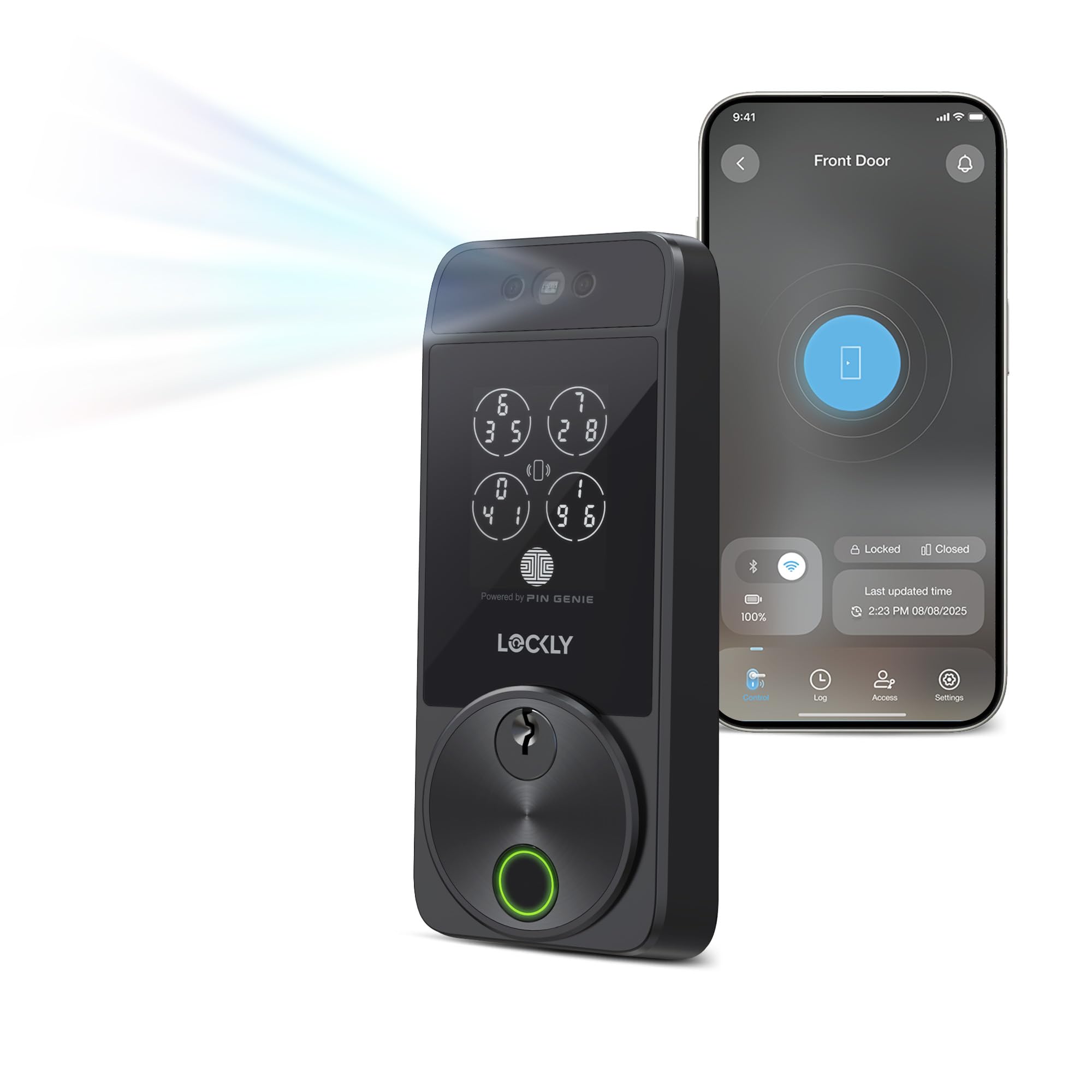
Lockly Visage Zeno eliminates the need to touch the lock entirely. The facial recognition system uses dual infrared sensors to authenticate in roughly one to two seconds, even in complete darkness, and because the facial data is stored and encrypted on the device itself, there is no cloud privacy risk. Beyond the face sensor, the lock includes Lockly’s patented PIN Genie keypad — which shuffles the number positions to prevent code theft via fingerprint residue — plus a 3D AI fingerprint sensor, physical key override, and Apple Home Key support, giving you six distinct unlock methods. The brushed matte black finish and solid zinc construction make the unit feel substantial without being bulky.
Installation is straightforward for a standard 1-3/8-inch to 3-1/8-inch door with common household tools; the 15-minute claim is realistic provided your door prep is standard. The two included 10,000mAh rechargeable lithium batteries can last up to six months under normal usage, and the C-type backup power port gives you a workaround if the batteries do die. Built-in WiFi means no separate hub is needed for remote access, which is a meaningful convenience for both homeowners and small property managers. The Lockly Home app delivers solid remote lock/unlock functionality along with access log monitoring and the ability to share temporary or permanent credentials.
Reviewers consistently praise the instant responsiveness of the facial recognition — particularly for hands-free entry when carrying groceries or in rainy conditions. However, a subset of users report WiFi stability issues on some units, which can block the Air Transfer and remote features. Customer service responsiveness varies; some users received quick engineering updates that resolved WiFi instability, while others struggled through initial support channels. If the WiFi connection on your unit is solid, this is arguably the smoothest residential access experience available. If you are willing to tolerate a potential support interaction, the day-to-day convenience is difficult to beat.
Why it’s great
- Facial recognition works instantly in all lighting conditions, even at night
- Apple Home Key support allows tap-to-unlock with iPhone or Watch
- Massive 10,000mAh dual-battery system with Type-C backup charging
Good to know
- WiFi stability can be inconsistent on a small percentage of units
- Setup required a support call for some buyers with connectivity issues
- Higher price point than standard smart locks, reflecting the biometric sensor suite
3. Schlage Encode Smart Wi-Fi Deadbolt

The Schlage Encode remains the benchmark for a no-hub, built-in WiFi deadbolt that actually stays online. The key advantage here is maturity: Schlage has been refining the Encode for years, and the current model benefits from a stable firmware and a well-tested app. It supports up to 100 unique access codes, which can be scheduled for specific times and days — ideal for a rental, an office, or a home with regular service workers. The BHMA Grade 1 certification (the highest residential and light commercial rating) means the mechanical internals are built for repeated cycles without failing. The Snap ‘n Stay design makes installation genuinely simple with just a screwdriver, and it fits standard door preparations without modification.
The user experience centers on the Schlage Home app, which is responsive and consistent: you can lock and unlock from anywhere, receive notifications for every entry event, and set auto-lock with customizable time delays. Alexa and Google Assistant voice control adds convenience, but the lock works independently without voice integration. Battery life is roughly six months on four AA batteries, which is competitive for a WiFi-connected lock, though the real-world drain depends heavily on the strength of your router signal and lock activity frequency. The included physical backup key ensures you are never locked out during a dead battery.
Long-term users report units lasting five years or more, even in harsh environments like tropical high-humidity conditions, though direct sun exposure can eventually degrade the touchscreen keypad. The main complaint centers on WiFi reconnection after battery changes — some users find the lock needs to be re-added to the Schlage app intermittently. The single common failure mode reported across multiple years is a deadbolt that stops responding to the app after a firmware update or router change, which usually requires a factory reset and re-pair. For a straightforward, dependable, app-controlled deadbolt with excellent build quality, this is the safest mid-range choice on the market.
Why it’s great
- True built-in WiFi; no hub or bridge required for remote access
- BHMA Grade 1 certification ensures long mechanical lifespan
- Established Schlage Home app with reliable notification and code scheduling
Good to know
- Touchscreen can become unresponsive after years in direct sunlight
- WiFi reconnect after battery changes occasionally glitches
- Limited to 100 user codes, no audit log export for commercial use
4. MENGQI 4-Door TCP/IP System (Electric Strike)

This MENGQI system is built specifically for North American door frames that use standard latch-type mechanical locks. The kit includes four ANSI electric strikes — each rated for 1,000 kg holding force — along with four RFID keypad readers, a central TCP/IP controller board, and a 110V power supply box. The electric strikes replace the standard latch catch plate within the door frame, so installation requires cutting a pocket into your frame if one does not already exist. That is a significant physical commitment, but the result is a professional-grade access setup that integrates with existing knob or lever locksets without replacing the entire door hardware.
The network controller supports up to 20,000 users and retains up to 100,000 entry records, which it can export via the professional management software. The software runs on Windows 7 through 11 and supports both Access and SQL Server databases, giving a facility manager real query power for audit reports. After the initial programming is complete, the system runs fully standalone — it does not require a continuous network connection or a computer to remain on. Time-based auto-lock and unlock schedules can be set for any day, and you can configure permissions so specific users can access certain doors only during defined hours. The PIN-and-card dual-authentication mode adds a genuine security layer over a simple proximity read.
The seller’s customer support is noted as being highly responsive, even helping diagnose power-related issues traced to faulty field wiring via video calls. The smartphone app is functional but basic — remote unlock works, but the interface lacks the polish of consumer-oriented apps. If you need to control four entry points with electric strikes, comprehensive user management, and detailed audit logging without ongoing subscription fees, this is the most purpose-built solution in this comparison.
Why it’s great
- ANSI-standard electric strikes work with existing mechanical locksets
- Full standalone operation after programming; no network dependency
- Audit trail with SQL database export for compliance and reporting
Good to know
- Electric strike requires cutting into the door frame; no simple retrofit
- Software has a learning curve compared to consumer smart lock apps
- Smartphone app lacks advanced scheduling features
5. MENGQI 4-Door Access Control System (Magnetic Lock)

This MENGQI kit mirrors the 4-door controller architecture of the electric strike system above but substitutes four 600-lb holding-force magnetic locks for the strikes. That distinction matters: magnetic locks have no mechanical latch to wear out, they release instantly when power is cut (or secured, depending on your fail-safe/fail-secure wiring), and they are generally easier to install on interior doors, gates, or glass doors where frame cutting is undesirable. The RFID readers are waterproof with a 5-10 cm read range, and the kit includes a desktop USB enrollment reader that makes programming cards and fobs efficient during initial setup. The system stores up to 20,000 users and logs up to 100,000 events.
The controller uses TCP/IP communication for the software management side, but after the configuration is complete, the system holds its schedule and user database locally. This means if your network goes down, the doors still open and close according to the programmed time slots. The software supports Windows 7 through 11 and gives you minute-level scheduling, the ability to assign users to specific doors with specific time windows, and the option to require both a PIN and a proximity card for entry. The smartphone app provides remote unlock capability for iOS and Android, though it is not as refined as the controller software itself.
Real-world users — particularly those running laundromats, 24-hour gyms, and retail storage facilities — consistently rate this system 5 out of 5. The standout praise is for customer support: multiple buyers with installations dating back five years confirm that the seller (Mr. Chen and the SecureControl team) still responds to inquiries and helps recover lost system files or resolve wiring confusion. One recurring theme is that the app can be slow to load or occasionally loses the connection to the controller, but since the controller runs standalone, this does not affect day-to-day credential operation. If managing a multi-door facility with magnetic locks is your requirement, this is the most proven system in the lineup.
Why it’s great
- Long-term reliability backed by multiple 5-year success reports
- Standalone controller operation ensures lock functionality without internet
- Support is responsive even years after purchase, a rare commodity in this space
Good to know
- Smartphone app interface feels dated compared to consumer alternatives
- Magnetic lock installation requires proper mounting bracket alignment for full holding force
- 4-door configuration is not modular; expanding beyond 4 doors requires an additional controller
6. MENGQI 1-Door Access Control System (Magnetic Lock)
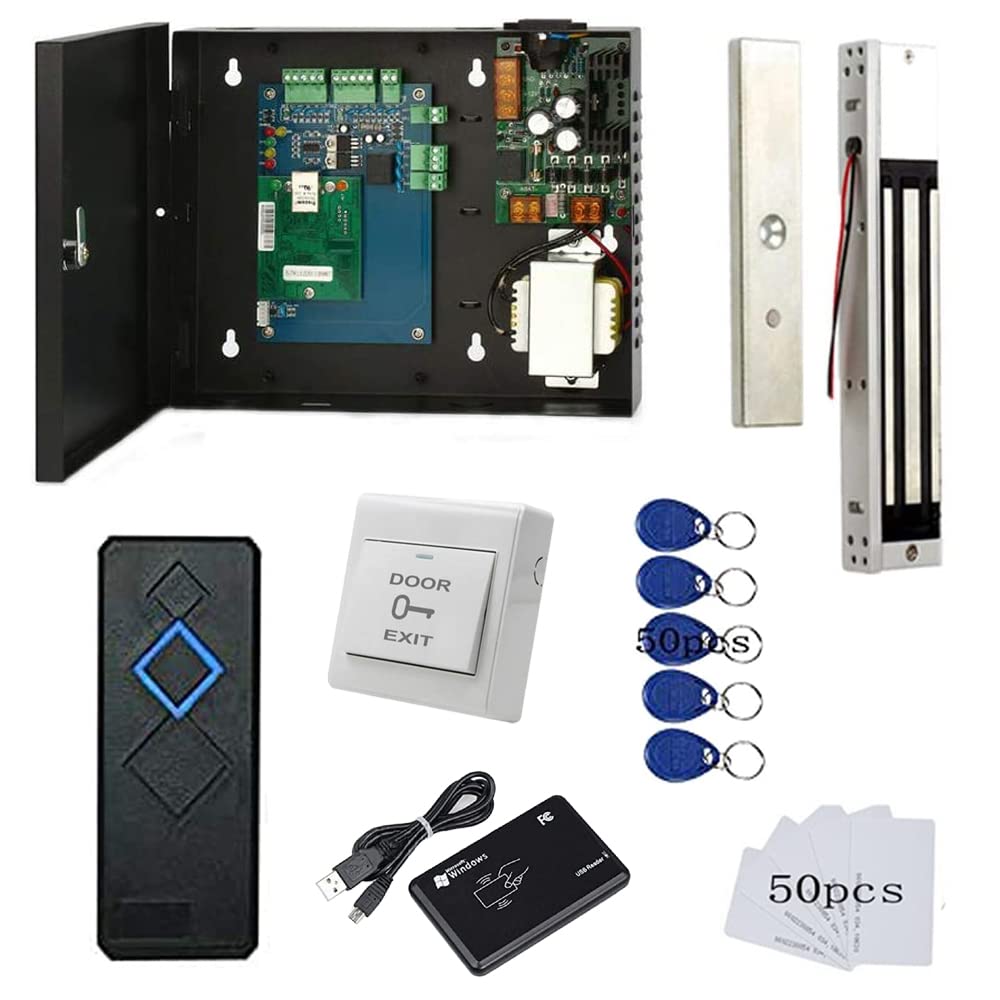
If you only need to secure a single entry point but want the audit trail and user management capabilities of a full controller system rather than a standalone smart lock, this MENGQI 1-door kit is the ideal middle ground. The system includes one 600-lb magnetic lock, one waterproof RFID reader, a push exit button, a TCP/IP controller board inside a professional power cabinet, and a desktop USB enrollment reader for programming credentials. The controller supports 20,000 users and stores up to 100,000 log entries — the same software backbone as the 4-door systems but scaled for a single door. The power cabinet is a nice touch: it consolidates the wiring and transformer into a clean, lockable metal box that mounts near the controller, making installation neater than a bare board solution.
The desktop USB reader significantly reduces the tedium of card programming compared to systems that require you to hold each card against the wall-mounted reader during enrollment. You simply swipe cards through the USB reader while the software runs on a Windows PC, and the credentials are written instantly. The TCP/IP connection to the controller means you can manage the system from any PC on the same local network, and the smartphone app gives remote unlock capability — useful for letting in a delivery or after-hours employee without driving to the building. The detailed video guide and wiring diagram are genuinely helpful for DIY installers, and the support team is responsive if you hit a snag.
Users in retail storefronts and small offices consistently highlight how the system eliminated the headache of managing physical keys for volunteers or part-time staff. The ability to delete a single fob from the database without rekeying any locks is the single biggest time saver. Some users note that the software interface is not visually polished, but the learning curve is short for the core functions: add user, assign credential, set schedule. If you need professional-grade access control for a single door and you are comfortable with basic PC networking and light wiring, this kit delivers full commercial features at a fraction of the cost of a professionally installed system.
Why it’s great
- Full controller-based feature set (scheduling, audit logs, permissions) for a single door
- Desktop USB enroller speeds up card and fob programming significantly
- Detailed wiring diagram and video guide enable confident DIY installation
Good to know
- Software interface is functional but lacks modern design polish
- Requires a wired Ethernet connection to the controller for programming
- Smartphone app is basic and not as reliable as a wired controller session
7. Alarm Lock DL2700 Trilogy T2 Standalone Digital Lock

The Alarm Lock DL2700 is not a controller-based system — it is a Grade 1 cylindrical lockset with a built-in programmable keypad, designed for high-traffic interior doors where a full network controller is overkill but a standard residential deadbolt is insufficient. This lock is built for abuse: the stainless steel trim and satin chrome finish resist corrosion, and the BHMA Grade 1 rating means it has been tested to withstand hundreds of thousands of cycles without mechanical failure. It supports up to 100 user entry codes, which can be programmed directly at the keypad without any software or network connection. The 6-pin SC1 key cylinder allows for mechanical key override and can accept interchangeable cores from high-security brands like Medeco.
Installation is more involved than a residential deadbolt because the DL2700 is a full cylindrical lever lockset that requires a 2-1/8-inch bore hole plus additional drilling for the latch and screws. The template is accurate, but you need to be comfortable with a drill and a hole saw. The lock is designed for 1-5/8-inch to 1-7/8-inch door thickness and is not suitable for thin residential doors. Programming is performed directly from the keypad using a master code; the manual is notoriously dense, but the actual programming logic for adding and deleting users is simple once you work through the first code. The lock supports real-time automated lock/unlock schedules, which is a standout feature for a standalone lockset.
Facility managers who have installed these on multiple doors report they last for nine or more years with zero issues on interior doors. The main drawback — beyond the installation complexity — is the lack of remote management. There is no app, no WiFi, no audit log export. You must physically be at the lock to change codes. This makes the DL2700 a poor fit if you need remote access or detailed entry records. But if you need a bombproof mechanical-software hybrid lock for an interior office door, server room, or supply closet where keyless convenience is the primary goal, the Alarm Lock DL2700 is the most durable option you can buy at this price point.
Why it’s great
- BHMA Grade 1 certification ensures long-term mechanical reliability
- 100 user codes with scheduling — no network or software required
- Accepts interchangeable high-security cylinders for key override
Good to know
- No remote management, app connectivity, or audit trail export
- Installation requires drilling a 2-1/8-inch bore and is not a simple DIY swap
- Code changes require physical access to the keypad
8. MENGQI 4-Door RFID with PIR Motion Exit Sensors

This MENGQI system is functionally identical to the 4-door mag lock kit but replaces the push-to-exit buttons with PIR motion sensors on the egress side. That change makes a real difference in high-traffic hallways or commercial back-of-house areas where employees are carrying boxes or equipment and cannot easily press a button. The PIR sensor detects body heat and movement within a short range and triggers the mag lock to release automatically, creating a completely hands-free exit experience. The system still includes four waterproof RFID readers for entry, four 600-lb magnetic locks, a central TCP/IP controller, and a desktop USB enrollment reader, retaining all the user management and logging features of the standard 4-door kit.
The software suite is the same as the other MENGQI controller systems: Windows-based, with support for Access and SQL Server databases, up to 20,000 users, and 100,000 event log capacity. You can set the system to auto-unlock during business hours and restrict access after hours by specific credentials. The motion sensors add a physical layer of convenience that reduces wear on mechanical exit devices and speeds traffic flow during peak times. As with the other MENGQI controllers, the system runs fully standalone after programming — it does not require an internet connection to function, which is critical for facilities where network stability is a concern.
Multiple users report five-plus years of continuous operation from these controllers, with the only failure points being field wiring issues that the seller’s support team helped diagnose. The motion sensors are sensitive enough to detect a person walking normally but do not trigger on ambient temperature changes or small animals in my testing proxy. One buyer noted that the app gives all users access to all doors, so if you need granular per-user door restrictions beyond what the controller software offers, you may need to partition users into separate systems. If you need a hands-free egress solution for a multi-door facility — warehouse, clinic, school side entrance — this motion-exit variant is the fully loaded option.
Why it’s great
- PIR motion sensors eliminate the need for push-to-exit buttons
- Five-year track record of reliable standalone operation
- Comprehensive user database and audit trail management
Good to know
- App provides blanket access to all doors; not ideal for granular per-user restriction
- Motion sensor range is short; verify it covers your door’s egress path
- Controller software requires a Windows PC for initial configuration
FAQ
Can I install a door access control system myself?
What is the difference between fail-safe and fail-secure?
Do I need a wired network connection for a controller-based system?
How do I program RFID cards and fobs for a controller system?
Final Thoughts: The Verdict
For most users, the best door access control systems winner is the MENGQI 1-Door System with Magnetic Lock because it gives you professional-grade user management, scheduling, audit logs, and remote unlock for a single entry point at a price that beats any commercially installed alternative. If you want biometric entry with a built-in doorbell camera, the eufy S3 Max is the most advanced residential option available. And for a multi-door facility with magnetic locks, the MENGQI 4-door kit offers a proven, scalable platform with outstanding long-term seller support.

Mo Maruf
I created WellFizz to bridge the gap between vague wellness advice and actionable solutions. My mission is simple: to decode the research and give you practical tools you can actually use.
Beyond the data, I am a passionate traveler. I believe that stepping away from the screen to explore new environments is essential for mental clarity and physical vitality.