Our readers keep the lights on and my smoothie glass nicely filled. As an Amazon Associate, I earn from qualifying purchases.
Every morning rush that ends with a frantic pat-down for a key chain—that jingle is a noise you can finally silence. Modern door locks have evolved beyond simple deadbolts, integrating fingerprint sensors, app control, and temporary codes that eliminate the need for physical keys entirely.
I’m Mohammad Maruf — the founder and writer behind WellFizz. For this guide, I analyzed the spec sheets and real-world feedback for dozens of electronic locks, focusing on authentication speed, weather resistance ratings, battery longevity claims, and ANSI certification grades to separate reliable hardware from risky shortcuts.
This review covers five of the most compelling options available, from a budget-friendly keypad knob to a premium Wi-Fi deadbolt with built-in biometrics, so you can confidently choose the best door locks for your specific security needs and daily routine.
How To Choose The Best Door Locks
Selecting the right lock means balancing authentication methods, build quality, and smart features against your door’s specific dimensions and exposure to the elements. Three factors deserve your closest attention before you commit to any model.
Authentication Methods – Fingerprint, Code, or App
The fastest unlock method remains a solid-state capacitive fingerprint reader, often handling verification in under 0.3 seconds. Keypad codes offer a reliable backup for guests and family members without smartphones. Built-in Wi-Fi lets you manage access remotely without an extra hub, while Bluetooth-only models require proximity for app control.
Build Certification and Weather Resistance
ANSI Grade 3 certification is the standard for residential deadbolts, ensuring the lock passes 100,000 open/close cycles and a 250-lb impact test. For exterior doors, an IP54 rating protects the electronics against rain splash and dust ingress, preventing the common cold-weather failure mode where moisture freezes inside the keypad mechanism.
Battery Life and Emergency Power Options
Most smart locks draw power from 4 AA batteries and claim around one year of typical use. Models with a USB-C emergency power port let you jump-start the lock with a portable power bank if the batteries die at an inconvenient time. Low-battery alerts via red indicator lights or app notifications help you avoid being locked out.
Quick Comparison
On smaller screens, swipe sideways to see the full table.
| Model | Category | Best For | Key Spec | Amazon |
|---|---|---|---|---|
| Veise VE017 | Smart Deadbolt | Multi-user access with app control | Self-learning AI fingerprint under 0.2 sec | Amazon |
| Tapo DL100 | Wi-Fi Deadbolt | Remote lock/unlock without extra hub | 200 days battery life (Wi-Fi mode) | Amazon |
| Philips DDL242X-1HW | Biometric Wi-Fi Lock | Fingerprint and voice control integration | Built-in Wi-Fi, no hub required | Amazon |
| TEEHO TE003 | Keypad Knob | Easy no-drill installation on interior doors | IP54 weatherproof aluminum keypad | Amazon |
| HIDALIFE HL668 | Keypad Lever | Budget-friendly keyless entry for rentals | Zinc alloy construction with auto-lock | Amazon |
In‑Depth Reviews
1. Veise VE017 Fingerprint Smart Door Lock

The Veise VE017 uses a Swedish FPC capacitive sensor paired with a dedicated on-device AI chip that verifies fingerprints in under 0.2 seconds. The algorithm learns and improves its recognition accuracy with each scan, which means the lock gets slightly faster with your actual fingerprint over weeks of use. It supports eight unlock methods including Bluetooth app control, RFID fob cards, and voice commands via Alexa or Google Assistant when paired with the optional G1 Gateway.
Security is handled through on-device AES-128 encryption for all credentials and entry logs, keeping biometric data off cloud servers. The lock also offers four distinct password modes—one-time, duration-based, permanent, and recurring—allowing granular access management for guests, cleaners, or service providers. Each entry is time-stamped in the app with no manual log deletion by the user.
The all-zinc alloy exterior carries an IP55 weatherproof rating and is certified to BHMA/ANSI Grade 3 standards, surviving temperatures from -35°F to 160°F. Installation takes roughly 15 minutes using only a screwdriver, and the auto-detection feature determines door handing without manual configuration. The four-AA battery configuration is rated for about 12 months under normal use.
Why it’s great
- Blazing fast fingerprint recognition with continuous AI learning
- Robust weather resistance (IP55) for extreme exterior conditions
- Multiple secure unlock methods including app, fob, and voice
Good to know
- Wi-Fi Gateway required for remote access and voice control
- Does not include a door handle, only the deadbolt assembly
2. Tapo Smart Wi-Fi Deadbolt Door Lock DL100

The Tapo DL100 integrates a Wi-Fi radio directly into the deadbolt, eliminating the need for a separate hub for remote lock/unlock and status checking. The keypad uses tactile rubber buttons with backlighting, and the unit supports up to 200 customized passcodes, which you can assign as permanent, temporary, or one-time codes through the Tapo app. It also includes an anti-peep feature that lets you pad your real PIN with random digits before and after the correct sequence.
Battery life is a strong differentiator: the lock runs on four AA batteries (included) and lasts up to 200 days in continuous Wi-Fi mode or 300 days in Bluetooth mode. If the batteries drain completely, the exposed USB-C port on the exterior provides emergency power using any standard power bank. The auto-lock timer can be set in five-minute increments up to 15 minutes, preventing accidental doors left unlocked from home.
This lock carries BHMA Grade 3 certification for durability and an IP54 weatherproof rating, making it suitable for covered front-door installation. It integrates with Alexa, Google Home, and Samsung SmartThings for voice-controlled locking and unlocking with PIN verification. Installation is straightforward on standard 2-1/8 inch or 1-1/2 inch bore holes.
Why it’s great
- No extra hub needed for Wi-Fi remote access
- Excellent battery life with USB-C emergency backup
- Up to 200 custom codes with full app management
Good to know
- Does not include a fingerprint sensor for touch-free unlock
- Auto-lock timer limited to 15-minute maximum interval
3. Philips Wi-Fi Door Lock DDL242X-1HW

The Philips DDL242X-1HW packs biometric, passcode, and app unlocking into a sleek aluminum body with a hidden keyhole tucked beneath the fingerprint reader. The capacitive sensor registers prints reliably and processes them quickly enough that most reviewers reported unlocking before the door handle reached its full travel. Built-in Wi-Fi supports 2.4GHz networks for remote control without a separate gateway, and voice commands work with both Alexa and Google Assistant after an app update.
You can create up to 100 custom passcodes with time-and-day restrictions, making it easy to set recurring schedules for dog walkers or cleaning services. The lock supports unlimited one-time codes for single-use access and scheduled codes that auto-expire. An Away Mode disables all unlock methods except the master passcode, adding a layer of protection during extended travel.
Auto-lock timing is adjustable from 10 to 180 seconds through the Philips Home Access app, and real-time alerts push notifications for every lock and unlock event. The lock uses 8 AA alkaline batteries (not included) and has a USB-C emergency port. Installation takes about 20 minutes with a #2 Phillips screwdriver on standard doors 1-3/8 to 2 inches thick.
Why it’s great
- Built-in Wi-Fi with no additional hub required
- Fast and reliable capacitive fingerprint sensor
- Flexible code scheduling with time/day restrictions
Good to know
- Requires 8 AA batteries, not the standard 4
- No auto-unlock feature for proximity detection
4. TEEHO TE003 Keyless Entry Keypad Door Lock
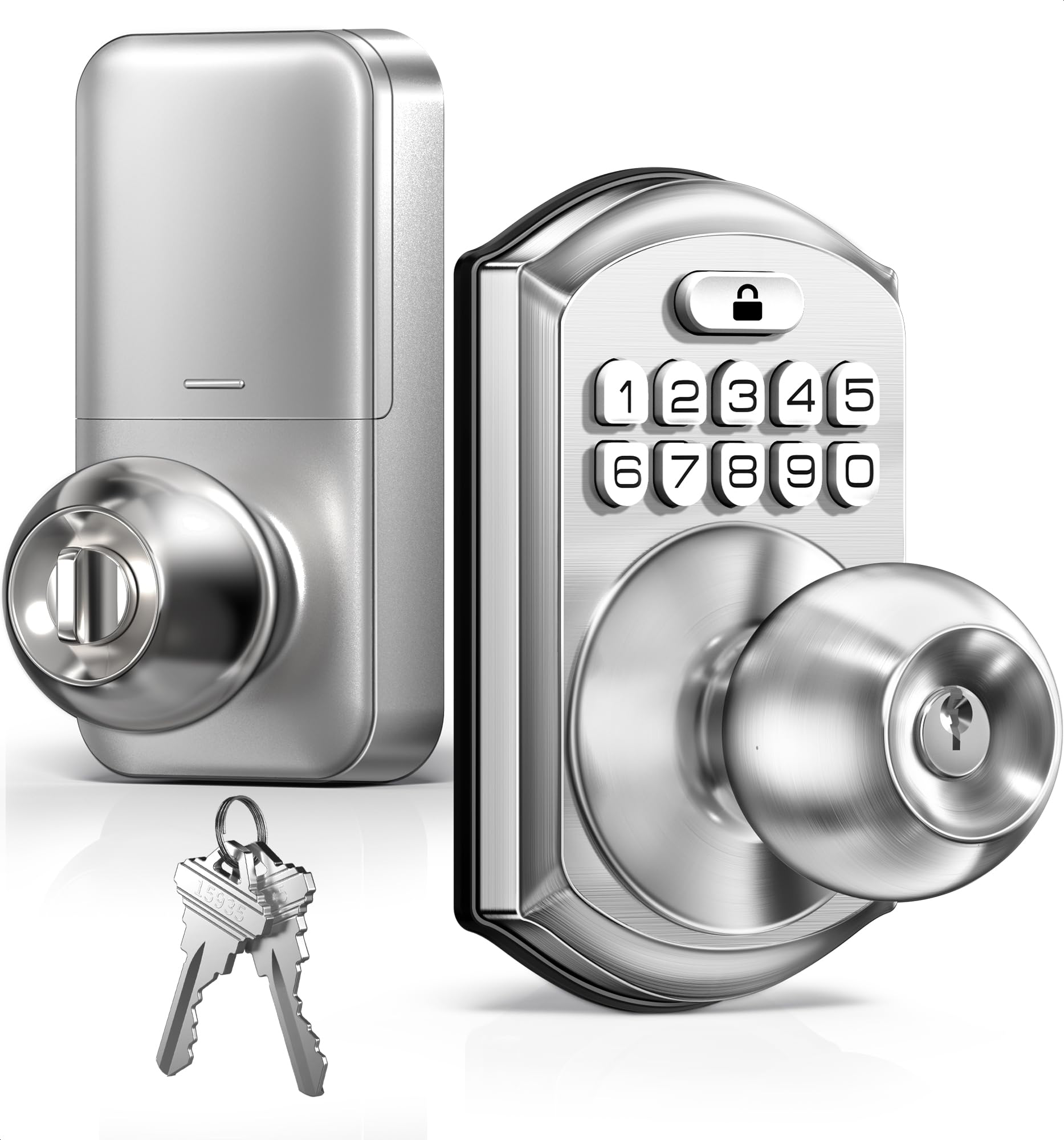
The TEEHO TE003 is a keypad door knob, not a deadbolt, making it an ideal choice for interior doors such as bedrooms, home offices, or garage entry where you want keyless convenience without the heavy security of a deadbolt. The aluminum alloy keypad is IP54 rated against rain splash, and the stainless steel handle offers corrosion resistance for exterior use on side or back doors. It supports up to 20 individual user codes plus two physical backup keys stored in the interior assembly.
Passage mode is a standout feature for this price tier: a simple keypad press disables the lock so the knob stays unlocked during parties or cleaning sessions. The auto-lock timer is adjustable from 10 to 99 seconds and is turned off by default, so you must intentionally enable it during programming. The one-touch locking feature lets you hold any keypad number for two seconds to instantly deadlatch the door from the inside.
Installation requires no drilling on standard doors with 2-1/8 inch bore holes and 2-3/8 or 2-3/4 inch backsets. The lock uses 4 AA batteries rated for up to one year of normal use, with a red LED indicator that illuminates below 15% remaining capacity. Some users in extremely cold climates reported jamming issues, which is common for mid-range keypad knobs without heated mechanisms.
Why it’s great
- Affordable keyless entry with easy pass-through mode
- Auto-lock timer fully configurable from 10 to 99 seconds
- IP54 weather resistance suitable for covered exterior use
Good to know
- Performance may degrade in sub-freezing temperatures
- Only a knob, not a deadbolt—lower physical security
5. HIDALIFE Keyless Entry Door Lock HL668
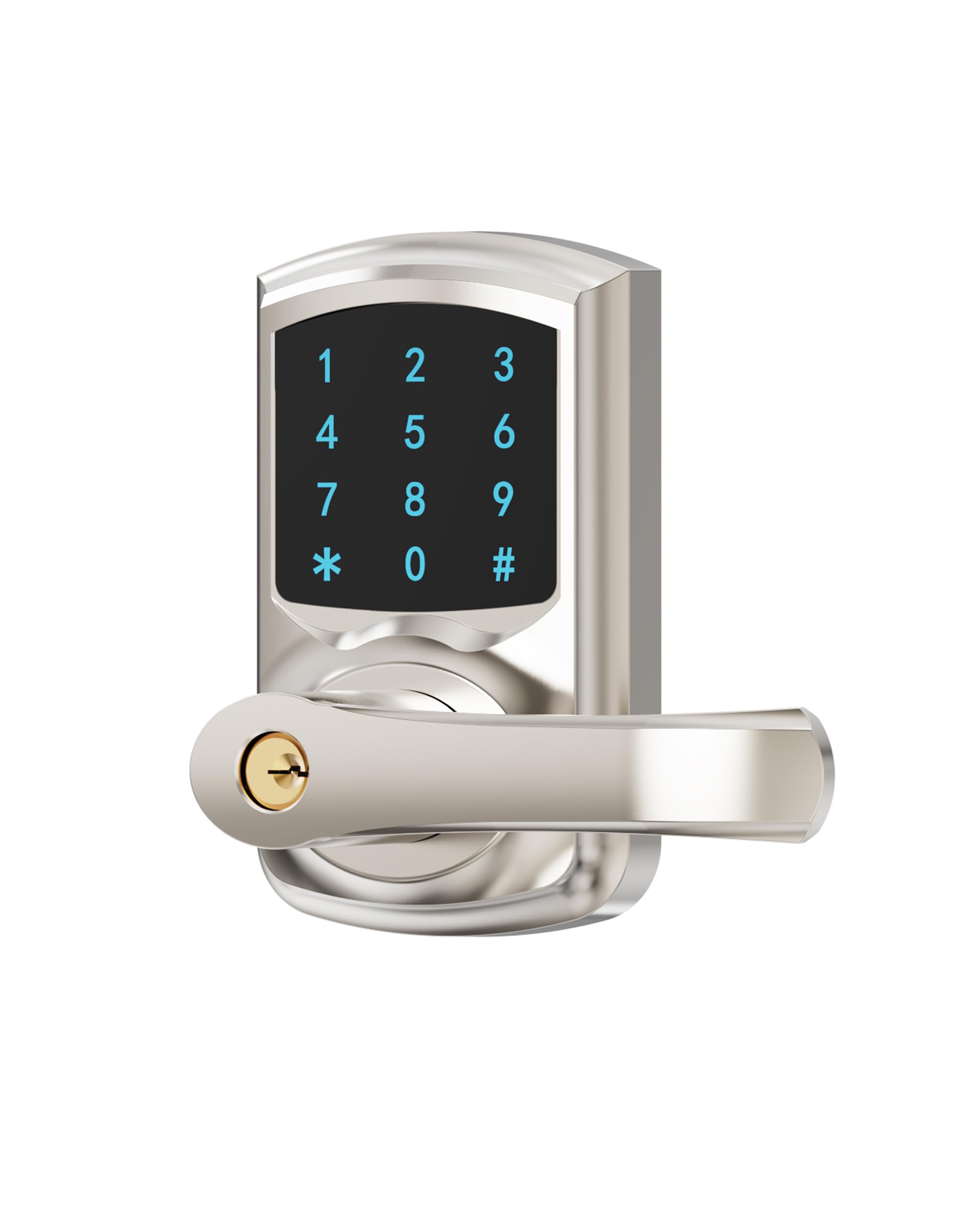
The HIDALIFE HL668 offers a straightforward keypad lever at a budget-friendly price point, using a touchscreen keypad with blue backlighting for nighttime visibility. The lock body is constructed from zinc alloy with a satin nickel or matte black finish, giving it a more expensive look than its price would suggest. It supports up to 50 user codes and includes three physical backup keys, with a five-second auto-lock timer activated by default after each unlock.
The anti-peep feature lets you type random digits before and after your real code, protecting against shoulder-surfing in shared entryways. The adjustable latch fits both 2-3/8 and 2-3/4 inch backsets, though the lock requires a 2-1/8 inch bore hole and will not fit the narrower 1-1/2 inch standard. Programming is done entirely from the keypad without a smartphone app, which simplifies setup but removes any remote access or event logging capability.
Some users noted the keypad requires a deliberate initial touch to wake the screen before entering the code, adding a slight delay compared to always-lit models. While the HL668 is marketed for residential and light commercial use, a small number of reports described complete lock failure within days, making this a better fit for low-stakes applications like a storage shed or a seldom-used back door rather than a primary front entrance.
Why it’s great
- Touchscreen keypad with blue backlight for dark conditions
- Zinc alloy construction at a very accessible price
- Auto-lock engages after 5 seconds by default
Good to know
- Keypad wake delay slows down quick entry
- No app, no event logs, no remote access
FAQ
Can a smart lock be picked or bumped like a traditional deadbolt?
Will a keypad lock work if the Wi-Fi goes out during a power outage?
How do I prevent a smart lock from jamming in freezing winter weather?
Final Thoughts: The Verdict
For most users, the best door locks winner is the Veise VE017 because it combines a genuinely fast AI-enhanced fingerprint sensor, robust IP55 weather resistance, and flexible app-based management without pushing into premium pricing territory. If you want built-in Wi-Fi remote control with no extra hub, grab the Tapo DL100. And for a complete biometric experience with voice control and time-restricted codes, nothing beats the Philips DDL242X-1HW.

Mo Maruf
I created WellFizz to bridge the gap between vague wellness advice and actionable solutions. My mission is simple: to decode the research and give you practical tools you can actually use.
Beyond the data, I am a passionate traveler. I believe that stepping away from the screen to explore new environments is essential for mental clarity and physical vitality.