Our readers keep the lights on and my smoothie glass nicely filled. As an Amazon Associate, I earn from qualifying purchases.
A charging dock should be the quiet hero of your desk or nightstand, not a source of cable clutter or slow, heat-soaked top-ups. Whether you manage a single phone or a full ecosystem of devices, the right dock delivers organized, fast, and safe power without requiring you to hunt for the right cord ever again. The difference between a smart dock and a cheap slab of plastic comes down to thermal management, charging protocol support, and real-world wattage delivery under load.
I’m Mohammad Maruf — the founder and writer behind WellFizz. I’ve spent countless hours analyzing charging hardware, comparing thermal performance claims against real user wattage tests, and sorting through the noise of Qi certification tiers to find the docks that actually keep their promises under continuous use.
This guide breaks down the best options for every device setup, from budget-friendly organizers to premium fast-charging hubs. Whether you need the best charging dock for a multi-device family or a sleek single-pad for your nightstand, these picks cut through the spec-sheet chaos and deliver reliable power every time.
How To Choose The Best Charging Dock
The right dock balances raw charging speed, thermal stability, physical fit for your devices, and build quality that survives daily plug-and-unplug cycles. Here are the three factors that separate a worthwhile dock from an expensive paperweight.
Power Delivery & Certification Tier
Not all wireless charging is created equal. Basic Qi docks cap at 5W or 7.5W for iPhones and 10W for many Androids. Qi2 and Qi2.2 certification unlocks 15W to 25W speeds, rivaling wired charging. For wired docks, look for Power Delivery (PD) support via USB-C — this is essential if you plan to charge a laptop or tablet. A dock that supports PD 3.0 with at least 65W input can handle a MacBook Pro while simultaneously juicing a phone and watch.
Thermal Management — The Hidden Spec
Heat is the enemy of battery health and charging speed. High-wattage wireless charging generates significant heat, causing many docks to throttle power after a few minutes. Premium docks use active cooling (quiet fans or TEC semiconductor chillers) to maintain peak wattage throughout the charge cycle. Budget docks rely on passive heat dissipation, which means they will slow down once the phone or pad warms up. If you consistently need fast top-ups, prioritize a dock with documented thermal management.
Physical Layout & Device Compatibility
Consider your daily device lineup. A 3-in-1 dock with dedicated magnetic spots for an iPhone, Apple Watch, and AirPods works perfectly for Apple users but is useless for a Galaxy Watch. Tower-style organizers with multiple USB ports and adjustable dividers suit households with mixed devices (phones, tablets, Kindles, earbuds). Measure your desk space: a vertical stand with an adjustable viewing angle is best for video calls, while a flat pad is minimal for a nightstand. Ensure the dock includes the necessary power adapter and cable, or budget for a compatible 9V/2A or 65W USB-C adapter separately.
Quick Comparison
On smaller screens, swipe sideways to see the full table.
| Model | Category | Best For | Key Spec | Amazon |
|---|---|---|---|---|
| Anker Prime 3-in-1 | Premium / Qi2.2 | Ultra-fast charging with active cooling & smart display | 25W Qi2.2 + TEC active cooling + 1.65″ HD touchscreen | Amazon |
| Belkin MagSafe 3-in-1 | Premium / Qi2.2 | Apple ecosystem with silent fan cooling & chrome base | 25W Qi2.2 + ChillBoost active cooling + 45W adapter inclusive | Amazon |
| Hostena 30W 6-in-1 | Mid-Range / Apple-Focused | Apple users who want a clock, night light & foldable design | 30W wired + wireless charging + 7-color ambient light + digital clock | Amazon |
| HSicily 95W 6-Port Station | Mid-Range / Multi-Device | Laptops, tablets, and phones with PD fast charging | 65W PD via USB-C + 6 ports + 8 cables + Apple Watch/AirPods stands | Amazon |
| MSTJRY 6-Port Organizer | Mid-Range / Family Organizer | Households with 6+ USB devices needing stable 2.4A per port | 6 smart USB ports + 7 removable dividers + 2 tall slots for tablets | Amazon |
| Anker 313 Wireless Stand (2-Pack) | Value / Entry-Level | Simple, reliable single-device wireless charging on a budget | 10W max output / 7.5W iPhone / dual orientation charging | Amazon |
| Kakyanill Power Strip Tower | Budget / Surge Tower | Desk or dorm with 9 AC outlets, 8 USB ports & retractable cord | 1080J surge protection + 4 USB-C + 4 USB-A + retractable 6ft cord | Amazon |
In‑Depth Reviews
1. Anker Prime 3-in-1 Charging Station
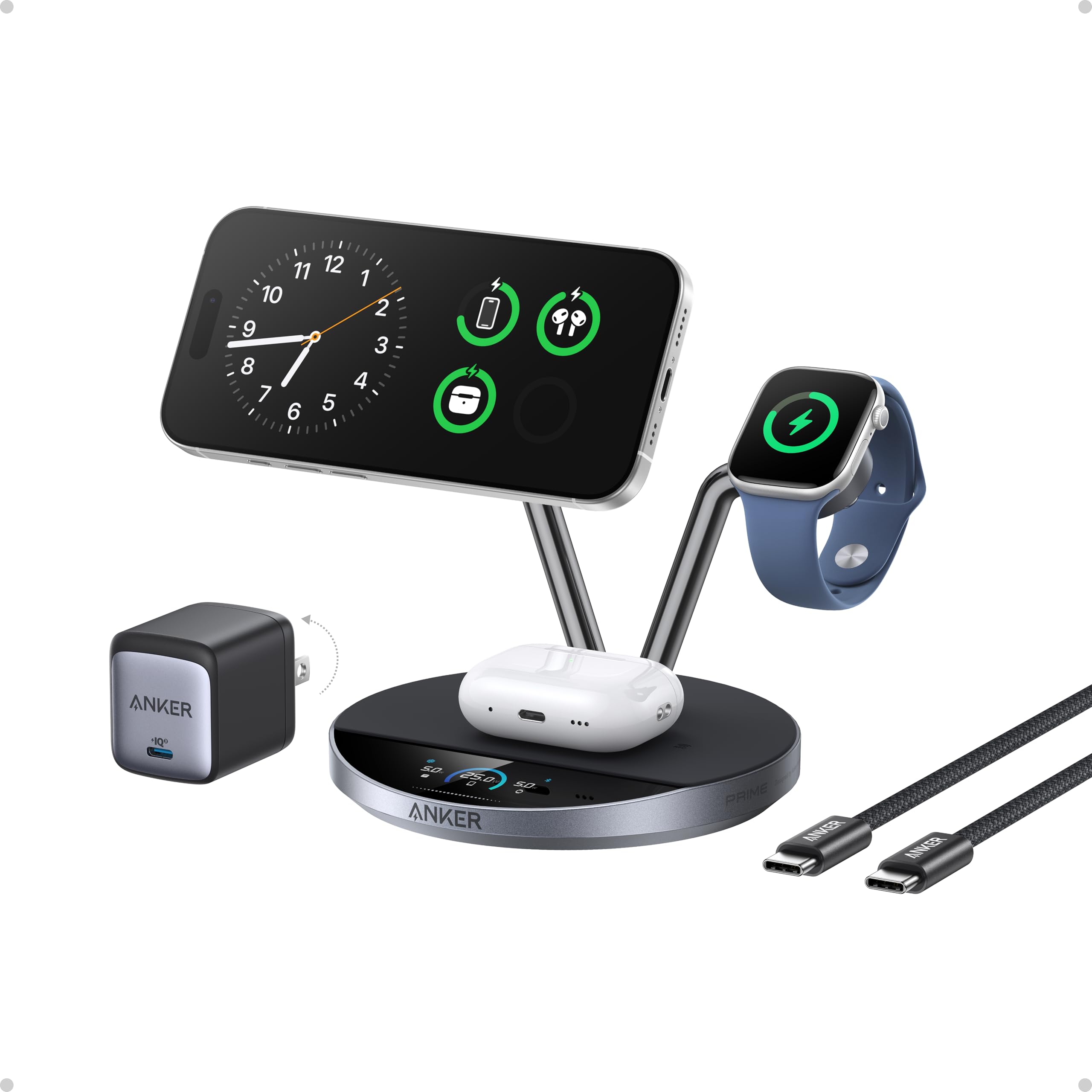
The Anker Prime is the most technologically complete charging dock on the market right now. It delivers a full 25W via Qi2.2 certification, which charges an iPhone 17 Pro to 50% in roughly 22 minutes — genuinely competitive with wired speeds. The secret is its aerospace-grade TEC (thermoelectric) active cooling system, which keeps the phone’s surface temperature below 89°F even during peak output, preventing the thermal throttling that plagues lesser docks. The built-in 1.65-inch HD touchscreen gives you real-time wattage, temperature, and charging status for each device, and the Anker app adds customizable charging modes, firmware updates, and safety alerts.
The build quality is premium all around: stainless steel arms, a weighted base, and a precision hinge that supports an adjustable 80-degree viewing angle for video calls or StandBy mode. It simultaneously fast-charges an iPhone, an Apple Watch (including Ultra at full 5W), and AirPods with a wireless charging case. The 65W USB-C power adapter is included, so there are no hidden costs. The charging modes — Boost for rapid top-ups, Ice Mode for cool charging under heavy use, and Sleep Mode for silent overnight charging — let you tailor behavior to your routine.
Some users note the fan is audible on Ice Mode, though Sleep Mode effectively silences it. The magnetic alignment is very strong, requiring a peel motion rather than a straight pull to remove the phone, and the base could use a bit more grip on very smooth surfaces. For anyone who wants the fastest wireless speeds, active cooling, and a live status display, this is the dock to beat.
Why it’s great
- 25W Qi2.2 wireless charging matches wired speed
- TEC active cooling prevents thermal throttling and protects battery health
- Touchscreen display shows real-time wattage and temperature per device
- Three smart charging modes for different scenarios
Good to know
- Fan is audible on Ice Mode (Sleep Mode is silent)
- Strong magnet can make phone removal tricky
- Optimized for Apple ecosystem — limited Android watch support
2. Belkin MagSafe Charger Compatible 3-in-1
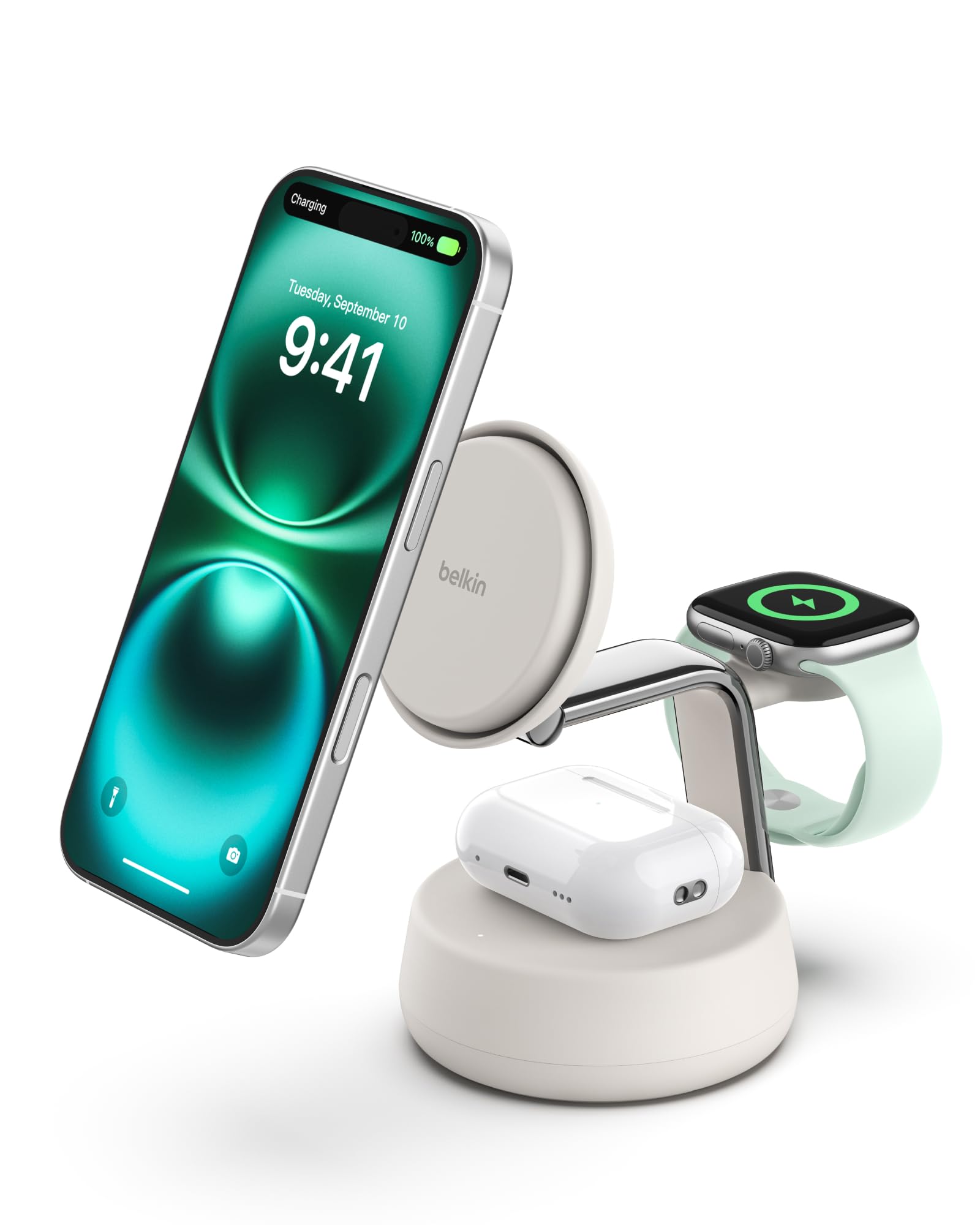
The Belkin UltraCharge Pro 3-in-1 delivers 25W Qi2.2 wireless charging with a different cooling philosophy — ChillBoost active thermal management. A quiet smart fan auto-adjusts speed based on temperature, keeping the dock up to 10°F cooler during high-speed charging. You can toggle the fan on or off manually, and it only runs when a device is attached. Real-world performance is excellent: an iPhone 17 charges from 0-50% in about 25 minutes, and an Apple Watch Series 10 goes from 0-80% in 45 minutes. The 45W power supply is included in the box, so you are ready to go immediately.
The design is intentionally refined. A weighted chrome base provides stability, and soft-touch silicone surfaces give it a furniture-grade feel that blends into a home office or bedside table. Magnetic alignment snaps the phone into the perfect charging position, and the adjustable viewing angle supports StandBy mode effectively. It supports simultaneous charging of an iPhone, Apple Watch, and AirPods (up to 5W for the earbuds). The 5-foot USB-C to USB-C cable gives reasonable placement flexibility without excess slack.
A few users note the magnetic connection can feel slightly loose if the phone is not perfectly centered, and the friction-based arm adjustment may loosen over time with heavy use. The fan produces a light hum that is noticeable in a completely silent room. For Apple users who prioritize a quiet, elegant dock with reliable fast charging and a proven brand, the Belkin delivers a premium experience without the app complexity of the Anker Prime.
Why it’s great
- ChillBoost active cooling keeps phone cool and charging fast
- Premium chrome and silicone construction
- 45W adapter included
- StandBy-compatible with adjustable viewing angle
Good to know
- Fan produces a light hum (not silent)
- Magnetic alignment requires precise centering
- Friction arm may loosen over extended use
3. Hostena 30W Charging Station for Apple Products
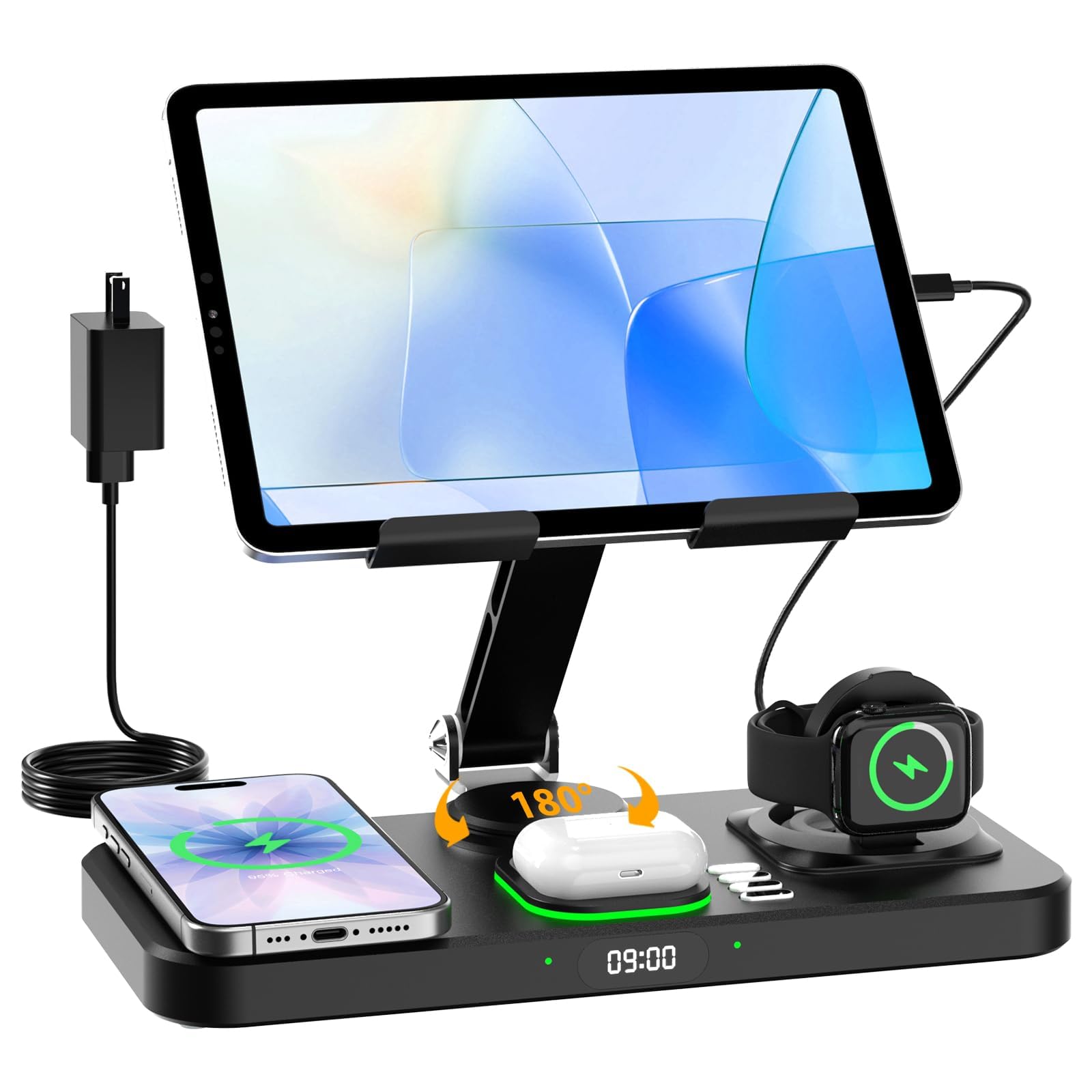
The Hostena 30W dock takes a different approach than the premium trio above — it prioritizes lifestyle features alongside charging. The 6-in-1 station includes a wireless charger for iPhone (up to 15W), a dedicated magnetic spot for Apple Watch, a wireless charging area for AirPods, and two USB-C ports for wired charging of an iPad or other tablets. The standout additions are a built-in digital clock (12-hour format) and a 7-color ambient night light with auto-color cycling, making it a genuine bedside companion rather than just a charging accessory.
The foldable iPad stand is a thoughtful addition for travelers or anyone who follows recipes in the kitchen or instructions in the workshop. It folds flat for easy packing. The 30W total power is sufficient for simultaneous charging of an iPhone and iPad, though it won’t match the blistering wireless speeds of the Anker or Belkin. Build quality is solid with a non-slip base, and the magnetic alignment holds the phone securely. The night light is adjustable via button press and adds a soft glow that is pleasant without being blinding.
There are some limitations to note. The dock only supports Apple Watch — no other smartwatch brands. The AirPods charger requires a wireless charging case (does not work with first-generation AirPods or non-wireless cases). Some users report occasional charging inconsistency where one device fails to start charging, requiring a repositioning. The digital clock is simple and functional but not a smart display. For Apple users who want a bedside station that combines charging, clock, and ambient lighting in one compact device, this is a uniquely appealing option.
Why it’s great
- Combines wireless charging, digital clock, and 7-color night light in one dock
- Foldable iPad stand is very travel-friendly
- Dedicated magnetic spot for Apple Watch
Good to know
- Not compatible with non-Apple watches or first-gen AirPods
- Occasional charging inconsistency reported
- Charges iPad via wired Type-C, not wirelessly
4. HSicily 95W Fast Charging Station
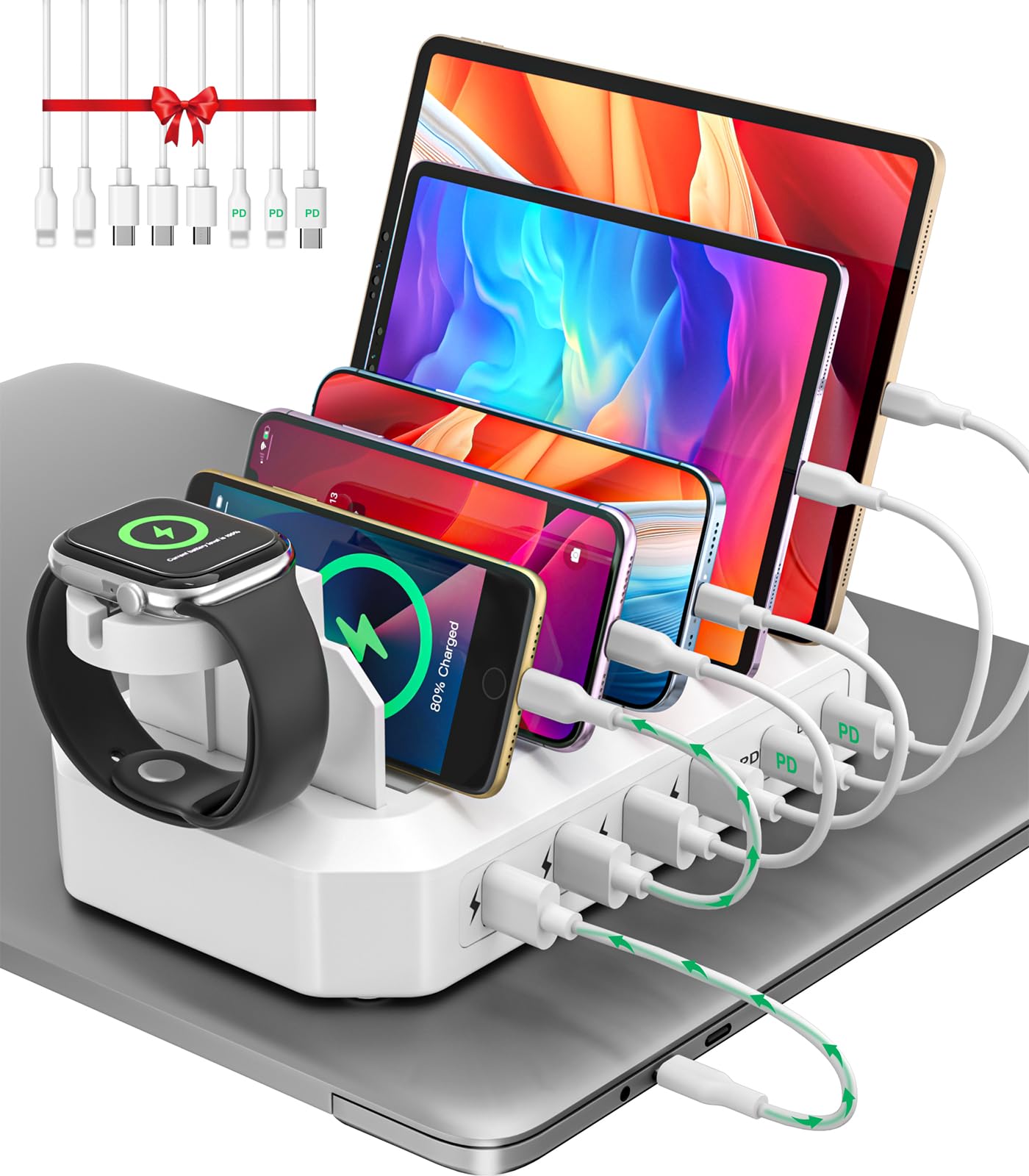
The HSicily charging station is a comprehensive wired hub ideal for mixed-device households and home offices. It packs 2 USB-C ports (supporting up to 65W Power Delivery when used singly) and 4 USB-A ports, delivering a total of 95W. This is enough to charge a MacBook Pro or ThinkPad from empty to 100% in about 90 minutes while simultaneously topping up an iPhone and AirPods. The station includes 8 mixed cables in the box — 2 USB-C to Lightning, 1 USB-C to USB-C, 2 USB-A to Lightning, 2 USB-A to USB-C, and 1 USB-A to Micro — covering essentially every device in a modern household.
The design adds two stands: one for an Apple Watch (note: the Watch charger puck is not included — you place your own) and one for AirPods. The main unit features non-slip pads on the bottom and between the dividers, keeping devices stable and preventing scratches. The flame-retardant ABS construction passes UL safety tests, and the smart GaN chip automatically adjusts voltage and current per device to prevent overcharging. The compact footprint keeps desks organized without dominating the space.
While the station excels at wired charging, its wireless capabilities are limited to the standalone Watch and AirPods platforms — there is no phone wireless pad built in. The bundled cables are a generous 13 inches, which is great for a tidy desk but short for floor or distant outlet placement. A one-year failure on a USB-C port was resolved by responsive warranty service. For anyone who wants a single hub to charge a laptop, phone, watch, earbuds, and tablet simultaneously, this provides tremendous value.
Why it’s great
- 65W PD USB-C can charge a laptop at full speed
- 8 cables included — covers Lightning, USB-C, and Micro-USB
- Apple Watch and AirPods stands included
- UL-tested safety with GaN chip
Good to know
- No built-in wireless charging for phones
- Apple Watch charger puck not included (stand only)
- Short 13-inch cables limit placement
5. MSTJRY 6-Port USB Charging Station
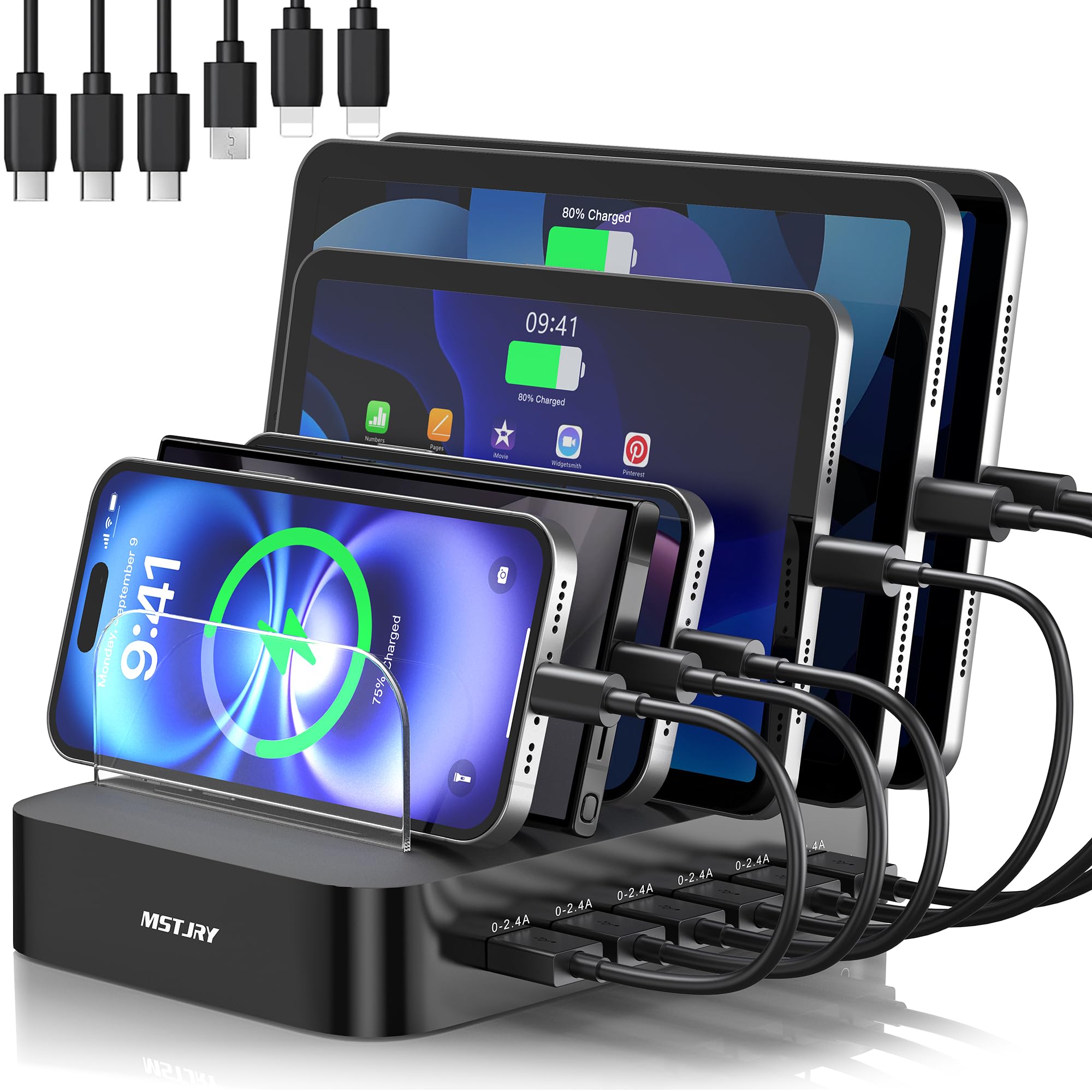
The MSTJRY charging station solves a specific problem: keeping a family’s worth of devices organized while charging them all simultaneously. It features 6 smart USB ports, each delivering a stable 2.4A output regardless of how many devices are plugged in, thanks to an advanced smart chip that prevents power sharing. The physical layout is the standout feature — 7 removable dividers, including 2 extra-tall slots designed specifically for iPads and tablets with thick cases. This creates a bookshelf-like dock where every device stands upright, eliminating the cable spaghetti that comes with scattered charging bricks.
The included cable set is well-considered: 2 Lightning, 3 USB-C, and 1 Micro-USB, all kept short to maintain a clean look. The flame-retardant ABS casing and built-in safeguards (overheat, overvoltage, overcharge, short circuit) provide basic but reliable protection. A dedicated power switch gives you a hard cutoff when not in use. The dock has been trusted by over 1 million users, and the dividers are replaceable, adding long-term usability. It handles everything from phones and tablets to Bluetooth headsets, e-readers, and power banks.
The limitations are straightforward: there is no wireless charging built in, and there is no USB-C Power Delivery port (all ports are standard USB-A at 2.4A). This means it cannot fast-charge a laptop or iPad Pro at full speed. The plastic construction feels sturdy but not premium, and the included cables are basic in quality. For a family with multiple phones, tablets, and earbuds who wants to eliminate counter clutter and ensure each device gets a consistent charge, the MSTJRY is a practical, affordable workhorse.
Why it’s great
- Steady 2.4A per port even with all 6 filled
- Adjustable dividers fit tablets with thick cases
- Included short cables keep desk clean
- Dedicated power switch for complete shutoff
Good to know
- No USB-C PD — cannot fast-charge laptops
- Plastic build feels functional, not premium
- No wireless charging capability at all
6. Anker 313 Wireless Charger (Stand, 2-Pack)

The Anker 313 Wireless Charger (Stand) is the definition of a reliable, no-frills entry-level dock. It delivers up to 10W for Samsung Galaxy devices and 7.5W for iPhones, which is sufficient for overnight charging or maintaining battery levels throughout a workday. The stand design supports both portrait and landscape orientations — charge horizontally for video consumption or vertically for notifications and Face ID. The 2-pack configuration is the real value play: keep one on your nightstand and one on your desk without moving chargers between rooms.
Build quality is typical Anker — compact, lightweight, and durable. The stand works through cases up to 2.5mm thick (plastic, rubber, or TPU), though metal plates or magnetic attachments will interfere. A clear LED indicator confirms charging status. The Micro-USB input (with included 4-foot cable) is a dated connector choice, and the dock requires a separate 9V/2A Quick Charge 2.0 or 3.0 adapter, which is sold separately. For best results, Anker recommends its own PowerPort adapters.
The main drawbacks are charging speed and the Micro-USB port. At 7.5W for iPhones, this is not a fast charger by today’s standards — expect roughly half the speed of a 20W wired brick. The Micro-USB port is the weakest physical point, with some users reporting failure after extended plug/unplug cycles. The 18-month warranty and responsive Anker customer service mitigate this risk. For budget-conscious users who simply want a reliable stand for overnight charging and don’t need blazing speeds, this 2-pack is an easy recommendation.
Why it’s great
- Affordable 2-pack covers nightstand and desk
- Dual orientation charging (portrait and landscape)
- Compact and lightweight for travel
- Charges through most thin plastic cases
Good to know
- Max 7.5W for iPhones — slow by modern standards
- Micro-USB port is fragile and dated
- 9V/2A power adapter not included
7. Kakyanill Power Strip Tower
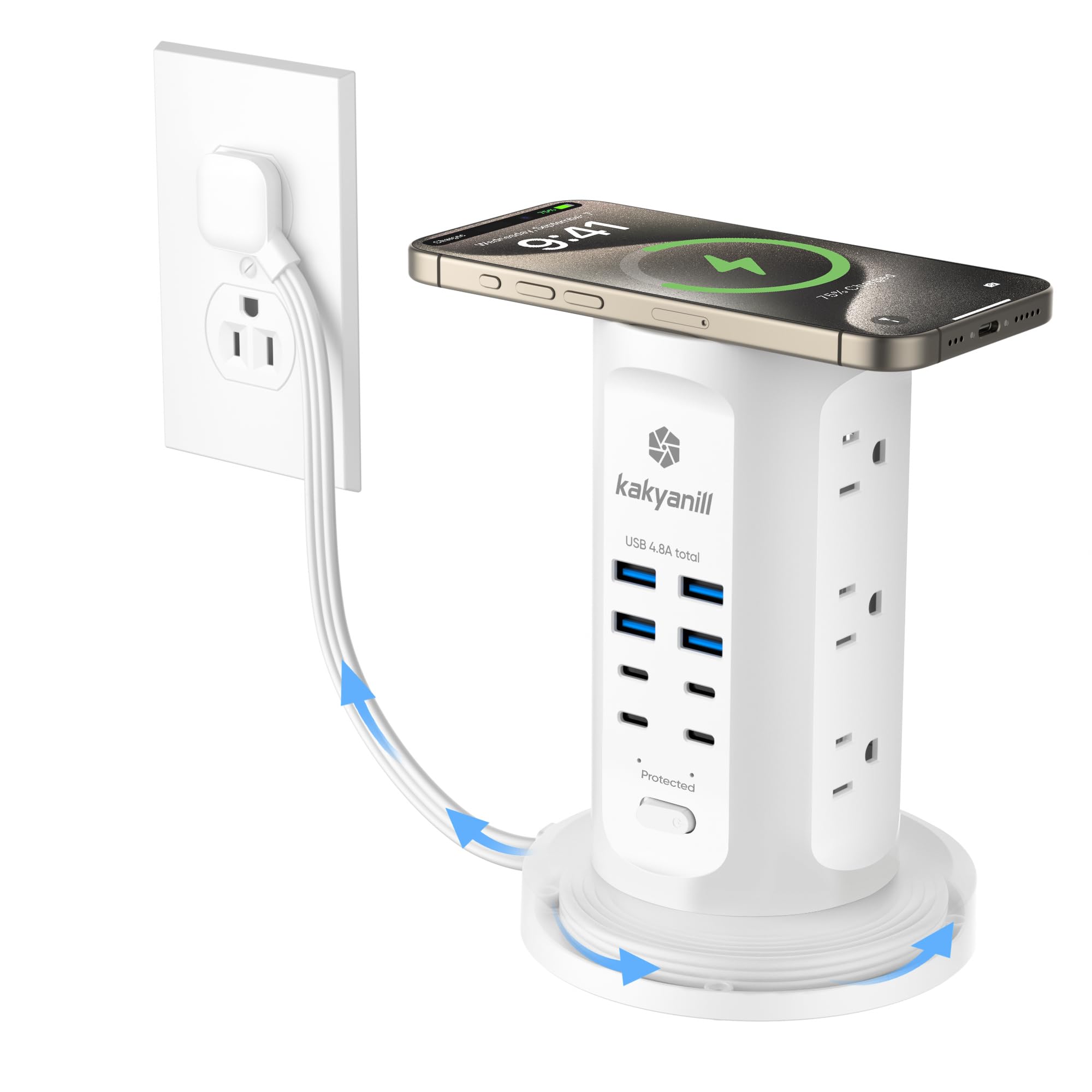
The Kakyanill Power Strip Tower is less a charging dock in the traditional sense and more a vertical power management station. It offers 9 AC outlets spaced 1.5 inches apart (accommodating bulky adapters) and 8 USB ports (4 USB-C and 4 USB-A) with a total USB output of 4.8A. The unique feature is the retractable 6-foot flat cord that winds neatly into the base, eliminating cable clutter when not in use. This makes it ideal for dorm rooms, office desks, or kitchen islands where outlet access is limited.
The tower includes 1080J surge protection, a 15A/1875W circuit breaker, and a fire-resistant ABS shell rated to 1382°F. Individual outlet switches let you cut power to specific devices, and the built-in circuit breaker adds peace of mind for high-wattage appliances like mini-fridges or printers. The flat plug (0.35 inches thin) and 45-degree angled design allow the tower to sit flush behind furniture. User reviews consistently praise its space-saving design and the convenience of the retractable cord, with many using it to power gaming rigs, dual monitors, and phone chargers simultaneously.
The main caveat is that this is not a smart dock — there is no PD negotiation, no GaN fast charging, and no device-specific power management. The USB ports share 4.8A total, so charging multiple tablets simultaneously will be slower than a dedicated PD hub. Some users note the retractable cord can tangle if not wound carefully, requiring disassembly to fix. For anyone who needs a massive expansion of AC and USB ports in a tidy vertical form factor, this tower is a practical, well-reviewed solution.
Why it’s great
- 17-in-1 hub: 9 AC outlets + 8 USB ports (4 USB-C)
- Retractable 6-foot flat cord eliminates cable mess
- 1080J surge protection with individual outlet switches
- UL/FCC certified with fire-resistant shell
Good to know
- USB ports share 4.8A total — not ideal for fast charging multiple large tablets
- No PD or GaN fast charging technology
- Retractable cord can tangle if not wound carefully
FAQ
Can I use a charging dock with a phone case on?
Why does my wireless charger get hot and slow down?
Do I need a PD charger for my charging dock or does it come in the box?
Will a charging dock work with Android phones and Samsung Galaxy Watches?
What is the difference between MagSafe and Qi2 charging?
Final Thoughts: The Verdict
For most users, the best charging dock winner is the Anker Prime 3-in-1 Charging Station because it delivers the fastest wireless speeds (25W Qi2.2), the most advanced thermal management (TEC active cooling), and the only live status display in its class. If you want a quieter, more elegant design with a proven brand and included adapter, grab the Belkin UltraCharge Pro 3-in-1. And for a family with multiple devices that needs a wired, organized hub, nothing beats the value of the HSicily 95W 6-Port Charging Station.

Mo Maruf
I created WellFizz to bridge the gap between vague wellness advice and actionable solutions. My mission is simple: to decode the research and give you practical tools you can actually use.
Beyond the data, I am a passionate traveler. I believe that stepping away from the screen to explore new environments is essential for mental clarity and physical vitality.