Our readers keep the lights on and my smoothie glass nicely filled. As an Amazon Associate, I earn from qualifying purchases.
The gap between what your hand intends and what the screen registers is the single most expensive thing in digital art. A pen display with visible parallax, a laggy cursor, or inaccurate pressure mapping will wreck your linework, force endless undo cycles, and kill your creative momentum before the composition even starts. Finding the right tool means matching your medium—line art, painting, 3D sculpting, or calligraphy—to a device that translates physical motion into digital data without translation loss.
I’m Mohammad Maruf — the founder and writer behind WellFizz. I’ve spent months cross-referencing pressure curves, screen lamination methods, color gamut standards, and real-world driver stability across every major drawing tablet subcategory to separate spec-sheet hype from measurable performance.
This guide cuts through the marketing noise to deliver a clear, head-to-head comparison of the market’s top contenders, helping you choose the right hardware for your exact workflow. Finding the best drawing tablet for artists means understanding which specs actually improve your output.
How To Choose The Best Drawing Tablet For Artists
A pen tablet with a screen is a display you draw on — its internals dictate latency, color fidelity, and pressure nuance. Buyers often overvalue resolution while ignoring the parallax introduced by non-laminated displays. Every millimeter of air gap between the glass and LCD shifts your cursor away from the nib tip. Full lamination eliminates that offset, which matters for tight line art and calligraphy but is less critical for loose painting or photo retouching where absolute positional accuracy is less demanding.
Pressure Sensitivity: 8K vs 16K and What It Actually Changes
Standard 8192-level pressure is already more than most human hands can deliberately control. The leap to 16384 levels — now available on XP-Pen’s X3 Pro chip — does not mean you can suddenly draw finer details. What it changes is the activation force floor. Higher-level tablets register lighter touches before the legacy threshold, which translates to smoother fades at the start of a stroke and better tapered line endings. For brush-and-ink style work or soft airbrush blending, the lower initial activation force matters more than the top-end resolution.
Standalone vs Tethered: The Real Workflow Trade-Off
A tethered pen display relies on your computer’s processing power, which means no battery anxiety and access to full desktop software like Clip Studio Paint EX or Adobe Fresco with zero throttling. A standalone Android tablet frees you from the desk — you can sketch on location, annotate PDFs, or teach without a laptop in sight. The trade-off is software lock-in: Android lacks Procreate, and apps like Krita run with a desktop UI that fights small screens. Decide based on whether your primary seat is a studio desk or a coffee shop table.
Color Gamut, Anti-Glare, and Build Quality
99% sRGB is the baseline for web-first work. If you output to print, look for 90%+ Adobe RGB or 95%+ DCI-P3 coverage. Anti-glare etched glass reduces reflections and adds a paper-like drag to the nib, but coarse etching can introduce a visible sparkle that muddy dark gradients — premium tablets use finer etching. Build materials matter for heat dissipation and durability: metal-backed panels run cooler during marathon sessions than plastic enclosures.
Quick Comparison
On smaller screens, swipe sideways to see the full table.
| Model | Category | Best For | Key Spec | Amazon |
|---|---|---|---|---|
| XP-Pen Artist Pro 14 Gen2 | Premium Pen Display | Hyper-detailed line art & illustration | 16384 pressure levels, X3 Pro chip | Amazon |
| XPPen Magic Drawing Pad | Standalone Android | On-the-go sketching without a PC | 12.2″ 2160×1440, 16K pen | Amazon |
| Wacom Cintiq 16 | Industry Standard | Professional print & animation work | 2.5K WQXGA, 99% DCI-P3 | Amazon |
| HUION Kamvas Slate 11 | Standalone Android | Note-taking & mobile art beginners | 10.95″ FHD+, 90Hz refresh | Amazon |
| XP-Pen Artist 13.3 Pro V2 | Mid-Range Pen Display | Space-constrained desktop setups | 16K pressure, red dial roller | Amazon |
| XPPen Artist13.3 Pro V2 (Dial) | Mid-Range Pen Display | Efficient workflow with shortcuts | Red Dial, 8 programmable keys | Amazon |
| UGEE UE12 | Budget Pen Display | Entry-level screen drawing | 11.6″ FHD, 124% sRGB gamut | Amazon |
| HUION Inspiroy Frego | Pen Tablet | Portable wireless drawing | 10×6.25″ area, Bluetooth | Amazon |
| Frunsi RubensTab T8 | Standalone Budget | Young beginners & casual art | 8″ FHD, Android 13, 4GB RAM | Amazon |
In‑Depth Reviews
1. XP-Pen Artist Pro 14 Gen2

The Artist Pro 14 Gen2 represents the best balance of precision hardware and workflow features in the mid-premium tier. Its X3 Pro smart chip delivers 16384 pressure levels with an extremely low initial activation force — real-world benefit is cleaner tapered strokes and smoother pressure fades that 8192-level tablets struggle to match. The 14-inch 1920×1200 display uses full lamination and anti-glare etched glass, so parallax is eliminated and the surface drag feels like quality marker paper rather than slick glass.
Color coverage hits 99% sRGB and 123% sRGB gamut area with a Delta E under 2.2, which means prints and exports match the screen without surprise shifts. The inclusion of a foldable stand, a wireless Mini Keydial remote, and an X-Edge wrist rest turns this into a complete ergonomic kit out of the box — you do not need to buy accessories to get a comfortable drawing angle or shortcut access. The remote pairs via RF rather than Bluetooth, so there is zero pairing delay.
The tablet also supports a dual-mode switch that lets you turn off the screen and use it as a standard pen tablet, which saves laptop battery and reduces neck strain when you want to reference the main monitor. Driver stability across Windows, macOS, and Linux is solid, though Android support requires USB 3.1 with DP Alt Mode. The only compromise is the 16:10 aspect ratio — some creative software still expects 16:9, resulting in small black bars unless you adjust canvas dimensions.
Why it’s great
- Industry-first 16K pressure with ultra-low activation force improves line tapering
- Full-laminated anti-glare glass eliminates parallax and reduces eye strain
- Wireless Mini Keydial remote adds hardware shortcuts without cable clutter
Good to know
- 16:10 aspect ratio may leave letterbox bars in some 16:9-only applications
- Pen does not include an eraser tail — eraser function requires button mapping
2. XPPen Magic Drawing Pad

If your workflow demands a computer-free solution, the Magic Drawing Pad is the most serious standalone option in the sub- space. The 12.2-inch AG-etched display runs at 2160×1440 resolution with a 3:2 aspect ratio that mimics the proportions of a physical sketchbook. The X3 Pro Slim stylus delivers the same 16384-level pressure engine as XP-Pen’s desktop displays, and it requires no battery or Bluetooth pairing — just pick it up and draw.
The internal hardware pairs an 8-core CPU with 8GB of RAM and 256GB of internal storage (expandable to 1TB via microSD), so it handles layered Clip Studio Paint files and high-res vector inks without stuttering. Battery life reaches 13 hours of continuous drawing from the 8000mAh cell, which is enough for a full day of on-location sketching. The screen is TÜV Rheinland certified for low blue light and includes ten-step soft light adjustment, reducing eye fatigue during long sessions.
The trade-off is the Android ecosystem. There is no ProCreate, and while Clip Studio Paint and ibisPaint X come pre-installed (with 3-month memberships), apps like Krita display a desktop-oriented UI that fights the smaller screen. Palm rejection is software-dependent — some users report needing a drawing glove for consistent performance. The bundled keyboard case is functional but its trackpad slides on smooth surfaces, so a Bluetooth mouse is a worthwhile addition.
Why it’s great
- AG-etched glass provides a paper-like drawing texture with zero parallax
- Battery-free X3 Pro Slim stylus with 16K pressure never needs charging
- 256GB base storage with microSD expansion handles large art file libraries
Good to know
- Android app ecosystem lacks ProCreate and desktop-grade UI scaling
- Keyboard case trackpad performance degrades on uneven or soft surfaces
3. Wacom Cintiq 16

Wacom’s Cintiq 16 sets the resolution benchmark in this comparison with a 2560×1600 WQXGA IPS display — that is 191 PPI on a 16-inch panel, which makes fine type and thin vector lines razor-sharp. The 100% sRGB and 99% DCI-P3 coverage targets the print and animation markets where color accuracy for export is non-negotiable. The 8-bit color depth with dithering handles smooth gradients without visible banding in most real-world scenarios.
The Pro Pen 3 delivers 8192 levels of pressure with Wacom’s signature consistency — the pressure curve feels linear across the full range, unlike some competitors that compress the mid-range. The pen includes a built-in holder that mounts magnetically to either side of the display, keeping the stylus accessible without a separate dock. The display ships with fold-out legs for a 20-degree working angle, and it supports VESA mounting for custom arm setups.
The Cintiq 16 is not a standalone device — it requires a USB-C connection with DisplayPort Alt Mode or Thunderbolt 3/4. The package does not include a mini-HDMI cable, which some desktop users will need to purchase separately. The non-laminated glass means there is a visible parallax gap of roughly a millimeter between the nib and the cursor, which bothers precision line artists more than painters. The Pro Pen 3 also ships without the interchangeable weight rings and grips available on the standalone pen — it feels lighter and narrower than older Wacom pens.
Why it’s great
- 2.5K WQXGA resolution delivers the sharpest image in this lineup
- DCI-P3 coverage matches cinema-grade color standards for print and video
- VESA mount compatible for ergonomic arm setups
Good to know
- Non-laminated glass introduces visible parallax compared to full-lamination rivals
- Pro Pen 3 ships without interchangeable grips or an eraser tail
4. HUION Kamvas Slate 11

The Kamvas Slate 11 is Huion’s all-in-one standalone drawing tablet that runs Android 14 out of the box, meaning you can open Clip Studio Paint or ibisPaint X without connecting to a computer. The 10.95-inch FHD+ display (1920×1200) uses full-lamination and a nano-etched anti-glare surface, which nearly eliminates parallax and gives the pen tip a paper-like drag. The 90Hz refresh rate is unusual for a drawing tablet — it makes panning and zooming feel fluid, though the difference matters more for UI navigation than static line drawing.
Internal specs include an 8-core CPU, 8GB of RAM, and 128GB of storage expandable to 1TB via microSD. The 8000mAh battery is rated for all-day use, and the included H-Pencil stylus offers 4096 levels of pressure with 60-degree tilt recognition — adequate for sketching and note-taking, though the pressure resolution is lower than the 16384-level competitors in this list. The tablet also packs an 8MP front camera and a 13MP rear camera with flash, turning it into a functional Android tablet for reference photo capture and video calls.
The pre-installed creative suite includes Clip Studio Paint and ibisPaint X with three-month free memberships, plus a leather case and glove in the box. Palm rejection has been reported as inconsistent — some users experience choppy strokes when the palm rests on the screen, requiring a glove to mitigate. The H-Pencil stylus lacks a side button or eraser, which limits shortcut customization compared to XP-Pen or Wacom pens. The tablet also runs warm on the left side during extended use, though heat levels stay within comfortable limits.
Why it’s great
- Full-laminated anti-glare screen with 90Hz smooth scrolling
- Pre-installed Clip Studio Paint and ibisPaint X with free memberships
- 8000mAh battery supports all-day mobile sketching sessions
Good to know
- Palm rejection can be inconsistent, requiring a glove for reliable strokes
- H-Pencil stylus limited to 4096 pressure levels with no side button or eraser
5. XP-Pen Artist 13.3 Pro V2
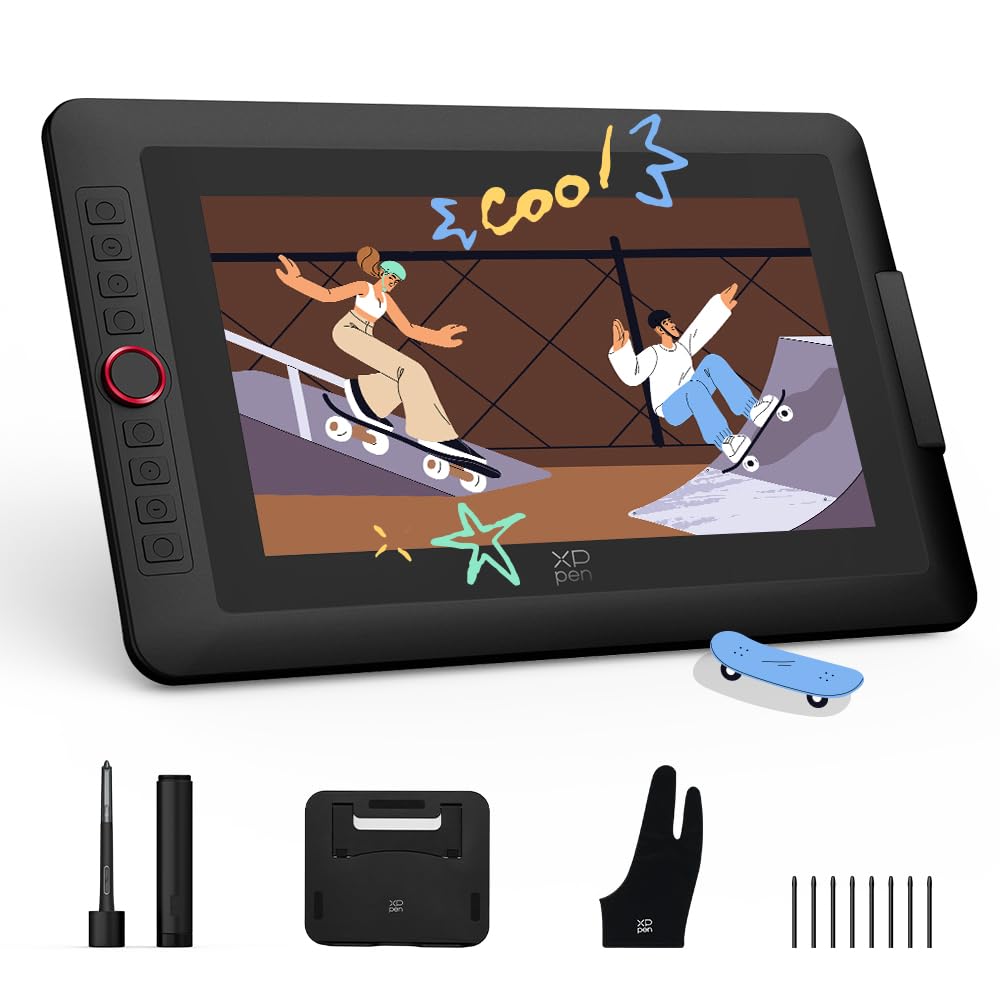
The Artist 13.3 Pro V2 is a smaller sibling to the 14 Gen2, but it shares the same X3 Pro smart chip and 16384-level pressure engine. The 13.3-inch 1920×1080 display is fully laminated with an anti-glare film, eliminating parallax while providing a textured drag that mimics traditional paper. The color gamut covers 99% sRGB, 89% Adobe RGB, and 95% P3 — strong numbers for a display at this size, though the 13.3-inch diagonal means less canvas real estate than the 14-inch or 16-inch options.
The standout hardware feature is the red dial roller alongside 8 customizable express keys. The dial controls brush size, zoom, and canvas rotation without lifting the stylus, and the keys can be assigned per-application through the driver software. The metal back panel provides better heat dissipation than plastic competitors, keeping the screen cool during multi-hour sessions. The tablet can switch between pen display mode and pen tablet mode (screen off), which saves laptop battery when you only need tracking area.
Setup requires a 3-in-1 HDMI cable for devices without USB-C with DP Alt Mode — the full-featured USB-C cable only works with computers that support USB 3.1 and DP 1.2 over Type-C. Some users have reported needing a firmware update before the tablet is recognized on Chromebook and Android devices, where the express keys may also be non-functional due to missing driver support. The included foldable stand is a basic V-shaped design that works but lacks angle adjustment compared to the S01 stand bundled with higher-tier XP-Pen models.
Why it’s great
- X3 Pro chip delivers 16K pressure with fast 90ms initial response
- Red dial roller provides tactile shortcut control without leaving the canvas
- Metal back panel dissipates heat faster than plastic alternatives
Good to know
- 13.3-inch diagonal reduces working area compared to 14-inch and 16-inch models
- Chromebook and Android devices may need firmware update for full functionality
6. XPPen Artist13.3 Pro V2 (Dial Version)

This second listing of the Artist 13.3 Pro V2 appears to be an identical hardware revision sold under a slightly different SKU, but the core specs match the previous model: X3 Pro chip with 16384 pressure levels, full-laminated 13.3-inch FHD display with AG film, and the same red dial roller with 8 express keys. The inclusion of the S01 foldable stand in this package gives better angle adjustment than the basic stand in the other listing, making this the better out-of-box value for ergonomic setup.
The display covers 125% sRGB gamut area and 99% sRGB coverage, with 95% P3 coverage — real-world color accuracy is excellent for the price bracket, and the 250 cd/m² brightness is sufficient for indoor studio use. The full-lamination with AG film eliminates the air gap, so the cursor sits directly under the nib tip, critical for tight line art where even 1mm of offset throws off alignment. The screen supports 178-degree viewing angles, so color and contrast stay consistent even when sharing the screen with a client or student.
Customer feedback highlights a potential driver bug where pen misalignment occurs when the tablet is used as a secondary display at a different resolution than the built-in laptop screen. Setting both displays to 1080p resolves the issue, but this is an extra step that some users may find frustrating. The pen nibs are reported to wear faster than Wacom equivalents, so ordering a third-party nib pack or a screen protector is recommended for heavy users who apply significant pressure during drawing sessions.
Why it’s great
- S01 foldable stand provides multiple angle adjustments right in the box
- Full-lamination with AG film gives a crisp, parallax-free drawing surface
- Driver supports per-application shortcut mapping for efficient workflow
Good to know
- Pen alignment may drift when using tablet as secondary display at mixed resolutions
- Pen nibs wear faster than Wacom equivalents for high-pressure artists
7. UGEE UE12

The UGEE UE12 is a full-laminated pen display that undercuts the premium tier on price while still delivering a zero-parallax drawing experience. The 11.6-inch 1920×1080 screen covers 124% sRGB color gamut, and you can switch between sRGB, Adobe RGB, and DCI-P3 color spaces directly from the display settings — a feature usually reserved for more expensive hardware. The battery-free stylus supports 16K-level pressure sensitivity and 60-degree tilt, and the 8 replacement nibs included in the package are a welcome bonus for heavy users.
The tablet body includes 8 concave-convex shortcut keys designed for blind operation, meaning you can feel which key you are pressing without looking away from the canvas. Dual USB-C ports allow plug-and-play connection to Windows, macOS, Android, and ChromeOS devices with a single full-featured USB-C cable, eliminating the need for a bulky 3-in-1 adapter. Build quality is adequate for the price point, with a sturdy screen that does not flex under normal drawing pressure.
The included nibs wear down quickly — users with a heavy hand report needing replacements within months of moderate use. A slight electrical buzzing has been reported at the power port on some units, though the sound is quiet enough that it disappears under ambient room noise or headphones. The 11.6-inch diagonal is smaller than the 13.3-inch and 16-inch panels, so users transitioning from larger displays may feel cramped when working on multi-layered compositions or wide canvas layouts.
Why it’s great
- Full-laminated screen eliminates parallax at a budget-friendly price point
- Triple color space switching (sRGB, Adobe RGB, DCI-P3) for flexible output matching
- Dual USB-C ports allow single-cable connectivity to most devices
Good to know
- Pen nibs wear rapidly under moderate to heavy drawing pressure
- 11.6-inch display feels compact for multi-window or large canvas work
8. HUION Inspiroy Frego Medium

The Inspiroy Frego is a traditional pen tablet — no screen, just a 10×6.25-inch active area that maps to your computer monitor. This form factor is lighter, cheaper, and more durable than a pen display, making it the right choice for artists who prefer to look at their main monitor while drawing, or for those who need a highly portable device for travel and teaching. The PW550S pen delivers 8192 levels of pressure with 60-degree tilt support, and the 0.4mm retraction distance provides solid tactile feedback — the nib depresses noticeably under pressure, which helps with pressure control.
Bluetooth connectivity means you can pair it with Windows, macOS, or Android devices without a cable, and the 24-hour battery life (2.5 hours to full charge) handles full work weeks between charges. The tablet’s symmetrical design supports both right-handed and left-handed orientation, and the sloping curved edges reduce wrist strain when the hand contacts the edge of the tablet. The included nylon pen holder is built into the tablet body, so the pen stays secure during transit without a separate case.
The lack of physical shortcut buttons on the tablet surface is a deliberate minimalist choice — you operate shortcuts entirely through the pen’s two programmable side keys and your keyboard. Some users find this limiting for applications like Photoshop or Clip Studio Paint where quick tool switching is essential. The smooth, non-textured surface has less drag than textured competitors, which some artists find slippery for controlled line work. Wireless mode can introduce occasional glitchy cursor behavior, and several users recommend switching to wired USB-C for precision-demanding tasks.
Why it’s great
- 24-hour battery life and Bluetooth support for wireless, cable-free drawing
- Symmetrical ergonomic design comfortable for both left and right-handed artists
- Minimalist, lightweight build is easy to pack for mobile or classroom use
Good to know
- No on-tablet shortcut keys — relies entirely on keyboard and pen button mapping
- Non-textured surface may feel too smooth for artists who prefer paper-like drag
9. Frunsi RubensTab T8

The RubensTab T8 is a standalone Android 13 drawing tablet aimed at entry-level users, students, and children who want a screen they can draw on without connecting to a computer. The 8-inch 1200×800 display is small by adult standards, but the included detachable keyboard and magnetic stand turn it into a functional mini-laptop for note-taking and sketching. The MTK quad-core CPU with 4GB RAM and 64GB storage (expandable to 256GB) is sufficient for lightweight apps like SketchBook, ArtFlow, and ibis Paint X, though it struggles with heavy multi-layered Clip Studio Paint files.
The 2048-level pressure sensitivity is the lowest in this comparison — it captures basic taper and fade, but experienced artists will feel the lack of nuance compared to 8192-level or 16384-level pens. Diagonal line wobble and occasional lag with heavy brushes are limitations of the entry-level hardware, though line smoothing settings in most drawing apps mitigate the issue. The 4000mAh battery delivers roughly 3.5 hours of active drawing time, which is half the capacity of premium standalone tablets.
Where the T8 excels is its accessible price point and complete package: it ships with the keyboard, magnetic stand, screen protector, stylus, and cleaning cloth included. Customer service has been praised for fast warranty replacements, which matters at this tier where hardware reliability can vary between units. The lack of palm rejection and limited pressure control app are notable gaps — younger users or absolute beginners may not notice, but artists with experience on higher-end gear will feel constrained by both the screen size and the stylus precision ceiling.
Why it’s great
- Complete out-of-box package with keyboard, stand, pen, and screen protector
- Standalone Android system runs drawing apps without a PC or laptop
- Compact 8-inch footprint and responsive customer service for warranty claims
Good to know
- 2048 pressure levels lack the nuance required for professional or semi-pro work
- 3.5-hour active battery life is half the endurance of premium standalone models
FAQ
Can I use a drawing tablet without a computer?
What is the practical difference between 8192 and 16384 pressure levels?
Does full lamination matter for beginners?
How often do drawing tablet nibs need replacement?
Final Thoughts: The Verdict
For most artists, the best drawing tablet for artists overall is the XP-Pen Artist Pro 14 Gen2 because it delivers 16384-level pressure, full-laminated anti-glare display, and a complete ergonomic kit (stand, remote, wrist rest) at a mid-premium price that undercuts Wacom. If you need a standalone device for sketching without a computer, the XPPen Magic Drawing Pad offers the best pen-to-screen experience on Android with 16K pressure and a paper-like AG-etched display. And for professionals whose output demands the highest resolution and color fidelity for print or animation, the Wacom Cintiq 16 provides a 2.5K panel with DCI-P3 coverage and Wacom’s industry-standard pressure curve, despite the parallax from its non-laminated glass.

Mo Maruf
I created WellFizz to bridge the gap between vague wellness advice and actionable solutions. My mission is simple: to decode the research and give you practical tools you can actually use.
Beyond the data, I am a passionate traveler. I believe that stepping away from the screen to explore new environments is essential for mental clarity and physical vitality.