Our readers keep the lights on and my smoothie glass nicely filled. As an Amazon Associate, I earn from qualifying purchases.
The difference between a satisfying digital sketching session and a frustrating one comes down to the device in your hands. Screen response time, stylus pressure sensitivity, and how closely the surface mimics real paper determine whether you stay in the creative flow or fight the tool.
I’m Mohammad Maruf — the founder and writer behind WellFizz. I’ve spent hundreds of hours analyzing the hardware specs, driver stability, and real-world user experiences across the current drawing tablet market to find which models actually deliver on their promises.
Whether you need a portable standalone unit or a high-precision pen display, this guide breaks down the top options to help you find the best drawing pad for your specific workflow and budget.
How To Choose The Best Drawing Pad
Drawing pads are not one-size-fits-all. A student sketching in a coffee shop needs different battery life and portability than a professional illustrator working with layered files in Clip Studio Paint. The right choice depends on three core factors: whether you need a standalone device, the level of pressure sensitivity required for your art style, and the quality of the screen surface itself.
Standalone vs. Computer-Dependent
Standalone tablets — like the Wacom MovinkPad 11, XP-Pen Magic Drawing Pad, Huion Kamvas Slate 10, and Frunsi RubensTab T11 Pro — run their own operating system (typically Android) and need no external computer. You can draw immediately after powering on. Computer-dependent tablets (pen displays) such as the XP-Pen Artist 13.3 Pro V2 or the Huion Inspiroy 2 require a wired connection to a PC or Mac and offer no onboard processing power. Standalone units give you freedom of movement but may limit software choice to mobile versions. Pen displays provide direct access to full desktop applications like Photoshop but tether you to a workstation.
Pressure Sensitivity and Pen Technology
Budget-friendly tablets often use 4096 pressure levels, while mid-range models hit 8192, and premium flagship pens now reach 16384 levels. Higher sensitivity translates to finer differentiation between light sketches and bold strokes, though the practical difference between 8192 and 16384 is most noticeable during delicate shading work. Battery-free pens — found on the Huion Inspiroy 2, Xencelabs Small, and XP-Pen Artist 13.3 Pro V2 — eliminate charging anxiety and maintain consistent weight. The X3 Pro Slim stylus used in XP-Pen’s newest models offers tilt recognition up to 60 degrees, crucial for natural brush angle effects.
Screen Surface and Parallax
A full-laminated screen bonds the display panel to the protective glass, reducing the gap between the stylus tip and the pixel — minimizing parallax. Models like the XP-Pen Artist 13.3 Pro V2 and Huion Kamvas Slate 10 use full lamination with anti-glare (AG) film to cut reflections and create a paper-like drag. The Wacom MovinkPad 11 uses etched glass for a similar textured feel. Budget screenless tablets (the Huion Inspiroy 2 and Xencelabs Small) have no parallax issues by design, since you draw on a blank surface while watching the cursor on your monitor — but that separation can feel less intuitive for beginners.
Quick Comparison
On smaller screens, swipe sideways to see the full table.
| Model | Category | Best For | Key Spec | Amazon |
|---|---|---|---|---|
| Wacom MovinkPad 11 | Standalone | Premium portable sketching | 8192 pressure, 11″ etched glass | Amazon |
| XP-Pen Magic Drawing Pad | Standalone | High-res paper-like standalone | 16384 pressure, 12.2″ 2K screen | Amazon |
| XP-Pen Artist 13.3 Pro V2 | Pen Display | Desktop color-critical work | 16384 pressure, 99% sRGB, full-laminated | Amazon |
| Huion Kamvas Slate 10 | Standalone | Affordable standalone creation | 4096 pressure, 10.1″ IPS Android 12 | Amazon |
| RubensTab T11 Pro | Standalone | Beginner no-computer entry | 1024 pressure, 10.1″ FHD Android | Amazon |
| Xencelabs Small | Pen Tablet | Screenless wireless precision | 8192 pressure, 16:9 active area, wireless | Amazon |
| Huion Inspiroy 2 Small | Pen Tablet | Ultra-portable value pick | PenTech 3.0 stylus, scroll wheel | Amazon |
In‑Depth Reviews
1. Wacom MovinkPad 11

The Wacom MovinkPad 11 is the most thoughtfully designed standalone drawing tablet in this lineup. Its 11.45-inch anti-glare etched glass screen delivers a paper-like drag that feels organic under the slim battery-free Pro Pen 3, which stores replacement nibs directly inside the barrel. Running Android 14 with 8GB RAM and 128GB storage, it launches Wacom Canvas instantly through the Quick Draw feature — tap and hold the pen on the locked screen to start sketching without navigating menus.
The 8192 pressure levels provide precise line variation for shading and thin strokes, and the matte surface eliminates distracting glare even under harsh lighting. Weighing 1.3 pounds, it is lighter than most laptops and fits comfortably into a bag alongside a sketchbook. The inclusion of a two-year Clip Studio Paint Debut license gives standalone users access to a professional-grade application without additional purchase.
Battery life is strong enough for full-day outings, though charging is on the slower side — the 6000mAh cell compensates by lasting through extended sessions. Some users note that the touch screen can be finicky, and the lack of a headphone jack may require a USB-C adapter for private audio. The MovinkPad 11 is expensive, but its seamless integration of hardware and software justifies the investment for artists who prioritize mobility and a distraction-free workflow.
Why it’s great
- Best-in-class matte etched glass screen with no parallax
- Battery-free Pro Pen 3 with 8192 levels and onboard nib storage
- Quick Draw feature for instant sketching from lock screen
Good to know
- No included protective case for travel
- No headphone jack; requires USB-C adapter for wired audio
2. XP-Pen Magic Drawing Pad

The XP-Pen Magic Drawing Pad is a standalone powerhouse that leapfrogs competitors with the industry-first X3 Pro Slim stylus delivering 16384 levels of pressure sensitivity. That means it detects four times the pressure gradations of most 4096-level tablets, making it ideal for artists who work with ultra-fine shading or watercolor-style digital brushes. The 12.2-inch screen runs at a sharp 2160×1440 resolution with a 3:2 aspect ratio, closely matching traditional sketchbook proportions.
The AG-etched glass surface provides a satisfying paper-like resistance without being overly grabby, and the TÜV Rheinland eye-comfort certification — combined with ten-step soft light adjustment — lets you draw for hours without eye strain. With 8GB RAM and 256GB storage (expandable via microSD up to 1TB), the Magic Drawing Pad handles multi-layer Clip Studio Paint files without stutter. The 8000mAh battery delivers a genuine thirteen hours of continuous drawing.
Tilt recognition is limited compared to Wacom’s implementation, and the Android 14 system is not guaranteed to receive major OS upgrades — what you buy is what you get long-term. The pre-installed apps (including a 3-month Clip Studio Paint membership) are solid, but some users report that no single Android app fully matches ProCreate’s polish. Still, for the price, the Magic Drawing Pad offers raw pressure sensitivity and screen quality that rivals devices costing considerably more.
Why it’s great
- Industry-first 16384 pressure levels for ultra-fine shading
- 13-hour battery life with 8000mAh capacity
- TÜV Rheinland eye-comfort certified screen
Good to know
- Tilt response is not as refined as premium competitors
- Android 14 is unlikely to receive major version upgrades
3. XP-Pen Artist 13.3 Pro V2

The XP-Pen Artist 13.3 Pro V2 is a pen display that brings workstation-grade color accuracy to a compact 13.3-inch form factor. Its full-laminated AG screen eliminates the air gap that causes parallax, so the stylus tip touches the pixel directly — a critical detail for precise line work. The 99% sRGB and 95% DCI-P3 color coverage ensures that what you see on screen matches print output, making it suitable for illustrators and designers working with brand palettes.
The X3 Pro Smart Chip stylus offers 16384 pressure levels and a 60-degree tilt range, picking up subtle angle changes for natural brush rotation. The Red Dial Quick Key lets you zoom, scroll, or adjust brush size with a physical knob, reducing reliance on keyboard shortcuts. Eight customizable press keys sit along the left side, and the included adjustable stand promotes ergonomic posture during long sessions. Its 1920×1080 resolution at this screen size yields a crisp pixel density for detailed work.
The unit is not standalone — it requires a USB-C connection to a computer. Drivers can occasionally misalign the pen cursor when using multiple monitors at different resolutions, though setting both displays to 1080p resolves the bug. The included foldable stand is sturdy, and the bundle covers cables, a glove, and spare nibs. For artists who work primarily at a desk and demand color fidelity, this pen display punches above its price segment.
Why it’s great
- Full-laminated AG screen with zero parallax
- 99% sRGB and 95% P3 color gamut coverage
- Red Dial Quick Key for hands-free zoom and brush control
Good to know
- Requires a computer; not standalone
- Driver bug with multi-monitor setups at mixed resolutions
4. Huion Kamvas Slate 10

The Huion Kamvas Slate 10 bridges the gap between entry-level standalone tablets and premium models. Its 10.1-inch Full HD IPS screen uses full lamination and an anti-glare writing film to reduce reflections and oil smudges — a practical feature for artists who draw in varied lighting. The rechargeable HS200 pen provides 4096 pressure levels and tilt recognition, enough for expressive strokes and smooth line work, though not as granular as the 8192 or 16384 options higher in the list.
Under the hood, an 8-core CPU, 8GB RAM, and 128GB storage (expandable to 512GB via SD card) handle Android 12, Huion’s pre-installed HiPaint app, and most Google Play creative tools without major lag. The 6000mAh battery delivers enough runtime for a day of sketching, and the included leather adjustable stand doubles as a protective cover. Front and rear cameras add versatility for reference photo capture and video calls.
Some users report that palm rejection can be inconsistent, causing stray marks during long drawing sessions. The tablet can also run warm near the left side under sustained use. Pressure fine-tuning requires adjustment — out of the box, the stylus demands a heavier hand than some artists prefer. At its price point, the Kamvas Slate 10 is a capable, feature-rich standalone option that works well for students and hobbyists moving up from screenless tablets.
Why it’s great
- Full-laminated anti-glare screen minimizes reflections
- Expandable storage up to 512GB for large art files
- Includes leather adjustable stand and USB-C power adapter
Good to know
- Palm rejection can be inconsistent during use
- Stylus needs pressure sensitivity recalibration out of box
5. RubensTab T11 Pro
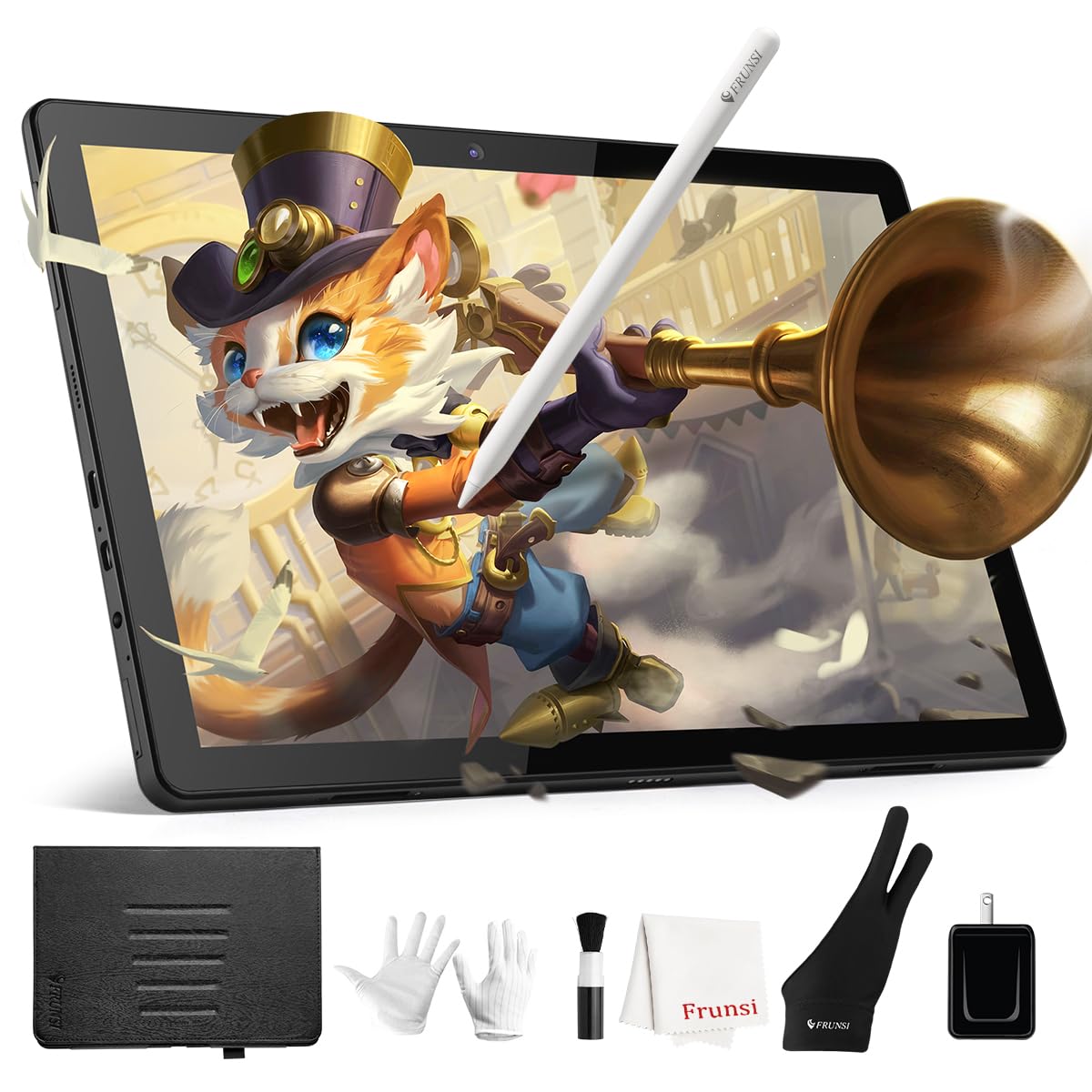
The RubensTab T11 Pro is a budget-friendly standalone drawing tablet that removes the computer requirement at a low entry barrier. Its 10.1-inch Full HD IPS screen delivers vibrant colors and wide viewing angles, while the battery-free pressure-sensitive pen offers 1024 levels — modest by modern standards but functional for basic sketching, note-taking, and beginner practice. Pre-installed apps like Krita and Sketchbook let new artists start immediately without hunting for software.
The 5800mAh battery provides up to five hours of continuous use, which is enough for a classroom day or a trip to the coffee shop. The included adjustable stand case protects the tablet during transport and props it at a comfortable angle on a desk. Android 12 keeps the interface familiar, and Wi-Fi connectivity allows downloading additional apps from the Google Play Store. Customer support is notably responsive and helpful according to user reports.
The 1024 pressure sensitivity is the main limitation — subtle brush transitions and delicate shading are lost compared to higher-tier tablets. Some users report shaky lines when drawing slowly without the ruler tool, and the processor can show slight lag with complex multi-layer files. The Frunsi brand is less established than Huion or XP-Pen, which may cause hesitation for some buyers. For absolute beginners or parents equipping a young artist, the RubensTab T11 Pro offers a functional, standalone experience at a reasonable cost.
Why it’s great
- Fully standalone operation with no computer needed
- Pre-installed Krita and Sketchbook for immediate drawing
- Helpful customer service team according to user feedback
Good to know
- 1024 pressure sensitivity misses subtle brush transitions
- Slow strokes may produce shaky lines without ruler assist
6. Xencelabs Small

The Xencelabs Small is a screenless pen tablet co-designed with input from professional creatives, manufactured to directly challenge Wacom’s dominance in the space. Its active area measures 6.93 x 3.89 inches with a true 16:9 aspect ratio that matches standard monitors, so your cursor mapping feels natural without scaling distortion. The tablet ships with two battery-free pens — one slim and one thicker — housed in an elegant carrying case, offering immediate choice based on hand preference.
8192 levels of pressure sensitivity and 5080 LPI resolution deliver virtually no lag and smooth line registration. Wireless connectivity via USB dongle provides up to 16 hours of drawing on a 2.5-hour charge, giving you desk-free flexibility without Bluetooth pairing headaches. The minimalist design places three nested quick keys at the top center, reducing clutter and accidental presses common on side-button layouts. Driver software is clean and customizable across applications.
Some users have reported initial tracking and mapping quirks on newer MacBook Pro M2 Max models, though pressing the pen buttons to re-establish connection typically resolves them. The thicker pen includes a third button near the tip that some artists find uncomfortable due to a sharp edge. Wired mode is preferred for latency-sensitive work. For artists transitioning from Wacom who want a well-built wireless pen tablet with dual-pen versatility, the Xencelabs Small is a compelling alternative.
Why it’s great
- True 16:9 aspect ratio for natural monitor mapping
- Includes two different battery-free pens in a carrying case
- Wireless with 16-hour battery life on 2.5-hour charge
Good to know
- Occasional tracking issues on newer MacBooks (fixable with pen button press)
- Thick pen’s third button can have a sharp edge at the tip
7. Huion Inspiroy 2 Small

The Huion Inspiroy 2 Small proves that a budget-friendly pen tablet can still feel premium where it counts. Its active area of 6.3 x 3.9 inches is compact enough to slip into a laptop bag while offering room for expressive strokes. The PenTech 3.0 stylus provides noticeable lag reduction and improved accuracy over earlier Huion generations — line wobble is minimal, and the slimmer body with a soft silicone grip makes long drawing sessions more comfortable than the previous PW507 pen.
The standout feature at this price level is the physical scroll wheel, a rarity on entry-level tablets. It saves you from repeatedly tapping keyboard shortcuts for canvas zoom and brush size. Six programmable press keys along the left side can be customized per application, and the driver allows per-app profiles. Android 6.0+ and ChromeOS 88+ compatibility lets you pair it with a smartphone for sketching on the go, broadening its utility beyond just desktop use.
The nibs wear down faster than some competing brands, and the scroll wheel requires a deliberate push that feels stiff at first — not a dealbreaker but worth noting. There is no Bluetooth option; it connects via USB-C only. The included USB-C OTG adapter ensures Android phone connectivity. For budget-conscious students, remote workers needing a digital signature pad, or aspiring digital artists making their first purchase, the Inspiroy 2 Small delivers a complete, functional experience without breaking the bank.
Why it’s great
- Scroll wheel and six customizable shortcut keys for efficient workflow
- PenTech 3.0 with improved accuracy and reduced wobble
- Compatible with Android phones via included OTG adapter
Good to know
- Nib wears down relatively quickly
- Scroll wheel feels stiff to press on initial use
FAQ
Can I use a drawing pad without a computer?
What does 16384 pressure sensitivity do that 4096 does not?
Is a matte screen protector necessary for a drawing pad?
Final Thoughts: The Verdict
For most users, the drawing pad winner is the Wacom MovinkPad 11 because it combines the most refined pen experience with a standalone Android ecosystem and a genuinely paper-like etched glass screen. If you want the highest pressure sensitivity available at a lower cost, grab the XP-Pen Magic Drawing Pad. And for a budget-friendly, ultra-portable pen tablet that still offers a scroll wheel and solid build, nothing beats the Huion Inspiroy 2 Small.

Mo Maruf
I created WellFizz to bridge the gap between vague wellness advice and actionable solutions. My mission is simple: to decode the research and give you practical tools you can actually use.
Beyond the data, I am a passionate traveler. I believe that stepping away from the screen to explore new environments is essential for mental clarity and physical vitality.