Our readers keep the lights on and my smoothie glass nicely filled. As an Amazon Associate, I earn from qualifying purchases.
Building a smart home can quickly become a tangled mess of hubs, apps, and conflicting protocols. The promise of seamless automation often turns into a frustrating hunt for the right bridge or the cause of a dropped connection, leaving rooms unlit and routines broken.
I’m Mohammad Maruf — the founder and writer behind WellFizz. I’ve spent over a hundred hours combing through technical specifications, user reports, and ecosystem compatibility tables to separate genuinely capable domotic hubs from the gadgets that create more problems than they solve.
This guide breaks down the hardware that actually delivers on its promises, so you can cut through the noise and find the best domotic system that keeps your network reliable, local, and private.
How To Choose The Best Domotic System
The core of a domotic system is the hub that speaks to your lights, locks, sensors, and switches. The wrong choice locks you into a single brand or leaves you dependent on cloud servers that can go offline or shut down. Focus on three factors to get this right.
Local Control vs. Cloud Dependency
A hub that processes automations locally keeps your home running even when your internet goes down. Cloud-dependent systems often introduce lag and fail during outages. Look for hubs that mention local processing, LAN control, or on-device rule engines as their primary feature — this is the single best predictor of long-term reliability.
Protocol Support and Device Compatibility
Your hub must speak the language of your devices. Zigbee 3.0 and Z-Wave 800 are the most established mesh protocols, offering low power and decent range. Matter is the newer unifying standard but requires compatible hardware on both sides. Wi-Fi devices are easy to set up but crowd your router. A good domotic hub supports at least two of these protocols natively, so you can mix and match sensors without buying separate bridges.
Expandability and Openness
Entry-level kits look attractive, but closed ecosystems limit you to one brand’s walled garden. Open platforms like Home Assistant or local-only hubs with MQTT and REST APIs let you integrate anything from motion sensors to solar inverters. Check whether the hub supports Home Assistant, MQTT, or a public API before committing — this openness determines whether your system grows with you or holds you back.
Quick Comparison
On smaller screens, swipe sideways to see the full table.
| Model | Category | Best For | Key Spec | Amazon |
|---|---|---|---|---|
| Hubitat C-8 Pro | Premium Hub | Advanced Local Automation | Z-Wave 800, Zigbee 3.0, Matter 1.5 | Amazon |
| Home Assistant Green | Open Platform | Unifying All Brands | Quad-Core, 32 GB, 4 GB RAM | Amazon |
| Aqara Hub M1S Gen 2 | Mid-Range Hub | Aqara Sensor Ecosystem | Zigbee 3.0, 128 Devices | Amazon |
| Tapo CentralHub H500 | Camera Hub | Local Camera Storage | 16 GB Internal, SATA Expandable | Amazon |
| Ring Alarm 8-Piece Kit | Security Kit | DIY Alarm System | Base, Keypad, 4 Sensors | Amazon |
| Emporia Vue 3 | Energy Monitor | Whole-Home Energy | 16 x 50A Sensors, UL Listed | Amazon |
| Refoss EM16 | Energy Monitor | Local MQTT & HA Control | ±1% Accuracy, Open API | Amazon |
| SEM-Meter Energy Monitor | Energy Monitor | Rental Bill Allocation | 16 x 50A + 2 x 200A Sensors | Amazon |
| YGS-Tech WiFi Downlight | Smart Lighting | RGB Downlight Retrofit | RGB + CCT, 5W, No Can | Amazon |
In‑Depth Reviews
1. Hubitat Elevation C-8 Pro Smart Home Hub
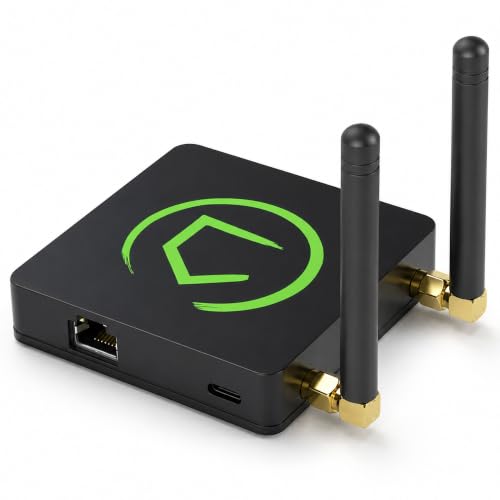
The Hubitat C-8 Pro is the closest thing to a pro-grade smart home controller that doesn’t require a monthly subscription. It runs every automation locally on the hub itself — no cloud server involved — so your lights, locks, and sensors keep working during an internet outage. The hardware supports Z-Wave 800 Series with Long Range, Zigbee 3.0, Matter 1.5, and Bluetooth, covering virtually every modern device protocol in one compact chassis.
Setup is not as simple as plugging in a consumer hub. The C-8 Pro expects you to configure rules through its web interface, which rewards patience with deep flexibility. You can create conditional automations that react to multiple triggers, schedule scenes, and even integrate Ring devices through the latest platform updates. The external antennas provide excellent signal penetration in larger homes, solving a common pain point with smaller hubs.
Where it truly shines is privacy and independence. Because all processing happens on the device, you never need to expose your home network to a third-party cloud. The trade-off is a steeper learning curve — beginners should budget time to read documentation. For anyone who wants total control over their automation without ongoing fees, this is the benchmark.
Why it’s great
- Full local control with no cloud dependency for automations
- Supports Z-Wave 800 LR, Zigbee 3.0, Matter 1.5, and Bluetooth
- External antennas provide strong signal for large homes
Good to know
- Steep learning curve for users new to home automation
- Amazon Alexa integration can be finicky with legacy devices
2. Home Assistant Green

Home Assistant Green is the easiest official entry point into the world’s most powerful open-source smart home platform. It ships with Home Assistant OS pre-installed, so you just plug in power and Ethernet to get started. The fanless quad-core processor and 4 GB of RAM handle thousands of automations smoothly while sipping just a couple of watts.
The real strength here is flexibility. Home Assistant Green connects to over 1,000 different brands and devices through community-built integrations. You can control Lutron shades, Hue lights, Z-Wave locks, and a Sonos speaker from a single dashboard, creating cross-brand automations that closed ecosystems simply cannot match. The hub stores all data locally, so your routines and history stay private.
That power comes with a real learning curve. New users often need to add a USB Zigbee or Z-Wave dongle separately, and basic setup requires following online guides. Once you invest the time, you gain a unified system that frees you from vendor lock-in forever. For anyone willing to learn, Home Assistant Green is the ultimate long-term investment.
Why it’s great
- Truly open platform with support for thousands of devices
- Fanless, power-sipping design runs silently 24/7
- Local storage keeps all data private and accessible
Good to know
- Requires separate dongles for Zigbee and Z-Wave
- Steep learning curve for beginners despite “plug and play” marketing
3. Aqara Hub M1S Gen 2

The Aqara Hub M1S Gen 2 is the central pillar of the Aqara ecosystem, connecting up to 128 Zigbee devices through a single compact unit. It supports Apple HomeKit, Alexa, Google Assistant, and IFTTT, giving you broad voice control and scene options. The built-in RGB light with 18 LEDs doubles as a nightlight or alarm indicator, and the 2-watt speaker can chime or play custom ringtones for doorbells.
Installation requires a dedicated 2.4 GHz Wi-Fi network and the Aqara Home app. The Gen 2 improves Wi-Fi radio stability over the first-gen model, fixing disconnection issues common on mesh networks. Setting up automations like turning on lights when motion is detected is straightforward, but advanced users will find the rule engine less flexible than local-only hubs.
A notable limitation is that the hub only works with Aqara devices — you cannot connect third-party Zigbee sensors directly. The built-in illumination sensor is useful for light-triggered automations, and the Zigbee 3.0 protocol ensures low-latency responses. If you are building an Aqara-based system, this hub delivers polished performance at a very competitive price point.
Why it’s great
- Supports up to 128 Zigbee 3.0 child devices
- Built-in RGB nightlight and alarm speaker with custom ringtones
- Broad voice assistant support including HomeKit
Good to know
- Exclusively supports Aqara brand devices only
- Some sensors not fully exposed to Alexa routines
4. Ring Alarm 8-Piece Kit
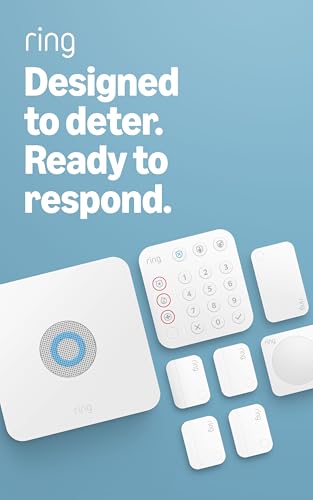
The Ring Alarm 8-Piece Kit is a full DIY security system designed for homes and small businesses. The kit includes a base station, keypad, four contact sensors, one motion detector, and a range extender — enough to cover entry points in a one to two bedroom space. Setup is app-guided and genuinely simple, with each component pairing via a unique code printed on the device.
The base station connects to Wi-Fi and includes a backup battery and cellular backup via AT&T when you subscribe to a Ring Protect Plan. This keeps your alarm online even if the power goes out or your internet drops. The keypad features dedicated police, fire, and medical buttons, adding a layer of one-touch emergency response that many smart home hubs lack.
Integration with Ring cameras and Schlage smart locks is smooth — the lock can even arm or disarm the alarm automatically. The system works with Alexa for voice control of arming and disarming. The downside is that the full feature set, including professional monitoring and cellular backup, requires a paid subscription. For a simple, reliable alarm that your whole family can use, this kit is hard to beat.
Why it’s great
- Extremely easy DIY installation with app guidance
- Backup battery and cellular backup keep alarm online
- Integrates seamlessly with Ring cameras and smart locks
Good to know
- Professional monitoring requires paid subscription
- Base station power cord is relatively short
5. Tapo CentralHub H500

The Tapo H500 acts as a central hub for up to 16 Tapo cameras and 64 Sub-G sensors, unifying your security system under a single interface. It comes with 16 GB of built-in storage and a 2.5-inch SATA bay for expansion, letting you keep footage locally without subscription fees. The built-in HDMI port allows you to view up to four live camera feeds on a monitor or TV.
One of the standout features is the ability to add facial recognition to existing Tapo cameras. This filters out familiar faces and only alerts you when an unrecognized person is detected, cutting down on nuisance notifications. The 110 dB siren can act as an alarm or a doorbell chime, and the built-in microphone and speaker enable two-way talk through connected cameras.
The H500 supports both Wi-Fi for placement flexibility and Ethernet for reliable backbone connectivity. Data stays local by default, and offline mode keeps recordings accessible even during network outages. The main limitation is that the SATA slot only supports 2.5-inch drives powered via the 5V bus, which limits available storage capacities. If you are already invested in the Tapo ecosystem, this hub is a natural upgrade that eliminates per-camera microSD cards and subscription costs.
Why it’s great
- Consolidates up to 16 cameras into one hub with local storage
- Adds facial recognition to existing Tapo cameras
- HDMI output for live multi-camera viewing
Good to know
- SATA slot only accepts 5V 2.5-inch drives, capping capacity
- No ONVIF or RTSP support for third-party cameras
6. Emporia Vue 3 Home Energy Monitor

The Emporia Vue 3 is a circuit-level energy monitor that installs inside your electrical panel. It comes with sixteen 50‑amp branch sensors and two 200‑amp mains sensors, letting you track individual circuits for loads like the furnace, water heater, washer, and EV charger. The device is UL Listed, meaning it has passed rigorous safety tests for overheating and short-circuit risk — a vital certification for anything installed inside a live panel.
The companion app provides real-time power readings with ±2% accuracy, breaking down usage by circuit and showing cost estimates based on your utility rate. You can set up alerts for abnormal consumption, like a pump running too long or an appliance left on. The Vue 3 also supports solar net metering, showing both consumption and production in one view.
Home Assistant integration works through custom firmware, but the stock experience is cloud-dependent — the device requires a 2.4 GHz Wi-Fi connection to upload data. Minute-level data is retained for 7 days, hourly data indefinitely. For homeowners serious about cutting their electric bill, the Vue 3 provides the granularity needed to spot waste and justify appliance upgrades.
Why it’s great
- UL Listed for safe installation inside electrical panels
- Granular per-circuit monitoring with 16 branch sensors
- Supports solar net metering and time-of-use rate templates
Good to know
- Requires cloud connection for data logging and app access
- WiFi antenna cable is relatively short for panel placement
7. Refoss Smart Home Energy Monitor (EM16)
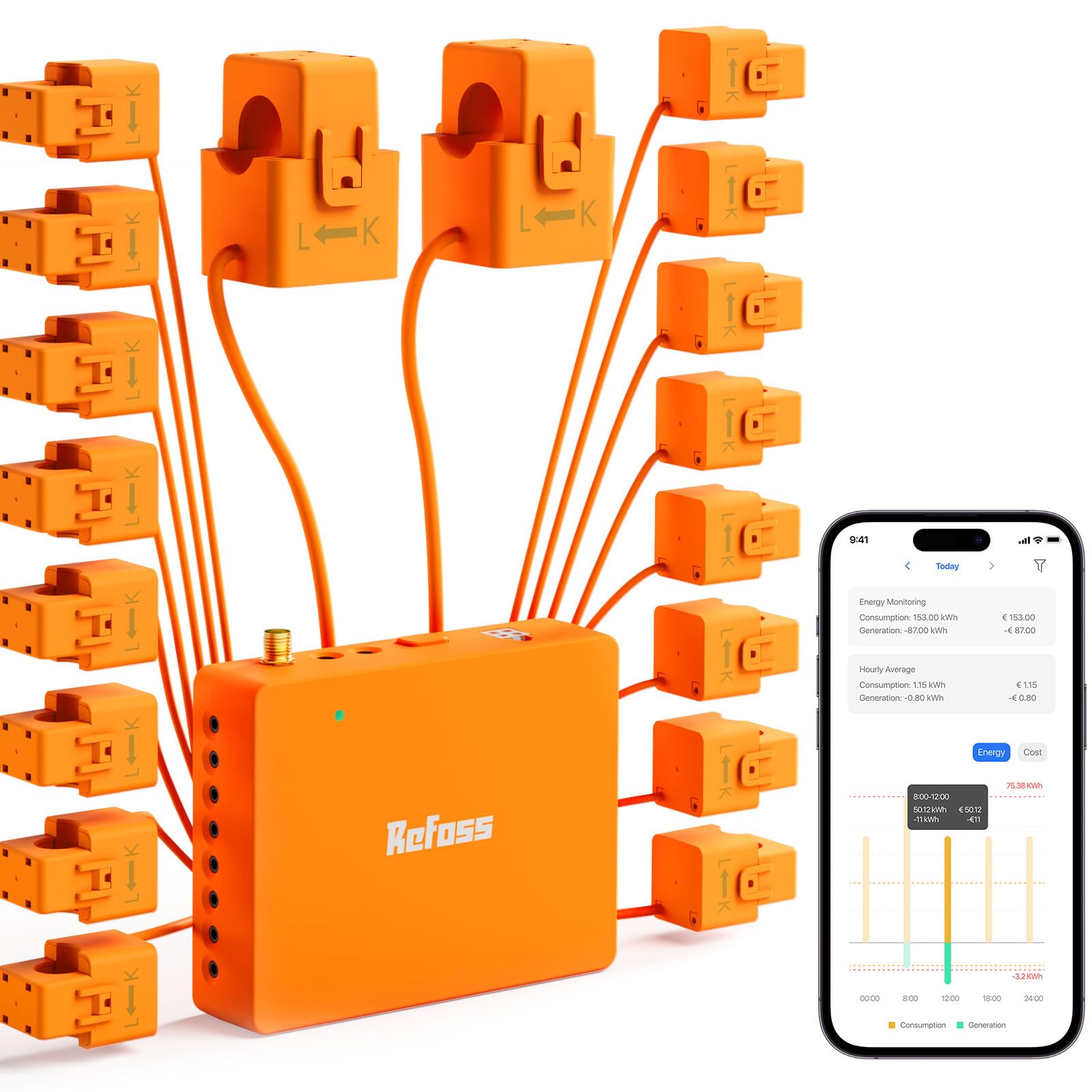
The Refoss EM16 takes a fundamentally different approach to energy monitoring by putting local control first. It exposes a built-in Web UI, Open API, and MQTT endpoint that let you access all your energy data without ever sending it to the cloud. This means your data stays on your home network and remains accessible even during an internet outage — a rare feature in the energy monitor space.
Hardware quality is solid, with ETL certification and UL 61010 compliance. The kit includes sixteen 60‑amp branch sensors and two 200‑amp mains sensors, all using clamp-on design for non-invasive installation. Accuracy is rated at ±1% across the normal operating range, which puts it ahead of most competitors. The sensors connect via headphone-jack style connectors, making the wiring less fiddly than screw terminals.
Home Assistant integration is native out of the box — no firmware flashing required. The device also supports OpenClaw AI for advanced automation, like routing surplus solar power to an EV charger or water heater. The app interface is functional but lacks polish, and the orange color of the sensor wires can look messy in a crowded panel. For privacy-focused users who want full control over their energy data, the Refoss EM16 is the standout choice.
Why it’s great
- Full local control via Web UI, Open API, and MQTT
- Native Home Assistant integration without custom firmware
- ±1% accuracy with ETL certification for safety
Good to know
- App interface feels basic and lacks polish
- Sensor wires can create clutter in tight breaker panels
8. Smart Home Energy Monitor with 16 50A Sensors (SEM-Meter)
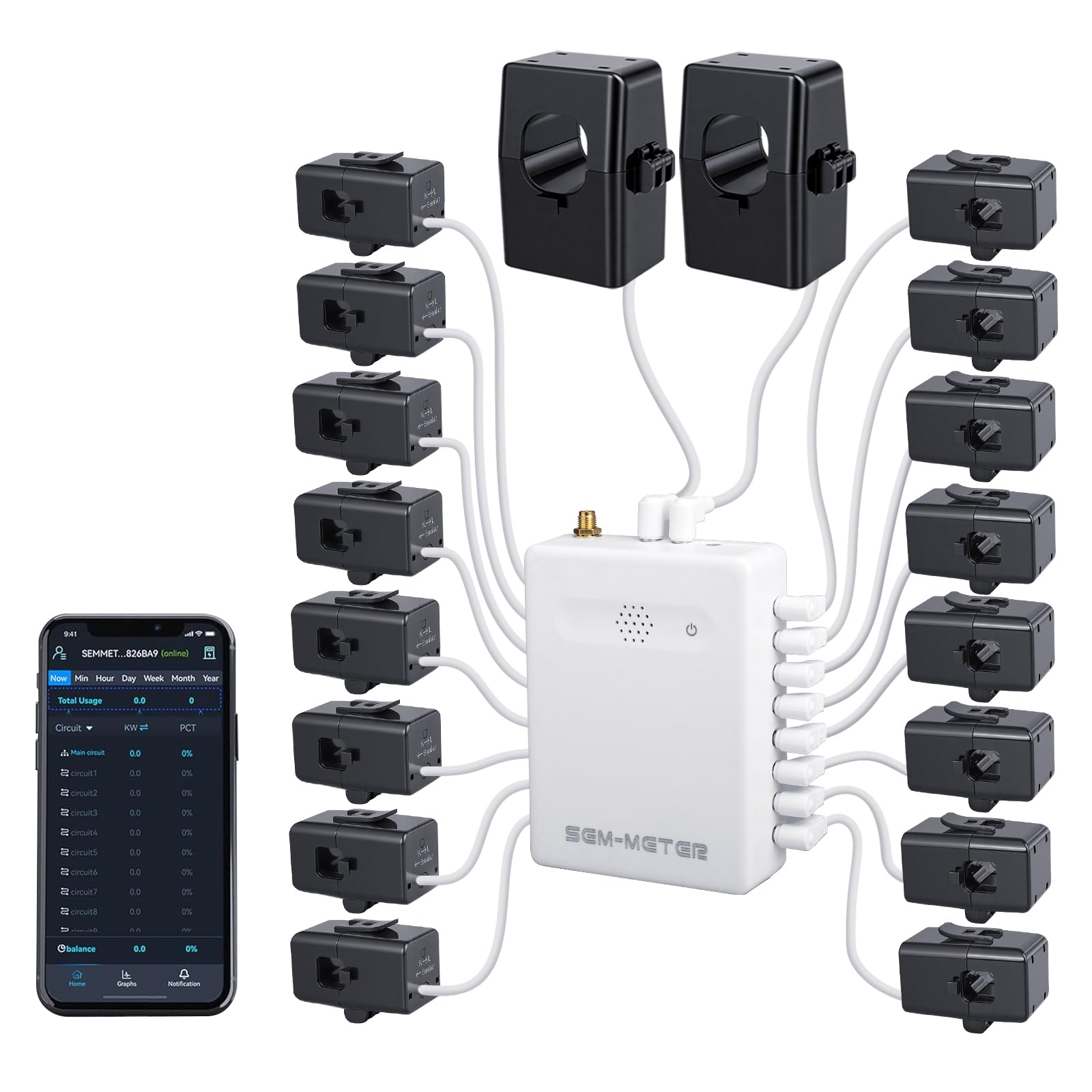
The SEM-Meter is designed specifically to solve the problem of fair electricity bill allocation in multi-tenant properties. With sixteen 50‑amp circuit-level sensors and two 200‑amp mains sensors, you can monitor each bedroom, common area, and EV charger separately without installing multiple expensive submeters. The app supports customizable time-of-use rates, including peak, off-peak, and holiday pricing, so you can automatically calculate each tenant’s cost.
Installation uses clamp-on sensors and works with single-phase, split-phase, and three-phase systems up to 415Y/240VAC. The kit includes an external SMA antenna for better Wi-Fi connectivity inside metal panel enclosures. Data is accurate to within ±1%, and the device stores hourly data for 90 days, while daily, monthly, and yearly data is permanent and exportable.
A notable feature is a privacy mode that allows the device to run entirely without the cloud or the vendor’s app — you can use your own MQTT server with Home Assistant. The primary trade-off is that the app user interface is functional but not as polished as more expensive competitors. For landlords and property managers who need transparent, automated energy billing, the SEM-Meter delivers a targeted solution at a reasonable cost.
Why it’s great
- Purpose-built for rental bill allocation with rate templates
- Local MQTT mode for complete data privacy
- Supports 3-phase systems and includes SMA antenna
Good to know
- App interface is functional but not highly polished
- Some users report minor accuracy variance vs utility meter
9. YGS-Tech Smart 3 Inch Recessed Lighting (10 Pack)
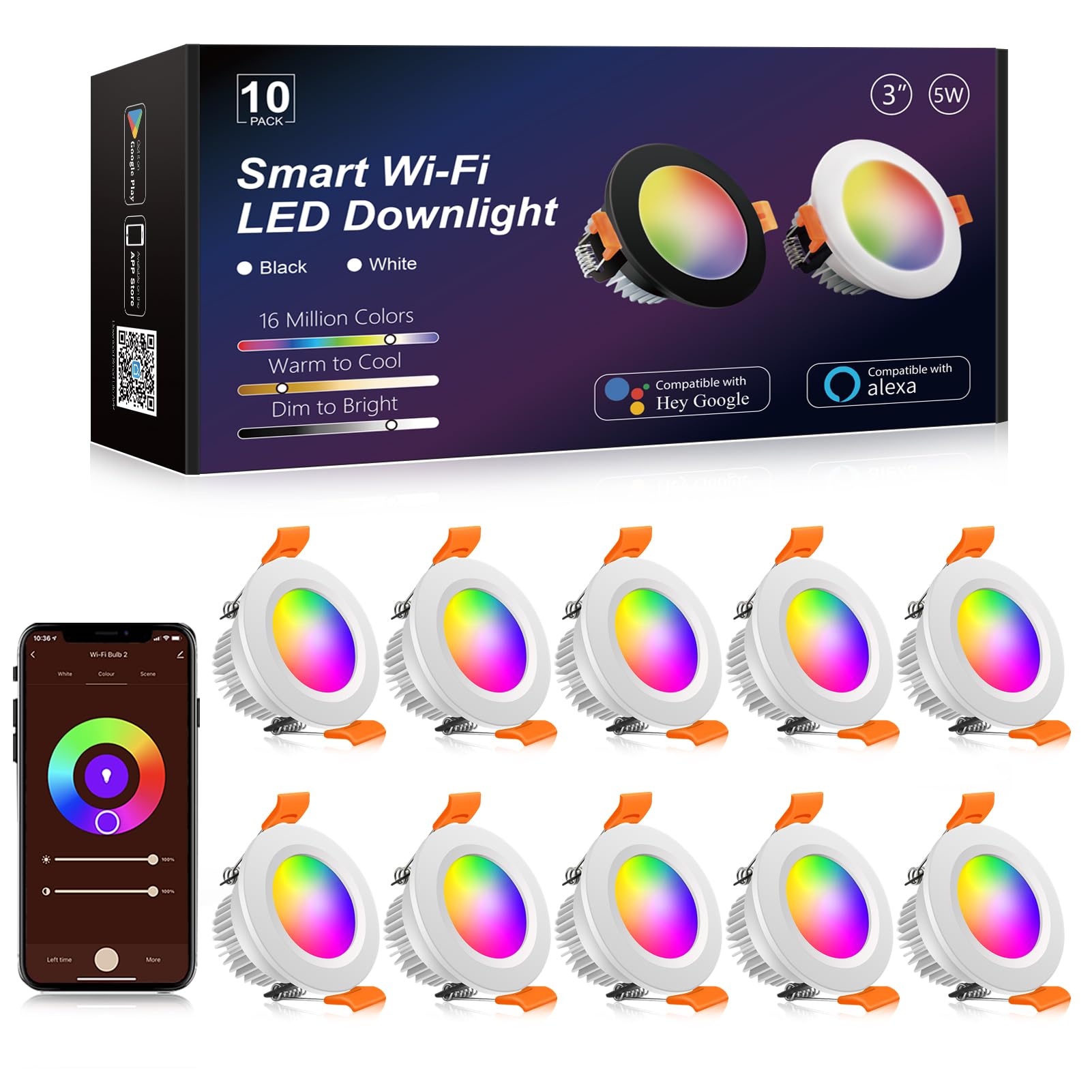
The YGS-Tech Smart Recessed Lighting kit brings full RGB and tunable white control to small 3-inch fixtures. Each light draws only 5 watts but outputs 800 lumens, enough for accent or task lighting. The color temperature ranges from 2700K warm white to 6500K daylight, plus full RGB with 16 million colors — all dimmable through the Smart Life app or voice control via Alexa and Google Home.
Installation is refreshingly simple because no recessed housing can is required. The LED driver is compact enough to fit through a standard 3-inch hole, and the lights are held in place by spring clips. A 2.625-inch hole saw creates the perfect opening for a snug fit. The lights are made from aviation aluminum and ABS plastic for heat dissipation, and the manufacturer rates the LEDs for over 40,000 hours of life.
The main drawback is that the lights only support 2.4 GHz Wi-Fi — they do not work with Zigbee or Z-Wave, so they will not integrate with a local domotic hub without a Wi-Fi bridge. The bundled connectors are somewhat cheap; some users prefer to strip the wires directly. For a budget-friendly way to add smart ambient lighting to a room, these downlights deliver impressive color and brightness range at a per-unit cost that is hard to match.
Why it’s great
- No housing can required for easy retrofit installation
- Full RGB and CCT control with smooth dimming
- Very low 5W power draw with 800 lumen output
Good to know
- Only works on 2.4 GHz Wi-Fi, no Zigbee or Z-Wave
- Included wire connectors feel cheap and fragile
FAQ
Can I mix Zigbee and Z-Wave devices on the same hub?
What is the practical difference between Matter and Zigbee?
How many devices can a single domotic hub handle realistically?
Is professional monitoring worth it for a home security system?
Final Thoughts: The Verdict
For most users, the best domotic system winner is the Hubitat Elevation C-8 Pro because it combines local control, broad protocol support, and no subscription fees into a single powerful box. If you want unlimited flexibility and device compatibility above all else, grab the Home Assistant Green. And for a focused, affordable energy monitoring system with local data privacy, nothing beats the Refoss EM16.

Mo Maruf
I created WellFizz to bridge the gap between vague wellness advice and actionable solutions. My mission is simple: to decode the research and give you practical tools you can actually use.
Beyond the data, I am a passionate traveler. I believe that stepping away from the screen to explore new environments is essential for mental clarity and physical vitality.