Our readers keep the lights on and my smoothie glass nicely filled. As an Amazon Associate, I earn from qualifying purchases.
That pencil-on-paper feel is the holy grail for digital artists, but the wrong screen can introduce parallax, color shift, and a stuttering pen that breaks your flow. A true drawing computer tablet bridges the gap between traditional sketching and digital precision, but only if its display, pressure sensitivity, and stylus technology align with your specific workflow. Whether you are a comic inker, a concept artist, or a graphic designer, the surface you draw on is as critical as the computer driving it.
I’m Mohammad Maruf — the founder and writer behind WellFizz. I’ve spent countless hours cross-referencing user experiences, factory calibration reports, and driver compatibility logs to isolate which drawing monitors actually deliver on their promised color gamuts and pen response rates.
After analyzing nine distinct models ranging from compact mobile screens to massive studio-grade canvases, this guide breaks down the real-world performance of each best drawing computer tablet contender using measurable specs like pressure levels, color coverage, lamination, and parallax thickness.
How To Choose The Best Drawing Computer Tablet
Selecting a drawing monitor means balancing screen real estate, color fidelity, and pen feel against your budget and desk space. Focusing on a few critical specs will separate a tool that enhances your workflow from one that introduces friction.
Screen Lamination and Parallax
A fully laminated display bonds the glass cover to the LCD panel, removing the air gap. This eliminates the visual offset—parallax—between where your pen touches the glass and where the cursor appears on screen. Non-laminated screens feel slightly disconnected, making fine line work less accurate. Look for “full lamination” in the spec sheet.
Pressure Sensitivity and Initial Activation Force
Pressure sensitivity is measured in levels (8192 is standard; 16384 is emerging), but the more important number is the initial activation force (IAF), measured in grams. A lower IAF (2g or 3g) registers the lightest stroke, which is critical for soft shading and watercolor-style brushes. The stylus technology—battery-free electromagnetic resonance (EMR)—is preferred because it never needs charging and maintains consistent weight.
Color Gamut and Calibration
For artists who print or deliver to clients, color accuracy is non-negotiable. sRGB covers web and screen content, Adobe RGB is the standard for print, and DCI-P3 is used in video and cinema. A display covering 99% sRGB is baseline for digital art. Professional-grade monitors include factory calibration reports with ΔE (delta error) values below 1.5, meaning colors are virtually indistinguishable from the intended value.
Quick Comparison
On smaller screens, swipe sideways to see the full table.
| Model | Category | Best For | Key Spec | Amazon |
|---|---|---|---|---|
| XP-PEN Artist Pro 19 Gen2 | Premium 4K | Studio professionals needing 4K resolution | 4K UHD (3840×2160) / 98% P3 | Amazon |
| HUION KAMVAS Pro 27 | Premium 4K Large | 3D modelers and large-canvas artists | 27-inch 4K / 98% Adobe RGB / Multi-Touch | Amazon |
| XPPEN Artist Pro 24 Gen2 | Premium Large 4K | Professionals demanding wide color space | 23.8-inch 4K / ΔE<1 / 99% Adobe RGB | Amazon |
| Wacom Cintiq 16 | Mid-Range Premium | Traditionalists wanting Wacom build quality | 16-inch 2.5K / 100% sRGB / Pro Pen 3 | Amazon |
| HUION Kamvas 13 (Gen 3) | Mid-Range Compact | Artists wanting a portable pen display | 13.3-inch / 16384 pressure / Dual Dial | Amazon |
| XP-PEN Artist 13.3 Pro V2 | Mid-Range Portable | Students and first-time pen display buyers | 13.3-inch / 16384 pressure / Red Dial | Amazon |
| XPPen Artist13.3 Pro V2 (Stand Included) | Mid-Range Value | Beginners needing an all-in-one kit | 13.3-inch / 16384 pressure / 8 Keys + Dial | Amazon |
| BenQ MA270UP 4K Monitor | Color-Critical Monitor | Mac users needing color-matched secondary display | 27-inch 4K / P3 / 90W USB-C | Amazon |
| Apple iPad Pro 11-inch (M5) | Versatile Creative Tablet | Mobile sketching and on-the-go creation | 11-inch Ultra Retina XDR / M5 Chip | Amazon |
In‑Depth Reviews
1. XPPen 4K UHD Artist Pro 19 Gen2

This 18.4-inch 4K panel delivers the pixel density needed to work on high-res canvases without constant zooming. The full-laminated display uses AG etched glass with TÜV SÜD certification, reducing blue light fatigue during long sessions while maintaining a paper-like texture. Calman verification with a ΔE below 1.5 ensures the 99.8% sRGB and 98% P3 coverage translates to accurate color across monitors and print.
The dual-stylus system is a major productivity differentiator. The X3 Pro Roller Stylus features a felt nib and digital eraser for natural shading, while the X3 Pro Slim Stylus has removable buttons to prevent accidental presses. Both offer 16,384 pressure levels with a 3g initial activation force, capturing whisper-light strokes. The included ACK05 wireless shortcut keyboard with Bluetooth 5.0 adds a physical dial and ten customizable keys, reducing reliance on keyboard shortcuts.
Connectivity is flexible with dual reversible USB-C ports and a 3-in-1 cable option, supporting easy switching between a MacBook and a Windows laptop. The VESA 75x75mm mount and wing-shaped stand provide stable positioning. The heavy, sturdy frame is better suited to a permanent desk setup than a mobile workstation. Overall, this tablet competes directly with Wacom’s Cintiq line at a significantly lower entry point.
Why it’s great
- Stunning 4K resolution on an 18.4-inch screen with excellent color accuracy
- Two professional-grade styluses with different nib textures included in the box
- Wireless shortcut remote with a physical dial streamlines complex workflows
Good to know
- Heavy build (over 19 pounds) makes it challenging to move between locations
- No touchscreen support, relying solely on pen input and the remote keypad
2. HUION KAMVAS Pro 27

The 27-inch 4K display (3840×2160) on the Kamvas Pro 27 is a massive canvas for concept artists and 3D modelers who need to see the full composition without scrubbing. The Canvas Glass 2.0 combines full lamination with a finer etched surface that reduces sparkle and glare, while DC dimming minimizes flicker for eye comfort during overnight deadlines. Multi-touch gestures—swipe, pinch, rotate—allow direct canvas manipulation, a feature missing from many competitors in this class.
PenTech 4.0 brings the retraction distance down to 0.35mm, so the cursor lands exactly where the nib touches the glass. Both the standard and slim pens activate at 2g, making light watercolor washes and faint underdrawings effortless. The pen also features tilt auto-alignment, which corrects cursor offset when the pen is angled near the edges of the screen—critical for comic artists paneling close to the frame border.
Color coverage spans three spaces (sRGB, Adobe RGB, DCI-P3) with instant switching via the on-screen display menu, and 3D LUT hardware calibration delivers a ΔE below 1.5 for consistent color across devices. The top-mounted cable exit keeps the desk clean, but the included stand feels plasticky given the tablet’s premium price point. Some users find the remote keypad’s build quality less refined than the main unit.
Why it’s great
- Massive 27-inch 4K screen with multi-touch support for intuitive navigation
- PenTech 4.0 minimizes parallax to 0.35mm for precise edge-to-edge linework
- Hardware-level 3D LUT calibration with ΔE<1.5 across three color spaces
Good to know
- Multi-touch is not functional on macOS without installing an additional tool
- Included plastic stand feels inferior to the tablet’s premium metal construction
3. XPPen Artist Pro 24 Gen2

The Artist Pro 24 Gen2 is calibrated to a ΔE of less than 1, making it one of the most color-accurate drawing displays on the market. The 23.8-inch 4K UHD panel covers 99% Adobe RGB, 99% sRGB, and 98% P3, which is ideal for print photographers and video colorists who need to trust their monitor. The AG etched glass with an anti-fingerprint coating keeps the surface clear without introducing the rainbow sparkle effect common on cheaper etched screens.
Dual X3 Pro chip styluses are included: a slim version with a smaller magnetic core for detail work, and a standard version with a felt nib and digital eraser for broader strokes. Both offer 16,384 pressure levels. The wireless ACK05 keypad attaches magnetically to the tablet or sits separately, giving you ten customizable keys and a dial for brush size or zoom. The S02 stand supports single-handed angle adjustment from 16 to 72 degrees, which is rare at this size.
Some early units shipped with a known ribbon cable defect causing image burn-in, though XPPen’s customer service has been responsive with replacements for affected users. The 19-pound weight and 29.9-inch width demand a sturdy desk and significant space. The XPPen ColorMaster software, powered by Calman, provides permanent color management across Windows and macOS, making this a future-proof choice for professional studios.
Why it’s great
- Industry-leading ΔE<1 calibration for professional color-critical work
- Covers 99% Adobe RGB and 98% P3 for print and video production
- Ergonomic stand with tool-free angle adjustment from 16 to 72 degrees
Good to know
- Earlier production units had quality control issues with screen burn-in
- Very large and heavy footprint requires dedicated desk space
4. Wacom Cintiq 16

The Cintiq 16 is Wacom’s mid-range entry point, offering a 16-inch IPS display with a 2.5K WQXGA resolution (2560×1600) that delivers sharper text and finer detail than standard 1080p panels. Color coverage hits 100% sRGB and 99% DCI-P3, which is solid for digital painting and animation. The anti-glare glass eliminates reflections without introducing visible grain, preserving subtle gradients.
The Pro Pen 3 offers 8,192 pressure levels with tilt support and three customizable side buttons. While this is half the pressure resolution of competitors, the pen’s tracking is smooth and the line wobble is minimal thanks to Wacom’s mature driver architecture. Built-in fold-out legs provide a 20-degree working angle, though a proper adjustable stand is sold separately—an omission at this price point.
Connection relies on a single USB-C cable for computers with DisplayPort Alt Mode or Thunderbolt 3/4, but older machines will require additional adapters. Some users report that the bundled Pro Pen 3 feels lighter and less substantial than the previous Pro Pen 2, and the lack of an eraser on the pen is a notable regression. The Cintiq 16 remains a reliable choice for artists who prioritize driver stability and Wacom’s ecosystem over raw specs.
Why it’s great
- Sharp 2.5K resolution on a 16-inch screen with excellent DCI-P3 coverage
- Mature, reliable Wacom drivers with minimal line jitter across software
- Compact footprint with fold-out legs for travel or tight desks
Good to know
- Bundled Pro Pen 3 lacks an eraser and feels less premium than earlier models
- Adjustable stand is not included, adding cost for ergonomic setup
5. HUION Kamvas 13 (Gen 3)

The Kamvas 13 (Gen 3) packs the advanced PenTech 4.0 technology into a compact 13.3-inch form factor. The fully laminated screen with Canvas Glass 2.0 anti-glare etching reduces parallax to near zero, giving a precise drawing experience that rivals larger monitors. The 99% sRGB coverage with ΔE below 1.5 ensures colors are accurate enough for illustration and graphic design work.
At 16,384 pressure levels with a 2g initial activation force, the PW600L stylus captures the faintest stroke, making it suitable for detailed line art and soft shading. The dual-dial interface combined with five customizable shortcut keys provides efficient control over brush size and canvas zoom without reaching for a keyboard. USB-C single-cable connectivity simplifies setup with compatible laptops and Android devices.
The screen brightness is rated at 200 nits, which is dimmer than premium models and may struggle in brightly lit rooms. The tablet runs warm on the connection side after extended use, and the included 3-in-1 cable is somewhat bulky for mobile rigs. For its size and price, this is a strong portable option for artists who need a second screen for sketching away from their main workstation.
Why it’s great
- PenTech 4.0 with 2g IAF and 16,384 levels for feather-light strokes
- Compact 13.3-inch form factor ideal for travel or dual-monitor setups
- Dual-dial controls offer intuitive shortcut management on a small screen
Good to know
- Screen brightness at 200 nits can feel dim under direct lighting
- 3-in-1 cable is less convenient than a single USB-C for portability
6. XP-PEN Artist 13.3 Pro V2 (First Unit)
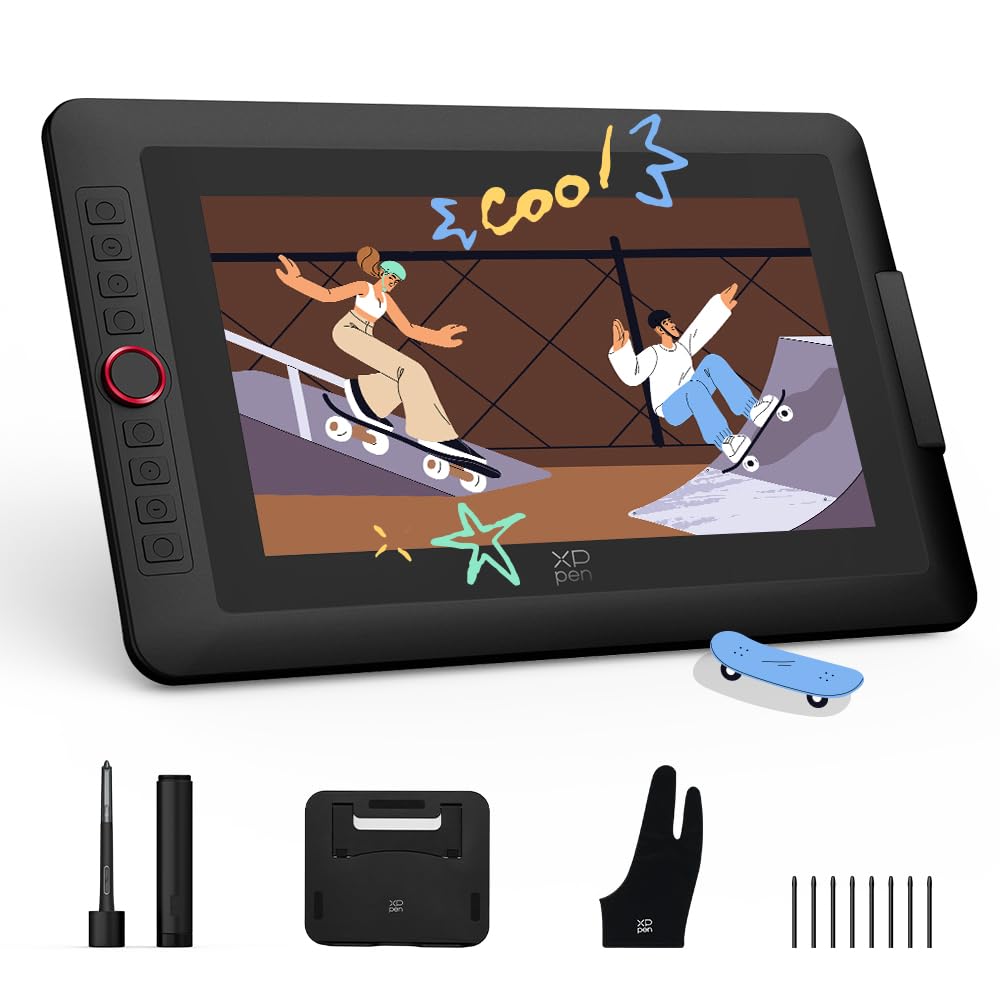
This 13.3-inch pen display introduces XPPen’s X3 Pro smart chip, delivering 16,384 pressure levels with a ±0.4mm center accuracy rating. The fully laminated screen with anti-glare film reduces parallax and provides a textured drawing resistance that mimics paper. Color coverage reaches 99% sRGB and 95% P3, making it suitable for digital painting and photo retouching without significant color shift.
The red dial roller and eight customizable express keys give you quick access to brush size, undo, and zoom functions. The tablet supports dual-mode operation: Pen Display mode for direct drawing, and Pen Tablet mode with the screen off to save battery during note-taking or less intensive tasks. The metal back panel improves heat dissipation, keeping the unit cooler than all-plastic alternatives during long sessions.
Some users report initial connection hurdles, particularly when using the 3-in-1 cable with certain laptops, and a firmware update via Windows or Mac may be required before use on Chromebooks or Android devices. The 1080p resolution at 13.3 inches produces a pixel density of about 166 PPI, which is fine for line art but less sharp for detailed photo work compared to 4K panels.
Why it’s great
- Industry-first 16K pressure sensitivity with ultra-low activation force
- Dual Pen Display and Pen Tablet modes offer flexibility for different tasks
- Metal back panel improves cooling and build rigidity
Good to know
- 1080p resolution may feel soft compared to 4K or 2.5K alternatives
- Driver setup requires a firmware update for full Chromebook/Android support
7. XPPen Artist13.3 Pro V2 (Stand Included)

This bundled version of the Artist 13.3 Pro V2 includes the S01 foldable stand, a cleaning cloth, and a drawing glove, making it an all-in-one starter kit. The stand provides a stable base with 90-degree angle adjustment, improving posture and reducing wrist strain. The tablet itself retains the same 16,384 pressure levels and X3 Pro smart chip stylus as the standard V2 model, ensuring consistent pen performance.
The updated driver simplifies setup for beginners, with a single installer that configures the display, pen, and shortcut keys. The 125% sRGB and 107% Adobe RGB color gamut area ratio is wider than typical at this price tier, though the coverage ratio sits at 99% sRGB and 89% Adobe RGB. The 250 cd/m² brightness and 1000:1 contrast ratio provide clear, vivid images suitable for most indoor environments.
A known driver bug causes pen misalignment when the primary monitor runs at a different resolution than 1920×1080, which affects users with multi-monitor setups featuring higher-res displays. The screen surface can be scratched by the pen nib over time, and several users recommend applying a screen protector immediately. For the price, this kit delivers excellent value if your display configuration matches its 1080p native resolution.
Why it’s great
- All-in-one bundle with stand, glove, and cleaning cloth saves accessory costs
- Wide color gamut area (125% sRGB) delivers punchy visuals out of the box
- Updated driver offers one-click setup for beginner artists
Good to know
- Pen alignment drifts when paired with non-1080p primary monitors
- Pen nib can scratch the screen surface over extended use
8. BenQ MA270UP 27″ 4K Monitor

The BenQ MA270UP is a 27-inch 4K IPS monitor specifically calibrated for MacBook Pro and MacBook Air users. Its glossy display with BenQ’s exclusive color tuning matches the MacBook’s P3 wide color gamut and provides a vibrant, high-contrast image. The 400-nit brightness and 2000:1 contrast ratio produce deep blacks and bright highlights that benefit photographers and video editors working in the Apple ecosystem.
A single USB-C cable delivers 90W power delivery to the MacBook while transmitting video and data, reducing cable clutter. Two HDMI ports and a second USB-C port offering 15W charging allow connection of an iPad or iPhone as a secondary reference device. Integrated MacBook controls let you adjust brightness and volume directly from the MacBook keyboard, maintaining a seamless workflow.
This monitor lacks built-in speakers and a camera, so external peripherals are needed for video calls or audio monitoring. The included stand allows height, tilt, swivel, and pivot adjustments, providing excellent ergonomic flexibility. For artists who pair a drawing tablet with a color-accurate main display, this monitor ensures that what you see on the tablet matches the large reference screen.
Why it’s great
- Mac color tuning technology accurately matches the MacBook’s P3 display
- Single USB-C cable with 90W power delivery simplifies desk setup
- Fully adjustable ergonomic stand with height, tilt, swivel, and pivot
Good to know
- No built-in speakers or camera require external peripherals
- Glossy screen may cause reflections in brightly lit environments
9. Apple iPad Pro 11-inch (M5)

The iPad Pro 11-inch with the M5 chip is a standalone creative computer that functions as both a drawing tablet and a full-fledged mobile workstation. The Ultra Retina XDR display with ProMotion, P3 wide color, and True Tone delivers exceptional brightness and color accuracy on the go. It does not require a separate computer, which sets it apart from every other device in this roundup.
With the Apple Pencil Pro, you get tilt, pressure, and barrel-roll sensitivity that is tightly integrated with iPadOS. The M5 chip provides enough power for 3D modeling in apps like Nomad Sculpt and heavy-layer painting in Procreate without lag. The landscape 12MP Center Stage camera and four-speaker audio system make it useful for client presentations and video calls directly from the canvas.
The 11-inch screen limits workspace compared to dedicated pen displays, and the glossy display can produce reflections in bright light. At this price point, it does not include the Apple Pencil Pro or the Magic Keyboard, both of which add significant cost. For artists who demand mobility and already work within the Apple ecosystem, this is the most versatile creative tool available, but it is not a direct replacement for a large studio pen display.
Why it’s great
- Standalone device requiring no computer; runs Procreate and Nomad Sculpt natively
- M5 chip delivers desktop-class performance for demanding creative apps
- Ultra Retina XDR display with ProMotion for smooth, fluid drawing
Good to know
- Apple Pencil Pro and Magic Keyboard sold separately, raising total cost
- 11-inch screen is significantly smaller than dedicated pen displays
FAQ
What is parallax and why does it matter for drawing tablets?
Do I need 16384 pressure sensitivity or is 8192 enough?
Can I use a drawing tablet without a computer?
What does the red dial on XPPen tablets do?
Is a glossy or matte screen better for digital art?
Final Thoughts: The Verdict
For most users, the best drawing computer tablet winner is the XPPen Artist Pro 19 Gen2 because it balances 4K resolution, Calman-verified color accuracy, dual styluses, and a wireless shortcut remote at a price that undercuts the premium competition significantly. If you need the largest canvas with multi-touch support for 3D modeling and animation, grab the HUION KAMVAS Pro 27. And for mobile versatility as a standalone device that travels with you, nothing beats the Apple iPad Pro 11-inch (M5) with an Apple Pencil Pro.

Mo Maruf
I created WellFizz to bridge the gap between vague wellness advice and actionable solutions. My mission is simple: to decode the research and give you practical tools you can actually use.
Beyond the data, I am a passionate traveler. I believe that stepping away from the screen to explore new environments is essential for mental clarity and physical vitality.